
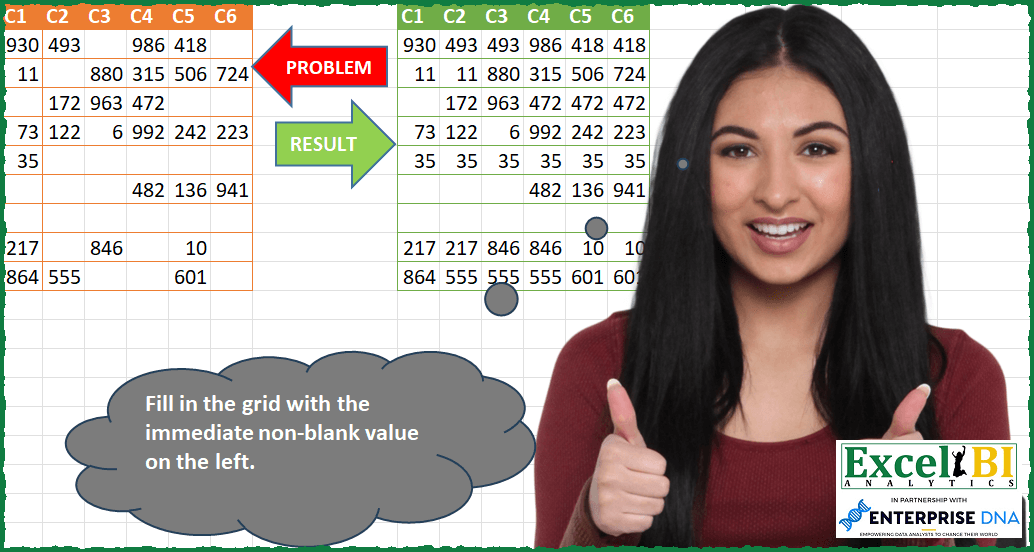
Fill in the grid with the immediate non-blank value on the left.
📌 Challenge Details and Links
ExcelBI Power Query Challenge Number: 97
Challenge Difficulty: ⭐️⭐️
📥Download Sample File
📥Link to the solutions on LinkedIn
Solving the challenge of Fill Grid With Left Values with Power Query
Power Query solution 1 for Fill Grid With Left Values, proposed by Bo Rydobon 🇹🇭:
let
  Source = Excel.CurrentWorkbook(){[Name = "Table1"]}[Content],
  Ans =
    let
      T = Table.Transpose(Source),
      F = Table.Transpose(Table.FillDown(T, Table.ColumnNames(T)))
    in
      Table.RenameColumns(F, List.Zip({Table.ColumnNames(F), Table.ColumnNames(Source)}))
in
  Ans
Power Query solution 2 for Fill Grid With Left Values, proposed by Zoran Milokanović:
let
  Source = Excel.CurrentWorkbook(){[Name = "Input"]}[Content],
  S = Table.FromRows(
    List.Transform(
      Table.ToRows(Source),
      each List.Accumulate(_, {}, (s, c) => s & {c ?? List.Last(s)})
    ),
    Table.ColumnNames(Source)
  )
in
  S
Power Query solution 3 for Fill Grid With Left Values, proposed by Kris Jaganah:
let
  Source      = Excel.CurrentWorkbook(){[Name = "Table3"]}[Content],
  Demote      = Table.DemoteHeaders(Source),
  Transpose   = Table.Transpose(Demote),
  columnNames = Table.ColumnNames(Transpose),
  Source2     = Table.SelectColumns(Transpose, columnNames),
  Down        = Table.FillDown(Source2, columnNames),
  Transpose1  = Table.Transpose(Down),
  Promote     = Table.PromoteHeaders(Transpose1, [PromoteAllScalars = true])
in
  Promote
Power Query solution 4 for Fill Grid With Left Values, proposed by Alejandro Simón 🇵🇦 🇪🇸:
let
  Source = Excel.CurrentWorkbook(){[Name = "Table1"]}[Content],
  Process = Table.FromRows(Table.ToColumns(Source)),
  Sol = Table.FromColumns(
    Table.ToRows(Table.FillDown(Process, Table.ColumnNames(Process))),
    Table.ColumnNames(Source)
  )
in
  Sol
Power Query solution 5 for Fill Grid With Left Values, proposed by Luan Rodrigues:
let
  Fonte = Query_Tabela1,
  t1    = Table.Transpose(Fonte),
  pb    = Table.FillDown(t1, Table.ColumnNames(t1)),
  t2    = Table.Transpose(pb, Table.ColumnNames(Fonte))
in
  t2
Power Query solution 6 for Fill Grid With Left Values, proposed by Brian Julius:
let
  Source            = Excel.CurrentWorkbook(){[Name = "Table1"]}[Content],
  OriginalHeaders   = Table.ColumnNames(Source),
  Transpose         = Table.Transpose(Source),
  TransposedHeaders = Table.ColumnNames(Transpose),
  FillDown          = Table.FillDown(Transpose, TransposedHeaders),
  ReTranspose       = Table.Transpose(FillDown, OriginalHeaders)
in
  ReTranspose
Power Query solution 7 for Fill Grid With Left Values, proposed by Md. Zohurul Islam:
let
  Source = Excel.CurrentWorkbook(){[Name = "Table1"]}[Content],
  a = Table.Transpose(Source),
  b = Table.FillDown(
    a,
    {
      "Column1",
      "Column2",
      "Column3",
      "Column4",
      "Column5",
      "Column6",
      "Column7",
      "Column8",
      "Column9",
      "Column10"
    }
  ),
  c = Table.Transpose(b),
  d = Table.PromoteHeaders(c, [PromoteAllScalars = true])
in
  d
Power Query solution 8 for Fill Grid With Left Values, proposed by Md. Zohurul Islam:
let
  Source = Excel.CurrentWorkbook(){[Name = "Table1"]}[Content],
  a = Table.Transpose(Source),
  b = Table.FillDown(
    a,
    {
      "Column1",
      "Column2",
      "Column3",
      "Column4",
      "Column5",
      "Column6",
      "Column7",
      "Column8",
      "Column9"
    }
  ),
  c = Table.Transpose(b),
  d = Table.RenameColumns(
    c,
    {
      {"Column1", "C1"},
      {"Column2", "C2"},
      {"Column3", "C3"},
      {"Column4", "C4"},
      {"Column5", "C5"},
      {"Column6", "C6"}
    }
  )
in
  d
Power Query solution 9 for Fill Grid With Left Values, proposed by Eric Laforce:
let
  Source = Excel.CurrentWorkbook(){[Name = "tData97"]}[Content],
  _CN = Table.ColumnNames(Source),
  TransformRows = Table.TransformRows(
    Source,
    each
      let
        _T = List.Accumulate(
          Record.ToList(_),
          [p = null, r = {}],
          (s, c) =>
            let
              _New = if (c = null and s[p] <> null) then s[p] else c
            in
              [r = s[r] & {_New}, p = _New]
        )
      in
        Record.FromList(_T[r], _CN)
  ),
  ToTable = Table.FromRecords(TransformRows)
in
  ToTable
Power Query solution 10 for Fill Grid With Left Values, proposed by Sandeep Marwal:
let
  Source = Excel.CurrentWorkbook(){[Name = "Table2"]}[Content],
  #"Transposed Table" = Table.Transpose(Source),
  #"Filled Down" = Table.FillDown(
    #"Transposed Table",
    {
      "Column1",
      "Column2",
      "Column3",
      "Column4",
      "Column5",
      "Column6",
      "Column7",
      "Column8",
      "Column9",
      "Column10"
    }
  ),
  #"Transposed Table1" = Table.Transpose(#"Filled Down"),
  #"Promoted Headers" = Table.PromoteHeaders(#"Transposed Table1", [PromoteAllScalars = true])
in
  #"Promoted Headers"
Power Query solution 11 for Fill Grid With Left Values, proposed by Henriette Hamer:
let
  Source               = Excel.CurrentWorkbook(){[Name = "Table14"]}[Content],
  #"Demoted Headers"   = Table.DemoteHeaders(Source),
  #"Transposed Table"  = Table.Transpose(#"Demoted Headers"),
  MyTable              = #"Transposed Table",
  ColumnNames          = Table.ColumnNames(MyTable),
  #"Filled Down"       = Table.FillDown(#"Transposed Table", ColumnNames),
  #"Transposed Table1" = Table.Transpose(#"Filled Down"),
  #"Promoted Headers"  = Table.PromoteHeaders(#"Transposed Table1", [PromoteAllScalars = true])
in
  #"Promoted Headers"
Power Query solution 12 for Fill Grid With Left Values, proposed by Henriette Hamer:
let
  Source = Excel.CurrentWorkbook(){[Name = "Table1"]}[Content],
  #"Demoted Headers" = Table.DemoteHeaders(Source),
  #"Transposed Table" = Table.Transpose(#"Demoted Headers"),
  #"Filled Down" = Table.FillDown(
    #"Transposed Table",
    {
      "Column2",
      "Column3",
      "Column4",
      "Column5",
      "Column6",
      "Column7",
      "Column8",
      "Column9",
      "Column10"
    }
  ),
  #"Transposed Table1" = Table.Transpose(#"Filled Down"),
  #"Promoted Headers" = Table.PromoteHeaders(#"Transposed Table1", [PromoteAllScalars = true])
in
  #"Promoted Headers"
Power Query solution 13 for Fill Grid With Left Values, proposed by Daniel Madhadha:
let
  Source = Excel.CurrentWorkbook(){[Name = "Table1"]}[Content],
  #"Demoted Headers" = Table.DemoteHeaders(Source),
  Transposed = Table.Transpose(#"Demoted Headers"),
  #"Filled Down" = Table.FillDown(
    Transposed,
    {"Column1", "Column2", "Column3", "Column4", "Column5", "Column6", "Column7"}
  ),
  #"Transposed Table" = Table.Transpose(#"Filled Down"),
  #"Promoted Headers" = Table.PromoteHeaders(#"Transposed Table", [PromoteAllScalars = true])
in
  #"Promoted Headers"
Power Query solution 14 for Fill Grid With Left Values, proposed by Roy Wilson:
let
  Source     = Excel.CurrentWorkbook(){[Name = "Tbl_Data"]}[Content],
  DmtHeaders = Table.DemoteHeaders(Source),
  Trnsps     = Table.Transpose(DmtHeaders),
  ColNames   = Table.ColumnNames(Trnsps),
  FDown      = Table.FillDown(Trnsps, ColNames),
  Final      = Table.PromoteHeaders(Table.Transpose(FDown))
in
  Final
Power Query solution 15 for Fill Grid With Left Values, proposed by Amarjit (Amo) Sangha BA (Hons):
let
  Source      = Excel.CurrentWorkbook(){[Name = "Table3"]}[Content],
  Demote      = Table.DemoteHeaders(Source),
  Transpose   = Table.Transpose(Demote),
  columnNames = Table.ColumnNames(Transpose),
  Source2     = Table.SelectColumns(Transpose, columnNames),
  Down        = Table.FillDown(Source2, columnNames),
  Transpose1  = Table.Transpose(Down),
  Promote     = Table.PromoteHeaders(Transpose1, [PromoteAllScalars = true])
in
  Promote
Solving the challenge of Fill Grid With Left Values with Excel
Excel solution 1 for Fill Grid With Left Values, proposed by Bo Rydobon 🇹🇭:
=SCAN(,A2:F10,LAMBDA(a,v,IF(v,v,IF(COLUMNS(A2:v)>1,a,""))))Excel solution 2 for Fill Grid With Left Values, proposed by محمد حلمي:
=MAP(A2:F10,LAMBDA(a,IF(a,a,IFNA(LOOKUP(2^15,TAKE(A2:a,-1)),""))))Excel solution 3 for Fill Grid With Left Values, proposed by محمد حلمي:
=SCAN(,A2:F10,LAMBDA(a,d,IF(1=COLUMN(d),d,IF(d,d,a))))Excel solution 4 for Fill Grid With Left Values, proposed by Kris Jaganah:
=LET(a,A2:F10,b,DROP(a,,1),VSTACK(A1:F1,HSTACK(TAKE(a,,1),IF(b="",OFFSET(b,0,-1),b))))Excel solution 5 for Fill Grid With Left Values, proposed by Oscar Mendez Roca Farell:
=SCAN( ,A2:F10, LAMBDA(i, x, IF(x>"", IF(COLUMN(x)-1,i,""),x)))Excel solution 6 for Fill Grid With Left Values, proposed by Sunny Baggu:
=DROP(
 REDUCE(
 "",
 SEQUENCE(ROWS(A2:A10)),
 LAMBDA(x, y, VSTACK(x, SCAN("", INDEX(A2:F10, y, ), LAMBDA(a, v, IF(v = "", a, v)))))
 ),
 1
)
Excel solution 7 for Fill Grid With Left Values, proposed by Md. Zohurul Islam:
=LET(a,A1:F1,
b,A2:F10,
u,BYROW(b,LAMBDA(x,TEXTJOIN("/",0,SCAN(,x,LAMBDA(p,q,IF(q="",p,q)))))),
v,REDUCE(a,u,LAMBDA(x,y,VSTACK(x,IFERROR(--TEXTSPLIT(y,"/"),"")))),
v)
Excel solution 8 for Fill Grid With Left Values, proposed by Ziad A.:
=BYROW(A2:F10,LAMBDA(r,TOROW(SCAN(,TOCOL(r),LAMBDA(a,c,IF(c,c,a))))))Excel solution 9 for Fill Grid With Left Values, proposed by Md Ismail Hosen:
=LAMBDA(DataMatrix,
 LET(
 _FILLROWVECTORFROMLEFT, LAMBDA(RowVector,
 SCAN("", RowVector, LAMBDA(Acc, Curr, IF(Curr = "", Acc, Curr)))
 ),
 _FirstRowFilled, _FILLROWVECTORFROMLEFT(TAKE(DataMatrix, 1)),
 _Row2ToN, SEQUENCE(ROWS(DataMatrix) - 1, , 2),
 _Result, REDUCE(
 _FirstRowFilled,
 _Row2ToN,
 LAMBDA(Acc, Curr,
 LET(
 CurrentRowFilled, _FILLROWVECTORFROMLEFT(CHOOSEROWS(DataMatrix, Curr)),
 VSTACK(Acc, CurrentRowFilled)
 )
 )
 ),
 _Result
 )
)(A2:F10)
Excel solution 10 for Fill Grid With Left Values, proposed by Koen Moerman:
=IFERROR(B2,"")Solving the challenge of Fill Grid With Left Values with Excel VBA
Excel VBA solution 1 for Fill Grid With Left Values, proposed by Md. Zohurul Islam:
Sub PQChallenge097()
 Dim nk As Long, k As Long
 Dim nj As Long, j As Long
 Dim rng As Range
 Dim a As Range, b As Range
 Dim x, y, v

 'headers
 Range("O1") = "VBA Solution"
 Range("O2:T2").Value = Range("A1:F1").Value

 Set rng = Range("A2:F10")
 nk = rng.Rows.Count
 nj = rng.Columns.Count

 For k = 1 To nk
 Set a = Range(Cells(k + 1, 1), Cells(k + 1, 6))
 Set b = Range(Cells(k + 2, 15), Cells(k + 2, 20))
 b.Value = a.Value
 'b.Select
 For j = 1 To nj
 x = b.Cells(j).Value
 y = b.Cells(j).Offset(0, 1).Value
 'condition
 If y = "" And j < nj Then
 v = x
 Else
 v = y
 End If
 'post
 b.Cells(j).Offset(0, 1) = v
 Next j
 Next k
End Sub
&&&