
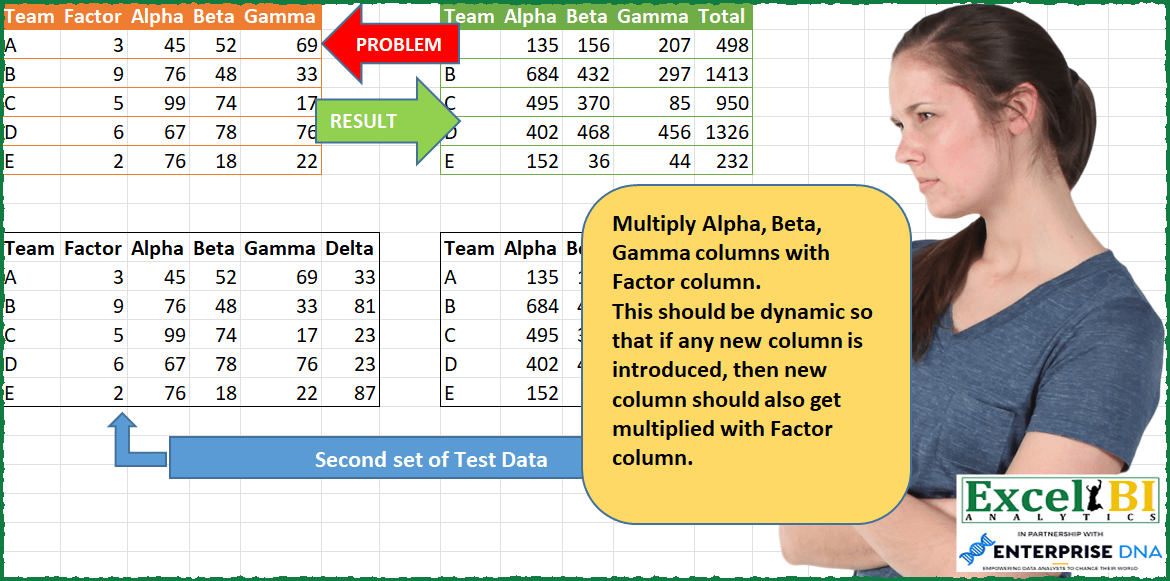
Multiply Alpha, Beta, Gamma columns with Factor column. This should be dynamic so that if any new column is introduced, then new column should also get multiplied with Factor column. You can test this with second set of Test Data.
📌 Challenge Details and Links
ExcelBI Power Query Challenge Number: 73
Challenge Difficulty: ⭐️⭐️⭐️
📥Download Sample File
📥Link to the solutions on LinkedIn
Solving the challenge of Multiply Columns by Factor Dynamically with Power Query
Power Query solution 1 for Multiply Columns by Factor Dynamically, proposed by Bo Rydobon 🇹🇭:
let
  Source = Excel.CurrentWorkbook(){[Name = "Table1"]}[Content],
  Ans =
    let
      a = Table.ToColumns(Source)
    in
      Table.AddColumn(
        Table.FromColumns(
          {a{0}}
            & List.Transform(
              List.Skip(a, 2),
              each List.Transform(List.Zip({a{1}, _}), List.Product)
            ),
          List.Alternate(Table.ColumnNames(Source), 1, 99, 1)
        ),
        "Total",
        each List.Sum(List.Skip(Record.ToList(_)))
      )
in
  Ans
Power Query solution 2 for Multiply Columns by Factor Dynamically, proposed by Bo Rydobon 🇹🇭:
let
  Source = Excel.CurrentWorkbook(){[Name = "Table1"]}[Content],
  Ans = Table.AddColumn(
    Table.RemoveColumns(
      Table.ReplaceValue(Source, null, each [Factor], (c, o, n) => c * n, Table.ColumnNames(Source)),
      "Factor"
    ),
    "Total",
    each List.Sum(List.Skip(Record.ToList(_)))
  )
in
  Ans
Power Query solution 3 for Multiply Columns by Factor Dynamically, proposed by Zoran Milokanović:
let
  Source = Excel.CurrentWorkbook(){[Name = "Input"]}[Content],
  Rows = List.Transform(
    Table.ToRows(Source),
    (o) =>
      let
        m = List.Transform(List.Skip(o, 2), each _ * o{1})
      in
        {o{0}} & m & {List.Sum(m)}
  ),
  Columns = List.RemoveRange(Table.ColumnNames(Source), 1, 1) & {"Total"},
  Solution = Table.FromRows(Rows, Columns)
in
  Solution
Power Query solution 4 for Multiply Columns by Factor Dynamically, proposed by Kris Jaganah:
let
  Source = Excel.CurrentWorkbook(){[Name = "Table1"]}[Content],
  #"Unpivoted Other Columns" = Table.UnpivotOtherColumns(
    Source,
    {"Team", "Factor"},
    "Attribute",
    "Value"
  ),
  #"Added Custom" = Table.AddColumn(
    #"Unpivoted Other Columns",
    "Multiplier",
    each [Factor] * [Value]
  ),
  #"Removed Columns" = Table.RemoveColumns(#"Added Custom", {"Value"}),
  #"Pivoted Column" = Table.Pivot(
    #"Removed Columns",
    List.Distinct(#"Removed Columns"[Attribute]),
    "Attribute",
    "Multiplier",
    List.Sum
  ),
  Total = Table.AddColumn(
    #"Pivoted Column",
    "Total",
    each List.Sum(
      Record.FieldValues(
        Record.SelectFields(
          _,
          List.Difference(Table.ColumnNames(#"Pivoted Column"), {"Team", "Factor"})
        )
      )
    )
  ),
  #"Removed Factor" = Table.RemoveColumns(Total, {"Factor"})
in
  #"Removed Factor"
Power Query solution 5 for Multiply Columns by Factor Dynamically, proposed by Alejandro Simón 🇵🇦 🇪🇸:
let
  Origen = Excel.CurrentWorkbook(){[Name = "Tabla1"]}[Content],
  Group = Table.Group(
    Origen,
    {"Team", "Factor"},
    {
      {
        "All",
        each
          let
            a = List.Skip(Table.ToRows(_){0}),
            b = List.Skip(List.Transform(a, each _ * a{0})),
            c = b & {List.Sum(b)}
          in
            Table.FromRows({c})
      }
    }
  ),
  Sol = Table.FromColumns(
    {Origen[Team]} & Table.ToColumns(Table.Combine(Group[All])),
    {"Team"} & List.Skip(Table.ColumnNames(Origen), 2) & {"Total"}
  )
in
  Sol
Power Query solution 6 for Multiply Columns by Factor Dynamically, proposed by Luan Rodrigues:
let
  Fonte = Tabela1,
  tab = Table.AddColumn(
    Fonte,
    "Total",
    each [
      a     = List.RemoveFirstN(Record.FieldValues(_), 2),
      b     = List.Transform(a, (x) => [Factor] * x),
      c     = List.Transform(b, each Table.FromRows({_})),
      Total = List.Sum(b)
    ][Total]
  )
in
  tab
Power Query solution 7 for Multiply Columns by Factor Dynamically, proposed by Luan Rodrigues:
let
  Fonte = Tabela1,
  tab = Table.AddColumn(
    Fonte,
    "Personalizar",
    each Table.FromRecords(
      {
        [
          a1    = [Team],
          a     = List.RemoveFirstN(Record.FieldValues(_), 2),
          b     = List.Transform(a, (x) => [Factor] * x),
          Total = List.Sum(b)
        ]
      }
    )
  )[[Personalizar]],
  exp = Table.ExpandTableColumn(tab, "Personalizar", {"a1", "b", "Total"}, {"a1", "b", "Total"}),
  calc = Table.ToColumns(Table.FromRows(exp[b])),
  res = Table.FromColumns(
    Table.ToColumns(exp[[a1]]) & calc & Table.ToColumns(exp[[Total]]),
    {"Team"} & List.RemoveFirstN(Table.ColumnNames(Fonte), 2) & {"Total"}
  )
in
  res
Power Query solution 8 for Multiply Columns by Factor Dynamically, proposed by Hussein SATOUR:
let
  Source = Excel.CurrentWorkbook(){[Name = "Table1"]}[Content],
  ValuesCol = List.Skip(Table.ColumnNames(Source), 2),
  ValColTot = List.Combine({ValuesCol, {"Total"}}),
  #"Added Custom" = Table.AddColumn(
    Source,
    "Custom",
    each
      let
        a    = Record.FieldValues(_),
        b    = List.Skip(a, 2),
        Fact = Number.From([Factor]),
        c    = List.Transform(b, each Number.From(_) * Fact),
        d    = List.Sum(c)
      in
        Text.Combine(List.Transform(c, Text.From), "/") & "/" & Text.From(d)
  ),
  #"Removed Columns" = Table.RemoveColumns(#"Added Custom", ValuesCol),
  #"Split Column by Delimiter" = Table.SplitColumn(
    #"Removed Columns",
    "Custom",
    Splitter.SplitTextByDelimiter("/", QuoteStyle.Csv),
    ValColTot
  )
in
  #"Split Column by Delimiter"
Power Query solution 9 for Multiply Columns by Factor Dynamically, proposed by Eric Laforce:
let
  Source = Excel.CurrentWorkbook(){[Name = "tData73b"]}[Content],
  CN = List.Skip(Table.ColumnNames(Source), 2) & {"Total"},
  NewData = List.Transform(
    Table.ToRows(Table.RemoveColumns(Source, "Team")),
    each
      let
        Factor  = _{0},
        NewList = List.Transform(List.Skip(_), each Factor * _)
      in
        Record.FromList(NewList & {List.Sum(NewList)}, CN)
  ),
  NewTable = Table.FromColumns({Source[Team], NewData}, {"Team", "Data"}),
  Expand = Table.ExpandRecordColumn(NewTable, "Data", CN)
in
  Expand
Power Query solution 10 for Multiply Columns by Factor Dynamically, proposed by Victor Wang:
let
  Source = Excel.CurrentWorkbook(){[Name = "Table1"]}[Content],
  multiplyFactor = Table.ReplaceValue(
    Source,
    null,
    each [Factor],
    (curr, cond, repl) => curr * repl,
    List.Skip(Table.ColumnNames(Source), 2)
  ),
  removeFactor = Table.RemoveColumns(multiplyFactor, {"Factor"}),
  addTotal = Table.AddColumn(removeFactor, "Total", each List.Sum(List.Skip(Record.ToList(_))))
in
  addTotal
Power Query solution 11 for Multiply Columns by Factor Dynamically, proposed by Krzysztof Kominiak:
let
  Source = Excel.CurrentWorkbook(){[Name = "Table1"]}[Content],
  Result = Table.RemoveColumns(
    Table.AddColumn(Source, "Total", each List.Sum(List.Skip(Record.ToList(_), 2)) * [Factor]),
    "Factor"
  )
in
  Result
Power Query solution 12 for Multiply Columns by Factor Dynamically, proposed by Felipe Perez Arevalo:
let
  //Source = #"Test Data",
  Source = Table,
  MainHeader = {"Team", "Factor"},
  OtherHeaders = List.RemoveMatchingItems(Table.ColumnNames(Source), MainHeader),
  Total = Table.AddColumn(
    Source,
    "Total",
    each List.Sum(Record.ToList(Record.SelectFields(_, OtherHeaders))),
    Int64.Type
  ),
  Unpivot = Table.UnpivotOtherColumns(Total, MainHeader, "Attribute", "Value"),
  Custom1 = Table.RemoveColumns(
    Table.AddColumn(Unpivot, "Custom1", each [Factor] * [Value], Int64.Type),
    {"Factor", "Value"}
  ),
  PivotColumn = Table.Pivot(
    Table.TransformColumnTypes(Custom1, {{"Attribute", type text}}),
    List.Distinct(Table.TransformColumnTypes(Custom1, {{"Attribute", type text}})[Attribute]),
    "Attribute",
    "Custom1"
  )
in
  PivotColumn
Power Query solution 13 for Multiply Columns by Factor Dynamically, proposed by Fatemeh Heydari:
let
  Source = Excel.CurrentWorkbook(){[Name = "Table1"]}[Content],
  #"Unpivoted Columns" = Table.UnpivotOtherColumns(Source, {"Team", "Factor"}, "Attribute", "Value"),
  #"Added Custom" = Table.AddColumn(
    #"Unpivoted Columns",
    "MultipliedValues",
    each [Factor] * [Value]
  ),
  #"Removed Columns" = Table.RemoveColumns(#"Added Custom", {"Factor", "Value"}),
  #"Pivoted Column2" = Table.Pivot(
    #"Removed Columns",
    List.Distinct(#"Removed Columns"[Attribute]),
    "Attribute",
    "MultipliedValues",
    List.Sum
  ),
  #"Added Custom1" = Table.AddColumn(
    #"Pivoted Column2",
    "Total",
    each List.Sum(List.RemoveFirstN(Record.ToList(_), 1))
  )
in
  #"Added Custom1"
Solving the challenge of Multiply Columns by Factor Dynamically with Excel
Excel solution 1 for Multiply Columns by Factor Dynamically, proposed by Bo Rydobon 🇹🇭:
=LET(z,Table1[hashtag#All],c,DROP(IFERROR(z*INDEX(z,,2),z),,2),HSTACK(TAKE(z,,1),c,VSTACK("Total",DROP(BYROW(c,LAMBDA(a,SUM(a))),1))))Excel solution 2 for Multiply Columns by Factor Dynamically, proposed by Rick Rothstein:
=LET(m,B2:B6*C2:E6,VSTACK(HSTACK(A1,C1:E1,"Total"),HSTACK(A2:A6,m,BYROW(m,LAMBDA(r,SUM(r))))))Excel solution 3 for Multiply Columns by Factor Dynamically, proposed by محمد حلمي:
=LET(
data,A1:E6,
f,DROP(INDEX(data,,2),1),
n,DROP(data,1,2),
VSTACK(HSTACK(TAKE(data,1,1),DROP(data,1-ROWS(data),2),"Total"),
HSTACK(DROP(TAKE(data,,1),1),
n*f,MMULT(n*f,SEQUENCE(COLUMNS(data)-2)^0))))
Excel solution 4 for Multiply Columns by Factor Dynamically, proposed by محمد حلمي:
=VSTACK(HSTACK(A1,C1:E1,"Total"),
HSTACK(A2:A6,C2:E6*B2:B6,
MMULT(C2:E6*B2:B6,TOCOL(C2:E2^0))))
Excel solution 5 for Multiply Columns by Factor Dynamically, proposed by 🇰🇷 Taeyong Shin:
= Header

=LET(
 d, Table1,
 h, Table1[hashtag#머리글],
 v, BYROW(DROP(d, , 1), LAMBDA(r, LET(a, N(r) * DROP(r, , 1), ARRAYTOTEXT(HSTACK(a, SUM(a)))))),
 VSTACK(
 HSTACK(T(h), DROP(h, , 2), "Total"),
 HSTACK(TAKE(d, , 1), --TEXTSPLIT(CONCAT(v & ";"), ", ", ";", 1))
 )
)
Excel solution 6 for Multiply Columns by Factor Dynamically, proposed by Alejandro Campos:
=LET(
input;_Team;
encab;EXCLUIR(_Team[hashtag#Encabezados];;2);
team;_Team[Team];
factor;_Team[Factor];
tblnum;EXCLUIR(_Team;;2);
totfactor;tblnum*factor;
tot;BYROW(totfactor;SUMA);
APILARV(APILARH("Team";encab;"Total");APILARH(team;totfactor;tot)))
Excel solution 7 for Multiply Columns by Factor Dynamically, proposed by Oscar Mendez Roca Farell:
=LET(_f, 1:1,_m, REDUCE(A1:A6, XMATCH(DROP(TOCOL(_f,1), 2), _f), LAMBDA(i, x, HSTACK(i, IFERROR(B1:B6*INDEX(A1:Z6, ,x), INDEX(_f, x))))), HSTACK(_m,BYROW(DROP(_m, ,1), LAMBDA(r, IFERROR((1/SUM(r))^-1,"Total")))))Excel solution 8 for Multiply Columns by Factor Dynamically, proposed by Sunny Baggu:
=LET(
 _input, A2:E6,
 _team, TAKE(_input, , 1),
 _factor, CHOOSECOLS(_input, 2),
 _tblnum, DROP(_input, , 2),
 _newtblnum, _tblnum * _factor,
 _tot, BYROW(_newtblnum, LAMBDA(a, SUM(a))),
 _result, HSTACK(_team, _newtblnum, _tot),
 _result
)
Excel solution 9 for Multiply Columns by Factor Dynamically, proposed by LEONARD OCHEA 🇷🇴:
=LET(t;A9:F14;r;ROWS(t)-1;c;COLUMNS(t)-2;te;TAKE(t;-r;1);f;DROP(CHOOSECOLS(t;2);1);d;TAKE(t;-r;-c);m;f*CHOOSECOLS(d;SEQUENCE(;c));VSTACK(HSTACK(TAKE(t;1);"Total");HSTACK(te;f;m;BYROW(m;LAMBDA(a;SUM(a))))))Excel solution 10 for Multiply Columns by Factor Dynamically, proposed by Miguel Angel Franco García:
=LET(filas; CONTARA(A:A);modelo;INDICE(A:E; SECUENCIA(filas); SECUENCIA(; COLUMNAS(A:E)));colums; COLUMNAS(modelo);calculo;INDICE(modelo; SECUENCIA(filas-1;; 2;1); SECUENCIA(;colums-2;3;1))*INDICE(modelo; SECUENCIA(filas-1;; 2;1);2);equipo;INDICE(modelo; SECUENCIA(filas-1;; 2;1);1); APILARH(equipo;calculo; BYROW(calculo; LAMBDA(a; SUMA(a)))))


Funcion encabezado
=APILARH(A1;INDICE(A1:E1;; SECUENCIA(; COLUMNAS(A1:E1)-2;3;1));" Total")=APILARH(A1;INDICE(A1:E1;; SECUENCIA(; COLUMNAS(A1:E1)-2;3;1));" Total")
Excel solution 11 for Multiply Columns by Factor Dynamically, proposed by Stevenson Yu:
=LET(A, A1:E6, B, DROP(A,,2),
C, INDEX(A,,2)*B,
HSTACK(TAKE(A,,1),IFERROR(C,B),IFERROR(BYROW(C, LAMBDA(C, SUM(C))),"Total")))
Solving the challenge of Multiply Columns by Factor Dynamically with Python in Excel
Python in Excel solution 1 for Multiply Columns by Factor Dynamically, proposed by Alejandro Campos:
Made a table with data called "_Team"
df.iloc[:, 1:] = df.iloc[:, 1:].mul(df['Factor'], axis=0)
res = pd.concat([team, df.assign(Total=df.sum(axis=1) - df['Factor'])
 .drop(columns=['Factor'])], axis=1)
res
&&&