
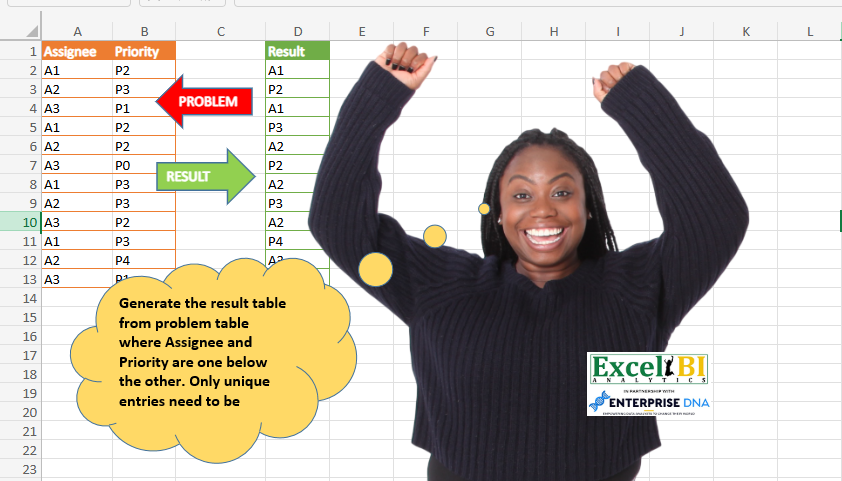
Generate the result table from problem table where Assignee and Priority are one below the other. Only unique entries need to be shown.
📌 Challenge Details and Links
ExcelBI Power Query Challenge Number: 65
Challenge Difficulty: ⭐️⭐️
📥Download Sample File
📥Link to the solutions on LinkedIn
Solving the challenge of List Unique Assignee Priorities with Power Query
Power Query solution 1 for List Unique Assignee Priorities, proposed by Bo Rydobon 🇹🇭:
let
  Source = Excel.CurrentWorkbook(){[Name = "Table1"]}[Content],
  Res    = List.Combine(Table.ToRows(Table.Sort(Table.Distinct(Source), {"Assignee", "Priority"})))
in
  Res
Power Query solution 2 for List Unique Assignee Priorities, proposed by Zoran Milokanović:
let
  Source = Excel.CurrentWorkbook(){[Name = "Input"]}[Content],
  RemovedDuplicates = Table.Distinct(Source),
  SortedRows = Table.Sort(
    RemovedDuplicates,
    {{"Assignee", Order.Ascending}, {"Priority", Order.Ascending}}
  ),
  UnpivotedColumns = Table.UnpivotOtherColumns(SortedRows, {}, "Attribute", "Result"),
  RemovedOtherColumns = Table.SelectColumns(UnpivotedColumns, {"Result"})
in
  RemovedOtherColumns
Power Query solution 3 for List Unique Assignee Priorities, proposed by Kris Jaganah:
let
  Source = Excel.CurrentWorkbook(){[Name = "Table1"]}[Content],
  #"Removed Duplicates" = Table.Distinct(Source),
  #"Sorted Rows" = Table.Sort(
    #"Removed Duplicates",
    {{"Assignee", Order.Ascending}, {"Priority", Order.Ascending}}
  ),
  #"Unpivoted Columns" = Table.UnpivotOtherColumns(#"Sorted Rows", {}, "Attribute", "Value"),
  #"Removed Columns" = Table.RemoveColumns(#"Unpivoted Columns", {"Attribute"}),
  #"Renamed Columns" = Table.RenameColumns(#"Removed Columns", {{"Value", "Result"}})
in
  #"Renamed Columns"
Power Query solution 4 for List Unique Assignee Priorities, proposed by Rick de Groot:
let
  Source = Excel.CurrentWorkbook(){[Name = "Table1"]}[Content],
  Sort = Table.Sort(Source, {{"Assignee", Order.Ascending}, {"Priority", Order.Ascending}}),
  Custom1 = Table.ToRows(Sort),
  List = Table.FromList(Custom1, Splitter.SplitByNothing(), type table [Result = {Text.Type}], null),
  RemoveDupl = Table.Distinct(List),
  ExpRows = Table.ExpandListColumn(RemoveDupl, "Result")
in
  ExpRows
Power Query solution 5 for List Unique Assignee Priorities, proposed by Aditya Kumar Darak 🇮🇳:
let
  Source = Excel.CurrentWorkbook(){[Name = "data"]}[Content],
  Unique = Table.Distinct(Source),
  Sort   = Table.Sort(Unique, Table.ColumnNames(Unique)),
  Return = List.Combine(Table.ToRows(Sort))
in
  Return
Power Query solution 6 for List Unique Assignee Priorities, proposed by Alejandro Simón 🇵🇦 🇪🇸:
let
  Source = Excel.CurrentWorkbook(){[Name = "Table1"]}[Content],
  Sort   = Table.Sort(Source, {"Assignee", "Priority"}),
  RD     = Table.Distinct(Sort),
  Sol    = List.Combine(Table.ToRows(RD))
in
  Sol
Power Query solution 7 for List Unique Assignee Priorities, proposed by Luan Rodrigues:
let
  Fonte = Tabela1,
  dup = Table.Sort(Table.Distinct(Fonte), {"Assignee", "Priority"}),
  res = List.Combine(Table.AddColumn(dup, "Personalizar", each Record.FieldValues(_))[Personalizar])
in
  res
Power Query solution 8 for List Unique Assignee Priorities, proposed by Brian Julius:
let
  Source = Excel.CurrentWorkbook(){[Name = "Table1"]}[Content],
  #"De-dupe" = Table.Distinct(Source),
  Sort = Table.Sort(#"De-dupe", {{"Assignee", Order.Ascending}, {"Priority", Order.Ascending}}),
  Merge = Table.CombineColumns(
    Sort,
    {"Assignee", "Priority"},
    Combiner.CombineTextByDelimiter(",", QuoteStyle.None),
    "Result"
  ),
  SplitToRows = Table.ExpandListColumn(
    Table.TransformColumns(
      Merge,
      {
        {
          "Result",
          Splitter.SplitTextByDelimiter(",", QuoteStyle.Csv),
          let
            itemType = (type nullable text) meta [Serialized.Text = true]
          in
            type {itemType}
        }
      }
    ),
    "Result"
  )
in
  SplitToRows
Power Query solution 9 for List Unique Assignee Priorities, proposed by Eric Laforce:
let
  Source     = Excel.CurrentWorkbook(){[Name = "tData65"]}[Content],
  RemoveDupl = Table.Distinct(Source),
  Sort       = Table.Sort(RemoveDupl, Table.ColumnNames(RemoveDupl)),
  Accumulate = List.Accumulate(Table.ToRows(Sort), {}, (s, c) => s & c),
  ToTable    = Table.FromList(Accumulate, Splitter.SplitByNothing(), {"Result"})
in
  ToTable
Power Query solution 10 for List Unique Assignee Priorities, proposed by Matthias Friedmann:
let
  Source = Excel.CurrentWorkbook(){[Name = "Assignee"]}[Content],
  #"Grouped Rows" = Table.Group(
    Source,
    {"Assignee"},
    {{"Priority", each List.Sort(List.Distinct([Priority]))}}
  ),
  #"Expanded Priority" = Table.ExpandListColumn(#"Grouped Rows", "Priority"),
  #"Unpivoted Columns" = Table.UnpivotOtherColumns(#"Expanded Priority", {}, "Attribute", "Result")[
    [Result]
  ]
in
  #"Unpivoted Columns"
Power Query solution 11 for List Unique Assignee Priorities, proposed by Krzysztof Kominiak:
let
  Source     = Excel.CurrentWorkbook(){[Name = "Table1"]}[Content],
  RemAndSort = Table.Sort(Table.Distinct(Source), {"Assignee", "Priority"}),
  Ls         = List.Combine(Table.ToRows(RemAndSort)),
  Result     = Table.FromList(Ls, Splitter.SplitByNothing(), {"Result"}, null, ExtraValues.Error)
in
  Result
Power Query solution 12 for List Unique Assignee Priorities, proposed by Sandeep Marwal:
let
  Source = Excel.CurrentWorkbook(){[Name = "Table1"]}[Content],
  #"Removed Duplicates" = Table.Distinct(Source),
  #"Sorted Rows" = Table.Sort(
    #"Removed Duplicates",
    {{"Assignee", Order.Ascending}, {"Priority", Order.Ascending}}
  ),
  Custom1 = List.Combine(Table.ToRows(#"Sorted Rows")),
  #"Converted to Table" = Table.FromColumns({Custom1}, {"Result"})
in
  #"Converted to Table"
Power Query solution 13 for List Unique Assignee Priorities, proposed by Gabriel Raigosa:
let
  Result = List.Combine(
    Table.ToRows(
      Table.Sort(
        Table.Distinct(Excel.CurrentWorkbook(){[Name = "Tabla1"]}[Content]),
        {"Assignee", "Priority"}
      )
    )
  )
in
  Result
Power Query solution 14 for List Unique Assignee Priorities, proposed by Kamran Mumtaz 🇵🇰:
let
  Source     = Excel.CurrentWorkbook(){[Name = "Table1"]}[Content],
  UniqueSort = Table.Sort(Table.Distinct(Source), {"Assignee", "Priority"}),
  Result     = Table.FromColumns({List.Combine(Table.ToColumns(Table.Transpose(UniqueSort)))})
in
  Result
Solving the challenge of List Unique Assignee Priorities with Excel
Excel solution 1 for List Unique Assignee Priorities, proposed by Bo Rydobon 🇹🇭:
=TOCOL(SORT(UNIQUE(A2:B13),{1,2}))Excel solution 2 for List Unique Assignee Priorities, proposed by Rick Rothstein:
=TOCOL(UNIQUE(SORT(A2:B12,{1,2})))Excel solution 3 for List Unique Assignee Priorities, proposed by محمد حلمي:
=TOCOL(SORT(UNIQUE(A2:B13),{1,2}))Excel solution 4 for List Unique Assignee Priorities, proposed by Kris Jaganah:
=REDUCE("Result",SORT(UNIQUE(A2:A13&"-"&B2:B13)),LAMBDA(x,y,VSTACK(x,TEXTSPLIT(y,,"-"))))Excel solution 5 for List Unique Assignee Priorities, proposed by Aditya Kumar Darak 🇮🇳:
=TOCOL(SORT(UNIQUE(A2:B13), {1, 2}))Excel solution 6 for List Unique Assignee Priorities, proposed by Hussein SATOUR:
=TOCOL(SORT(UNIQUE(A2:B13),{1,2}))Excel solution 7 for List Unique Assignee Priorities, proposed by Md. Zohurul Islam:
=LET(u,A2:A13,v,B2:B13,w,DROP(REDUCE("",UNIQUE(u),LAMBDA(x,y,LET(a,SORT(UNIQUE(FILTER(v,u=y))),b,TOCOL(IFNA(HSTACK(y,a),y)),d,VSTACK(x,b),d))),1),w)Excel solution 8 for List Unique Assignee Priorities, proposed by Gabriel Raigosa:
=TOCOL(SORT(SORT(UNIQUE(A2:B13),2)))
 =TOCOL(UNIQUE(SORT(A2:B13,{1,2})))

▶️ES:
 =ENCOL(ORDENAR(ORDENAR(UNICOS(A2:B13),2)))
 =ENCOL(UNICOS(ORDENAR(A2:B13,{1,2})))
Excel solution 9 for List Unique Assignee Priorities, proposed by Ricardo Alexis Domínguez Hernández:
=LET(x,UNIQUE(A2:B13),
TOCOL(SORTBY(x,INDEX(x,,1),1,INDEX(x,,2),1)))
&&&