
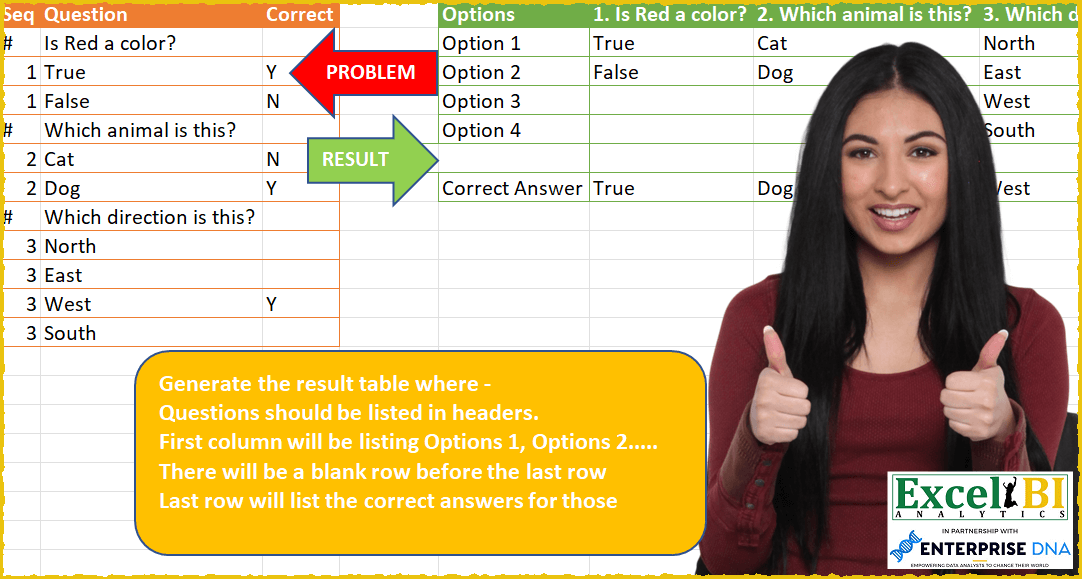
Generate the result table where – Questions should be listed in headers. First column will be listing Options 1, Options 2….. There will be a blank row before the last row Last row will list the correct answers for those questions
📌 Challenge Details and Links
ExcelBI Power Query Challenge Number: 59
Challenge Difficulty: ⭐️⭐️
📥Download Sample File
📥Link to the solutions on LinkedIn
Solving the challenge of List Question Options Summary with Power Query
Power Query solution 1 for List Question Options Summary, proposed by Bo Rydobon 🇹🇭:
let
  Source = Excel.CurrentWorkbook(){[Name = "Table1"]}[Content],
  Group = Table.Group(
    Source,
    "Seq",
    {
      "T",
      each Table.AddColumn(
        _,
        "Q",
        (t) => if t[Seq] = "#" then Text.From(List.Min([Seq])) & ". " & t[Question] else t[Question]
      )[Q]
    },
    0,
    (b, e) => Number.From(e = "#")
  ),
  Op = Table.FromColumns(
    {
      List.Transform(
        {0 .. List.Max(List.Transform(Group[T], List.Count)) - 1},
        each if _ > 0 then "Option " & Text.From(_) else "Options"
      )
    }
      & Group[T]
  ),
  Cor = Table.PromoteHeaders(
    Op
      & Table.FromRows(
        {List.Repeat({null}, Table.ColumnCount(Op))}
          & {{"Correct Answer"} & Table.SelectRows(Source, each [Correct] = "Y")[Question]}
      )
  )
in
  Cor
Power Query solution 2 for List Question Options Summary, proposed by Aditya Kumar Darak 🇮🇳:
let
  Source = Excel.CurrentWorkbook(){[Name = "data"]}[Content],
  Group = Table.Group(Source, "Seq", {"All", each _}, GroupKind.Local),
  Split = Table.Split(Group, 2),
  Transform = List.Transform(
    Split,
    each [
      Ques = Text.From([Seq]{1}) & ". " & [All]{0}[Question]{0},
      A    = [All]{1}[Question],
      O    = List.Transform({1 .. List.Count(A)}, (f) => "Option " & Text.From(f)),
      T    = Table.FromColumns({O, A}, {"Options", "Ans"})
    ][[Ques], [T]]
  ),
  Combine = Table.FromRecords(Transform),
  Expand = Table.ExpandTableColumn(Combine, "T", {"Options", "Ans"}),
  Pivot = Table.Pivot(Expand, List.Distinct(Expand[Ques]), "Ques", "Ans"),
  Correct = Record.FromList(
    {"Correct"} & Table.SelectRows(Source, each [Correct] = "Y")[Question],
    Table.ColumnNames(Pivot)
  ),
  Blank = Record.FromList(List.Repeat({null}, Table.ColumnCount(Pivot)), Table.ColumnNames(Pivot)),
  Return = Pivot & Table.FromRecords({Blank} & {Correct})
in
  Return
Power Query solution 3 for List Question Options Summary, proposed by Alejandro Simón 🇵🇦 🇪🇸:
let
  Source = Excel.CurrentWorkbook(){[Name = "Table1"]}[Content],
  Preguntas = Table.AddColumn(
    Source,
    "Custom",
    each if Value.Type([Seq]) = type number then null else [Question]
  ),
  Fill = Table.FillDown(Preguntas, {"Custom"}),
  Filter = Table.SelectRows(Fill, each ([Seq] <> "#")),
  Agrupar = Table.Group(
    Filter,
    {"Custom"},
    {
      {
        "Count",
        each
          let
            a = Table.AddIndexColumn(_, "Opcion", 1),
            b = Table.TransformColumns(a, {"Opcion", each "Opcion " & Text.From(_)})
          in
            b
      }
    }
  )[[Count]],
  Expand = Table.ExpandTableColumn(Agrupar, "Count", {"Question", "Custom", "Opcion"}),
  Pivot = Table.Pivot(Expand, List.Distinct(Expand[Custom]), "Custom", "Question"),
  Sol = Pivot
    & Table.FromRows(
      {List.Repeat({null}, Table.ColumnCount(Pivot))}
        & {{"Correct Answer"} & Table.SelectRows(Source, each [Correct] = "Y")[Question]},
      Table.ColumnNames(Pivot)
    )
in
  Sol
Power Query solution 4 for List Question Options Summary, proposed by Eric Laforce:
let
  Source = Excel.CurrentWorkbook(){[Name = "tData59"]}[Content],
  FillUp_Seq = Table.FillUp(
    Table.ReplaceValue(Source, "#", null, Replacer.ReplaceValue, {"Seq"}),
    {"Seq"}
  ),
  Part = Table.Partition(FillUp_Seq, "Seq", List.Last(FillUp_Seq[Seq]), each _),
  NbOptMax = List.Max(List.Transform(Part, Table.RowCount)) - 1,
  Transform = List.Transform(
    Part,
    each
      let
        _q = Text.Combine({Text.From([Seq]{0}), ".", Text.From([Question]{0})}),
        _o = List.Skip(_[Question]),
        _n = List.Repeat({null}, NbOptMax - List.Count(_o) + 1),
        _a = Table.SelectRows(_, each ([Correct] = "Y"))[Question]
      in
        List.Combine({{_q}, _o, _n, _a})
  ),
  FirstCol = {"0.Options"}
    & List.Transform({1 .. NbOptMax}, (o) => "Option " & Text.From(o))
    & {null, "Correct Answer"},
  Result = Table.PromoteHeaders(Table.FromColumns(Transform & {FirstCol})),
  Reorder = Table.ReorderColumns(Result, List.Sort(Table.ColumnNames(Result))),
  Rename = Table.RenameColumns(Reorder, {{"0.Options", "Options"}})
in
  Rename
Power Query solution 5 for List Question Options Summary, proposed by Victor Wang:
let
  Source = Excel.CurrentWorkbook(){[Name = "Table1"]}[Content],
  Headers =
    let
      l = Table.SelectRows(Source, each [Seq] = "#")[Question]
    in
      {"Options"} & List.Transform(l, each Text.From(List.PositionOf(l, _) + 1) & ". " & _),
  Group = Table.Group(Table.SelectRows(Source, each [Seq] <> "#"), {"Seq"}, {{"all", each _}}),
  Options = Table.FromColumns(
    {
      List.Transform(
        {1 .. List.Max(List.Transform(Group[all], each Table.RowCount(_)))},
        each "Option " & Text.From(_)
      )
    }
      & List.Transform(Group[all], each [Question]),
    Headers
  ),
  BlankRow = Table.FromRows({List.Repeat({null}, List.Count(Headers))}, Headers),
  CorrectAnswers = Table.FromRows(
    {
      {"Correct Answer"}
        & List.Transform(Group[all], each Table.SelectRows(_, (a) => a[Correct] = "Y")[Question]{0})
    },
    Headers
  ),
  Combine = Table.Combine({Options, BlankRow, CorrectAnswers})
in
  Combine
Power Query solution 6 for List Question Options Summary, proposed by Sergei Baklan:
let
  Source = Excel.CurrentWorkbook(){[Name = "data"]}[Content],
  tbl = Table.PromoteHeaders(Source, [PromoteAllScalars = true]),
  replaceSeq = Table.ReplaceValue(tbl, "#", 0, Replacer.ReplaceValue, {"Seq"}),
  tables = Table.Partition(replaceSeq, "Seq", List.Max(replaceSeq[Seq]) + 1, each _),
  headers = {"Options"}
    & (
      let
        h = tables{0}[Question]
      in
        List.Transform(h, (q) => Text.From(List.PositionOf(h, q) + 1) & ". " & q)
    ),
  options = List.Transform(
    {1 .. List.Max(List.Transform(tables, (q) => Table.RowCount(q)))},
    (o) => "Option " & Text.From(o)
  ),
  empty = Table.FromRows({List.Repeat({null}, List.Count(headers))}, headers),
  correct = Table.FromRows(
    {
      {"Correct answer"}
        & List.Transform(
          List.Skip(tables, 1),
          (q) => Table.SelectRows(q, each ([Correct] = "Y")){0}[Question]
        )
    },
    headers
  ),
  variants = Table.FromColumns(
    {options} & List.Transform(List.Skip(tables, 1), (q) => q[Question]),
    headers
  ),
  final = variants & empty & correct
in
  final
Power Query solution 7 for List Question Options Summary, proposed by Sue Bayes:
let
 Source = Excel.CurrentWorkbook(){[Name="Table1"]}[Content],
 Qn = Table.FillDown(Table.AddColumn(Source, "Qn", each if Value.Type([Seq]) = type number then null else [Question]), {"Qn"}),
 #"Filtered Rows" = Table.SelectRows(Qn, each ([Seq] <> "#")),
 Grp = Table.Group(#"Filtered Rows", {"Seq"}, {{"All", each
let
a = Table.AddIndexColumn(_, "Option", 1),
b = Table.TransformColumns(a, { "Option", each "Option " & Text.From(_)})
in
b}})[[All]],
 Expand = Table.ExpandTableColumn(Grp, "All", {"Qn", "Question", "Option"}),
 Pivot = Table.Pivot(Expand, List.Distinct(Expand[Qn]), "Qn", "Question"),
 Answer = Pivot & Table.FromRows( { List.Repeat({null}, Table.ColumnCount(Pivot))} & {{"Correct Answer"} & Table.SelectRows(Source, each [Correct] = "Y")[Question]},
Table.ColumnNames(Pivot))
in
 Answer
with a little help from Alejandro Simón
Solving the challenge of List Question Options Summary with Excel
Excel solution 1 for List Question Options Summary, proposed by Bo Rydobon 🇹🇭:
=LET(z,A2:C12,s,TAKE(z,,1),q,INDEX(z,,2),u,UNIQUE(s),v,FILTER(u,N(u)),t,TEXTSPLIT(CONCAT(s&q),v,"#",1,,""),
HSTACK(VSTACK("Option"&TEXT(SEQUENCE(MAX(COUNTIF(s,v))+1,,0)," 0;;s"),"","Correct Answer"),
TRANSPOSE(HSTACK(v&". "&TAKE(t,,1),DROP(t,,1),IF(v,""),FILTER(q,DROP(z,,2)="Y")))))
Excel solution 2 for List Question Options Summary, proposed by Bo Rydobon 🇹🇭:
=LET(z,A2:C12,s,TAKE(z,,1),u,UNIQUE(s),v,FILTER(u,N(u)),q,INDEX(z,,2),o,"Option",
IFNA(VSTACK(HSTACK(o&"s",TOROW(v&". "&FILTER(q,s="#"))),
REDUCE(o&" "&SEQUENCE(MAX(COUNTIF(s,v))),v,LAMBDA(a,v,HSTACK(a,FILTER(q,s=v)))),
"",HSTACK("Correct Answer",TOROW(FILTER(q,DROP(z,,2)="Y")))),""))
Excel solution 3 for List Question Options Summary, proposed by Rick Rothstein:
=LET(a,A2:A12,b,B2:B12,c,C2:C12,HSTACK(VSTACK("Option","Option "&SEQUENCE(MAX(LEN(TEXTSPLIT(CONCAT(IF(a="#","#","X")),"#")))),"","Correct Answer"),VSTACK(IFNA(DROP(TRANSPOSE(TEXTSPLIT(CONCAT(IF(a="#","#"&OFFSET(a,1,)&". "&b,b)&"/"),"/","#")),,1),""),TRANSPOSE(DROP(UNIQUE(IF(c="Y",b,"")),1)))))Excel solution 4 for List Question Options Summary, proposed by Rick Rothstein:
=LET(a,A2:A12,b,B2:B12,c,C2:C12,m,MAX(a),HSTACK(VSTACK("Option","Option "&SEQUENCE(MAX(LEN(TEXTSPLIT(CONCAT(IF(a="#","#","X")),"#")))),"","Correct Answer"),VSTACK(TRANSPOSE(DROP(UNIQUE(a),1)&". "&FILTER(b,a="#")),LET(f,LAMBDA(x,FILTER(b,a=x)),IFNA(DROP(REDUCE("",SEQUENCE(,m),LAMBDA(j,z,HSTACK(j,f(z)))),,1),"")),REPT("",SEQUENCE(,m)),TRANSPOSE(FILTER(b,c="Y")))))Excel solution 5 for List Question Options Summary, proposed by 🇰🇷 Taeyong Shin:
=LET(s,A2:A12,q,B2:B12,p,PIVOTBY("Option "&MAP(s,LAMBDA(x,COUNTIF(A2:x,x))),s&". "&SCAN(,q,LAMBDA(a,v,IF(RIGHT(v)="?",v,a))),q,SINGLE,,0,,0,,N(+s)),r,VSTACK(EXPAND(p,ROWS(p)+1,,""),HSTACK("Correct Answer",TOROW(FILTER(q,C2:C12="Y")))),IF(SCAN("",r,COUNT),r,"Options"))Excel solution 6 for List Question Options Summary, proposed by 🇰🇷 Taeyong Shin:
=LET(
 s, A2:A12,
 q, B2:B12,
 u, DROP(UNIQUE(s), 1),
 opt, "Option " & SEQUENCE(MAX(COUNTIF(s, u))),
 body, IFNA(REDUCE(opt, SEQUENCE(MAX(u)), LAMBDA(a,b, HSTACK(a, EXPAND(FILTER(q, s = b), ROWS(opt) + 1, , "")))), ""),
 head, HSTACK("Options", TOROW(u & ". " & FILTER(q, s = "#"))),
 VSTACK(head, body, TOROW(VSTACK("Correct Answer", FILTER(q, C2:C12 = "Y"))))
)
Excel solution 7 for List Question Options Summary, proposed by Kris Jaganah:
=LET(a,A2:A12,b,B2:B12,c,C2:C12,e,FILTER(b,RIGHT(b)="?"),f,TOROW(SEQUENCE(COUNTA(e))&"."&e),g,SCAN(0,a,LAMBDA(x,y,IF(y<>"#",y/y+x,0))),h,"Option"&SEQUENCE(MAX(g)),i,DROP(IFNA(UNIQUE(REDUCE("",FILTER(a,a<>"#"),LAMBDA(v,w,HSTACK(v,FILTER(b,a=w)))),1),""),,1),j,TOROW(FILTER(b,c="Y")),IFNA(HSTACK(VSTACK("Options",h,"","Correct Answer"),VSTACK(f,i,"",j)),""))Excel solution 8 for List Question Options Summary, proposed by Aditya Kumar Darak 🇮🇳:
=LET(
 _d, A2:C12,
 _cl1, TAKE(_d, , 1),
 _cl2, INDEX(_d, , 2),
 _cl3, TAKE(_d, , -1),
 _q, FILTER(_cl2, _cl1 = "#"),
 _qsq, SEQUENCE(1, ROWS(_q)),
 _fq, _qsq & ". " & TOROW(_q),
 _mx, MAX(COUNTIFS(_cl1, _qsq)),
 _o, "Option",
 _osq, _o & " " & SEQUENCE(_mx),
 _fo, REDUCE(_osq, _qsq, LAMBDA(a, b, HSTACK(a, FILTER(_cl2, _cl1 = b)))),
 _cr, HSTACK("Correct", TOROW(FILTER(_cl2, _cl3 = "Y"))),
 _br, EXPAND("", , MAX(_qsq) + 1, ""),
 _h, HSTACK(_o & "s", _fq),
 _r, VSTACK(_h, IFNA(_fo, ""), _br, _cr),
 _r
)
Excel solution 9 for List Question Options Summary, proposed by Oscar Mendez Roca Farell:
=IFNA(LET(_c; A2:A12;
VSTACK(REDUCE("Option" & VSTACK("s";
" "&SEQUENCE(MAX(COUNTIF(_c; SEQUENCE(MAX(_c))))));
SEQUENCE(MAX(_c)); LAMBDA(i; x;
 HSTACK(i; LET(_r; A2:A12; FILTER(B2:B12;
 MAP(_r; LAMBDA(i; IF(i="#"; INDEX(_r; ROW(i)); i)))=x)))));
 ""; HSTACK("Correct Answer";
 TRANSPOSE( FILTER( B2:B12;C2:C12="Y")))));"")
Excel solution 10 for List Question Options Summary, proposed by Duy Tùng:
=LET(a,A2:A12,b,B2:B12,c,SCAN(0,a="#",SUM),REDUCE(VSTACK("Options","Option "&SEQUENCE(MAX(COUNTIF(a,a))),"","Correct Answer"),UNIQUE(c),LAMBDA(x,y,HSTACK(x,VSTACK(EXPAND(FILTER(IF(a="#",c&". "&b,b),c=y),6,,""),FILTER(b,(c=y)*(C2:C12="y")))))))Excel solution 11 for List Question Options Summary, proposed by Sunny Baggu:
=LET(_vnum,SEQUENCE(COUNTIF(A2:A12,"#")),_hnum,SEQUENCE(,COUNTIF(A2:A12,"#")),
_header,_hnum&". "&TOROW(FILTER(B2:B12,A2:A12="#")),
_fill,IFNA(DROP(REDUCE("",_hnum,LAMBDA(a,v,HSTACK(a,FILTER(B2:B12,A2:A12=v)))),,1),""),
_op,VSTACK("Options","Option "&SEQUENCE(COUNTIF(A2:A12,MAX(A2:A12)))),
_cans,HSTACK("Correct Answer",TOROW(FILTER(B2:B12,C2:C12="Y"))),
VSTACK(EXPAND(HSTACK(_op,VSTACK(_header,_fill)),ROWS(_op)+1,,""),_cans))
Excel solution 12 for List Question Options Summary, proposed by Sunny Baggu:
=LET(_seq,A2:A12,_ques,B2:B12,_cor,C2:C12,
_qf,FILTER(_ques,ISNUMBER(SEARCH("~?",_ques))),
_cq,COUNTA(_qf),
_headers,TOROW(SEQUENCE(_cq)&". "&_qf),
_options,VSTACK("Options","Option "&SEQUENCE(MAX(COUNTIF(_seq,TOROW(UNIQUE(_seq+0),3))))),
_fill,IFNA(DROP(REDUCE("",TOROW(UNIQUE(FILTER(_seq,ISNUMBER(_seq)))),LAMBDA(a,v,HSTACK(a,FILTER(_ques,_seq=v)))),,1),""),
_cans,HSTACK("Correct Answer",TOROW(FILTER(_ques,_cor="Y"))),
_tbl,HSTACK(_options,VSTACK(_headers,_fill)),
VSTACK(EXPAND(_tbl,COUNTA(_options)+1,,""),_cans))
Excel solution 13 for List Question Options Summary, proposed by Oscar Javier Rosero Jiménez:
=IFERROR(LET(_a,A2:C12,
_b,FILTER(_a,ISNUMBER(CHOOSECOLS(_a,1))),
_c,TOROW(VSTACK("Options",FILTER(INDEX(_a,,2),CHOOSECOLS(_a,3)="Y"))),
_d,TOROW(VSTACK("Correct Answer",FILTER(INDEX(_a,,2),NOT(ISNUMBER(CHOOSECOLS(_a,1)))))),
_U,UNIQUE(FILTER(CHOOSECOLS(_b,1),ISNUMBER(CHOOSECOLS(_b,1)))),
_f,SEQUENCE(MAX(4)),_p,"Slope define formula for 4",
VSTACK(_d,REDUCE("Option "&_f,_U,LAMBDA(i,x,
HSTACK(i,FILTER(INDEX(_b,,2),INDEX(_b,,1)=x)))),"",_c)),"")
Excel solution 14 for List Question Options Summary, proposed by Oscar Javier Rosero Jiménez:
=LET(_a,A2:C12,
_b,FILTER(_a,N(CHOOSECOLS(_a,1))),
_Enc,TOROW(VSTACK("Correct Answer",FILTER(INDEX(_a,,2),NOT(N(CHOOSECOLS(_a,1)))))),
_ResOK,TOROW(VSTACK("Options",FILTER(INDEX(_a,,2),CHOOSECOLS(_a,3)="Y"))),
_U,UNIQUE(FILTER(CHOOSECOLS(_b,1),N(CHOOSECOLS(_b,1)))),
_MaxOp,SEQUENCE(MAX(COUNTIF(INDEX(_a,,1),_U))),
IFERROR(VSTACK(_Enc,
REDUCE("Option "&_MaxOp,_U,&LAMBDA(i,x,HSTACK(i,FILTER(INDEX(_b,,2),INDEX(_b,,1)=x)))), "",
_ResOK),""))
Excel solution 15 for List Question Options Summary, proposed by Mohamed Helmy:
=LET(
e,A2:A12,
b,B2:B12,
c,FILTER(b,e="#"),
r,SEQUENCE(ROWS(c)),
V,SEQUENCE(MAX(IF(e="#","",COUNTIF(e,e)))),
IFNA(
HSTACK(VSTACK("Options","Option "&V,"",C1&" Answer"),
VSTACK(TOROW(r&"."&c),DROP(REDUCE(0,r,LAMBDA(A,D,HSTACK(A,
FILTER(b,e=D)))),,1),"",TOROW(FILTER(b,C2:C12="Y")))),""))
Excel solution 16 for List Question Options Summary, proposed by Mohamed Helmy:
=LET(
e,A2:A12,
b,B2:B12,
c,FILTER(b,e="#"),
V,SEQUENCE(1+ MAX(IF(e="#","",COUNTIF(e,e))),,0),
IFNA(VSTACK(
HSTACK("Options "&IF(V,V,""),
VSTACK(TOROW(SEQUENCE(ROWS(c))&"."&c),
DROP(REDUCE(0,UNIQUE( FILTER(e,e<>"#")),LAMBDA(A,D,
HSTACK(A,FILTER(b,e=D)))),,1))),"",
HSTACK("Correct Answer",TOROW(FILTER(b,C2:C12="Y")))),""))
&&