
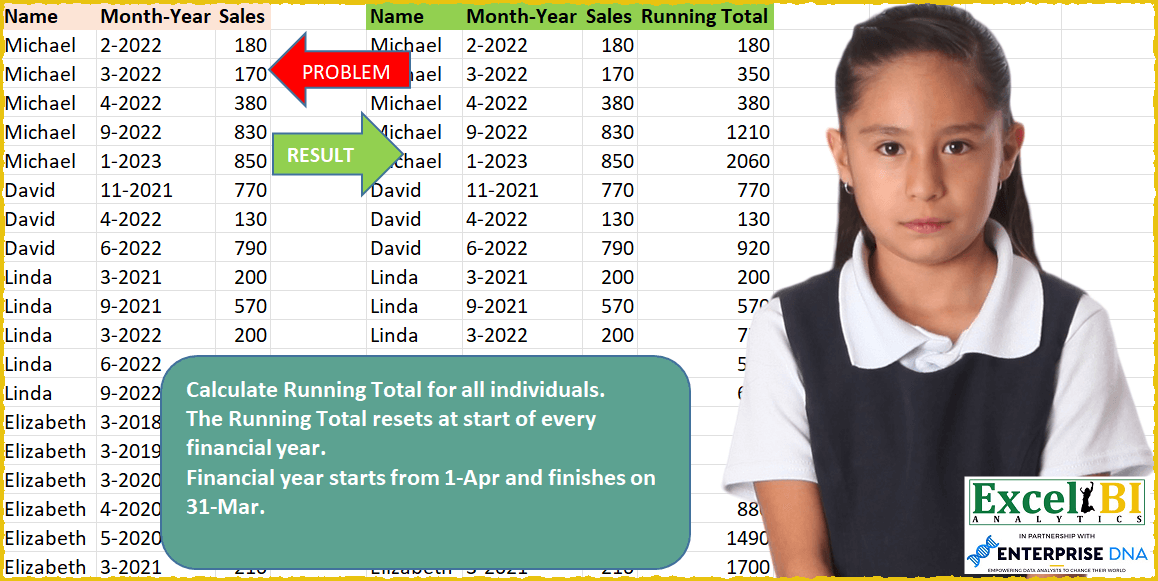
Calculate Running Total for all individuals. The Running Total resets at start of every financial year. Financial year starts from 1-Apr and finishes on 31-Mar.
📌 Challenge Details and Links
ExcelBI Power Query Challenge Number: 39
Challenge Difficulty: ⭐️⭐️⭐️
📥Download Sample File
📥Link to the solutions on LinkedIn
Solving the challenge of Calculate financial year running totals with Power Query
Power Query solution 1 for Calculate financial year running totals, proposed by Bo Rydobon 🇹🇭:
let
  Source = Excel.CurrentWorkbook(){[Name = "Table1"]}[Content],
  AFYear = Table.AddColumn(
    Source,
    "FYear",
    each Date.Year(Date.AddMonths(Date.From([#"Month-Year"]), - 3))
  ),
  AAc = List.Combine(
    Table.Group(
      AFYear,
      {"Name", "FYear"},
      {{"Ac", each List.Accumulate([Sales], {}, (s, l) => s & {List.Last({0} & s) + l})}}
    )[Ac]
  ),
  Combine = Table.FromColumns(
    Table.ToColumns(Source) & {AAc},
    Table.ColumnNames(Source) & {"Runing Total"}
  )
in
  Combine
Power Query solution 2 for Calculate financial year running totals, proposed by Kris Jaganah:
let
  A = Excel.CurrentWorkbook(){[Name = "Table1"]}[Content],
  B = Table.AddColumn(A, "Yr", each Date.Year(Date.AddMonths(Date.From([#"Month-Year"]), - 3))),
  C = Table.ToColumns(B),
  D = List.Generate(
    () => [a = 0, b = C{0}{0}, c = C{3}{0}, d = C{2}{0}],
    each [a] < List.Count(C{2}),
    each [
      a = [a] + 1,
      b = C{0}{a},
      c = C{3}{a},
      d = if c = [c] and b = [b] then C{2}{a} + [d] else C{2}{a}
    ],
    each [d]
  ),
  E = Table.FromColumns(Table.ToColumns(A) & {D}, Table.ColumnNames(A) & {"Running Total"})
in
  E
Power Query solution 3 for Calculate financial year running totals, proposed by Alejandro Simón 🇵🇦 🇪🇸:
let
  Source = Excel.CurrentWorkbook(){[Name = "Table1"]}[Content],
  AñoFiscal = Table.AddColumn(
    Source,
    "AñoFiscal",
    each
      let
        a = Number.From(Text.BeforeDelimiter([#"Month-Year"], "-")),
        b = Number.From(Text.End([#"Month-Year"], 4)),
        c = if a < 4 then b - 1 else b
      in
        c
  ),
  Agrupar = Table.Combine(
    Table.Group(
      AñoFiscal,
      {"Name", "AñoFiscal"},
      {
        {
          "Running Total",
          each
            let
              a = _,
              b = Table.AddIndexColumn(a, "Idx", 1, 1),
              c = Table.AddColumn(b, "RunTot", each List.Sum(List.FirstN(b[Sales], [Idx])))[
                [Name],
                [#"Month-Year"],
                [Sales],
                [RunTot]
              ]
            in
              c
        }
      }
    )[Running Total]
  )
in
  Agrupar
Power Query solution 4 for Calculate financial year running totals, proposed by Luan Rodrigues:
let
  Fonte = Data,
  tab = Table.AddColumn(
    Fonte,
    "Personalizar",
    each [
      a = Number.From(Text.Split([#"Month-Year"], "-"){0}),
      b = Number.From(Text.Split([#"Month-Year"], "-"){1}),
      c = if a > 3 then b + 1 else b
    ][c]
  ),
  gp = Table.Group(
    tab,
    {"Name", "Personalizar"},
    {
      {
        "tab",
        each [
          a = _,
          b = Table.AddIndexColumn(a, "Rank", 1, 1),
          c = List.Buffer(_[Sales]),
          d = Table.AddColumn(b, "Running Total", each List.Sum(List.FirstN(c, [Rank])))
        ][d]
      }
    }
  ),
  Result = Table.ExpandTableColumn(
    gp,
    "tab",
    {"Sales", "Running Total"},
    {"Sales", "Running Total"}
  )
in
  Result
Power Query solution 5 for Calculate financial year running totals, proposed by 🇮🇷 Navid Esmaeilzadeh اسماعیل زاده:
let
  Source = Excel.CurrentWorkbook(){[Name = "Table1"]}[Content],
  #"Changed Type" = Table.TransformColumnTypes(
    Source,
    {{"Name", type text}, {"Month-Year", type date}, {"Sales", Int64.Type}}
  ),
  #"Added Custom" = Table.AddColumn(
    #"Changed Type",
    "Fis-Year",
    each Date.Year(Date.AddMonths([#"Month-Year"], - 3))
  ),
  #"Grouped Rows" = Table.Group(
    #"Added Custom",
    {"Name", "Fis-Year"},
    {
      {
        "Count",
        each _,
        type table [
          Name = nullable text,
          #"Month-Year" = nullable date,
          Sales = nullable number,
          #"Fis-Year" = number
        ]
      }
    }
  ),
  //Function to Compute Running Totals
  RunTotalFunction = (RunTotalTable as table) as table =>
    let
      #"Added Index" = Table.AddIndexColumn(RunTotalTable, "Index", 1, 1, Int64.Type),
      #"Added Custom" = Table.AddColumn(
        #"Added Index",
        "RT",
        each List.Sum(List.FirstN(#"Added Index"[Sales], [Index]))
      )
    in
      #"Added Custom",
  //Assigning the Function
  RunTotals = Table.TransformColumns(#"Grouped Rows", {"Count", each RunTotalFunction(_)}),
  #"Removed Other Columns" = Table.SelectColumns(RunTotals, {"Count"}),
  #"Expanded Count" = Table.ExpandTableColumn(
    #"Removed Other Columns",
    "Count",
    {"Name", "Month-Year", "Sales", "RT"},
    {"Count.Name", "Count.Month-Year", "Count.Sales", "Count.RT"}
  )
in
  #"Expanded Count"
Power Query solution 6 for Calculate financial year running totals, proposed by Matthias Friedmann:
let
 GRTList = List.Generate(
 ()=> [ GRT = values{0}, i = 0 ],
 each [i] < List.Count(values),
 each try
 if grouping{[i]} = grouping{[i] + 1}
 then [GRT = [GRT] + values{[i] + 1}, i = [i] + 1]
 else [GRT = values{[i] + 1}, i = [i] + 1]
 otherwise [i = [i] + 1] ,
 each [GRT]
 )
in
 GRTList
let
 Source = Excel.CurrentWorkbook(){[Name="GRT"]}[Content],
 Type = Table.TransformColumnTypes(Source,{{"Month-Year", type date}}),
 Grouping = Table.AddColumn(Type, "Grouping", each if Date.Month([#"Month-Year"]) > 3 then [Name] & Text.From(Date.Year([#"Month-Year"])+1) else [Name] & Text.From(Date.Year([#"Month-Year"])) ),
 GRT = Table.FromColumns(
 Table.ToColumns(Grouping) & {fxRunningTotal( List.Buffer(Grouping[Sales]) , List.Buffer(Grouping[Grouping]) )},
 Table.ColumnNames(Grouping) & {"Running Total"}
 ),
 Removed = Table.RemoveColumns(GRT,{"Grouping"})
in
 Removed
Power Query solution 7 for Calculate financial year running totals, proposed by Matthias Friedmann:
https://www.myonlinetraininghub.com/quickly-create-running-totals-in-power-query
Grouped Running Totals in Power Query
Power Query solution 8 for Calculate financial year running totals, proposed by Victor Wang:
let
 Source = Excel.CurrentWorkbook(){[Name="Table1"]}[Content],
 NextApr = (thedate as date) as date => hashtag#date(if Date.Month(thedate) >= 4 then Date.Year(thedate)+1 else Date.Year(thedate), 4, 1),
 Accumulate =
 let Names = Source[Name], Dates = List.Transform(Source[#"Month-Year"], Date.From), Sales = Source[Sales] in
 List.Accumulate({1..Table.RowCount(Source)-1},
 [name = Names{0}, d = Dates{0}, s = {Sales{0}}],
 (state, current) =>
 if Names{current} = state[name] and Dates{current} < NextApr(state[d]) then
 [name = Names{current}, d = Dates{current}, s = state[s] & {List.Last(state[s]) + Sales{current}}]
 else
 [name = Source[Name]{current}, d = Dates{current}, s = state[s] & {Sales{current}}]),
 Result = Table.FromColumns(Table.ToColumns(Source) & {Accumulate[s]}, Table.ColumnNames(Source) & {"Running Total"})
in
 Result
Solving the challenge of Calculate financial year running totals with Excel
Excel solution 1 for Calculate financial year running totals, proposed by Bo Rydobon 🇹🇭:
=LET(a,
    A2:A20,
    b,
    YEAR(
        EDATE(
            +B2:B20,
            -3
        )
    ),
    SCAN(0,
    (a=DROP(
        VSTACK(
            0,
            a
        ),
        -1
    ))*(b=DROP(
        VSTACK(
            0,
            b
        ),
        -1
    ))*10^9+C2:C20,
    LAMBDA(
        a,
        v,
        MOD(
            v,
            10^9
        )+IF(
            v>10^9,
            a
        )
    )))
Excel solution 2 for Calculate financial year running totals, proposed by Bo Rydobon 🇹🇭:
=SCAN(0,
    C2:C20,
    LAMBDA(a,
    v,
    v+IF((OFFSET(
        v,
        -1,
        -2
    )=OFFSET(
        v,
        ,
        -2
    ))*(YEAR(
        EDATE(
            OFFSET(
                v,
                ,
                -1
            ),
            -3
        )
    )=IFERROR(
        YEAR(
            EDATE(
                OFFSET(
                    v,
                    -1,
                    -1
                ),
                -3
            )
        ),

    )),
    a)))
Excel solution 3 for Calculate financial year running totals, proposed by Rick Rothstein:
=LET(
    f,
    LAMBDA(
        d,
        IFERROR(
            YEAR(
                EOMONTH(
                    DATEVALUE(
                        d
                    ),
                    -4
                )+1
            ),

        )
    ),
    IF(
        f(
            OFFSET(
                B2,
                -1,

            )
        )<>f(
            B2
        ),
        C2,
        D1+C2
    )
)
Excel solution 4 for Calculate financial year running totals, proposed by محمد حلمي:
=LET(n,
    A2:A20,
    i,
    EDATE(
        --B2:B20,
        -3
    ),
    SCAN(0,

ROW(
    n
)-1,
    LAMBDA(a,
    v,
    a*(INDEX((YEAR(
        i
    )=YEAR(
        DROP(

            VSTACK(
                0,
                i
            ),
            -1
        )
    ))*(n=A1:A19),
    v))+INDEX(
        C2:C20,
        v
    ))))
Excel solution 5 for Calculate financial year running totals, proposed by محمد حلمي:
=SCAN(0,
    SEQUENCE(
        ROWS(
            C2:C20
        )
    ),

LAMBDA(a,
    d,
    LET(
r,
    INDEX(
        C2:C20,
        d
    ),

b,
    B2:B20+0,

y,
    YEAR(
        b
    ),

e,
    VSTACK(
        0,
        IF(
            MONTH(
        b
    )>3,
            y+1,
            y
        )
    ),

IF((INDEX(
    A1:A20,
    d+1
)=INDEX(
    A1:A19,
    d
))*
INDEX(
    DROP(
        e,
        -1
    ),
    d
)=INDEX(
    e,
    d+1
),

r+a,
    r))))
Excel solution 6 for Calculate financial year running totals, proposed by محمد حلمي:
=SCAN(0,
    SEQUENCE(
        ROWS(
            C2:C20
        )
    ),

LAMBDA(a,
    d,

LET(
r,
    INDEX(
        C2:C20,
        d
    )
,
    b,
    B2:B20,

y,
    YEAR(
        b+0
    ),

e,
    VSTACK(
        0,
        DATE(
            IF(
                MONTH(
        b+0
    )>3,
                y+1,
                y
            ),
            4,
            1
        )
    ),

IF((INDEX(
    A1:A20,
    d+1
)=INDEX(
    A1:A19,
    d
))*
INDEX(
    DROP(
        e,
        -1
    ),
    d
)=INDEX(
    e,
    d+1
),

r+a,
    r))))
Excel solution 7 for Calculate financial year running totals, proposed by محمد حلمي:
=SCAN(0,
    B2:B20,
    LAMBDA(b,
    c,
    LET(f,
    LAMBDA(
        d,
        IFERROR(
            YEAR(
                EOMONTH(
                    d+0,
                    -4
                )+1
            ),

        )
    ),
    r,
    OFFSET(
        c,
        ,
        1
    ),

IF(
(f(
    OFFSET(
        c,
        -1,

    )
)=f(
    c
))*(INDEX(
    A1:A20,
    ROW(
    c
)
)=INDEX(
    A1:A19,
    ROW(
    c
)-1
)),


b+r,
    r))))
Excel solution 8 for Calculate financial year running totals, proposed by 🇰🇷 Taeyong Shin:
=LET(

     name,
     A2:A20,

     Sales,
     C2:C20,

     yy,
     YEAR(
         EDATE(
             B2:B20 & "-1",
              -3
         )
     ),

     bool,
     VSTACK(
         1,
          DROP(
              yy,
               1
          ) = DROP(
              yy,
               -1
          )
     ) * VSTACK(
         1,
          DROP(
              name,
               1
          ) = DROP(
              name,
               -1
          )
     ),

     Rt,
     SCAN(
         0,
          SEQUENCE(
              ROWS(
                  Sales
              )
          ),

          LAMBDA(
              a,
              b,
               INDEX(
                   bool,
                    b,
                    1
               ) * a + INDEX(
                   Sales,
                    b
               )
          )

     ),


     HSTACK(
         A2:C20,
          Rt
     )

)
Excel solution 9 for Calculate financial year running totals, proposed by Kris Jaganah:
=LET(a,
    A2:A20,
    b,
    B2:B20,
    c,
    C2:C20,
    d,
    EOMONTH(
        DATE(
            RIGHT(
                b,
                4
            )/1,
            TEXTBEFORE(
                b,
                "-",
                1,
                0
            ),
            1
        ),
        0
    ),
    e,
    EOMONTH(
        MIN(
            d
        ),
        SEQUENCE(
            59,
            ,
            0
        )
    ),
    f,
    ROUNDUP(
        SEQUENCE(
            59,
            ,
            0
        )/12,
        0
    ),
    g,
    XLOOKUP(
        d,
        e,
        f
    ),
    h,
    (--(a=VSTACK(
        TAKE(
            a,
            -1
        ),
        DROP(
            a,
            -1
        )
    )))*(--(g=(VSTACK(
        TAKE(
            g,
            -1
        ),
        DROP(
            g,
            -1
        )
    ))))/10+c,
    i,
    SCAN(0,
    h,
    LAMBDA(x,
    y,
    IF((y-MOD(
        y,
        1
    ))<>y,
    x+y-MOD(
        y,
        1
    ),
    y))),
    HSTACK(
        a,
        b,
        c,
        i
    ))
Excel solution 10 for Calculate financial year running totals, proposed by Aditya Kumar Darak 🇮🇳:
=LET(

     _d,
     A2:C20,

     _ndt,
     EOMONTH(
         "1-" & INDEX(
             _d,
              ,
              2
         ),
          -3
     ),

     _y,
     YEAR(
         _ndt
     ),

     _n,
     TAKE(
         _d,
          ,
          1
     ),

     _c1,
     DROP(
         _y,
          1
     ) > DROP(
         _y,
          -1
     ),

     _c2,
     DROP(
         _n,
          1
     ) = DROP(
         _n,
          -1
     ),

     _fc,
     VSTACK(
         1,
          _c1 - _c2
     ),

     _seq,
     SEQUENCE(
         ROWS(
             _d
         )
     ),

     _e1,
     LAMBDA(
         a,
          b,

          IF(
              INDEX(
                  _fc,
                   b
              ),
               a + INDEX(
                   _d,
                    b,
                    3
               ),
               INDEX(
                   _d,
                    b,
                    3
               )
          )

     ),

     _rt,
     SCAN(
         0,
          _seq,
          _e1
     ),
 &
     _r,
     HSTACK(
         _d,
          _rt
     ),

     _r

)
Solving the challenge of Calculate financial year running totals with Python
Python solution 1 for Calculate financial year running totals, proposed by Igor Perković:
import pandas as pd
import numpy as np
from tabulate import tabulate
# SOURCE
df = pd.read_excel('PQ_Challenge_39.xlsx', usecols="A:C")
# Processing
df[['Month', 'Year']] = df['Month-Year'].str.split('-', expand=True)
df['FY'] = np.where(df['Month'].astype(int) < 4, df['Year'].astype(int)-1 , df['Year'].astype(int) )
df['🎯 Total'] = df.groupby(['Name', 'FY'])['Sales'].cumsum()
# Result
print(tabulate(df,headers=df.columns, tablefmt='simple',showindex=False),'n')
# print(df.to_string(index=False))
# exit()
Solving the challenge of Calculate financial year running totals with Python in Excel
Python in Excel solution 1 for Calculate financial year running totals, proposed by Alejandro Campos:
df = xl("A1:C20", headers=True)
df['Month-Year'] = pd.to_datetime(df['Month-Year'], format='%m-%Y')
df['Financial_Year'] = df['Month-Year'].apply(lambda x: f'{x.year}-{x.year + 1}' if x.month >= 4 else f'{x.year - 1}-{x.year}')
df['Running_Total'] = df.groupby(['Name', 'Financial_Year'])['Sales'].cumsum()
df.drop(columns=['Financial_Year'], inplace=True)
df
Solving the challenge of Calculate financial year running totals with SQL
SQL solution 1 for Calculate financial year running totals, proposed by Zoran Milokanović:
WITH
DATA_PREPARATION
AS
(
 SELECT
 F.ORDINAL_NUMBER
 , F.NAME
 ,F.MONTH_YEAR
 ,F.SALES
 ,F.MONTH
 ,F.YEAR
 FROM
 (
 SELECT
 ROW_NUMBER() OVER () AS ORDINAL_NUMBER
 , D.NAME
 ,D.MONTH_YEAR
 ,D.SALES
 ,TO_NUMBER(SUBSTR(D.MONTH_YEAR, 1, INSTR(D.MONTH_YEAR, '-') - 1)) AS MONTH
 ,TO_NUMBER(SUBSTR(D.MONTH_YEAR, INSTR(D.MONTH_YEAR, '-') + 1)) AS YEAR
 FROM DATA D
 ) F
)
SELECT
 DP.NAME
,DP.MONTH_YEAR
,DP.SALES
,SUM(DP.SALES) OVER (PARTITION BY DP.NAME, DP.FISCAL_YEAR ORDER BY DP.YEAR, DP.MONTH) AS RUNNING_TOTAL
FROM DATA_PREPARATION DP
ORDER BY
 DP.ORDINAL_NUMBER
;
&&