
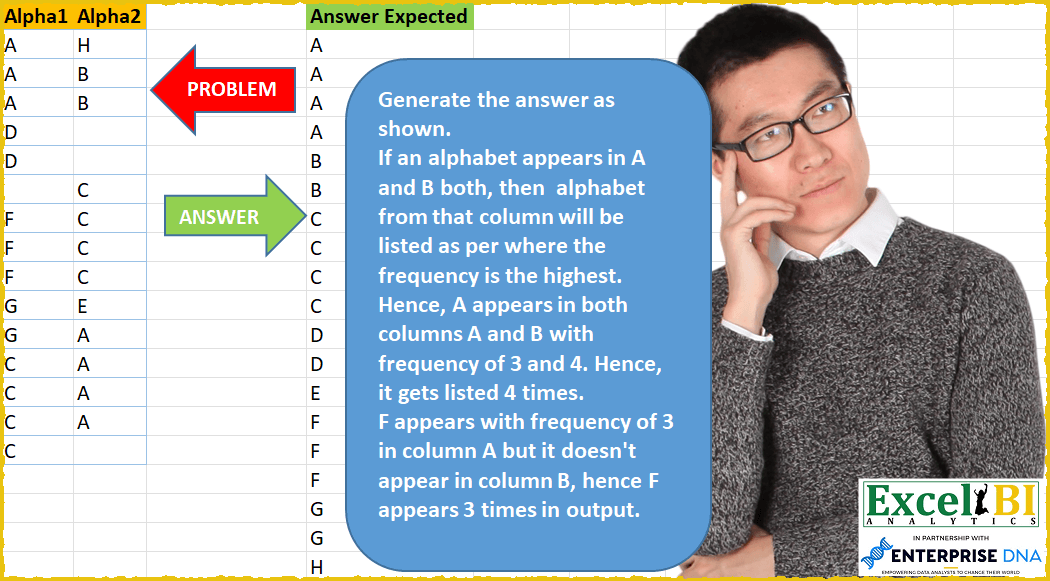
Generate the answer as shown. If an alphabet appears in A and B both, then alphabet from that column will be listed as per where the frequency is the highest. Hence, A appears in both columns A and B with frequency of 3 and 4. Hence, it gets listed 4 times. F appears with frequency of 3 in column A but it doesn’t appear in column B, hence F appears 3 times in output.
📌 Challenge Details and Links
ExcelBI Power Query Challenge Number: 33
Challenge Difficulty: ⭐️⭐️
📥Download Sample File
📥Link to the solutions on LinkedIn
Solving the challenge of List max frequency alphabets across with Power Query
Power Query solution 1 for List max frequency alphabets across, proposed by Alejandro Simón 🇵🇦 🇪🇸:
let
  Source = Excel.CurrentWorkbook(){[Name = "Table1"]}[Content],
  GroupedRows = Table.Group(Source[[Alpha1]], {"Alpha1"}, {{"Agrupado", each _}}),
  Tabla1 = Table.AddColumn(GroupedRows, "Custom", each Table.RowCount([Agrupado])),
  GroupedRows2 = Table.Group(Source[[Alpha2]], {"Alpha2"}, {{"Count", each _}}),
  Tabla2 = Table.AddColumn(GroupedRows2, "Custom", each Table.RowCount([Count])),
  MergedQueries = Table.NestedJoin(
    Tabla2,
    {"Alpha2"},
    Tabla1,
    {"Alpha1"},
    "Join",
    JoinKind.FullOuter
  ),
  ExpandedJoin = Table.ExpandTableColumn(
    MergedQueries,
    "Join",
    {"Alpha1", "Agrupado", "Custom"},
    {"Alpha1", "Agrupado", "Custom.1"}
  ),
  ReplacedNull = Table.ReplaceValue(
    ExpandedJoin,
    null,
    0,
    Replacer.ReplaceValue,
    {"Alpha2", "Count", "Custom", "Alpha1", "Agrupado", "Custom.1"}
  ),
  Conditional1 = Table.Combine(
    Table.AddColumn(
      ReplacedNull,
      "Custom.2",
      each if [Custom] >= [Custom.1] then [Count] else [Agrupado]
    )[Custom.2]
  ),
  Conditional2 = Table.AddColumn(
    Conditional1,
    "Custom",
    each if [Alpha2] = null then [Alpha1] else [Alpha2]
  )[[Custom]],
  Result = Table.SelectRows(Conditional2, each ([Custom] <> null)),
  #"Sorted Rows" = Table.Sort(Result, {{"Custom", Order.Ascending}})
in
  #"Sorted Rows"
Power Query solution 2 for List max frequency alphabets across, proposed by Luan Rodrigues:
let
  F1 = Tabela1[[Alpha1]],
  G1 = Table.Group(F1, {"Alpha1"}, {{"Contagem", each Table.RowCount(_), Int64.Type}}),
  F2 = Tabela1[[Alpha2]],
  G2 = Table.Group(F2, {"Alpha2"}, {{"Contagem1", each Table.RowCount(_), Int64.Type}}),
  M = Table.NestedJoin(G1, {"Alpha1"}, G2, {"Alpha2"}, "Linhas Agrupadas1", JoinKind.FullOuter),
  E = Table.ExpandTableColumn(
    M,
    "Linhas Agrupadas1",
    {"Alpha2", "Contagem1"},
    {"Alpha2", "Contagem1"}
  ),
  S = Table.ReplaceValue(E, null, 0, Replacer.ReplaceValue, {"Contagem", "Contagem1"}),
  tab = Table.SelectRows(
    Table.AddColumn(
      S,
      "Personalizar",
      each [
        a = [Contagem1] > [Contagem],
        b = if a = true then [Contagem1] else [Contagem],
        c = if [Alpha1] <> null then [Alpha1] else [Alpha2],
        d = try List.Repeat(Lines.FromText(c), b) otherwise null
      ][d]
    )[[Personalizar]],
    each [Personalizar] <> null
  )[Personalizar],
  Result = List.Sort(List.Combine(tab), Order.Ascending)
in
  Result
Power Query solution 3 for List max frequency alphabets across, proposed by Brian Julius:
let
  Source = AlphaRaw,
  Alpha1Group = Table.SelectRows(
    Table.Group(Source, {"Alpha1"}, {{"Count1", each Table.RowCount(_), Int64.Type}}),
    each ([Alpha1] <> "")
  ),
  Alpha2Group = Table.SelectRows(
    Table.Group(Source, {"Alpha2"}, {{"Count2", each Table.RowCount(_), Int64.Type}}),
    each ([Alpha2] <> "")
  ),
  Join = Table.Join(Alpha1Group, "Alpha1", Alpha2Group, "Alpha2", JoinKind.FullOuter),
  MaxLetter = Table.AddColumn(Join, "Letter", each List.Max({[Alpha1], [Alpha2]})),
  MaxCount = Table.AddColumn(MaxLetter, "MaxCount", each List.Max({[Count1], [Count2]})),
  Repeat = Table.SelectColumns(
    Table.AddColumn(MaxCount, "Result", each Text.Repeat([Letter], [MaxCount])),
    "Result"
  ),
  SplittoRows = Table.ExpandListColumn(
    Table.TransformColumns(
      Repeat,
      {
        {
          "Result",
          Splitter.SplitTextByRepeatedLengths(1),
          let
            itemType = (type nullable text) meta [Serialized.Text = true]
          in
            type {itemType}
        }
      }
    ),
    "Result"
  ),
  Sort = Table.Sort(SplittoRows, {{"Result", Order.Ascending}})
in
  Sort
Power Query solution 4 for List max frequency alphabets across, proposed by Bhavya Gupta:
let
  Source = Table.ToColumns(Excel.CurrentWorkbook(){[Name = "Table1"]}[Content]),
  Flattened = List.RemoveNulls(List.Sort(List.Distinct(List.Combine(Source)))),
  ExpectedOutput = List.Combine(
    List.Transform(
      List.Zip(
        {
          Flattened,
          List.Transform(
            List.Zip(
              List.Transform(
                {0 .. List.Count(Source) - 1},
                (b) =>
                  List.Transform(Flattened, (a) => List.Count(List.Select(Source{b}, each _ = a)))
              )
            ),
            each List.Max(_)
          )
        }
      ),
      each List.Repeat({_{0}}, _{1})
    )
  )
in
  ExpectedOutput
Power Query solution 5 for List max frequency alphabets across, proposed by 🇮🇷 Navid Esmaeilzadeh اسماعیل زاده:
let
  Source = Excel.CurrentWorkbook(){[Name = "Table1"]}[Content],
  #"Changed Type" = Table.TransformColumnTypes(
    Source,
    {{"Alpha1", type text}, {"Alpha2", type text}}
  ),
  #"Renamed Columns" = Table.RenameColumns(#"Changed Type", {{"Alpha1", "Alpha"}}),
  #"Grouped Rows" = Table.Group(
    #"Renamed Columns",
    {"Alpha"},
    {{"Count", each Table.RowCount(_), Int64.Type}}
  ),
  Custom1 = #"Grouped Rows",
  Custom2 = #"Changed Type",
  #"Renamed Columns1" = Table.RenameColumns(Custom2, {{"Alpha2", "Alpha"}}),
  #"Grouped Rows1" = Table.Group(
    #"Renamed Columns1",
    {"Alpha"},
    {{"Count", each Table.RowCount(_), Int64.Type}}
  ),
  Custom3 = Table.Combine({#"Grouped Rows1", #"Grouped Rows"}),
  #"Filtered Rows" = Table.SelectRows(Custom3, each ([Alpha] <> null)),
  #"Grouped Rows2" = Table.Group(
    #"Filtered Rows",
    {"Alpha"},
    {{"Max", each List.Max([Count]), type number}}
  ),
  #"Sorted Rows" = Table.Sort(#"Grouped Rows2", {{"Alpha", Order.Ascending}}),
  #"Added Custom" = Table.AddColumn(#"Sorted Rows", "Custom", each {1 .. [Max]}),
  #"Expanded Custom" = Table.ExpandListColumn(#"Added Custom", "Custom"),
  #"Removed Other Columns" = Table.SelectColumns(#"Expanded Custom", {"Alpha"})
in
  #"Removed Other Columns"
Power Query solution 6 for List max frequency alphabets across, proposed by Matthias Friedmann:
letters, split into rows
After the sorting a buffer is needed to maintain the sorting❗
let
 Source = Excel.CurrentWorkbook(){[Name = "Alpha"]}[Content],
 Unpivoted = Table.UnpivotOtherColumns(Source, {}, "Attribute", "Value"),
 Grouped = Table.Group(
 Unpivoted,
 {"Attribute", "Value"},
 {{"Count", each Table.RowCount(_), Int64.Type}}
 )[[Value], [Count]],
 Sorted = Table.Buffer(
 Table.Sort(Grouped, {{"Value", Order.Ascending}, {"Count", Order.Descending}})
 ),
 Distinct = Table.Distinct(Sorted, {"Value"}),
 Repeat = Table.AddColumn(
 Distinct,
 "Answer",
 each Text.Repeat([Value], [Count])
 )[[Answer]],
 Split = Table.ExpandListColumn(
 Table.TransformColumns(
 Repeat,
 {{
 "Answer",
 Splitter.SplitTextByRepeatedLengths(1),
 let
 itemType = (type nullable text) meta [Serialized.Text = true]
 in
 type {itemType}
 }}
 ),
 "Answer"
 )
in
 Split
Power Query solution 7 for List max frequency alphabets across, proposed by Antriksh Sharma:
let
  Source = Raw,
  Columns = Table.ToColumns(Source),
  DistinctCharacters = List.RemoveItems(List.Distinct(List.Combine(Columns)), {""}),
  Transformation = List.Transform(
    DistinctCharacters,
    (Char) =>
      [
        N      = List.Max(List.Transform(Columns, (L) => List.Count(List.Select(L, each _ = Char)))),
        Repeat = List.Repeat({Char}, N)
      ][Repeat]
  ),
  Result = Table.FromColumns({List.Sort(List.Combine(Transformation))}, type table [Answer = text])
in
  Result
Power Query solution 8 for List max frequency alphabets across, proposed by Victor Wang:
let
  Source = Excel.CurrentWorkbook(){[Name = "Table1"]}[Content],
  Distinct = List.Distinct(List.Sort(List.RemoveNulls(Source[Alpha1] & Source[Alpha2]))),
  Lists = List.Transform(
    Distinct,
    each [
      a = _,
      b = List.Count(List.Select(Source[Alpha1], each _ = a)),
      c = List.Count(List.Select(Source[Alpha2], each _ = a)),
      d = List.Max({b, c}),
      e = List.Repeat({a}, d)
    ][e]
  ),
  Result = List.Combine(Lists)
in
  Result
Power Query solution 9 for List max frequency alphabets across, proposed by Krzysztof Kominiak:
let
  Source = Excel.CurrentWorkbook(){[Name = "Table1"]}[Content],
  ColList = Table.ColumnNames(Source),
  TabChar = Table.FromList(
    List.RemoveNulls(List.Sort(List.Distinct(List.Combine(Table.ToColumns(Source))))),
    null,
    {"Char"}
  ),
  AccumList = List.Accumulate(
    ColList,
    TabChar,
    (S, C) =>
      Table.AddColumn(
        S,
        C,
        each List.Count(List.Select(Table.Column(Source, C), (x) => x = [Char]))
      )
  ),
  AddLists = Table.AddColumn(
    AccumList,
    "AnswerExpected",
    each
      let
        R   = _,
        Max = List.Max(List.Transform(ColList, each Record.Field(R, _)))
      in
        List.Repeat({[Char]}, Max)
  ),
  Result = Table.ExpandListColumn(
    Table.SelectColumns(AddLists, {"AnswerExpected"}),
    "AnswerExpected"
  )
in
  Result
Power Query solution 10 for List max frequency alphabets across, proposed by Sandeep Marwal:
let
  Source = Excel.CurrentWorkbook(){[Name = "Table1"]}[Content],
  S1 = Table.TransformColumns(Source, {{"Alpha1", each "1-" & _, type text}}),
  S2 = Table.TransformColumns(S1, {{"Alpha2", each "2-" & _, type text}}),
  S3 = Table.FromColumns({List.Combine(Table.ToColumns(S2))}),
  S4 = Table.SplitColumn(
    S3,
    "Column1",
    Splitter.SplitTextByDelimiter("-", QuoteStyle.Csv),
    {"Column1.1", "Column1.2"}
  ),
  S5 = Table.Group(S4, {"Column1.2", "Column1.1"}, {{"Count", each Table.RowCount(_), Int64.Type}}),
  S6 = Table.Sort(S5, {{"Column1.2", Order.Ascending}}),
  S7 = Table.SelectRows(S6, each ([Column1.2] <> null)),
  S8 = Table.RemoveColumns(S7, {"Column1.1"}),
  S9 = Table.Group(S8, {"Column1.2"}, {{"Count", each {1 .. List.Max([Count])}}}),
  S10 = Table.ExpandListColumn(S9, "Count"),
  S11 = Table.RemoveColumns(S10, {"Count"}),
  S12 = Table.Sort(S11, {{"Column1.2", Order.Ascending}})
in
  S12
Solving the challenge of List max frequency alphabets across with Excel
Excel solution 1 for List max frequency alphabets across, proposed by Bo Rydobon 🇹🇭:
=LET(
    u,
    UNIQUE(
        SORT(
            TOCOL(
                A2:B16,
                3
            )
        )
    ),
    c,
    MAP(
        u,
        LAMBDA(
            a,
            MAX(
                COUNTIF(
                    A2:A16,
                    a
                ),
                COUNTIF(
                    B2:B16,
                    a
                )
            )
        )
    ),
    TOCOL(
        IF(
            SEQUENCE(
                ,
                MAX(
                    c
                )
            )>c,
            x,
            u
        ),
        3
    )
)
Excel solution 2 for List max frequency alphabets across, proposed by Rick Rothstein:
=LET(
    s,
    SORT(
        UNIQUE(
            TOCOL(
                A2:B16,
                1
            )
        )
    ),
    m,
    TEXTJOIN(
        "",
        ,
        MAP(
            s,
            LAMBDA(
                x,
                REPT(
                    x&" ",
                    MAX(
                        COUNTIFS(
                            OFFSET(
                                A2:A16,
                                ,
                                {0,
                                1}
                            ),
                            x
                        )
                    )
                )
            )
        )
    ),
    TEXTSPLIT(
        m,
        ,
        " "
    )
)
Excel solution 3 for List max frequency alphabets across, proposed by Rick Rothstein:
=LET(
    s,
    SORT(
        UNIQUE(
            TOCOL(
                A2:B16,
                1
            )
        )
    ),
    m,
    MAP(
        s,
        LAMBDA(
            x,
            MAX(
                COUNTIF(
                    A2:A16,
                    x
                ),
                COUNTIF(
                    B2:B16,
                    x
                )
            )
        )
    ),
    t,
    TRIM(
        CONCAT(
            MAP(
                s,
                m,
                LAMBDA(
                    y,
                    z,
                    REPT(
                        y&" ",
                        z
                    )
                )
            )
        )
    ),
    TOCOL(
        TEXTSPLIT(
            t,
            " "
        )
    )
)
Excel solution 4 for List max frequency alphabets across, proposed by محمد حلمي:
=LET(

    a,
    UNIQUE(
        TOCOL(
            A2:B16
        )
    ),

    SORT(
        TEXTSPLIT(
             TEXTJOIN(
                 0,
                 ,
                 REPT(
                     a&0,
                     BYROW(
                         HSTACK(

                             COUNTIF(
                                 B2:B16,
                                 a
                             ),
                             COUNTIF(
                                 A2:A16,
                                 a
                             )
                         ),

                         LAMBDA(
                             z,
                             MAX(
                                 z
                             )
                         )
                     )
                 )
             ),
            ,
            0,
            1
        )
    )
)
Excel solution 5 for List max frequency alphabets across, proposed by محمد حلمي:
=LET(

    a,
    UNIQUE(
        TOCOL(
            A2:B16
        )
    ),

    v,
    COUNTIF(
        B2:B16,
        a
    ),

    x,
    COUNTIF(
        A2:A16,
        a
    ),

    b,
    BYROW(
        HSTACK(
            v,
            x
        ),
        LAMBDA(
            z,
            MAX(
                z
            )
        )
    ),

    SORT(
        TEXTSPLIT(
             TEXTJOIN(
                 " ",
                 ,
                 REPT(
                     a&" ",
                     b
                 )
             ),
            ,
            " ",
            1
        )
    )
)
Excel solution 6 for List max frequency alphabets across, proposed by 🇰🇷 Taeyong Shin:
=LET(

     Data,
     A2:B16,

     Alp,
     UNIQUE(
         TOCOL(
             Data,
              1
         )
     ),

     num,
     TOROW(
         FACT(
             ISERR(
                 A2:A16
             )
         )
     ),

     arr,
     REDUCE(
         "",
          Alp,
        &  LAMBDA(
              a,
              b,

               LET(

                    maxn,
                    MAX(
                        MMULT(
                            num,
                             N(
                                 Data = b
                             )
                        )
                    ),

                    VSTACK(
                        a,
                         IF(
                             SEQUENCE(
                                 ,
                                  maxn
                             ),
                              b
                         )
                    )

               )

          )
     ),

     SORT(
         DROP(
             TOCOL(
                 arr,
                  2
             ),
              1
         )
     )

)
Excel solution 7 for List max frequency alphabets across, proposed by Kris Jaganah:
=LET(
    a,
    A2:A16,
    b,
    B2:B16,
    c,
    SORT(
        UNIQUE(
            TOCOL(
                a:b,
                1
            )
        ),
        1,
        1
    ),
    d,
    BYROW(
        c,
        LAMBDA(
            x,
            SUM(
                IF(
                    a=x,
                    1,
                    0
                )
            )
        )
    ),
    e,
    BYROW(
        c,
        LAMBDA(
            x,
            SUM(
                IF(
                    b=x,
                    1,
                    0
                )
            )
        )
    ),
    f,
    MAP(
        d,
        e,
        LAMBDA(
            p,
            q,
            MAX(
                p,
                q
            )
        )
    ),
    g,
    CONCAT(
        REPT(
            c,
            f
        )
    ),
    h,
    MID(
        g,
        SEQUENCE(
            LEN(
                g
            )
        ),
        1
    ),
    h
)
Excel solution 8 for List max frequency alphabets across, proposed by Aditya Kumar Darak 🇮🇳:
=LET(

     _d,
     A2:B16,

     _ua,
     SORT(
         UNIQUE(
             TOCOL(
                 _d,
                  1
             )
         )
     ),

     _e,
     LAMBDA(
         x,
          COUNT(
              x
          )
     ),

     _f,
     MAP(
         _ua,
          LAMBDA(
              a,
               MAX(
                   BYCOL(
                       XMATCH(
                           _d,
                            a
                       ),
                        _e
                   )
               )
          )
     ),

     _rt,
     SCAN(
         0,
          _f,
          LAMBDA(
              a,
               b,
               a + b
          )
     ),

     _s,
     SEQUENCE(
         MAX(
             _rt
         )
     ),

     _r,
     XLOOKUP(
         _s,
          _rt,
          _ua,
          ,
          1
     ),

     _r

)
Excel solution 9 for List max frequency alphabets across, proposed by Duy Tùng:
=LET(
    a,
    TOCOL(
        A2:B16,
        1,
        1
    ),
    b,
    SCAN(
        0,
        a<>VSTACK(
            0,
            DROP(
                a,
                -1
            )
        ),
        SUM
    ),
    c,
    GROUPBY(
        a,
        BYROW(
            N(
                b=TOROW(
                    b
                )
            ),
            SUM
        ),
        MAX,
        ,
        0
    ),
    TEXTSPLIT(
        CONCAT(
            REPT(
                TAKE(
                    c,
                    ,
                    1
                )&"/",
                DROP(
                    c,
                    ,
                    1
                )
            )
        ),
        ,
        "/",
        1
    )
)
Excel solution 10 for List max frequency alphabets across, proposed by Stefan Olsson:
=LAMBDA(

    a,

     TRANSPOSE(

          SPLIT(

               TEXTJOIN(

                    ",",
                   true,
                   ArrayFormula(

                        REPT(
                            INDEX(
                                a,
                                ,
                                1
                            )&",",
                            INDEX(
                                a,
                                ,
                                2
                            )
                        )
                   )

               ),

               ",",
              true,
              true
          )

     )

)
(QUERY(
    {
    QUERY(
        {A1:A16},

        "Select Col1, Count(Col1) Where Col1<>'' Group by Col1",
        1
    );
    QUERY(
        {B1:B16},

        "Select Col1, Count(Col1) Where Col1<>'' Group by Col1",
        1
    )
    },

    "Select Col1, Max(Col2) Where Col2>0 Group by Col1 Label Max(Col2) ''",
    0
)
)
Excel solution 11 for List max frequency alphabets across, proposed by Jardiel Euflázio:
=LET(
    b,
    SORT(
        UNIQUE(
            TOCOL(
                A2:B16,
                1
            )
        )
    ),
    c,
    CONCAT(
        REPT(
            b,
            MAP(
                SORT(
        UNIQUE(
            TOCOL(
                A2:B16,
                1
            )
        )
    ),
                LAMBDA(
                    a,
                    MAX(
                        COUNTIF(
                            A2:A16,
                            a
                        ),
                        COUNTIF(
                            B2:B16,
                            a
                        )
                    )
                )
            )
        )
    ),
    MID(
        c,
        SEQUENCE(
            LEN(
                c
            )
        ),
        1
    )
)
Excel solution 12 for List max frequency alphabets across, proposed by Sergei Baklan:
=LET(

     ismatch,
     IFNA(
         NOT(
             XMATCH(
                 Alpha2,
                  Alpha1
             )
         ),
          1
     ),

     SORT(

          TOCOL(

               VSTACK(

                    Alpha1,

                    FILTER(
                        Alpha2,
                         ismatch
                    ),

                    UNIQUE(
                        FILTER(
                            Alpha2,
                             NOT(
                                 ismatch
                             )
                        )
                    )

               ),

               1

          )

     )

)
Excel solution 13 for List max frequency alphabets across, proposed by Rajesh Sinha:
=SORT(LET(Rngs,
    (AE2:AE12,
    AF2:AF12),
    Rws,
    ROWS(
        INDEX(
            Rngs,
            ,
            ,
            1
        )
    ),
    Seq,
    SEQUENCE(
        AREAS(
            Rngs
        )*Rws,
        ,
        0
    ),
    Ary,
    INDEX(
        Rngs,
        MOD(
            Seq,
            Rws
        )+1,
        1,
        INT(
            Seq/Rws
        )+1
    ),
    FILTER(
        Ary,
        Ary<>""
    )),
    ,
    1)
Solving the challenge of List max frequency alphabets across with SQL
SQL solution 1 for List max frequency alphabets across, proposed by Zoran Milokanović:
WITH
DATA_PREPARATION
AS
(
 SELECT
 D.ALPHA1
 ,COUNT(*) OVER (PARTITION BY D.ALPHA1) AS FREQUENCY1
 ,D.ALPHA2
 ,COUNT(*) OVER (PARTITION BY D.ALPHA2) AS FREQUENCY2
 FROM DATA D
)
SELECT
 F.ANSWER_EXPECTED
FROM
(
 SELECT
 DP1.ALPHA1 AS ANSWER_EXPECTED
 FROM DATA_PREPARATION DP1
 (
 SELECT NULL FROM DATA_PREPARATION DP2
 AND DP1.FREQUENCY1 < DP2.FREQUENCY2
 )
 UNION ALL
 SELECT
 DP2.ALPHA2 AS ANSWER_EXPECTED
 FROM DATA_PREPARATION DP2
 (
 SELECT NULL FROM DATA_PREPARATION DP1
 AND DP1.FREQUENCY1 >= DP2.FREQUENCY2
 )
) F
WHERE
 F.ANSWER_EXPECTED <> ''
ORDER BY
 1
;
&&