
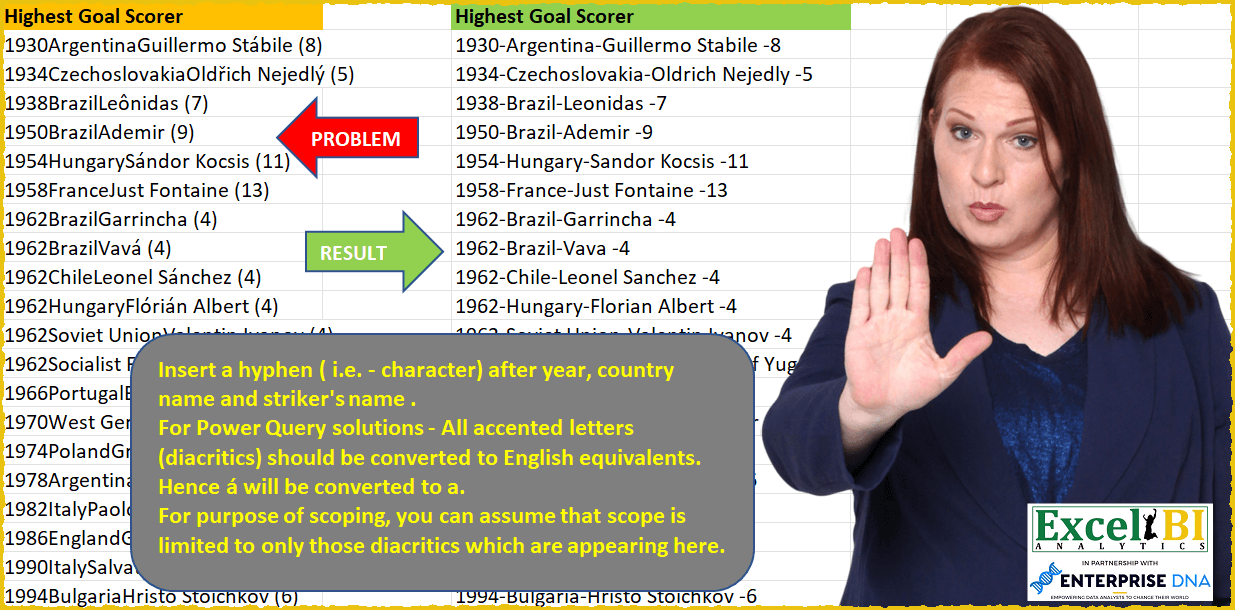
— This week is for FIFA world cup challenges — Insert a hyphen ( i.e. – character) after year, country name and striker’s name. Remove parentheses. For Power Query solutions only (not for Excel formulas) – All accented letters (diacritics) should be converted to English equivalents. Hence á will be converted to a. For purpose of scoping, you can assume that scope is limited to only those diacritics which are appearing in the source data.
📌 Challenge Details and Links
ExcelBI Power Query Challenge Number: 30
Challenge Difficulty: ⭐️⭐️⭐️
📥Download Sample File
📥Link to the solutions on LinkedIn
Solving the challenge of Format FIFA data with hyphens with Power Query
Power Query solution 1 for Format FIFA data with hyphens, proposed by Luan Rodrigues:
let
  Fonte = Data,
  Result = Table.AddColumn(
    Fonte,
    "Personalizar",
    each [
      a = Text.Start(Text.Select([Highest Goal Scorer], {"0" .. "9"}), 4),
      b = Text.Middle(Text.Select([Highest Goal Scorer], {"0" .. "9"}), 4),
      c = Text.FromBinary(Text.ToBinary([Highest Goal Scorer], 1251), TextEncoding.Ascii),
      d = Text.Select(c, {"A" .. "Z", "a" .. "z", " "}),
      e = Splitter.SplitTextByCharacterTransition({"a" .. "z"}, {"A" .. "Z"})(d),
      f = Text.Combine(List.Transform(e, Text.From), "-"),
      g = a & "-" & f & "-" & b
    ][g]
  )
in
  Result
Power Query solution 2 for Format FIFA data with hyphens, proposed by Brian Julius:
https://gist.github.com/bjulius/4832c21c2cc942bec43c260c3fa52ac9
Power Query solution 3 for Format FIFA data with hyphens, proposed by Bhavya Gupta:
let
  Source = Excel.CurrentWorkbook(){[Name = "Table1"]}[Content],
  AddedCustom = Table.AddColumn(
    Source,
    "Highest Goal Scorer Transformed",
    each Text.FromBinary(
      Text.ToBinary(
        List.Accumulate(
          List.Split({"(", "-", ")", ""}, 2),
          Text.Combine(
            Splitter.SplitTextByCharacterTransition({"0" .. "9", "a" .. "z"}, {"A" .. "Z"})(
              [Highest Goal Scorer]
            ),
            "-"
          ),
          (x, y) => Replacer.ReplaceText(x, y{0}, y{1})
        ),
        1251
      ),
      TextEncoding.Ascii
    )
  ),
  Final = Table.SelectColumns(AddedCustom, {"Highest Goal Scorer Transformed"})
in
  Final
Power Query solution 4 for Format FIFA data with hyphens, proposed by 🇮🇷 Navid Esmaeilzadeh اسماعیل زاده:
let
  Source = Excel.CurrentWorkbook(){[Name = "Table1"]}[Content],
  #"Added Custom" = Table.AddColumn(
    Source,
    "Data",
    each Text.FromBinary(Text.ToBinary([Highest Goal Scorer], 1251), TextEncoding.Ascii)
  ),
  #"Inserted Text Between Delimiters" = Table.AddColumn(
    #"Added Custom",
    "Text Between Delimiters",
    each Text.BetweenDelimiters([Data], " (", ")"),
    type text
  ),
  #"Renamed Columns" = Table.RenameColumns(
    #"Inserted Text Between Delimiters",
    {{"Text Between Delimiters", "Score"}}
  ),
  #"Added Custom1" = Table.AddColumn(#"Renamed Columns", "Year", each Text.Start([Data], 4)),
  #"Added Custom2" = Table.AddColumn(
    #"Added Custom1",
    "Other",
    each Splitter.SplitTextByCharacterTransition({"a" .. "z"}, {"A" .. "Z"})(
      Text.Trim(Text.Remove([Data], {"0" .. "9", "(", ")"}))
    )
  ),
  #"Removed Other Columns" = Table.SelectColumns(#"Added Custom2", {"Year", "Other", "Score"}),
  #"Extracted Values" = Table.TransformColumns(
    #"Removed Other Columns",
    {"Other", each Text.Combine(List.Transform(_, Text.From), "-"), type text}
  ),
  #"Merged Columns" = Table.CombineColumns(
    #"Extracted Values",
    {"Year", "Other", "Score"},
    Combiner.CombineTextByDelimiter("-", QuoteStyle.None),
    "Highest Goal Socer"
  )
in
  #"Merged Columns"
Power Query solution 5 for Format FIFA data with hyphens, proposed by Matthias Friedmann:
let
  Source = Excel.CurrentWorkbook(){[Name = "Diacritics"]}[Content],
  Diacritics = Table.TransformColumns(
    Source,
    {{"Highest Goal Scorer", each Text.FromBinary(Text.ToBinary(_, 1251), TextEncoding.Ascii)}}
  ),
  #"Split Column by Delimiter" = Table.SplitColumn(
    Diacritics,
    "Highest Goal Scorer",
    Splitter.SplitTextByEachDelimiter({"(", ")"}, QuoteStyle.Csv),
    {"Highest Goal Scorer", "Goals"}
  ),
  #"Split Column by Character Transition" = Table.SplitColumn(
    #"Split Column by Delimiter",
    "Highest Goal Scorer",
    Splitter.SplitTextByCharacterTransition({"0" .. "9", "a" .. "z"}, {"A" .. "Z"}),
    {"Year", "Country", "Highest Goal Scorer"}
  ),
  #"Merged Columns" = Table.CombineColumns(
    #"Split Column by Character Transition",
    {"Year", "Country", "Highest Goal Scorer", "Goals"},
    Combiner.CombineTextByDelimiter("-", QuoteStyle.None),
    "Highest Goal Scorer"
  )
in
  #"Merged Columns"
Power Query solution 6 for Format FIFA data with hyphens, proposed by Antriksh Sharma:
let
  Source = Data,
  Transform = Table.AddColumn(
    Source,
    "Custom",
    (CurrentRow) =>
      let
        Text = Text.Replace(Text.Replace(CurrentRow[Highest Goal Scorer], " (", " -"), ")", ""),
        Split = Splitter.SplitTextByCharacterTransition({"a" .. "z", "0" .. "9"}, {"A" .. "Z"})(
          Text
        ),
        Combine = Text.Combine(Split, "-"),
        TreatDiacritics = Text.FromBinary(Text.ToBinary(Combine, 1251), TextEncoding.Ascii)
      in
        TreatDiacritics,
    type text
  )
in
  Transform
Power Query solution 7 for Format FIFA data with hyphens, proposed by Victor Wang:
let
  Source = Excel.CurrentWorkbook(){[Name = "Table1"]}[Content],
  Transform = Table.TransformColumns(
    Source,
    {
      {
        "Highest Goal Scorer",
        each [
          t = Text.FromBinary(Text.ToBinary(_, 1251), TextEncoding.Ascii),
          a = Text.Start(t, 4) & "-",
          b = Splitter.SplitTextByCharacterTransition({"a" .. "z"}, {"A" .. "Z"})(Text.Middle(t, 4)),
          b0 = b{0} & "-",
          b1 = Text.BeforeDelimiter(b{1}, " ("),
          c = " -" & Text.BetweenDelimiters(List.Last(b), "(", ")"),
          d = Text.Combine({a, b0, b1, c})
        ][d]
      }
    }
  )
in
  Transform
Solving the challenge of Format FIFA data with hyphens with Excel
Excel solution 1 for Format FIFA data with hyphens, proposed by Rick Rothstein:
=LET(a,
    A2:A31,
    MAP(TRIM(
        LEFT(
            a,
            LEN(
                a
            )-4
        )&" "&RIGHT(
            a,
            4
        )+0
    ),
    LAMBDA(x,
    LET(s,
     SEQUENCE(
         LEN(
             x
         )
     ),
    m,
    MID(
        x,
        s,
        1
    ),
    c,
    CODE(
        m
    ),
    t,
    (c>64)*(c<91)*IF(
        s=1,
        0,
        MID(
            x,
            s-1,
            1
        )<>" "
    ),
    CONCAT(
        IF(
            t,
            "-"&m,
            m
        )
    )))))
Excel solution 2 for Format FIFA data with hyphens, proposed by محمد حلمي:
=LET(

    e,CHAR(
        ROW(
            65:90
        )
    ),
    fr,VSTACK(
        e,
        {"ü";
        "ó";
        "ý";
        "á";
        "ř";
        "ô";
        "ž";
        "ć";
        "Š";
        "é";
        "í";
        " -";
        "(";
        ")"}
    ),
    to,VSTACK(
        "-" &e,{"u";
        "o";
        "y";
        "a";
        "r";
        "o";
        "z";
        "c";
        "S";
        "e";
        "i";
        " ";
        "-";
        ""}
    ),
    REDUCE(
        A2:A31,SEQUENCE(
            ROWS(
                fr
            )
        ),
        LAMBDA(
            c,v,SUBSTITUTE(
                c,INDEX(
                    fr,v
                ),INDEX(
                    to,v
                )
            )
        )
    )
)
Excel solution 3 for Format FIFA data with hyphens, proposed by محمد حلمي:
=LET(

    e,
    CHAR(
        ROW(
            65:90
        )
    ),

    a,
    REDUCE(
        A2:A31,

        {"ü",
        "ó",
        "ý",
        "á",
        "ř",
        "ô",
        "ž",
        "ć",
        "Š",
        "é",
        "í",
        ")"}&"-"&{"u",
        "o",
        "y",
        "a",
        "r",
        "o",
        "z",
        "c",
        "S",
        "e",
        "i",
        ""},

        LAMBDA(
            a,
            d,
            SUBSTITUTE(
                a,
                TEXTBEFORE(
                    d,
                    "-"
                ),
                TEXTAFTER(
                    d,
                    "-"
                )
            )
        )
    ),

    SUBSTITUTE(
        SUBSTITUTE(
            REDUCE(
                a,
                e,

                LAMBDA(
                    a,
                    d,
                    SUBSTITUTE(
                        a,
                        d,
                        "-"&d
                    )
                )
            ),
            " -",
            " "
        ),
        "(",
        "-"
    )
)
Excel solution 4 for Format FIFA data with hyphens, proposed by 🇰🇷 Taeyong Shin:
=LET(

     Data,
     A2:A31,

     y,
     LEFT(
         Data,
          4
     ) & "-",

     Sb,
     SUBSTITUTE(
         SUBSTITUTE(
             MID(
                 Data,
                  5,
                  LEN(
                      Data
                  )
             ),
              "(",
              "-"
         ),
          ")",

     ),

     alp,
     CHAR(
         ROW(
             26:90
         )
     ),

     MAP(
         Sb,
          y,
          LAMBDA(
              m,
              ym,

               LET(

                    str,
                    TEXTBEFORE(
                        m,
                         " ",
                         -1
                    ),

                    txt,
                    TEXTBEFORE(
                        str,
                         " ",
                         -1,
                         ,
                         ,
                         str
                    ),

                    a,
                    TEXTAFTER(
                        txt,
                         " ",
                         -1,
                         ,
                         ,
                         txt
                    ),

                    b,
                    REPLACE(
                        a,
                         MAX(
                             IFERROR(
                                 FIND(
                                     alp,
                                      a,
                                      2
                                 ),
                                  ""
                             )
                         ),
                         0,
                         "-"
                    ),

                    ym & TEXTBEFORE(
                        m,
                         a
                    ) & b & TEXTAFTER(
                        m,
                         a
                    )

               )

          )
     )

)
Excel solution 5 for Format FIFA data with hyphens, proposed by 🇰🇷 Taeyong Shin:
=LET(

     str,
     REDUCE(
         A2:A31,
          COUNTRY,
          LAMBDA(
              a,
              b,
               SUBSTITUTE(
                   a,
                    b,
                    TEXT(
                        b,
                         "-@-"
                    )
               )
          )
     ),

     SUBSTITUTE(
         SUBSTITUTE(
             str,
              "(",
              "-"
         ),
          ")",

     )

)
Excel solution 6 for Format FIFA data with hyphens, proposed by Aditya Kumar Darak 🇮🇳:
=MAP(
 A2:A31,

 LAMBDA(a,

 LET(
 _x1,
     SUBSTITUTE(
         a,
          "(",
          "-"
     ),

 _x2,
     SUBSTITUTE(
         _x1,
          ")",
          ""
     ),

 _l,
     SEQUENCE(
         LEN(
             _x2
         )
     ),

 _s1,
     MID(
         _x2,
          _l,
          1
     ),

 _c,
     CODE(
         _s1
     ),

 _t,
     (_c > 64) * (_c < 91) *
 IFERROR(
     MID(
         _x2,
          _l - 1,
          1
     ) <> " ",
      0
 ),

 _r,
     CONCAT(
         IF(
             _t,
              "-" & _s1,
              _s1
         )
     ),

 _r
 )
 )
)
Excel solution 7 for Format FIFA data with hyphens, proposed by Bhavya Gupta:
=MAP(A2:A31,
    LAMBDA(HGS,
    LET(t,
    SUBSTITUTE(
        SUBSTITUTE(
            HGS,
            "(",
            ""
        ),
        ")",
        ""
    ),
    a,
    SEQUENCE(
        LEN(
            t
        )
    ),
    b,
    MID(
        t,
        a,
        1
    ),
    c,
    MID(
        t,
        a-1,
        1
    ),
    d,
    ((EXACT(
        b,
        UPPER(
            b
        )
    )*(ISERROR(
        --b
    ))*(TRIM(
            b
        )<>"")+IFERROR(
        TRIM(
            c
        )="",
        0
    ))*(EXACT(
        b,
        UPPER(
            b
        )
    )))=1,
    CONCAT(
        IF(
            d,
            "-"&b,
            b
        )
    ))))
Excel solution 8 for Format FIFA data with hyphens, proposed by Md. Zohurul Islam:
=LET(

    z,
    A2:A31,

    w,
    CHAR(
        SEQUENCE(
            26,
            ,
            65
        )
    ),

    u,
    {"ü",
    "ó",
    "ý",
    "á",
    "ř",
    "ô",
    "ž",
    "ć",
    "Š",
    "é",
    "í",
    ")",
    "("},

    v,
    {"u",
    "o",
    "y",
    "a",
    "r",
    "o",
    "z",
    "c",
    "S",
    "e",
    "i",
    "",
    ""},

    a,
    REDUCE(
        z,
        u&"-"&v,
        LAMBDA(
            x,
            y,
            SUBSTITUTE(
                x,
                TEXTBEFORE(
                    y,
                    "-"
                ),
                TEXTAFTER(
                    y,
                    "-"
                )
            )
        )
    ),

    b,
    REDUCE(
        a,
        w,
        LAMBDA(
            x,
            y,
            SUBSTITUTE(
                x,
                y,
                "-"&y
            )
        )
    ),

    d,
    SUBSTITUTE(
        b,
        " -",
        " "
    ),

    n,
    SEARCH(
        " ",
        d,
        LEN(
            d
        )-4
    )-1,

    m,
    RIGHT(
        d,
        LEN(
            d
        )-n
    ),

    e,
    SUBSTITUTE(
        m,
        " ",
        " -"
    ),

    f,
    LEFT(
        d,
        n
    ),

    f&e
)
Excel solution 9 for Format FIFA data with hyphens, proposed by Stefan Olsson:
=ArrayFormula(
    REGEXREPLACE(
        A2:A31,
        "(d{4})(.+[a-z])([A-Z].*)((d+))",
        "$1-$2-$3-$4"
    )
)

To do the replacing of accented letters as well,
     the following is what I came up with (after studying other people's solutions):
=TRANSPOSE(

     SPLIT(

          REDUCE(

               TEXTJOIN(
                   "|",
                   true,

                    ArrayFormula(
                        REGEXREPLACE(
                            A2:A31,
                            "(&d{4})(.+[a-z])([A-Z].*)((d+))",
                            "$1-$2-$3-$4"
                        )
                    )

               ),

               {"áa",
               "ćc",
               "ée",
               "íi",
               "óo",
               "ôo",
               "řr",
               "ŠS" ,
               "üu",
               "ýy",
               "žz"},

               LAMBDA(
                   a,
                   r,

                    REGEXREPLACE(
                        a,
                        LEFT(
                            r
                        ),
                        RIGHT(
                            r
                        )
                    )
               )
          ),

          "|",
         true,
         true
     )

)
-That would of course been a little bit tidier with LET()
Excel solution 10 for Format FIFA data with hyphens, proposed by Morteza Rahmani:
=RegEx(
    A2,
    "[A-Z][a-u0255]+ [A-Z][a-u0255]+|[A-Z][a-u0255]+|d+",
    ,
    ,
    "-"
)
Solving the challenge of Format FIFA data with hyphens with DAX
DAX solution 1 for Format FIFA data with hyphens, proposed by darlas karren:
Congratulations to Prof. Dr. Jan Kemper, Lars Klodwig, Julian Fieres, Carsten Coesfeld, and Dr. Thomas Schroeter! 👏👏👏
Solving the challenge of Format FIFA data with hyphens with SQL
SQL solution 1 for Format FIFA data with hyphens, proposed by Zoran Milokanović:
SELECT
 TRANSLATE(F.T, 'àáâãäåæÀÁÂÃÄÅÆèéêëÈÉÊËìíîïÌÍÎÏòóôõöøÒÓÔÕÖØùúûüÙÚÛÜýÿÝŸçčćÇČĆñÑžŽřŘšŠ',
 'aaaaaaaAAAAAAAeeeeEEEEiiiiIIIIooooooOOOOOOuuuuUUUUyyYYcccCCCnNzZrRsS') AS HIGHEST_GOAL_SCORER
FROM
(
 SELECT
 D.HIGHEST_GOAL_SCORER
 ,REGEXP_REPLACE(D.HIGHEST_GOAL_SCORER,
 '([[:digit:]]+)([[:upper:]][[:alnum:]|[:blank:]]+[[:lower:]])([[:upper:]][[:alnum:]|[:blank:]]+) (([[:digit:]]+))'
 ,'1-2-3 -4'
 ) AS T
 FROM DATA D
) F
;
&&