
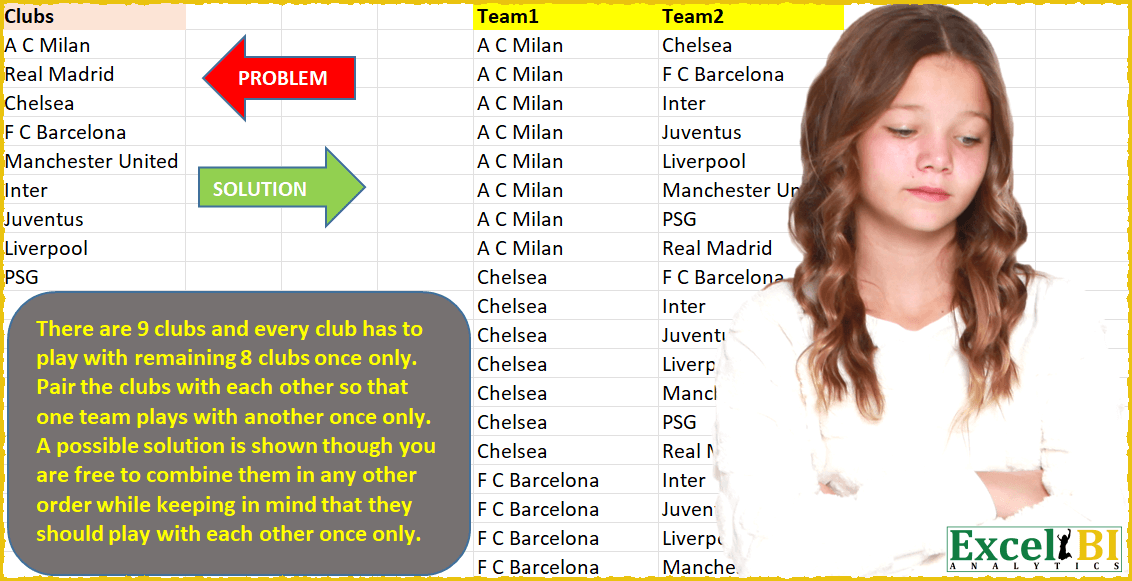
There are 9 clubs and every club has to play with remaining 8 clubs once only. Pair the clubs with each other so that one team plays with another once only. A possible solution is shown though you are free to combine them in any other order while keeping in mind that they should play with each other once only. Don’t hard code this number 9, you should derive this number from the given range.
📌 Challenge Details and Links
ExcelBI Power Query Challenge Number: 27
Challenge Difficulty: ⭐️⭐️⭐️
📥Download Sample File
📥Link to the solutions on LinkedIn
Solving the challenge of Pair clubs so each team with Power Query
Power Query solution 1 for Pair clubs so each team, proposed by Luan Rodrigues:
let
  Fonte = Data,
  T2 = Table.AddColumn(
    Fonte,
    "Team2",
    each [Team1 = [Clubs], Team2 = List.Difference(Data[Clubs], Text.Split([Clubs], "/"))]
  )[[Team2]],
  Exp = Table.ExpandListColumn(
    Table.ExpandRecordColumn(T2, "Team2", {"Team1", "Team2"}, {"Team1", "Team2"}),
    "Team2"
  ),
  List = Table.AddColumn(Exp, "Personalizar", each List.Sort({[Team1], [Team2]}, Order.Ascending)),
  Result = Table.Distinct(
    Table.TransformColumns(
      List,
      {"Personalizar", each Text.Combine(List.Transform(_, Text.From), ","), type text}
    ),
    {"Personalizar"}
  )[[Team1], [Team2]]
in
  Result
Power Query solution 2 for Pair clubs so each team, proposed by Brian Julius:
let
  Source = Table.AddColumn(ClubsRaw, "Custom", each ClubsRaw),
  Expand = Table.Sort(
    Table.ExpandTableColumn(Source, "Custom", {"Clubs"}, {"Clubs.1"}),
    {"Clubs", Order.Ascending}
  ),
  AddSortList = Table.AddColumn(
    Expand,
    "Lists",
    each List.Sort({[Clubs], [Clubs.1]}, Order.Ascending)
  ),
  Extract = Table.TransformColumns(
    AddSortList,
    {"Lists", each Text.Combine(List.Transform(_, Text.From), ","), type text}
  ),
  DeDupe = Table.SelectRows(Table.Distinct(Extract, {"Lists"}), each [Clubs] <> [Clubs.1]),
  Clean = Table.RemoveColumns(
    Table.RenameColumns(DeDupe, {{"Clubs", "Team 1"}, {"Clubs.1", "Team 2"}}),
    "Lists"
  )
in
  Clean
Power Query solution 3 for Pair clubs so each team, proposed by Bhavya Gupta:
let
  Source = Excel.CurrentWorkbook(){[Name = "Table1"]}[Content],
  Sorted = Table.Sort(Source, {{"Clubs", Order.Ascending}}),
  AddedCustom = Table.AddColumn(Sorted, "Custom", each Sorted),
  Expanded = Table.ExpandTableColumn(AddedCustom, "Custom", {"Clubs"}, {"Clubs.1"}),
  Transform = List.Transform(List.Zip(Table.ToColumns(Expanded)), each List.Sort(List.Distinct(_))),
  CreatedTable = Table.FromRows(Transform, {"Team1", "Team2"}),
  RemovedErrors = Table.RemoveRowsWithErrors(CreatedTable),
  Final = Table.Distinct(RemovedErrors)
in
  Final
Power Query solution 4 for Pair clubs so each team, proposed by 🇮🇷 Navid Esmaeilzadeh اسماعیل زاده:
let
  Source = Excel.CurrentWorkbook(){[Name = "Table1"]}[Content],
  #"Changed Type" = Table.TransformColumnTypes(Source, {{"Clubs", type text}}),
  #"Sorted Rows" = Table.Sort(#"Changed Type", {{"Clubs", Order.Ascending}}),
  #"Renamed Columns" = Table.RenameColumns(#"Sorted Rows", {{"Clubs", "Team 1"}}),
  #"Added Index" = Table.AddIndexColumn(#"Renamed Columns", "Index", 1, 1, Int64.Type),
  #"Added Custom" = Table.AddColumn(
    #"Added Index",
    "Team 2",
    each List.Skip(#"Added Index"[Team 1], [Index])
  ),
  #"Expanded Team 2" = Table.ExpandListColumn(#"Added Custom", "Team 2"),
  #"Filtered Rows" = Table.SelectRows(#"Expanded Team 2", each ([Team 2] <> null)),
  #"Removed Other Columns" = Table.SelectColumns(#"Filtered Rows", {"Team 1", "Team 2"})
in
  #"Removed Other Columns"
Power Query solution 5 for Pair clubs so each team, proposed by Matthias Friedmann:
let
  Source = Excel.CurrentWorkbook(){[Name = "Clubs"]}[Content][Clubs],
  count = List.Count(Source) - 1,
  Team1 = List.Accumulate(
    {0 .. count},
    {},
    (s, c) => s & List.Repeat({Source{c}}, List.Count(Source) - 1 - c)
  ),
  Team2 = List.Accumulate({0 .. count}, {}, (s, c) => s & List.Skip(Source, c + 1))
in
  Table.FromColumns({Team1} & {Team2}, {"Team1", "Team2"})
Power Query solution 6 for Pair clubs so each team, proposed by Owen Price:
https://gist.github.com/ncalm/d448886a11a18920630dab9b2f2ed592Power Query solution 7 for Pair clubs so each team, proposed by Victor Wang:
let
  Source = Excel.CurrentWorkbook(){[Name = "Clubs"]}[Content],
  Index = Table.AddIndexColumn(Source, "Index", 1, 1, Int64.Type),
  AddList = Table.AddColumn(
    Index,
    "Team 2",
    let
      l = Source[Clubs]
    in
      each List.LastN(l, List.Count(l) - [Index])
  ),
  Filter = Table.SelectRows(AddList, each not List.IsEmpty([Team 2])),
  Expand = Table.ExpandListColumn(Filter, "Team 2"),
  Rename = Table.RenameColumns(Expand, {{"Clubs", "Team 1"}})[[Team 1], [Team 2]]
in
  Rename
Power Query solution 8 for Pair clubs so each team, proposed by Victor Momoh (MVP, MOS, R.Eng):
let
  Source = Excel.CurrentWorkbook(){[Name = "Clubs"]}[Content],
  IndexAdded = Table.AddIndexColumn(Source, "Index", 1, 1, Int64.Type),
  AddClubsList = Table.AddColumn(IndexAdded, "AllClubs", each List.Skip(IndexAdded[Clubs], [Index])),
  RemoveIndexCol = Table.RemoveColumns(AddClubsList, {"Index"}),
  GetRidOfNull = Table.RemoveLastN(RemoveIndexCol, 1),
  Result = Table.ExpandListColumn(GetRidOfNull, "AllClubs")
in
  Result
Power Query solution 9 for Pair clubs so each team, proposed by Victor Momoh (MVP, MOS, R.Eng):
let
 Source = Excel.CurrentWorkbook(){[Name="Clubs"]}[Content],
 AddClubsList = Table.AddColumn(Source,"AllClubs",each List.RemoveItems(Source[Clubs],Record.ToList(_))),
 Result = Table.ExpandListColumn(AddClubsList, "AllClubs")
in
 Result
Power Query solution 10 for Pair clubs so each team, proposed by Venkata Rajesh:
let
  Source = Clubs,
  Team1 = Table.RenameColumns(Source, {{"Clubs", "Team1"}}),
  Index = Table.AddIndexColumn(Team1, "Index", 1, 1, Int64.Type),
  Team2 = Table.AddColumn(
    Index,
    "Team2",
    each
      let
        _Index = [Index]
      in
        List.Skip(Clubs[Clubs], _Index)
  ),
  ExpandTeam2 = Table.ExpandListColumn(Team2, "Team2"),
  #"Filtered Rows" = Table.SelectRows(ExpandTeam2, each ([Team2] <> null)),
  Result = Table.SelectColumns(#"Filtered Rows", {"Team1", "Team2"})
in
  Result
Power Query solution 11 for Pair clubs so each team, proposed by Sandeep Marwal:
let
  Source = Excel.CurrentWorkbook(){[Name = "Table1"]}[Content],
  #"Added Custom" = Table.AddColumn(
    Source,
    "Custom",
    each List.Skip(Source[Clubs], 1 + List.PositionOf(Source[Clubs], [Clubs]))
  ),
  #"Expanded Custom" = Table.ExpandListColumn(#"Added Custom", "Custom"),
  #"Filtered Rows" = Table.SelectRows(#"Expanded Custom", each ([Custom] <> null))
in
  #"Filtered Rows"
Power Query solution 12 for Pair clubs so each team, proposed by Abdoul Karim N.:
let
  Source = Excel.CurrentWorkbook(){[Name = "TClubs"]}[Content],
  ChangedType = Table.TransformColumnTypes(Source, {{"Clubs", type text}}),
  SortClubs = Table.Sort(ChangedType, {{"Clubs", Order.Ascending}}),
  AddTeam2 = Table.AddColumn(SortClubs, "Team2", each SortClubs[Clubs]),
  Expantion = Table.ExpandListColumn(AddTeam2, "Team2"),
  Checking = Table.AddColumn(Expantion, "Custom", each [Clubs] = [Team2]),
  Filtering = Table.SelectRows(Checking, each ([Custom] = false))[[Clubs], [Team2]],
  Renaming = Table.RenameColumns(Filtering, {{"Clubs", "Team1"}}),
  NoSameMatches = Table.AddColumn(
    Renaming,
    "RemoveDuplicate",
    each Text.Combine(
      List.Sort(Text.ToList(Text.Remove(Text.Combine({[Team1], [Team2]}), {" "})), Order.Ascending)
    )
  ),
  RemovedDuplicates = Table.Distinct(NoSameMatches, {"RemoveDuplicate"})[[Team1], [Team2]]
in
  RemovedDuplicates
Power Query solution 13 for Pair clubs so each team, proposed by Dominic Walsh:
let
  Source = Excel.CurrentWorkbook(){[Name = "Table1"]}[Content],
  Sort = Table.Sort(Source, {{"Clubs", Order.Ascending}}),
  Home = Table.AddIndexColumn(Sort, "Home", 1, 1, Int64.Type),
  Opp = Table.ExpandListColumn(Table.AddColumn(Home, "List", each {1 .. 8}), "List"),
  AdjOpp = Table.AddColumn(
    Opp,
    "Opponent",
    each if [Home] = [List] then 9 else if [Home] > [List] then 0 else [List]
  ),
  Dups = Table.SelectRows(AdjOpp, each ([Opponent] <> 0)),
  Join = Table.NestedJoin(Dups, "Opponent", Home, "Home", "Table"),
  Expand = Table.ExpandTableColumn(Join, "Table", {"Clubs"}, {"Clubs.1"}),
  Remove = Table.RemoveColumns(Expand, {"Home", "List", "Opponent"}),
  Sort1 = Table.Sort(Remove, {{"Clubs", Order.Ascending}, {"Clubs.1", Order.Ascending}})
in
  Sort1
Power Query solution 14 for Pair clubs so each team, proposed by Omisile Kehinde Olugbenga:
let
  Source = Excel.CurrentWorkbook(){[Name = "Lists"]}[Content],
  AddedIndex = Table.AddIndexColumn(Source, "Index", 1, 1, Int64.Type),
  AddedAllRowsIndex = Table.AddColumn(AddedIndex, "Custom", each List.Numbers(1, NumOfRows)),
  ExpandAllRowsIndex = Table.ExpandListColumn(AddedAllRowsIndex, "Custom"),
  MergedQueries = Table.NestedJoin(
    ExpandAllRowsIndex,
    {"Index"},
    ExpandAllRowsIndex,
    {"Custom"},
    "Expanded Custom",
    JoinKind.LeftOuter
  ),
  ExpandedQueries = Table.ExpandTableColumn(MergedQueries, "Expanded Custom", {"List"}, {"List.1"}),
  AddConcat = Table.AddColumn(
    ExpandedQueries,
    "concat",
    each if [List] = [List.1] then {"x"} else List.Sort({[List], [List.1]})
  ),
  ExtractedConcat = Table.TransformColumns(
    AddConcat,
    {"concat", each Text.Combine(List.Transform(_, Text.From)), type text}
  ),
  RemovedConcatDuplicates = Table.Distinct(ExtractedConcat, {"concat"}),
  RemoveConcatNull = Table.SelectRows(RemovedConcatDuplicates, each ([concat] <> "x")),
  Results = Table.SelectColumns(RemoveConcatNull, {"List", "List.1"})
in
  Results
Solving the challenge of Pair clubs so each team with Excel
Excel solution 1 for Pair clubs so each team, proposed by Rick Rothstein:
=LET(
    a,
    A2:A10,
    _t1,
    TEXTSPLIT(
        CONCAT(
            REPT(
                a&"|",
                SEQUENCE(
                    COUNTA(
                        a
                    ),
                    ,
                    COUNTA(
                        a
                    )-1,
                    -1
                )
            )
        ),
        ,
        "|"
    ),
    _t2,
    TEXTSPLIT(
        TEXTJOIN(
            "|",
            ,
            MAP(
                SEQUENCE(
                    COUNTA(
                        a
                    )-1
                ),
                LAMBDA(
                    x,
                    TEXTJOIN(
                        "|",
                        ,
                        DROP(
                            a,
                            x
                        )
                    )
                )
            )
        ),
        ,
        "|"
    ),
    IFERROR(
        HSTACK(
            _t1,
            _t2
        ),
        ""
    )
)
Excel solution 2 for Pair clubs so each team, proposed by محمد حلمي:
=LET(
a,
    SORT(
        A2:A10
    ),

r,
    TOCOL(
        a&"-"&TOROW(
            a
        )
    ),

b,
    TEXTBEFORE(
        r,
        "-"
    ),

v,
    TEXTAFTER(
        r,
        "-"
    ),

x,
    ROW(
        1:81
    ),

e,
    MAP(
        r,
        LAMBDA(
            g,
            CONCAT(
                SORT(
                    MID(
                        g,
                        x,
                        1
                    )
                )
            )
        )
    ),

FILTER(HSTACK(
    b,
    v
),
    (b<>v)*(XMATCH(
        e,
        e
    )=x)))
Excel solution 3 for Pair clubs so each team, proposed by محمد حلمي:
=LET(
    a,
    A2:A10,

    r,
    TOCOL(
        a&"-"&TOROW(
            a
        )
    ),

    v,
    TEXTBEFORE(
        r,
        "-"
    ),

    b,
    TEXTAFTER(
        r,
        "-"
    ),

    e,
    FILTER(
        HSTACK(
            v,
            b
        ),
        v<>b
    ),

    DROP(
        SORT(
            UNIQUE(

                REDUCE(
                    0,
                    SEQUENCE(
                        ROWS(
                            e
                        )
                    ),

                    LAMBDA(
                        a,
                        d,
                        VSTACK(
                            a,

                            SORT(
                                INDEX(
                                    e,
                                    d,

                                ),
                                ,
                                ,
                                1
                            )
                        )
                    )
                )
            ),
            {1,
            2}
        ),
        1
    )
)
Excel solution 4 for Pair clubs so each team, proposed by 🇰🇷 Taeyong Shin:
=LET(
    s,
    SORT(
        A2:A10
    ),
    r,
    SEQUENCE(
        ROWS(
            s
        )
    ),
    c,
    TOROW(
        r
    ),
    b,
    r+c-r>r,
    INDEX(
        s,
        HSTACK(
            TOCOL(
                IFS(
                    b,
                    r
                ),
                2
            ),
            TOCOL(
                IFS(
                    b,
                    c
                ),
                2
            )
        )
    )
)
Excel solution 5 for Pair clubs so each team, proposed by 🇰🇷 Taeyong Shin:
=LET(

     Sorted,
     SORT(
         A2:A10
     ),
     r,
     ROWS(
         Sorted
     ),

     Loop,
     LAMBDA(
         ME,
         Data,
         n,

          LET(
              Clubs,
               TAKE(
                   Data,
                    n
               ),

               Cell,
               INDEX(
                   Clubs,
                    n,
                    1
               ),

               arr,
               FILTER(
                   Data,
                    ISNA(
                        XMATCH(
                            Data,
                             Clubs
                        )
                    )
               ),

               Harr,
               HSTACK(
                   EXPAND(
                       Cell,
                        ROWS(
            &                arr
                        ),
                        ,
                        Cell
                   ),
                    arr
               ),

               IF(
                   n=r-1,
                    Harr,
                    VSTACK(
                        Harr,
                         ME(
                             ME,
                              Data,
                              n+1
                         )
                    )
               )

          )

     ),

    Loop(
        Loop,
         Sorted,
         1
    )

)
Excel solution 6 for Pair clubs so each team, proposed by Aditya Kumar Darak 🇮🇳:
=INDEX(

     SORT(
         A2:A10
     ),

     DROP(

          REDUCE(

               1,

               SEQUENCE(
                   COMBIN(
                       ROWS(
         A2:A10
     ),
                        2
                   )
               ),

               LAMBDA(
                   a,
                    b,

                    LET(

                         _a,
                         TAKE(
                             a,
                              -1,
                              -1
                         ),

                         _b,
                         TAKE(
                             a,
                              -1,
                              1
                         ),

                         VSTACK(

                              a,

                              IF(

                                   _a = ROWS(
         A2:A10
     ),

                                   HSTACK(
                                       _b + 1,
                                        _b + 2
                                   ),

                                   HSTACK(
                                       _b,
                                        _a + 1
                                   )

                              )

                         )

                    )

               )

          ),

          1

     )

)
Excel solution 7 for Pair clubs so each team, proposed by Aditya Kumar Darak 🇮🇳:
=LET(

     _t,
     SORT(
         A2:A10
     ),

     _c,
     ROWS(
         _t
     ),

     _s,
     SEQUENCE(
         _c - 1
     ),

     _ft,
     REDUCE(

          "",

          _s,

          LAMBDA(
              a,
               b,

               VSTACK(

                    a,

                    INDEX(

                         _t,

                         HSTACK(

                              SEQUENCE(
                                  _c - b,
                                   ,
                                   b,
                                   0
                              ),
                              SEQUENCE(
                                  _c - b,
                                   ,
                                   b + 1
                              )

                         )

                    )

               )

          )

     ),

     _r,
     DROP(
         _ft,
          1
     ),

     _r

)
Excel solution 8 for Pair clubs so each team, proposed by Bhavya Gupta:
=LET(
    Clubs,
    SORT(
        A3:A11
    ),
    r,
    ROWS(
        Clubs
    ),
    DROP(
        REDUCE(
            0,
            SEQUENCE(
                r-1
            ),
            LAMBDA(
                x,
                y,
                VSTACK(
                    x,
                    HSTACK(
                        EXPAND(
                            INDEX(
                                Clubs,
                                y,
                                1
                            ),
                            r-y,
                            ,
                            INDEX(
                                Clubs,
                                y,
                                1
                            )
                        ),
                        DROP(
                            Clubs,
                            y
                        )
                    )
                )
            )
        ),
        1
    )
)
Excel solution 9 for Pair clubs so each team, proposed by Bhavya Gupta:
=LET(Clubs,
    A2:A10,
    rws,
    ROWS(
        Clubs
    ),
    m,
    MAKEARRAY(rws^2,
    2,
    LAMBDA(r,
    c,
    MOD(ROUNDUP(r/(rws^(2-c)),
    0)-1,
    rws)+1)),
    INDEX(
        SORT(
        Clubs
    ),
        FILTER(
            m,
            DROP(
                m,
                ,
                1
            )>TAKE(
                m,
                ,
                1
            )
        )
    ))
Excel solution 10 for Pair clubs so each team, proposed by Amardeep Singh:
=LET(
    r,
    A2:A10,
    c,
    COUNTA(
        r
    ),
    INDEX(
        r,
        TEXTSPLIT(
            TEXTJOIN(
                ",",
                ,
                MAP(
                    DROP(
                        SEQUENCE(
                            c
                        ),
                        -1
                    ),
                    LAMBDA(
                        x,
                        TEXTJOIN(
                            ",",
                            ,
                            x&"-"&SEQUENCE(
                                c-x,
                                ,
                                x+1
                            )
                        )
                    )
                )
            ),
            "-",
            ","
        )
    )
)