
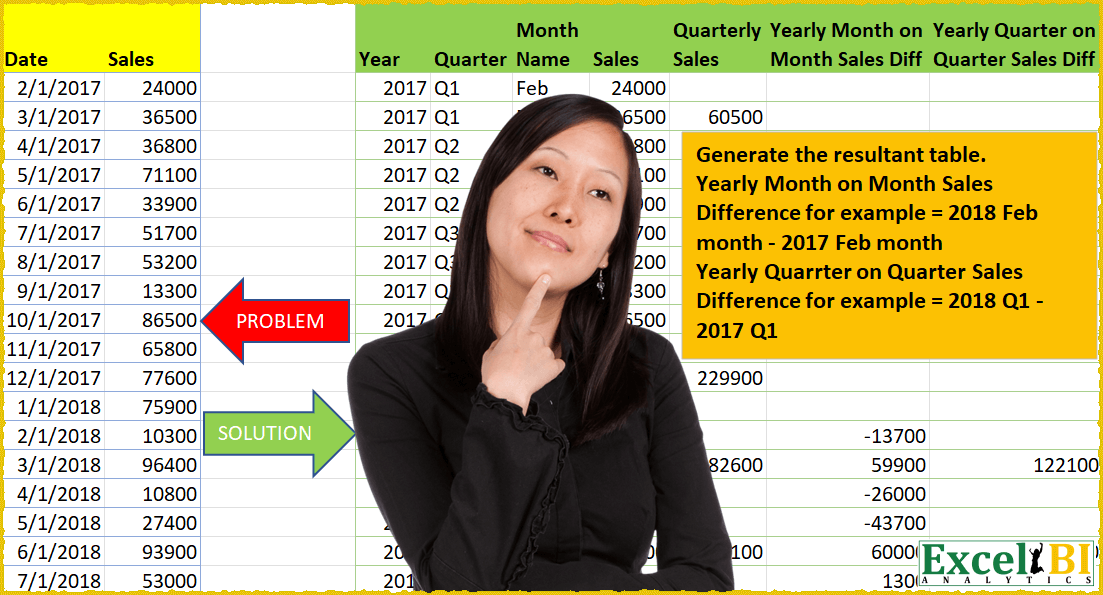
Generate the resultant table. Yearly Month on Month Sales Difference is difference in sales for one year – previous year for same month For example = 2018 Feb Sales – 2017 Feb Sales Yearly Quarter on Quarter Sales Difference is difference in sales for one year – previous year for same quarter For example = 2018 Q1 Sales – 2017 Q1 Sales
📌 Challenge Details and Links
ExcelBI Power Query Challenge Number: 23
Challenge Difficulty: ⭐️⭐️⭐️⭐️⭐️⭐️
📥Download Sample File
📥Link to the solutions on LinkedIn
Solving the challenge of Monthly and Quarterly Sales Difference with Power Query
Power Query solution 1 for Monthly and Quarterly Sales Difference, proposed by Eric Laforce:
let
  Source = Excel.CurrentWorkbook(){[Name = "tData23"]}[Content],
  ChangeType = Table.TransformColumnTypes(Source, {"Date", type date}),
  Transform = List.Accumulate(
    Table.ToRecords(ChangeType),
    [R = {}],
    (s, c) =>
      let
        _N = List.Count(s[R]),
        _IsQM = (Number.Mod(Date.Month(_D), 3) = 0),
        _D = c[Date],
        _Q = "Q" & Text.From(Date.QuarterOfYear(_D)),
        _MN = Text.Start(Date.MonthName(_D), 3),
        _S = c[Sales],
        _QS = if _IsQM then List.Sum(Table.FromRecords(List.LastN(s[R], 2))[S]) + _S else null,
        _DSPY = if (_N >= 12) then _S - s[R]{_N - 12}[S] else null,
        _DQSPY = if (_N >= 12 and _IsQM) then _QS - s[R]{_N - 12}[QS] else null,
        _R = s[R]
          & {[Y = Date.Year(_D), Q = _Q, MN = _MN, S = _S, QS = _QS, DSPY = _DSPY, DQSPY = _DQSPY]}
      in
        [R = _R]
  )[R],
  Result = Table.RenameColumns(
    Table.FromRecords(Transform),
    {
      {"Y", "Year"},
      {"Q", "Quarter"},
      {"MN", "Month Name"},
      {"S", "Sales"},
      {"QS", "Quaterly Sales"},
      {"DSPY", "Yearly Month on Month Sales Diff"},
      {"DQSPY", "Yearly Quarter on Quarter Sales Diff"}
    }
  )
in
  Result
Solving the challenge of Monthly and Quarterly Sales Difference with Excel
Excel solution 1 for Monthly and Quarterly Sales Difference, proposed by محمد حلمي:
=let(
aa,
    lambda(var1,
    var2,
    var3,
    var4,
    var5,

map(var1,
    var2,
    var3,
    lambda(
        a,
        b,
        c,
        a*b*c*var4*var5
    )
Excel solution 2 for Monthly and Quarterly Sales Difference, proposed by محمد حلمي:
=
IFNA(
LET(
s,
    A2:A56,

b,
    B2:B56,

u,
    YEAR(
        s
    ),

m,
    MONTH(
        s
    ),

q,
    "Q"&INT((m-1)/3)+1,

bb,
    DROP(
        q,
        1
    ),

z,
    MAP(
        u,
        q,
        bb,
        LAMBDA(
            a,
            d,
            ss,
            IF(
                d=ss,
                "",
                SUM(
                    IF(
                        a&d=u&q,
                        b
                    )
                )
            )
        )
    ),

Custom_Funcrion,

LAMBDA(
    bb,
    mm,
    uu,
    mmm,
    bbb,

     MAP(
         bb,
         mm,
         uu,
                            LAMBDA(
                                n,
                                x,
                                k,
                                IFERROR(
                                    n-XLOOKUP(
                                        x,
                                        FILTER(
                                            mmm,
                                            u=k-1
                                        ),
                                        FILTER(
                                            bbb,
                                            u=k-1
                                        ),
                                        ,
                                        ,
                                        -1
                                    ),
                                    ""
                                )
                            )
     )
),


HSTACK(

    u,

    q,

    TEXT(
        m*29,
        "mmm"
    ),

    b,

    DROP(
        z,
        -1
    ),

     Custom_Funcrion(
         b,
         m,
         u,
         m,
         b
     ),

    DROP(

         Custom_Funcrion(
             z,
             q,
             u,
             q,
             z
         ),
        -1
    )
)),
    "")
Excel solution 3 for Monthly and Quarterly Sales Difference, proposed by 🇰🇷 Taeyong Shin:
=LET(
    d,
    A2:A56,
    s,
    B2:B56,
    y,
    YEAR(
        d
    ),
    m,
    MONTH(
        d
    ),
    q,
    MONTH(
        m*10
    ),
    yq,
    y&q,
    qs,
    IF(
        MOD(
            m,
            3
        ),
        "",
        LOOKUP(
            yq,
            GROUPBY(
                yq,
                s,
                SUM
            )
        )
    ),
    HSTACK(
        y,
        "Q"&q,
        TEXT(
            m,
            "mmm"
        ),
        s,
        qs,
        IFNA(
            s-XLOOKUP(
                y-1&m,
                y&m,
                s
            ),
            ""
        ),
        IFERROR(
            qs-XLOOKUP(
                y-1&q,
                y&q,
                qs,
                ,
                ,
                -1
            ),
            ""
        )
    )
)
Excel solution 4 for Monthly and Quarterly Sales Difference, proposed by 🇰🇷 Taeyong Shin:
=LET(
    Dt,
     --A2:A56,
     Sales,
     B2:B56,

    Ydt,
     YEAR(
         Dt
     ),
     Qtr,
     "Q""IENT(
         MONTH(
         Dt
     )-1,
          3
     )+1,
     Yname,
     TEXT(
         Dt,
          "mmm"
     ),

    ydt_1,
     EDATE(
         +Dt,
          -12
     ),
     Yq_1,
     Ydt-1 & Qtr,

    Yq,
     Ydt & Qtr,

    Expr,
     LAMBDA(
         Curr,
          SCAN(
              0,
               FILTER(
                   Sales,
                    Yq=Curr
               ),
               LAMBDA(
                   x,
                   y,
                    x+y
               )
          )
     ),

    Rt,
     DROP(
         REDUCE(
             "",
              UNIQUE(
                  Yq
              ),
              LAMBDA(
                  a,
                  b,

                   LET(
                       Qtd,
                        Expr(
                            b
                        ),
                        VSTACK(
                            a,
                             Qtd
                        )
                   )

              )
         ),
          1
     ),

    fRt,
     IF(
         ISNA(
             XMATCH(
                 Yname,
                  {"Mar";"Jun";"Sep";"Dec"}
             )
         ),
          "",
          Rt
     ),

    Diff_mon,
     IFNA(
         Sales - XLOOKUP(
             ydt_1,
              Dt,
              Sales
         ),
          ""
     ),

    Diff_Qtr,
     IFERROR(
         fRt - XLOOKUP(
             Yq_1,
              Yq,
              fRt,
              ,
              ,
              -1
         ),
          ""
     ),

    HSTACK(
        Ydt,
         Qtr,
         Yname,
         Sales,
         fRt,
         Diff_mon,
         Diff_Qtr
    )

)