
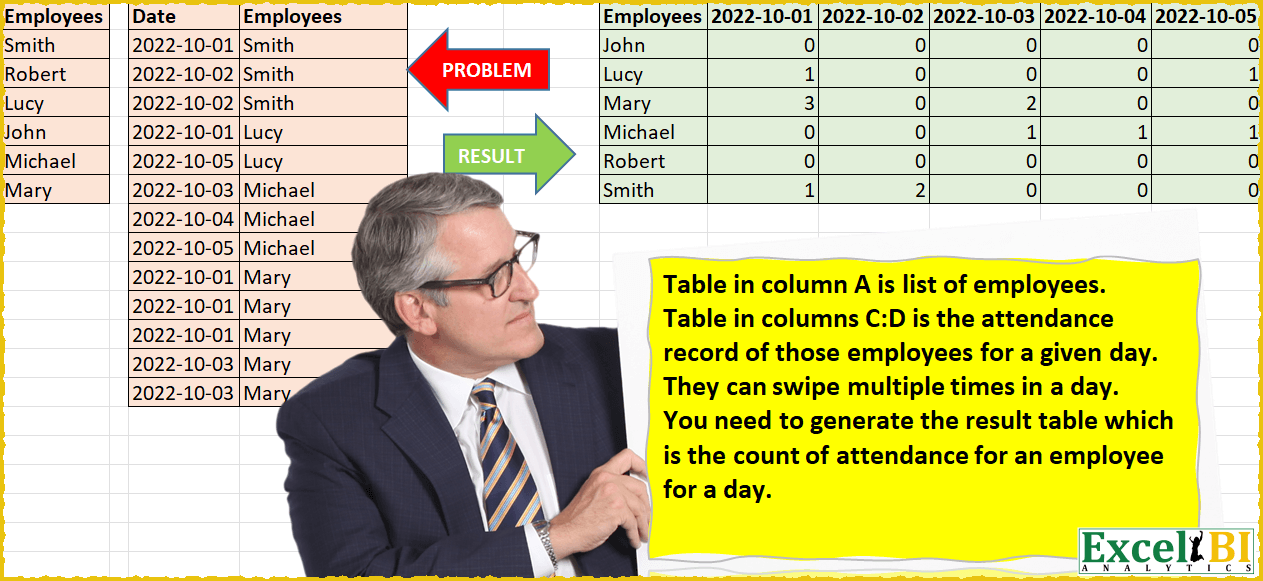
Since yesterday’s Power Query Challenge stretched people a lot, here is a lighter challenge. Table in column A is list of employees. Table in columns C:D is the attendance record of those employees for a given day. They can swipe multiple times in a day. You need to generate the result table which is the count of swipes for an employee for a day.
📌 Challenge Details and Links
ExcelBI Power Query Challenge Number: 22
Challenge Difficulty: ⭐️⭐️⭐️
📥Download Sample File
📥Link to the solutions on LinkedIn
Solving the challenge of Count Daily Swipe Records with Power Query
Power Query solution 2 for Count Daily Swipe Records, proposed by 🇮🇷 Navid Esmaeilzadeh اسماعیل زاده:
let
 Source = Excel.CurrentWorkbook(){[Name="Table2"]}[Content],
 #"Changed Type" = Table.TransformColumnTypes(Source,{{"Employees", type text}}),
 #"Merged Queries" = Table.NestedJoin(#"Changed Type", {"Employees"}, Table1, {"Employees"}, "Table1", JoinKind.LeftOuter),
 #"Expanded Table1" = Table.ExpandTableColumn(#"Merged Queries", "Table1", {"All"}, {"Table1.All"}),
 #"Expanded Table1.All" = Table.ExpandTableColumn(#"Expanded Table1", "Table1.All", {"Date"}, {"Table1.All.Date"}),
 #"Sorted Rows" = Table.Sort(#"Expanded Table1.All",{{"Employees", Order.Ascending}, {"Table1.All.Date", Order.Ascending}}),
 #"Grouped Rows" = Table.Group(#"Sorted Rows", {"Table1.All.Date"}, {{"All", each _, type table [Employees=nullable text, Table1.All.Date=nullable date]}}),
 #"Sorted Rows1" = Table.Sort(#"Grouped Rows",{{"Table1.All.Date", Order.Ascending}}),
 #"Expanded All" = Table.ExpandTableColumn(#"Sorted Rows1", "All", {"Employees"}, {"Employees"}),

 #"Added Index" = Table.AddIndexColumn(#"Expanded All", "Index", 1, 1, Int64.Type),
 #"Changed Type1" = Table.TransformColumnTypes(#"Added Index",{{"Table1.All.Date", type text}}),
 #"Replaced Value" = Table.ReplaceValue(#"Changed Type1",null,"",Replacer.ReplaceValue,{"Table1.All.Date"}),
 #"Pivoted Column" = Table.Pivot(#"Replaced Value", List.Distinct(#"Replaced Value"[Table1.All.Date]), "Table1.All.Date", "Index", List.Count),
 #"Removed Columns" = Table.RemoveColumns(#"Pivoted Column",{""})
in
 #"Removed Columns"
Power Query solution 3 for Count Daily Swipe Records, proposed by Matthias Friedmann:
\\let's pivot it!
\\All UI except for the last step, which needs to be made dynamic:
\\-append the two tables
\\-replace the null with a 01.01.1900 to avoid errors while pivoting
\\-duplicate the Employees, to have something you can pivot on
\\-pivot
\\-remove 01.01.1900 column & sort the other date columns in 1 step


let
 Source = Table.Combine({AttendEmployee, Attendance}),
 #"Replaced Value" = Table.ReplaceValue(
 Source,
 null,
 hashtag#date(1900, 1, 1),
 Replacer.ReplaceValue,
 {"Date"}
 ),
 #"Duplicated Column" = Table.DuplicateColumn(#"Replaced Value", "Employees", "Employees - Copy"),
 #"Pivoted Column" = Table.Pivot(
 Table.TransformColumnTypes(#"Duplicated Column", {{"Date", type text}}, "de-DE"),
 List.Distinct(
 Table.TransformColumnTypes(#"Duplicated Column", {{"Date", type text}}, "de-DE")[Date]
 ),
 "Date",
 "Employees - Copy",
 List.Count
 ),
 #"Removed Other Columns" = Table.SelectColumns(
 #"Pivoted Column",
 {"Employees"} & List.Sort(List.Skip(Table.ColumnNames(#"Pivoted Column"), 2))
 )
in
 #"Removed Other Columns"
Power Query solution 5 for Count Daily Swipe Records, proposed by Victor Wang:
let
  Emp = Excel.CurrentWorkbook(){[Name = "Table1"]}[Content],
  Data = Excel.CurrentWorkbook(){[Name = "Table2"]}[Content],
  Finish = List.Accumulate(
    List.Sort(List.Distinct(Data[Date])),
    Table.Sort(Emp, "Employees"),
    (state, current) =>
      Table.AddColumn(
        state,
        current,
        (a) =>
          Table.RowCount(
            Table.SelectRows(Data, (b) => b[Date] = current and b[Employees] = a[Employees])
          )
      )
  )
in
  Finish
Power Query solution 6 for Count Daily Swipe Records, proposed by Mahmoud Bani Asadi:
let
  Source = Excel.CurrentWorkbook(){[Name = "Data"]}[Content],
  AddedIndex = Table.AddIndexColumn(Source, "Index", 0, 1, Int64.Type),
  PivotedColumn = Table.Pivot(
    AddedIndex,
    List.Sort(List.Distinct(AddedIndex[Date])),
    "Date",
    "Index",
    List.Count
  ),
  AppendedQuery = Table.Combine({PivotedColumn, Employees}),
  RemovedDuplicates = Table.Distinct(AppendedQuery, {"Employees"}),
  SortedRows = Table.Sort(RemovedDuplicates, {{"Employees", Order.Ascending}}),
  NulltoZero = Table.TransformColumns(SortedRows, {}, each if _ = null then 0 else _)
in
  NulltoZero
Solving the challenge of Count Daily Swipe Records with Excel
Excel solution 1 for Count Daily Swipe Records, proposed by محمد حلمي:
=LET(
    c,
    C2:C14,
    a,
    SORT(
        A2:A7
    ),

    b,
    TOROW(
        UNIQUE(
            SORT(
                c
            )
        )
    ),

    VSTACK(
        HSTACK(
            A1,
            b
        ),

        HSTACK(
            a,
            COUNTIFS(
                D2:D14,
                a,
                c,
                b
            )
        )
    )
)
Excel solution 2 for Count Daily Swipe Records, proposed by 🇰🇷 Taeyong Shin:
=LET(
    d,
    TOROW(
        SORT(
            UNIQUE(
                C2:C14
            )
        )
    ),
    e,
    SORT(
        A1:A7
    ),
    MAKEARRAY(
        ROWS(
            e
        ),
        COLUMNS(
            d
        )+1,
        LAMBDA(
            r,
            c,
            IFS(
                c=1,
                INDEX(
                    e,
                    r
                ),
                r=1,
                INDEX(
                    d,
                    ,
                    c-1
                ),
                1,
                SUM(
                    N(
                        INDEX(
                            d&e,
                            r,
                            c-1
                        )=C2:C14&D2:D14
                    )
                )
            )
        )
    )
)
Excel solution 3 for Count Daily Swipe Records, proposed by 🇰🇷 Taeyong Shin:
=LET(
    c,
    A2:A7,
    n,
    VSTACK(
        D2:D14,
        c
    ),
    p,
    PIVOTBY(
        n,
        VSTACK(
            C2:C14,
            N(
                +c
            )
        ),
        n,
        ROWS,
        ,
        0,
        ,
        0
    ),
    r,
    IFS(
        SEQUENCE(
            ROWS(
                p
            ),
            COLUMNS(
                p
            )
        )=1,
        "Employee",
        p="",
        0,
        1,
        p
    ),
    FILTER(
        r,
        TAKE(
            r,
            1
        )>0
    )
)
Excel solution 4 for Count Daily Swipe Records, proposed by Aditya Kumar Darak 🇮🇳:
= LET(

     _dEmp,
     A2:A7,

     _fPay,
     C2:D14,

     _wd,
     TAKE(
         _fPay,
          ,
          1
     ),

     _we,
     DROP(
         _fPay,
          ,
          1
     ),

     _rh,
     SORT(
         _dEmp
     ),

     _ch,
     TRANSPOSE(
         UNIQUE(
             SORTBY(
                 _wd,
                  --_wd
             )
         )
     ),

     _calc,
     COUNTIFS(
         _we,
          _rh,
          _wd,
          _ch
     ),

     _ret,
     VSTACK(
         HSTACK(
             "Employees",
              _ch
         ),
          HSTACK(
              _rh,
               _calc
          )
     ),

     _ret
)
Excel solution 5 for Count Daily Swipe Records, proposed by Md. Zohurul Islam:
=LET(u,
    SORT(
        A3:A8
    ),
    v,
    D3:D15,
    w,
    C3:C15,

z,
    TOROW(
        UNIQUE(
            SORT(
                w
            )
        )
    ),

a,
    MAP(u&z,
    LAMBDA(x,
    SUM(ABS((v&w)=x)))),

b,
    HSTACK(
        VSTACK(
            "Employees",
            u
        ),
        VSTACK(
            z,
            a
        )
    ),

b)
Excel solution 6 for Count Daily Swipe Records, proposed by Stefan Olsson:
=ARRAY_CONSTRAIN(
    QUERY(
        {C2:D; {SEQUENCE(
            COUNTA(
                UNIQUE(
                    {D2:D; A2:A},
                     false,
                     true
                )
            ),
             1,
             DATE(
                 9999,
                 1,
                 1
             ),
             0
        ),
         UNIQUE(
             {D2:D;A2:A},
              false,
              true
         )}},
         "Select Col2, Count(Col2) Where Not Col1 is null Group by Col2 Pivot Col1 Label Col2 'Employee'",
        0
    ),
     COUNTA(
         A1:A
     ),
     COUNTUNIQUE(
         C1:C
     )
)
Excel solution 7 for Count Daily Swipe Records, proposed by Sarun Chimamphant:
=LET(
    a,
    SORT(
        A2:A7
    ),
    b,
    C2:C14,
    c,
    D2:D14,
    d,
    TRANSPOSE(
        UNIQUE(
            SORT(
                b
            )
        )
    ),
    ad,
    a&","&d,
    VSTACK(
        HSTACK(
            "Employees",
            d
        ),
        HSTACK(
            a,
            COUNTIFS(
                b,
                TEXTAFTER(
                    ad,
                    ","
                ),
                c,
                TEXTBEFORE(
                    ad,
                    ","
                )
            )
        )
    )
)
Excel solution 8 for Count Daily Swipe Records, proposed by CA. Suyesh Jain:
=COUNTIFS($C$2:$C$14,H$1,$D$2:$D$14,$G2)