
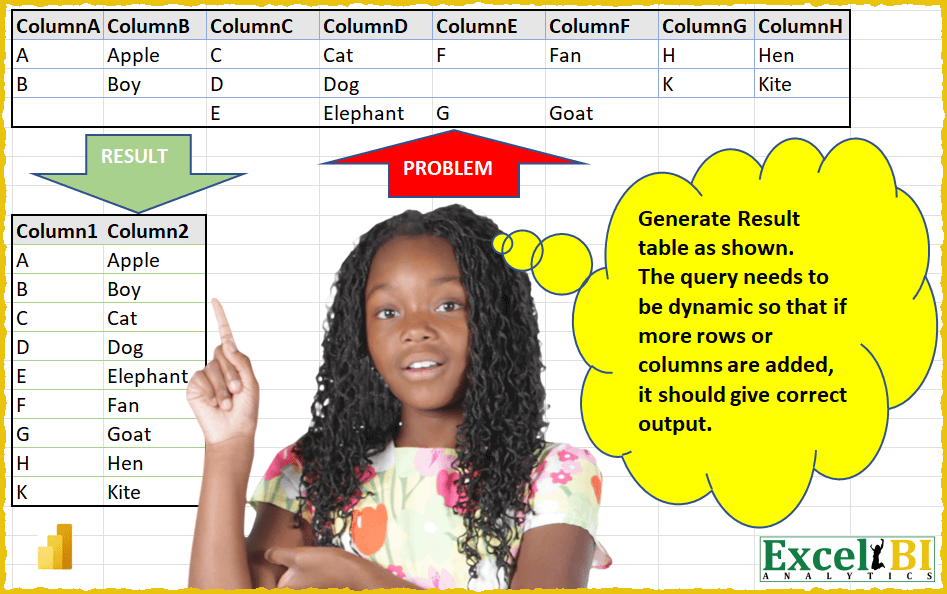
(Excel formulas also welcome) Generate Result table as shown. The query needs to be dynamic so that if more rows or columns are added, it should give correct output. For Excel formulas, dynamism is not a requirement, hence they should take the given range only.
📌 Challenge Details and Links
ExcelBI Power Query Challenge Number: 10
Challenge Difficulty: ⭐️⭐️
📥Download Sample File
📥Link to the solutions on LinkedIn
Solving the challenge of Dynamic Result Table Generation with Power Query
Power Query solution 1 for Dynamic Result Table Generation, proposed by Alejandro Simón 🇵🇦 🇪🇸:
let
  Source = Excel.CurrentWorkbook(){[Name = "Table1"]}[Content],
  Unpivoted = Table.UnpivotOtherColumns(Source, {}, "Attribute", "Value"),
  TextLength = Table.AddColumn(Unpivoted, "Custom", each Text.Length([Value])),
  Column1 = Table.AddColumn(TextLength, "Custom.1", each if [Custom] = 1 then [Value] else null),
  Column2 = Table.AddColumn(Column1, "Custom.2", each if [Custom] > 1 then [Value] else null)[
    [Custom.1],
    [Custom.2]
  ],
  Final = Table.Sort(
    Table.FromColumns(
      {
        List.Select(Column2[Custom.1], each _ <> null),
        List.Select(Column2[Custom.2], each _ <> null)
      }
    ),
    {{"Column1", Order.Ascending}}
  )
in
  Final
Power Query solution 2 for Dynamic Result Table Generation, proposed by Luan Rodrigues:
let
  Fonte = Excel.CurrentWorkbook(){[Name = "Tabela15"]}[Content],
  Col = Table.UnpivotOtherColumns(Fonte, {}, "Atributo", "Column2")[[Column2]],
  Indice = Table.AddIndexColumn(Col, "Índice", 0, 1, Int64.Type),
  Mod = Table.AddColumn(Indice, "Personalizar1", each Number.Mod([Índice], 2)),
  Result = Table.Sort(
    Table.SelectRows(
      Table.AddColumn(Mod, "Column1", each Text.Start([Column2], 1)),
      each [Personalizar1] = 1
    )[[Column1], [Column2]],
    {"Column1", Order.Ascending}
  )
in
  Result
Power Query solution 3 for Dynamic Result Table Generation, proposed by Brian Julius:
let
  BreakCols = Table.DuplicateColumn(
    Table.AddIndexColumn(
      Table.SelectRows(
        Table.FromList(List.Combine(Table.ToColumns(Table.Transpose(PairsRaw)))),
        each [Column1] <> ""
      ),
      "Index",
      0,
      1
    ),
    "Index",
    "ModIdx"
  ),
  Modulo = Table.TransformColumns(
    BreakCols,
    {
      {"ModIdx", each Number.Mod(_, 2), type number},
      {"Index", each Number.IntegerDivide(_, 2), Int64.Type}
    }
  ),
  PivotClean = Table.Sort(
    Table.RenameColumns(
      Table.SelectColumns(
        Table.Pivot(
          Table.TransformColumnTypes(Modulo, {{"ModIdx", type text}}, "en-US"),
          List.Distinct(
            Table.TransformColumnTypes(Modulo, {{"ModIdx", type text}}, "en-US")[ModIdx]
          ),
          "ModIdx",
          "Column1"
        ),
        {"0", "1"}
      ),
      {{"0", "Column1"}, {"1", "Column2"}}
    ),
    {{"Column1", Order.Ascending}}
  )
in
  PivotClean
Power Query solution 4 for Dynamic Result Table Generation, proposed by Eric Laforce:
let
  Source = Excel.CurrentWorkbook(){[Name = "tData10"]}[Content],
  ToColumns = Table.ToColumns(Source),
  ZipAlternates = List.Zip(
    {
      List.Combine(List.Alternate(ToColumns, 1, 1, 1)),
      List.Combine(List.Alternate(ToColumns, 1, 1, 0))
    }
  ),
  ToRecord = Table.FromRecords(
    List.Transform(ZipAlternates, (v) => Record.FromList(v, {"Column1", "Column2"}))
  ),
  Filter = Table.SelectRows(ToRecord, each ([Column1] <> null))
in
  Filter
Power Query solution 5 for Dynamic Result Table Generation, proposed by 🇮🇷 Navid Esmaeilzadeh اسماعیل زاده:
let
  Source = Excel.CurrentWorkbook(){[Name = "Table1"]}[Content],
  #"Changed Type" = Table.TransformColumnTypes(
    Source,
    {
      {"ColumnA", type text},
      {"ColumnB", type text},
      {"ColumnC", type text},
      {"ColumnD", type text},
      {"ColumnE", type text},
      {"ColumnF", type text},
      {"ColumnG", type text},
      {"ColumnH", type text}
    }
  ),
  #"Added Index" = Table.AddIndexColumn(#"Changed Type", "Index", 0, 1, Int64.Type),
  #"Unpivoted Other Columns" = Table.UnpivotOtherColumns(
    #"Added Index",
    {"Index"},
    "Attribute",
    "Value"
  ),
  #"Added Custom" = Table.AddColumn(
    #"Unpivoted Other Columns",
    "Cat.",
    each if Text.Length([Value]) = 1 then "Column 1" else "Column 2"
  ),
  #"Pivoted Column" = Table.Pivot(
    #"Added Custom",
    List.Distinct(#"Added Custom"[#"Cat."]),
    "Cat.",
    "Value"
  ),
  #"Filled Down" = Table.FillDown(#"Pivoted Column", {"Column 1"}),
  #"Filled Up" = Table.FillUp(#"Filled Down", {"Column 2"}),
  #"Removed Other Columns" = Table.SelectColumns(#"Filled Up", {"Column 1", "Column 2"}),
  #"Removed Duplicates" = Table.Distinct(#"Removed Other Columns"),
  #"Sorted Rows" = Table.Sort(#"Removed Duplicates", {{"Column 1", Order.Ascending}})
in
  #"Sorted Rows"
Power Query solution 6 for Dynamic Result Table Generation, proposed by Matthias Friedmann:
let
  Source = Excel.CurrentWorkbook(){[Name = "Table1"]}[Content],
  #"Added Index" = Table.AddIndexColumn(Source, "Index", 0, 1, Int64.Type),
  #"Unpivoted Other Columns" = Table.UnpivotOtherColumns(
    #"Added Index",
    {"Index"},
    "Attribute",
    "Value"
  )[[Value]],
  #"Added Index1" = Table.AddIndexColumn(#"Unpivoted Other Columns", "Index", 0, 1, Int64.Type),
  #"Integer-Division" = Table.AddColumn(
    #"Added Index1",
    "Integer-Division",
    each Number.IntegerDivide([Index], 2),
    Int64.Type
  ),
  #"Column Name" = Table.TransformColumns(
    #"Integer-Division",
    {{"Index", each if Number.IsEven(_) then "Column 1" else "Column 2", type number}}
  ),
  #"Pivoted Column" = Table.Pivot(
    Table.TransformColumnTypes(#"Column Name", {{"Index", type text}}, "de-DE"),
    List.Distinct(
      Table.TransformColumnTypes(#"Column Name", {{"Index", type text}}, "de-DE")[Index]
    ),
    "Index",
    "Value"
  )[[Column 1], [Column 2]],
  #"Sorted Rows" = Table.Sort(#"Pivoted Column", {{"Column 1", Order.Ascending}})
in
  #"Sorted Rows"
Power Query solution 7 for Dynamic Result Table Generation, proposed by Matthias Friedmann:
let
  Source = Excel.CurrentWorkbook(){[Name = "stackColumns"]}[Content],
  #"Added Index" = Table.AddIndexColumn(Source, "Index", 0, 1, Int64.Type),
  #"Unpivoted Other Columns" = Table.UnpivotOtherColumns(
    #"Added Index",
    {"Index"},
    "Attribute",
    "Value"
  )[Value],
  Custom = Table.FromColumns(
    {
      List.Alternate(#"Unpivoted Other Columns", 1, 1, 1),
      List.Alternate(#"Unpivoted Other Columns", 1, 1)
    }
  )
in
  Custom
Power Query solution 8 for Dynamic Result Table Generation, proposed by Antriksh Sharma:
= Table.SelectRows ( Table.Combine ( List.Transform ( List.Split ( Table.ToColumns ( Table ), 2 ), (x) => Table.FromRows ( List.Zip ( x ) ) ) ), each [Column1] <> "" )Power Query solution 9 for Dynamic Result Table Generation, proposed by Sandeep Marwal:
let
  Source           = Excel.CurrentWorkbook(){[Name = "Table1"]}[Content],
  Custom1          = Table.ToRows(Source),
  Custom2          = Table.Combine(List.Transform(Custom1, each Table.FromRows(List.Split(_, 2)))),
  #"Filtered Rows" = Table.SelectRows(Custom2, each ([Column1] <> null)),
  #"Sorted Rows"   = Table.Sort(#"Filtered Rows", {{"Column1", Order.Ascending}})
in
  #"Sorted Rows"
Power Query solution 10 for Dynamic Result Table Generation, proposed by Sergei Baklan:
let
  Source = Excel.CurrentWorkbook(){[Name = "range"]}[Content],
  #"Promoted Headers" = Table.PromoteHeaders(Source, [PromoteAllScalars = true]),
  Answer = Table.Sort(
    Table.FromColumns(
      List.Transform(
        {1, 0},
        (q) =>
          List.Alternate(
            List.RemoveNulls(
              List.Union(
                List.Transform(Table.ToRecords(#"Promoted Headers"), (r) => Record.FieldValues(r))
              )
            ),
            1,
            1,
            q
          )
      ),
      {"Letter", "Word"}
    ),
    "Letter"
  )
in
  Answer
Power Query solution 11 for Dynamic Result Table Generation, proposed by Melissa de Korte:
let
  Source = Excel.CurrentWorkbook(){[Name = "Table1"]}[Content],
  ColsAsList = Table.ToColumns(Source),
  Result = Table.FromColumns(
    {
      List.RemoveNulls(List.Combine(List.Alternate(ColsAsList, 1, 1, 1))),
      List.RemoveNulls(List.Combine(List.Alternate(ColsAsList, 1, 1)))
    }
  )
in
  Result
Power Query solution 12 for Dynamic Result Table Generation, proposed by Artur Pilipczuk:
let
 Source = Excel.CurrentWorkbook(){[Name="Table1"]}[Content],
 CNames = Table.ColumnNames( Source),
 NCNames = List.Last(List.Generate(
 () => [ls=CNames, y = {/*{ls{0}, ls{1}}*/}, i=-2],  // x = increasing series, y = factorial
 each [i] < List.Count(CNames),       // as long as x <= 10
 each [y = List.Combine({[y],
 {{[ls]{i}, [ls]{i+1}}}
 } ),
 ls=[ls],
 i=[i]+2 ],   // Turn into factorial
 each [y]
)),
 Transformation = List.Accumulate(NCNames,
hashtag#table({},{}),
(a,b) => Table.Combine({a,
Table.RenameColumns(
Table.SelectColumns(Source,b) ,
{{b{0}, "Column1"}, {b{1}, "Column2"}})
})
),
 #"Filtered Rows" = Table.SelectRows(Transformation, each ([Column1] <> null and [Column2] <> null))
in
 #"Filtered Rows"
Power Query solution 13 for Dynamic Result Table Generation, proposed by Artur Pilipczuk:
let
 Source = Excel.CurrentWorkbook(){[Name="Table1"]}[Content],
 Custom3 = Table.Transpose( Table.FromColumns( List.Split( List.RemoveMatchingItems( Text.Split( Text.Combine( Table.ToList(Source)) ,","),{""}),2)))
in
 Custom3

Artur
Power Query solution 14 for Dynamic Result Table Generation, proposed by Hristo Tsenov:
let
 Source = Excel.CurrentWorkbook(){[Name="Table1"]}[Content],
 #"Unpivot" = Table.AddColumn(Table.UnpivotOtherColumns(Table.AddIndexColumn(Source, "Index", 1, 1, Int64.Type), {"Index"}, "Attribute", "Value"), "Custom", each Text.Length([Value])),
 Value = Table.Distinct(Table.SelectRows(#"Unpivot", each ([Custom] = 1)), {"Value"}),
 #"Result" = Table.AddColumn(Table.SelectRows(#"Unpivot", each ([Custom] <> 1)), "First", each Text.Start([Value], 1), type text),
 #"Expand" = Table.ExpandTableColumn(Table.NestedJoin(Value, {"Value"}, Result, {"First"}, "Value.1", JoinKind.LeftOuter), "Value.1", {"Value"}, {"Value.1"}),
 #"Sort" = Table.Sort(Table.Group(#"Expand", {"Value"}, {{"Result", each Text.Combine ([Value.1], ", "),type text }}),{{"Value", Order.Ascending}})
in
 #"Sort"
I also did a scenario if we repeat letter and word in different column. For example if we put A-Ananas in Columns C and D, we will get A -> "Apple, Ananas" in the result. If we put A-Apple in other column we will have A -> "Apple, Apple", but I could remove the duplicates in the words outcome if I want to. If I remove Text.Combine and Table.Distinct from the query I could expand more rows with one letter but it's not compact this way.
Power Query solution 15 for Dynamic Result Table Generation, proposed by Hristo Tsenov:
let
  Source = Excel.CurrentWorkbook(){[Name = "Table1"]}[Content],
  #"Unpivot" = Table.AddColumn(
    Table.UnpivotOtherColumns(
      Table.AddIndexColumn(Source, "Index", 1, 1, Int64.Type),
      {"Index"},
      "Attribute",
      "Value"
    ),
    "Custom",
    each Text.Length([Value])
  ),
  #"Sort" = Table.Sort(Unpivot, {{"Attribute", Order.Ascending}, {"Index", Order.Ascending}}),
  #"Result" = Table.AddColumn(
    Table.SelectRows(#"Sort", each ([Custom] <> 1)),
    "First",
    each Text.Start([Value], 1),
    type text
  ),
  #"Group" = Table.Group(
    Result,
    {"First"},
    {{"Result", each Text.Combine([Value], ", "), type text}}
  )
in
  #"Group"
Power Query solution 16 for Dynamic Result Table Generation, proposed by Kolyu Minevski:
let
  Source = Excel.CurrentWorkbook(){[Name = "Table1"]}[Content],
  #"Unpivoted Columns" = Table.UnpivotOtherColumns(Source, {}, "Attribute", "Value"),
  #"Added Custom" = Table.AddColumn(#"Unpivoted Columns", "Text Length", each Text.Length([Value])),
  #"Added Conditional Column" = Table.AddColumn(
    #"Added Custom",
    "Custom",
    each if [Text Length] = 1 then [Value] else null
  ),
  #"Filled Down" = Table.FillDown(#"Added Conditional Column", {"Custom"}),
  #"Reordered Columns" = Table.ReorderColumns(#"Filled Down", {"Custom", "Value"}),
  #"Added Conditional Column1" = Table.AddColumn(
    #"Reordered Columns",
    "Custom.1",
    each if [Custom] = [Value] then "remove" else null
  ),
  #"Filtered Rows" = Table.SelectRows(#"Added Conditional Column1", each ([Custom.1] = null)),
  #"Removed Columns2" = Table.RemoveColumns(
    #"Filtered Rows",
    {"Custom.1", "Attribute", "Text Length"}
  ),
  #"Renamed Columns" = Table.RenameColumns(
    #"Removed Columns2",
    {{"Custom", "Column1"}, {"Value", "Column2"}}
  )
in
  #"Renamed Columns"
Power Query solution 17 for Dynamic Result Table Generation, proposed by Alexandru Badiu:
let
  Source = DataSource,
  UnpivotCol = Table.UnpivotOtherColumns(Source, {}, "Attribute", "Value"),
  FilterEmpty = Table.SelectRows(UnpivotCol, each ([Value] <> "")),
  Index = Table.AddIndexColumn(FilterEmpty, "Index", 0, 1, Int64.Type),
  #"Inserted Integer-Division" = Table.AddColumn(
    Index,
    "Integer-Division",
    each Number.IntegerDivide([Index], 2),
    Int64.Type
  ),
  #"Grouped Rows" = Table.Group(
    #"Inserted Integer-Division",
    {"Integer-Division"},
    {
      {
        "Count",
        each _,
        type table [Attribute = text, Value = text, Index = number, #"Integer-Division" = number]
      }
    }
  ),
  #"Added Custom" = Table.AddColumn(#"Grouped Rows", "Custom", each [Count][Value]{1}),
  #"Expanded Count" = Table.ExpandTableColumn(#"Added Custom", "Count", {"Value"}, {"Value"}),
  #"Removed Duplicates" = Table.Distinct(#"Expanded Count", {"Integer-Division"}),
  #"Sorted Rows" = Table.Sort(#"Removed Duplicates", {{"Value", Order.Ascending}}),
  #"Removed Columns" = Table.RemoveColumns(#"Sorted Rows", {"Integer-Division"})
in
  #"Removed Columns"
Power Query solution 18 for Dynamic Result Table Generation, proposed by Bohdan Duda, PhD:
let
  Source = Excel.CurrentWorkbook(){[Name = "Table1"]}[Content],
  #"Filled Down1" = Table.FillDown(Source, Table.ColumnNames(Source)),
  #"Unpivoted Columns" = Table.UnpivotOtherColumns(#"Filled Down1", {}, "Attribute", "Value"),
  #"Removed Columns" = Table.RemoveColumns(#"Unpivoted Columns", {"Attribute"}),
  #"Inserted Text Length" = Table.AddColumn(
    #"Removed Columns",
    "Length",
    each Text.Length([Value]),
    Int64.Type
  ),
  #"Added Conditional Column" = Table.AddColumn(
    #"Inserted Text Length",
    "Custom",
    each if [Length] = 1 then [Value] else null
  ),
  #"Added Conditional Column1" = Table.AddColumn(
    #"Added Conditional Column",
    "Custom.1",
    each if [Length] <> 1 then [Value] else null
  ),
  #"Filled Down" = Table.FillDown(#"Added Conditional Column1", {"Custom", "Custom.1"}),
  #"Filtered Ro&ws1" = Table.SelectRows(#"Filled Down", each ([Length] <> 1)),
  #"Filtered Rows" = Table.SelectRows(#"Filtered Rows1", each ([Custom.1] <> null)),
  #"Removed Other Columns" = Table.SelectColumns(#"Filtered Rows", {"Custom", "Custom.1"}),
  #"Sorted Rows" = Table.Sort(#"Removed Other Columns", {{"Custom", Order.Ascending}}),
  #"Removed Duplicates" = Table.Distinct(#"Sorted Rows")
in
  #"Removed Duplicates"
Power Query solution 19 for Dynamic Result Table Generation, proposed by Chandeep Chhabra:
let
  Source = Excel.CurrentWorkbook(){[Name = "Table1"]}[Content],
  #"Added Index" = Table.AddIndexColumn(Source, "Index", 0, 1, Int64.Type),
  #"Unpivoted Other Columns" = Table.UnpivotOtherColumns(
    #"Added Index",
    {"Index"},
    "Attribute",
    "Value"
  ),
  TableLists = Table.Split(Table.SelectColumns(#"Unpivoted Other Columns", {"Value"}), 2),
  Final = Table.FromRecords(
    List.Transform(TableLists, each Table.Transpose(_){0}),
    {"Column1", "Column2"}
  )
in
  Final
Power Query solution 20 for Dynamic Result Table Generation, proposed by Muneer Marzouq:
let
  Source = Excel.CurrentWorkbook(){[Name = "Table1"]}[Content],
  ToColumns = Table.ToColumns(Source),
  ListSplit = List.Split(ToColumns, 2),
  ListTransform = List.Transform(ListSplit, each Table.FromColumns(_)),
  Combine = Table.Combine(ListTransform),
  RemoveEmpty = Table.SelectRows(
    Combine,
    each not List.IsEmpty(List.RemoveMatchingItems(Record.FieldValues(_), {"", null}))
  )
in
  RemoveEmpty
Power Query solution 21 for Dynamic Result Table Generation, proposed by Oleksandr Mynka:
let
  src   = Excel.CurrentWorkbook(){[Name = "input"]}[Content],
  unpiv = Table.UnpivotOtherColumns(src, {}, "a", "b"),
  split = List.Split(unpiv[b], 2),
  to    = Table.Sort(Table.FromColumns(List.Zip(split)), "Column1")
in
  to
Solving the challenge of Dynamic Result Table Generation with Excel
Excel solution 1 for Dynamic Result Table Generation, proposed by Rick Rothstein:
=LET(A,SEQUENCE(,COLUMNS(Table1)),HSTACK(TOCOL(FILTER(Table1,ISODD(A)),3),SORT(TOCOL(FILTER(Table1,ISEVEN(A)),3),1,,TRUE)))Excel solution 2 for Dynamic Result Table Generation, proposed by John V.:
=LET(r,{1;2;3},c,{1,3,5,7},HSTACK(TOCOL(INDEX(B3:I5,r,c),1,1),TOCOL(INDEX(B3:I5,r,1+c),1,1)))

or... because of the way the data is arranged
=WRAPROWS(SORT(TOCOL(B3:I5,1)),2)
Excel solution 3 for Dynamic Result Table Generation, proposed by محمد حلمي:
=LET(a;MOD(SEQUENCE(ROWS(B3:B5)*COLUMNS(B3:I3)/2)-1;3)+1;
b;INT((ROW(1:12)-1)/3)+1+INT(((ROW(1:12)-1)/3-1)+1);
IF({1,0};FILTER(INDEX(B3:I5;a;b);INDEX(B3:I5;a;b)<>"");FILTER(INDEX(C3:J5;a;b);INDEX(C3:J5;a;b)<>"")))
Excel solution 4 for Dynamic Result Table Generation, proposed by Aditya Kumar Darak 🇮🇳:
= LET(
 _cols,
 COLUMNS(B3:I5) / 2,
 HSTACK(
 TOCOL(CHOOSECOLS(B3:I5, SEQUENCE(_cols, , 1, 2)), 1, TRUE),
 TOCOL(CHOOSECOLS(B3:I5, SEQUENCE(_cols, , 2, 2)), 1, TRUE)))
Excel solution 5 for Dynamic Result Table Generation, proposed by Aditya Kumar Darak 🇮🇳:
= SORT(WRAPROWS(TOCOL(B3:I5, 1), 2), 1)Excel solution 6 for Dynamic Result Table Generation, proposed by Duy Tùng:
=LET(f,LAMBDA(v,TOCOL(IFS(LEN(B3:H5)=1,v),3,1)),HSTACK(f(B3:H5),f(C3:I5)))Excel solution 7 for Dynamic Result Table Generation, proposed by Bhavya Gupta:
=LET(a,SEQUENCE(,COLUMNS(A2:H4)),
HSTACK(
TOCOL(FILTER(A2:H4,ISODD(a)),3),
TOCOL(FILTER(A2:H4,ISEVEN(a)),3)
))
Excel solution 8 for Dynamic Result Table Generation, proposed by Antriksh Sharma:
=SORT(WRAPROWS(TOCOL(B3:I5,1,FALSE),2),1)Excel solution 9 for Dynamic Result Table Generation, proposed by Antriksh Sharma:
=SORT(TRANSPOSE(WRAPCOLS(TOCOL(B3:I5,1,FALSE),2)),1)Excel solution 10 for Dynamic Result Table Generation, proposed by Peter Bartholomew:
= SORT(WRAPROWS(TOCOL(data,1),2))
It responds dynamically because 'data' is a table (I added a Lion to keep the Elephant company)
Excel solution 11 for Dynamic Result Table Generation, proposed by Jardiel Euflázio:
=LET(
a,B3:I5,
b,SEQUENCE(ROWS(a),COLUMNS(a),),
HSTACK(
TEXTSPLIT(TEXTJOIN("-",,IF(ISODD(0+b)*(a<>""),a,"")),,"-"),
TEXTSPLIT(TEXTJOIN("-",,IF(ISEVEN(0+b)*(a<>""),a,"")),,"-")
)
)
Excel solution 12 for Dynamic Result Table Generation, proposed by Jardiel Euflázio:
=LET(

a,TOCOL(B3:I5,1),

HSTACK(

FILTER(a,ISODD(SEQUENCE(ROWS(a)))),
FILTER(a,ISEVEN(SEQUENCE(ROWS(a))))

)
)
Excel solution 13 for Dynamic Result Table Generation, proposed by Jardiel Euflázio:
=LET(

a,B3:I5,
b,COLUMNS(a),
c,SEQUENCE(,b),


HSTACK(
TOCOL(FILTER(a,ISODD(c)),1),
TOCOL(FILTER(a,ISEVEN(c)),1)

)

)
Excel solution 14 for Dynamic Result Table Generation, proposed by Jardiel Euflázio:
=LET(

a,B3:I5,
b,TOCOL(a,1),
c,ROWS(b),

HSTACK(

INDEX(b,SEQUENCE(c/2,,1,2)),
INDEX(b,SEQUENCE(c/2,,2,2))

)

)
Excel solution 15 for Dynamic Result Table Generation, proposed by Jardiel Euflázio:
=WRAPROWS(TOCOL(B3:I5,1),2)