
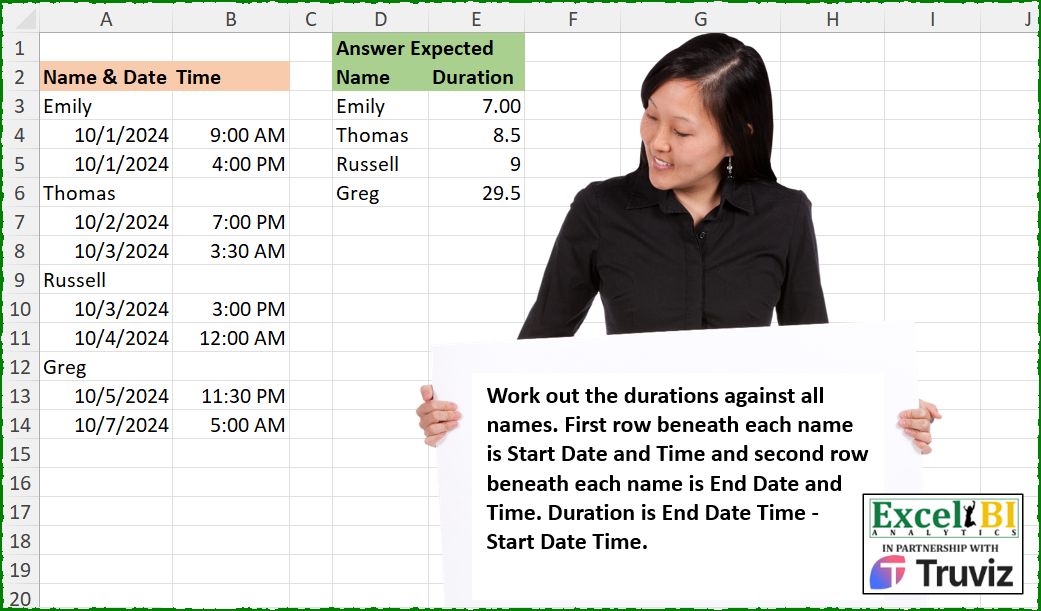
Work out the durations in hours against all names. First row beneath each name is Start Date and Time and second row beneath each name is End Date and Time. Duration is End Date Time – Start Date Time.
📌 Challenge Details and Links
ExcelBI Excel Challenge Number: 573
Challenge Difficulty: ⭐️
📥Download Sample File
📥Link to the solutions on LinkedIn
Solving the challenge of Calculate Name-Based Durations with Power Query
Power Query solution 1 for Calculate Name-Based Durations, proposed by Kris Jaganah:
let
  A = Excel.CurrentWorkbook(){[Name = "Table1"]}[Content],
  B = Table.ToColumns(A),
  C = List.Select(B{0}, each Text.From(_) = _),
  D = List.Transform(List.Difference(B{0}, C), Number.From),
  E = List.Transform(
    List.Split(List.Transform({0 .. List.Count(D) - 1}, each D{_} + List.RemoveNulls(B{1}){_}), 2),
    (x) => (x{1} - x{0}) * 24
  ),
  F = Table.FromColumns({C, E}, {"Name", "Duration"})
in
  F
Power Query solution 2 for Calculate Name-Based Durations, proposed by Kris Jaganah:
let
  A = Excel.CurrentWorkbook(){[Name = "Table1"]}[Content],
  B = Table.AddColumn(A, "Num", each Number.From([#"Name & Date"]) + [Time]),
  C = Table.TransformColumns(B, {"Name & Date", each if Text.From(_) = _ then _ else null}),
  D = Table.FillDown(C, {"Name & Date"}),
  E = Table.Group(D, {"Name & Date"}, {"Duration", each ([Num]{2} - [Num]{1}) * 24})
in
  E
Power Query solution 3 for Calculate Name-Based Durations, proposed by Aditya Kumar Darak 🇮🇳:
let
  Source = Excel.CurrentWorkbook(){[Name = "data"]}[Content],
  Rename = Table.RenameColumns(Source, {{"Name & Date", "Name"}}),
  Return = Table.Group(
    Rename,
    "Name",
    {
      "Duration",
      each [
        S = Date.From(_{1}[Name]) & Time.From(_{1}[Time]),
        E = Date.From(_{2}[Name]) & Time.From(_{2}[Time]),
        R = Duration.TotalHours(E - S)
      ][R]
    },
    0,
    (x, y) => 1 - Number.From(y is datetime)
  )
in
  Return
Power Query solution 4 for Calculate Name-Based Durations, proposed by Alejandro Simón 🇵🇦 🇪🇸:
let
  Source = Excel.CurrentWorkbook(){[Name = "Table1"]}[Content],
  Rename = Table.RenameColumns(Source, {{"Name & Date", "Name"}}),
  Sol = Table.Group(
    Rename,
    "Name",
    {
      {
        "Duration",
        each
          let
            a = Table.Skip(_),
            b = Table.AddColumn(a, "A", each Date.From([Name]) & Time.From([Time]))[A],
            c = Duration.TotalHours(List.Last(b) - b{0})
          in
            c
      }
    },
    0,
    (x, y) => Number.From(y is text)
  )
in
  Sol
Power Query solution 5 for Calculate Name-Based Durations, proposed by Alejandro Simón 🇵🇦 🇪🇸:
let
Source = Excel.CurrentWorkbook(){[Name="Table1"]}[Content],
Ren = Table.RenameColumns(Source,{{"Name & Date", "Name"}}),
Sol = Table.Group(Ren, "Name", {{"Duration", each
 let
 a = Table.Skip(_),
 b = Table.AddColumn(a,"A", each
 let
 c = [Name],
 d = [Time],
 e = hashtag#datetime(Date.Year(c), Date.Month(c), Date.Day(c),
 Time.Hour(Time.From(d)), Time.Minute(Time.From(d)), 0)
 in e)[A],
 f = Number.From(List.Last(b) - b{0})*24
 in f}},0, (x,y)=>Number.From(y is text))
in
Sol
Power Query solution 6 for Calculate Name-Based Durations, proposed by Abdallah Ally:
let
  Source = Excel.CurrentWorkbook(){[Name = "Table1"]}[Content],
  AddCol1 = Table.AddColumn(
    Source,
    "DateTime",
    each try Number.From([#"Name & Date"]) + [Time] otherwise null
  ),
  AddCol2 = Table.AddColumn(
    AddCol1,
    "Name",
    each if [DateTime] = null then [#"Name & Date"] else null
  ),
  FillDown = Table.FillDown(AddCol2, {"Name"}),
  Result = Table.Group(
    FillDown,
    {"Name"},
    {"Duration", each [a = List.RemoveNulls([DateTime]), b = (a{1} - a{0}) * 24][b]}
  )
in
  Result
Power Query solution 7 for Calculate Name-Based Durations, proposed by Bhaskar Joshi:
let
  Source = Excel.CurrentWorkbook(){[Name = "Table1"]}[Content],
  Table.Rename = Table.RenameColumns(Source, {{"Name & Date", "Date"}}),
  Table.Group = Table.Group(
    Table.Rename,
    "Date",
    {
      {
        "Details",
        each
          let
            rawTable = Table.Skip(_),
            Entry    = Date.From(rawTable[Date]{0}) & Time.From(rawTable[Time]{0}),
            Exit     = Date.From(rawTable[Date]{1}) & Time.From(rawTable[Time]{1}),
            Net      = Exit - Entry
          in
            Duration.TotalHours(Net),
        type number
      }
    },
    GroupKind.Local,
    (x as text, y as any) as number => 1 - Number.From(not (y is text))
  )
in
  Table.Group
Solving the challenge of Calculate Name-Based Durations with Excel
Excel solution 1 for Calculate Name-Based Durations, proposed by Bo Rydobon 🇹🇭:
=LET(a,WRAPROWS(A3:A14,3),HSTACK(TAKE(a,,1),MMULT(DROP(a+WRAPROWS(B3:B14,3),,1),{-24;24})))Excel solution 2 for Calculate Name-Based Durations, proposed by Rick Rothstein:
=LET(a,A3:A14,b,b3:b14,HSTACK(FILTER(a,ISTEXT(a)),BYROW(WRAPROWS(FILTER(a+B,ISNUMBER(B)),2),LAMBDA(r,24*(MAX(r)-MIN(r))))))Excel solution 3 for Calculate Name-Based Durations, proposed by Kris Jaganah:
=LET(a,
    A3:A14,
    b,
    SCAN(
        ,
        a,
        LAMBDA(
            x,
            y,
            IF(
                ISTEXT(
                    y
                ),
                y,
                x
            )
        )
    ),
    c,
    IFERROR(
        a+B3:B14,

    ),
    SORTBY(GROUPBY(b,
    (XLOOKUP(
        b,
        b,
        c,
        ,
        ,
        -1
    )-c)*24,
    SUM,
    ,
    0,
    ,
    c>0),
    UNIQUE(
        b
    )))
Excel solution 4 for Calculate Name-Based Durations, proposed by Julian Poeltl:
=LET(D,
    A3:B14,
    C,
    TAKE(
        D,
        ,
        1
    ),
    F,
    FILTER(
        C,
        NOT(
            ISNUMBER(
                C
            )
        )
    ),
    W,
    WRAPROWS(
        TOROW(
            BYROW(
                FILTER(
                    D,
                    ISNUMBER(
                C
            )
                ),
                SUM
            )
        ),
        2
    ),
    HSTACK(F,
    (DROP(
        W,
        ,
        1
    )-TAKE(
        W,
        ,
        1
    ))*24))
Excel solution 5 for Calculate Name-Based Durations, proposed by Timothée BLIOT:
=LET(A,
    A3:A14,
    F,
    LAMBDA(
        n,
        m,
        FILTER(
            n,
            m(
                A
            )
        )
    ),
    S,
    WRAPROWS(
        F(
            A,
            ISNUMBER
        )+F(
            B3:B14,
            ISNUMBER
        ),
        2
    ),
    HSTACK(F(
        A,
        ISTEXT
    ),
    (TAKE(
        S,
        ,
        -1
    )-TAKE(
        S,
        ,
        1
    ))*24))
Excel solution 6 for Calculate Name-Based Durations, proposed by Hussein SATOUR:
=LET(O,
    OFFSET,
    D,
    MAP(B3:B14,
    LAMBDA(x,
    IF(x="",
    (SUM(
        O(
            x,
            2,
            -1,
            ,
            2
        )
    )-SUM(
        O(
            x,
            1,
            -1,
            ,
            2
        )
    ))*24,
    ""))),
    FILTER(
        HSTACK(
            A3:A14,
            D
        ),
        D<>""
    ))
Excel solution 7 for Calculate Name-Based Durations, proposed by Oscar Mendez Roca Farell:
=LET(d,
    A3:B14,
    n,
    TAKE(
        d,
        ,
        1
    ),
    HSTACK(FILTER(
        n,
        n>"A"
    ),
    24*BYROW(WRAPROWS(TOCOL((1/BYROW(
        d,
        SUM
    ))^-1,
    2),
    2)*{-1,
    1},
    SUM)))
Excel solution 8 for Calculate Name-Based Durations, proposed by LEONARD OCHEA 🇷🇴:
=LET(I,
    INDEX,
    m,
    WRAPROWS(
        IFERROR(
            A3:A14+B3:B14,
            A3:A14
        ),
        3
    ),
    HSTACK(I(
        m,
        ,
        1
    ),
    24*(I(
        m,
        ,
        3
    )-I(
        m,
        ,
        2
    ))))
Excel solution 9 for Calculate Name-Based Durations, proposed by Pieter de B.:
=LET(
    t,
    WRAPROWS(
        TOCOL(
            FILTER(
                A3:B14,
                LEN(
                    B3:B14
                )
            )
        ),
        4
    ),
    HSTACK(
        FILTER(
            A3:A14,
            ISTEXT(
                A3:A14
            )
        ),
        BYROW(
            t,
            LAMBDA(
                t,
                SUM(
                    DROP(
                        t,
                        ,
                        2
                    )-TAKE(
                        t,
                        ,
                        2
                    )
                )*24
            )
        )
    )
)
Excel solution 10 for Calculate Name-Based Durations, proposed by Hamidi Hamid:
=LET(x,
    TOCOL(
        IF(
            ISERROR(
                A3:A14*1
            ),
            A3:A14,
            1/0
        ),
        3
    ),
    u,
    DROP(
        WRAPROWS(
            A3:A14,
            3
        ),
        ,
        1
    ),
    d,
    TAKE(
        WRAPROWS(
            B3:B14,
            3
        ),
        ,
        -2
    ),
    dd,
    VSTACK(D2:E2,
    HSTACK(x,
    (TAKE(
        d+u,
        ,
        -1
    )-TAKE(
        d+u,
        ,
        1
    ))*24)),
    dd)
Excel solution 11 for Calculate Name-Based Durations, proposed by ferhat CK:
=LET(a,
    DROP(REDUCE(0,
    A3:A14,
    LAMBDA(x,
    y,
    VSTACK(x,
    LET(ti,
    OFFSET(
        y,
        1,

    ),
    ts,
    OFFSET(
        y,
        2,

    ),
    si,
    TEXT(
        OFFSET(
            y,
            1,
            1
        ),
        "ss:dd"
    ),
    ss,
    TEXT(
        OFFSET(
            y,
            2,
            1
        ),
        "ss:dd"
    ),
    IF(ISTEXT(
        y
    ),
    IF((ss-si)=0,
    ts-ti,
    (24-(--ti)*24)+(--ts)*24)+(ss-si-1)*24,
    ""))))),
    1),
    HSTACK(
        FILTER(
            A3:A14,
            ISTEXT(
                A3:A14
            )
        ),
        FILTER(
            a,
            ISNUMBER(
                a
            )
        )
    ))
Excel solution 12 for Calculate Name-Based Durations, proposed by Jaroslaw Kujawa:
=LET(b ;
     A3:B14;

c ;
     HSTACK(
         SCAN(
             "" ;
              TAKE(
                  b ;
                   ;
                   1
              );

             LAMBDA(
                 a ;
                  x ;
                  IF(
                      ISTEXT(
                          x
                      ) ;
                       x ;
                       a
                  )
             )
         ) ;
          b
     ) ;

d ;
     FILTER(
         c ;
          ISNUMBER(
              CHOOSECOLS(
                  c ;
                   2
              )
          )
     ) ;

e ;
     HSTACK(
         TAKE(
             d ;
              ;
              1
         ) ;
          CHOOSECOLS(
              d ;
               2
          )+CHOOSECOLS(
              d ;
               3
          )
     ) ;

seq ;
     SEQUENCE(
         ROWS(
             e
         )
     ) ;

f ;
     HSTACK(TAKE(
         e ;
          ;
          1
     ) ;
     24*(INDEX(
         e ;
          seq ;
          2
     )-INDEX(
         e ;
          seq-1 ;
          2
     )) ;
     seq);
     FILTER(
         TAKE(
             f ;
              ;
              2
         ) ;
          MOD(
              TAKE(
                  f ;
                   ;
                   -1
              ) ;
               2
          )=0
     ))
Excel solution 13 for Calculate Name-Based Durations, proposed by Andy Heybruch:
=LET(
_input,
    A3:B14,

_filter,
    ISNUMBER(
        TAKE(
            _input,
            ,
            1
        )
    ),

_times,
    WRAPROWS(
        BYROW(
            FILTER(
                _input,
                _filter
            ),
            SUM
        ),
        2
    ),

HSTACK(FILTER(
    TAKE(
            _input,
            ,
            1
        ),
    _filter=FALSE
),
    (TAKE(
        _times,
        ,
        -1
    )-TAKE(
        _times,
        ,
        1
    ))*24))
Excel solution 14 for Calculate Name-Based Durations, proposed by Imam Hambali:
=LET(
nd, A3:A14,
t, B3:B14,
f, nd+t,
tbl, WRAPROWS(IF(ISERROR(f),nd,f),3),
HSTACK(TAKE(tbl,,1), (TAKE(tbl,,-1)-CHOOSECOLS(tbl,2))*24)
)
Excel solution 15 for Calculate Name-Based Durations, proposed by Milan Shrimali:
=let(a,
    wraprows(
        TOCOL(
            A2:B13,
            1
        ),
        5
    ),

byrow(a,
    lambda(x,
    hstack(choosecols(
        x,
        1
    ),
    ((choosecols(
        x,
        4
    )+choosecols(
        x,
        5
    ))-(CHOOSECOLS(
        x,
        2
    )+choosecols(
        x,
        3
    )))*24))))
Excel solution 16 for Calculate Name-Based Durations, proposed by Edwin Tisnado:
=LET(
    a,
    A3:A14,
    b,
    WRAPROWS(
        IFERROR(
            a+B3:B14,
            a
        ),
        3
    ),
    HSTACK(
        TAKE(
            b,
            ,
            1
        ),
        24*MMULT(
            DROP(
            b,
            ,
            1
        ),
            {-1;1}
        )
    )
)
Excel solution 17 for Calculate Name-Based Durations, proposed by Philippe Brillault:
=LET(f,
    LAMBDA(z,
    c,
    TOCOL(IFS(c-(2*c-1)*ISNUMBER(
        z
    ),
    z),
    3)),
    d,
    A3&:B14,
    §1,
    INDEX(
        d,
        ,
        1
    ),
    tn,
    f(
        §1,
        1
    ),
    tt,
    f(
        d,
        0
    ),
    m,
    WRAPROWS(SCAN(
        0,
        tt,
        LAMBDA(
            c,
            t,
            IF(
                t>=1,
                t,
                c+t
            )
        )
    )*(tt<1),
    4),
    HSTACK(
        tn,
        MMULT(
            m,
            {0;-1;0;1}
        )*24
    ))
Excel solution 18 for Calculate Name-Based Durations, proposed by Cary Ballard, DML:
=LET(a,
    A3:A14,
     b,
    B3:B14,

 n,
     FILTER(
         a,
          ISTEXT(
              a
          )
     ),

 t,
     WRAPROWS(
         FILTER(
             a + b,
              ISNUMBER(
              a
          )
         ),
          2
     ),

 beg,
     TAKE(
         t,
          ,
          1
     ),

 end,
     DROP(
         t,
          ,
          1
     ),

 dur,
     (end - beg) * 24,

 HSTACK(
     n,
      dur
 )
)
Excel solution 19 for Calculate Name-Based Durations, proposed by Stefan Alexandrov:
=LET(_table,
    HSTACK(
        WRAPROWS(
            TRANSPOSE(
                A3:A14
            ),
            3
        ),
        WRAPROWS(
            TRANSPOSE(
                B3:B14
            ),
            3
        )
    ),

_Name,
    CHOOSECOLS(
        _table,
        1
    ),

_start,
    CHOOSECOLS(
        _table,
        2
    )+CHOOSECOLS(
        _table,
        5
    ),

_end,
    CHOOSECOLS(
        _table,
        3
    )+CHOOSECOLS(
        _table,
        6
    ),

_result,
    (_end-_start)*24,

HSTACK(
    _Name,
    _result
))
Solving the challenge of Calculate Name-Based Durations with Python
Python solution 1 for Calculate Name-Based Durations, proposed by Konrad Gryczan, PhD:
import pandas as pd
import numpy as np
path = "573 Durations.xlsx"
input = pd.read_excel(path, usecols="A:B", skiprows=1, nrows=12)
test = pd.read_excel(path, usecols="D:E", skiprows=1, nrows=4)
test["Duration"] = test["Duration"].apply(lambda x: round(x, 1))
input["Name"] = input["Name & Date"].apply(lambda x: x if type(x) == str else np.nan)
input["Name"] = input["Name"].ffill()
input = input.dropna(subset=["Time"]).reset_index(drop=True)
input["Time"] = input["Time"].apply(lambda x: x.strftime("%H:%M:%S"))
input["Name & Date"] = input["Name & Date"].apply(lambda x: x.strftime("%Y-%m-%d"))
input["Time"] = pd.to_datetime(input["Name & Date"] + " " + input["Time"])
input = input.drop(columns=["Name & Date"])
input["RowNumber"] = input.groupby("Name").cumcount() + 1
input = input.pivot(index="Name", columns="RowNumber", values="Time").reset_index()
input.columns.name = None
input["Duration"] = input[2] - input[1]
input["Duration"] = input["Duration"].apply(lambda x: x.total_seconds() / 3600)
input = input.drop(columns=[1, 2]).sort_values("Duration").reset_index(drop=True)
print(input.equals(test))   # True
Solving the challenge of Calculate Name-Based Durations with Python in Excel
Python in Excel solution 1 for Calculate Name-Based Durations, proposed by Alejandro Campos:
from datetime import datetime
df = pd.DataFrame({
 'Name & Date': ['Emily', '01/10/2024', '01/10/2024', 'Thomas', '02/10/2024', '03/10/2024',
 'Russell', '03/10/2024', '04/10/2024', 'Greg', '05/10/2024', '07/10/2024'],
 'Time': ['', '9:00 AM', '4:00 PM', '', '7:00 PM', '3:30 AM', '', '3:00 PM', '12:00 AM', '', '11:30 PM', '5:00 AM']
})
names = []
start_datetimes = []
end_datetimes = []
durations = []
i = 0
while i < len(df):
 if df.loc[i, 'Time'] == '':
 name = df.loc[i, 'Name & Date']
 start_datetime = df.loc[i + 1, 'Name & Date'] + " " + df.loc[i + 1, 'Time']
 end_datetime = df.loc[i + 2, 'Name & Date'] + " " + df.loc[i + 2, 'Time']
 start_dt = datetime.strptime(start_datetime, "%d/%m/%Y %I:%M %p")
 end_dt = datetime.strptime(end_datetime, "%d/%m/%Y %I:%M %p")
 duration = (end_dt - start_dt).total_seconds() / 3600
 names.append(name)
 start_datetimes.append(start_datetime)
 end_datetimes.append(end_datetime)
 durations.append(duration)
 i += 3
 else:
 i += 1
result_df = pd.DataFrame({
 "Name": names,
 "Duration (hours)": durations
})
result_df
Python in Excel solution 2 for Calculate Name-Based Durations, proposed by Anshu Bantra:
df = xl("A2:B14", headers=True).fillna(0)
results = {}
current_name, current_start_time = None, None
for index, row in df.iterrows():
 if row['Time']==0:
 current_name = row['Name & Date']
 else:
 if row['Time'] != 0:
 date = row['Name & Date']
 time = row['Time']
 if current_start_time is None:
 current_start_time = pd.Timestamp.combine(date, time)
 else:
 end_time = pd.Timestamp.combine(date, time)
 duration = (end_time - current_start_time).total_seconds() / 3600
 results[current_name] = results.get(current_name, 0) + duration
 current_start_time = None
pd.DataFrame(list(results.items()), columns=['Name', 'Duration'])
Solving the challenge of Calculate Name-Based Durations with R
R solution 1 for Calculate Name-Based Durations, proposed by Konrad Gryczan, PhD:
library(tidyverse)
library(readxl)
library(hms)
library(janitor)
library(lubridate)
path = "Excel/573 Durations.xlsx"
input = read_excel(path, range = "A2:B14")
test = read_excel(path, range = "D2:E6")
result = input %>%
 mutate(name = ifelse(str_detect(`Name & Date`, "[a-zA-Z]"), `Name & Date`, NA)) %>%
 fill(name) %>%
 filter(!is.na(Time)) %>%
 mutate(date = excel_numeric_to_date(as.numeric(`Name & Date`)) %>% as.character(),
 time = as_hms(Time) %>% as.character()) %>%
 unite("datetime", c("date", "time"), sep = " ") %>%
 mutate(datetime = ymd_hms(datetime)) %>%
 select(name, datetime) %>%
 mutate(rn = row_number(), .by = name) %>%
 pivot_wider(names_from = rn, values_from = datetime) %>%
 mutate(duration = as.numeric(`2` - `1`)) %>%
 select(Name = name, Duration = duration)
all.equal(result, test, check.attributes = FALSE)
#> [1] TRUE
&&