
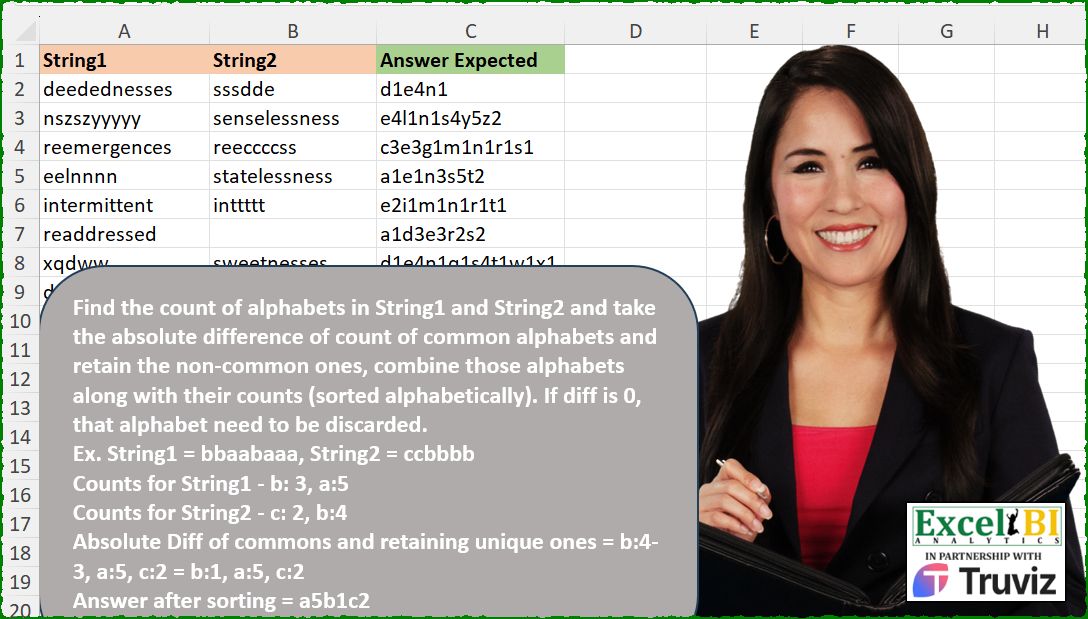
Find the count of alphabets in String1 and String2 and take the absolute difference of count of common alphabets and retain the non-common ones, combine those alphabets along with their counts (sorted alphabetically). If diff is 0, that alphabet need to be discarded. Ex. String1 = bbaabaaa, String2 = ccbbbb Counts for String1 – b: 3, a:5 Counts for String2 – c: 2, b:4 Absolute Diff of commons and retaining unique ones = b:4-3, a:5, c:2 = b:1, a:5, c:2 Answer after sorting = a5b1c2
📌 Challenge Details and Links
ExcelBI Excel Challenge Number: 569
Challenge Difficulty: ⭐️⭐️
📥Download Sample File
📥Link to the solutions on LinkedIn
Solving the challenge of Absolute Alphabet Frequency Difference with Power Query
Power Query solution 1 for Absolute Alphabet Frequency Difference, proposed by Aditya Kumar Darak 🇮🇳:
let
  Source = Excel.CurrentWorkbook(){[Name = "data"]}[Content],
  Return = Table.AddColumn(
    Source,
    "Answer",
    each [
      TL = Record.ToList(_),
      T = List.TransformMany(
        {TL},
        (x) => {"a" .. "z"},
        (x, y) =>
          [
            oc = List.Transform(x, each List.Count(Text.PositionOf(_ ?? "", y, 2))),
            df = Number.Abs(oc{0} - oc{1}),
            r  = if df = 0 then null else y & Text.From(df)
          ][r]
      ),
      R = Text.Combine(T)
    ][R]
  )
in
  Return
Power Query solution 2 for Absolute Alphabet Frequency Difference, proposed by Alejandro Simón 🇵🇦 🇪🇸:
let
  Source = Excel.CurrentWorkbook(){[Name = "Table1"]}[Content],
  Sol = Table.AddColumn(
    Source,
    "Answer",
    each
      let
        a = Table.Combine(
          List.Transform(
            Record.ToList(_),
            (y) =>
              try
                Table.FromRows(
                  List.Transform(
                    List.Distinct(Text.ToList(y)),
                    (x) => {x, Text.Length(Text.Select(y, x))}
                  )
                )
              otherwise
                Table.FromRows({})
          )
        ),
        b = Table.SelectRows(
          Table.Group(
            a,
            "Column1",
            {"A", each Number.Abs([Column2]{0} - [Column2]{1}? ?? [Column2]{0})}
          ),
          each [A] <> 0
        ),
        c = Text.Combine(
          List.Transform(Table.ToRows(Table.Sort(b, "Column1")), each _{0} & Text.From(_{1}))
        )
      in
        c
  )
in
  Sol
Power Query solution 3 for Absolute Alphabet Frequency Difference, proposed by Luan Rodrigues:
let
  fx = (y) =>
    Table.FromRows(
      try
        List.Transform(
          List.Distinct(y),
          each [o = List.Select(y, (x) => x = _), p = List.Count(o), q = {o{0}} & {p}][q]
        )
      otherwise
        {{""} & {""}}
    ),
  Fonte = Tabela1,
  res = Table.AddColumn(
    Fonte,
    "tab",
    each
      let
        a = Text.ToList([String1]),
        c = try Text.ToList([String2]) otherwise null,
        e = Table.Group(
          fx(a) & fx(c),
          {"Column1"},
          {"number", each Text.From(Number.Abs(_[Column2]{0} - _[Column2]{1}? ?? _[Column2]{0}))}
        )
      in
        Text.Combine(
          List.Combine(
            Table.ToRows(Table.Sort(Table.SelectRows(e, each [Column1] <> ""), {"Column1"}))
          )
        )
  )
in
  res
Power Query solution 4 for Absolute Alphabet Frequency Difference, proposed by Abdallah Ally:
let
  Source = Excel.CurrentWorkbook(){[Name = "Table1"]}[Content],
  AddCol = Table.AddColumn(
    Source,
    "My Answer",
    each [
      a = Text.Length,
      b = (x, y) => a(x) - a(Text.Remove(x, y)),
      c = [String1] ?? "",
      d = [String2] ?? "",
      e = List.Sort(List.Distinct(Text.ToList(c & d))),
      f = List.Transform(e, each {_, Text.From(Number.Abs(b(d, _) - b(c, _)))}),
      g = List.Select(f, each _{1} <> "0"),
      h = Text.Combine(List.Transform(g, each Text.Combine(_)))
    ][h]
  ),
  Result = Table.AddColumn(AddCol, "Check", each [Answer Expected] = [My Answer])
in
  Result
Power Query solution 5 for Absolute Alphabet Frequency Difference, proposed by Mihai Radu O:
let
  Source = Excel.CurrentWorkbook(){[Name = "Table1"]}[Content],
  r = Table.AddColumn(
    Source,
    "r",
    each [
      s1 = [String1],
      s2 = [String2],
      lt = List.Transform,
      a = List.Sort(
        List.Distinct(List.RemoveNulls(Text.ToList(s1) & (try Text.ToList(s2) otherwise {null})))
      ),
      b = lt(
        {s1, s2},
        (x) => lt(a, (y) => try List.Count(Text.PositionOf(x, y, Occurrence.All)) otherwise 0)
      ),
      c = lt(List.Zip({b{0}, b{1}}), (x) => Text.From(Number.Abs(x{0} - x{1}))),
      d = Text.Combine(lt(List.Select(List.Zip({a, c}), (x) => x{1} <> "0"), Text.Combine))
    ][d]
  )[r]
in
  r
Solving the challenge of Absolute Alphabet Frequency Difference with Excel
Excel solution 1 for Absolute Alphabet Frequency Difference, proposed by Bo Rydobon 🇹🇭:
=BYROW(
    A2:B11,
    LAMBDA(
        a,
        LET(
            c,
            CHAR(
                SEQUENCE(
                    26
                )+96
            ),
            n,
            ABS(
                MMULT(
                    LEN(
                        a
                    )-LEN(
                        SUBSTITUTE(
                            a,
                            c,

                        )
                    ),
                    {1;-1}
                )
            ),
            CONCAT(
                IF(
                    n,
                    c&n,
                    ""
                )
            )
        )
    )
)
Excel solution 2 for Absolute Alphabet Frequency Difference, proposed by Rick Rothstein:
=BYROW(
    A2:B10,
    LAMBDA(
        r,
        LET(
            a,
            CHAR(
                SEQUENCE(
                    26,
                    ,
                    97
                )
            ),
            c,
            LEN(
                r
            )-LEN(
                SUBSTITUTE(
                    r,
                    a,
                    ""
                )
            ),
            p,
            ABS(
                TAKE(
                    c,
                    ,
                    1
                )-TAKE(
                    c,
                    ,
                    -1
                )
            ),
            CONCAT(
                IF(
                    p,
                    a&p,
                    ""
                )
            )
        )
    )
)
Excel solution 3 for Absolute Alphabet Frequency Difference, proposed by John V.:
=BYROW(A2:B10,
    LAMBDA(x,
    LET(c,
    CHAR(
        ROW(
            97:122
        )
    ),
    f,
    ABS(BYROW((LEN(
        x
    )-LEN(
        SUBSTITUTE(
            x,
            c,

        )
    ))*{1,
    -1},
    SUM)),
    CONCAT(
        IF(
            f,
            c&f,
            ""
        )
    ))))
Excel solution 4 for Absolute Alphabet Frequency Difference, proposed by Kris Jaganah:
=MAP(A2:A10,B2:B10,LAMBDA(x,y,LET(p,SEQUENCE,a,MID(x,p(LEN(x)),1),b,MID(y,p(LEN(y)),1),c,GROUPBY(a,a,COUNTA,,0),d,GROUPBY(b,b,COUNTA,,0),e,IFERROR(VSTACK(c,IFERROR(-(d),d)),c),f,GROUPBY(TAKE(e,,1),TAKE(e,,-1),SUM,,0),g,ABS(TAKE(f,,-1)),CONCAT(FILTER(HSTACK(TAKE(f,,1),g),g<>0)))))Excel solution 5 for Absolute Alphabet Frequency Difference, proposed by Julian Poeltl:
Excel BI Challenge 569 - Diff of Common Counts (LAMBDA inside LET use)Excel solution 6 for Absolute Alphabet Frequency Difference, proposed by Julian Poeltl:
=MAP(A2:A10,B2:B10,LAMBDA(O,T,LET(A,CHAR(SEQUENCE(26,,97)),L,LAMBDA(B,LEN(B)-LEN(SUBSTITUTE(B,A,""))),D,ABS(L(O)-L(T)),CONCAT(FILTER(A&D,D>0)))))Excel solution 7 for Absolute Alphabet Frequency Difference, proposed by Aditya Kumar Darak 🇮🇳:
=BYROW(
 A2:B10,
 LAMBDA(a,
 LET(
 chrs, CHAR(SEQUENCE(26, , 97)),
 occr, LEN(a) - LEN(SUBSTITUTE(a, chrs, "")),
 diff, ABS(MMULT(occr, {1; -1})),
 fltr, FILTER(HSTACK(chrs, diff), diff),
 rtrn, CONCAT(fltr),
 rtrn
 )
 )
)
Excel solution 8 for Absolute Alphabet Frequency Difference, proposed by Timothée BLIOT:
=MAP(A2:A10,B2:B10,LAMBDA(x,y,CONCAT(MAP(SORT(UNIQUE(MID(CONCAT(x,y),SEQUENCE(LEN(x)+LEN(y)),1))),LAMBDA(v,LET(F,LAMBDA(n,LEN(n)-LEN(SUBSTITUTE(n,v,""))),A,ABS(F(x)-F(y)),IF(A<>0,v&A,"")))))))Excel solution 9 for Absolute Alphabet Frequency Difference, proposed by Hussein SATOUR:
=MAP(A2:A10,
    B2:B10,
    LAMBDA(x,
    y,
    LET(S,
    SEQUENCE,
    V,
    VSTACK,
    I,
    INDEX,
    a,
    S(
        LEN(
            x
        )
    ),
    b,
    S(
        IF(
            y="",
            1,
            LEN(
                y
            )
        )
    ),
    c,
    MID(
        x,
        a,
        1
    ),
    d,
    MID(
        y,
        b,
        1
    ),
    e,
    GROUPBY(
        V(
            c,
            d
        ),
        V(
            a^0,
            b^0*-1
        ),
        SUM,
        ,
        0
    ),
    h,
    FILTER(e,
    (I(
        e,
        ,
        1
    )<>"")*(I(
        e,
        ,
        2
    )<>0)),
    CONCAT(
        IF(
            ISERR(
                ABS(
                    h
                )
            ),
            h,
            ABS(
                    h
                )
        )
    ))))
Excel solution 10 for Absolute Alphabet Frequency Difference, proposed by Oscar Mendez Roca Farell:
=BYROW(A2:B10,
    LAMBDA(r,
    LET(e,
    MID(
        r,
        SEQUENCE(
            15
        ),
        1
    ),
    CONCAT(MAP(SORT(
        UNIQUE(
            TOCOL(
                e
            )
        )
    ),
    LAMBDA(a,
    LET(s,
    ABS(SUM((e=a)*{1;-1}));IF((a<>"")*s,
    a&s,
    ""))))))))
Excel solution 11 for Absolute Alphabet Frequency Difference, proposed by Sunny Baggu:
=MAP(
 A2:A10,
 B2:B10,
 LAMBDA(x, y,
 LET(
 _e1, LAMBDA(k, MID(k, SEQUENCE(LEN(k)), 1)),
 LET(
 _m1, _e1(x),
 _um1, SORT(UNIQUE(_m1)),
 _c1, MAP(_um1, LAMBDA(a, SUM(N(_m1 = a)))),
 _m2, _e1(y),
 _um2, UNIQUE(SORT(_m2)),
 _c2, MAP(_um2, LAMBDA(a, SUM(N(_m2 = a)))),
 _d, SORT(UNIQUE(TOCOL(VSTACK(_um1, _um2), 3))),
 _e, ABS(XLOOKUP(_d, _um1, _c1, 0) - XLOOKUP(_d, _um2, _c2, 0)),
 IFERROR(
 IFERROR(CONCAT(TOCOL(IF(_e, _d & _e, 1 / 0), 3)), CONCAT(_um1 & _c1)),
 CONCAT(_um2 & _c2)
 )
 )
 )
 )
)
Excel solution 12 for Absolute Alphabet Frequency Difference, proposed by LEONARD OCHEA 🇷🇴:
=MAP(
    A2:A10,
    B2:B10,
    LAMBDA(
        a,
        b,
        LET(
            C,
            INDEX,
            G,
            LAMBDA(
                x,
                LET(
                    y,
                    TOCOL(
                        REGEXEXTRACT(
                            x,
                            ".",
                            1
                        )
                    ),
                    GROUPBY(
                        y,
                        y,
                        ROWS,
                        ,
                        0
                    )
                )
            ),
            i,
            G(
                a
            ),
            j,
            G(
                b
            ),
            k,
            G(
                a&b
            ),
            l,
            C(
                k,
                ,
                1
            ),
            P,
            LAMBDA(
                u,
                IFNA(
                    XLOOKUP(
                        l,
                        C(
                            u,
                            ,
                            1
                        ),
                        C(
                            u,
                            ,
                            2
                        )
                    ),

                )
            ),
            n,
            ABS(
                P(
                    i
                )-P(
                    j
                )
            ),
            CONCAT(
                IF(
                    n,
                    l&n,
                    ""
                )
            )
        )
    )
)
Excel solution 13 for Absolute Alphabet Frequency Difference, proposed by Md. Zohurul Islam:
=BYROW(A2:B10,LAMBDA(x,LET(
a,CHAR(SEQUENCE(26,,97)),
b,LEN(x),
c,LEN(SUBSTITUTE(x,a,"")),
d,ABS(b-c),
e,ABS(MMULT(d,{1;-1})),
rng,HSTACK(a,e),
P,FILTER(rng,e),
result,CONCAT(P),
result)))
Excel solution 14 for Absolute Alphabet Frequency Difference, proposed by Md. Zohurul Islam:
=0,
    bNum,
    q=0,
    aNum,
     AND(
         p>0,
         q>0
     ),
    ABS(
        aNum-bNum
    )),

rng,
    HSTACK(
        unq,
        diff
    ),

res,
    FILTER(
        rng,
        diff>0
    ),

result,
    CONCAT(
        res
    ),

result)))
Excel solution 15 for Absolute Alphabet Frequency Difference, proposed by Jaroslaw Kujawa:
=MAP(
    A2:A10 ;
     B2:B10;

    LAMBDA(
        u ;
         x ;

        LET(
            y ;
             UNIQUE(
                 MID(
                     u&x ;
                      SEQUENCE(
                          LEN(
                              u&x
                          )
                      ) ;
                      1
                 )
             ) ;
             v ;
             LEN(
                 u
             )-LEN(
                 SUBSTITUTE(
                     u ;
                      y ;
                     ""
                 )
             ) ;
             vv ;
             LEN(
                 x
             )-LEN(
                 SUBSTITUTE(
                     x ;
                      y ;
                      ""
                 )
             );

            CONCAT(
                TOROW(
                    SORT(
                        FILTER(
                            HSTACK(
                                y ;
                                 ABS(
                                     v-vv
                                 )
                            ) ;
                             v-vv<>0
                        ) ;
                         1
                    )
                )
            )
        )

    )

)
Excel solution 16 for Absolute Alphabet Frequency Difference, proposed by Bilal Mahmoud kh.:
=MAP(A2:A10,B2:B10,LAMBDA(a,s,LET(n,IFERROR(MID(a,SEQUENCE(LEN(a)),1)," "),m,IFERROR(MID(s,SEQUENCE(LEN(s)),1)," "),i,SORT(UNIQUE(VSTACK(n,m))),TEXTJOIN("",TRUE,REDUCE("",i,LAMBDA(x,y,VSTACK(x,y&ABS(LEN(CONCAT(FILTER(n,n=y,"")))-LEN(CONCAT(FILTER(m,m=y,"")))))))))))Excel solution 17 for Absolute Alphabet Frequency Difference, proposed by JvdV –:
=LET(
    f,
    REGEXREPLACE,
    f(
        REDUCE(
            "",
            CHAR(
                ROW(
                    97:122
                )
            ),
            LAMBDA(
                x,
                y,
                x&y&MMULT(
                    LEN(
                        f(
                            A2:B10,
                            "[^"&y&"]",

                        )
                    ),
                    {1;-1}
                )
            )
        ),
        "D0|-",

    )
)
Solving the challenge of Absolute Alphabet Frequency Difference with Python
Python solution 1 for Absolute Alphabet Frequency Difference, proposed by Konrad Gryczan, PhD:
import pandas as pd
import numpy as np
from collections import Counter
path = "569 Diff of Common Counts.xlsx"
input = pd.read_excel(path, usecols="A:B", nrows=10).fillna("")
test = pd.read_excel(path, usecols="C", nrows=10)
def count_letters(s):
 s = s.lower()
 return Counter(s)
def process_strings(str1, str2):
 s1 = count_letters(str1)
 s2 = count_letters(str2)

 all_letters = set(s1.keys()).union(set(s2.keys()))
 diff_counts = {letter: abs(s1.get(letter, 0) - s2.get(letter, 0)) for letter in all_letters}
 diff_counts = {k: v for k, v in diff_counts.items() if v != 0}

 result = ''.join(f"{k}{v}" for k, v in sorted(diff_counts.items()))
 return result
input['Answer Expected'] = input.apply(lambda row: process_strings(row['String1'], row['String2']), axis=1)
print(np.array_equal(input['Answer Expected'].values, test['Answer Expected'].values)) # True
Solving the challenge of Absolute Alphabet Frequency Difference with Python in Excel
Python in Excel solution 1 for Absolute Alphabet Frequency Difference, proposed by Alejandro Campos:
from collections import Counter
def count_alphabets(string):
 return Counter(string)
def process_strings(string1, string2):
 count1 = count_alphabets(string1)
 count2 = count_alphabets(string2)
 result = {}
 for char in set(count1.keys()).union(set(count2.keys())):
 diff = abs(count1.get(char, 0) - count2.get(char, 0))
 if diff != 0:
 result[char] = diff
 sorted_result = sorted(result.items())
 output = ''.join(f"{char}{count}" for char, count in sorted_result)
 return output
df_string1 = xl("A1:A10", headers=True)
df_string2 = xl("B1:B10", headers=True).fillna(' ')
results = []
for s1, s2 in zip(df_string1["String1"], df_string2["String2"]):
 result = process_strings(s1, s2)
 results.append({"String1": s1, "String2": s2, "Result": result})
df_results = pd.DataFrame(results)
df_results
Python in Excel solution 2 for Absolute Alphabet Frequency Difference, proposed by Anshu Bantra:
import collections as col
def word_count(word: str) -> dict[str, int]:
 return dict(col.Counter(word))
def dict_diff(dict_1: dict, dict_2: dict) -> str:
 all_keys = set(dict_1) | set(dict_2)
 dict_3 = {key: abs(dict_1.get(key, 0) - dict_2.get(key, 0)) for key in all_keys}
 dict_3 = {key: value for key, value in dict_3.items() if value != 0}
 return ''.join(f"{key}{value}" for key, value in dict(sorted(dict_3.items())).items())
df = xl("A1:B10", headers=True).fillna('')
answer = [dict_diff(word_count(df['String1'][idx]), word_count(df['String2'][idx])) for idx in range(len(df))]
answer
Solving the challenge of Absolute Alphabet Frequency Difference with R
R solution 1 for Absolute Alphabet Frequency Difference, proposed by Konrad Gryczan, PhD:
library(tidyverse)
library(readxl)
path = "Excel/569 Diff of Common Counts.xlsx"
input = read_excel(path, range = "A1:B10") %>% replace_na(list(String1 = "", String2 = ""))
test = read_excel(path, range = "C1:C10")
process_strings = function(str1, str2) {
 count_letters = function(str) {
 lets = str_split(str_to_lower(str), "")[[1]]
 df = letters %>%
 tibble(letter = .) %>%
 mutate(count = map_int(letter, ~ sum(.x == lets)))
 }
 s1 = count_letters(str1)
 s2 = count_letters(str2)

 s = s1 %>%
 left_join(s2, by = "letter") %>%
 mutate(diff = abs(count.x - count.y)) %>%
 filter(diff != 0) %>%
 select(letter, diff) %>%
 unite("letter_diff", letter, diff, sep = "") %>%
 pull() %>%
 paste0(collapse = "")
 return(s)
}
result = input %>%
 mutate(`Answer Expected` = map2_chr(String1, String2, process_strings))
all.equal(result$`Answer Expected`, test$`Answer Expected`)
#> [1] TRUE
&&