
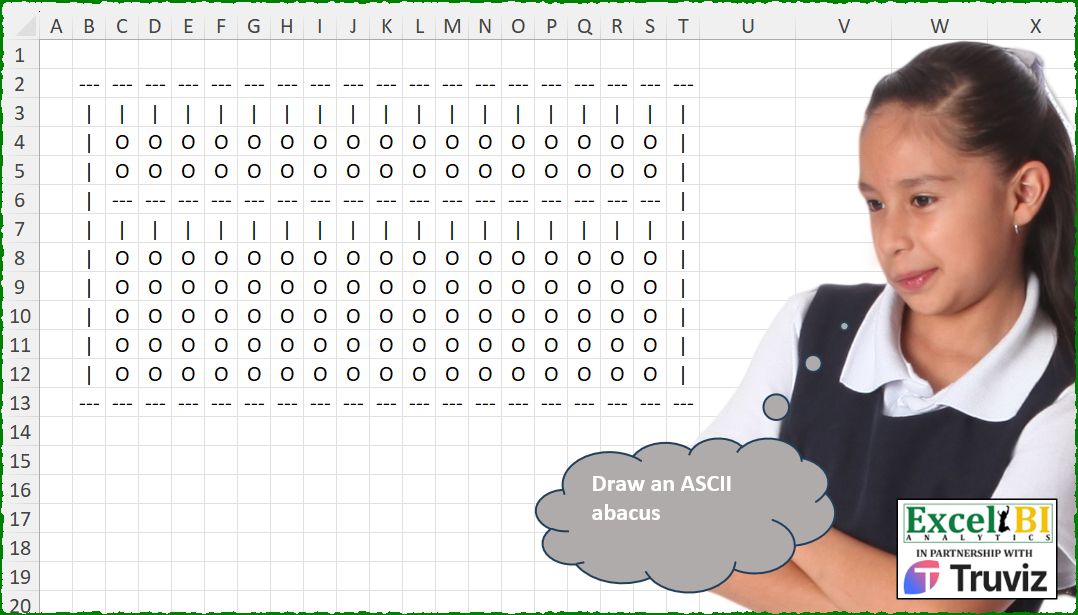
Draw an ASCII abacus.
📌 Challenge Details and Links
ExcelBI Excel Challenge Number: 553
Challenge Difficulty: ⭐️
📥Download Sample File
📥Link to the solutions on LinkedIn
Solving the challenge of Draw ASCII Abacus Display with Power Query
Power Query solution 1 for Draw ASCII Abacus Display, proposed by Abdallah Ally:
let
  Result = Table.FromList(
    {0 .. 11},
    each List.Transform(
      {0 .. 18},
      (x) =>
        if _ = 0 or _ = 11 then
          "---"
        else if _ = 1 or _ = 5 or x = 0 or x = 18 then
          "|"
        else if _ = 4 then
          "---"
        else
          "O"
    )
  )
in
  Result
Solving the challenge of Draw ASCII Abacus Display with Excel
Excel solution 1 for Draw ASCII Abacus Display, proposed by Bo Rydobon 🇹🇭:
=MAKEARRAY(
    12,
    19,
    LAMBDA(
        r,
        c,
        IFS(
            MOD(
                r,
                11
            )=1,
            "---",
            OR(
                c=1,
                c=19,
                r=2,
                r=6
            ),
            "|",
            r=5,
            "---",
            1,
            "O"
        )
    )
)
Excel solution 2 for Draw ASCII Abacus Display, proposed by Rick Rothstein:
=MAKEARRAY(12,19,LAMBDA(r,c,IF(AND(r>1,r<12,OR(c={1,19})),"|",IF(OR(r={1,5,12}),"---",IF(OR(r={2,6}),"|","O")))))Excel solution 3 for Draw ASCII Abacus Display, proposed by Rick Rothstein:
=MAKEARRAY(
    12,
    19,
    LAMBDA(
        r,
        c,
        IF(
            AND(
                r>1,
                r<12,
                OR(
                    c={1,
                    19}
                )
            ),
            "|",
            INDEX(
                MID(
                    "-|OO-|OOOOO-",
                    SEQUENCE(
                        12
                    ),
                    1
                ),
                r
            )
        )
    )
)
Excel solution 4 for Draw ASCII Abacus Display, proposed by John V.:
=MAKEARRAY(
    12,
    19,
    LAMBDA(
        r,
        c,
        IFS(
            OR(
                r={1;12}
            ),
            "---",
            OR(
                c={1;19},
                r={2;6}
            ),
            "|",
            r=5,
            "---",
            1,
            "O"
        )
    )
)
Excel solution 5 for Draw ASCII Abacus Display, proposed by Kris Jaganah:
=MAKEARRAY(12,19,LAMBDA(x,y,IFS((x=1)+(x=12),"---",OR(y=1,y=19,x=2,x=6),"|",x=5,"---",1,"o")))Excel solution 6 for Draw ASCII Abacus Display, proposed by Julian Poeltl:
=MAKEARRAY(12,19,LAMBDA(A,B,IFS((A=1)+(A=5)*(B>1)*(B<19)+(A=12),"---",(A=2)+(A=6)+(B=1)+(B=19),"|",1,"O")))Excel solution 7 for Draw ASCII Abacus Display, proposed by Timothée BLIOT:
=MAKEARRAY(12,19,LAMBDA(x,y, IF(OR(x={1,12},AND(x=5,y>1,y<19)),"---",IF(OR(x=2,x=6,AND(y=1,x<12,x>1),AND(y=19,x<12,x>1)),"|","O"))))Excel solution 8 for Draw ASCII Abacus Display, proposed by Sunny Baggu:
=LET(

     _c,
     12,

     _d,
     19,

     MAKEARRAY(

          _c,

          _d,

          LAMBDA(
              r,
               c,

               INDEX(

                    LET(

                         _a,
                         IFS(

                              OR(
                                  r = 1,
                                   r = _c
                              ),

                              "---",

                              OR(
                                  c = 1,
                                   c = _d
                              ),

                              "|",

                              1,

                              INDEX(
                                  {"---"; "|"; "O"; "O"; "---"; "|"; "O"; "O"; "O"; "O"; "O"; "---"},
                                   r,
                                   1
                              )

                         ),

                         EXPAND(
                             _a,
                              ,
                              _d,
                              _a
                         )

                    ),

                    c

               )

          )

     )

)
Excel solution 9 for Draw ASCII Abacus Display, proposed by Sunny Baggu:
=LET(
 r, SEQUENCE(12),
 c, SEQUENCE(, 19),
 a, IF(c, (r = 1) + (r = 12)),
 b, IF((c = 1) + (c = 19) + (r = 2) + (r = 6), 2, 0),
 d, (r = 5),
 IFS(a, "---", b, "|", d, "---", 1, "O")
)
Excel solution 10 for Draw ASCII Abacus Display, proposed by Abdallah Ally:
=MAKEARRAY(12,19,LAMBDA(r,c,IFS(OR(r={1,12}),"---",OR(OR(r={2,6}),OR(c={1,19})),"|",r=5,"---",1,"O")))Excel solution 11 for Draw ASCII Abacus Display, proposed by Pieter de B.:
=LET(a,LAMBDA(x,MAKEARRAY(x,19,LAMBDA(b,c,IF(b=1,"---",IF((b=2)+(c=1)+(c=19),"|","O"))))),VSTACK(a(4),a(7),a(1)))Excel solution 12 for Draw ASCII Abacus Display, proposed by Hamidi Hamid:
=LET(q,VSTACK("---",IF(SEQUENCE(10),"|",""),"---"),x,IF(SEQUENCE(,17),"---",""),w,IF(SEQUENCE(1,17),"|",""),y,IF(SEQUENCE(1,17),"O",""),r,IF(SEQUENCE(10),"|",""),HSTACK(q,VSTACK(x,w,y,y,x,w,IF(SEQUENCE(5,17),"O",""),x),q))Excel solution 13 for Draw ASCII Abacus Display, proposed by ferhat CK:
=MAKEARRAY(12,19,LAMBDA(x,y,IFNA(IFS(x=1,"---",x=2,"|",(y=1)*(x<12),"|",(y=19)*(x<12),"|",(x=5)*(y>1),"---",x=6,"|",x=12,"---"),"O")))Excel solution 14 for Draw ASCII Abacus Display, proposed by Jaroslaw Kujawa:
=MAKEARRAY(12 ; 19 ;
LAMBDA(r ; c ; IF(OR(c=1 ; c=19) ;
IF(OR(r=1 ; r=12) ; "---";"|");
IF(OR(r=2 ; r=6) ; "|" ;
IF(r=5 ; "---" ; IF(AND(r>1 ; r<12) ; "O" ; "---"))))))
Excel solution 15 for Draw ASCII Abacus Display, proposed by Andy Heybruch:
=MAKEARRAY(
    12,
    19,
    LAMBDA(
        _r,
        _c,
        IFERROR(
            IFS(

                OR(
                    OR(
                        _r={1,
                        12}
                    ),
                    AND(
                        _r=5,
                        AND(
                            _c<>{1,
                            19}
                        )
                    )
                ),
                "---",

                OR(
                    OR(
                        _c={1,
                        19}
                    ),
                    OR(
                        _r={2,
                        6}
                    )
                ),
                "|"
            ),
            "O"
        )
    )
)
Excel solution 16 for Draw ASCII Abacus Display, proposed by Bilal Mahmoud kh.:
=REDUCE(REPT("---",SEQUENCE(,19,1,0)),SEQUENCE(11),LAMBDA(x,y,VSTACK(x,IF(OR(y=1,y=5),REPT("|",SEQUENCE(,19,1,0)),IF(y=4,HSTACK("|",REPT("---",SEQUENCE(,17,1,0)),"|"),IF(y=11,REPT("---",SEQUENCE(,19,1,0)),HSTACK("|",REPT("O",SEQUENCE(,17,1,0)),"|")))))))Excel solution 17 for Draw ASCII Abacus Display, proposed by Eddy Wijaya:
=LET(

    r_o,
    12,

    c_o,
    19,

    MAKEARRAY(
        r_o,
        c_o,
        LAMBDA(
            r,
            c,

            IFS(
                OR(
                    r=1,
                    r=r_o,
                    AND(
                        c>1,
                        c
Excel solution 18 for Draw ASCII Abacus Display, proposed by El Badlis Mohd Marzudin:
=LET(
    a,
    "---",
    b,
    "|",
    c,
    "O",
    d,
    HSTACK(
        a,
        EXPAND(
            b,
            ,
            10,
            a
        ),
        b
    ),
    e,
    HSTACK(
        a,
        b,
        c,
        c,
        a,
        b,
        c,
        c,
        c,
        c,
        c,
        a
    ),
    TRANSPOSE(
        VSTACK(
            d,
            IFNA(
                EXPAND(
                    e,
                    17
                ),
                e
            ),
            d
        )
    )
)
Excel solution 19 for Draw ASCII Abacus Display, proposed by Songglod P.:
=MAKEARRAY(
    12,
    19,
    LAMBDA(
        r,
        c,
        IFNA(
            IFS(
                OR(
                    r=1,
                    r=12
                ),
                "---",
                OR(
                    r=2,
                    r=6
                ),
                "|",
                AND(
                    OR(
                        c=1,
                        c=19
                    ),
                    OR(
                        r>1,
                        r<12
                    )
                ),
                "|",
                AND(
                    r=5,
                    OR(
                        c>1,
                        c<19
                    )
                ),
                "---"
            ),
            "O"
        )
    )
)
Solving the challenge of Draw ASCII Abacus Display with Python
Python solution 1 for Draw ASCII Abacus Display, proposed by Konrad Gryczan, PhD:
import pandas as pd
import numpy as np
path = "553 ASCII Abacus.xlsx"
test = pd.read_excel(path, header=None, usecols="B:T", nrows=12, skiprows=1).values
M = np.full((12, 19), np.nan, dtype=object)
for i in range(12):
 for j in range(19):
 if i in [0, 4, 11]:
 M[i, j] = "---"
 elif i in [1, 5]:
 M[i, j] = "|"
 else:
 M[i, j] = "O"
for i in range(1, 11):
 M[i, 0] = "|"
 M[i, 18] = "|"
print(np.all(M == test)) # True
Solving the challenge of Draw ASCII Abacus Display with Python in Excel
Python in Excel solution 1 for Draw ASCII Abacus Display, proposed by Alejandro Campos:
M = np.full((12, 19), np.nan, dtype=object)
M[[0, 4, 11], :] = "---"
M[[1, 5], :] = "|"
M[2:4, :] = M[6:11, :] = "O"
M[2:4, [0, -1]] = M[6:11, [0, -1]] = "|"
df_abacus = pd.DataFrame(M)
df_abacus
Python in Excel solution 2 for Draw ASCII Abacus Display, proposed by Abdallah Ally:
# Perform data munging
values = []
for i in range(12):
 value = []
 for j in range(19):
 if i in [0, 11] :
 value.append('---')
 elif i in [1, 5] or j in [0, 18]:
 value.append('|')
 elif i == 4 :
 value.append('---')
 else:
 value.append('O')
 values.append(value)

df = pd.DataFrame(data=values)
df
Solving the challenge of Draw ASCII Abacus Display with R
R solution 1 for Draw ASCII Abacus Display, proposed by Konrad Gryczan, PhD:
library(tidyverse)
library(readxl)
path = "Excel/553 ASCII Abacus.xlsx"
test = read_excel(path, range = "B2:T13", col_names = FALSE) %>% as.matrix()
M = matrix(NA_character_, nrow = 12, ncol = 19)
for (i in 1:12) {
 for (j in 1:19) {
 if (i %in% c(1, 5, 12)) {
 M[i, j] = "---"
 } else if (i %in% c(2, 6)) {
 M[i, j] = "|"
 } else {
 M[i, j] = "O"
 }
 }
}
for (i in 2:11) {
 M[i, 1] = "|"
 M[i, 19] = "|"
}
all(M == test) %>% print()
as.data.frame(M)
&&&