
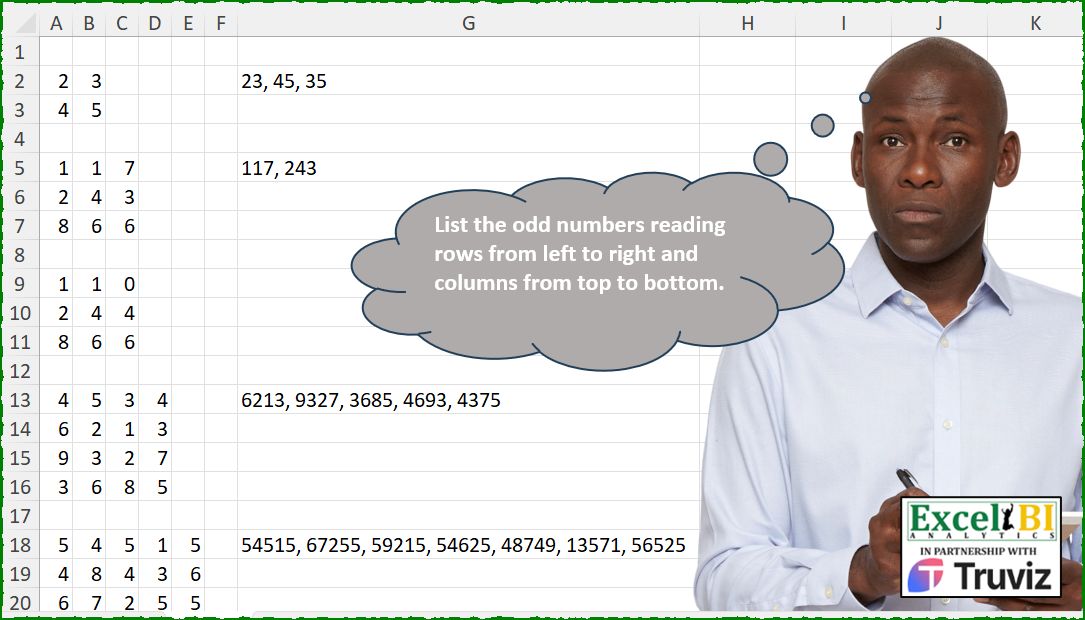
List the odd numbers reading rows from left to right and columns from top to bottom.
📌 Challenge Details and Links
ExcelBI Excel Challenge Number: 546
Challenge Difficulty: ⭐️
📥Download Sample File
📥Link to the solutions on LinkedIn
Solving the challenge of Odd Numbers in Matrix with Power Query
Power Query solution 1 for Odd Numbers in Matrix, proposed by Kris Jaganah:
let
  A = Excel.CurrentWorkbook(){[Name = "Table1"]}[Content],
  B = Table.AddIndexColumn(A, "Idx", 1),
  C = Table.AddColumn(
    B,
    "Ans",
    each List.Accumulate(
      List.Range(B[Column1], 0, [Idx]),
      0,
      (x, y) => if y = null then 1 + x else x
    )
  ),
  D = Table.AddColumn(
    C,
    "Final",
    each
      let
        a = Table.RemoveColumns(Table.SelectRows(C, (x) => x[Ans] = [Ans]), {"Idx", "Ans"}),
        b = (x) =>
          Table.AddColumn(
            x,
            "Answer",
            each
              let
                p = Text.Combine(List.Transform(Record.ToList(_), Text.From)),
                q = try if Number.IsOdd(Number.From(p)) then p else null otherwise null
              in
                q
          )[Answer],
        c = Text.Combine(b(a) & b(Table.Transpose(a)), ", "),
        d = if [Column1] = null then c else null
      in
        d
  ),
  E = Table.RemoveColumns(D, {"Idx", "Ans"})
in
  E
Power Query solution 2 for Odd Numbers in Matrix, proposed by Kris Jaganah:
let
  A = Excel.CurrentWorkbook(){[Name = "Table4"]}[Content],
  B = (x) =>
    Table.AddColumn(
      x,
      "Ans",
      each
        let
          a = Text.Combine(List.Transform(Record.ToList(_), Text.From)),
          b = if Number.IsOdd(Number.From(a)) then a else null
        in
          b
    )[Ans],
  C = Text.Combine(B(A) & B(Table.Transpose(A)), ", ")
in
  C
Power Query solution 3 for Odd Numbers in Matrix, proposed by Aditya Kumar Darak 🇮🇳:
let
  Source = Excel.CurrentWorkbook(){[Name = "data"]}[Content],
  ToLists = Table.ToRows(Source) & Table.ToColumns(Source),
  Generate = List.TransformMany(
    ToLists,
    (x) => {[T = List.Transform(x, Text.From), C = Text.Combine(T), R = Number.From(C)][R]},
    (x, y) => if Number.IsOdd(y) then Text.From(y) else null
  ),
  Return = Text.Combine(Generate, ", ")
in
  Return
Power Query solution 4 for Odd Numbers in Matrix, proposed by Abdallah Ally:
let
  Source = Excel.CurrentWorkbook(){[Name = "Table1"]}[Content],
  Transform = List.Transform(
    Table.ToRows(Source) & Table.ToColumns(Source),
    each Text.Combine(List.Transform(_, each Text.From(_)))
  ),
  Result = Text.Combine(List.Select(Transform, each Number.IsOdd(Number.From(_))), ", ")
in
  Result
Power Query solution 5 for Odd Numbers in Matrix, proposed by Ramiro Ayala Chávez:
let
  S   = Excel.CurrentWorkbook(){[Name = "Table5"]}[Content],
  T   = List.Transform,
  a   = Table.ToRows(S) & Table.ToColumns(S),
  b   = T(a, each T(_, Text.From)),
  c   = T(b, Text.Combine),
  d   = T(c, Number.From),
  e   = List.Select(d, Number.IsOdd),
  f   = Text.Combine(T(e, Text.From), ", "),
  Sol = Table.FromValue(f, [DefaultColumnName = "Answer"])
in
  Sol
Solving the challenge of Odd Numbers in Matrix with Excel
Excel solution 1 for Odd Numbers in Matrix, proposed by Bo Rydobon 🇹🇭:
=LET(x,A13:D16,n,BYROW(VSTACK(x,TRANSPOSE(x)),CONCAT),ARRAYTOTEXT(FILTER(n,MOD(n,2),"")))Excel solution 2 for Odd Numbers in Matrix, proposed by Rick Rothstein:
=LET(a,A18:E22,b,BYROW(VSTACK(a,TRANSPOSE(a)),LAMBDA(r,CONCAT(r))),TEXTJOIN(", ",,FILTER(b,MOD(b,2))))Excel solution 3 for Odd Numbers in Matrix, proposed by John V.:
=LET(
    n,
    A5:C7,
    i,
    BYROW(
        VSTACK(
            n,
            TRANSPOSE(
                n
            )
        ),
        CONCAT
    ),
    TEXTJOIN(
        ", ",
        ,
        REPT(
            i,
            ISODD(
                i
            )
        )
    )
)
Excel solution 4 for Odd Numbers in Matrix, proposed by Kris Jaganah:
=LET(
    a,
    A18:E22,
    c,
    LAMBDA(
        w,
        x,
        y,
        w(
            FILTER(
                a,
                ISODD(
                    -TAKE(
                        a,
                        x,
                        y
                    )
                ),
                ""
            ),
            CONCAT
        )
    ),
    TEXTJOIN(
        ", ",
        ,
        c(
            BYROW,
            ,
            -1
        ),
        c(
            BYCOL,
            -1,

        )
    )
)
Excel solution 5 for Odd Numbers in Matrix, proposed by Julian Poeltl:
=LET(A,A18:E22,N,TOROW(VSTACK(BYROW(A,CONCAT),BYCOL(A,CONCAT)),3),IFERROR(TEXTJOIN(", ",,FILTER(N,ISODD(--N))),""))Excel solution 6 for Odd Numbers in Matrix, proposed by Timothée BLIOT:
=LET(M,A2:B3,N,VSTACK(BYROW(M,LAMBDA(x,CONCAT(x))),TOCOL(BYCOL(M,LAMBDA(x,CONCAT(x))))),ARRAYTOTEXT(SORT(FILTER(N,ISODD(--N),""))))Excel solution 7 for Odd Numbers in Matrix, proposed by Nikola Z Grujicic – Nikola Ž Grujičić:
=LET(k, A18:E22, p, BYROW(k, LAMBDA(x, CONCAT(x))), q, TOCOL(BYCOL(k, LAMBDA(y, CONCAT(y)))), r, VSTACK(p, q), s, FILTER(r, MOD(r, 2)=1), TEXTJOIN(", ",,s))Excel solution 8 for Odd Numbers in Matrix, proposed by Hussein SATOUR:
=LET(
    v,
    A18:E22,
    a,
    VSTACK(
        BYROW(
            v,
            CONCAT
        ),
        TOCOL(
            BYCOL(
            v,
            CONCAT
        )
        )
    ),
    ARRAYTOTEXT(
        FILTER(
            a,
            ISODD(
                a
            ),
            ""
        )
    )
)
Excel solution 9 for Odd Numbers in Matrix, proposed by Oscar Mendez Roca Farell:
=LET(m, A2:B3, b, BYROW(VSTACK(m, TRANSPOSE(m)), CONCAT), ARRAYTOTEXT(FILTER(b, ISODD(b))))Excel solution 10 for Odd Numbers in Matrix, proposed by Sunny Baggu:
=LET(

     rng,
     A18:E22,

     v,
     VSTACK(

          BYROW(
              rng,
               LAMBDA(
                   a,
                    CONCAT(
                        a
                    )
               )
          ),

          TOCOL(
              BYCOL(
              rng,
               LAMBDA(
                   a,
                    CONCAT(
                        a
                    )
               )
          )
          )

     ),

     ARRAYTOTEXT(
         FILTER(
             v,
              MOD(
                  v,
                   2
              )
         )
     )

)
Excel solution 11 for Odd Numbers in Matrix, proposed by LEONARD OCHEA 🇷🇴:
=LET(
    g,
    A18:E22,
    C,
    CONCAT,
    F,
    LAMBDA(
        x,
        TOROW(
            x/ISODD(
                x
            ),
            3
        )
    ),
    ARRAYTOTEXT(
        HSTACK(
            F(
                --BYROW(
                    g,
                    C
                )
            ),
            F(
                --BYCOL(
                    g,
                    C
                )
            )
        )
    )
)
Excel solution 12 for Odd Numbers in Matrix, proposed by Abdallah Ally:
=LET(a,A2:B3,b,VSTACK(BYROW(a,CONCAT),TOCOL(BYCOL(a, CONCAT))),ARRAYTOTEXT(FILTER(b,ISODD(b),"")))Excel solution 13 for Odd Numbers in Matrix, proposed by Pieter de B.:
=LET(a,A2:B3,r,ROWS(a),x,MID(CONCAT(a,TRANSPOSE(a)),SEQUENCE(2*r,,1,r),r),TEXTJOIN(", ",,REPT(x,MOD(x,2))))Excel solution 14 for Odd Numbers in Matrix, proposed by ferhat CK:
=LET(
    a,
    A13:D16,
    b,
    VSTACK(
        TOCOL(
            BYCOL(
                a,
                CONCAT
            )
        ),
        BYROW(
                a,
                CONCAT
            )
    ),
    l,
    LAMBDA(
        x,
        MOD(
            x,
            2
        )
    ),
    TEXTJOIN(
        ",",
        TRUE,
        IF(
            l(
                b
            )=1,
            b,
            ""
        )
    )
)
Excel solution 15 for Odd Numbers in Matrix, proposed by Andy Heybruch:
=LET(
    _a,
    A13:D16,
    _b,
    VSTACK(
        BYROW(
            _a,
            LAMBDA(
                a,
                CONCAT(
                    a
                )
            )
        ),
        TOCOL(
            BYCOL(
            _a,
            LAMBDA(
                a,
                CONCAT(
                    a
                )
            )
        )
        )
    ),
    ARRAYTOTEXT(
        FILTER(
            _b,
            ISODD(
                _b
            )
        )
    )
)
Excel solution 16 for Odd Numbers in Matrix, proposed by Bilal Mahmoud kh.:
=LET(
    input,
    A14:D17,
    fn,
    LAMBDA(
        n,
        TEXTJOIN(
            ",",
            TRUE,
            BYROW(
                n,
                LAMBDA(
                    x,
                    IF(
                        ISODD(
                            CONCAT(
                                x
                            )
                        ),
                        CONCAT(
                                x
                            ),
                        ""
                    )
                )
            )
        )
    ),
    TEXTJOIN(
        ",",
        ,
        fn(
            input
        ),
        fn(
            TRANSPOSE(
            input
        )
        )
    )
)
Excel solution 17 for Odd Numbers in Matrix, proposed by JvdV –:
=REGEXREPLACE(
    TEXTJOIN(
        ", ",
        ,
        BYROW(
            A18:E22,
            CONCAT
        ),
        BYCOL(
            A18:E22,
            CONCAT
        )
    ),
    "bd*[02468]bD*",

)

=LET(
    x,
    A18:E22,
    f,
    LAMBDA(
        n,
        REPT(
            CONCAT(
                n
            ),
            MOD(
                CONCAT(
                n
            ),
                2
            )
        )
    ),
    TEXTJOIN(
        ", ",
        ,
        BYROW(
            x,
            f
        ),
        BYCOL(
            x,
            f
        )
    )
)
Excel solution 18 for Odd Numbers in Matrix, proposed by Mey Tithveasna:
=LET(a,A2:B3,L,LAMBDA(x,CONCAT(x)),r,BYROW(a,L),c,TOCOL(BYCOL(a,L),3),d,VSTACK(r,c),ARRAYTOTEXT(FILTER(d,MOD(d,2))))Excel solution 19 for Odd Numbers in Matrix, proposed by Peter Bartholomew:
= ListOddλ(array)

ListOddλ
//  Calculate sum and return odd totals
= LAMBDA(array,
 LET(
 u, BYCOL(array, SelectOddλ),
 v, BYROW(array, SelectOddλ),
 TEXTJOIN(", ", ,u, v)
 )
 );

SelectOddλ
// Conditional sum
= LAMBDA(a,
 LET(
 v, CONCAT(a),
 IF(ISODD(VALUE(v)),  v, "")
 )
)
Excel solution 20 for Odd Numbers in Matrix, proposed by El Badlis Mohd Marzudin:
=LET(
    d,
    A18:E22,
    f,
    LAMBDA(
        x,
        BYROW(
            x,
            CONCAT
        )
    ),
    a,
    VSTACK(
        f(
            d
        ),
        f(
            TRANSPOSE(
            d
        )
        )
    ),
    ARRAYTOTEXT(
        FILTER(
            a,
            ISODD(
                a
            ),
            ""
        )
    )
)
Excel solution 21 for Odd Numbers in Matrix, proposed by RIJESH T.:
=LET(rng,A18:E22,
r,BYROW(rng,LAMBDA(a,CONCAT(a))),
c,BYCOL(rng,LAMBDA(b,CONCAT(b))),
t,(TOCOL(HSTACK(r,c),3)),
ARRAYTOTEXT(FILTER(t,ISODD(t))))
Excel solution 22 for Odd Numbers in Matrix, proposed by Bevon Clarke:
=LET(
    a,
    A13:D16,
    b,
    HSTACK(
        BYROW(
            a,
            LAMBDA(
                x,
                --CONCAT(
                    x
                )
            )
        ),
        BYROW(
            TRANSPOSE(
                a
            ),
            LAMBDA(
                y,
                --CONCAT(
                    y
                )
            )
        )
    ),

    c,
    --TEXTSPLIT(
        TEXTJOIN(
            "|",
            TRUE,
            b
        ),
        ,
        "|",
        TRUE
    ),

    d,
    MOD(
        c,
        2
    ),
    e,
    c*d,

    TEXTJOIN(
        ", ",
        TRUE,
        FILTER(
            e,
            e<>0
        )
    )
)
Excel solution 23 for Odd Numbers in Matrix, proposed by André Gonçalves:
=TEXTJOIN(", ";; BYROW(A2:B3; LAMBDA(a; IF(ISODD(INDEX(a;; COLS(a))); CONCAT(a); ""))); BYCOL(A2:B3; LAMBDA(a; IF(ISODD(INDEX(a; ROWS(a))); CONCAT(a); ""))))Excel solution 24 for Odd Numbers in Matrix, proposed by Victor Yemitan:
=LET(
&
    r,
    A18:E22,

    fx,
    LAMBDA(
        x,
        IF(
            ISODD(
                --CONCAT(
                    x
                )
            ),
            CONCAT(
                    x
                ),
            ""
        )
    ),

    TEXTJOIN(
        ", ",
        ,
        VSTACK(
            BYROW(
                r,
                fx
            ),
            TOCOL(
                BYCOL(
                r,
                fx
            )
            )
        )
    )
)
Solving the challenge of Odd Numbers in Matrix with Python
Python solution 1 for Odd Numbers in Matrix, proposed by Konrad Gryczan, PhD:
Lot of loading. Three cases here, all of them on Github.
import numpy as np
import pandas as pd
input1 = pd.read_excel(path, header=None, usecols = "A:B", skiprows=1, nrows =2).values
input2 = pd.read_excel(path, header=None, usecols = "A:C", skiprows=4, nrows = 3).values
input3 = pd.read_excel(path, header=None, usecols = "A:C", skiprows=8, nrows = 3).values
test1 = pd.read_excel(path, header=None, usecols = "G", skiprows=1, nrows =1).values[0][0]
test2 = pd.read_excel(path, header=None, usecols = "G", skiprows=4, nrows =1).values[0][0]
test3 = pd.read_excel(path, header=None, usecols = "G", skiprows=8, nrows =1).values[0][0]
def odd_numbers(matrix):
 all = np.concatenate((matrix, np.transpose(matrix)), axis=0)
 all = np.array([int(''.join(map(str, x))) for x in all])
 return ', '.join(map(str, all[all % 2 != 0]))
print(test1 == odd_numbers(input1)) # True
print(test2 == odd_numbers(input2)) # True
print(test3 == odd_numbers(input3)) # No Value vs NaN
Solving the challenge of Odd Numbers in Matrix with Python in Excel
Python in Excel solution 1 for Odd Numbers in Matrix, proposed by Alejandro Campos:
def odd_numbers(matrix):
 flattened = (list(matrix.apply(''.join, axis=1)) + list(matrix.apply(''.join)))
 odd_numbers_list = [int(x) for x in flattened if pd.notna(x) and int(x) % 2 != 0]
 return ', '.join(map(str, odd_numbers_list))
matrix1 = xl("A2:B3").astype(str)
matrix2 = xl("A5:C7").astype(str)
matrix3 = xl("A9:C11").astype(str)
matrix4 = xl("A13:D16").astype(str)
matrix5 = xl("A18:E22").astype(str)
result = odd_numbers(matrix1)
result
result = odd_numbers(matrix2)
result
result = odd_numbers(matrix3)
result
result = odd_numbers(matrix4)
result
result = odd_numbers(matrix5)
result
Python in Excel solution 2 for Odd Numbers in Matrix, proposed by Abdallah Ally:
# Create a data range
df = xl("A13:D16")
# Perform data munging
df = df.map(str)
numbers = (
 list(df.apply(''.join, axis=1)) + list(df.apply(''.join))
)
odd_numbers = ', '.join(x for x in numbers if int(x) % 2)
odd_numbers
Solving the challenge of Odd Numbers in Matrix with R
R solution 1 for Odd Numbers in Matrix, proposed by Konrad Gryczan, PhD:
library(tidyverse)
library(readxl)
input1 = read_excel(path, range = "A2:B3", col_names = FALSE) %>% as.matrix()
test1 = read_excel(path, range = "G2:G2", col_names = FALSE) %>% pull()
input2 = read_excel(path, range = "A5:C7", col_names = FALSE) %>% as.matrix()
test2 = read_excel(path, range = "G5:G5", col_names = FALSE) %>% pull()
input3 = read_excel(path, range = "A9:C11", col_names = FALSE) %>% as.matrix()
test3 = read_excel(path, range = "G9:G9", col_names = FALSE) %>% pull()
pick_odds <- function(M) {
 all <- as.numeric(apply(rbind(M, t(M)), 1, paste0, collapse = ""))
 paste(all[all %% 2 == 1], collapse = ", ")
}
all.equal(pick_odds(input1), test1) # TRUE
all.equal(pick_odds(input2), test2) # TRUE
&&