
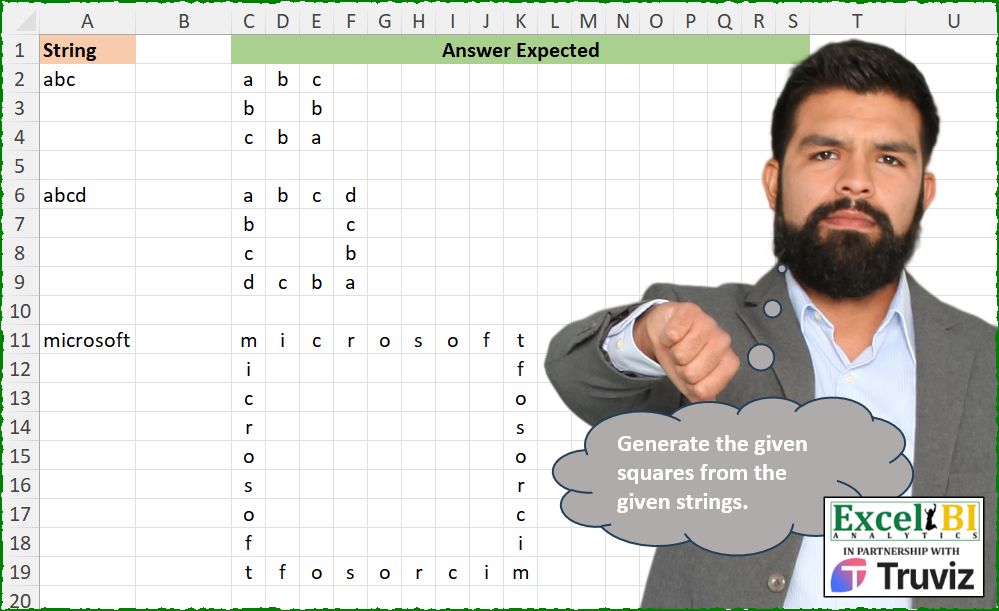
Generate the given squares from the given strings.
📌 Challenge Details and Links
ExcelBI Excel Challenge Number: 542
Challenge Difficulty: ⭐️
📥Download Sample File
📥Link to the solutions on LinkedIn
Solving the challenge of Create Text-Based Square with Power Query
Power Query solution 1 for Create Text-Based Square, proposed by Aditya Kumar Darak 🇮🇳:
let
  Word = "abcd",
  Len = Text.Length(Word) - 1,
  Generate = List.Transform(
    {0 .. Len},
    (r) =>
      List.Transform(
        {0 .. Len},
        (c) =>
          if r = 0 or c = 0 then
            Text.At(Word, r + c)
          else if r = Len or c = Len then
            Text.At(Word, Number.Abs(c - r))
          else
            null
      )
  ),
  Return = Table.FromColumns(Generate)
in
  Return
Power Query solution 2 for Create Text-Based Square, proposed by Alejandro Simón 🇵🇦 🇪🇸:
let
  Source = Excel.CurrentWorkbook(){[Name = "Table1"]}[Content],
  Sol = Table.Combine(
    Table.AddColumn(
      Source,
      "A",
      each
        let
          a = Text.ToList([Column1]),
          b = {1 .. List.Count(a) - 2},
          c = List.Transform(
            b,
            each {a{_}} & List.Repeat({null}, List.Last(b)) & {List.Reverse(a){_}}
          ),
          d = Table.FromRows({a} & c & {List.Reverse(a)})
        in
          d
    )[A]
  )
in
  Sol
Power Query solution 3 for Create Text-Based Square, proposed by Ramiro Ayala Chávez:
let
  String = "microsoft",
  a = Text.ToList(String),
  b = List.Count(a),
  c = List.Reverse(a),
  d = List.Generate(
    () => [i = 0],
    each [i] <= Number.RoundDown(b / 2) - 1,
    each [i = [i] + 1],
    each List.Range(a, [i] + 1, 1) & List.Repeat({null}, b - 2) & List.Range(c, [i] + 1, 1)
  ),
  e = {a} & d,
  f = List.Skip(List.Reverse(e)),
  g = List.Distinct(e & List.Transform(f, List.Reverse)),
  Sol = Table.FromRows(g)
in
  Sol
Power Query solution 4 for Create Text-Based Square, proposed by Mihai Radu O:
let
  txt = "microsoft",
  r = [
    lt = List.Transform,
    f = Text.Length(txt),
    s = Text.ToList(txt),
    ls = List.Reverse(s),
    a = lt(
      {0 .. f - 1},
      (x) =>
        if x = 0 then s else if x = f - 1 then ls else {s{x}} & List.Repeat({""}, f - 2) & {ls{x}}
    ),
    b = Table.FromColumns(a)
  ][b]
in
  r
Solving the challenge of Create Text-Based Square with Excel
Excel solution 1 for Create Text-Based Square, proposed by Bo Rydobon 🇹🇭:
=LET(w,A11,l,LEN(w),MAKEARRAY(l,l,LAMBDA(r,c,MID(w,1+ABS(r-c),OR(c=1,r=1,r=l,c=l)))))

😓
=LET(l,LEN(A11),MAKEARRAY(l,l,LAMBDA(r,c,MID(A11,1+ABS(r-c),OR(c=1,r=1,r=l,c=l)))))
Excel solution 2 for Create Text-Based Square, proposed by Rick Rothstein:
=LET(n,LEN(A2),IFERROR(VSTACK(HSTACK(MID(A2,SEQUENCE(n-1),1),MID(A2,1+SEQUENCE(,n-2),1),MID(A2,1+SEQUENCE(n-1,,n-1,-1),1)),MID(A2,SEQUENCE(,n,n,-1),1)),""))Excel solution 3 for Create Text-Based Square, proposed by Rick Rothstein:
=LET(
    n,
    LEN(
        A2
    ),
    f,
    MID(
        A2,
        SEQUENCE(
            n
        ),
        1
    ),
    b,
    MID(
        A2,
        SEQUENCE(
            n,
            ,
            n,
            -1
        ),
        1
    ),
    MAKEARRAY(
        n,
        n,
        LAMBDA(
            r,
            c,
            IF(
                r=1,
                INDEX(
                    f,
                    c
                ),
                IF(
                    c=1,
                    INDEX(
                        f,
                        r
                    ),
                    IF(
                        r=n,
                        INDEX(
                            b,
                            c
                        ),
                        IF(
                            c=n,
                            INDEX(
                                b,
                                r
                            ),
                            ""
                        )
                    )
                )
            )
        )
    )
)
Excel solution 4 for Create Text-Based Square, proposed by John V.:
=LET(
    n,
    LEN(
        A6
    ),
    x,
    SEQUENCE(
        n
    ),
    y,
    TOROW(
        x
    ),
    MID(
        A6,
        1+IFS(
            y=1,
            x-1,
            x=1,
            y-1,
            x=n,
            n-y,
            y=n,
            n-x,
            1,
            n
        ),
        1
    )
)
Excel solution 5 for Create Text-Based Square, proposed by محمد حلمي:
=LET(a,A11,e,LEN(a),MAKEARRAY(e,e,LAMBDA(r,c,
REPT(MID(a,ABS(r-c)+1,1),OR(r=1,c=1,c=e,r=e)))))
Excel solution 6 for Create Text-Based Square, proposed by Kris Jaganah:
=LET(
    a,
    A2,
    b,
    LEN(
        a
    ),
    MAKEARRAY(
        b,
        b,
        LAMBDA(
            x,
            y,
            IFS(
                y=1,
                MID(
                    a,
                    x,
                    1
                ),
                x=1,
                MID(
                    a,
                    y,
                    1
                ),
                y=b,
                MID(
                    a,
                    y-x+1,
                    1
                ),
                x=b,
                MID(
                    a,
                    x-y+1,
                    1
                ),
                1,
                ""
            )
        )
    )
)
Excel solution 7 for Create Text-Based Square, proposed by Julian Poeltl:
=LET(S,A2,L,LEN(S),MAKEARRAY(L,L,LAMBDA(A,B,IFS(A=1,MID(S,B,1),B=1,MID(S,A,1),A=L,MID(S,L-B+1,1),B=L,MID(S,L-A+1,1),1,""))))Excel solution 8 for Create Text-Based Square, proposed by Aditya Kumar Darak 🇮🇳:
=LET(

     _t,
     A2,

     _l,
     LEN(
         _t
     ),

     _seq,
     MAKEARRAY(

          _l,

          _l,

          LAMBDA(
              r,
               c,

               IFS(

                    OR(
                        r = 1,
                         c = 1
                    ),

                    r + c - 1,

                    OR(
                        r = _l,
                         c = _l
                    ),

                    ABS(
                        c - r
                    ) + 1

               )

          )

     ),

     _r,
     IFNA(
         MID(
             _t,
              _seq,
              1
         ),
          ""
     ),

     _r

)
Excel solution 9 for Create Text-Based Square, proposed by Timothée BLIOT:
=LET(A,LEN(A2),B,MID(A2,SEQUENCE(A),1),I,INDEX,MAKEARRAY(A,A,LAMBDA(x,y,IF(y=1,I(B,x),IF(x=1,I(B,y),IF(x=A,I(B,A+1-y),IF(y=A,I(B,A+1-x),"")))))))Excel solution 10 for Create Text-Based Square, proposed by Nikola Z Grujicic - Nikola Ž Grujičić:
=LET(
    u,
     MID(
         A2,
          SEQUENCE(
              LEN(
                  A2
              ),
              ,
              ,
              1
          ),
         1
     ),
     rs,
     ROWS(
         u
     ),
     v,
     SEQUENCE(
         rs
     ),
     aa,
     SEQUENCE(
         rs,
          ,
          rs,
          -1
     ),
     w,
     v*SEQUENCE(
         ,
          rs
     ),
     ab,
     aa*SEQUENCE(
         ,
          rs,
          rs,
          -1
     ),
     an,
     MAKEARRAY(
         rs,
          rs,
          LAMBDA(
              r,
              c,
               IF(
                   OR(
                       r=1,
                        c=1,
                        r=rs,
                        c=rs
                   ),
                    1,
                    0
               )
          )
     ),
     af,
     an*IF(
         w
Excel solution 11 for Create Text-Based Square, proposed by Hussein SATOUR:
=LET(
    s,
    A11,
    a,
    LEN(
        s
    ),
    b,
    SEQUENCE(
        a
    ),
    c,
    TAKE(
        b,
        a-2
    ),
    IFERROR(
        MID(
            s,
            HSTACK(
                REDUCE(
                    b,
                    c,
                    LAMBDA(
                        x,
                        y,
                        HSTACK(
                            x,
                            INDEX(
                                x,
                                ,
                                y
                            )+VSTACK(
                                1,
                                c&"*",
                                -1
                            )
                        )
                    )
                ),
                a+1-b
            ),
            1
        ),
        ""
    )
)
Excel solution 12 for Create Text-Based Square, proposed by Oscar Mendez Roca Farell:
=LET(n, LEN(A11), s, SEQUENCE(n), t, TOROW(s), MID(A11, 1+IF((s=1)+(t=1)+(s=n)+(t=n), ABS(s-t), n), 1))Excel solution 13 for Create Text-Based Square, proposed by Sunny Baggu:
=LET(
 s, A11,
 l, LEN(s),
 _a, SEQUENCE(l),
 _b, 1 + l - _a,
 _c, TOROW(_a),
 _d, TOROW(_b),
 _e, ((1 = _c) * _a + (l = _c) * _b),
 _f, ((1 = _a) * _c + (l = _a) * _d),
 IFERROR(MID(s, IF(_e = 0, _f, _e), 1), "")
)
Excel solution 14 for Create Text-Based Square, proposed by LEONARD OCHEA 🇷🇴:
=LET(s,A11,l,LEN(s),IFNA(MID(s,MAKEARRAY(l,l,LAMBDA(a,b,IFS(a=1,b,b=1,a,a=l,l-b+1,b=l,l-a+1))),1),""))Excel solution 15 for Create Text-Based Square, proposed by Anshu Bantra:
=LAMBDA(
    wrd,

     LET(

          len_,
          LEN(
              wrd
          ),

          hor_splt_forw,
          MID(
              wrd,
               SEQUENCE(
                   ,
                    len_
               ),
               1
          ),

          hor_splt_back,
          MID(
              wrd,
               SEQUENCE(
                   ,
                    len_,
                    len_,
                    -1
               ),
               1
          ),

          ver_splt_forw,
          DROP(
              DROP(
                  TRANSPOSE(
                      hor_splt_forw
                  ),
                   1
              ),
               -1
          ),

          ver_splt_back,
          DROP(
              DROP(
                  TRANSPOSE(
                      hor_splt_back
                  ),
                   1
              ),
               -1
          ),

          mid_,
          HSTACK(
               ver_splt_forw,

               MAKEARRAY(
                   len_ - 2,
                    len_ - 2,
                    LAMBDA(
                        r,
                         c,
                         ""
                    )
               ),

               ver_splt_back

          ),

          VSTACK(
              hor_splt_forw,
               mid_,
               hor_splt_back
          )

     )

)(A2)
Excel solution 16 for Create Text-Based Square, proposed by Pieter de B.:
=LET(
    l,
    LEN(
        A11
    ),
    s,
    SEQUENCE(
        l
    ),
    t,
    TOROW(
        s
    ),
    IFERROR(
        MID(
            A11,
            IFS(
                s=1,
                t,
                s=l,
                1+l-t,
                t=1,
                s,
                t=l,
                1+l-s
            ),
            1
        ),
        ""
    )
)
Excel solution 17 for Create Text-Based Square, proposed by ferhat CK:
=LET(n,LEN(A6),IFNA(MAKEARRAY(n,n,LAMBDA(x,y,IFS(y=1,MID(A6,x,1),x=1,MID(A6,y,1),y=n,MID(A6,y-x+1,1),x=n,MID(A6,x-y+1,1)))),""))Excel solution 18 for Create Text-Based Square, proposed by Bilal Mahmoud kh.:
=LET(
    t,
    "microsoft",
    MAKEARRAY(
        LEN(
            t
        ),
        LEN(
            t
        ),
        LAMBDA(
            r,
            c,
            IF(
                r=1,
                MID(
                    t,
                    c,
                    1
                ),
                IF(
                    c=1,
                    MID(
                        t,
                        r,
                        1
                    ),
                    IF(
                        c=LEN(
            t
        ),
                        MID(
                            t,
                            LEN(
            t
        )-r+1,
                            1
                        ),
                        IF(
                            r=LEN(
            t
        ),
                            MID(
                                t,
                                LEN(
            t
        )-c+1,
                                1
                            ),
                            ""
                        )
                    )
                )
            )
        )
    )
)
Excel solution 19 for Create Text-Based Square, proposed by Bilal Mahmoud kh.:
=LET(t,"BILAL",a,REDUCE(t,SEQUENCE(LEN(t)-1,,2),LAMBDA(x,y,VSTACK(x,IF(y<>LEN(t),MID(t,y,1)&REPT(" ",LEN(t)-2)&MID(t,LEN(t)-y+1,1),CONCAT(MID(t,SEQUENCE(LEN(t),,LEN(t),-1),1)))))),DROP(REDUCE(0,a,LAMBDA(n,m,VSTACK(n,MID(m,SEQUENCE(,LEN(m)),1)))),1))Excel solution 20 for Create Text-Based Square, proposed by Tolga Demirci, PMP, PMI-ACP, MOS-Expert:
=LET(
    i,
    A2,
    LET(
        x,
        MID(
            i,
            SEQUENCE(
                LEN(
                    i
                )
            ),
            1
        ),
        y,
        MID(
            i,
            2,
            LEN(
                    i
                )-2
        ),
        IFERROR(
            HSTACK(
                x,
                VSTACK(
                    TOROW(
                        MID(
                            y,
                            SEQUENCE(
                                LEN(
                                    y
                                )
                            ),
                            1
                        )
                    ),
                    MID(
                        REPT(
                            " ",
                            COUNTA(
                                x
                            )-2
                        ),
                        SEQUENCE(
                            LEN(
                                REPT(
                                    " ",
                                    COUNTA(
                                x
                            )-2
                                )
                            )
                        ),
                        1
                    ),
                    TOROW(
                        MID(
                            y,
                            LEN(
                                    y
                                )-SEQUENCE(
                                LEN(
                                    y
                                )
                            )+1,
                            1
                        )
                    )
                ),
                MID(
                    i,
                    LEN(
                    i
                )-SEQUENCE(
                LEN(
                    i
                )
            )+1,
                    1
                )
            ),
            ""
        )
    )
)
Excel solution 21 for Create Text-Based Square, proposed by Eddy Wijaya:
=LET(

    t,
    A11,

    s_t,
    MID(
        t,
        SEQUENCE(
            LEN(
                t
            )
        ),
        1
    ),

    n,
    COUNTA(
        s_t
    ),

    arr,
    MAKEARRAY(
        n,
        n,
        LAMBDA(
            r,
            c,

            IFS(
                OR(
                    r=1,
                    c=1
                ),
                r+c-1,

                r=n,
                r-c+1,

                c=n,
                c-r+1,
                TRUE,
                ""
            )
        )
    ),

    MAP(
        arr,
        LAMBDA(
            m,
            IFERROR(
                CHOOSEROWS(
                    s_t,
                    m
                ),
                ""
            )
        )
    )
)
Excel solution 22 for Create Text-Based Square, proposed by Mey Tithveasna:
=LET(a,A2,b,LEN(A2),arr,MAKEARRAY(b,b,LAMBDA(x,y,IF(OR(MIN(x,y)=1),x+y-1,IF(OR(x=b,y=b),IF(x>y,x-y,y-x)+1,"")))),IFERROR(MID(a,arr,1),""))Excel solution 23 for Create Text-Based Square, proposed by Milan Shrimali:
=LET(data,A2,a,MID(data,SEQUENCE(LEN(data)),1),rev,SORTBY(a,SEQUENCE(COUNTA(a),1,1,-1)),top,DROP(DROP(TRANSPOSE(a),,-1),,1),IFERROR(VSTACK(DROP(HSTACK(a,top,rev),-1),TRANSPOSE(rev)),""))Excel solution 24 for Create Text-Based Square, proposed by Songglod P.:
=LET(
    n,
    LEN(
        A2
    ),
    MAKEARRAY(
        n,
        n,
        LAMBDA(
            r,
            c,
            IF(
                OR(
                    r=1,
                    r=n,
                    c=1,
                    c=n
                ),
                MID(
                    A2,
                    ABS(
                        c-r
                    )+1,
                    1
                ),
                ""
            )
        )
    )
)
Excel solution 25 for Create Text-Based Square, proposed by Andres Rojas Moncada:
=LET(
    l,
    LEN(
        A2
    ),
    MID(
        A2,
        MAKEARRAY(
            l,
            l,
            LAMBDA(
                f,
                c,

                IFS(
                    f=1,
                    c,
                    c=1,
                    f,
                    c=l,
                    l-f+1,
                    f=l,
                    l-c+1,
                    1,
                    l+1
                )
            )
        ),
        1
    )
)
Excel solution 26 for Create Text-Based Square, proposed by Andres Rojas Moncada:
=LET(p,A2,l,LEN(p),MID(A2,MAKEARRAY(l,l,LAMBDA(f,c,
IFS(f=1,c,c=1,f,c=l,l-f+1,f=l,l-c+1,1,l+1))),1))
Excel solution 27 for Create Text-Based Square, proposed by Ricardo Alexis Domínguez Hernández:
=IFNA(LET(sq,LAMBDA(x,
LET(a,MID(x,SEQUENCE(,LEN(x)),1),MAKEARRAY(LEN(x),LEN(x),LAMBDA(r,c,
IF(r=1,CHOOSECOLS(a,c),
IF(c=1,CHOOSEROWS(TRANSPOSE(a),r),
IF(c=LEN(x),CHOOSEROWS(TRANSPOSE(a),LEN(x)-r+1),
IF(r=LEN(x),CHOOSECOLS(a,LEN(x)-c+1),"")
))))))),
VSTACK(sq(A2),
MAKEARRAY(1,LEN(A11),LAMBDA(r,c,"")),
sq(A6),
MAKEARRAY(1,LEN(A11),LAMBDA(r,c,"")),
sq(A11))
),"")
Solving the challenge of Create Text-Based Square with Python
Python solution 1 for Create Text-Based Square, proposed by Konrad Gryczan, PhD:
import pandas as pd
import numpy as np
path = "542 Squares from Strings.xlsx"
test_abc = pd.read_excel(path, sheet_name=None, usecols="C:E", skiprows=1, nrows=3, header=None).get('Sheet1').replace(np.nan, '', regex=True)
test_abcd = pd.read_excel(path, sheet_name=None, usecols="C:F", skiprows=5, nrows=4, header=None).get('Sheet1').replace(np.nan, '', regex=True)
test_microsoft = pd.read_excel(path, sheet_name=None, usecols="C:K", skiprows=10, nrows=9, header=None).get('Sheet1').replace(np.nan, '', regex=True)
def make_word_frame(word):
 n = len(word)
 word_frame = np.full((n, n), '', dtype=str)
 word_frame[0] = list(word)
 word_frame[:, 0] = list(word)
 word_frame[-1] = list(word[::-1])
 word_frame[:, -1] = list(word[::-1])
 return word_frame
print(all(make_word_frame("abc")==test_abc)) # True
print(all(make_word_frame("abcd")==test_abcd)) # True
print(all(make_word_frame("microsoft")==test_microsoft)) # True
Solving the challenge of Create Text-Based Square with Python in Excel
Python in Excel solution 1 for Create Text-Based Square, proposed by Alejandro Campos:
def generate_square_pattern_df(s: str) -> pd.DataFrame:
 n = len(s)
 matrix = [[" " for _ in range(n)] for _ in range(n)]
 for i in range(n):
 matrix[0][i] = s[i]
 matrix[i][0] = s[i]
 for i in range(n):
 matrix[n-1][i] = s[n-i-1]
 matrix[i][n-1] = s[n-i-1]
 df = pd.DataFrame(matrix)
 return df
"Generate code"
df_abc = generate_square_pattern_df("abc")
df_abcd = generate_square_pattern_df("abcd")
df_microsoft = generate_square_pattern_df("microsoft")
Python in Excel solution 2 for Create Text-Based Square, proposed by Anshu Bantra:
def create_word_sq(word):
 n = len(word)
 # Create Empty Data Frame
 df = pd.DataFrame('', index=range(n), columns=range(n))

 # Fill Top & Bottom Rows
 df.iloc[0] = list(word)
 df.iloc[-1] = list(word[::-1])
 # Fill Left and Right Columns
 for i in range(1, n-1):
 df.iat[i, 0] = word[i]
 df.iat[i, -1] = word[::-1][i]
 return df
# Example usage
create_word_sq(xl("A2"))
Python in Excel solution 3 for Create Text-Based Square, proposed by Ümit Barış Köse, MSc:
name = "Microsoft"
length = len(name)
arr = [[""] * length for _ in range(length)]
for i in range(length):
 char = name[i]
 arr[0][i] = char
 arr[i][0] = char
 arr[length-1][length-1-i] = char
 arr[length-1-i][length-1] = char
arr
Solving the challenge of Create Text-Based Square with R
R solution 1 for Create Text-Based Square, proposed by Konrad Gryczan, PhD:
library(tidyverse)
library(readxl)
path = "Excel/542 Squares from Strings.xlsx"
test_abc = read_excel(path, range = "C2:E4", col_names = FALSE) %>% as.matrix()
test_abcd = read_excel(path, range = "C6:F9", col_names = FALSE) %>% as.matrix()
test_microsoft = read_excel(path, range = "C11:K19", col_names = FALSE) %>% as.matrix()
make_word_frame <- function(word) {
 n <- nchar(word)
 chars <- str_split(word, "")[[1]]
 M <- matrix(NA, n, n)

 M[1, ] <- M[, 1] <- chars
 M[n, ] <- M[, n] <- rev(chars)

 return(M)
}
all.equal(make_word_frame("abc"), test_abc, check.attributes = FALSE) # TRUE
all.equal(make_word_frame("abcd"), test_abcd, check.attributes = FALSE) # TRUE
all.equal(make_word_frame("microsoft"), test_microsoft, check.attributes = FALSE) # TRUE
Solving the challenge of Create Text-Based Square with Excel VBA
Excel VBA solution 1 for Create Text-Based Square, proposed by Md. Zohurul Islam:
Sub Excel_BI_Challenge542()
 'create squares
 Dim strText As String
 Dim strMid As String
 Dim Length As Integer
 Dim x, j, r

 For j = 1 To 3
 If j = 1 Then r = 2
 If j = 2 Then r = 6
 If j = 3 Then r = 11

 strText = Range("A" & r).Value
 Length = Len(strText)
 'ceate 3 sqrs
 For x = 1 To Length
 strMid = Mid(strText, x, 1)
 Range("A" & r).Offset(0, x + 1) = strMid
 Range("A" & r).Offset(x - 1, 2) = strMid
 Cells(r + Length - 1, Length + 2).Offset(0, 1 - x) = strMid
 Range("A" & r + Length - 1).Offset(1 - x, Length + 1) = strMid
 Next x
 Next j
 Range("C:K").ColumnWidth = 2.43
End Sub
&&