
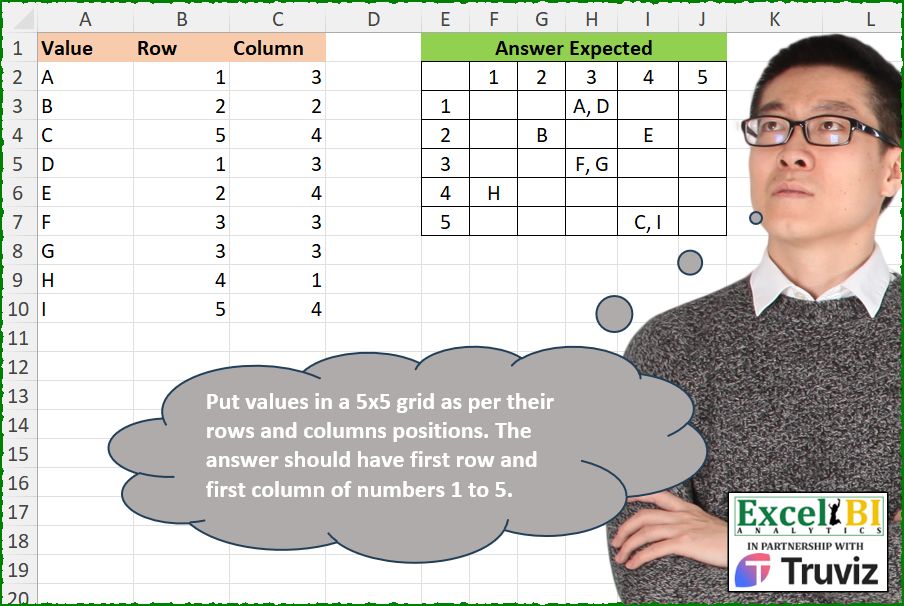
Put values in a 5×5 grid as per their rows and columns positions. The answer should have first row and first column of numbers 1 to 5.
📌 Challenge Details and Links
ExcelBI Excel Challenge Number: 536
Challenge Difficulty: ⭐️
📥Download Sample File
📥Link to the solutions on LinkedIn
Solving the challenge of Fill 5×5 Grid with Index with Power Query
Power Query solution 1 for Fill 5×5 Grid with Index, proposed by Kris Jaganah:
let
  Source = Excel.CurrentWorkbook(){[Name = "Table1"]}[Content],
  Type = Table.TransformColumnTypes(Source, {{"Column", type text}, {"Row", type text}}),
  Pivot = Table.Pivot(
    Type,
    List.Sort(List.Distinct(Type[Column] & Type[Row])),
    "Column",
    "Value",
    each Text.Combine(_, ", ")
  )
in
  Pivot
Power Query solution 2 for Fill 5×5 Grid with Index, proposed by Aditya Kumar Darak 🇮🇳:
let
  Source = Excel.CurrentWorkbook(){[Name = "data"]}[Content],
  Text = Table.TransformColumns(Source, {}, (x) as text => Text.From(x)),
  Return = Table.Pivot(
    Text,
    List.Sort(List.Distinct(Text[Column] & Text[Row])),
    "Column",
    "Value",
    each Text.Combine(_, ", ")
  )
in
  Return
Power Query solution 3 for Fill 5×5 Grid with Index, proposed by Alejandro Simón 🇵🇦 🇪🇸:
let
  Source = Excel.CurrentWorkbook(){[Name = "Table1"]}[Content],
  Group = Table.Group(Source, {"Row", "Column"}, {{"Val", each Text.Combine([Value], ", ")}}),
  Sol = Table.Pivot(
    Table.TransformColumnTypes(Group, {{"Column", type text}}),
    List.Transform(List.Sort(List.Distinct(Source[Row] & Source[Column])), Text.From),
    "Column",
    "Val"
  )
in
  Sol
Power Query solution 4 for Fill 5×5 Grid with Index, proposed by Ramiro Ayala Chávez:
let
  S = Excel.CurrentWorkbook(){[Name = "Table1"]}[Content],
  a = Table.InsertRows(S, Table.RowCount(S), {[Value = null, Row = 5, Column = 5]}),
  b = Table.Sort(a, {"Column", 0}),
  c = Table.Pivot(
    Table.TransformColumnTypes(b, {"Column", type text}),
    List.Distinct(Table.TransformColumnTypes(b, {"Column", type text})[Column]),
    "Column",
    "Value",
    each Text.Combine(List.Sort(_), ", ")
  ),
  Sol = Table.DemoteHeaders(Table.RenameColumns(c, {"Row", ""}))
in
  Sol
Solving the challenge of Fill 5×5 Grid with Index with Excel
Excel solution 1 for Fill 5×5 Grid with Index, proposed by Bo Rydobon 🇹🇭:
=MAKEARRAY(6,6,LAMBDA(r,c,IFS(r^c*c^r>6,TEXTJOIN(", ",,REPT(A2:A10,r-1&c-1=B2:B10&C2:C10)),r=c,"",1,r+c-2)))Excel solution 2 for Fill 5×5 Grid with Index, proposed by Bo Rydobon 🇹🇭:
=LET(
    s,
    SEQUENCE(
        5
    ),
    PIVOTBY(
        VSTACK(
            B2:B10,
            s
        ),
        VSTACK(
            C2:C10,
            s
        ),
        VSTACK(
            A2:A10,
            T(
                s
            )
        ),
        ARRAYTOTEXT,
        ,
        0,
        ,
        0
    )
)
Excel solution 3 for Fill 5×5 Grid with Index, proposed by Rick Rothstein:
=MAKEARRAY(6,6,LAMBDA(r,c,IF(r*c=1,"",IF(r=1,c-1,IF(c=1,r-1,TEXTJOIN(", ",,FILTER(A2:A10,(r=B2:B10+1)*(c=C2:C10+1),"")))))))Excel solution 4 for Fill 5×5 Grid with Index, proposed by محمد حلمي:
=MAKEARRAY(6,6,LAMBDA(r,c,
IFS((r=1)*(c=1),"",r=1,c-1,c=1,r-1,1,
TEXTJOIN(", ",,REPT(A2:A10,B2:B10&C2:C10=r-1&c-1)))))
Excel solution 5 for Fill 5×5 Grid with Index, proposed by محمد حلمي:
=LET(
    s,
    SEQUENCE(
        5
    ),
    i,
    TOROW(
        s
    ),
    HSTACK(
        VSTACK(
            "",
            s
        ),
        VSTACK(
            i,
            MAP(
                s&i,
                LAMBDA(
                    a,
                    ARRAYTOTEXT(
                        FILTER(
                            A2:A10,
                            B2:B10&C2:C10=a,
                            ""
                        )
                    )
                )
            )
        )
    )
)
Excel solution 6 for Fill 5×5 Grid with Index, proposed by محمد حلمي:
=LET(s,SEQUENCE(5),i,TOROW(s),HSTACK(VSTACK("",s),
VSTACK(i,MAP(s&i,LAMBDA(a,TEXTJOIN(", ",,
REPT(A2:A10,B2:B10&C2:C10=a)))))))
Excel solution 7 for Fill 5×5 Grid with Index, proposed by Kris Jaganah:
=MAKEARRAY(5,
    5,
    LAMBDA(x,
    y,
    TEXTJOIN(", ",
    1,
    FILTER(A2:A10,
    (B2:B10=x)*(C2:C10=y),
    ""))))
Excel solution 8 for Fill 5×5 Grid with Index, proposed by Kris Jaganah:
=MAKEARRAY(6,6,LAMBDA(x,y,IFS(x*y=1,"",x=1,y-1,y=1,x-1,1,TEXTJOIN(", ",1,FILTER(A2:A10,(B2:B10=x-1)*(C2:C10=y-1),"")))))Excel solution 9 for Fill 5×5 Grid with Index, proposed by Kris Jaganah:
=LET(a,
    SEQUENCE(
        5,
        5
    ),
    b,
    INT((a/5)+1),
    c,
    MOD(
        a-1,
        5
    )+1,
    VSTACK(HSTACK(
        "",
        TAKE(
            a,
            1
        )
    ),
    HSTACK(TAKE(
        b,
        ,
        1
    ),
    MAP(b,
    c,
    LAMBDA(x,
    y,
    TEXTJOIN(", ",
    1,
    FILTER(A2:A10,
    (B2:B10=x)*(C2:C10=y),
    "")))))))
Excel solution 10 for Fill 5×5 Grid with Index, proposed by Julian Poeltl:
=VSTACK(HSTACK("",SEQUENCE(,5)),HSTACK(SEQUENCE(5),IFERROR(MAKEARRAY(5,5,LAMBDA(A,B,TEXTJOIN(", ",,FILTER(A2:A10,(B2:B10=A)*(C2:C10=B))))),"")))Excel solution 11 for Fill 5×5 Grid with Index, proposed by Aditya Kumar Darak 🇮🇳:
=MAKEARRAY(6, 6, LAMBDA(r,c, IFS(AND(r = 1, c = 1), "", r = 1, c - 1, c = 1, r - 1, TRUE, ARRAYTOTEXT(FILTER(A2:A10, (r - 1 = B2:B10) * (c - 1 = C2:C10), "")))))Excel solution 12 for Fill 5×5 Grid with Index, proposed by Timothée BLIOT:
=MAKEARRAY(5,
    5,
    LAMBDA(x,
    y,
    ARRAYTOTEXT(FILTER(A2:A10,
    (B2:B10=x)*(C2:C10=y),
    ""))))
Excel solution 13 for Fill 5×5 Grid with Index, proposed by Hussein SATOUR:
=LET(a,SEQUENCE(5),b,VSTACK(A2:C10,IFNA(HSTACK("",a,a),"")),PIVOTBY(INDEX(b,,2),INDEX(b,,3),INDEX(b,,1),ARRAYTOTEXT,,0,,0))Excel solution 14 for Fill 5×5 Grid with Index, proposed by Oscar Mendez Roca Farell:
=LET(n,
     6,
     MAKEARRAY(n,
     n,
     LAMBDA(r,
     c,
     IF((r>1)*(c>1),
     ARRAYTOTEXT(
         FILTER(
             A2:A10,
              B2:B10&C2:C10=r-1&c-1,
              ""
         )
     ),
     MAX(
         r,
          c
     )-1))))
Excel solution 15 for Fill 5×5 Grid with Index, proposed by Sunny Baggu:
=LET(
 _r,
     SEQUENCE(
         5
     ),

 _c,
     TOROW(
         _r
     ),

 _a,
     IF(
         _c,
          _r
     ),

 _b,
     IF(
         _r,
          _c
     ),

 _v,
     MAP(
 _a,

 _b,

 LAMBDA(a,
     b,

 TEXTJOIN(",",
     1,
     IF((B2:B10 = a) * (C2:C10 = b),
     A2:A10,
     ""))
 )
 ),

 VSTACK(
     HSTACK(
         "",
          _c
     ),
      HSTACK(
          _r,
           _v
      )
 )
)
Excel solution 16 for Fill 5×5 Grid with Index, proposed by Sunny Baggu:
=LET(

     r,
     SEQUENCE(
         5
     ),

     k,
     TOROW(
         r
     ),

     v,
     IFERROR(

          MAP(

               r & k,

               LAMBDA(
                   a,

                    ARRAYTOTEXT(
                        TOCOL(
                            IF(
                                B2:B10 & C2:C10 = a,
                                 A2:A10,
                                 x
                            ),
                             3
                        )
                    )

               )

          ),

          ""

     ),

     VSTACK(
         HSTACK(
             "",
              k
         ),
          HSTACK(
              r,
               v
          )
     )

)
Excel solution 17 for Fill 5×5 Grid with Index, proposed by Abdallah Ally:
=LET(a,
    SEQUENCE(
        5
    ),
    VSTACK(HSTACK(
        "",
        TOROW(
            a
        )
    ),
    HSTACK(a,
    MAKEARRAY(5,
    5,
    LAMBDA(x,
    y,
    TEXTJOIN(", ",
    ,
    FILTER(A2:A10,
    (B2:B10=x)*(C2:C10=y),
    "")))))))
Excel solution 18 for Fill 5×5 Grid with Index, proposed by Abdallah Ally:
=MAKEARRAY(5,
    5,
    LAMBDA(x,
    y,
    TEXTJOIN(", ",
    ,
    FILTER(A2:A10,
    (B2:B10=x)*(C2:C10=y),
    ""))))
Excel solution 19 for Fill 5×5 Grid with Index, proposed by Anshu Bantra:
=LET(
vals_,
     MAKEARRAY(5,
     5,
     LAMBDA(r,
    c,
    TEXTJOIN(",",
    ,
    FILTER($A$2:$A$10,
    ( ($B$2:$B$10=r) * ($C$2:$C$10=c)),
     "")))),

VSTACK(
    HSTACK(
        "",
        SEQUENCE(
            ,
            5
        )
    ),

    HSTACK(
        SEQUENCE(
            5
        ),
        vals_
    )
)
)
Excel solution 20 for Fill 5×5 Grid with Index, proposed by Pieter de B.:
=VSTACK(HSTACK("",SEQUENCE(,5)),HSTACK(SEQUENCE(5),MAKEARRAY(5,5,LAMBDA(r,c,TEXTJOIN(", ",,REPT(A2:A10,(B2:B10=r)*(C2:C10=c)))))))Excel solution 21 for Fill 5×5 Grid with Index, proposed by Pieter de B.:
=MAKEARRAY(6,
    6,
    LAMBDA(a,
    b,
    LET(c,
    a-1,
    d,
    b-1,
    IF(c*d,
    TEXTJOIN(", ",
    ,
    REPT(A2:A10,
    (B2:B10=c)*(C2:C10=d))),
    IF(
        c-d,
        ABS(
            c-d
        ),
        ""
    )))))
Excel solution 22 for Fill 5×5 Grid with Index, proposed by ferhat CK:
=HSTACK(IF(SEQUENCE(6,,0)=0,"",SEQUENCE(6,,0)),VSTACK(SEQUENCE(,5),MAKEARRAY(5,5,LAMBDA(x,y,TEXTJOIN(",",TRUE,IF(B2:B10&C2:C10=CONCAT(x,y),A2:A10,""))))))
2)
=MAKEARRAY(6,6,LAMBDA(x,y,IFS(x*y=1,"",(y=1)*(x>1),x-1,(x=1)*(y>1),y-1,x*y>3,TEXTJOIN(",",TRUE,IF(B2:B10&C2:C10=(x-1)&(y-1),A2:A10,"")))))
Excel solution 23 for Fill 5×5 Grid with Index, proposed by Ankur Sharma:
=LET(
    a,
     SEQUENCE(
         5
     ),
     TEXTSPLIT(
         TEXTJOIN(
             "$",
              ,
              MAP(
                  a,
                   LAMBDA(
                       z,
                        TEXTJOIN(
                            "@",
                             FALSE,
                             MAP(
                                 a,
                                  LAMBDA(
                                      y,
                                       ARRAYTOTEXT(
                                           FILTER(
                                               A2:A10,
                                                B2:B10 & C2:C10 = z & y,
                                                ""
                                           )
                                       )
                                  )
                             )
                        )
                   )
              )
         ),
          "@",
          "$",
          FALSE
     )
)
Excel solution 24 for Fill 5×5 Grid with Index, proposed by Bilal Mahmoud kh.:
=HSTACK(
    SEQUENCE(
        6,
        ,
        0
    ),
    REDUCE(
        SEQUENCE(
            ,
            5
        ),
        SEQUENCE(
            5
        ),
        LAMBDA(
            x,
            y,
            VSTACK(
                x,
                MAP(
                    SEQUENCE(
            ,
            5
        ),
                    LAMBDA(
                        n,
                        TEXTJOIN(
                            ",",
                            ,
                            FILTER(
                                A1:A10,
                                B1:B10&C1:C10=y&n,
                                ""
                            )
                        )
                    )
                )
            )
        )
    )
)
Excel solution 25 for Fill 5×5 Grid with Index, proposed by Imam Hambali:
=LET(
seq,SEQUENCE(5),
PIVOTBY(VSTACK(B2:B10,seq),VSTACK(C2:C10,seq),VSTACK(A2:A10,IF(seq,"")),ARRAYTOTEXT,0,0,,0)
)
Excel solution 26 for Fill 5×5 Grid with Index, proposed by Mey Tithveasna:
=LET(n,
    MAX(
        B2:B10
    ),
    VSTACK(HSTACK(
        "",
        SEQUENCE(
            ,
            n
        )
    ),
    HSTACK(SEQUENCE(
        n
    ),
    MAKEARRAY(n,
    n,
    LAMBDA(x,
    y,
    ARRAYTOTEXT(FILTER(A2:A10,
    (B2:B10=x)*(C2:C10=y),
    "")))))))
Excel solution 27 for Fill 5×5 Grid with Index, proposed by Peter Bartholomew:
= PIVOTBY(
    row,
     column,
     value,
     TEXTJOINλ,
     ,
     0,
     ,
     0
)

TEXTJOINλ
= LAMBDA(
    v,
     TEXTJOIN(
         ",",
         ,
         v
     )
)
Excel solution 28 for Fill 5×5 Grid with Index, proposed by Nicolas Micot:
=JOINDRE.TEXTE(", ";
    VRAI;
    FILTRE($A$2:$A$10;
    ($B$2:$B$10=$E3)*($C$2:$C$10=F$2);
    ""))
Excel solution 29 for Fill 5×5 Grid with Index, proposed by El Badlis Mohd Marzudin:
=LET(a,SEQUENCE(5),b,TOROW(a),VSTACK(HSTACK("",b),HSTACK(a,MAP(a&b,LAMBDA(x,ARRAYTOTEXT(FILTER(A2:A10,B2:B10&C2:C10=x,"")))))))Excel solution 30 for Fill 5×5 Grid with Index, proposed by Songglod P.:
=MAKEARRAY(6,
    6,
    LAMBDA(r,
    c,
    LET(i,
    r+c-2,
    IF(OR(
        r=1,
        c=1
    ),
    IF(
        i>0,
        i,
        ""
    ),
    ARRAYTOTEXT(FILTER(A2:A10,
    B2:B10&C2:C10=(r-1)&(c-1),
    ""))))))
Solving the challenge of Fill 5×5 Grid with Index with Python
Python solution 1 for Fill 5×5 Grid with Index, proposed by Konrad Gryczan, PhD:
import pandas as pd
import numpy as np
path = "536 Populate Grid for Rows and Columns.xlsx"
input = pd.read_excel(path, usecols="A:C", nrows = 9)
test  = pd.read_excel(path, usecols="E:J", nrows = 5, skiprows=1)
# approach 1
output = input.groupby(['Row', 'Column'])['Value'].apply(lambda x: ', '.join(x)).reset_index()
output = output.pivot(index='Row', columns='Column', values='Value').reset_index()
output['5'] = np.NaN
test.columns = output.columns
print(output.equals(test)) # True
Python solution 2 for Fill 5×5 Grid with Index, proposed by Konrad Gryczan, PhD:
import pandas as pd
import numpy as np
path = "536 Populate Grid for Rows and Columns.xlsx"
input = pd.read_excel(path, usecols="A:C", nrows = 9)
test  = pd.read_excel(path, usecols="E:J", nrows = 5, skiprows=1)
# approach 2
matrix = np.empty((5,5), dtype=object)
for i, row in input.iterrows():
 matrix[row['Row']-1, row['Column']-1] = row['Value'] if pd.isna(matrix[row['Row']-1, row['Column']-1]) else f"{matrix[row['Row']-1, row['Column']-1]}, {row['Value']}"
mat_test = test.iloc[:, 1:].values
matrix = matrix.fill(np.NaN)
mat_test = mat_test.fill(np.NaN)
print(np.array_equal(matrix, mat_test)) # True
Solving the challenge of Fill 5×5 Grid with Index with Python in Excel
Python in Excel solution 1 for Fill 5×5 Grid with Index, proposed by Anshu Bantra:
df = xl("A1:C10", headers=True)
grid = [["" for _ in range(5)] for _ in range(5)]
for _, row in df.iterrows():
 r, c = row['Row'] - 1, row['Column'] - 1
 if grid[r][c] == "":
 grid[r][c] = row['Value']
 else:
 grid[r][c] += ", " + row['Value']
nums = [*range(1,6)]
pd.DataFrame(grid, columns=nums, index=nums)
Solving the challenge of Fill 5×5 Grid with Index with R
R solution 1 for Fill 5×5 Grid with Index, proposed by Konrad Gryczan, PhD:
library(tidyverse)
library(readxl)
path = "Excel/536 Populate Grid for Rows and Columns.xlsx"
input = read_excel(path, range = "A1:C10")
test = read_excel(path, range = "E2:J7")
# Tidyverse Approach
result = input %>%
 pivot_wider(names_from = Column,
 values_from = Value,
 values_fn = list(Value = function(x) paste(x, collapse = ", "))) %>%
 mutate(`5` = NA) %>%
 select(Row, `1`, `2`, `3`, `4`, `5`) %>%
 arrange(Row)
all.equal(result, test, check.attributes = FALSE)
# [1] TRUE
R solution 2 for Fill 5×5 Grid with Index, proposed by Konrad Gryczan, PhD:
library(tidyverse)
library(readxl)
path = "Excel/536 Populate Grid for Rows and Columns.xlsx"
input = read_excel(path, range = "A1:C10")
test = read_excel(path, range = "E2:J7")
# Matrix Approach
M = matrix(NA_character_, nrow = 5, ncol = 5)
for (i in 1:nrow(input)) {
 M[input$Row[i], input$Column[i]] = ifelse(is.na(M[input$Row[i], input$Column[i]]),
 as.character(input$Value[i]),
 paste(M[input$Row[i], input$Column[i]], as.character(input$Value[i]), sep = ", "))}
testM = test %>% as.matrix() %>%
 .[, -1]
all.equal(M, testM, check.attributes = FALSE)
# [1] TRUE
&&