
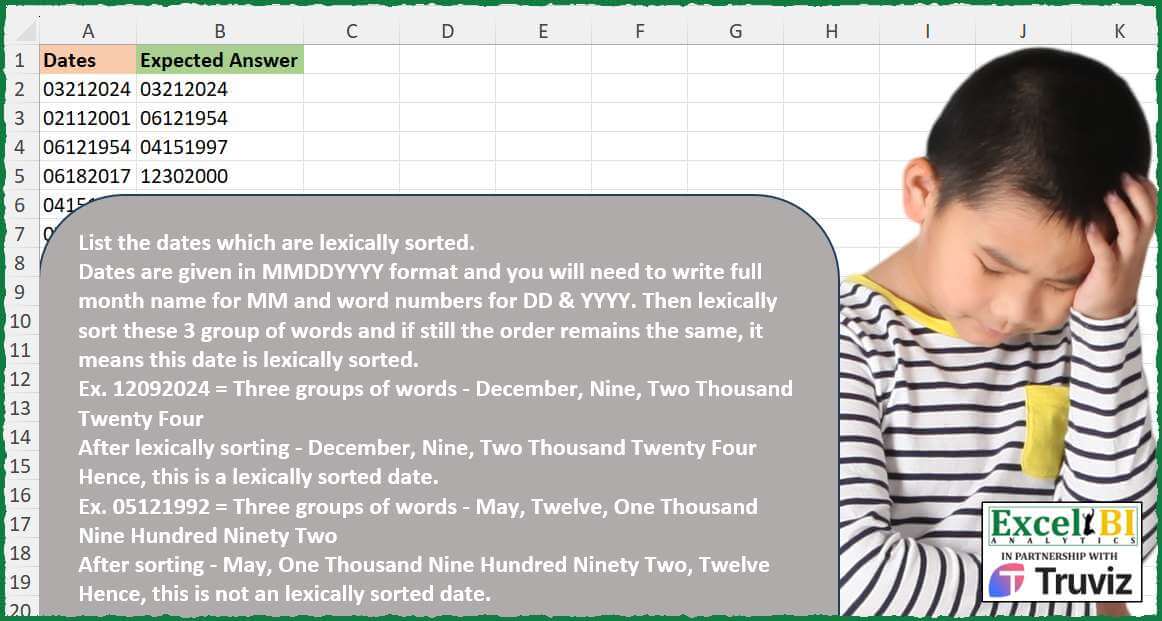
List the dates which are lexically sorted. Dates are given in MMDDYYYY format and you will need to write full month name for MM and word numbers for DD & YYYY. Then lexically sort these 3 group of words and if still the order remains the same, it means this date is lexically sorted. Ex. 12092024 = Three groups of words – December, Nine, Two Thousand Twenty Four After lexically sorting – December, Nine, Two Thousand Twenty Four Hence, this is a lexically sorted date. Ex. 05121992 = Three groups of words – May, Twelve, One Thousand Nine Hundred Ninety Two After sorting – May, One Thousand Nine Hundred Ninety Two, Twelve Hence, this is not an lexically sorted date.
📌 Challenge Details and Links
ExcelBI Excel Challenge Number: 507
Challenge Difficulty: ⭐️⭐️
📥Download Sample File
📥Link to the solutions on LinkedIn
Solving the challenge of Check Lexically Sorted Dates with Power Query
Power Query solution 1 for Check Lexically Sorted Dates, proposed by Ahmed Ariem:
let
ConvertToWord = (n as number) as text =>
 let
 words = {"Zero", "One", "Two", "Three", "Four", "Five", "Six", "Seven",
 "Eight", "Nine", "Ten", "Eleven", "Twelve", "Thirteen", "Fourteen",
 "Fifteen", "Sixteen", "Seventeen", "Eighteen", "Nineteen", "Twenty", "Twenty One",
 "Twenty Two", "Twenty Three", "Twenty Four", "Twenty Five",
 "Twenty Six", "Twenty Seven", "Twenty Eight", "Twenty Nine", "Thirty", "Thirty One"},
 word = words{n}
 in
 word,
chickDate = (w)=> [
 a = Splitter.SplitTextByLengths({2,2,4})(w),
 b = List.Transform(a, Number.From),
 c = Date.MonthName(hashtag#date(2000,b{0},1),"en-US"),
 d = ConvertToWord(b{1}),
 e = Text.Combine( List.Transform( Text.ToList( a{2}),(x)=> ConvertToWord(Number.From(x)))," "),
 f = {c,d,e},
 final = Text.Combine(f) =Text.Combine( List.Sort(f))

][final],
 Source = Excel.CurrentWorkbook(){[Name="tbl"]}[Content],
 from = Table.PromoteHeaders(Source, [PromoteAllScalars=true]),

 SelectRows = Table.SelectRows(  from, each chickDate([Dates]))
in
 SelectRows
Power Query solution 2 for Check Lexically Sorted Dates, proposed by Ahmed Ariem:
let
ConvertToWord = (n as number) as text =>
 let
 words = {"Zero", "One", "Two", "Three", "Four", "Five", "Six", "Seven",
 "Eight", "Nine", "Ten", "Eleven", "Twelve", "Thirteen", "Fourteen",
 "Fifteen", "Sixteen", "Seventeen", "Eighteen", "Nineteen", "Twenty", "Twenty One",
 "Twenty Two", "Twenty Three", "Twenty Four", "Twenty Five",
 "Twenty Six", "Twenty Seven", "Twenty Eight", "Twenty Nine", "Thirty", "Thirty One"},
 word = words{n}
 in
 word,
chickDate = (w)=> [
 a = Splitter.SplitTextByRanges({{0,2},{2,2},{4,4}})(w),
 b = List.Transform(a, Number.From),
 c = Date.MonthName(hashtag#date(2000,b{0},1),"en-US"),
 d = ConvertToWord(b{1}),
 e = Text.Combine( List.Transform( Text.ToList( a{2}),(x)=> ConvertToWord(Number.From(x)))," "),
 f = {c,d,e},
 final = Text.Combine(f) =Text.Combine( List.Sort(f))

][final],
 Source = Excel.CurrentWorkbook(){[Name="tbl"]}[Content],
 from = Table.PromoteHeaders(Source, [PromoteAllScalars=true]),

 SelectRows = Table.SelectRows(  from, each chickDate([Dates]))
in
 SelectRows
Solving the challenge of Check Lexically Sorted Dates with Excel
Excel solution 1 for Check Lexically Sorted Dates, proposed by Bo Rydobon 🇹🇭:
=FILTER(A2:A10,MAP(A2:A10,LAMBDA(d,LET(m,XMATCH(MID(d,{1;3;5},2)*{-1;1;10},{-4;-8;-12;8;18;11;-2;15;5;4;14;-1;-7;-6;-3;-5;9;19;-11;-10;1;190;-9;7;17;6;16;10;13;30;31;3;12;20;28;25;24;29;21;27;26;23;22;2;200}),AND(m=SORT(m))))))Excel solution 2 for Check Lexically Sorted Dates, proposed by Bo Rydobon 🇹🇭:
=FILTER(
    A2:A10,
    MAP(
        A2:A10,
        LAMBDA(
            d,
            LET(
                e,
                VSTACK(
                    TEXT(
                        LEFT(
                            d,
                            2
                        )*29,
                        "mmm"
                    ),
                    TRANSLATE(
                        BAHTTEXT(
                            MID(
                                d,
                                {3;5},
                                {2;4}
                            )
                        )
                    )
                ),
                AND(
                    SORT(
                        e
                    )=e
                )
            )
        )
    )
)
Excel solution 3 for Check Lexically Sorted Dates, proposed by Rick Rothstein:
=LET(r,A2:A10,s,"04m08m12m08d18d11d02m15d05d04d14d01m07m06m03m05m09d19d11m10m01d01y09m07d17d06d16d10d13d30d31d03d12d20d28d25d24d29d21d27d26d23d22d02d02y",m,FIND(LEFT(r,2)&"m",s),d,FIND(MID(r,3,2)&"d",s),y,FIND("0"&MID(r,5,1)&"y",s),FILTER(r,(mExcel solution 4 for Check Lexically Sorted Dates, proposed by John V.:
=FILTER(
    A2:A10,
    MAP(
        A2:A10,
        LAMBDA(
            x,
            LET(
                i,
                VSTACK(
                    TEXT(
                        29*LEFT(
                            x,
                            2
                        ),
                        "mmm"
                    ),
                    TRANSLATE(
                        BAHTTEXT(
                            MID(
                                x,
                                {3;5},
                                {2;4}
                            )
                        ),
                        "th",
                        "en"
                    )
                ),
                AND(
                    i=SORT(
                        i
                    )
                )
            )
        )
    )
)
Excel solution 5 for Check Lexically Sorted Dates, proposed by Julian Poeltl:
=FILTER(A2:A10,
    MAP(A2:A10,
    LAMBDA(D,
    LET(M,
    CHOOSE(
        LEFT(
            D,
            2
        )*1,
        "Ja",
        "Fe",
        "Ma",
        "Ap",
        "Ma",
        "Ju",
        "Ju",
        "Au",
        "Se",
        "Oc",
        "No",
        "De"
    ),
    DY,
    --MID(
        D,
        3,
        2
    ),
    DW,
    IFS(
        DY=11,
        "el",
        DY=10,
        "te",
        DY>29,
        "th",
        DY>19,
        "tw",
        1,
        CHOOSE(
            RIGHT(
                DY,
                1
            )*1,
            "on",
            "tw",
            "th",
            "fo",
            "fi",
            "si",
            "se",
            "ei",
            "ni"
        )
    ),
    Y,
    IF(
        MID(
            D,
            5,
            2
        )="20",
        "tw",
        "ni"
    ),
    SUM((VSTACK(
        M,
        DW,
        Y
    )=SORT(
        VSTACK(
        M,
        DW,
        Y
    )
    ))*1)=3))))
Excel solution 6 for Check Lexically Sorted Dates, proposed by Timothée BLIOT:
=LET(A,A2:A10,B,LEFT(A,2),C,MID(A,3,2),D,RIGHT(A,4),E,TEXT(DATE(1900,B,1),"mmmm"),F,LAMBDA(n,TRANSLATE(BAHTTEXT(n),"th","en")),
FILTER(A,MAP(ROW(1:9),LAMBDA(x,CONCAT(SORTBY(TOCOL(INDEX(HSTACK(B,C,D),x)),TOCOL(INDEX(HSTACK(E,F(C),F(D)),x))))))=A))
Excel solution 7 for Check Lexically Sorted Dates, proposed by Hussein SATOUR:
=FILTER(A2:A10,
    MAP(A2:A10,
    LAMBDA(x,
    LET(a,
    LEFT(
        x,
        2
    ),
    b,
    MID(
        x,
        {3;5},
        {2;4}
    ),
    M,
    TEXT(
        "1/"&a,
        "mmm"
    ),
    DY,
    TEXTBEFORE(
        TEXTAFTER(
            WEBSERVICE(
                "numbers.un-web.com/?l=en&n="&b
            ),
            b&": "
        ),
        """ /"
    ),
    c,
    VSTACK(
        a,
        b
    ),
    SUM((c=SORTBY(
        c,
        VSTACK(
            M,
            DY
        )
    ))*1))))=3)
Excel solution 8 for Check Lexically Sorted Dates, proposed by JvdV -:
=TOCOL(
    MAP(
        A2:A10,
        LAMBDA(
            d,
            LET(
                a,
                TEXTSPLIT(
                    TEXT(
                        RIGHT(
                            d,
                            4
                        )&-LEFT(
                            d,
                            2
                        )&-MID(
                            d,
                            3,
                            2
                        ),
                        "mmmm,d,e"
                    ),
                    ,
                    ","
                ),
                b,
                TRIM(
                    REGEXREPLACE(
                        IFERROR(
                            TRANSLATE(
                                BAHTTEXT(
                                    a
                                ),
                                "th",
                                "en"
                            ),
                            a
                        ),
                        "-|baht| and ",
                        " "
                    )
                ),
                IFS(
                    AND(
                        SORT(
                            b
                        )=b
                    ),
                    d
                )
            )
        )
    ),
    3
)
Excel solution 9 for Check Lexically Sorted Dates, proposed by Peter Tholstrup:
=LET(

     source,
     A2:A10,

     criteria,
     LAMBDA(
         date,

          LET(

               m,
               TEXT(
                   DATE(
                       ,
                        LEFT(
                            date,
                             2
                        ),
                        1
                   ),
                    "mmmm"
               ),

               dy,
               TRANSLATE(

                    BAHTTEXT(
                        MID(
                            date,
                             {3,
                             5},
                             {2,
                             4}
                        )
                    ),

                    "th",

                    "en"

               ),

               mdy,
               HSTACK(
                   m,
                    dy
               ),

               AND(
                   mdy = SORT(
                       mdy,
                        ,
                        ,
                        1
                   )
               )

          )

     ),

     FILTER(
         source,
          MAP(
              source,
               criteria
          )
     )

)
Excel solution 10 for Check Lexically Sorted Dates, proposed by Pieter de Bruijn:
=LET(m,MID(A2:A10,{1,3,5},{2,2,4}),FILTER(A2:A10,BYROW(CHOOSE({1,2,2},TEXT(--(m&-2000),"Mmm"),TRANSLATE(BAHTTEXT(m))),LAMBDA(b,AND(b=SORT(b,,,1))))))Excel solution 11 for Check Lexically Sorted Dates, proposed by Pieter de Bruijn:
=LET(m,MID(A2:A10,{1,3,5},{2,2,4}),FILTER(A2:A10,BYROW(CHOOSE({2,1,1},TRANSLATE(BAHTTEXT(m)),MID("JaFeMaApMaJuJuAuSeOcNoDe",m*2-1,2)),LAMBDA(b,AND(b=SORT(b,,,1))))))Excel solution 12 for Check Lexically Sorted Dates, proposed by Edwin Tisnado:
=FILTER(
    A2:A10,
    MAP(
        A2:A10,
        LAMBDA(
            r,
            LET(
                m,
                TEXT(
                    LEFT(
                        r,
                        2
                    )*30,
                    "mmm"
                ),
                d,
                MID(
                    r,
                    3,
                    2
                ),
                l,
                {"";"One";"Two";"Three";"Four";"Five";"Six";"Seven";"Eight";"Nine"},
                j,
                {"Ten";"Eleven";"Twelve";"Thirteen";"Fourteen";"Fifteen";"Sixteen";"Seventeen";"Eighteen";"Nineteen"},
                h,
                {"twenty",
                "thirty"},
                t,
                VSTACK(
                    l,
                    j,
                    TOCOL(
                        h&" "&l,
                        ,
                        1
                    )
                ),
                z,
                VSTACK(
                    m,
                    INDEX(
                        t,
                        d+1
                    )
                ),
                AND(
                    z=SORT(
                        z
                    )
                )
            )
        )
    )
)
Excel solution 13 for Check Lexically Sorted Dates, proposed by El Badlis Mohd Marzudin:
=FILTER(
    A2:A10,
    MAP(
        A2:A10,
        LAMBDA(
            x,
            LET(
                a,
                TEXTSPLIT(
                    TEXT(
                        DATE(
                            RIGHT(
                                x,
                                4
                            ),
                            LEFT(
                                x,
                                2
                            ),
                            MID(
                                x,
                                3,
                                2
                            )
                        ),
                        "mmm-d-e"
                    ),
                    "-"
                ),
                b,
                LEFT(
                    TAKE(
                        a,
                        ,
                        1
                    )
                ),
                c,
                INDEX(
                    a,
                    ,
                    2
                ),
                d,
                LEFT(
                    TAKE(
                        a,
                        ,
                        -1
                    )
                ),
                e,
                XLOOKUP(
                    HSTACK(
                        c,
                        d
                    ),
                    SEQUENCE(
                        30
                    )&"",
                    {"o";"t";"t";"f";"f";"s";"s";"e";"n";"t";"e";"t";"t";"f";"f";"s";"s";"e";"n";"t";"t";"t";"t";"t";"t";"t";"t";"t";"t";"t"}
                ),
                f,
                 HSTACK(
                     b,
                     e
                 ),
                AND(
                    f=SORT(
                        f,
                        ,
                        ,
                        1
                    )
                )
            )
        )
    )
)
Solving the challenge of Check Lexically Sorted Dates with Python
Python solution 1 for Check Lexically Sorted Dates, proposed by Konrad Gryczan, PhD:
import pandas as pd
from inflect import engine
from calendar import month_name
path = "507 Lexically Sorted MDY Dates.xlsx"
input = pd.read_excel(path, usecols="A", dtype=str)
test = pd.read_excel(path, usecols="B", nrows = 3, dtype=str)
def number_to_words(num):
 p = engine()
 return p.number_to_words(num)
input['lit_month'] = input['Dates'].str[:2].astype(i&nt).apply(lambda x: month_name[x]).str.lower()
input['lit_day'] = input['Dates'].str[2:4].astype(int).apply(lambda x: number_to_words(x))
input['lit_year'] = input['Dates'].str[4:].astype(int).apply(lambda x: number_to_words(x))
input['lit_date'] = input[['lit_month', 'lit_day', 'lit_year']].values.tolist()
input['lit_date_sorted'] = input['lit_date'].apply(sorted)
input = input[input['lit_date'] == input['lit_date_sorted']]
result = input[['Dates']].rename(columns={'Dates': 'Expected Answer'}).reset_index(drop=True)
print(result.equals(test)) # True
Solving the challenge of Check Lexically Sorted Dates with R
R solution 1 for Check Lexically Sorted Dates, proposed by Konrad Gryczan, PhD:
library(tidyverse)
library(readxl)
library(english)
path = "Excel/507 Lexically Sorted MDY Dates.xlsx"
input = read_excel(path, range = "A1:A10")
test = read_excel(path, range = "B1:B4")
result = input %>%
 mutate(parts = str_match(Dates, '(\d{2})(\d{2})(\d{4})'),
 lit_month = month.name[as.integer(parts[,2])],
 lit_day = as.character(english(as.integer(parts[,3]))),
 lit_year = as.character(english(as.integer(parts[,4])))) %>%
 mutate(
 is_alphabetical = pmap_lgl(list(lit_month, lit_day, lit_year),
 ~ {
 lit_date <- c(..1, ..2, ..3)
 identical(lit_date, sort(lit_date))
 })
 ) %>%
 filter(is_alphabetical) %>%
 select(`Expected Answer` = Dates)
identical(result, test)
# [1] TRUE
R solution 2 for Check Lexically Sorted Dates, proposed by Anil Kumar Goyal:
library(tidyverse)
library(qdap)
df %>%
 filter(
 map_lgl(Dates, ~ { x <- c(str_sub(.x, 1, 2), str_sub(.x, 3, 4), str_sub(.x, 5, 8)) %>%
 as.integer()
 all(rank(c(month.abb[x[1]], replace_number(x[2]), replace_number(x[3]))) == 1:3)}
 )
 )
R solution 3 for Check Lexically Sorted Dates, proposed by Anil Kumar Goyal:
library(tidyverse)
library(qdap)
df <- read_excel("Excel/Excel_Challenge_507 - Lexically Sorted MDY Dates.xlsx",
 range = cell_cols("A"))
df %>%
 mutate(across(everything(),
 .fns = list(M = ~month.name[month(mdy(.x))],
 D = ~replace_number(day(mdy(.x))),
 Y = ~replace_number(year(mdy(.x)))),
 .names = "{fn}")) %>%
 {.[pmap_lgl(., ~ all(rank(c(...)[2:4]) == 1:3)),]}
&&