
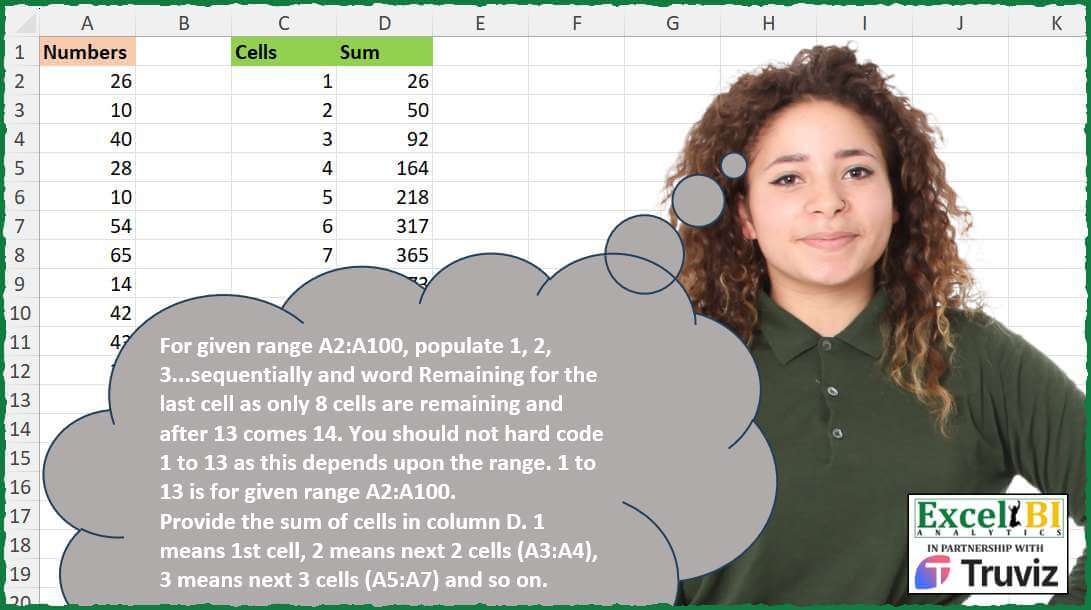
For given range A2:A100, populate 1, 2, 3…sequentially and word Remaining for the last cell as only 8 cells are remaining and after 13 comes 14. You should not hard code 1 to 13 as this depends upon the range. 1 to 13 is for given range A2:A100. Provide the sum of cells in column D. 1 means 1st cell, 2 means next 2 cells (A3:A4), 3 means next 3 cells (A5:A7) and so on.
📌 Challenge Details and Links
ExcelBI Excel Challenge Number: 497
Challenge Difficulty: ⭐️
📥Download Sample File
📥Link to the solutions on LinkedIn
Solving the challenge of Fill Sequence and Compute Sum with Power Query
Power Query solution 1 for Fill Sequence and Compute Sum, proposed by Kris Jaganah:
let
  Source = Excel.CurrentWorkbook(){[Name = "Table1"]}[Content],
  Index = Table.AddIndexColumn(Source, "I", 0, 1),
  Calc = Table.AddColumn(
    Index,
    "Cells",
    each [
      a = List.Transform(Index[I], each (_ * (_ - 1)) / 2),
      b = List.PositionOf(a, [I]),
      c = if b = 0 then 1 else if b < 0 then null else b
    ][c]
  ),
  Fill = Table.FillDown(Calc, {"Cells"}),
  Group = Table.Group(Fill, {"Cells"}, {"Sum", each List.Sum([Numbers])}),
  Rem = Table.TransformColumns(
    Group,
    {"Cells", each if _ = List.Max(Group[Cells]) then "Remaining" else _}
  )
in
  Rem
Power Query solution 2 for Fill Sequence and Compute Sum, proposed by Aditya Kumar Darak 🇮🇳:
let
  Source = Excel.CurrentWorkbook(){[Name = "data"]}[Content],
  Count = Table.RowCount(Source),
  N = Number.RoundDown(Number.Sqrt(Count * 2)),
  Groups = if N * (N + 1) / 2 = Count then N else N - 1,
  Generate = List.Transform(
    {1 .. N},
    each [
      Cell  = _,
      CT    = Cell * (Cell + 1) / 2,
      PT    = Cell * (Cell - 1) / 2,
      Rng   = List.Range(Source[Numbers], PT, CT - PT),
      Total = List.Sum(Rng)
    ]
  ),
  Table = Table.FromRecords(Generate, type table [Cell, Total = number]),
  Return = Table.ReplaceValue(
    Table,
    N,
    if N = Groups then N else "Remaining",
    Replacer.ReplaceValue,
    {"Cell"}
  )
in
  Return
Power Query solution 3 for Fill Sequence and Compute Sum, proposed by Alejandro Simón 🇵🇦 🇪🇸:
let
Source = Excel.CurrentWorkbook(){[Name="Table1"]}[Content],
Cells = List.Skip(List.Generate(()=>[x=0, z=Source[Numbers], s = 0],
 each [s]<>null,
 each [x=[x]+1, z=List.RemoveFirstN([z], x), s=List.Sum(List.FirstN([z], x))],
 each {Text.From([x]),[s]})),
Remaining = List.Transform(Cells, each if Number.From(_{0})=List.Count(Cells) and
 List.Sum(List.LastN(Source[Numbers], List.Count(Cells)))>_{1} then {"Remaining", _{1}} else _),
Sol = Table.FromRows(Remaining, {"Cells", "Sum"})
in
Sol


          T2 - WORKSHOP # 9 - RETOS EXCEL BI
          Retos Excel BI
Power Query solution 4 for Fill Sequence and Compute Sum, proposed by Alejandro Simón 🇵🇦 🇪🇸:
let
  Source = Excel.CurrentWorkbook(){[Name = "Table1"]}[Content],
  Count = List.Count(Source[Numbers]),
  Cells = List.Skip(
    List.Generate(
      () => [x = 0, y = Count, z = Source[Numbers]],
      each [y] >= 0,
      each [
        x = [x] + 1,
        y = [y] - x,
        z = List.RemoveFirstN([z], x),
        s = List.Sum(List.FirstN([z], x))
      ],
      each {Text.From([x]), [s]}
    )
  ),
  Remaining =
    if List.Sum(List.Transform(Cells, each _{1})) < List.Sum(Source[Numbers]) then
      Cells
        & {{"Remaining", List.Sum(Source[Numbers]) - List.Sum(List.Transform(Cells, each _{1}))}}
    else
      Cells,
  Sol = Table.FromRows(Remaining, {"Cells", "Sum"})
in
  Sol
Power Query solution 5 for Fill Sequence and Compute Sum, proposed by Abdallah Ally:
let
  Source = Excel.CurrentWorkbook(){[Name = "Table1"]}[Content],
  a      = Table.AddIndexColumn(Source, "Index", 1),
  b      = List.Transform(a[Index], each Number.RoundUp((Number.Sqrt(1 + 8 * _) - 1) / 2)),
  c      = List.Transform(b, each if _ = List.Max(b) then "Remaining" else _),
  d      = Table.AddColumn(a, "Cells", each c{[Index] - 1}),
  Result = Table.Group(d, "Cells", {"Sum", each List.Sum([Numbers])})
in
  Result
Power Query solution 6 for Fill Sequence and Compute Sum, proposed by 🇵🇪 Ned Navarrete C.:
let
  S = Excel.CurrentWorkbook(){[Name = "Table1"]}[Content][Numbers],
  R = Table.FromRows(
    List.TransformMany(
      {1 .. Number.Round(Number.Sqrt(2 * List.Count(S)), 0)},
      each {(_ * _ - _ + 2) / 2},
      (x, y) =>
        [
          a = List.FirstN(List.Range(S, y - 1, List.Count(S)), x),
          b = if List.Count(a) = x then x else "Remaining",
          c = {b, List.Sum(a)}
        ][c]
    ),
    {"Cells", "Sum"}
  )
in
  R
Power Query solution 7 for Fill Sequence and Compute Sum, proposed by Ramiro Ayala Chávez:
let
  S = Excel.CurrentWorkbook(){[Name = "Table1"]}[Content],
  a = List.Generate(
    () => [i = 0, j = 1],
    each [i] <= List.Count(S[Numbers]),
    each
      if [j] = List.Count(S[Numbers]) then
        [i = [i] + 1, j = [i] + 2]
      else
        [i = [i] + [j], j = [j] + 1],
    each
      if List.Count(List.Range(S[Numbers], [i], [j])) = [j] then
        List.Range(S[Numbers], [i], [j]) & {[j]}
      else
        List.Range(S[Numbers], [i], [j]) & {0}
  ),
  b = List.Transform(a, each {List.Sum(_) - List.Last(_)} & {List.Last(_)}),
  Sol = Table.AddColumn(
    Table.FromRows(b, {"Sum", "C"}),
    "Cells",
    each if [C] = 0 then "Remaining" else [C]
  )[[Cells], [Sum]]
in
  Sol
Power Query solution 8 for Fill Sequence and Compute Sum, proposed by Rafael González B.:
let
Source = Excel.CurrentWorkbook(){0}[Content],
LG = List.Generate(
() => [Cells = 0, L = Source[Numbers], Sum = 0],
each [Sum] <> null,
each [
Cells = [Cells] + 1,
L0 = List.FirstN([L], Cells),
Sum = List.Sum(L0),
L = List.RemoveFirstN([L], Cells)
]
),
LT = List.Transform(List.Skip(LG), each
let
a = Record.SelectFields(_, {"Cells", "Sum"}),
b = Record.Field(a, "Cells"),
c = if b = List.Count(LG) - 1
then Record.TransformFields(a, {"Cells", each "Remaining" })
else a
in
c),
Result = Table.FromRecords(LT)
in
Result
🧙♂️🧙♂️🧙♂️
Solving the challenge of Fill Sequence and Compute Sum with Excel
Excel solution 1 for Fill Sequence and Compute Sum, proposed by Bo Rydobon 🇹🇭:
=LET(z,
    A2:A999,
    c,
    COUNT(
        z
    ),
    s,
    SEQUENCE(
        ROUND(
            SQRT(
                2*c
            ),

        )
    ),

HSTACK(IF(OR(c=s*(s+1)/2),
    s,
    VSTACK(
        DROP(
            s,
            -1
        ),
        "Remaining"
    )),

MAP(s,
    LAMBDA(n,
    SUM(TAKE(DROP(z,
    n*(n-1)/2),
    n))))))
Excel solution 2 for Fill Sequence and Compute Sum, proposed by Bo Rydobon 🇹🇭:
=LET(z,
    A2:A999,
    n,
    SEQUENCE(
        ROUND(
            SQRT(
                2*COUNT(
                    z
                )
            ),

        )
    ),
    HSTACK(VSTACK(
        DROP(
            n,
            -1
        ),
        "Remaining"
    ),

MAP(n,
    LAMBDA(s,
    SUM(TAKE(DROP(z,
    s*(s-1)/2),
    s))))))
Excel solution 3 for Fill Sequence and Compute Sum, proposed by Rick Rothstein:
=LET(n,
    1+INT((SQRT(
        8*COUNT(
            A2:A100
        )+1
    )-1)/2),
    s,
    SEQUENCE(
        n
    ),
    HSTACK(VSTACK(
        DROP(
            s,
            -1
        ),
        "Remaining"
    ),
    SCAN(0,
    s,
    LAMBDA(a,
    x,
    SUM(OFFSET(A1,
    1+x*(x-1)/2,
    ,
    x))))))
Excel solution 4 for Fill Sequence and Compute Sum, proposed by John V.:
=LET(n,A2:A100,r,ROWS(n),s,SEQUENCE(r),x,XMATCH(s,SCAN(,s,SUM),1),GROUPBY(IF(x^2+x>2*r,"Remaining",x),n,SUM,,0))Excel solution 5 for Fill Sequence and Compute Sum, proposed by محمد حلمي:
=LET(d,A2:A100,e,TAKE(DROP(REDUCE(0,SEQUENCE(15),LAMBDA(a,v,VSTACK(a,SEQUENCE(v,,v,0)))),1),ROWS(d)),REDUCE(C1:D1,UNIQUE(e),LAMBDA(a,v,VSTACK(a,HSTACK(IF(v=ROWS(FILTER(e,v=e)),v,"Remaining"),SUM(((v=e)*d)))))))Excel solution 6 for Fill Sequence and Compute Sum, proposed by محمد حلمي:
=REDUCE(C1:D1,SCAN(1,SEQUENCE(15)-1,LAMBDA(a,v,a+v)),
LAMBDA(a,v,LET(j,N(TAKE(a,-1,1))+1,
x,IFERROR(INDEX(A2:A100,SEQUENCE(@j,,v)),""),i,SUM(x), IF(i=0,a,VSTACK(a,HSTACK(IF(j=COUNT(x),j,"Remindar"),i))))))
Excel solution 7 for Fill Sequence and Compute Sum, proposed by محمد حلمي:
=LET(
    s,
    SEQUENCE(
        14
    ),
    MAP(
        s,
        SCAN(
            1,
            s-1,
            LAMBDA(
                a,
                v,
                a+v
            )
        ),

        LAMBDA(
            a,
            v,
            SUM(
                IFERROR(
                    INDEX(
                        A2:A100,
                        SEQUENCE(
                            a,
                            ,
                            v
                        )
                    ),

                )
            )
        )
    )
)
Excel solution 8 for Fill Sequence and Compute Sum, proposed by Kris Jaganah:
=LET(a,A2:A100,b,SEQUENCE(ROWS(a)),c,(b*(b+1))/2,d,XMATCH(b,c,1),e,GROUPBY(d,a,SUM,,0),f,TAKE(e,,1),HSTACK(IF(f=MAX(f),"Remaining",f),DROP(e,,1)))Excel solution 9 for Fill Sequence and Compute Sum, proposed by Julian Poeltl:
=LET(
    N,
    A2:A100,
    C,
    COUNT(
        N
    ),
    SH,
    SEQUENCE(
        C
    ),
    SC,
    SCAN(
        ,
        SH,
        LAMBDA(
            A,
            B,
            A+B
        )
    ),
    No,
    FILTER(
        SH,
        SC<=100
    ),
    LN,
    MAX(
        No
    ),
    OF,
    VSTACK(
        0,
        TAKE(
            SC,
            LN-1
        )
    ),
    RS,
    MAP(
        No,
        OF,
        LAMBDA(
            A,
            B,
            SUM(
                OFFSET(
                    TAKE(
                        N,
                        1
                    ),
                    B,
                    ,
                    A
                )
            )
        )
    ),
    VSTACK(
        HSTACK(
            "Cells",
            "Sum"
        ),
        HSTACK(
            No,
            RS
        ),
        HSTACK(
            "Remaining",
            SUM(
                FILTER(
                    N,
                    LN+TAKE(
                        OF,
                        -1
                    )
Excel solution 10 for Fill Sequence and Compute Sum, proposed by Timothée BLIOT:
=LET(A,
    A2:A100,
    B,
    ROW(
        1:99
    ),
    C,
    B*(B+1)/2,
    D,
    MAP(B,
    C,
    LAMBDA(x,
    y,
     SUM(DROP(TAKE(
         A,
         y
     ),
    x*(x-1)/2)))),
    E,
    XMATCH(
        TRUE,
        ISERROR(
            D
        )
    ),
     HSTACK(
         VSTACK(
             SEQUENCE(
                 E-2
             ),
             "Remaining"
         ),
         TAKE(
             D,
             E-1
         )
     ))
Excel solution 11 for Fill Sequence and Compute Sum, proposed by Nikola Z Grujicic - Nikola Ž Grujičić:
=LET(b, A1:A100, f, SEQUENCE(100000), g, SCAN(1, f, LAMBDA(a, x, a+x)), h, FILTER(g, g<100), i, VSTACK(h, "Remaining"), j, h+1, k, VSTACK(TAKE(h, 1), j), l, VSTACK(h,100), MAP(k, l, LAMBDA(ka, el, SUM(INDEX(b, ka):INDEX(b, el)))))Excel solution 12 for Fill Sequence and Compute Sum, proposed by Oscar Mendez Roca Farell:
=LET(
    n,
     A2:A100,
     r,
     ROWS(
         n
     ),
     s,
     SEQUENCE(
         r
     ),
     c,
     SCAN(
          ,
          s,
          LAMBDA(
              i,
               x,
               i+x
          )
     ),
     IFNA(
         HSTACK(
             SEQUENCE(
                 SUM(
                     N(
                         c
Excel solution 13 for Fill Sequence and Compute Sum, proposed by Duy Tùng:
=REDUCE(C1:D1,
    SEQUENCE(
        14
    ),
    LAMBDA(x,
    i,
    VSTACK(x,
    HSTACK(SUBSTITUTE(
        i,
        14,
        "Remaining"
    ),
    SUM(OFFSET(A2,
    i*(i-1)/2,
    ,
    i))))))
Excel solution 14 for Fill Sequence and Compute Sum, proposed by Sunny Baggu:
=LET(
 _v,
     SEQUENCE(0.5 * (-1 + SQRT(1 + 4 * (COUNT(
         A2:A100
     ) - 8) * 2)) + 1),

 _s,
     _v * (_v + 1) / 2,

 _t,
     MAP(

          _v,

          _s,

          LAMBDA(
              a,
               b,
               SUM(
                   TOROW(
                       INDEX(
                           A2:A100,
                            SEQUENCE(
                                ,
                                 a,
                                 b,
                                 -1
                            )
                       ),
                        3
                   )
               )
          )

     ),

 HSTACK(
     VSTACK(
         DROP(
             _v,
              -1
         ),
          "remaining"
     ),
      _t
 )
)
Excel solution 15 &for Fill Sequence and Compute Sum, proposed by LEONARD OCHEA 🇷🇴:
=LET(n,
    A2:A100,
    f,
    ROWS(
        n
    ),
    m,
    ROUNDUP((-1+(1+8*f)^0.5)/2,
    ),
     s,
    SEQUENCE(
        m
    ),
    t,
    SEQUENCE(
        ,
        f
    ),
    HSTACK(IF(
        s=m,
        "Remaining",
        s
    ),
    MMULT((t<=(s^2+s)/2)*(t>=(s^2-s+2)/2),
    n)))
Excel solution 16 for Fill Sequence and Compute Sum, proposed by ferhat CK:
=LET(a,
    XLOOKUP(
        SEQUENCE(
            SUM(
                SEQUENCE(
                    14
                )
            )
        ),
        VSTACK(
            1,
            SCAN(
                1,
                SEQUENCE(
                    14
                ),
                LAMBDA(
                    a,
                    b,
                    a+b
                )
            )
        ),
        VSTACK(
            SEQUENCE(
                    14
                ),
            ""
        ),
        ,
        -1
    ),
    d,
    A2:A100,
    BYROW(SEQUENCE(
                    14
                ),
    LAMBDA(x,
    SUMPRODUCT((TAKE(
        a,
        -6
    )=x)*(d)))))
Excel solution 17 for Fill Sequence and Compute Sum, proposed by Bilal Mahmoud kh.:
=LET(
    a,
    REDUCE(
        1,
        B2:B14,
        LAMBDA(
            x,
            y,
            VSTACK(
                x,
                MAX(
                    x
                )+y
            )
        )
    ),
    b,
    MAP(
        a,
        B2:B15,
        LAMBDA(
            x,
            y,
            IFERROR(
                SUM(
                    OFFSET(
                        $A$1,
                        x,
                        0,
                        y,
                        1
                    )
                ),
                SUM(
                    OFFSET(
                        $A$1,
                        x,
                        0,
                        100,
                        1
                    )
                )
            )
        )
    ),
    b
)
Excel solution 18 for Fill Sequence and Compute Sum, proposed by Imam Hambali:
=LET(

    a,
     A2:A100,

    ac,
     COUNTA(
         a
     ),

    cells,
     C2:C15,

    b,
     SCAN(
         0,
         cells,
         LAMBDA(
             x,
             y,
              IF(
                  y="Remaining",
                  ac,
                  x+y
              )
         )
     ),

    c,
     XLOOKUP(
         SEQUENCE(
             ac
         ),
         b,
         cells,
         ,
         1
     ),

    d,
     GROUPBY(
         c,
         a,
         SUM,
         0,
         0
     ),

    d

)
Excel solution 19 for Fill Sequence and Compute Sum, proposed by Edwin Tisnado:
=LET(s,SEQUENCE(14),HSTACK(IF(s=14,"Remaining",s),MAP(s,LAMBDA(x,SUM(OFFSET(INDIRECT("A"&x*(x-1)/2+2),,,x))))))Excel solution 20 for Fill Sequence and Compute Sum, proposed by El Badlis Mohd Marzudin:
=LET(d,
    A2:A100,
    a,
    DROP(
        d,
        -8
    ),
    c,
    INT((SQRT(4*(COUNT(
        a
    )*2))+1)/2),
    b,
    TAKE(
        SORT(
            TOCOL(
                SEQUENCE(
                    c
                )+SEQUENCE(
                    ,
                    c,
                    0
                )
            )
        ),
        ROWS(
        a
    )
    ),
    VSTACK(
        GROUPBY(
            b,
            a,
            SUM,
            ,
            0
        ),
        HSTACK(
            "Remaining",
            SUM(
                d
            )-SUM(
        a
    )
        )
    ))
Excel solution 21 for Fill Sequence and Compute Sum, proposed by El Badlis Mohd Marzudin:
=LET(d,
    A2:A100,
    a,
    INT((SQRT(8*(COUNT(
        d
    )))+1)/2),
    b,
    (a*(a-1))/2,
    c,
    TAKE(
        SORT(
            TOCOL(
                SEQUENCE(
                    a
                )+SEQUENCE(
                    ,
                    a,
                    0
                )
            )
        ),
        b
    ),
    e,
    TAKE(
        d,
        b
    ),
    VSTACK(
        GROUPBY(
            c,
            e,
            SUM,
            ,
            0
        ),
        HSTACK(
            "Remaining",
            SUM(
        d
    )-SUM(
        e
    )
        )
    ))
Excel solution 22 for Fill Sequence and Compute Sum, proposed by Rayan S.:
=LET(c,TEXTSPLIT(ARRAYTOTEXT(MAP(C2:C14,LAMBDA(x,ARRAYTOTEXT(SEQUENCE(x,,x,0))))),,", ")+0,s,MAP(C2:C14,LAMBDA(x,SUM(FILTER(TAKE(A2:A100,COUNTA(c)),c=x)))),VSTACK(s,SUM(A:A)-SUM(s)))Excel solution 23 for Fill Sequence and Compute Sum, proposed by Ben Warshaw:
=LET(
a, SCAN(0,SEQUENCE(ROWS(A2:A100),1),LAMBDA(st,curr,st+curr)),
b, VSTACK(1,a+1),
c, LET(x,MAP(b,a,LAMBDA(x,y,
SUM(INDEX($A$2:$A$100,x):INDEX($A$2:$A$100,MIN(y,ROWS(a)))))),
FILTER(x,NOT(ISERROR(x)))),
HSTACK(VSTACK(SEQUENCE(ROWS(c)-1,1),"Remaining"),c))
Excel solution 24 for Fill Sequence and Compute Sum, proposed by Bevon Clarke:
=LET(n,A2:A100,
 s, SEQUENCE(0.5*(-1+SQRT(1+4*(COUNT(n)-8)*2))+1),
 t, s*(s+1)/2,
 p, MAP(s,t, LAMBDA(a,b, SUM(TOROW(INDEX(n, SEQUENCE(, a, b, -1)), 3)))),
 HSTACK(VSTACK(DROP(s, -1), "Remaining"), p))
Solving the challenge of Fill Sequence and Compute Sum with Python
Python solution 1 for Fill Sequence and Compute Sum, proposed by Konrad Gryczan, PhD:
import pandas as pd
import math
import numpy as np
path = "497 Sum for Increasing Range.xlsx"
input = pd.read_excel(path, usecols="A", nrows = 100)
test = pd.read_excel(path, usecols="C:D", nrows = 14)
def is_triangular(n):
 n = 8 * n + 1
 return math.floor(math.sqrt(n)) == math.sqrt(n)
input['row'] = np.arange(1, len(input) + 1)
input['triangular'] = input['row'].apply(is_triangular)
input['cumsum'] = input['triangular'].cumsum()
input['Cells'] = np.where(~input['triangular'], input['cumsum'] + 1, input['cumsum'])
result = input.groupby('Cells', as_index=False)['Numbers'].sum().rename(columns={'Numbers': 'Sum'})
result['Cells'] = result['Cells'].replace(14, 'Remaining')
print(result.equals(test))  # True
Solving the challenge of Fill Sequence and Compute Sum with Python in Excel
Python in Excel solution 1 for Fill Sequence and Compute Sum, proposed by Abdallah Ally:
df = xl("A1:A100", headers=True)
# Perform data wrangling
df['Cells'] = float('nan')
serial = 0
start = 0
while start < len(df.index):
 start = serial * (serial + 1) // 2
 end = (serial + 1) * (serial + 2) // 2
 df.iloc[start:end, 1] = serial + 1
 serial += 1
largest = df['Cells'].max()
df['Cells'] = df['Cells'].where(df['Cells'] < largest, 'Remaining')
df = df.groupby('Cells')['Numbers'].sum().reset_index()
df = df.rename(columns={'Numbers': 'Sum'})
df
Python in Excel solution 2 for Fill Sequence and Compute Sum, proposed by Anshu Bantra:
Python in Excel Solution
lst = list(xl("A2:A1000").dropna().iloc[:,0])
lst_len, sums, start = len(lst), [], 0
cells = [_ for _ in range(1,lst_len+1) if sum(range(_))+_<=lst_len]
for _ in range(1, len(cells)+1):
 sums.append((cells[_-1], sum(lst[start:start+_])))
 start += _
if sum(cells)
Solving the challenge of Fill Sequence and Compute Sum with R
R solution 1 for Fill Sequence and Compute Sum, proposed by Konrad Gryczan, PhD:
library(tidyverse)
library(readxl)
path = "Excel/497 Sum for Increasing Range.xlsx"
input = read_excel(path, range = "A1:A100")
test = read_excel(path, range = "C1:D15")
is_triangular = function(n) {
 n = 8 * n + 1
 return(floor(sqrt(n)) == sqrt(n))
}
result <- input %>%
 mutate(row = row_number(),
 triangular = is_triangular(row),
 cumsum = cumsum(triangular),
 Cells = ifelse(!triangular, cumsum + 1, cumsum)) %>%
 summarise(Sum = sum(Numbers), .by = Cells) %>%
 mutate(Cells = ifelse(Cells == 14, "Remaining", Cells))
identical(result, test)
#> [1] TRUE
R solution 2 for Fill Sequence and Compute Sum, proposed by Anil Kumar Goyal:
n <- floor(sqrt(2*nrow(df)))
df %>%
 mutate(Cells = head(rep(1:n, 1:n), nrow(.))) %>%
 mutate(Cells = ifelse(n() == cur_group_id(), as.character(Cells), "Remaining"), .by = Cells) %>%
 summarise(Sum = sum(Numbers), .by = Cells)
&&