
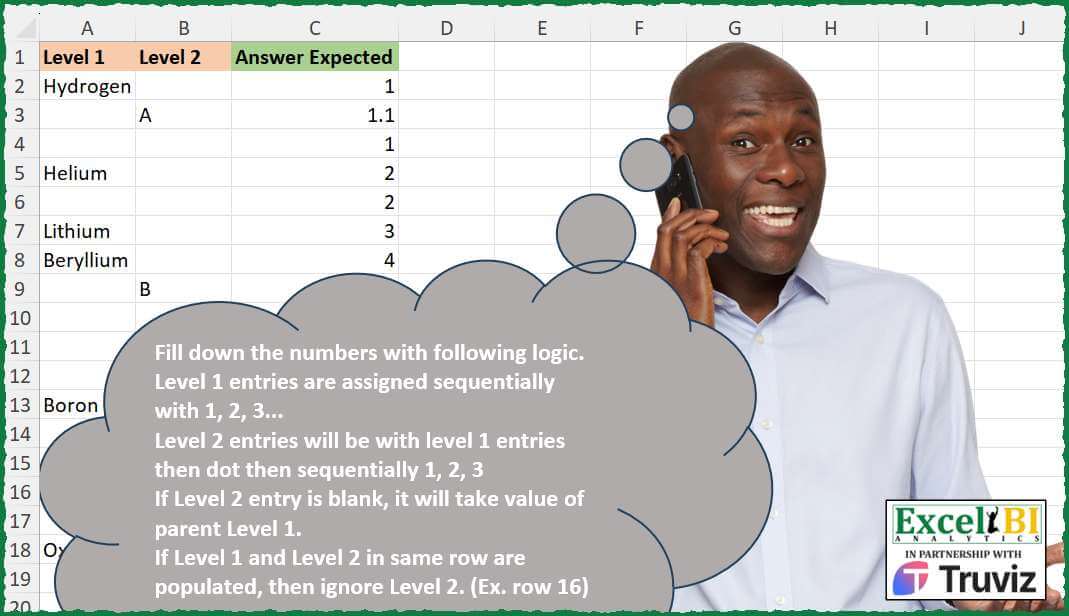
Fill down the numbers with following logic. Level 1 entries are assigned sequentially with 1, 2, 3… Level 2 entries will be with level 1 entries then dot then sequentially 1, 2, 3 If Level 2 entry is blank, it will take value of parent Level 1. If Level 1 and Level 2 in same row are populated, then ignore Level 2. (Ex. row 16)
📌 Challenge Details and Links
ExcelBI Excel Challenge Number: 490
Challenge Difficulty: ⭐️⭐️
📥Download Sample File
📥Link to the solutions on LinkedIn
Solving the challenge of Sequential Number Labeling with Power Query
Power Query solution 1 for Sequential Number Labeling, proposed by Alejandro Simón 🇵🇦 🇪🇸:
let
  Source = Excel.CurrentWorkbook(){[Name = "Table1"]}[Content],
  Sol = List.Skip(
    List.Generate(
      () => [x = 0, y = 1, z = 0, t = 0],
      each [x] <= Table.RowCount(Source),
      each [
        x = [x] + 1,
        t = if a{0} <> null then 0 else if a{1} <> null then [t] + .1 else [t],
        z = if a{0} <> null then [z] + 1 else [z],
        a = Table.ToRows(Source){[x]},
        y =
          if a{0} <> null and a{1} = null then
            z
          else if a{1} <> null and a{0} = null then
            z + t
          else
            z
      ],
      each [y]
    )
  )
in
  Sol
Power Query solution 2 for Sequential Number Labeling, proposed by Ramiro Ayala Chávez:
let
  S = Excel.CurrentWorkbook(){[Name = "Table1"]}[Content],
  A = Table.AddColumn,
  L = List.Transform,
  I = Table.AddIndexColumn,
  T = Table.TransformColumnTypes,
  a = Table.FillDown(A(I(S, "I"), "E", each [Level 1]), {"E"}),
  b = I(Table.Group(a, {"E"}, {"G", each _}), "A", 1),
  c = Table.ExpandTableColumn(T(b, {"A", type text}), "G", {"Level 1", "Level 2", "I"}),
  d = Table.Group(c, {"E", "A"}, {"H", each _})[H],
  e = L(d, each Table.SelectRows(_, each [Level 2] <> null and [Level 1] = null)),
  f = L(e, each T(I(_, "J", 1), {"J", type text})),
  g = Table.Combine(L(f, each A(_, "M", each [A] & "." & [J]))),
  h = Table.RenameColumns(Table.SelectColumns(g, {"Level 1", "Level 2", "M", "I"}), {"M", "A"}),
  i = Table.Combine(L(d, each Table.SelectRows(_, each [Level 1] <> null or [Level 2] = null))),
  j = Table.SelectColumns(i, {"Level 1", "Level 2", "A", "I"}),
  Sol = Table.RenameColumns(
    Table.Sort(h & j, {"I", 0})[[Level 1], [Level 2], [A]],
    {"A", "Answer Expected"}
  )
in
  Sol
Solving the challenge of Sequential Number Labeling with Excel
Excel solution 1 for Sequential Number Labeling, proposed by Bo Rydobon 🇹🇭:
=LET(
    m,
    MMULT(
        N(
            A2:B18>0
        ),
        {2;1}
    ),
    c,
    SCAN(
        0,
        m,
        LAMBDA(
            a,
            v,
            SWITCH(
                v,
                ,
                a,
                1,
                a+0.1,
                INT(
                    a
                )+1
            )
        )
    ),
    IF(
        m=1,
        c,
        INT(
            c
        )
    )
)
Excel solution 2 for Sequential Number Labeling, proposed by John V.:
=LET(
    b,
    B2:B18,
    i,
    SCAN(
        0,
        LEN(
            A2:A18&b
        ),
        LAMBDA(
            a,
            v,
            IF(
                v>1,
                1+INT(
                    a
                ),
                a+v*0.1
            )
        )
    ),
    IF(
        b="",
        INT(
            i
        ),
        i
    )
)
Excel solution 3 for Sequential Number Labeling, proposed by محمد حلمي:
=LET(
    r,
    A2:A18&B2:B18,
    x,
    SCAN(
        0,
        r,
        LAMBDA(
            a,
            v,

            IFS(
                v="",
                a,
                LEN(
                    v
                )>1,
                INT(
                    a
                )+1,
                1,
                a+0.1
            )
        )
    ),
    IF(
        r="",
        INT(
            x
        ),
        x
    )
)
Excel solution 4 for Sequential Number Labeling, proposed by محمد حلمي:
=REDUCE(C1,A2:A18&B2:B18,LAMBDA(a,v,LET(i,INT(N(TAKE(a,-1))),VSTACK(a,IFS(v="",i,LEN(v)>1,i+1,1,MAX(a)+0.1)))))Excel solution 5 for Sequential Number Labeling, proposed by Kris Jaganah:
=LET(a,A2:A18&B2:B18,b,SCAN(0,a,LAMBDA(x,y,IFS(LEN(y)>1,1+INT(x),y<>"",x+0.1,1,x))),IF(a="",INT(b),b))Excel solution 6 for Sequential Number Labeling, proposed by Julian Poeltl:
=LET(T,A2:B18,M,TAKE(T,,1)&TAKE(T,,-1),S,SCAN("0,0",M,LAMBDA(A,B,LET(L,LEN(B),TB,TEXTBEFORE(A,","),IFS(L>1,TB+1&","&0,L=1,TB&","&TEXTAFTER(A,",")+1,1,A)))),TB,TEXTBEFORE(S,","),L,LEN(M),IFS(L>1,TB,L=0,TB,1,S))Excel solution 7 for Sequential Number Labeling, proposed by Timothée BLIOT:
=MAP(ROW(
    1:17
),
    LAMBDA(x,
    LET(S,
    TAKE,
    D,
    DROP,
    C,
    COUNTA,
    I,
    INDEX,
    A,
    A2:A18,
    B,
    B2:B18,
    L,
    S(
        A,
        x
    ),
    M,
    XMATCH(
        "*",
        L,
        2,
        -1
    ),
    N,
    C(
        L
    ),
    O,
    C(
        D(
            S(
                B,
                x
            ),
            M
        )
    )*PRODUCT(
        --NOT(
            ISERROR(
                D(
                    S(
                B,
                x
            ),
                    N
                )
            )
        )
    )*C(
        I(
                B,
                x
            )
    )*(C(
        I(
        A,
        x
    )
    )=0),
    N&IF(
        O=0,
        "",
        "."&O
    ))))
Excel solution 8 for Sequential Number Labeling, proposed by Sunny Baggu:
=LET(
 _a,
     SCAN(
         0,
          A2:A18 <> "",
          LAMBDA(
              a,
               v,
               IF(
                   v,
                    a + 1,
                    a
               )
          )
     ),

 _b,
     IF(
         A2:A18 <> "",
          _a,
          0
     ),

 _c,
     IF((B2:B18 = "") * (A2:A18 = ""),
     _a,
     0.1),

 _d,
     IF(
         _b > _c,
          _b,
          _c
     ),

 DROP(

      REDUCE(

           1,

           _d,

           LAMBDA(
               a,
                v,
                VSTACK(
                    a,
                     IF(
                         v = 0.1,
                          MAX(
                              TAKE(
                                  a,
                                   -4
                              )
                          ) + v,
                          v
                     )
                )
           )

      ),

      1

 )
)
Excel solution 9 for Sequential Number Labeling, proposed by Ankur Sharma:
=LET(
    a,
     $A$2:A2,
     IF(
         OR(
             A2 <> "",
              B2 = ""
         ),
          COUNTA(
              a
          ),
          COUNTA(
              a
          ) & "." & COUNTA(
              OFFSET(
                  XLOOKUP(
                      "*",
                       a,
                       a,
                       ,
                       2,
                       -1
                  ),
                   1,
                   0
              ):B2
          )
     )
)
Excel solution 10 for Sequential Number Labeling, proposed by Bilal Mahmoud kh.:
=n),
    LAMBDA(x,
    y,
    IF((y<>0)*(COUNTA(
        x
    )>1),
    VSTACK(
        x,
        MAX(
        x
    )+1
    ),
    VSTACK(
        x,
        ""
    )))),
    1))))),
    ,
    ","),
    a&IF(
        b<>"",
        "."&b,
        ""
    ))
Excel solution 11 for Sequential Number Labeling, proposed by El Badlis Mohd Marzudin:
=LET(data,A2:A18&B2:B18,q,SCAN(0,data,LAMBDA(a,b,IF(LEN(b)>1,a+1,a)))+SCAN(0,data,LAMBDA(d,e,IFS(LEN(e)>1,INT(d),LEN(e)=1,d+0.1,e="",d))),IF(data="",INT(q),q))Excel solution 12 for Sequential Number Labeling, proposed by Tomasz Jakóbczyk:
=--IF(OR(B2="",AND(A2<>"",B2<>"")),COUNTA(UNIQUE($D$2:D2)),
CONCAT(COUNTA(UNIQUE($D$2:D2)),".",SUMPRODUCT(($B$2:B2<>"")*($D$2:D2=D2))-SUMPRODUCT(($A$2:A2<>"")*($B$2:B2<>"")*($D$2:D2=D2))))
Excel solution 13 for Sequential Number Labeling, proposed by Murat OSMA:
=SCAN(
    0,
    A2:A8&B2:B8,
    LAMBDA(
        x,
        y,
        LET(
            u,
            LEN(
                y
            ),
            IFS(
                u=0,
                INT(
                    x
                ),
                u>1,
                INT(
                    x+1
                ),
                u>0,
                x+0,
                1
            )
        )
    )
)

TR:
=SCAN(
    0;B3:B11&C3:C11;LAMBDA(
        x;y;LET(
            u;UZUNLUK(
                y
            );ÇOKEĞER(
                u=0;TAMSAYI(
                    x
                );u>1;TAMSAYI(
                    x+1
                );u>0;x+0,
                1
            )
        )
    )
)
Solving the challenge of Sequential Number Labeling with Python
Python solution 1 for Sequential Number Labeling, proposed by Konrad Gryczan, PhD:
import pandas as pd
path = "490 - Fill Down.xlsx"
input = pd.read_excel(path, usecols="A:B")
test = pd.read_excel(path, usecols="C:C")
result = input.copy()
result["Level 1"].fillna(method="ffill", inplace=True)
result["group"] = (result["Level 1"] != result["Level 1"].shift()).cumsum()
result["nr1"] = result.groupby("group").cumcount() + 1
result["L2"] = (~result["Level 2"].isna()) & (result["nr1"] != 1)
result["L2_n2"] = result.groupby("group")["L2"].cumsum()
result.loc[~result["L2"], "L2_n2"] = 0
result["Answer Expected"] = result["group"].astype(str) + "." + result["L2_n2"].astype(str)
result = result[["Answer Expected"]].astype("float64").reset_index(drop=True)
print(result.equals(test)) # True
Solving the challenge of Sequential Number Labeling with Python in Excel
Python in Excel solution 1 for Sequential Number Labeling, proposed by Abdallah Ally:
import pandas as pd
file_path = 'Excel_Challenge_490 - Fill Down.xlsx'
df = pd.read_excel(file_path, dtype={'Answer Expected': str})
# Perform data wrangling
df['Order'] = pd.notna(df['Level 1']).cumsum()
values = []
for i in df.index:
 order = df.iat[i, 3]
 if i > 0 and df.iat[i, 3] != df.iat[i - 1, 3]:
 increment = 1
 if pd.isnull(df.iat[i, 1]) or pd.notnull(df.iat[i, 0]):
 values.append(f'{order}')
 else:
 values.append(f'{order}.{increment}')
 increment += 1
df['My Answer'] = values
df['Check'] = df['Answer Expected'] == df['My Answer']
df = df.drop('Order', axis=1).astype(str).replace('nan', '')
df
Python in Excel solution 2 for Sequential Number Labeling, proposed by Anshu Bantra:
Python in Excel solution
lvl1=xl("A2:A18")
lvl2=xl("B2:B18")
lvl1.columns
lst = []
count_ = 0
for idx in range(len(lvl1)):
 if not (lvl1.iloc[idx,0] is None ):
 count_=int(count_)+1
 lst.append(count_)
 elif not(lvl2.iloc[idx,0] is None):
 count_ += 0.10
 lst.append(count_)
 else:
 lst.append(int(count_))
lst
Solving the challenge of Sequential Number Labeling with R
R solution 1 for Sequential Number Labeling, proposed by Konrad Gryczan, PhD:
library(tidyverse)
library(readxl)
path = "Excel/490 - Fill Down.xlsx"
input = read_xlsx(path, range = "A1:B18")
test = read_xlsx(path, range = "C1:C18")
result = input %>%
 fill(`Level 1`, .direction = "down") %>%
 group_by(group = cumsum(`Level 1` != lag(`Level 1`, default = first(`Level 1`))) + 1) %>%
 mutate(
 nr1 = row_number(),
 L2 = !is.na(`Level 2`) & nr1 != 1,
 L2_n2 = ifelse(L2, cumsum(L2), 0),
 `Answer Expected` = as.numeric(paste0(group, ".", L2_n2))
 ) %>%
 ungroup() %>%
 select(`Answer Expected`)
identical(result, test)
#> [1] TRUE
&&&