
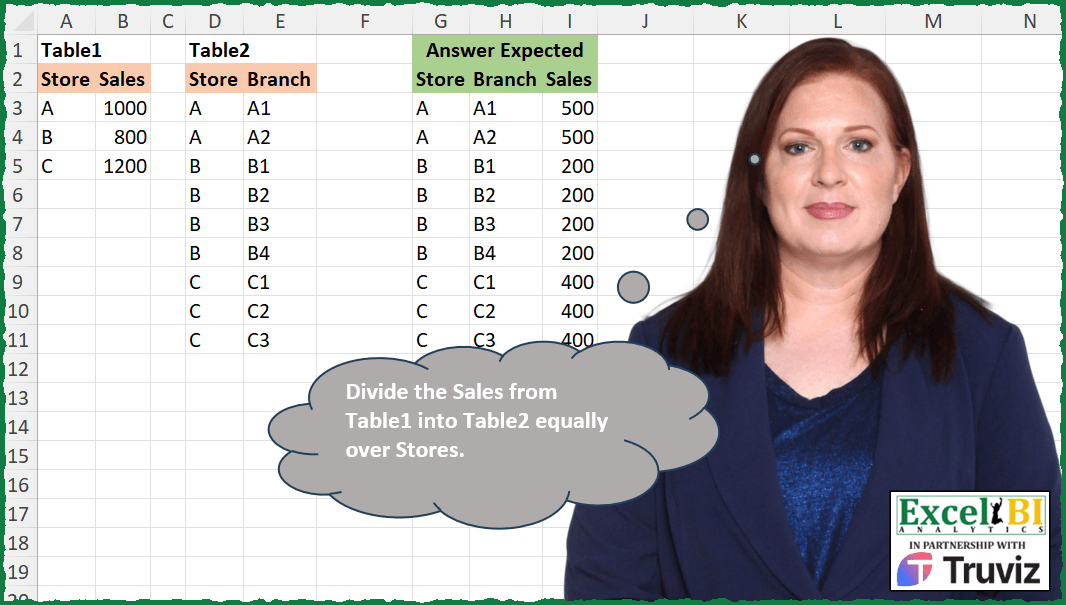
Divide the Sales from Table1 into Table2 equally over Stores.
📌 Challenge Details and Links
ExcelBI Excel Challenge Number: 476
Challenge Difficulty: ⭐️
📥Download Sample File
📥Link to the solutions on LinkedIn
Solving the challenge of Distribute Sales Equally with Power Query
Power Query solution 1 for Distribute Sales Equally, proposed by Zoran Milokanović:
let
  Source = each Excel.CurrentWorkbook(){[Name = _]}[Content],
  T = Source("Table2"),
  O = each [Store],
  S = Table.AddColumn(
    T,
    "Sales",
    each Source("Table1"){[Store = O(_)]}[Sales] / List.Count(List.PositionOf(O(T), O(_), 2))
  )
in
  S
Power Query solution 2 for Distribute Sales Equally, proposed by Aditya Kumar Darak 🇮🇳:
let
  Table1 = Excel.CurrentWorkbook(){[Name = "Table1"]}[Content],
  Table2 = Excel.CurrentWorkbook(){[Name = "Table2"]}[Content],
  Join = Table.NestedJoin(Table1, "Store", Table2, "Store", "J"),
  Table = Table.AddColumn(
    Join,
    "T",
    each Table.AddColumn([J], "Sales", (f) => [Sales] / Table.RowCount([J]))
  ),
  Return = Table.Combine(Table[T])
in
  Return
Power Query solution 3 for Distribute Sales Equally, proposed by Alejandro Simón 🇵🇦 🇪🇸:
let
  Tbl1 = Excel.CurrentWorkbook(){[Name = "Table1"]}[Content],
  Tbl2 = Excel.CurrentWorkbook(){[Name = "Table2"]}[Content],
  Sol = Table.Combine(
    Table.AddColumn(
      Tbl1,
      "A",
      (x) =>
        let
          a = Tbl2,
          b = Table.SelectRows(a, each [Store] = x[Store]),
          c = Table.AddColumn(b, "Sales", each x[Sales] / Table.RowCount(b))
        in
          c
    )[A]
  )
in
  Sol
Power Query solution 4 for Distribute Sales Equally, proposed by Ramiro Ayala Chávez:
let
  t1 = Excel.CurrentWorkbook(){[Name = "Table1"]}[Content],
  t2 = Excel.CurrentWorkbook(){[Name = "Table2"]}[Content],
  a = t2 & t1,
  b = Table.Group(
    a,
    {"Store"},
    {{"G", each List.Count([Store]) - 1}, {"H", each List.Last([Sales])}}
  ),
  c = Table.AddColumn(b, "S", each [H] / [G]),
  d = Table.SelectRows(a, each [Branch] <> null)[[Store], [Branch]],
  Sol = Table.AddColumn(d, "Sales", each c[S]{List.PositionOf(c[Store], [Store])})
in
  Sol
Power Query solution 5 for Distribute Sales Equally, proposed by Luke Jarych:
let
 tb1 = Excel.CurrentWorkbook(){[Name="Table1"]}[Content],
 tb2 = Excel.CurrentWorkbook(){[Name="Table2"]}[Content],
 AddCol = Table.AddColumn(tb1, "Answer", each
 let a = Table.SelectRows(tb2, (tb2Row) => [Store] = tb2Row[Store]),
 b = Table.RowCount(a),
 c = [Sales]/b,
 d = Table.AddColumn(a, "Sales", each c)
 in d)[[Answer]],
 Expanded = Table.ExpandTableColumn(AddCol, "Answer", Table.ColumnNames(AddCol{0}[Answer]))
in
 Expanded

It is maybe nicer than AI answer but definitely it took me longer than 30 seconds :)
Power Query solution 6 for Distribute Sales Equally, proposed by Luke Jarych:
let
 // Load the tables
 Table1 = Excel.CurrentWorkbook(){[Name="Table1"]}[Content],
 Table2 = Excel.CurrentWorkbook(){[Name="Table2"]}[Content],

 // Count the number of branches for each store
 BranchCount = Table.Group(Table2, {"Store"}, {{"Count", each Table.RowCount(_), type number}}),

 // Merge the sales table and the branch count table
 MergedTable = Table.NestedJoin(Table1, {"Store"}, BranchCount, {"Store"}, "NewColumn", JoinKind.LeftOuter),

 // Expand the new column to get the count of branches
 ExpandedTable = Table.ExpandTableColumn(MergedTable, "NewColumn", {"Count"}, {"Count"}),
Power Query solution 7 for Distribute Sales Equally, proposed by Luke Jarych:
Luke Jarych
 // Create a new column for sales per branch
 AddedCustom = Table.AddColumn(ExpandedTable, "Sales per Branch", each [Sales] / [Count], type number),
 FinalTable = Table.NestedJoin(AddedCustom, {"Store"}, Table2, {"Store"}, "NewColumn", JoinKind.LeftOuter),
 FinalExpandedTable = Table.ExpandTableColumn(FinalTable, "NewColumn", {"Branch"}, {"Branch"}),
 RemovedColumns = Table.RemoveColumns(FinalExpandedTable,{"Count", "Sales"})
in
 RemovedColumns
Power Query solution 8 for Distribute Sales Equally, proposed by Venkata Rajesh:
let
  Source = Table2,
  Output = Table.AddColumn(
    Source,
    "Sales",
    each [
      x = Table.SelectRows(Source, (r) => r[Store] = [Store]),
      y = Table1{[Store = [Store]]}[Sales] / Table.RowCount(x)
    ][y],
    Int64.Type
  )
in
  Output
Power Query solution 9 for Distribute Sales Equally, proposed by Francesco Bianchi 🇮🇹:
let
  TblFrRec = Table.FromRecords(
    Table.AddColumn(
      Excel.CurrentWorkbook(){[Name = "Table1"]}[Content],
      "TR",
      each
        let
          a = Table.SelectRows(
            Excel.CurrentWorkbook(){[Name = "Table2"]}[Content],
            (x) => x[Store] = _[Store]
          )[Branch],
          b = List.Count(a)
        in
          [Store = _[Store], Branch = a, Sales = _[Sales] / b]
    )[TR]
  ),
  ExpandedBranch = Table.ExpandListColumn(TblFrRec, "Branch")
in
  ExpandedBranch
Solving the challenge of Distribute Sales Equally with Excel
Excel solution 1 for Distribute Sales Equally, proposed by Rick Rothstein:
=HSTACK(
    D3:E11,
    XLOOKUP(
        D3:D11,
        A3:A5,
        MAP(
            A3:A5,
            B3:B5,
            LAMBDA(
                a,
                b,
                LET(
                    c,
                    COUNTA(
                        FILTER(
                            D3:D11,
                            D3:D11=a
                        )
                    ),
                    b/c
                )
            )
        )
    )
)
Excel solution 2 for Distribute Sales Equally, proposed by John V.:
=LET(
    s,
    D3:D11,
    HSTACK(
        D3:E11,
        LOOKUP(
            s,
            A3:B5
        )/COUNTIF(
            s,
            s
        )
    )
)
Excel solution 3 for Distribute Sales Equally, proposed by محمد حلمي:
=LET(
    d,
    D3:D11,
    VLOOKUP(
        d,
        A3:B5,
        2,

    )/COUNTIF(
        d,
        d
    )
)
Excel solution 4 for Distribute Sales Equally, proposed by محمد حلمي:
=LET(
    d,
    D3:D11,

    HSTACK(
        D3:E11,
        VLOOKUP(
            d,
            A3:B5,
            2,

        )/COUNTIF(
            d,
            d
        )
    )
)
Excel solution 5 for Distribute Sales Equally, proposed by 🇰🇷 Taeyong Shin:
=GROUPBY(D2:E11,
    VSTACK(
        B2,
        D3:D11
    ),
    LAMBDA(x,
    @(SUMIFS(
        B3:B5,
        A3:A5,
        x
    )/COUNTIF(
        D3:D11,
        x
    ))),
    3,
    0)

=LET(
    s,
    D3:D11,
    HSTACK(
        D3:E11,
        LOOKUP(
            s,
            A3:B5
        )/COUNTIF(
            s,
            s
        )
    )
)
Excel solution 6 for Distribute Sales Equally, proposed by Kris Jaganah:
=LET(
    a,
    D3:D11,
    HSTACK(
        a,
        E3:E11,
        VLOOKUP(
            a,
            A3:B5,
            2,
            0
        )/COUNTIF(
            a,
            a
        )
    )
)
Excel solution 7 for Distribute Sales Equally, proposed by Julian Poeltl:
=LET(
    T,
    A2:B5,
    TT,
    D2:E11,
    STT,
    DROP(
        TAKE(
            TT,
            ,
            1
        ),
        1
    ),
    SST,
    DROP(
        TAKE(
            T,
            ,
            2
        ),
        1
    ),
    HSTACK(
        TT,
        VSTACK(
            INDEX(
                T,
                1,
                2
            ),
            VLOOKUP(
                STT,
                T,
                2
            )/COUNTIF(
                STT,
                STT
            )
        )
    )
)
Excel solution 8 for Distribute Sales Equally, proposed by Timothée BLIOT:
=LET(A,
    D3:D11,
    HSTACK(A,
    E3:E11,
    MAP(A,
    LAMBDA(x,
    XLOOKUP(
        x,
        A3:A5,
        B3:B5
    )/SUM(--(A=x))))))

=LET(
    S,
    D3:D11,
    HSTACK(
        S,
        E3:E11,
        XLOOKUP(
            S,
            A3:A5,
            B3:B5
        )/COUNTIF(
            S,
            S
        )
    )
)
Excel solution 9 for Distribute Sales Equally, proposed by Oscar Mendez Roca Farell:
=LET(
    c,
     B3:B5,
     HSTACK(
         D3:E11,
          TOCOL(
              REPT(
                  c/COUNTIF(
                      D3:D11,
                       A3:A5
                  ),
                   TOROW(
                       c^0
                   )
              )
          )
     )
)
Excel solution 10 for Distribute Sales Equally, proposed by Brian Julius:
=

VAR __SelStore =
SELECTEDVALUE(
     'Table 2'[Store]
)

VAR __Numerator =
LOOKUPVALUE(

     'Table 1'[Sales] ,

     'Table 1'[Store],

     __SelStore

)

VAR __Denominator =
COUNTROWS(

     FILTER(

          ALL(
               'Table 2'
          ),

          'Table 2'[Store] = __SelStore

     )

)

VAR __Result =
DIVIDE(
     __Numerator,
     __Denominator
)
Excel solution 11 for Distribute Sales Equally, proposed by Abdallah Ally:
=LET(
    a,
    D3:D11,
    VSTACK(
        {"Store",
        "Branch",
        "Sales"},
        HSTACK(
            D3:E11,
             MAP(
                 a,
                 LAMBDA(
                     x,
                     VLOOKUP(
                         x,
                         A3:B5,
                         2,
                         0
                     )/COUNTA(
                         FILTER(
                             a,
                             a=x
                         )
                     )
                 )
             )
        )
    )
)
Excel solution 12 for Distribute Sales Equally, proposed by 🇵🇪 Ned Navarrete C.:
=HSTACK(D3:E11,XLOOKUP(D3:D11,A3:A5,B3:B5/COUNTIF(D3:D11,A3:A5)))Excel solution 13 for Distribute Sales Equally, proposed by Pieter de B.:
=LET(
    s,
    D3:D11,
    HSTACK(
        D3:E11,
        LOOKUP(
            s,
            A3:B5
        )/COUNTIF(
            s,
            s
        )
    )
)
Excel solution 14 for Distribute Sales Equally, proposed by Hamidi Hamid:
=LET(
    x,
    MID(
        E3:E11,
        1,
        1
    ),
    y,
    MID(
        E3:E11,
        2,
        100
    ),
    z,
    VLOOKUP(
        x,
        A3:B5,
        2,
        0
    ),
    v,
    MAP(
        x,
        y,
        z,
        LAMBDA(
            a,
            b,
            c,
            XLOOKUP(
                a,
                x,
                z,
                "",
                0,
                -1
            )/XLOOKUP(
                a,
                x,
                y,
                "",
                0,
                -1
            )
        )
    ),
    HSTACK(
        MID(
        E3:E11,
        1,
        1
    ),
        MID(
        E3:E11,
        1,
        1
    )&MID(
        E3:E11,
        2,
        100
    ),
        v
    )
)
Excel solution 15 for Distribute Sales Equally, proposed by Milan Shrimali:
=let(data,
    LET(
        a,
        A1:B3,
        b,

        arrayformula(
            choosecols(
                COUNTIF(
                    D1:D9,
                    a
                ),
                1
            )
        ),
        hstack(
            a,
            arrayformula(
                choosecols(
                    a,
                    2
                )/b
            )
        )
    ),
    MAP(D1:D9,
    E1:E9,
    LAMBDA(x,
    y,
    FILTER(choosecols(
        data,
        3
    ),
    (choosecols(
        data,
        1
    )=x)*(left(
        y,
        1
    )=x)))))
Excel solution 16 for Distribute Sales Equally, proposed by Peter Tholstrup:
=HSTACK(

     Table2,

     XLOOKUP(

          Table2[Store],

          Table1[Store],

          Table1[Sales]

     ) / COUNTIFS(
         Table2[Store],
          Table2[Store]
     )

)
Excel solution 17 for Distribute Sales Equally, proposed by Nicolas Micot:
=LET(
    _nbBranch;
    NB.SI(
        Table2[Store];
        Table1[Store]
    );

    _salesRepartition;
    Table1[Sales]/_nbBranch;

    ASSEMB.H(
        Table2;
        RECHERCHEX(
            Table2[Store];
            Table1[Store];
            _salesRepartition
        )
    )
)
Excel solution 18 for Distribute Sales Equally, proposed by El Badlis Mohd Marzudin:
=VSTACK(
    G2:I2;
    HSTACK(
        D3:E11;
        XLOOKUP(
            D3:D11;
            A3:A5;
            B3:B5
        )/COUNTIFS(
            D3:D11;
            D3:D11
        )
    )
)
=LET(
sto,
D3:D11,
HSTACK(
sto,
E3:E11,
SUMIFS(
B3:B5,
A3:A5,
sto
)/COUNTIFS(
sto,
sto
)
)
)Excel solution 20 for Distribute Sales Equally, proposed by Andres Rojas Moncada:
=LET(
    st,
    A3:A5,
    sa,
    B3:B5,
    sto,
    D3:D11,
    bra,
    E3:E11,
    HSTACK(
        sto,
        bra,
        SUMIFS(
            sa,
            st,
            sto
        )/COUNTIFS(
            sto,
            sto
        )
    )
)
Excel solution 21 for Distribute Sales Equally, proposed by Andres Rojas Moncada:
=HSTACK(D3:E11,XLOOKUP(D3:D11,A3:A5,B3:B5)/VLOOKUP(D3:D11,GROUPBY(D3:D11,D3:D11,COUNTA,,0),2))Excel solution 22 for Distribute Sales Equally, proposed by Burhan Cesur:
=REDUCE(G2:I2,
    A3:A5,
    LAMBDA(s,
    v,
    VSTACK(s,
    LET(a,
    COUNTIF(
        D3:D11,
        v
    ),
    HSTACK(FILTER(
        D3:E11,
        D3:D11=v
    ),
    OFFSET(
        v,
        0,
        1
    )/(a*SEQUENCE(
        a
    )^0))))))
Excel solution 23 for Distribute Sales Equally, proposed by Hussain Ali Nasser:
=LET(
    _st,
     A3:A5,
     _sts,
     B3:B5,
     _st2,
     D3:D11,
     HSTACK(
         D3:E11,
          INDEX(
              _sts / COUNTIF(
                  _st2,
                   _st
              ),
               XMATCH(
                  _st2,
                   _st
              )
          )
     )
)
Excel solution 24 for Distribute Sales Equally, proposed by Hussain Ali Nasser:
=HSTACK(
 D3:E11,
 VLOOKUP(D3:D11, A3:B5, 2) /
 COUNTIF(D3:D11, D3:D11)
)
Excel solution 25 for Distribute Sales Equally, proposed by Josh Brodrick:
=HSTACK(D3:E11,TEXTSPLIT(CONCAT(REPT(B3:B5/(COUNTIF(D3:D11,A3:A5))&"A",COUNTIF(D3:D11,A3:A5))),,"A",TRUE))Excel solution 26 for Distribute Sales Equally, proposed by Bevon Clarke:
LET(
    divisions;
    XLOOKUP(
        D3:D11;
        A3:A5;
        B3:B5/COUNTIF(
            D3:D11;
            A3:A5
        )
    );
    store;
    D3:D11;
    branch;
    E3:E11;
    HSTACK(
        store;
        branch;
        divisions
    )
)
Excel solution 27 for Distribute Sales Equally, proposed by Tyler Cameron:
=LET(
    a,
    D3:D11,
    HSTACK(
        D3:E11,
        INDEX(
            B3:B5,
            CODE(
                a
            )-64
        )/COUNTIF(
            a,
            a
        )
    )
)
Excel solution 28 for Distribute Sales Equally, proposed by Tyler Cameron:
=LET(
    a,
    D3:D11,
    HSTACK(
        D2:E11,
        VSTACK(
            B2,
            XLOOKUP(
                a,
                A3:A5,
                B3:B5
            )/COUNTIF(
                a,
                a
            )
        )
    )
)
Excel solution 29 for Distribute Sales Equally, proposed by Caroline Blake:
=LET(
    a,
    A3:B5,
    b,
    D3:E11,
    _t,
    LAMBDA(
        x,
        y,
        CHOOSECOLS(
            x,
            y
        )
    ),
    z,
    BYROW(
        _t(
            a,
            1
        ),
        LAMBDA(
            x,
            COUNTA(
                FILTER(
                    _t(
                        b,
                        1
                    ),
                    _t(
                        b,
                        1
                    )=x
                )
            )
        )
    ),
    HSTACK(
        b,
        XLOOKUP(
            _t(
                        b,
                        1
                    ),
            _t(
            a,
            1
        ),
            _t(
                a,
                2
            )/z,
            0,
            0,
            1
        )
    )
)
Excel solution 30 for Distribute Sales Equally, proposed by Alan Webster:
=SUMIF($H$6:$H$8,$L6,$I$6:$I$8)/COUNTIF($L$6:$M$14,L6)Excel solution 31 for Distribute Sales Equally, proposed by Treasure Okafor:
CREATE TABLE Answer_Expected (
 Store CHAR(
     1
 ),

 Branch VARCHAR2(2),

 Sales NUMBER
);
Solving the challenge of Distribute Sales Equally with Python
Python solution 1 for Distribute Sales Equally, proposed by Konrad Gryczan, PhD:
import pandas as pd
input1 = pd.read_excel("476 Assigning Sales.xlsx", usecols="A:B", skiprows=1, nrows = 3 )
input2 = pd.read_excel("476 Assigning Sales.xlsx", usecols="D:E", skiprows=1)
input2.columns = ["Store", "Branch"]
test = pd.read_excel("476 Assigning Sales.xlsx", usecols="G:I", skiprows=1)
test.columns = ["Store", "Branch", "Sales"]
result = pd.merge(input1, input2, on="Store", how="left")
result["n"] = result.groupby("Store")["Store"].transform("count")
result["Sales"] = result["Sales"] / result["n"]
result["Sales"] = result["Sales"].astype('int64')
result = result[["Store", "Branch", "Sales"]]
print(result.equals(test)) # True
Python solution 2 for Distribute Sales Equally, proposed by Luke Jarych:
Python Xlwings solution:
import pandas as pd
import xlwings as xw
wb = xw.Book(r'Excel_Challenge_476 - Assigning Sales.xlsx')
sh = wb.sheets[0]
table = sh.tables['Table1']
rng = sh.range(table.range.address)
df1 = rng.options(pd.DataFrame, header = True, index=False, numbers=int).value
table = sh.tables['Table2']
rng = sh.range(table.range.address)
df2 = rng.options(pd.DataFrame, header = True, index=False, numbers=int).value
df = pd.merge(df2, df1)
df['Store_Count'] = df2.groupby('Store')['Store'].transform('count')
df['Sales'] = (df['Sales'] / df['Store_Count']).astype(int)
df.drop(df.columns[-1], axis=1, inplace=True)
Python solution 3 for Distribute Sales Equally, proposed by Aman Mashetty:
# python solution
data = {
 'store': ['A', 'B', 'C'],
 'sales': [1000,800,1200]}
tbl1 = pd.DataFrame(data)
data1 = { 'store' : ['A','A','B','B','B','B','C','C','C'],
 'Branch' : ['A1','A2','B1','B2','B3','B4','C1','C2','C3'],
 }
tbl2 = pd.DataFrame(data1)
# Step 1: Calculate total sales for each store
total_sales = tbl1.groupby('store')['sales'].sum()
branch_counts = tbl2['store'].value_counts()
# Step 3: Calculate sales per branch
sales_per_branch = total_sales / branch_counts
# Step 4: Assign sales per branch to tbl2 based on store
tbl2['sales'] = tbl2['store'].map(sales_per_branch)
print("tbl1:")
print(tbl1)
print("ntbl2 with sales distributed equally based on store level:")
print(tbl2)
Solving the challenge of Distribute Sales Equally with Python in Excel
Python in Excel solution 1 for Distribute Sales Equally, proposed by Abdallah Ally:
import pandas as pd
file_path = 'Excel_Challenge_476 - Assigning Sales.xlsx'
df1 = pd.read_excel(file_path, usecols='A:B', skiprows=1, nrows=3)
df2 = pd.read_excel(file_path, usecols='D:E', skiprows=1)
df2 = df2.rename(columns={'Store.1': 'Store'})
# Perform data wrangling
df = pd.merge(df2, df1)
df['Count'] = df.groupby('Store')['Store'].transform('count')
df['Sales'] = (df['Sales'] / df['Count']).astype(int)
df = df.iloc[:, : 3]
df
Solving the challenge of Distribute Sales Equally with R
R solution 1 for Distribute Sales Equally, proposed by Konrad Gryczan, PhD:
library(tidyverse)
library(readxl)
input1 = read_excel("Excel/476 Assigning Sales.xlsx", range = "A2:B5")
input2 = read_excel("Excel/476 Assigning Sales.xlsx", range = "D2:E11")
test  = read_excel("Excel/476 Assigning Sales.xlsx", range = "G2:I11")
result = input1 %>%
 left_join(input2, by = "Store") %>%
 mutate(n = n(), .by = Store) %>%
 mutate(Sales = Sales / n) %>%
 select(Store, Branch, Sales)
identical(result, test)
# [1] TRUE
Solving the challenge of Distribute Sales Equally with Excel VBA
Excel VBA solution 1 for Distribute Sales Equally, proposed by Ümit Barış Köse, MSc:
Sub list2()
 Dim EndRow1 As Integer, EndRow2 As Integer, i1 As Integer, num1 As Integer, r As Integer
 Dim Store1 As String, Store2 As String, Branch As String
 Dim sales As Double, pay As Double
 Application.ScreenUpdating = False
 EndRow1 = Cells(Rows.Count, 4).End(xlUp).Row
 EndRow2 = Cells(Rows.Count, 1).End(xlUp).Row
 Range("G3:I" & EndRow1).Clear
 Store1 = ""
 For i1 = EndRow1 To 3 Step -1
 Store2 = Cells(i1, 4).Value
 If Store2 <> Store1 Then
 Branch = Cells(i1, 5).Value
 num1 = Mid(Branch, Len(Store2) + 1)
 r = Range("A2:A" & EndRow2).Find(Store2).Row
 sales = Cells(r, 2).Value
 pay = sales / num1
 End If
 Cells(i1, 7).Value = Store2
 Cells(i1, 8).Value = Cells(i1, 5).Value
 Cells(i1, 9).Value = pay
 Store1 = Store2
 Next i1
 Application.ScreenUpdating = True
End Sub
Solving the challenge of Distribute Sales Equally with DAX
DAX solution 1 for Distribute Sales Equally, proposed by Zoran Milokanović:
EVALUATE
ADDCOLUMNS(Table2, "Sales", CALCULATE(MAX(Table1[Sales]), FILTER(Table1, Table1[Store] = Table2[Store])) / COUNTROWS(CALCULATETABLE(Table2, ALLEXCEPT(Table2, Table2[Store]))))
&&