
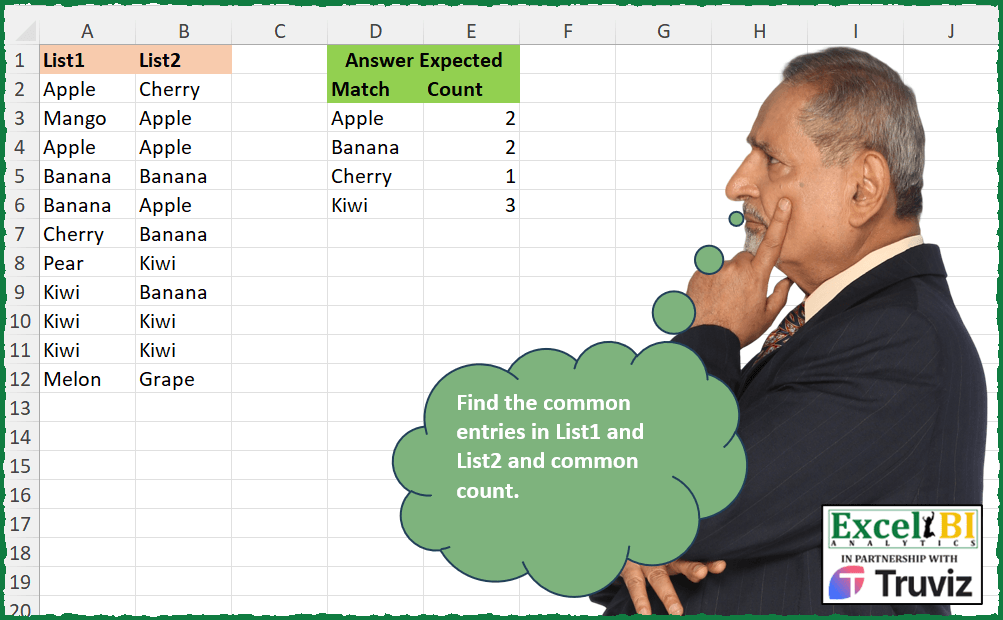
Today’s challenge is contributed by Mehmet Çiçek Find the common entries in List1 and List2 and common count.
📌 Challenge Details and Links
ExcelBI Excel Challenge Number: 453
Challenge Difficulty: ⭐️
📥Download Sample File
📥Link to the solutions on LinkedIn
Solving the challenge of Common Entries and Count with Power Query
Power Query solution 1 for Common Entries and Count, proposed by Aditya Kumar Darak 🇮🇳:
let
  Source    = Excel.CurrentWorkbook(){[Name = "data"]}[Content],
  Intersect = List.Intersect(Table.ToColumns(Source)),
  Table     = Table.FromList(Intersect, null, type table [Match = text]),
  Return    = Table.Group(Table, "Match", {"Count", Table.RowCount})
in
  Return
Power Query solution 2 for Common Entries and Count, proposed by Alejandro Simón 🇵🇦 🇪🇸:
let
  Origen = Excel.CurrentWorkbook(){[Name = "Tabla1"]}[Content],
  List1 = Table.FromColumns({List.Distinct(Origen[List1])}, {"Match"}),
  Sol = Table.SelectRows(
    Table.AddColumn(
      List1,
      "Count",
      (x) =>
        let
          a = Table.ToColumns(Origen),
          b = List.Min(List.Transform(a, each List.Count(List.Select(_, (y) => y = x[Match]))))
        in
          b
    ),
    each [Count] <> 0
  )
in
  Sol
Power Query solution 3 for Common Entries and Count, proposed by Alejandro Simón 🇵🇦 🇪🇸:
let
  Source = Excel.CurrentWorkbook(){[Name = "Table1"]}[Content],
  Lista = List.Distinct(Source[List1] & Source[List2]),
  Lista2 = List.Transform(
    Lista,
    each {
      _,
      List.Min(
        {
          List.Count(List.Select(Source[List1], (x) => x = _)),
          List.Count(List.Select(Source[List2], (x) => x = _))
        }
      )
    }
  ),
  Sol = Table.FromRows(List.Select(Lista2, each _{1} <> 0), {"Match", "Count"})
in
  Sol
Power Query solution 4 for Common Entries and Count, proposed by Ramiro Ayala Chávez:
let
  S   = Excel.CurrentWorkbook(){[Name = "Table1"]}[Content],
  a   = List.Intersect({S[List1], S[List2]}),
  Sol = Table.Group(Table.FromColumns({a}, {"Match"}), {"Match"}, {"Count", each Table.RowCount(_)})
in
  Sol
Power Query solution 5 for Common Entries and Count, proposed by Krzysztof Nowak:
let
  Source = Excel.Workbook(File.Contents("......ruits.xlsx"), true, true),
  MainTable = Source{[Item = "Sheet1", Kind = "Sheet"]}[Data],
  Unpivot = Table.UnpivotOtherColumns(MainTable, {}, "Attribute", "Value"),
  Grouped_Rows = Table.Group(
    Unpivot,
    {"Attribute", "Value"},
    {{"Count", each Table.RowCount(_), Int64.Type}}
  ),
  Grouped_Rows1 = Table.Group(
    Grouped_Rows,
    {"Value"},
    {{"Count", each Table.RowCount(_), Int64.Type}}
  ),
  NListsFilter = Table.SelectRows(Grouped_Rows1, each ([Count] = Table.ColumnCount(MainTable))),
  FruitsInScope = Table.RemoveColumns(NListsFilter, {"Count"}),
  InterS = Table.Join(Grouped_Rows, "Value", FruitsInScope, "Value", JoinKind.Inner),
  #"Grouped Rows" = Table.Group(InterS, {"Value"}, {{"Min", each List.Min([Count]), type number}}),
  #"Sorted Rows" = Table.Sort(#"Grouped Rows", {{"Value", Order.Ascending}})
in
  #"Sorted Rows"
Power Query solution 6 for Common Entries and Count, proposed by Luke Jarych:
let
  Source = Table.NestedJoin(List1, {"List1"}, List2, {"List2"}, "List2", JoinKind.Inner),
  #"Removed Columns" = Table.RemoveColumns(Source, {"List2"}),
  #"Grouped Rows" = Table.Group(
    #"Removed Columns",
    {"List1"},
    {{"Count", each Table.RowCount(_), Int64.Type}}
  )
in
  #"Grouped Rows"
Power Query solution 7 for Common Entries and Count, proposed by Venkata Rajesh:
let
  Source = Data,
  Count = Table.AddColumn(
    Source,
    "Count",
    each [
      l1 = [List1],
      x  = List.Count(List.PositionOf(Source[List1], l1, Occurrence.All)),
      y  = List.Count(List.PositionOf(Source[List2], l1, Occurrence.All)),
      z  = if x <= y then x else y
    ][z]
  ),
  Filter = Table.SelectRows(Count, each ([Count] <> 0)),
  Remove = Table.Distinct(Table.FromColumns({Filter[List1], Filter[Count]}, {"Match", "Count"}))
in
  Remove
Power Query solution 8 for Common Entries and Count, proposed by Cristobal Salcedo Beltran:
let
  Source = Excel.CurrentWorkbook(){[Name = "Tabla1"]}[Content],
  #"Grouped Rows" = Table.Group(
    Source,
    {"List1"},
    {
      {
        "Count",
        (x) =>
          if List.Count(List.Select(Source[List2], each _ = x[List1]{0})) > 0 then
            List.Count(x[List1])
          else
            null,
        Int64.Type
      }
    }
  ),
  Result = Table.RenameColumns(
    Table.SelectRows(#"Grouped Rows", each ([Count] <> null)),
    {{"List1", "Match"}}
  )
in
  Result
Solving the challenge of Common Entries and Count with Excel
Excel solution 1 for Common Entries and Count, proposed by Bo Rydobon 🇹🇭:
=LET(
    a,
    A2:A12,
    u,
    SORT(
        UNIQUE(
            a
        )
    ),
    b,
    BYROW(
        HSTACK(
            COUNTIF(
                a,
                u
            ),
            COUNTIF(
                B2:B12,
                u
            )
        ),
        MIN
    ),
    FILTER(
        HSTACK(
            u,
            b
        ),
        b
    )
)
Excel solution 2 for Common Entries and Count, proposed by Rick Rothstein:
=LET(
    u,
    UNIQUE(
        A2:A12
    ),
    f,
    FILTER(
        u,
        COUNTIF(
            B2:B12,
            u
        )
    ),
    HSTACK(
        f,
        MAP(
            COUNTIF(
                A2:A12,
                f
            ),
            COUNTIF(
                B2:B12,
                f
            ),
            LAMBDA(
                a,
                b,
                MIN(
                    a,
                    b
                )
            )
        )
    )
)
Excel solution 3 for Common Entries and Count, proposed by Rick Rothstein:
=LET(
    u,
    UNIQUE(
        A2:A12
    ),
    FILTER(
        u,
        COUNTIF(
            B2:B12,
            u
        )
    )
)
Excel solution 4 for Common Entries and Count, proposed by John V.:
=LET(
    r,
    A2:B12,
    i,
    TOCOL(
        MAP(
            r,
            LAMBDA(
                x,
                MIN(
                    BYCOL(
                        N(
                            x=r
                        ),
                        SUM
                    )
                )
            )
        )
    ),
    UNIQUE(
        FILTER(
            HSTACK(
                TOCOL(
                    r
                ),
                i
            ),
            i
        )
    )
)
Different approach:
✅=LET(
    i,
    A2:A12,
    f,
    COUNTIF,
    a,
    f(
        i,
        i
    ),
    b,
    f(
        B2:B12,
        i
    ),
    v,
    IF(
        a
Excel solution 5 for Common Entries and Count, proposed by محمد حلمي:
=LET(
    a,
    A2:A12,
    i,
    UNIQUE(
        a
    ),
    V,
    MAP(
        i,
        LAMBDA(
            c,
            MIN(
                COUNTIF(
                    a,
                    c
                ),
                COUNTIF(
                    B2:B12,
                    c
                )
            )
        )
    ),
    FILTER(
        HSTACK(
            i,
            V
        ),
        V
    )
)
Excel solution 6 for Common Entries and Count, proposed by Kris Jaganah:
=LET(
    a,
    A2:A12,
    b,
    COUNTIF(
        a,
        a
    ),
    c,
    COUNTIF(
        B2:B12,
        a
    ),
    d,
    IF(
        b>c,
        c,
        b
    ),
    UNIQUE(
        FILTER(
            HSTACK(
                a,
                d
            ),
            d
        )
    )
)
Excel solution 7 for Common Entries and Count, proposed by Konrad Gryczan, PhD:
= input %>%
 pivot_longer(
     cols = everything()
 ) %>%
 count(
     value,
      by = name
 ) %>%
 mutate(
     nr = n_distinct(
         by
     ),

      min_n = min(
          n
      ) %>% as.numeric(),

      .by = value
 ) %>%
 filter(
     nr == 2
 ) %>%
 select(
     Match = value,
      Count = min_n
 ) %>%
 distinct()


identical(
    result,
     test
)
Excel solution 8 for Common Entries and Count, proposed by Julian Poeltl:
=LET(
    T,
    A2:B12,
    LO,
    TAKE(
        T,
        ,
        1
    ),
    LT,
    TAKE(
        T,
        ,
        -1
    ),
    U,
    UNIQUE(
        LO
    ),
    C,
    BYROW(
        HSTACK(
            COUNTIF(
                LO,
                U
            ),
            COUNTIF(
                LT,
                U
            )
        ),
        LAMBDA(
            A,
            MIN(
                A
            )
        )
    ),
    VSTACK(
        HSTACK(
            "Match",
            "Count"
        ),
        HSTACK(
            FILTER(
                U,
                C>0
            ),
            FILTER(
                C,
                C>0
            )
        )
    )
)
Excel solution 9 for Common Entries and Count, proposed by Timothée BLIOT:
=LET(U,
    UNIQUE(
        A2:A12
    ),
    F,
    FILTER(U,
    MAP(U,
    LAMBDA(x,
    SUM(--(x=B2:B12))>0))),
    HSTACK(F,
    MAP(F,
    LAMBDA(x,
    SUM(--(x=A2:A12))))))
Excel solution 10 for Common Entries and Count, proposed by Nikola Z Grujicic - Nikola Ž Grujičić:
=LET(a, A2:A12, b, B2:B12, m, SORT(UNIQUE(VSTACK(a, b))), x, MAP(m, LAMBDA(mm, MIN(SUMPRODUCT((mm=a)*1), SUMPRODUCT((mm=b)*1)))), s, FILTER(m, x>0), t, FILTER(x, x>0), HSTACK(s, t))Excel solution 11 for Common Entries and Count, proposed by Hussein SATOUR:
=LET(
    a,
    A2:A12,
    b,
    COUNTIF(
        B2:B12,
        a
    ),
    UNIQUE(
        FILTER(
            HSTACK(
                a,
                BYROW(
                    HSTACK(
                        COUNTIF(
                            a,
                            a
                        ),
                        b
                    ),
                    MIN
                )
            ),
            b>0
        )
    )
)
Excel solution 12 for Common Entries and Count, proposed by Oscar Mendez Roca Farell:
=LET(
    a,
     A2:A12,
     b,
     B2:B12,
     u,
     UNIQUE(
         TOCOL(
             XLOOKUP(
                 a,
                  b,
                  b
             ),
              2
         )
     ),
     HSTACK(
         u,
          MAP(
              u,
               LAMBDA(
                   i,
                    MIN(
                        COUNTIF(
                            a,
                             i
                        ),
                         COUNTIF(
                             b,
                              i
                         )
                    )
               )
          )
     )
)
Excel solution 13 for Common Entries and Count, proposed by Oscar Mendez Roca Farell:
=LET(
    a,
     A2:A12,
     b,
     B2:B12,
     u,
     UNIQUE(
         TOCOL(
             XLOOKUP(
                 a,
                  b,
                  b
             ),
              2
         )
     ),
     HSTACK(
         u,
          MAP(
              u,
               LAMBDA(
                   i,
                    MIN(
                        COUNTIF(
                            a,
                             i
                        ),
                         COUNTIF(
                             b,
                              i
                         )
                    )
               )
          )
     )
)
Excel solution 14 for Common Entries and Count, proposed by Duy Tùng:
=LET(
    a,
    UNIQUE(
        FILTER(
            A2:A12,
            COUNTIF(
                B2:B12,
                A2:A12
            )>0
        )
    ),
    HSTACK(
        a,
        MAP(
            a,
            LAMBDA(
                x,
                MIN(
                    BYCOL(
                        N(
                            A2:B12=x
                        ),
                        SUM
                    )
                )
            )
        )
    )
)
Excel solution 15 for Common Entries and Count, proposed by Sunny Baggu:
=LET(

     _a,
     SORT(
         UNIQUE(
             TOCOL(
                 A2:B12
             )
         )
     ),

     _b,
     MAP(

          _a,

          LAMBDA(
              b,
               MIN(
                   BYCOL(
                       N(
                           A2:B12 = b
                       ),
                        LAMBDA(
                            a,
                             SUM(
                                 a
                             )
                        )
                   )
               )
          )

     ),

     FILTER(
         HSTACK(
             _a,
              _b
         ),
          _b <> 0
     )

)
Excel solution 16 for Common Entries and Count, proposed by LEONARD OCHEA 🇷🇴:
=LET(
    a,
    A2:A12,
    b,
    B2:B12,
    p,
    VSTACK(
        COUNTIF(
            b,
            a
        ),
        COUNTIF(
            a,
            b
        )
    ),
    GROUPBY(
        VSTACK(
            a,
            b
        ),
        p,
        MIN,
        ,
        0,
        ,
        ,
        p
    )
)
Excel solution 17& for Common Entries and Count, proposed by 🇵🇪 Ned Navarrete C.:
=LET(
    a,
    A2:A12,
    b,
    B2:B12,
    REDUCE(
        D2:E2,
        UNIQUE(
            FILTER(
                a,
                COUNTIF(
                    b,
                    a
                )
            )
        ),
        LAMBDA(
            c,
            v,
            VSTACK(
                c,
                HSTACK(
                    v,
                    MIN(
                        SUM(
                            N(
                                v=a
                            )
                        ),
                        SUM(
                            N(
                                v=b
                            )
                        )
                    )
                )
            )
        )
    )
)
Excel solution 18 for Common Entries and Count, proposed by Md. Zohurul Islam:
=LET(
    u,
    A2:A12,
    v,
    B2:B12,
    w,
    VSTACK(
        u,
        v
    ),

    hdr,
    HSTACK(
        "Match",
        "Count"
    ),

    a,
    COUNTIF(
        u,
        v
    ),

    b,
    COUNTIF(
        v,
        u
    ),

    c,
    VSTACK(
        b,
        a
    ),

    d,
    GROUPBY(
        w,
        c,
        MIN,
        0,
        0
    ),

    e,
    FILTER(
        d,
        DROP(
            d,
            ,
            1
        )>0
    ),

    VSTACK(
        hdr,
        e
    )
)
Excel solution 19 for Common Entries and Count, proposed by Pieter de B.:
=LET(
    a,
    A2:A12,
    b,
    B2:B12,
    L,
    SORT(
        UNIQUE(
            FILTER(
                b,
                1-ISNA(
                    XMATCH(
                        b,
                        a
                    )
                )
            )
        )
    ),

    x,
    LAMBDA(
        a,
        MMULT(
            N(
                TOROW(
                    a
                )=L
            ),
            SEQUENCE(
                ROWS(
                    a
                )
            )^0
        )
    ),

    HSTACK(
        L,
        MAP(
            x(
                    a
                ),
            x(
                b
            ),
            LAMBDA(
                y,
                z,
                MIN(
                    y,
                    z
                )
            )
        )
    )
)
Excel solution 20 for Common Entries and Count, proposed by ferhat CK:
=LET(
    b,
    UNIQUE(
        A2:A12
    ),
    a,
    B2:B12,
    c,
    COUNTIF(
        a,
        b
    ),
    d,
    TAKE(
        FILTER(
            HSTACK(
                b,
                c
            ),
            c>0
        ),
        ,
        1
    ),
    HSTACK(
        d,
        MAP(
            d,
            LAMBDA(
                x,
                COUNTIF(
                    A2:A12,
                    x
                )
            )
        )
    )
)
Excel solution 21 for Common Entries and Count, proposed by Andy Heybruch:
=LET(

    _L1,
    A2:A12,

    _L2,
    B2:B12,

    _u,
    UNIQUE(
        _L1
    ),

    _a,
    HSTACK(
        _u,
        BYROW(
            _u,
            LAMBDA(
                a,
                MIN(
                    COUNTIFS(
                        _L1,
                        a
                    ),
                    COUNTIFS(
                        _L2,
                        a
                    )
                )
            )
        )
    ),

    FILTER(
        _a,
        TAKE(
            _a,
            ,
            -1
        )>0
    )
)
Excel solution 22 for Common Entries and Count, proposed by Milan Shrimali:
=LET(
list1,
    $A$2:$A$12,

list2,
    $B$2:$B$12,

common,
    FILTER(
        list2,
        COUNTIF(
            list1,
            list2
        )
    ),

unque,
    SORT(
        UNIQUE(
            common
        ),
        1,
        1
    ),

IFNA(HSTACK(unque,
    MAP(list1,
    unque,
    LAMBDA(x,
    y,
    SUMPRODUCT(--(list1=y))))),
    ""))
Excel solution 23 for Common Entries and Count, proposed by Peter Tholstrup:
=LET(

     list1,
     $A$2:$A$12,

     list2,
     $B$2:$B$12,

     getCount,
     LAMBDA(
         a,

          MIN(
              COUNTIFS(
                  list1,
                   a
              ),
               COUNTIFS(
                   list2,
                    a
               )
          )

     ),

     m,
     UNIQUE(

          FILTER(
              list1,
               ISNUMBER(
                   XMATCH(
                       list1,
                        list2
                   )
               )
          )

     ),

     c,
     BYROW(
         m,
          getCount
     ),

     result,
     VSTACK(
         {"Match",
          "Count"},
          HSTACK(
              m,
               c
          )
     ),

     result

)
Excel solution 24 for Common Entries and Count, proposed by Nicolas Micot:
=LET(
    _List1;
    A2:A12;
    _List2;
    B2:B12;

    _elements;
    UNIQUE(
        ASSEMB.V(
            _List1;
            _List2
        )
    );

    _minCommonElements;
    MAP(
        _elements;
        LAMBDA(
            l_element;
            MIN(
                NB.SI(
                    _List1;
                    l_element
                );
                NB.SI(
                    _List2;
                    l_element
                )
            )
        )
    );

    FILTRE(
        ASSEMB.H(
            _elements;
            _minCommonElements
        );
        _minCommonElements > 0;
        ""
    )
)
Excel solution 25 for Common Entries and Count, proposed by Edwin Tisnado:
=LET(
    a,
    SORT(
        UNIQUE(
            B2:B12
        )
    ),
    b,
    COUNTIF(
        A2:A12,
        a
    ),
    FILTER(
        HSTACK(
            a,
            b
        ),
        b
    )
)
Excel solution 26 for Common Entries and Count, proposed by Sergei Baklan:
=LET(
 fruits,
     UNIQUE(
          VSTACK(
              List1,
               List2
          )
     ),

 k,
     SEQUENCE(
         ROWS(
             List1
         ),
         ,
         ,
         0
     ),

 fa,
     MMULT(--(fruits=TRANSPOSE(
             List1
         )),
    k),

 fb,
     MMULT(--(fruits=TRANSPOSE(
         List2
     )),
    k),

 both,
     IF(
         fa < fb,
          fa,
          fb
     ),

 FILTER(
      HSTACK(
          fruits,
           both
      ),
      both
 )
)
Excel solution 27 for Common Entries and Count, proposed by Rayan S.:
=LET(

     l,
     TOCOL(
         A2:B12
     ),

     u,
     UNIQUE(
         l
     ),

     n,
     ROUNDDOWN(

          MAP(
              u,
               LAMBDA(
                   x,
                    COUNTA(
                        FILTER(
                            l,
                             l = x
                        )
                    )
               )
          ) /
          2,

          0

     ),

     FILTER(
         HSTACK(
             u,
              n
         ),
          n > 0
     )

)
Excel solution 28 for Common Entries and Count, proposed by Rayan S.:
=LET(
arr,
    A2:B12,

u,
    UNIQUE(
        TOCOL(
            arr
        )
    ),

s,
    MAP(u,
    LAMBDA(x,

MIN(BYCOL(--
(FILTER(arr,

((TAKE(
    arr,
    ,
    1
)=x)+(TAKE(
    arr,
    ,
    -1
)=x)))=x),
    SUM)))),

FILTER(
    HSTACK(
        u,
        s
    ),
    s>0
))
Excel solution 29 for Common Entries and Count, proposed by Ernesto Vega Castillo:
=UNIQUE(
    LET(
        a,
        A2:A12,
        b,
        B2:B12,
        c,
        BYROW(
            HSTACK(
                COUNTIFS(
                    a,
                    b
                ),
                COUNTIFS(
                    b,
                    b
                )
            ),
            LAMBDA(
                m,
                MIN(
                    m
                )
            )
        ),
        SORT(
            FILTER(
                HSTACK(
                    b,
                    c
                ),
                c>0
            )
        )
    )
)
Excel solution 30 for Common Entries and Count, proposed by Ernesto Vega Castillo:
=LET(
    a,
    A2:A12,
    b,
    B2:B12,
    u,
    SORT(
        UNIQUE(
            a
        )
    ),
    list1,
    HSTACK(
        u,
        COUNTIFS(
            a,
            u
        )
    ),
    list2,
    HSTACK(
        b,
        BYROW(
            HSTACK(
                COUNTIFS(
                    b,
                    u
                )
            ),
            LAMBDA(
                d,
                d
            )
        )
    ),
    r,
    IFNA(
        MAP(
            TAKE(
                list1,
                ,
                -1
            ),
            TAKE(
                list2,
                ,
                -1
            ),
            LAMBDA(
                p,
                q,
                MIN(
                    p,
                    q
                )
            )
        ),
        0
    ),
    FILTER(
        HSTACK(
            u,
            r
        ),
        r>0
    )
)
Excel solution 31 for Common Entries and Count, proposed by Gabriel Raigosa:
=LET(a,A2:A12,u,UNIQUE(a),c,COUNTIF(a,u),m,COUNTIF(B2:B12,u),n,IF(c>m,m,c),FILTER(HSTACK(u,n),n>0))

🔹ES:
=LET(a,A2:A12,u,UNICOS(a),c,CONTAR.SI(a,u),m,CONTAR.SI(B2:B12,u),n,SI(c>m,m,c),FILTRAR(APILARH(u,n),n>0))
Excel solution 32 for Common Entries and Count, proposed by Burhan Cesur:
=LET(
    a,
    A2:A12,
    b,
    UNIQUE(
        a
    ),
    FILTER(
        HSTACK(
            b,
            COUNTIF(
                a,
                b
            )
        ),
        COUNTIF(
            B2:B12,
            b
        )
    )
)
Excel solution 33 for Common Entries and Count, proposed by Burhan Cesur:
=LET(
    a,
    A2:A12,
    b,
    UNIQUE(
        a
    ),
    c,
    BYROW(
        HSTACK(
            COUNTIF(
                a,
                b
            ),
            COUNTIF(
                B2:B12,
                b
            )
        ),
        MIN
    ),
    FILTER(
        HSTACK(
            b,
            c
        ),
        c
    )
)
Excel solution 34 for Common Entries and Count, proposed by Mehmet Çiçek:
=LET(a,
    A2:A12,
    b,
    B2:B12,
    f,
    LAMBDA(
        x,
        MAP(
            x,
            LAMBDA(
                m,
                LET(
                    n,
                    x,
                    m&"-"&COUNTIF(
                        INDEX(
                            n,
                            1
                        ):m,
                        m
                    )
                )
            )
        )
    ),
    c,
    TEXTBEFORE(
        FILTER(
            f(
                a
            ),
            ISNUMBER(
                MATCH(
                    f(
                a
            ),
                    f(
                        b
                    ),
                    0
                )
            )
        ),
        "-"
    ),
    d,
    UNIQUE(
        c
    ),
    HSTACK(d,
    MAP(d,
    LAMBDA(y,
    SUM(--(c=y))))))
Excel solution 35 for Common Entries and Count, proposed by Ibrahim Sadiq:
=VSTACK(
    HSTACK(
        {"Match",
        "Count"}
    ),
    LET(
        a,
        A2:A12,
        b,
        B2:B12,
        u,
        UNIQUE(
            a
        ),
        c,
        COUNTIF(
            b,
            u
        ),
        x,
        FILTER(
            u,
            c
        ),
        y,
        COUNTIF(
            a,
            x
        ),
        HSTACK(
            x,
            y
        )
    )
)
Excel solution 36 for Common Entries and Count, proposed by Josh Brodrick:
=LET(
    a,
    XLOOKUP(
        UNIQUE(
            A2:A12
        ),
        B2:B12,
        B2:B12,
        0
    ),
    b,
    COUNTIF(
        A2:A12,
        UNIQUE(
            A2:A12
        )
    ),
    FILTER(
        HSTACK(
            a,
            b
        ),
        a<>0
    )
)
Excel solution 37 for Common Entries and Count, proposed by Josh Brodrick:
=LET(

    a,
    XLOOKUP(
        UNIQUE(
            A2:A12
        ),
        B2:B12,
        B2:B12,
        0
    ),

    b,
    COUNTIF(
        A2:A12,
        UNIQUE(
            A2:A12
        )
    ),

    c,
    COUNTIF(
        B2:B12,
        UNIQUE(
            A2:A12
        )
    ),

    FILTER(
        HSTACK(
            a,
            IF(
                b<=c,
                b,
                c
            )
        ),
        a<>0
    )
)
Excel solution 38 for Common Entries and Count, proposed by Tyler Cameron:
=LET(
    b,
    A2:A12,
    a,
    SORT(
        UNIQUE(
            b
        )
    ),
    i,
    COUNTIF(
        B2:B12,
        a
    ),
    j,
    COUNTIF(
        b,
        a
    ),
    t,
    IF(
        i0
    )
)
Original
=LET(
    b,
    SORT(
        UNIQUE(
            A2:A12
        )
    ),
    i,
    ROUNDDOWN(
        COUNTIF(
            A2:B12,
            b
        )/2,
        0
    ),
    FILTER(
        HSTACK(
            b,
            i
        ),
        i<>0
    )
)
Excel solution 39 for Common Entries and Count, proposed by Will Freestone:
=LET(d,
    A2:B12,
    f,
    UNIQUE(
        TAKE(
            d,
            ,
            1
        )
    ),
    ct,
    DROP(REDUCE(0,
    f,
    LAMBDA(a,
    v,
    VSTACK(a,
    MIN(BYCOL(d,
    LAMBDA(c,
    SUM(--(c=v)))))))),
    1),
    FILTER(
        HSTACK(
            f,
            ct
        ),
        ct
    ))
Excel solution 40 for Common Entries and Count, proposed by Henk-Jan van Well:
=LET(
    l,
    A2:A12,
    r,
    B2:B12,
    u,
    UNIQUE(
        l
    ),
    f,
    FILTER(
        u,
        BYROW(
            u,
            LAMBDA(
                x,
                OR(
                    x=r
                )
            )
        )
    ),
    HSTACK(
        f,
 &       BYROW(
            HSTACK(
                COUNTIF(
                    l,
                    f
                ),
                COUNTIF(
                    r,
                    f
                )
            ),
            MIN
        )
    )
)
Solving the challenge of Common Entries and Count with Python
Python solution 1 for Common Entries and Count, proposed by Konrad Gryczan, PhD:
import pandas as pd
input = pd.read_excel("453 Common in Columns.xlsx", sheet_name="Sheet1", usecols="A:B")
test = pd.read_excel("453 Common in Columns.xlsx", sheet_name="Sheet1", usecols="D:E", skiprows=1, nrows = 4)
result = input.assign(nr_l1=input.groupby("List1").cumcount()+1).assign(nr_l2=input.groupby("List2").cumcount()+1)
result["List1"] = result["List1"] + "_" + result["nr_l1"].astype(str)
result["List2"] = result["List2"] + "_" + result["nr_l2"].astype(str)
l1 = result["List1"].tolist()
l2 = result["List2"].tolist()
common = list(set(l1) & set(l2))
result2 = pd.DataFrame(common, columns=["Match"])
result2[["Match", "Count"]] = result2["Match"].str.split("_", expand=True)
result2["Count"] = result2["Count"].astype("int64")
result2 = result2.groupby("Match")["Count"].max().reset_index()
print(result2.equals(test)) # True
Python solution 2 for Common Entries and Count, proposed by Luke Jarych:
import pandas as pd
import xlwings as xw
from collections import Counter as co
wb = xw.Book(r'Excel_Challenge_453 - Common in Columns.xlsx')
sh = wb.sheets[0]
table = sh.tables['data']
rng = sh.range(table.range.address)
df = rng.options(pd.DataFrame, header = True, index=False, numbers=int).value
list1 = df.iloc[:, 0].tolist()
list2 = df.iloc[:, 1].tolist()
intersection = list((co(list1) & co(list2)).elements())
counts = co(intersection)
for match, count in counts.items():
 print(f"{match}t{count}")
Apple2
Banana2
Cherry1
Kiwi3
Solving the challenge of Common Entries and Count with Python in Excel
Python in Excel solution 1 for Common Entries and Count, proposed by Abdallah Ally:
import pandas as pd
file_path = 'Excel_Challenge_453 - Common in Columns.xlsx'
df = pd.read_excel(file_path, usecols='A:B')
# Perform data transformation and cleansing
c, d = df.columns
fruits = [(x, min([sum(df[c] == x), sum(df[d] == x)]))
 for x in df[c].unique() if x in df[d].values]
df = pd.DataFrame(fruits, columns=['Match', 'Count'])
# Display final results
df
Solving the challenge of Common Entries and Count with R
R solution 1 for Common Entries and Count, proposed by Konrad Gryczan, PhD:
library(tidyverse)
library(readxl)
input = read_excel("Excel/453 Common in Columns.xlsx", range = "A1:B12")
test = read_excel("Excel/453 Common in Columns.xlsx", range = "D2:E6")
result = input %>%
 mutate(nr_l1 = row_number(), .by = List1) %>%
 mutate(nr_l2 = row_number(), .by = List2) %>%
 unite("List1", List1, nr_l1, sep = "_") %>%
 unite("List2", List2, nr_l2, sep = "_")
l1 = result$List1
l2 = result$List2
common = intersect(l1, l2)
result2 = as_tibble(common) %>%
 separate(value, c("Match", "Count"), sep = "_") %>%
 mutate(Count = as.numeric(Count)) %>%
 slice_max(Count, by = Match)
identical(result2, test)
#> [1] TRUE
Solving the challenge of Common Entries and Count with Excel VBA
Excel VBA solution 1 for Common Entries and Count, proposed by Rushikesh K.:
Option Explicit
Sub FindCommonItems()
 Dim ws As Worksheet
 Dim lastRowA As Long, lastRowB As Long
 Dim cell As Range
 Dim commonCount As Integer
 Dim commonList As Object


 Set commonList = CreateObject("Scripting.Dictionary")


 Set ws = ThisWorkbook.Sheets("Sheet1")


 lastRowA = ws.Cells(ws.Rows.Count, "A").End(xlUp).Row
 lastRowB = ws.Cells(ws.Rows.Count, "B").End(xlUp).Row

 ' Loop through each item in column A
 For Each cell In ws.Range("A1:A" & lastRowA)
 If Not IsError(Application.Match(cell.Value, ws.Range("B1:B" & lastRowB), 0)) Then
 ' Increment common count
 commonCount = commonCount + 1
 ' Add item to common list or update its count
 If Not commonList.Exists(cell.Value) Then
 commonList.Add cell.Value, 1
 Else
 commonList(cell.Value) = commonList(cell.Value) + 1
 End If
 End If
 Next cell


 ws.Range("D3").Resize(commonList.Count, 1).Value = Application.Transpose(commonList.keys)
 ws.Range("E3").Resize(commonList.Count, 1).Value = Application.Transpose(commonList.items)

End Sub
&