
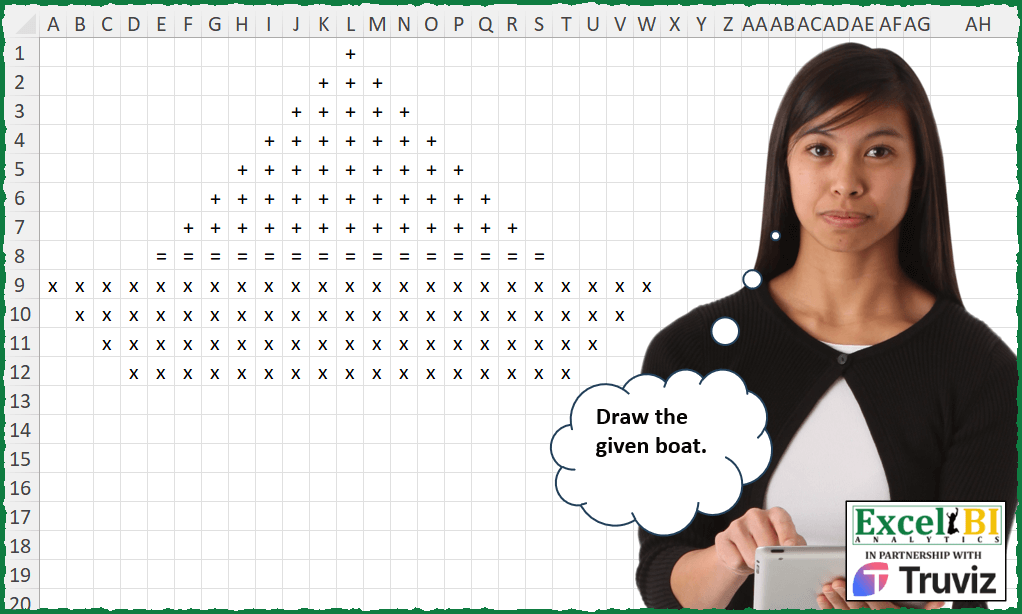
Draw the given boat.
📌 Challenge Details and Links
ExcelBI Excel Challenge Number: 435
Challenge Difficulty: ⭐️⭐️
📥Download Sample File
📥Link to the solutions on LinkedIn
Solving the challenge of Draw Boat Using Grid with Power Query
Power Query solution 1 for Draw Boat Using Grid, proposed by Zoran Milokanović:
let
  Source = Table.FromRows(
    List.Transform(
      {0 .. 11},
      each
        let
          p = List.PositionOf({_ < 7, _ = 7, true}, true)
        in
          {F(p, 11 - _, (_ + 1) * 2 - 1), F(p, 4, (_ + 1) * 2 - 1), F(2, _ - 8, 23 - 2 * (_ - 8))}{
            p
          }
    ),
    {"A" .. "W"}
  ),
  A = {"+", "=", "x"},
  F = (a, e, m) =>
    let
      R = List.Repeat
    in
      R({null}, e) & R({A{a}}, m) & R({null}, e)
in
  Source
Power Query solution 2 for Draw Boat Using Grid, proposed by Alejandro Simón 🇵🇦 🇪🇸:
let
  A = List.Repeat,
  B = List.Transform,
  C = List.RemoveFirstN,
  Sol = Table.FromColumns(
    List.Zip(
      List.Reverse(B({0 .. 6}, each A({""}, 5 + _) & C(A({"+"}, 13), _ * 2) & A({""}, 5 + _)))
        & {A({""}, 4) & A({"="}, 15) & A({""}, 4)}
        & B({0 .. 3}, each A({""}, _) & C(A({"X"}, 23), _ * 2) & A({""}, _))
    )
  )
in
  Sol
Power Query solution 3 for Draw Boat Using Grid, proposed by Luan Rodrigues:
let
  Fonte = List.Transform(
    List.Alternate({1 .. 13}, 1, 1, 1),
    each Text.Combine(List.Repeat({" + "}, _))
  )
    & {Text.Combine(List.Repeat({" = "}, 15))}
    & List.Transform(
      List.Alternate({- 23 .. - 17}, 1, 1, 1),
      each Text.Combine(List.Repeat({" x "}, _ * - 1))
    )
in
  Fonte
Solving the challenge of Draw Boat Using Grid with Excel
Excel solution 1 for Draw Boat Using Grid, proposed by Bo Rydobon 🇹🇭:
=MAKEARRAY(12,
    23,
    LAMBDA(r,
    c,
    MID("+=x",
    1+(r>7)+(r>8),
    ABS(
        c-12
    )8)*(21-2*r))))
Excel solution 2 for Draw Boat Using Grid, proposed by Rick Rothstein:
=MAKEARRAY(12,
    23,
    LAMBDA(r,
    c,
    IF((c>=13-r)*(c<=11+r)*(r<9),
    IF(
        r=8,
        "=",
        "+"
    ),
    IF((c>=r-8)*(c<=32-r)*(r>8),
    "x",
    ""))))
Excel solution 3 for Draw Boat Using Grid, proposed by John V.:
=MAKEARRAY(
    12,
    23,
    LAMBDA(
        r,
        c,
        IF(
            r>8,
            REPT(
                "x",
                ABS(
                    c-12
                )<21-r
            ),
            REPT(
                IF(
                    r=8,
                    "=",
                    "+"
                ),
                ABS(
                    c-12
                )
Excel solution 4 for Draw Boat Using Grid, proposed by محمد حلمي:
=MAKEARRAY(12,
    23,
    LAMBDA(r,
    c,
    IFS((c+r<13)*(r<9)+(r<9)*(c+r>13+
r*2-2),
    "",
    r<8,
    "+",
    r=8,
    "=",
    (c+r<33)*(c-r>-9),
    "x",
    1,
    "")))
Excel solution 5 for Draw Boat Using Grid, proposed by Julian Poeltl:
=MAKEARRAY(12,
    23,
    LAMBDA(A,
    B,
    IFS((A<8)*(B>=12-(A-1))*(B<=12+(A-1)),
    "+",
    (A=8)*(B>4)*(B<20),
    "=",
    (A>8)*(B>0+(A-9))*(B<(24-(A-9))),
    "x",
    1,
    "")))
Excel solution 6 for Draw Boat Using Grid, proposed by Timothée BLIOT:
=MAKEARRAY(
    12,
    23,
    LAMBDA(
        x,
        y,
         IF(
             x<9,
              IF(
                  AND(
                      x>12-y,
                      x+12>y
                  ),
                  IF(
                      x=8,
                      "=",
                      "+"
                  ),
                  ""
              ),
              IF(
                  OR(
                      x-8>y,
                      32
Excel solution 7 for Draw Boat Using Grid, proposed by Nikola Z Grujicic - Nikola Ž Grujičić:
=LET(h,
     SEQUENCE(
         7
     ),
    i,
    2*(h-1)+1,
    j,
    12-h,
    k,
    REPT(
        " ",
        j
    )&REPT(
        "+",
        i
    )&REPT(
        " ",
        j
    ),
    l,
     SEQUENCE(
         4,
         ,
         0,
         1
     ),
    ak,
     REPT(
         " ",
         4
     )&REPT(
         "=",
         15
     )&REPT(
         " ",
         4
     ),
    m,
     REPT(
         " ",
         l
     )&REPT(
         "x",
         23-l*2
     )&REPT(
         " ",
         l
     ),
     aq,
     VSTACK(
         k,
          ak,
          m
     ),
     MID(
         aq,
          SEQUENCE(
              ,
              23,
              ,
              1
          ),
         1
     ))
Excel solution 8 for Draw Boat Using Grid, proposed by Oscar Mendez Roca Farell:
=MAKEARRAY(12,
     23,
     LAMBDA(r,
     c,
     IFS((r<8)*(c>12-f)*(c<12+f),
     "+",
     (r=8)*(c>4)*(c<20),
     "=",
     (r>8)*(c>f-9)*(c<24-MOD(
         f,
          9
     )),
     "x",
     1,
     "")))
Excel solution 9 for Draw Boat Using Grid, proposed by Sunny Baggu:
=LET(

     _a,
     VSTACK(
         SEQUENCE(
             8
         ),
          SEQUENCE(
              4,
               ,
               12,
               -1
          )
     ),

     _b,
     _a * 2 - 1,

     _c,
     _a - _b,

     _r,
     SEQUENCE(
         ROWS(
             _a
         )
     ),

     _s,
     IFNA(
         DROP(
             REDUCE(
                 "",
                  _r,
                  LAMBDA(
                      a,
                       v,
                       VSTACK(
                           a,
                            SEQUENCE(
                                ,
                                 INDEX(
                                     _b,
                                      v,
                                      1
                                 ),
                                 INDEX(
                                     _c,
                                      v,
                                      1
                                 )
                            )
                       )
                  )
             ),
              1
         ),
          0
     ),

     _s1,
     12 - _s,

     _cri,
     DROP(

          REDUCE(
              "",
               _r,
               LAMBDA(
                   x,
                    y,
                    VSTACK(
                        x,
                         MAP(
                             SEQUENCE(
                                 ,
                                  23
                             ),
                              LAMBDA(
                                  a,
                                   OR(
                                       INDEX(
                                           _s1,
                                            y,

                                       ) = a
                                   )
                              )
                         )
                    )
               )
          ),

          1

     ),

     REPT(
         IFS(
             _a <= 7,
              "+",
              _a = 8,
              "=",
              1,
              "x"
         ),
          _cri
     )

)
Excel solution 10 for Draw Boat Using Grid, proposed by LEONARD OCHEA 🇷🇴:
=LET(s,
    VSTACK(
        SEQUENCE(
            8
        ),
        13-SEQUENCE(
            4
        )
    ),
    m,
    --MID(BASE(2^(11+s)-2^(12-s),
    2,
    23),
    SEQUENCE(
        ,
        23
    ),
    1),
    IF(
        m,
        IFS(
            s<8,
            "+",
            s=8,
            "=",
            1,
            "x"
        ),
        ""
    ))
Excel solution 11 for Draw Boat Using Grid, proposed by 🇵🇪 Ned Navarrete C.:
=LET(f,
    SEQUENCE(
        12
    ),
    c,
    TOROW(
        f
    ),
     b,
    IFS((f<8)*(12-c
Excel solution 12 for Draw Boat Using Grid, proposed by Andy Heybruch:
=MAKEARRAY(12,
    23,
    LAMBDA(r,
    c,
    IFERROR(IFS(
AND((ABS(
    c-12
)-r)<=-1,
    r<8),
    "+",

AND(
    r=8,
    ABS(
    c-12
)<8
),
    "=",

AND(r>8,
    (ABS(
    c-12
)+r)<=20),
    "x"),
    "")))
Excel solution 13 for Draw Boat Using Grid, proposed by Bilal Mahmoud kh.:
=MAKEARRAY(12,
    24,
    LAMBDA(r,
    c,
    IF(r <= 7,
    IF(AND(c<=12+(r-1),
    c>=12-(r-1)),
    "+",
    ""),
    IF(AND(
        r=8,
        c>=5,
        c<=19
    ),
    "=",
    IF(AND(r>8,
    c >= 1 +(r-9),
    c <= 24 - (r-9)),
    "×",
    "")))))
Excel solution 14 for Draw Boat Using Grid, proposed by Tyler Cameron:
=MAKEARRAY(12,
    23,
    LAMBDA(r,
    c,
    LET(a,
    12-r,
    b,
    12+r,
    IF(AND(
        c>a,
        c8,
    c>r-9,
    c<24-(r-9)),
    "x",
    "")))))
or for a bit of a different less efficient idea Josh Brodrick
=LET(a,
    VSTACK(
        SEQUENCE(
            8,
            ,
            ,
            2
        ),
        SEQUENCE(
            4,
            ,
            23,
            -2
        )
    ),
    b,
    IF(a<17,
    REPT(
        " ,",
        12-MATCH(
            a,
            a
        )
    )&REPT(
        IF(
            a=15,
            "=,",
            "+,"
        ),
        a
    ),
    REPT(" ,",
    (23-a)/2)&REPT(
        "x,",
        a
    )),
    DROP(
        IFNA(
            DROP(
                REDUCE(
                    "",
                    b,
                    LAMBDA(
                        x,
                        y,
                        VSTACK(
                            x,
                            TEXTSPLIT(
                                y,
                                ","
                            )
                        )
                    )
                ),
                1
            ),
            ""
        ),
        ,
        -1
    ))
Solving the challenge of Draw Boat Using Grid with Python
Python solution 1 for Draw Boat Using Grid, proposed by Konrad Gryczan, PhD:
import numpy as np
import pandas as pd
M = np.full((12, 23), None)
for i in range(1, 8):
 num_NAs = int((23 - 2*i + 1)/2)
 M[i-1, ] = [None] * num_NAs + ['+'] * (2*i - 1) + [None] * num_NAs
i = 8
num_NAs = int((23 - 2*i + 1)/2)
M[i-1, ] = [None] * num_NAs + ['='] * (2*i - 1) + [None] * num_NAs
for i in range(9, 13):
 num_NAs = i - 9
 M[i-1, ] = [None] * num_NAs + ['x'] * (23 - 2*num_NAs) + [None] * num_NAs
df = pd.DataFrame(M)
print(df)
Solving the challenge of Draw Boat Using Grid with R
R solution 1 for Draw Boat Using Grid, proposed by Anil Kumar Goyal:
library(tidyverse)
map(c(0:7, 11:8),
 ~ 12 + seq(-1 * (.x ), .x, by = 1)) %>%
 imap_dfr(~ .x %>%
 as_tibble() %>%
 set_names("col") %>%
 mutate(row = .y)) %>%
 mutate(shape = case_when(
 row %in% 1:7 ~ "A",
 row == 8 ~ "B",
 TRUE ~ "C"
 )) %>%
 ggplot(aes(col, row)) +
 geom_point(aes(shape = shape)) +
 scale_y_reverse() +
 scale_shape_manual(values = c(3, 61, 4)) +
 theme_void() +
 theme(legend.position = "none")
Solving the challenge of Draw Boat Using Grid with Excel VBA
Excel VBA solution 1 for Draw Boat Using Grid, proposed by Anup Kumar:
VBA Code
Sub DrawBoat()
 Dim ws As Worksheet
 Dim sCol As Integer, eCol As Integer
 Dim row As Integer, col As Integer
 Sheets.Add After:=ActiveSheet
 Set ws = ActiveSheet
 ws.Columns("A:AZ").ColumnWidth = 2
 sCol = 13
 eCol = 6
 For row = 1 To 8
 For col = sCol To sCol + (row - 2) * 2
 ws.Cells(row, col).Value = "+"
 Next col
 sCol = sCol - 1
 Next row

 sCol = 5
 For col = sCol To 19
 ws.Cells(9, col).Value = "="
 Next col

 sCol = 1
 eCol = 23
 For row = 10 To 13
 For col = sCol To eCol
 ws.Cells(row, col).Value = "X"
 Next col
 sCol = sCol + 1
 eCol = eCol - 1
 Next row

End Sub
&&&