
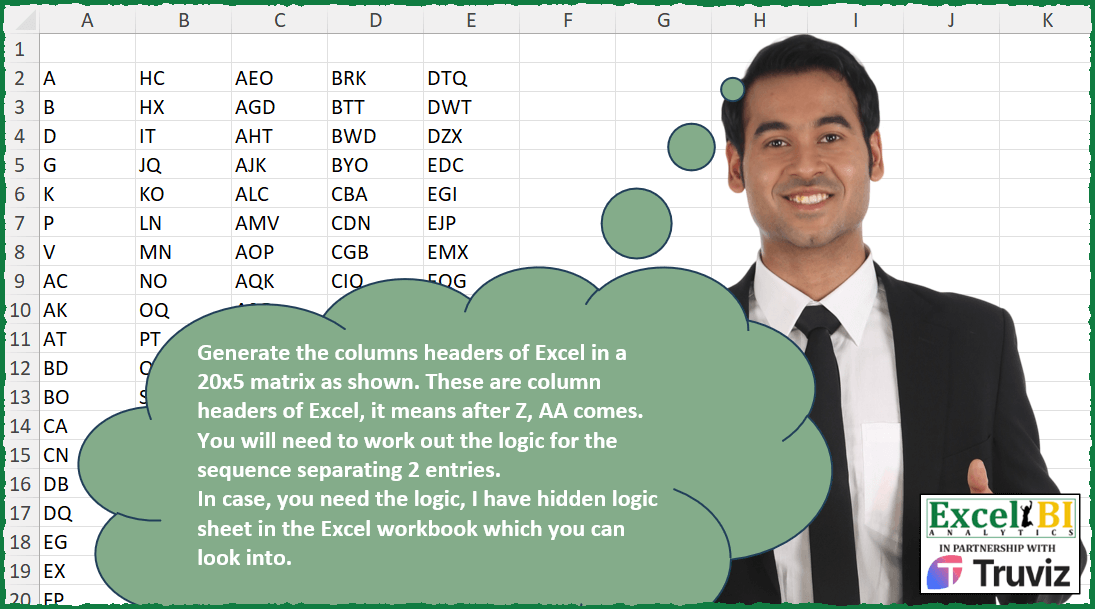
Generate the columns headers of Excel in a 20×5 matrix as shown. These are column headers of Excel, it means after Z, AA comes. You will need to work out the logic for the sequence separating 2 entries. In case, you need the logic, I have hidden logic sheet in the Excel workbook which you can look into.
📌 Challenge Details and Links
ExcelBI Excel Challenge Number: 434
Challenge Difficulty: ⭐️
📥Download Sample File
📥Link to the solutions on LinkedIn
Solving the challenge of Generate Excel Column Headers with Power Query
Power Query solution 1 for Generate Excel Column Headers, proposed by Bo Rydobon 🇹🇭:
let
  N = {1 .. 100},
  Col = Table.FromColumns(
    List.Split(
      List.Transform(
        N,
        (n) =>
          Text.Combine(
            List.Transform(
              {2, 1, 0},
              each
                let
                  m = Number.Mod(
                    Number.IntegerDivide((n * (n - 1) / 2 + 1), Number.Power(26, _)),
                    26
                  )
                in
                  if m > 0 then Character.FromNumber(m + 64) else null
            )
          )
      ),
      20
    )
  )
in
  Col
Power Query solution 2 for Generate Excel Column Headers, proposed by Ramiro Ayala Chávez:
let
  a = {"A" .. "Z"},
  b = List.TransformMany(a, (x) => a, (x, y) => Text.Combine({x, y})),
  c = List.TransformMany(a, (x) => b, (x, y) => Text.Combine({x, y})),
  d = List.Zip({List.FirstN(a & b & c, 5000), {0 .. 4999}}),
  e = List.Skip(
    List.Generate(
      () => [i = 0, j = 0],
      each [i] < 5000,
      each [i = [i] + [j], j = [j] + 1],
      each [i]
    )
  ),
  f = List.Select(d, each List.ContainsAny(_, e)),
  g = List.FirstN(List.Transform(f, each _{0}), 100),
  Sol = Table.FromColumns(List.Split(g, 20))
in
  Sol
Solving the challenge of Generate Excel Column Headers with Excel
Excel solution 1 for Generate Excel Column Headers, proposed by Bo Rydobon 🇹🇭:
=TEXTSPLIT(
    ADDRESS(
        1,
        WRAPCOLS(
            SCAN(
                1,
                SEQUENCE(
                    100,
                    ,
                    0
                ),
                SUM
            ),
            20
        ),
        4
    ),
    1
)
Excel solution 2 for Generate Excel Column Headers, proposed by Rick Rothstein:
=LET(
    s,
    SEQUENCE(
        100
    ),
    WRAPCOLS(
        TEXTBEFORE(
            ADDRESS(
                1,
                1-s/2+s*s/2,
                4
            ),
            1
        ),
        20
    )
)


Original formula
----------------------------
=LET(
    s,
    SEQUENCE(
        100
    ),
    WRAPROWS(
        TEXTBEFORE(
            ADDRESS(
                1,
                1-s/2+s*s/2,
                4
            ),
            1
        ),
        5
    )
)
Excel solution 3 for Generate Excel Column Headers, proposed by Rick Rothstein:
=WRAPCOLS(TEXTBEFORE(ADDRESS(1,
    (SEQUENCE(
        100,
        ,
        ,
        2
    )^2-1)/8+1,
    4),
    1),
    20)
Excel solution 4 for Generate Excel Column Headers, proposed by John V.:
=LET(
    s,
    ROW(
        1:100
    ),
    WRAPCOLS(
        TEXTSPLIT(
            ADDRESS(
                1,
                1+s^2/2-s/2,
                4
            ),
            1
        ),
        20
    )
)
Excel solution 5 for Generate Excel Column Headers, proposed by محمد حلمي:
=WRAPCOLS(
    DROP(
        REDUCE(
            0,
            SCAN(
                ,
                SEQUENCE(
                    100
                )-1,
                LAMBDA(
                    a,
                    d,
                    a+d
                )
            ),

            LAMBDA(
                a,
                d,
                LET(
                    i,
                    ADDRESS(
                        1,
                        SEQUENCE(
                            5000
                        ),
                        4
                    ),

                    VSTACK(
                        a,
                        @DROP(
                            LEFT(
                                i,
                                LEN(
                                    i
                                )-1
                            ),
                            d
                        )
                    )
                )
            )
        ),
        1
    ),
    20
)
Excel solution 6 for Generate Excel Column Headers, proposed by Kris Jaganah:
=WRAPCOLS(
    SUBSTITUTE(
        ADDRESS(
            1,
            SCAN(
                1,
                SEQUENCE(
                    100,
                    ,
                    0
                ),
                SUM
            ),
            4
        ),
        1,
        ""
    ),
    20
)
Excel solution 7 for Generate Excel Column Headers, proposed by Julian Poeltl:
=LET(S,SEQUENCE(100),N,SCAN(0,S,LAMBDA(A,B,A+B-1))+1,WRAPCOLS(SUBSTITUTE(ADDRESS(1,N,4),1,""),20))Excel solution 8 for Generate Excel Column Headers, proposed by Julian Poeltl:
=WRAPCOLS(
    SUBSTITUTE(
        ADDRESS(
            1,
            SCAN(
                0,
                SEQUENCE(
                    100
                ),
                LAMBDA(
                    A,
                    B,
                    A+B-1
                )
            )+1,
            4
        ),
        1,
        ""
    ),
    20
)
Excel solution 9 for Generate Excel Column Headers, proposed by Aditya Kumar Darak 🇮🇳:
=WRAPCOLS(
    SUBSTITUTE(
        ADDRESS(
            1,
             SCAN(
                 1,
                  SEQUENCE(
                      100,
                       ,
                       0
                  ),
                  LAMBDA(
                      a,
                      b,
                       a + b
                  )
             ),
             4
        ),
         1,
         ""
    ),
     20
)
Excel solution 10 for Generate Excel Column Headers, proposed by Timothée BLIOT:
=SUBSTITUTE(
    ADDRESS(
        1,
        WRAPCOLS(
            SCAN(
                1,
                ROW(
                    1:100
                )-1,
                LAMBDA(
                    w,
                    v,
                    w+v
                )
            ),
            20
        ),
        4
    ),
    "1",
    ""
)
Excel solution 11 for Generate Excel Column Headers, proposed by Hussein SATOUR:
=WRAPCOLS(TEXTBEFORE(ADDRESS(1,SCAN(,VSTACK(1,ROW(1:99)),SUM),2),"$"),20)Excel solution 12 for Generate Excel Column Headers, proposed by Sunny Baggu:
=LET(

     _a,
     SCAN(
         1,
          SEQUENCE(
              100,
               ,
               0
          ),
          LAMBDA(
              a,
               v,
               a + v
          )
     ),

     _b,
     ADDRESS(
         _a,
          _a,
          4
     ),

     WRAPCOLS(
         LEFT(
             _b,
              LEN(
                  _b
              ) - LEN(
                  _a
              )
         ),
          20
     )

)
Excel solution 13 for Generate Excel Column Headers, proposed by LEONARD OCHEA 🇷🇴:
=LET(s,
    SEQUENCE,
    t,
    s(
        20
    ),
    u,
    s(
        ,
        5,
        0
    ),
    v,
    t+20*u,
    SUBSTITUTE(ADDRESS(1,
    (v^2-v+2)/2,
    4),
    1,
    ""))
Excel solution 14 for Generate Excel Column Headers, proposed by 🇵🇪 Ned Navarrete C.:
=LET(s,
    SEQUENCE(
        5,
        20
    ),
    TRANSPOSE(TEXTSPLIT(ADDRESS(1,
    (s^2-s+2)/2,
    4),
    1)))
Excel solution 15 for Generate Excel Column Headers, proposed by Charles Roldan:
=WRAPCOLS(TEXTBEFORE(ADDRESS(1,
     ((2 * SEQUENCE(
         100
     ) - 1) ^ 2 - 1) / 8 + 1,
     4),
     1),
     20)
Excel solution 16 for Generate Excel Column Headers, proposed by Andy Heybruch:
=TEXTBEFORE(
    ADDRESS(
        1,
        WRAPCOLS(
            SCAN(
                1,
                SEQUENCE(
                    100,
                    ,
                    0
                ),
                LAMBDA(
                    a,
                    v,
                    a+v
                )
            ),
            20
        ),
        4
    ),
    1
)
Excel solution 17 for Generate Excel Column Headers, proposed by LUIS FLORENTINO COUTO CORTEGOSO:
=WRAPCOLS(
    LET(
        s,
        SCAN(
            1,
            SEQUENCE(
                100,
                ,
                0
            ),
            SUM
        ),
        r,
        HSTACK(
            QUOTIENT(
                s,
                26^2
            ),
            MOD(
                QUOTIENT(
                    s,
                    26
                ),
                26
            ),
            MOD(
                    s,
                    26
                )
        ),
        BYROW(
            CHAR(
                IF(
                    r,
                    r+64,
                    32
                )
            ),
            CONCAT
        )
    ),
    20
)
Excel solution 18 for Generate Excel Column Headers, proposed by Tyler Cameron:
=LET(a,
    SEQUENCE(
        100,
        ,
        0
    ),
    b,
    (a^2+a+2)/2,
    WRAPCOLS(
        SUBSTITUTE(
            ADDRESS(
                1,
                b,
                4
            ),
            1,
            ""
        ),
        20
    ))
Solving the challenge of Generate Excel Column Headers with Python
Python solution 1 for Generate Excel Column Headers, proposed by Konrad Gryczan, PhD:
Anil used package cellranger::num_to_letter function so...
import pandas as pd
import numpy as np
import numpy as np

n = 100
seq = np.arange(1, n+1)
cumulative_sum = np.cumsum(seq)
indices = cumulative_sum - seq + 1
def num_to_letter(y):
 import numpy as np
 def jfun(div):
 if np.isnan(div):
 return None
 ret = []
 while div > 0:
 remainder = (div - 1) % 26 + 1
 ret.insert(0, remainder)
 div = (div - remainder) // 26
 return ''.join([chr(r + 64) for r in ret])
 y = np.array(y, ndmin=1)
 ret = np.vectorize(jfun)(y)
 ret[ret == ''] = None
 return ret if len(ret) > 1 else ret[0]
cols = num_to_letter(indices)
matrix = np.reshape(cols, (5,20)).T
print(matrix)
Solving the challenge of Generate Excel Column Headers with R
R solution 1 for Generate Excel Column Headers, proposed by Konrad Gryczan, PhD:
Much longer than Anil's
library(tidyverse)
library(stringi)
library(readxl)
 range = "A2:E21", col_names = FALSE) %>%
 as.matrix()
col_names = c(LETTERS, do.call(paste0, expand.grid(LETTERS, LETTERS)),
 do.call(paste0, expand.grid(LETTERS, LETTERS, LETTERS))) %>%
 map_chr(~stri_reverse(.))


columns = data.frame(cols = col_names) %>%
 mutate(indices = 1:nrow(.))
index <- accumulate(1:99, ~ .x + .y, .init = 1)
result_df = columns %>%
 filter(indices %in% index) %>%
 pull(cols)
result = matrix(result_df, nrow = 20, ncol = 5, byrow = FALSE)
all.equal(result, test, check.attributes = FALSE)
# [1] TRUE
R solution 2 for Generate Excel Column Headers, proposed by Anil Kumar Goyal:
n <- 100
{cumsum(seq(n)) - seq(n) + 1} |>
 cellranger::num_to_letter() |>
 matrix(nrow=20)
&&&