
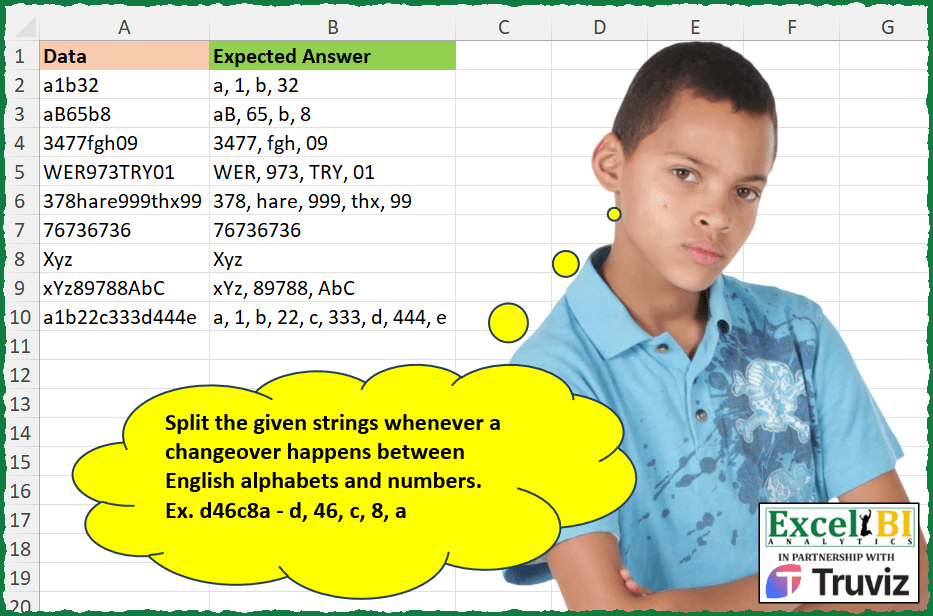
Split the given strings whenever a changeover happens between English alphabets and numbers. Ex. d46c8a – d, 46, c, 8, a
📌 Challenge Details and Links
ExcelBI Excel Challenge Number: 417
Challenge Difficulty: ⭐️⭐️
📥Download Sample File
📥Link to the solutions on LinkedIn
Solving the challenge of Split by Alpha-Numeric Change with Power Query
Power Query solution 1 for Split by Alpha-Numeric Change, proposed by Bo Rydobon 🇹🇭:
let
  Source = Excel.CurrentWorkbook(){[Name = "Table1"]}[Content],
  Ans = Table.TransformColumns(
    Source,
    {
      "Data",
      each Text.Combine(
        List.Transform(
          Splitter.SplitTextByCharacterTransition(
            (c) => not List.Contains({"0" .. "9"}, c),
            {"0" .. "9"}
          )(_),
          each Text.Combine(
            Splitter.SplitTextByCharacterTransition(
              {"0" .. "9"},
              (c) => not List.Contains({"0" .. "9"}, c)
            )(_),
            ", "
          )
        ),
        ", "
      )
    }
  )
in
  Ans
Power Query solution 2 for Split by Alpha-Numeric Change, proposed by Zoran Milokanović:
let
  Source = Excel.CurrentWorkbook(){[Name = "Input"]}[Content],
  S = Table.TransformRows(
    Source,
    each
      let
        R = (i, s) =>
          let
            N = Number.From,
            c = Text.ToList([Data]),
            C = each List.Contains({"0" .. "9"}, _),
            l = List.Last(s, ""),
            f = N(C(c{i}) <> C({Text.End(l, 1), ""}{N(l = "")}))
          in
            {@R(i + 1, List.RemoveLastN(s, 1 - f) & {{l, ""}{f} & c{i}}), s}{N(i = List.Count(c))}
      in
        Text.Combine(R(0, {}), ", ")
  )
in
  S
Power Query solution 3 for Split by Alpha-Numeric Change, proposed by Zoran Milokanović:
let
  Source = Excel.CurrentWorkbook(){[Name = "Input"]}[Content],
  S = Table.TransformRows(
    Source,
    each Text.Combine(
      List.Accumulate(
        Text.ToList([Data]),
        {},
        (s, c) =>
          let
            l = List.Last(s, ""),
            C = each Number.From(List.Contains({"0" .. "9"}, _)),
            f = Number.BitwiseXor(C(List.Last(Text.ToList(l), "")), C(c))
          in
            List.RemoveLastN(s, 1 - f) & {{l, ""}{f} & c}
      ),
      ", "
    )
  )
in
  S
Power Query solution 4 for Split by Alpha-Numeric Change, proposed by Aditya Kumar Darak 🇮🇳:
let
  Source = Excel.CurrentWorkbook(){[Name = "data"]}[Content],
  Return = Table.AddColumn(
    Source,
    "Answer",
    each [
      Text    = {"A" .. "Z", "a" .. "z"},
      Digit   = {"0" .. "9"},
      S1      = Splitter.SplitTextByCharacterTransition(Text, Digit)([Data]),
      S2      = List.Transform(S1, (f) => Splitter.SplitTextByCharacterTransition(Digit, Text)(f)),
      Output  = List.Combine(S2),
      Combine = Text.Combine(Output, ", ")
    ][Combine]
  )
in
  Return
Power Query solution 5 for Split by Alpha-Numeric Change, proposed by Alejandro Simón 🇵🇦 🇪🇸:
let
  Source = Excel.CurrentWorkbook(){[Name = "Table1"]}[Content],
  Sol = Table.AddColumn(
    Source,
    "Answer",
    each
      let
        a = Splitter.SplitTextByCharacterTransition({"A" .. "z"}, {"0" .. "9"})([Data]),
        b = List.Transform(
          a,
          each Text.Combine(
            Splitter.SplitTextByCharacterTransition({"0" .. "9"}, {"A" .. "z"})(_),
            ", "
          )
        ),
        c = Text.Combine(b, ", ")
      in
        c
  )[[Answer]]
in
  Sol
Power Query solution 6 for Split by Alpha-Numeric Change, proposed by Luan Rodrigues:
let
  Fonte = Tabela1,
  res = Table.AddColumn(
    Fonte,
    "Personalizar",
    each Text.Combine(
      List.TransformMany(
        {{"0" .. "9"}, {"A" .. "z"}},
        (x) =>
          let
            a = Text.Split(
              Text.Combine(List.Transform(Text.ToList([Data]), each Text.Select(_, x)), ", "),
              ", , "
            ),
            b = List.Transform(a, each Text.Remove(_, {",", " "})),
            c = List.Select(b, each _ <> "")
          in
            c,
        (x, y) => y
      ),
      ", "
    )
  )
in
  res
Power Query solution 7 for Split by Alpha-Numeric Change, proposed by Ramiro Ayala Chávez:
let
  S = Excel.CurrentWorkbook(){[Name = "Table1"]}[Content],
  A = Table.TransformColumnTypes(S, {{"Data", type text}}),
  Fx = (x) =>
    let
      a = x,
      T = List.Transform,
      C = Text.Combine,
      S = Splitter.SplitTextByCharacterTransition,
      b = S({"a" .. "z", "A" .. "Z"}, {"0" .. "9"})(a),
      c = T(b, S({"0" .. "9"}, {"a" .. "z", "A" .. "Z"})),
      d = T(c, each C(_, ", ")),
      e = C(d, ", ")
    in
      e,
  Sol = Table.AddColumn(A, "Expected Answer", each Fx([Data]))
in
  Sol
Power Query solution 8 for Split by Alpha-Numeric Change, proposed by Cristobal Salcedo Beltran:
let
  Source = Excel.CurrentWorkbook(){0}[Content],
  AddCustomColumn = Table.AddColumn(
    Source,
    "ExpectedAnswer",
    each
      let
        TextToProcess = [Data],
        SplitText = Splitter.SplitTextByCharacterTransition({"A" .. "z"}, {"0" .. "9"})(
          TextToProcess
        ),
        TransformedText = List.Accumulate(
          SplitText,
          "",
          (state, current) =>
            state
              & ", "
              & Text.Combine(
                Splitter.SplitTextByCharacterTransition({"0" .. "9"}, {"A" .. "z"})(current),
                ", "
              )
        )
      in
        if Text.Length(TransformedText) > 2 then Text.Middle(TransformedText, 2) else ""
  )
in
  AddCustomColumn
Solving the challenge of Split by Alpha-Numeric Change with Excel
Excel solution 1 for Split by Alpha-Numeric Change, proposed by Bo Rydobon 🇹🇭:
=MAP(
    A2:A10,
    LAMBDA(
        a,
        LET(
            m,
            MID(
                a,
                SEQUENCE(
                    30
                ),
                1
            ),
            e,
            m>"9",
            TEXTJOIN(
                REPT(
                    ", ",
                    DROP(
                        e,
                        -1
                    )+DROP(
                        e,
                        1
                    )=1
                ),
                ,
                m
            )
        )
    )
)
Excel solution 2 for Split by Alpha-Numeric Change, proposed by Rick Rothstein:
=MAP(
    A2:A10,
    LAMBDA(
        r,
        SUBSTITUTE(
            TRIM(
                REDUCE(
                    r,
                    TEXTSPLIT(
                        r,
                        SEQUENCE(
                            10,
                            ,
                            0
                        )
                    ),
                    LAMBDA(
                        a,
                        x,
                        SUBSTITUTE(
                            a,
                            x,
                            " "&x&" ",
                            1
                        )
                    )
                )
            ),
            " ",
            ", "
        )
    )
)
Excel solution 3 for Split by Alpha-Numeric Change, proposed by John V.:
=MAP(A2:A10,
    LAMBDA(x,
    LET(a,
    MID(
        x,
        ROW(
            1:20
        ),
        1
    ),
    b,
    DROP(
        a,
        -1
    ),
    c,
    DROP(
        a,
        1
    ),
    CONCAT(b&REPT(", ",
    (c>"")*((b>"9")+(c>"9")=1))))))
Excel solution 4 for Split by Alpha-Numeric Change, proposed by محمد حلمي:
=MAP(A2:A10,
    LAMBDA(a,
    LET(v,
    LAMBDA(x,
    c,
    SCAN("",

MID(
    a,
    SEQUENCE(
        LEN(
            a
        )
    ),
    1
),
    LAMBDA(a,
    d,
    IF((CODE(
        d
    )>x)*(CODE(
        d
    )
Excel solution 5 for Split by Alpha-Numeric Change, proposed by Kris Jaganah:
=MAP(
    A2:A10,
    LAMBDA(
        x,
        LET(
            a,
            SEQUENCE(
                26
            ),
            b,
            TEXTSPLIT(
                x,
                ,
                CHAR(
                    a+64
                ),
                1,
                1
            ),
            c,
            TEXTSPLIT(
                x,
                ,
                a-1,
                1
            ),
            d,
            IFNA(
                HSTACK(
                    b,
                    c
                ),
                ""
            ),
            e,
            IFNA(
                HSTACK(
                    c,
                    b
                ),
                ""
            ),
            IFERROR(
                TEXTJOIN(
                    ", ",
                    ,
                    IF(
                        IFERROR(
                            --LEFT(
                                x
                            ),
                            -1
                        )>=0,
                        d,
                        e
                    )
                ),
                x
            )
        )
    )
)
Excel solution 6 for Split by Alpha-Numeric Change, proposed by Julian Poeltl:
=BYROW(
    A2:A10,
    LAMBDA(
        T,
        LET(
            SP,
            MID(
                T,
                SEQUENCE(
                    1,
                    LEN(
                        T
                    )
                ),
                1
            ),
            ST,
            SCAN(
                ,
                SP,
                LAMBDA(
                    A,
                    B,
                    A&B
                )
            ),
            CONCAT(
                IF(
                    ISNUMBER(
                        LEFT(
                            RIGHT(
                                ST,
                                2
                            ),
                            1
                        )*1
                    )<>ISNUMBER(
                        RIGHT(
                            ST,
                            1
                        )*1
                    )=TRUE,
                    ", "&SP,
                    SP
                )
            )
        )
    )
)
Excel solution 7 for Split by Alpha-Numeric Change, proposed by Timothée BLIOT:
=MAP(
    A2:A10,
    LAMBDA(
        z,
        ARRAYTOTEXT(
            REGEXEXTRACT(
                z,
                "d+|p{L}+",
                1
            )
        )
    )
)
Excel solution 8 for Split by Alpha-Numeric Change, proposed by Nikola Z Grujicic - Nikola Ž Grujičić:
=MAP(
    A2:A10,
    LAMBDA(
        n,
        LET(
            c,
            MID(
                n,
                SEQUENCE(
                    LEN(
                        n
                    ),
                    ,
                    ,
                    1
                ),
                1
            ),
            REDUCE(
                TAKE(
                    c,
                    1
                ),
                TAKE(
                    c,
                    -LEN(
                        n
                    )+1
                ),
                LAMBDA(
                    a,
                    b,
                    LET(
                        curr,
                        IF(
                            RIGHT(
                                a,
                                2
                            )=", ",
                            MID(
                                a,
                                LEN(
                                    a
                                )-2,
                                1
                            ),
                            RIGHT(
                                a,
                                1
                            )
                        ),
                        IF(
                            AND(
                                ISNUMBER(
                                    --b
                                ),
                                ISNUMBER(
                                    --curr
                                )
                            ),
                            a&b,
                            IF(
                                AND(
                                    NOT(
                                        ISNUMBER(
                                    --b
                                )
                                    ),
                                    NOT(
                                        ISNUMBER(
                                    --curr
                                )
                                    )
                                ),
                                a&b,
                                a&", "&b
                            )
                        )
                    )
                )
            )
        )
    )
)
Excel solution 9 for Split by Alpha-Numeric Change, proposed by Hussein SATOUR:
=MAP(
    A2:A10,
    LAMBDA(
        x,
         LET(
             a,
             VSTACK(
                 TEXTSPLIT(
                     x,
                     ,
                     CHAR(
                         SEQUENCE(
                             10
                         )+47
                     )
                 ),
                 TEXTSPLIT(
                     x,
                     ,
                     CHAR(
                         SEQUENCE(
                             58
                         )+64
                     )
                 )
             ),
             b,
             FILTER(
                 a,
                 a<>""
             ),
             ARRAYTOTEXT(
                 SORTBY(
                     b,
                     FIND(
                         b,
                         x
                     )
                 )
             )
         )
    )
)
Excel solution 10 for Split by Alpha-Numeric Change, proposed by Sunny Baggu:
=MAP(

     A2:A10,

     LAMBDA(
         x,

          LET(

               _m,
               MID(
                   x,
                    SEQUENCE(
                        30
                    ),
                    1
               ),

               _c1,
               _m > "9",

               _c2,
               DROP(
                   _c1,
                    1
               ) <> DROP(
              &     _c1,
                    -1
               ),

               _c3,
               REPT(
                   ", ",
                    _c2
               ),

               TEXTJOIN(
                   _c3,
                    ,
                    _m
               )

          )

     )

)
Excel solution 11 for Split by Alpha-Numeric Change, proposed by LEONARD OCHEA 🇷🇴:
=LET(
    e,
    LAMBDA(
        i,
        ISNUMBER(
            --RIGHT(
                i
            )
        )
    ),
    MAP(
        A2:A10,
        LAMBDA(
            x,
             CONCAT(
                 SCAN(
                     ,
                     MID(
                         x,
                         SEQUENCE(
                             LEN(
                                 x
                             )
                         ),
                         1
                     ),
                     LAMBDA(
                         a,
                         b,
                         IF(
                             2*e(
                                 a
                             )*e(
                                 b
                             )-e(
                                 a
                             )-e(
                                 b
                             ),
                             ", "&b,
                             b
                         )
                     )
                 )
             )
        )
    )
)
Excel solution 12 for Split by Alpha-Numeric Change, proposed by Asheesh Pahwa:
=MAP(
    A2:A10,
    LAMBDA(
        x,
         LET(
             alp,
             CHAR(
                 SEQUENCE(
                     100,
                     ,
                     65
                 )
             ),

             nm,
             SEQUENCE(
                 10,
                 ,
                 0
             ),

             ts,
             TEXTSPLIT(
                 x,
                 nm
             ),

             ns,
             TEXTSPLIT(
                 x,
                 alp
             ),

             ft,
             FILTER(
                 ts,
                  ts<>"",
                  ""
             ),

             fn,
             FILTER(
                 ns,
                  ns<>"",
                 ""
             ),

             L,
             LEFT(
                 x
             ),

             f,
             IF(
                 ISNUMBER(
                     --L
                 ),
                 VSTACK(
                     fn,
                      ft
                 ),
                 VSTACK(
                     ft,
                     fn
                 )
             ),

             tc,
             TOCOL(
                 f,
                 3,
                 1
             ),
             TEXTJOIN(
                 ", ",
                 1,
                 tc
             )
         )
    )
)
Excel solution 13 for Split by Alpha-Numeric Change, proposed by Charles Roldan:
=MAP(
    A2:A10,
    LAMBDA(
        x,
        REDUCE(
            ,
            MID(
                x,
                SEQUENCE(
                    LEN(
                        x
                    )
                ),
                1
            ),
            LAMBDA(
                a,
                b,
                LET(
                    f,
                    LAMBDA(
                        y,
                        MATCH(
                            CODE(
                                y
                            ),
                            CODE(
                                {"0",
                                "A"}
                            )
                        )
                    ),
                    a&REPT(
                        ", ",
                        f(
                            RIGHT(
                                a
                            )
                        )<>f(
                            b
                        )
                    )&b
                )
            )
        )
    )
)
Excel solution 14 for Split by Alpha-Numeric Change, proposed by Ziad A.:
=MID(
    REGEXREPLACE(
        A2,
        "D+|d+",
        ", $0"
    ),
    3,
    99
)
Excel solution 15 for Split by Alpha-Numeric Change, proposed by LUIS FLORENTINO COUTO CORTEGOSO:
=MAP(
    A2:A10,
    LAMBDA(
        x,
        LET(
            a,
            MID(
                x,
                SEQUENCE(
                    LEN(
                        x
                    )
                ),
                1
            ),
            CONCAT(
                MAP(
                    a,
                    VSTACK(
                        DROP(
                            a,
                            1
                        ),
                        TAKE(
                            a,
                            -1
                        )
                    ),
                    LAMBDA(
                        x,
                        y,
                        IF(
                            TYPE(
                                --x
                            )=TYPE(
                                --y
                            ),
                            x,
                            x&", "
                        )
                    )
                )
            )
        )
    )
)
Excel solution 16 for Split by Alpha-Numeric Change, proposed by Alexandra Popoff:
= LAMBDA(
    Input,
    [Separator],

    LET(

        z_src,
         Input,

        z_sep,
        if(
            ISOMITTED(
                Separator
            ),
            ", ",
            Separator
        ),

        z_out,
         BYROW(
             z_src,
             LAMBDA(
                 z_input,

                 LET(

                      z_len,
                      VALUE(
                          LEN(
                              z_input
                          )
                      ),

                      z_char,
                      BYROW(
                          SEQUENCE(
                              z_len,
                               1,
                               1,
                               1
                          ),
                           LAMBDA(
                               z_x,
                                RIGHT(
                                    LEFT(
                                        z_input,
                                         z_x
                                    ),
                                     1
                                )
                           )
                      ),

                      z_type,
                      IF(
                          ISNUMBER(
                              VALUE(
                                  z_char
                              )
                          ),
                           1,
                           0
                      ),

                      z_test,
                      IF(
                          z_type <> VSTACK(
                              DROP(
                                  z_type,
                                   1
                              ),
                               INDEX(
                                   z_type,
                                    ROWS(
                                  z_char
                              ),
                                    1
                               )
                          ),
                           z_sep,
                           ""
                      ),

                      TEXTJOIN(
                          "",
                           TRUE,
                           z_char & z_test
                      )

                 )
             )
         ),

        z_out
    )
)
Solving the challenge of Split by Alpha-Numeric Change with Python
Python solution 1 for Split by Alpha-Numeric Change, proposed by Konrad Gryczan, PhD:
With some comments.
import pandas as pd
import re
file_path = "***/Excel/417 Split Alphabets and Numbers.xlsx"
df = pd.read_excel(file_path)
# Split each 'Data' column value into alphabets and numbers, then join with ', '
df['splitted'] = df['Data'].astype(str).apply(lambda x: re.findall("[A-Za-z]+|[0-9]+", x))
df['splitted'] = df['splitted'].apply(lambda x: ', '.join(x))
# Add a 'Check' column to compare 'splitted' with 'Expected Answer'
df['Check'] = df['splitted'] == df['Expected Answer']
print(df.head())
Python solution 2 for Split by Alpha-Numeric Change, proposed by Luan Rodrigues:
import pandas as pd
import re
file_path = r'Excel_Challenge_417 - Split Alphabets and Numbers.xlsx'
df = pd.read_excel(file_path,usecols=['Data'])
def split_case(text):
 chars = re.findall('[A-z]+|[0-9]+',text)
 return ', '.join(chars)
df['Resposta'] = df['Data'].apply(split_case)
print(df[["Data", "Resposta"]])
Python solution 3 for Split by Alpha-Numeric Change, proposed by Abdallah Ally:
import pandas as pd
file_path = 'Excel_Challenge_417 - Split Alphabets and Numbers.xlsx'
df = pd.read_excel(file_path)
def split_chars(col):
 chars = ''
 for i in range(len(col) - 1):
 a = (ord(col[i].upper()) - 48) in range(10)
 b = (ord(col[i + 1].upper()) - 48) in range(10)
 if not a == b:
 chars += col[i] + ', '
 else:
 chars += col[i]
 return chars + col[-1]
df['My Answer'] = df['Data'].apply(split_chars)
df1, df2 = df[['Data', 'Expected Answer']], df[['Data', 'My Answer']]
print(f'Expected Results:n{df1}nnMy Results:n{df2}')
Python solution 4 for Split by Alpha-Numeric Change, proposed by Abdallah Ally:
import pandas as pd
file_path = 'Excel_Challenge_417 - Split Alphabets and Numbers.xlsx'
df = pd.read_excel(file_path)
def split_chars(col):
 chars = ''
 for i in range(len(col) - 1):
 a, b = col[i].isdigit(), col[i + 1].isdigit()
 if a == b:
 chars += col[i]
 else:
 chars += col[i] + ', '
 return chars + col[-1]
df['My Answer'] = df['Data'].apply(split_chars)
df1, df2 = df[['Data', 'Expected Answer']], df[['Data', 'My Answer']]
print(f'nExpected Results:n{df1}nnMy Results:n{df2}')
Python solution 5 for Split by Alpha-Numeric Change, proposed by Giorgi Goderdzishvili:
# Ex - 417
lst = pd.read_clipboard().Data.values
for i in lst:
 fin = []
 counter = 1
 starter = 0
 for k in range(len(i)-1):
 if (i[k].isalpha() and i[k+1].isdigit()) or (i[k+1].isalpha() and i[k].isdigit()):
 fin.append(i[starter:starter+counter])
 starter = k + 1
 counter = 1
 else:
 counter += 1
 else:
 fin.append(i[starter:])
 print(', '.join(fin))
Python solution 6 for Split by Alpha-Numeric Change, proposed by Cristobal Salcedo Beltran:
Code__________________________
import pandas as pd
import re
file_path = "/lakehouse/default/Files/Challenge/Excel_Challenge_417 - Split Alphabets and Numbers.xlsx"
pandas_df = pd.read_excel(file_path, usecols=[0])
def transform_data(value):
 parts = re.findall(r'd+|[A-Za-z]+', value)
 return ', '.join(parts)
pandas_df['ExpectedAnswer'] = pandas_df['Data'].apply(transform_data)
print(pandas_df)
Python solution 7 for Split by Alpha-Numeric Change, proposed by Cristobal Salcedo Beltran:
Code__________________________________
from pyspark.sql import SparkSession
from pyspark.sql.functions import udf
from pyspark.sql.types import StringType
import re
spark = SparkSession.builder.appName("CHALLENGE417").getOrCreate()
file_path = "/lakehouse/default/Files/Challenge/Excel_Challenge_417 - Split Alphabets and Numbers.xlsx"
pandas_df = pd.read_excel(file_path, usecols=[0])
spark_df = spark.createDataFrame(pandas_df)
def transform_data(value):
 parts = re.findall(r'd+|[A-Za-z]+', value)
 return ', '.join(parts)
transform_data_udf = udf(transform_data, StringType())
df_transformed = spark_df.withColumn("ExpectedAnswer", transform_data_udf("Data"))
df_transformed.show(truncate=False)
Solving the challenge of Split by Alpha-Numeric Change with Python in Excel
Python in Excel solution 1 for Split by Alpha-Numeric Change, proposed by JvdV -:
Excel ms365 PY():
xl("A2:A10").replace(r'(?<=d)(?=D)|(?<=D)(?=d)',', ',regex=True).values


        Show translation
Solving the challenge of Split by Alpha-Numeric Change with R
R solution 1 for Split by Alpha-Numeric Change, proposed by Konrad Gryczan, PhD:
library(tidyverse)
library(readxl)
input = read_excel("Excel/417 Split Alphabets and Numbers.xlsx", range = "A1:A10")
test = read_excel("Excel/417 Split Alphabets and Numbers.xlsx", range = "B1:B10")
pattern = ("[A-Za-z]+|[0-9]+")
result = input %>%
 mutate(splitted = map_chr(Data, ~str_extract_all(., pattern) %>% unlist() %>%
 str_c(collapse = ", ")))
Solving the challenge of Split by Alpha-Numeric Change with Excel VBA
Excel VBA solution 1 for Split by Alpha-Numeric Change, proposed by Nicolas Micot:
VBA solution:
Function f_split_letters_and_numbers(ByVal texte As String) As String
Dim numCar As Integer
Dim resultat As String, car_pre As String, car_actu As String
For numCar = 1 To Len(texte)
 car_pre = car_actu
 car_actu = Mid(texte, numCar, 1)
 If numCar > 1 Then
 If IsNumeric(car_actu) <> IsNumeric(car_pre) Then
 resultat = resultat & ", " & car_actu
 Else
 resultat = resultat & car_actu
 End If
 Else
 resultat = resultat & car_actu
 End If
Next numCar
f_split_letters_and_numbers = resultat
End Function
&&