
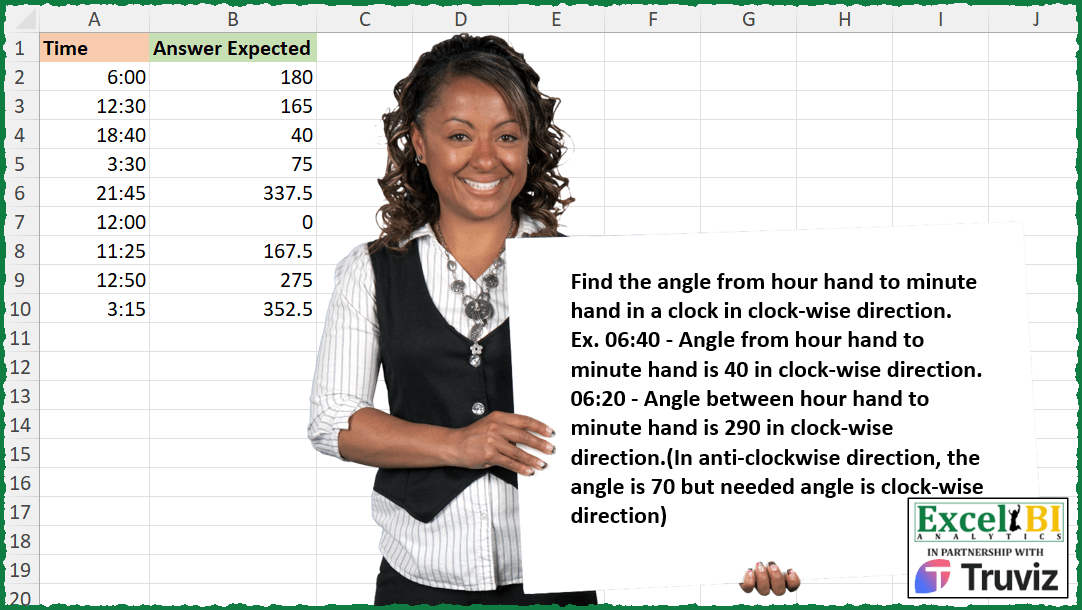
Find the angle from hour hand to minute hand in a clock in clock-wise direction. Ex. 06:40 – Angle from hour hand to minute hand is 40 in clock-wise direction. 06:20 – Angle between hour hand to minute hand is 290 in clock-wise direction.(In anti-clockwise direction, the angle is 70 but needed angle is clock-wise direction)
📌 Challenge Details and Links
ExcelBI Excel Challenge Number: 408
Challenge Difficulty: ⭐️⭐️
📥Download Sample File
📥Link to the solutions on LinkedIn
Solving the challenge of Clockwise Angle Between Clock Hands with Power Query
Power Query solution 1 for Clockwise Angle Between Clock Hands, proposed by Alejandro Simón 🇵🇦 🇪🇸:
let
  Source = Excel.CurrentWorkbook(){[Name = "Table1"]}[Content],
  Type = Table.TransformColumnTypes(Source, {{"Time", type time}}),
  Sol = Table.AddColumn(
    Type,
    "Answer",
    each
      let
        a = Time.Hour([Time]),
        b = Time.Minute([Time]),
        c = 360 - ((a + b / 60) * 30 - b * 6),
        d = if c > 360 then c - 360 else if c < 0 then 360 + c else c
      in
        d
  )[[Answer]]
in
  Sol
Solving the challenge of Clockwise Angle Between Clock Hands with Excel
Excel solution 1 for Clockwise Angle Between Clock Hands, proposed by Bo Rydobon 🇹🇭:
=MOD(
    MINUTE(
        A2:A10
    )*6-A2:A10*720,
    360
)

=MOD(
    A2:A10*1440*6-A2:A10*720,
    360
)
=MOD(A2:A10*(1440*6-720),
    360)
=MOD(
    A2:A10*7920,
    360
)
Excel solution 2 for Clockwise Angle Between Clock Hands, proposed by Rick Rothstein:
=LET(a,
    A2:A10,
    h,
    30*MOD(
        HOUR(
            a
        ),
        12
    ),
    m,
    5.5*MINUTE(
            a
        ),
    ABS(360*(m
Excel solution 3 for Clockwise Angle Between Clock Hands, proposed by John V.:
=MOD(
    5.5*MINUTE(
        A2:A10
    )-30*HOUR(
        A2:A10
    ),
    360
)
or
✅ =90*MOD(
    88*A2:A10,
    4
)
Excel solution 4 for Clockwise Angle Between Clock Hands, proposed by محمد حلمي:
=let(h,
    A2:A10,
    m,
    MINUTE(
        h
    ),
     ABS((MOD(
         hour(
        h
    ),
         12
     )*60+m)*0.5-m*6))
Excel solution 5 for Clockwise Angle Between Clock Hands, proposed by Kris Jaganah:
=LET(a,
    A2:A10*24,
    b,
    360,
    c,
    (MOD(
        a,
        1
    )*b)-MOD(
        b/12*a,
        b
    ),
    IF(
        c<0,
        b+c,
        c
    ))
Excel solution 6 for Clockwise Angle Between Clock Hands, proposed by Julian Poeltl:
=LET(T,
    A2:A10,
    M,
    MINUTE(
        T
    ),
    H,
    HOUR(
        T
    ),
    HH,
    (MOD(
        H,
        12
    )+(M/60))/12*360,
    MM,
    M/60*360,
    IF(
        HH>MM,
        360-ABS(
            MM-HH
        ),
        ABS(
            HH-MM
        )
    ))
Excel solution 7 for Clockwise Angle Between Clock Hands, proposed by Timothée BLIOT:
=MAP(A2:A10,
    LAMBDA(x,
    LET(A,
    (MOD(HOUR(
        x
    )+(MINUTE(
        x
    )/60),
    12))*30,
    B,
    (MINUTE(
        x
    )*6),
    MOD(
        MIN(
            A,
            B
        )-MAX(
            A,
            B
        ),
        360
    ))))
Excel solution 8 for Clockwise Angle Between Clock Hands, proposed by Sunny Baggu:
=MAP(

     A2:A10,

     LAMBDA(
         a,

          LET(

               _h,
               HOUR(
                   a
               ),

               _h1,
               IF(
                   _h > 12,
                    _h - 12,
                    _h
               ),

               _m,
               MINUTE(
                   a
               ),

               _r,
               -30 * _h1 + 5.5 * _m,

               IF(
                   _r < 0,
                    360 + _r,
                    _r
               )

          )

     )

)
Excel solution 9 for Clockwise Angle Between Clock Hands, proposed by LEONARD OCHEA 🇷🇴:
=MOD(
    360-30*HOUR(
        A2:A10
    )+11*MINUTE(
        A2:A10
    )/2,
    360
)
Excel solution 10 for Clockwise Angle Between Clock Hands, proposed by Charles Roldan:
=MOD(
    22*--A2:A10,
    1
)
Excel solution 11 for Clockwise Angle Between Clock Hands, proposed by Andy Heybruch:
=MAP(
    A2:A10,

    LAMBDA(
        a,
        LET(

            _min,
            MINUTE(
                a
            )*6,

            _hr,
            MOD(
                HOUR(
                a
            ),
                12
            )*30+_min/12,

            _diff,
            ABS(
                _hr-_min
            ),

            IF(
                _hr>_min,
                360-_diff,
                _diff
            )
        )
    )
)
Excel solution 12 for Clockwise Angle Between Clock Hands, proposed by Anup Kumar:
=MAP(A2:A10,
    LAMBDA(x,
    LET(
t,
    x,

msq,
    SEQUENCE(
        120,
        ,
        0,
        0.5
    ),

asq,
    SEQUENCE(
        120,
        ,
        0,
        3
    ),

m,
    MINUTE(
        t
    ),

hr,
    HOUR(
        t
    )*5+m/12,

h,
    MROUND(
        IF(
            hr>=60,
            hr-60,
            hr
        ),
        0.5
    ),

ha,
    XLOOKUP(
        h,
        msq,
        asq
    ),

ma,
    XLOOKUP(
        m,
        msq,
        asq
    ),

IF(m>=h,
    ma-ha,
    360-(ha-ma))
)))
Excel solution 13 for Clockwise Angle Between Clock Hands, proposed by Ernesto Vega Castillo:
=LET(data,
    A2:A10,
    h,
    30*MOD(
        HOUR(
            data
        ),
        12
    ),
    m,
    5.5*(MINUTE(
            data
        )),
    IF(
        h>m,
        360-ABS(
            h-m
        ),
        ABS(
            h-m
        )
    ))
Excel solution 14 for Clockwise Angle Between Clock Hands, proposed by Enrico Giorgi:
=LET(h,
    HOUR(
        A2
    ),
    hh,
    IF(
        h>12,
        h-12,
        h
    ),
    mm,
    MINUTE(
        A2
    ),
    hh_ang,
    IF((hh+mm/60)*360/12>360,
    (hh+mm/60)*360/12-360,
    (hh+mm/60)*360/12),
    mm_ang,
    (mm/60)*360,
    IF(
        mm_ang>=hh_ang,
        mm_ang-hh_ang,
        360-hh_ang+mm_ang
    ))

➡ ITALIAN FORMULA
=LET(h;ORA(
        A2
    );hh;SE(
        h>12;h-12;h
    );mm;MINUTO(
        A2
    );hh_ang;SE((hh+mm/60)*360/12>360;(hh+mm/60)*360/12-360;(hh+mm/60)*360/12);mm_ang;(mm/60)*360;SE(
        mm_ang>=hh_ang;mm_ang-hh_ang;360-hh_ang+mm_ang
    ))
Excel solution 15 for Clockwise Angle Between Clock Hands, proposed by Luis Couto:
=MOD(360*(1-MOD(
    A2:A10,
    TIME(
        12,
        0,
        0
    )
)/TIME(
        12,
        0,
        0
    ))+6*MINUTE(
        A2:A10
    ),
    360)
Excel solution 16 for Clockwise Angle Between Clock Hands, proposed by Davit Bekurishvili:
=MOD(A2:A10*24*60*5.5,360)Excel solution 17 for Clockwise Angle Between Clock Hands, proposed by Marek Tomanek:
=LET(
h,
    IF(
        HOUR(
            A2:A10
        )>12,
        HOUR(
            A2:A10
        )-12,
        HOUR(
            A2:A10
        )
    ),

m,
    MINUTE(
            A2:A10
        ),

h_ang,
    360-(h*30),

m_ang,
    m*6,

h_mv_ang,
    m*0.5,

h_mid_ang,
    h_ang-h_mv_ang,

angel,
    IF((h_mid_ang+m_ang)>360,
    h_mid_ang+m_ang-360,
    h_mid_ang+m_ang),
    angel)

maybe too complicated but it works :)
Solving the challenge of Clockwise Angle Between Clock Hands with R
R solution 1 for Clockwise Angle Between Clock Hands, proposed by Konrad Gryczan, PhD:
library(tidyverse)
input = tibble(time = c("6:00","12:30", "18:40", "3:30",
 "21:45","12:00", "11:25","12:50","3:15"))
test = tibble(answer_expected = c(180,165,40,75,337.5,0,167.5, 275,352.5))
angle_per_min_hh = 360/(60*12)
angle_per_min_mh = 360/60
result = input %>%
 separate(time, into = c("hour","mins"), sep = ":") %>%
 mutate(hour = as.numeric(hour),
 mins = as.numeric(mins),
 hour12 = hour %% 12,
 period_hh = hour12*60 + mins,
 period_mh = mins,
 angle_hh = period_hh * angle_per_min_hh,
 angle_mh = period_mh * angle_per_min_mh,
 angle_hh_to_mh = if_else(angle_hh > angle_mh,
 360 - (angle_hh - angle_mh),
 angle_mh - angle_hh)) %>%
 select(answer_expected = angle_hh_to_mh)
Solving the challenge of Clockwise Angle Between Clock Hands with DAX
DAX solution 1 for Clockwise Angle Between Clock Hands, proposed by Zoran Milokanović:
EVALUATE
ADDCOLUMNS(Input, "Answer Expected",
 VAR T = Input[Time]
 VAR H = HOUR(T)
 VAR M = MINUTE(T)
 RETURN
 MOD(5.5 * M - 30 * H + 360, 360)

)
&&&