
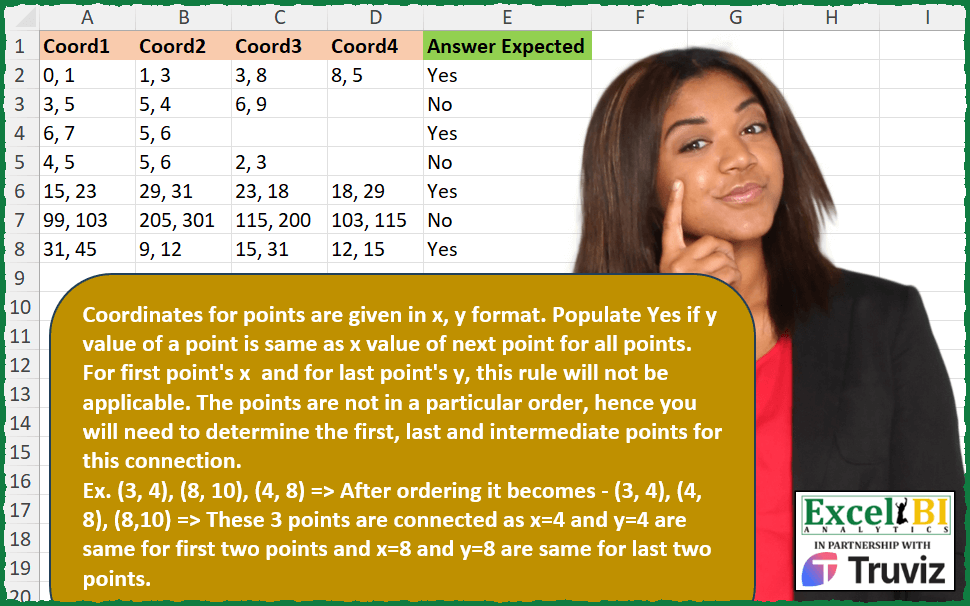
Coordinates for points are given in x, y format. Populate Yes if y value of a point is same as x value of next point for all points. For first point’s x and for last point’s y, this rule will not be applicable. The points are not in a particular order, hence you will need to determine the first, last and intermediate points for this connection. Ex. (3, 4), (8, 10), (4, 8) => After ordering it becomes – (3, 4), (4, 8), (8,10) => These 3 points are connected as x=4 and y=4 are same for first two points and x=8 and y=8 are same for last two points.
📌 Challenge Details and Links
ExcelBI Excel Challenge Number: 400
Challenge Difficulty: ⭐️⭐️
📥Download Sample File
📥Link to the solutions on LinkedIn
Solving the challenge of Check Connectivity of Random Points with Power Query
Power Query solution 1 for Check Connectivity of Random Points, proposed by Alejandro Simón 🇵🇦 🇪🇸:
let
  Source = Excel.CurrentWorkbook(){[Name = "Table1"]}[Content],
  Sol = Table.AddColumn(
    Source,
    "Answer",
    each
      let
        a = List.Transform(
          List.RemoveNulls(Record.ToList(_)),
          each List.Transform(Text.Split(_, ", "), Number.From)
        ),
        b = List.Combine(List.Sort(a, each List.Sum(_))),
        c = List.Split(List.RemoveLastN(List.Skip(b)), 2),
        d = List.Transform(c, each if _{0} = _{1} then true else false),
        e = if List.AllTrue(d) then "Yes" else "No"
      in
        e
  )[[Answer]]
in
  Sol
Power Query solution 2 for Check Connectivity of Random Points, proposed by Ramiro Ayala Chávez:
let
  S = Excel.CurrentWorkbook(){[Name = "Table1"]}[Content],
  T = Table.ReplaceValue(
    S,
    null,
    "X",
    Replacer.ReplaceValue,
    {"Coord1", "Coord2", "Coord3", "Coord4"}
  ),
  Fx = (w, x, y, z) =>
    let
      s1 = w,
      s2 = x,
      s3 = y,
      s4 = z,
      a = Text.Split(s1 & "|" & s2 & "|" & s3 & "|" & s4, "|"),
      b = List.Select(a, each _ <> "X"),
      c = List.Transform(b, each Text.Split(_, ", ")),
      d = List.Transform(c, each List.Sum(List.Transform(_, Number.From))),
      e = Table.FromRows(List.Zip({b, d}), {"A", "B"}),
      f = Table.Sort(e, {{"B", 0}})[A],
      g = List.Split(
        List.RemoveLastN(List.Skip(List.Combine(List.Transform(f, each Text.Split(_, ", "))))),
        2
      ),
      h = List.Transform(g, each List.Count(List.Distinct(_))),
      i = if List.Contains(h, 2) then "No" else "Yes"
    in
      i,
  j = Table.AddColumn(T, "Answer Expected", each Fx([Coord1], [Coord2], [Coord3], [Coord4])),
  Sol = Table.ReplaceValue(
    j,
    "X",
    null,
    Replacer.ReplaceValue,
    {"Coord1", "Coord2", "Coord3", "Coord4"}
  )
in
  Sol
Power Query solution 3 for Check Connectivity of Random Points, proposed by Glyn Willis:
let
  Source = Excel.CurrentWorkbook(){[Name = "Table1"]}[Content],
  #"Changed Type" = Table.TransformColumnTypes(
    Source,
    {
      {"Coord1", type text},
      {"Coord2", type text},
      {"Coord3", type text},
      {"Coord4", type text},
      {"Answer Expected", type text}
    }
  ),
  #"Added Custom" = Table.AddColumn(
    #"Changed Type",
    "Custom",
    each
      let
        a = List.Sort(
          List.Transform(
            Record.ToList(Record.RemoveFields(_, {"Answer Expected"})),
            (x) => try Text.Split(x, ", ") otherwise {null, null}
          ),
          {{(y) => Int64.From(y{0}), Order.Ascending}}
        ),
        b = List.Transform(a, (x) => List.Transform(x, (y) => Int64.From(y))),
        c = List.RemoveLastN(
          List.RemoveFirstN(
            List.RemoveNulls(List.Combine(List.Transform(b, (x) => {x{0}, x{1} * (- 1)}))),
            1
          ),
          1
        ),
        d = if List.Sum(c) = 0 then "Yes" else "No"
      in
        d,
    type text
  )
in
  #"Added Custom"
Solving the challenge of Check Connectivity of Random Points with Excel
Excel solution 1 for Check Connectivity of Random Points, proposed by Bo Rydobon 🇹🇭:
=BYROW(A2:D9,
    LAMBDA(a,
    LET(t,
    TEXTSPLIT(
        TEXTJOIN(
            "_",
            ,
            a
        ),
        ", ",
        "_"
    ),
    x,
    TAKE(
        t,
        ,
        1
    ),
    y,
    DROP(
        t,
        ,
        1
    ),
    b,
    ISNA(
        XMATCH(
            x,
            y
        )
    ),
    IF((SUM(
        --b
    )<2)*ISTEXT(
        @REDUCE(
            XLOOKUP(
                TRUE,
                b,
                t
            ),
            SEQUENCE(
                1
            ),
            LAMBDA(
                c,
                v,
                XLOOKUP(
                    @DROP(
                        c,
                        ,
                        1
                    ),
                    x,
                    t
                )
            )
        )
    ),
    "Yes",
    "No"))))
Excel solution 2 for Check Connectivity of Random Points, proposed by Rick Rothstein:
=IF(COUNTA(UNIQUE(HSTACK(TEXTBEFORE(A2:D2,","),TEXTAFTER(A2:D2," ")),TRUE,1))=2,"Yes","No")Excel solution 3 for Check Connectivity of Random Points, proposed by John V.:
=IF(
    BYROW(
        A2:D8,
        LAMBDA(
            r,
            COUNTA(
                r
            )-SUM(
                MAP(
                    r,
                    LAMBDA(
                        x,
                        --OR(
                            TEXTBEFORE(
                                x,
                                ",",
                                ,
                                ,
                                ,
                                -1
                            )=TEXTAFTER(
                                r,
                                " ",
                                ,
                                ,
                                ,
                                -2
                            )
                        )
                    )
                )
            )>1
        )
    ),
    "No",
    "Yes"
)
Excel solution 4 for Check Connectivity of Random Points, proposed by محمد حلمي:
=BYROW(A2:E9,
    LAMBDA(a,
    LET(t,
    TEXTSPLIT(

        TEXTJOIN(
            "_",
            ,
            a
        ),
        ", ",
        "_"
    ),
    x,
    TAKE(
        t,
        ,
        1
    ),
    y,
    DROP(
        t,
        ,
        1
    ),

b,
    ISNA(
        XMATCH(
            x,
            y
        )
    ),
    IF((SUM(
        --b
    )<2)*ISTEXT(

        XLOOKUP(
            XLOOKUP(
                TRUE,
                b,
                y,
                @y
            ),
            x,
            y
        )
    ),
    "Yes",
    "No"))))
Excel solution 5 for Check Connectivity of Random Points, proposed by محمد حلمي:
=BYROW(
    A2:D8,
    LAMBDA(
        a,
        LET(
            j,
            TOCOL(
                a,
                1
            ),

            i,
            SORTBY(
                j,
                --TEXTSPLIT(
                    j,
                    ","
                )
            ),
            u,
            TEXTSPLIT(
                i,
                ","
            ),

            v,
            TEXTAFTER(
                i,
                " "
            ),
            IF(
                AND(
                    DROP(
                        u,
                        1
                    )=DROP(
                        v,
                        -1
                    )
                )+
                AND(
                    IFERROR(
                        DROP(
                            u,
                            2
                        )=DROP(
                            v,
                            -2
                        ),

                    )
                ),
                "Yes",
                "No"
            )
        )
    )
)
Excel solution 6 for Check Connectivity of Random Points, proposed by Julian Poeltl:
=BYROW(
    A2:D8,
    LAMBDA(
        ARR,
        LET(
            Cells,
            BYROW(
                ARR,
                LAMBDA(
                    A,
                    COUNTA(
                        A
                    )
                )
            ),
            TB,
            IFERROR(
                TEXTBEFORE(
                    ARR,
                    ","
                )*1,
                "x"
            ),
            TA,
            IFERROR(
                TEXTAFTER(
                    ARR,
                    ", "
                )*1,
                "y"
            ),
            CSL,
            BYROW(
                MAP(
                    TB,
                    TA,
                    LAMBDA(
                        A,
                        B,
                        SUM(
                            N(
                                A=B
                            )
                        )
                    )
                ),
                LAMBDA(
                    C,
                    SUM(
                        C
                    )
                )
            ),
            IF(
                CSL>0,
                "No",
                IF(
                    SUM(
                        ISNUMBER(
                            XMATCH(
                                TB,
                                TA
                            )
                        )*1
                    )>=Cells-1,
                    "Yes",
                    "No"
                )
            )
        )
    )
)
Excel solution 7 for Check Connectivity of Random Points, proposed by Timothée BLIOT:
=BYROW(
    A2:D8,
    LAMBDA(
        r,
        LET(
            A,
            --TEXTSPLIT(
                TEXTJOIN(
                    "|",
                    ,
                    r
                ),
                ", ",
                "|",
                1
            ),
            IF(
                PRODUCT(
                    --MAP(
                        {1,
                        -1},
                        LAMBDA(
                            x,
                            SUM(
                                --ISNUMBER(
                                    XMATCH(
                                        TAKE(
                                            A,
                                            ,
                                            x
                                        ),
                                        TAKE(
                                            A,
                                            ,
                                            -x
                                        )
                                    )
                                )
                            )=ROWS(
                                A
                            )-1
                        )
                    )
                ),
                "Yes",
                "No"
            )
        )
    )
)
Excel solution 8 for Check Connectivity of Random Points, proposed by Hussein SATOUR:
=BYROW(
    A2:D8,
     LAMBDA(
         x,
          LET(
              a,
              x,
              b,
              COUNTA(
                  a
              ),
              IF(
                  COUNT(
                      --UNIQUE(
                          TEXTSPLIT(
                              TEXTJOIN(
                                  ", ",
                                  ,
                                  x
                              ),
                              ,
                              ", "
                          )
                      )
                  )=b+1,
                  "Yes",
                  "No"
              )
          )
     )
)
Excel solution 9 for Check Connectivity of Random Points, proposed by LEONARD OCHEA 🇷🇴:
=IF(
    BYROW(
        A2:D8,
        LAMBDA(
            a,
            3=COUNT(
                XMATCH(
                    TEXTBEFORE(
                        a,
                        ",",
                        ,
                        ,
                        ,
                        1
                    ),
                    TEXTAFTER(
                        a,
                        " ",
                        ,
                        ,
                        ,
                        1
                    )
                )
            )
        )
    ),
    "Yes",
    "No"
)
Excel solution 10 for Check Connectivity of Random Points, proposed by 🇵🇪 Ned Navarrete C.:
=BYROW(
    A2:D8,
    LAMBDA(
        r,
        LET(
            c,
            COUNTA(
                r
            ),
            i,
            --TEXTBEFORE(
                r,
                ","
            ),
            j,
            --TEXTAFTER(
                r,
                ","
            ),
            IF(
                SUM(
                    N(
                        ISNUMBER(
                            XMATCH(
                                i,
                                j
                            )
                        )
                    )
                )>=c-1,
                "Yes",
                "No"
            )
        )
    )
)
Excel solution 11 for Check Connectivity of Random Points, proposed by Charles Roldan:
=IF(
    BYROW(
        A2:D8,
         LAMBDA(
             x,
              LET(
                  y,
                   TOROW(
                       x,
                        1
                   ),
                   1 = SUM(
                       --ISERROR(
                           XMATCH(
                               TEXTBEFORE(
                                   y,
                                    ", "
                               ),
                                TEXTAFTER(
                                    y,
                                     ", "
                                )
                           )
                       )
                   )
              )
         )
    ),
     "Yes",
     "No"
)
Excel solution 12 for Check Connectivity of Random Points, proposed by Andy Heybruch:
=BYROW(
    A2:D8,
    LAMBDA(
        _a,
        LET(
            _coorarray,
            TEXTSPLIT(
                TEXTJOIN(
                    "|",
                    1,
                    _a
                ),
                ", ",
                "|"
            ),

            _y,
            TAKE(
                _coorarray,
                ,
                -1
            ),

            _x,
            TAKE(
                _coorarray,
                ,
                1
            ),

            cnt,
            ROWS(
                _coorarray
            )-1,

            IF(
                SUM(
                    --ISNUMBER(
                        XMATCH(
                            _x,
                            _y,
                            0
                        )
                    )
                )=cnt,
                "Yes",
                "No"
            )
        )
    )
)
Excel solution 13 for Check Connectivity of Random Points, proposed by Bilal Mahmoud kh.:
=BYROW(A2:D8,
    LAMBDA(x,
    LET(a,
    SORT(
        1*TEXTSPLIT(
           & TEXTJOIN(
                ",",
                TRUE,
                x
            ),
            ,
            ","
        )
    ),
    b,
    COUNT(
        a
    ),
    c,
    COUNT(
        UNIQUE(
        a
    )
    ),
    d,
    IF((b/2)+1=c,
    "yes",
    "no"),
    d)))
Solving the challenge of Check Connectivity of Random Points with R
R solution 1 for Check Connectivity of Random Points, proposed by Konrad Gryczan, PhD:
library(tidyverse)
library(readxl)
input = read_excel("Excel/400 Connected Points_v2.xlsx", range = "A1:D8")
test = read_excel("Excel/400 Connected Points_v2.xlsx", range = "E1:E8")
result = input %>%
 mutate(row = row_number()) %>%
 select(row, everything()) %>%
 pivot_longer(-row, names_to = "col", values_to = "value") %>%
 select(-col) %>%
 na.omit() %>%
 group_by(row) %>%
 separate_rows(value, sep = ", ") %>%
 group_by(row, value) %>%
 summarise(n = n()) %>%
 ungroup() %>%
 select(-value) %>%
 group_by(n, row) %>%
 summarise(count = n()) %>%
 ungroup() %>%
 filter(n == 1) %>%
 mutate(`Answer Expected` = ifelse(count == 2, "Yes", "No")) %>%
 select(`Answer Expected`)
&&