
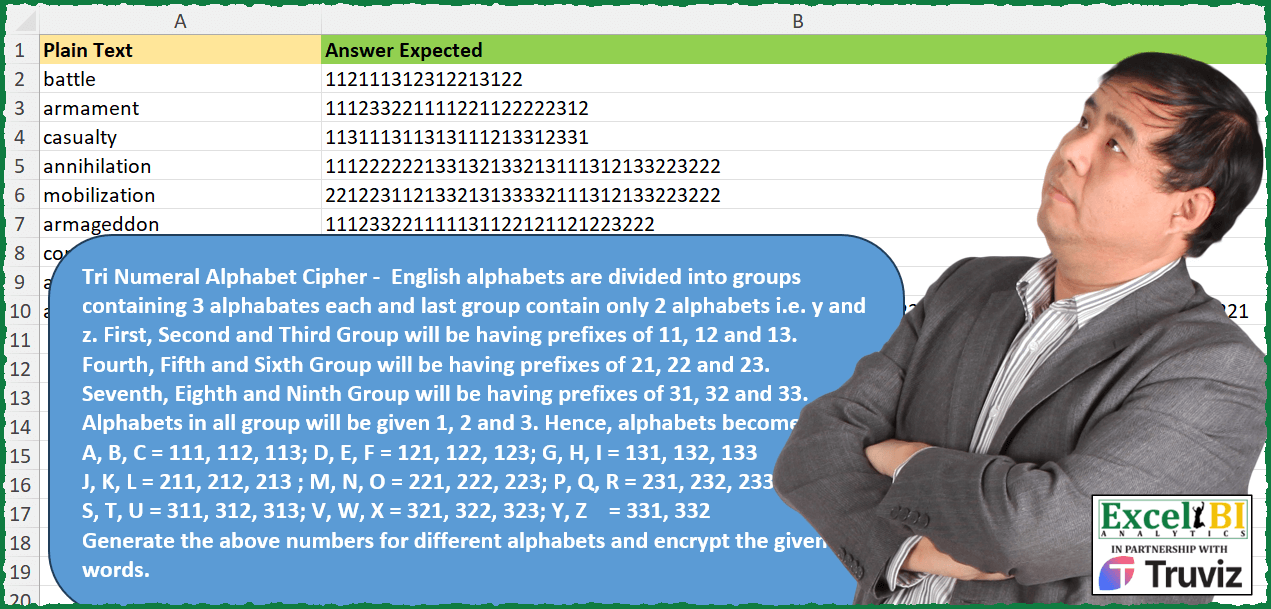
Tri Numeral Alphabet Cipher – English alphabets are divided into groups containing 3 alphabets each and last group contain only 2 alphabets i.e. y and z. First, Second and Third Group will be having prefixes of 11, 12 and 13. Fourth, Fifth and Sixth Group will be having prefixes of 21, 22 and 23. Seventh, Eighth and Ninth Group will be having prefixes of 31, 32 and 33. Alphabets in all group will be given 1, 2 and 3. Hence, alphabets become A, B, C = 111, 112, 113 D, E, F = 121, 122, 123 G, H, I = 131, 132, 133 J, K, L = 211, 212, 213 M, N, O = 221, 222, 223 P, Q, R = 231, 232, 233 S, T, U = 311, 312, 313 V, W, X = 321, 322, 323 Y, Z = 331, 332 Generate the above numbers for different alphabets and encrypt the given words.
📌 Challenge Details and Links
ExcelBI Excel Challenge Number: 397
Challenge Difficulty: ⭐️⭐️
📥Download Sample File
📥Link to the solutions on LinkedIn
Solving the challenge of Encrypt Words with Tri Numeral Cipher with Power Query
Power Query solution 1 for Encrypt Words with Tri Numeral Cipher, proposed by John V.:
let
 S = Excel.CurrentWorkbook(){0}[Content],
 F = Text.From, a = {1, 2, 3},
 b = List.Accumulate({1, 1}, a, (s, c) => List.TransformMany(s, each a, (x, y) => F(x) & F(y))),
 R = Table.AddColumn(S, "R", each Text.Combine(List.Transform(Text.ToList([Plain Text]), each b{Character.ToNumber(_) - 97})))
in
 R[[R]]

Blessings!
Power Query solution 2 for Encrypt Words with Tri Numeral Cipher, proposed by Alejandro Simón 🇵🇦 🇪🇸:
let
  Origen = List.RemoveLastN(
    List.Sort(
      List.Transform(
        List.Combine(
          List.TransformMany(
            {1 .. 3},
            (x) => {1 .. 3},
            (x, y) => List.Transform({1 .. 3}, each {x} & {_} & {y})
          )
        ),
        each Text.Combine(List.Transform(_, Text.From))
      )
    )
  ),
  A = List.Zip({{"a" .. "z"}, Origen}),
  Sol = Table.AddColumn(
    Excel.CurrentWorkbook(){[Name = "Tabla1"]}[Content],
    "Personalizado",
    each Text.Combine(List.ReplaceMatchingItems(Text.ToList([Plain Text]), A))
  )
in
  Sol
Power Query solution 3 for Encrypt Words with Tri Numeral Cipher, proposed by Alejandro Simón 🇵🇦 🇪🇸:
let
  Source = Excel.CurrentWorkbook(){[Name = "Table1"]}[Content],
  A = {"a" .. "z"},
  B = List.Transform(
    List.RemoveLastN(
      List.Combine(List.Transform({111, 121, 131, 211, 221, 231, 311, 321, 331}, each {_ .. _ + 2}))
    ),
    Text.From
  ),
  Zip = List.Zip({A, B}),
  Sol = Table.AddColumn(
    Source,
    "Answer",
    each Text.Combine(List.ReplaceMatchingItems(Text.ToList([Plain Text]), Zip))
  )
in
  Sol
Power Query solution 4 for Encrypt Words with Tri Numeral Cipher, proposed by Luan Rodrigues:
let
  Fonte = Tabela1,
  rep = [
    b = List.Combine(List.TransformMany({1 .. 3}, each {_}, (x, y) => List.Repeat({y}, 9))),
    c = List.Repeat(
      List.TransformMany(
        {1 .. 3},
        each Text.ToList(Text.Repeat(Text.From(_), 3)),
        (x, y) => Number.From(y)
      ),
      3
    ),
    d = List.Transform(
      List.Zip({b, c, List.Repeat({1 .. 3}, 9)}),
      each Text.Combine(List.Transform(_, Text.From))
    ),
    e = List.Zip({{"A" .. "Z"}, d})
  ][e],
  res = Table.AddColumn(
    Fonte,
    "res",
    each Text.Combine(List.ReplaceMatchingItems(Text.ToList(Text.Upper([Plain Text])), rep))
  )
in
  res
Power Query solution 5 for Encrypt Words with Tri Numeral Cipher, proposed by Glyn Willis:
let
  fxCypher = (StartLetter, EndLetter, SplitBy) =>
    let
      alpha = {StartLetter .. EndLetter},
      aplhasplit = List.Split(alpha, SplitBy),
      numb = Number.RoundUp(List.Count(aplhasplit) / SplitBy, 0),
      cypher = List.Transform(
        {1 .. numb},
        (x) =>
          List.Transform(
            {1 .. SplitBy},
            (y) => List.Transform({1 .. SplitBy}, (z) => Text.From(y + (x * 10)) & Text.From(z))
          )
      ),
      unwrap = Table.FromColumns({alpha, List.Combine(List.Combine(cypher))})
    in
      unwrap,
  InvokeCypher = Table.Buffer(fxCypher("a", "z", 3)),
  Source = Excel.CurrentWorkbook(){[Name = "Table1"]}[Content],
  #"Added Custom" = Table.AddColumn(
    Source,
    "Custom",
    each Text.Combine(
      Table.Combine(
        Table.NestedJoin(
          Table.FromList(Text.ToList([Plain Text]), Splitter.SplitByNothing()),
          {"Column1"},
          InvokeCypher,
          {"Column1"},
          "cypher",
          JoinKind.LeftOuter
        )[cypher]
      )[Column2]
    )
  )
in
  #"Added Custom"
Solving the challenge of Encrypt Words with Tri Numeral Cipher with Excel
Excel solution 1 for Encrypt Words with Tri Numeral Cipher, proposed by Bo Rydobon 🇹🇭:
=MAP(
    A2:A10,
    LAMBDA(
        a,
        CONCAT(
            BASE(
                CODE(
                    MID(
                        a,
                        SEQUENCE(
                            LEN(
                                a
                            )
                        ),
                        1
                    )
                )-97,
                3,
                3
            )+111
        )
    )
)
Excel solution 2 for Encrypt Words with Tri Numeral Cipher, proposed by John V.:
=MAP(
    A2:A10,
    LAMBDA(
        x,
        CONCAT(
            111+BASE(
                CODE(
                    MID(
                        x,
                        SEQUENCE(
                            LEN(
                                x
                            )
                        ),
                        1
                    )
                )-97,
                3
            )
        )
    )
)
Excel solution 3 for Encrypt Words with Tri Numeral Cipher, proposed by محمد حلمي:
=MAP(
    A2:A10,LAMBDA(
        a,CONCAT(
            XLOOKUP(
                CODE(
                    MID(
                        a,SEQUENCE(
                            LEN(
                                a
                            )
                        ),1
                    )
                ),SEQUENCE(
                    27
                )+96,TOCOL(
                    {111;
                    121;
                    131;
                    211;
                    221;
                    231;
                    311;
                    321;
                    331}+{0,1,2}
                )
            )
        )
    )
)
Excel solution 4 for Encrypt Words with Tri Numeral Cipher, proposed by Kris Jaganah:
=MAP(
    A2:A10,
    LAMBDA(
        x,
        LET(
            a,
            INT(
                SEQUENCE(
                    3,
                    3,
                    ,
                    1/3
                )
            ),
            CONCAT(
                XLOOKUP(
                    MID(
                        x,
                        SEQUENCE(
                            LEN(
                                x
                            )
                        ),
                        1
                    ),
                    CHAR(
                        SEQUENCE(
                            27,
                            ,
                            97
                        )
                    ),
                    TOCOL(
                        TOCOL(
                            a
                        )&TOCOL(
                            a,
                            ,
                            1
                        )&TOROW(
                            TAKE(
                            a,
                            ,
                            1
                        )
                        )
                    )
                )
            )
        )
    )
)
Excel solution 5 for Encrypt Words with Tri Numeral Cipher, proposed by Julian Poeltl:
=MAP(A2:A10,
    LAMBDA(ARR,
    LET(BaseSEQ,
    BASE(
        SEQUENCE(
            42,
            ,
            21
        ),
        4
    ),
    SEQFiltered,
    FILTER(BaseSEQ,
    (ISNUMBER(
        SEARCH(
            "0",
            BaseSEQ
        )
    )=FALSE)),
    CharSEQ,
    MID(
        ARR,
        SEQUENCE(
            1,
            LEN(
                ARR
            )
        ),
        1
    ),
    ChartoTriNumber,
    INDEX(
        SEQFiltered,
        XMATCH(
            CharSEQ,
            CHAR(
                64+SEQUENCE(
                    26
                )
            )
        )
    ),
    CONCAT(
        ChartoTriNumber
    ))))
Excel solution 6 for Encrypt Words with Tri Numeral Cipher, proposed by Timothée BLIOT:
=CONCAT(LET(A,
    CODE(
        MID(
            A2,
            SEQUENCE(
                LEN(
                    A2
                )
            ),
            1
        )
    )-97,
    B,
    ROUNDDOWN(
        A/3,
        0
    ),
    C,
    ROUNDDOWN(
        B/3,
        0
    )+1,
     C*100+(MOD(
         B,
         3
     )+1)*10+MOD((A),
    3)+1))
Excel solution 7 for Encrypt Words with Tri Numeral Cipher, proposed by Sunny Baggu:
=MAP(

     A2:A10,

     LAMBDA(
         x,

          LET(

               _num,
               SORT(
                   TOCOL(
                       TOCOL(
                           SEQUENCE(
                               3,
                                ,
                                11
                           ) + SEQUENCE(
                               ,
                                3,
                                0,
                                10
                           )
                       ) & {1,
                        2,
                        3}
                   )
               ) + 0,

               _a,
               TOCOL(
                   WRAPCOLS(
                       CHAR(
                           SEQUENCE(
                               26,
                                ,
                                CODE(
                                    "a"
                                )
                           )
                       ),
                        3
                   ),
                    ,
                    1
               ),

               _m,
               MID(
                   x,
                    SEQUENCE(
                        LEN(
                            x
                        )
                    ),
                    1
               ),

               CONCAT(
                   XLOOKUP(
                       _m,
                        _a,
                        _num
                   )
               )

          )

     )

)
Excel solution 8 for Encrypt Words with Tri Numeral Cipher, proposed by LEONARD OCHEA 🇷🇴:
=MAP(A2:A10,
    LAMBDA(x,
    LET(e,
    CODE(
        MID(
            x,
            SEQUENCE(
                LEN(
                    x
                )
            ),
            1
        )
    ),
    CONCAT(INT((e+2)/9)-10&MOD(INT((e-97)/3),
    3)+1&MOD(
        e-1,
        3
    )+1))))
Excel solution 9 for Encrypt Words with Tri Numeral Cipher, proposed by 🇵🇪 Ned Navarrete C.:
=LET(
    c,
    SEQUENCE(
        9,
        ,
        99,
        3
    ),
    v,
    TOCOL(
        {10;20;30}+{1,
        2,
        3}
    ),
    MAP(
        A2:A10,
        LAMBDA(
            r,
            LET(
                m,
                CODE(
                    MID(
                        r,
                        SEQUENCE(
                            LEN(
                                r
                            )
                        ),
                        1
                    )
                ),
                x,
                XLOOKUP(
                    m,
                    c,
                    v,
                    ,
                    1
                ),
                CONCAT(
                    x&m-XLOOKUP(
                        x,
                        v,
                        c
                    )+3
                )
            )
        )
    )
)
Excel solution 10 for Encrypt Words with Tri Numeral Cipher, proposed by Pieter de B.:
=LET(
    s,
    SEQUENCE(
        3
    ),
    t,
    SEQUENCE(
        27
    ),
    x,
    TOCOL(
        TOROW(
            TOROW(
                s
            )+s*10
        )+s*100
    ),
    BYROW(
        XLOOKUP(
            MID(
                A2:A10,
                TOROW(
                    t
                ),
                1
            ),
            CHAR(
                t+96
            ),
            x,
            ""
        ),
        CONCAT
    )
)
Excel solution 11 for Encrypt Words with Tri Numeral Cipher, proposed by Charles Roldan:
=LET(

     Compose,
     LAMBDA(
         f,
         g,
          LAMBDA(
              x,
               f(
                   g(
                       x
                   )
               )
          )
     ),

     ByChar,
     LAMBDA(
         f,
          LAMBDA(
              x,
               CONCAT(
                   f(
                       MID(
                           x,
                            SEQUENCE(
                                LEN(
                       x
                   )
                            ),
                            1
                       )
                   )
               )
          )
     ),

     fnMap,
     LAMBDA(
         f,
          LAMBDA(
              x,
               MAP(
                   x,
                    f
               )
          )
     ),


     fnMap(

          Compose(

               ByChar(
                   LAMBDA(
                       x,
                        x + 1
                   )
               ),

               ByChar(
                   LAMBDA(
                       x,
                        BASE(
                            CODE(
                       x
                   ) - CODE(
                       "a"
                   ),
                             3,
                             3
                        )
                   )
               )

          )

     )

)(A2:A10)
Excel solution 12 for Encrypt Words with Tri Numeral Cipher, proposed by Andy Heybruch:
=MAP(A2:A10, LAMBDA(rng, CONCAT(MAP(LET(a,rng,MID(a,SEQUENCE(LEN(a)),1)),LAMBDA(a,INDEX(INDEX(TOCOL({1;2;3}&{1,2,3}),ROUNDUP(SEQUENCE(26,,1/3,1/3),0),1)*10+MOD(SEQUENCE(26,,65)-2,3)+1,(UNICODE(UPPER(a))-64)))))))Excel solution 13 for Encrypt Words with Tri Numeral Cipher, proposed by Giorgi Goderdzishvili:
= pd.read_clipboard().Plain.to_list()

def tri_ciph(
    letter
):
 result = []
 for i in range(
     1,
      4
 ):
 for j in range(
     1,
      4
 ):
 for k in range(
     1,
      4
 ):
 result.append(
     str(
         i
     ) + str(
         j
     ) + str(
 &        k
     )
 )

 return result[ord(
    letter
)-97]

fin = []
for el in lst:
 fin_st = ''
 for i in el:
 fin_st += tri_ciph(
         i
     )
 fin.append(
     fin_st
 )
Excel solution 14 for Encrypt Words with Tri Numeral Cipher, proposed by Tyler Cameron:
=MAP(
    A2:A10,
    LAMBDA(
        x,
        LET(
            a,
            TOCOL(
                MAKEARRAY(
                    9,
                    3,
                    LAMBDA(
                        r,
                        c,
                        CONCAT(
                            ROUNDUP(
                                r/3,
                                0
                            ),
                            IF(
                                MOD(
                                    r,
                                    3
                                )=0,
                                3,
                                MOD(
                                    r,
                                    3
                                )
                            ),
                            c
                        )
                    )
                )
            ),
            CONCAT(
                INDEX(
                    a,
                    CODE(
                        MID(
                            x,
                            SEQUENCE(
                                LEN(
                                    x
                                )
                            ),
                            1
                        )
                    )-96,

                )
            )
        )
    )
)
Solving the challenge of Encrypt Words with Tri Numeral Cipher with Python in Excel
Python in Excel solution 1 for Encrypt Words with Tri Numeral Cipher, proposed by John V.:
Hi everyone!
One [Py] option could be:
Blessings!
Solving the challenge of Encrypt Words with Tri Numeral Cipher with R
R solution 1 for Encrypt Words with Tri Numeral Cipher, proposed by Konrad Gryczan, PhD:
library(tidyverse)
library(readxl)
input = read_excel("Excel/397 Tri Numeral Alphabets Cipher.xlsx", range = "A1:A10")
test = read_excel("Excel/397 Tri Numeral Alphabets Cipher.xlsx", range = "B1:B10")
ext_letters = c(letters, 0) %>%
 data.frame(chars = .) %>%
 mutate(gr1 = floor((row_number() - 1) %/% 9) + 1) %>%
 group_by(gr1) %>%
 mutate(gr2_rn = row_number(),
 gr2 = floor((gr2_rn - 1) %/% 3) + 1) %>%
 ungroup() %>%
 group_by(gr1, gr2) %>%
 mutate(gr3 = row_number()) %>%
 select(-gr2_rn) %>%
 unite("code",2:4, sep = "")


process = function(string) {
 chars = str_split(string, "")[[1]] %>%
 data.frame(chars = .) %>%
 left_join(ext_letters, by = c("chars" = "chars")) %>%
 pull(code) %>%
 paste0(collapse = "")
 return(chars)
}
result = input %>%
 mutate(`Answer Expected` = map_chr(`Plain Text`, process))
https://github.com/kgryczan/excelbi_puzzles/blob/main/Excel/397%20Challenge.R
&&