
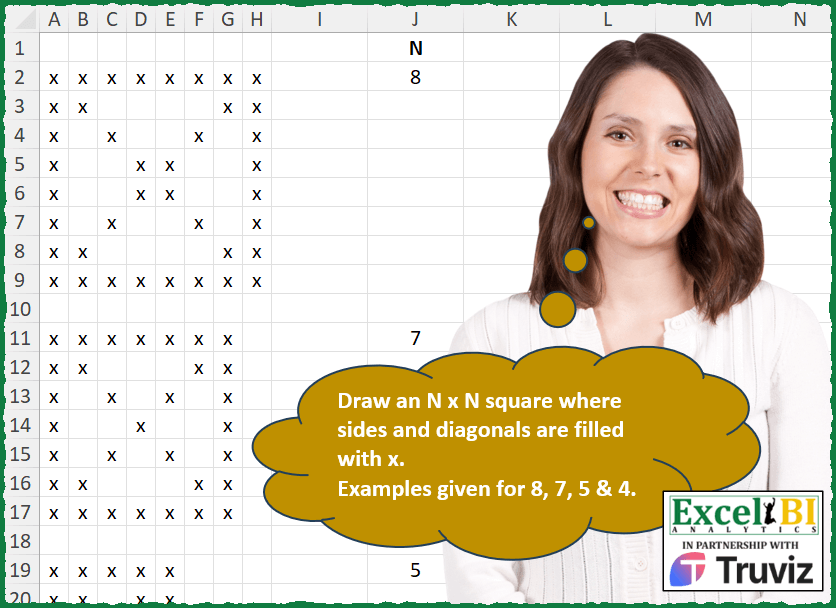
Draw an N x N square where sides and diagonals are filled with x. Examples given for 8, 7, 5 & 4.
📌 Challenge Details and Links
ExcelBI Excel Challenge Number: 380
Challenge Difficulty: ⭐️
📥Download Sample File
📥Link to the solutions on LinkedIn
Solving the challenge of Draw Square With X Pattern with Power Query
Power Query solution 1 for Draw Square With X Pattern, proposed by John V.:
let
 n = 8, b = {1..n}, F = Number.From,
 R = List.TransformMany(b, each b, (x, y) => if F(x = y) + F(x + y = 1 + n) + F(x = 1) + F(y = 1) + F(x = n) + F(y = n) > 0 then "x" else null)
in
 Table.FromRows(List.Split(R, n))

Blessings!
Power Query solution 2 for Draw Square With X Pattern, proposed by Alejandro Simón 🇵🇦 🇪🇸:
let
  N = 8,
  Listas = List.Transform(
    {0 .. N - 1},
    each
      if _ = 0 or _ = N - 1 then
        List.Repeat({"x"}, N)
      else
        {"x"} & List.Repeat({null}, N - 2) & {"x"}
  ),
  D1 = List.Reverse(
    List.Split(
      List.TransformMany(
        {0 .. N - 1},
        (x) => {0 .. N - 1},
        (x, y) => if x = y then "x" else Listas{x}{y}
      ),
      N
    )
  ),
  D2 = List.Split(
    List.TransformMany({0 .. N - 1}, (x) => {0 .. N - 1}, (x, y) => if x = y then "x" else D1{x}{y}),
    N
  ),
  Sol = Table.FromRows(D2)
in
  Sol
Power Query solution 3 for Draw Square With X Pattern, proposed by Ramiro Ayala Chávez:
let
  N = 8,
  a = List.Generate(
    () => [i = 1, j = 1],
    each [i] <= N,
    each if [j] = N then [i = [i] + 1, j = 1] else [i = [i], j = [j] + 1],
    each {[i]} & {[j]}
  ),
  b = List.Transform(
    a,
    each
      if _{0} = _{1} or _{0} = 1 or _{1} = 1 or _{0} = N or _{1} = N or List.Sum(_) = N + 1 then
        "x"
      else
        null
  ),
  Sol = Table.FromColumns(List.Split(b, N))
in
  Sol
Power Query solution 4 for Draw Square With X Pattern, proposed by Arden Nguyen, CPA:
let
 n = 7,
 cols = List.Transform({ 1 .. n}, Text.From),
 tbl = hashtag#table(cols,{List.Repeat({""},n)}),
 a = List.Generate( ()=>
 [i = 0],
 each [i] < n,
 each [i = [i]+1],
 each if [i] = 0 or [i] = n-1
 then Table.ReplaceValue(tbl, each "", each "x", Replacer.ReplaceValue, cols)
 else Table.ReplaceValue(tbl, each "", each "x", Replacer.ReplaceValue, {"1"} & List.Distinct({Text.From([i]+1)} & {Text.From(n-[i])}) & {Text.From(n)} )
 ),
 b = Table.Combine(a)
in
 b
Solving the challenge of Draw Square With X Pattern with Excel
Excel solution 1 for Draw Square With X Pattern, proposed by Bo Rydobon 🇹🇭:
=LET(n,
    J2,
    r,
    SEQUENCE(
        n
    ),
    c,
    TOROW(
        r
    ),
    IF((r=1)+(r=n)+(c=1)+(c=n)+(r=c)+(r+c-1=n),
    "*",
    ""))
Excel solution 2 for Draw Square With X Pattern, proposed by Bo Rydobon 🇹🇭:
=LET(r,
    ABS(SEQUENCE(J2,
    ,
    (1-J2)/2)),
    c,
    TOROW(
        r
    ),
    IF((r=c)+(r=@r)+(c=@r),
    "*",
    ""))
Excel solution 3 for Draw Square With X Pattern, proposed by Rick Rothstein:
=MAKEARRAY(J2,
    J2,
    LAMBDA(r,
    c,
    IF((r=1)+(r=J2)+(c=1)+(c=J2)+(r=c)+(r=1+J2-c),
    "X",
    "")))
Excel solution 4 for Draw Square With X Pattern, proposed by Rick Rothstein:
=MAKEARRAY(J2,
    J2,
    LAMBDA(r,
    c,
    IF(OR(r=1,
    c=1,
    r=c,
    c=J2,
    r=J2+{0,
    1}*(1-c)),
    "X",
    "")))
Excel solution 5 for Draw Square With X Pattern, proposed by John V.:
=MAKEARRAY(
    J2,
    J2,
    LAMBDA(
        r,
        c,
        REPT(
            "x",
            OR(
                r=c,
                r+c=1+J2,
                r=1,
                c=1,
                r=J2,
                c=J2
            )
        )
    )
)
Excel solution 6 for Draw Square With X Pattern, proposed by محمد حلمي:
=LET(n,J2,s,SEQUENCE(n,n),q,MOD(s,n)<2,
IF(q+TRANSPOSE(q)+(MOD(s,n-1)=1)+MUNIT(n),"x",""))
Excel solution 7 for Draw Square With X Pattern, proposed by Kris Jaganah:
=LET(a,
    J2,
    b,
    SEQUENCE(
        a
    ),
    c,
    TOROW(
        b
    ),
    IF(((c=1)*(b>0))+(b=1)*(c>0)+(b=a)*(c>0)+(b>0)*(c=a)+(b=c)+(-SORT(
        -b
    )=c),
    "x",
    ""))
Excel solution 8 for Draw Square With X Pattern, proposed by Julian Poeltl:
=LET(N,
    J2,
    MAKEARRAY(N,
    N,
    LAMBDA(A,
    B,
    IF(OR(A=B,
    (A+B)=N+1,
    A=N,
    B=N,
    A=1,
    B=1),
    "x",
    ""))))
Excel solution 9 for Draw Square With X Pattern, proposed by Timothée BLIOT:
=MAKEARRAY(
    J2,
    J2,
    LAMBDA(
        x,
        y,
        IF(
            OR(
                x=1,
                y=1,
                x=J2,
                y=J2,
                x=y,
                J2+1-y=x
            ),
            "x",
            ""
        )
    )
)
Excel solution 10 for Draw Square With X Pattern, proposed by Hussein SATOUR:
=LET(x,
    J2,
     a,
    SEQUENCE(
        x^2
    ),
     b,
    SEQUENCE(
        x
    ),
     c,
    VSTACK(b,
     x*(x-1)+b,
     (b-1)*x+1,
     b*x,
     (b-1)*x+b,
     b*x-b+1),
     WRAPROWS(
         IF(
             IFNA(
                 XMATCH(
                     a,
                     c
                 ),
                  0
             )>0,
              "x",
              ""
         ),
          x
     ))
Excel solution 11 for Draw Square With X Pattern, proposed by Sunny Baggu:
=LET(
 n,
     J2,

 _a,
     MAKEARRAY(
         n,
          n,
          LAMBDA(
              r,
               c,
               r
          )
     ),

 _b,
     MAKEARRAY(
         n,
          n,
          LAMBDA(
              r,
               c,
               c
          )
     ),

 _c,
     SEQUENCE(
         n
     ),

 IF(
 IF(
     _c = TOROW(
         _c
     ),
      1,
      0
 ) + IF(
     _c = SEQUENCE(
         ,
          n,
          n,
          -1
     ),
      1,
      0
 ) + (_a = 1) +
 (_a = n) + (_b = 1) + (_b = n),

 "x",

 ""
 )
)
Excel solution 12 for Draw Square With X Pattern, proposed by Abdallah Ally:
=LET(
    a,
    J2,
    MAKEARRAY(
        a,
        a,
        LAMBDA(
            x,
            y,
            IF(
                OR(
                    x=1,
                    y=1,
                    x=a,
                    y=a,
                    x=y,
                     x=a-y+1
                ),
                "x",
                ""
            )
        )
    )
)
Excel solution 13 for Draw Square With X Pattern, proposed by 🇵🇪 Ned Navarrete C.:
=LET(
    e,
    LAMBDA(
        i,
        LET(
            a,
            MAKEARRAY(
                i,
                i,
                LAMBDA(
                    r,
                    c,
                    IF(
                        OR(
                            r=1,
                            r=i,
                            c=1,
                            c=i,
                            c=r,
                            c+r=i+1
                        ),
                        "x",
                        ""
                    )
                )
            ),
            EXPAND(
                a,
                i+1,
                ,
                ""
            )
        )
    ),
    DROP(
        DROP(
            REDUCE(
                "",
                FILTER(
                    J2:J25,
                    J2:J25
                ),
                LAMBDA(
                    r,
                    v,
                    IFNA(
                        VSTACK(
                            r,
                            e(
                                v
                            )
                        ),
                        ""
                    )
                )
            ),
            1
        ),
        -1
    )
)
Excel solution 14 for Draw Square With X Pattern, proposed by 🇵🇪 Ned Navarrete C.:
=1,
    r=i,
    c=1,
    c=i,
    c=r,
    c+r=i+1),
    "x",
    ""))),
    EXPAND(
        a,
        i+1,
        ,
        ""
    ))),
    DROP(
        IFNA(
            VSTACK(
                e(
                    J2
                ),
                e(
                    J11
                ),
                e(
                    J19
                ),
                e(
                    J25
                )
            ),
            ""
        ),
        -1
    ))
Excel solution 15 for Draw Square With X Pattern, proposed by 🇵🇪 Ned Navarrete C.:
=LET(
    i,
    J2,
    MAKEARRAY(
        i,
        i,
        LAMBDA(
            r,
            c,
            IF(
                OR(
                    r=1,
                    r=i,
                    c=1,
                    c=i,
                    c=r,
                    c+r=i+1
                ),
                "x",
                ""
            )
        )
    )
)
Excel solution 16 for Draw Square With X Pattern, proposed by Charles Roldan:
=LET(m,
     J2,

p,
     WRAPCOLS(
         MOD(
             SEQUENCE(
                 m ^ 2,
                  ,
                  0
             ),
              m - 1
         ),
          m
     ),

IF(p * TAKE(
    p,
     1
) * TAKE(
    p,
     ,
     -1
) * (1 - MUNIT(
    m
)),
     "",
     "x"))
Excel solution 17 for Draw Square With X Pattern, proposed by Pieter de Bruijn:
=LET(n,
    5,
    s,
    SEQUENCE(
        n
    ),
    m,
    MUNIT(
        n
    ),
    b,
    (s=1)+(s=n),
    IF(
        b+TOROW(
            b
        )+m+SORTBY(
            m,
            -s
        ),
        "x",
        ""
    ))
or 1 char shorter using the MOD-trick by محمد حلمي:
=LET(
    n,
    5,
    s,
    SEQUENCE(
        n
    ),
    m,
    MUNIT(
        n
    ),
    b,
    MOD(
        s,
        n
    )<2,
    IF(
        b+TOROW(
            b
        )+m+SORTBY(
            m,
            -s
        ),
        "x",
        ""
    )
)
Excel solution 18 for Draw Square With X Pattern, proposed by Ziad A.:
=MAKEARRAY(
    J2,
    J2,
    LAMBDA(
        i,
        j,
        IF(
            OR(
                i=j,
                i-1=J2-j,
                i=1,
                j=1,
                j=J2,
                i=J2
            ),
            "X",

        )
    )
)
Excel solution 19 for Draw Square With X Pattern, proposed by Giorgi Goderdzishvili:
=LET(
_n,
    J2,

_mk,
     MAKEARRAY(_n,
    _n,
    LAMBDA(r,
    c,

REPT("x",
     OR(r=1,
    c=1,
    r=_n,
    c=_n,
    r=c,
    r=(_n-c+1))))),

_mk)
Excel solution 20 for Draw Square With X Pattern, proposed by Edwin Tisnado:
=LET(
    t,
    J2,
    f,
    "x",
    MAKEARRAY(
        t,
        t,
        LAMBDA(
            x,
            y,
            IFNA(
                IFS(
                    x=1,
                    f,
                    x=t,
                    f,
                    y=1,
                    f,
                    y=t,
                    f,
                    x=y,
                    f,
                    x+y=t+1,
                    f
                ),
                ""
            )
        )
    )
)
Excel solution 21 for Draw Square With X Pattern, proposed by Josh Brodrick:
=LET(N,
    J2,
    MAKEARRAY(N,
    N,
    LAMBDA(x,
    y,
    SWITCH(OR(x=1,
    y=1,
    x=N,
    y=N,
    x+2=y+2,
    x+y=(N+1)),
    TRUE,
    "X",
    FALSE,
    ""))))
Excel solution 22 for Draw Square With X Pattern, proposed by Tyler Cameron:
=LET(
    n,
    J2,
    MAKEARRAY(
        n,
        n,
        LAMBDA(
            r,
            c,
            IF(
                OR(
                    r=1,
                    c=1,
                    r=n,
                    c=n
                ),
                "x",
                IF(
                    OR(
                        r=c,
                        r+c-1=n
                    ),
                    "x",
                    ""
                )
            )
        )
    )
)
Excel solution 23 for Draw Square With X Pattern, proposed by Surendra Reddy:
=LET(
    a,
    8,
    MAKEARRAY(
        a,
        a,
        LAMBDA(
            x,
            y,
            IF(
                OR(
                    x=1,
                    x=y,
                    y=1,
                    x-a=0,
                    y=a,
                    x+y-a=1
                ),
                "X",
                ""
            )
        )
    )
)
Excel solution 24 for Draw Square With X Pattern, proposed by Surendra Reddy:
=LET(
    a,
    8,
    MAKEARRAY(
        a,
        a,
        LAMBDA(
            x,
            y,
            IF(
                OR(
                  &  x=1,
                    x=y,
                    y=1,
                    x=a,
                    y=a,
                    x+y-a=1
                ),
                "X",
                ""
            )
        )
    )
)
Excel solution 25 for Draw Square With X Pattern, proposed by Craig Hatmaker:
=  MAKEARRAY(J2, J2,
 LAMBDA(R,C,
 SWITCH(R,
 1, "X",
 J2, "X",
 IF(OR(C=HSTACK(1, R, J2-R+1, J2)),"X","")
 )
 )
 )

Revision: Even lower complexity score (26):
= MAKEARRAY( J2, J2, LAMBDA( R, C, IF( OR( R = HSTACK( 1, J2), C = HSTACK( 1, R, J2 - R + 1, J2) ), "X", "" ) ) ) )
Solving the challenge of Draw Square With X Pattern with Python
Python solution 1 for Draw Square With X Pattern, proposed by Giorgi Goderdzishvili:
Python solution
lst_n = [4,5,7,8]
for n in lst_n:
 for i in range(1,n+1):
 for k in range(1,n+1):
 if i==1 or k==1 or k==i or k==n or i==n or i==(n-k+1):
 print('x',end=' ')
 else:
 print(end=' ')
 print()
 print()
Solving the challenge of Draw Square With X Pattern with R
R solution 1 for Draw Square With X Pattern, proposed by Konrad Gryczan, PhD:
library(tidyverse)
library(readxl)
test1 = read_excel("Excel/380 Draw NxN Squares.xlsx", range = "A2:H9", col_names = FALSE)
colnames(test1) = NULL
test2 = read_excel("Excel/380 Draw NxN Squares.xlsx", range = "A11:G17", col_names = FALSE)
colnames(test2) = NULL
test3 = read_excel("Excel/380 Draw NxN Squares.xlsx", range = "A19:E23", col_names = FALSE)
colnames(test3) = NULL
test4 = read_excel("Excel/380 Draw NxN Squares.xlsx", range = "A25:D28", col_names = FALSE)
colnames(test4) = NULL
draw_sides_and_diag = function(matrix_size) {
 mat = matrix(NA, nrow = matrix_size, ncol = matrix_size)
 mat[1,] = "x"
 mat[matrix_size,] = "x"
 mat[,1] = "x"
 mat[,matrix_size] = "x"
 diag(mat) = "x"
 diag(mat[,ncol(mat):1]) = "x"
 mat = as_tibble(mat)
 colnames(mat) = NULL
 return(mat)
}
all.equal(draw_sides_and_diag(8), test1)
#> [1] TRUE
all.equal(draw_sides_and_diag(7), test2)
#> [1] TRUE
all.equal(draw_sides_and_diag(5), test3)
#> [1] TRUE
all.equal(draw_sides_and_diag(4), test4)
#> [1] TRUE
Solving the challenge of Draw Square With X Pattern with Excel VBA
Excel VBA solution 1 for Draw Square With X Pattern, proposed by Nicolas Micot:
VBA solution:
Function f_draw_NbyN_square(ByVal n As Integer) As Variant
Dim directions As Variant, tabSplit As Variant
Dim tableau() As String
Dim numDirection As Integer, ligDep As Integer, colDep As Integer, ligDir As Integer, colDir As Integer
ReDim tableau(1 To n, 1 To n)
'ligDep, colDep, ligDir, colDir
directions = Array("1,1,0,1", "1,1,1,0", n & "," & n & ",0,-1", n & "," & n & ",-1,0", "1,1,1,1", n & ",1,-1,1")
For numDirection = 0 To UBound(directions, 1)
 tabSplit = Split(directions(numDirection), ",")
 ligDep = tabSplit(0)
 colDep = tabSplit(1)
 ligDir = tabSplit(2)
 colDir = tabSplit(3)
 For i = 0 To n - 1
 tableau(ligDep + ligDir * i, colDep + colDir * i) = "x"
 Next i
Next numDirection
f_draw_NbyN_square = tableau
End Function
Excel VBA solution 2 for Draw Square With X Pattern, proposed by Hiran de Silva FCMA:
Sub ExcelBI380_ChrisCrossBox()
 Cells.ClearContents
 r_origin = 2
 c_origin = 1
 Size = 8
 r = r_origin
 c = c_origin
 For c = c To c + Size - 1
 Cells(r, c).Value = "X"
 Next c
 r = r_origin + Size - 1
 c = c_origin
 For c = c To c + Size - 1
 Cells(r, c).Value = "X"
 Next c
 r = r_origin
 c = c_origin
 For r = r To r + Size - 1
 Cells(r, c).Value = "X"
 Next r
 r = r_origin
 c = c_origin + Size - 1
 For r = r To r + Size - 1
 Cells(r, c).Value = "X"
 Next r
 r = r_origin
 c = c_origin
 For r = r To r + Size - 1
 Cells(r, c).Value = "X"
 c = c + 1
 Next r
 r = r_origin
 c = c_origin + Size - 1
 For r = r To r + Size - 1
 Cells(r, c).Value = "X"
 c = c - 1
 Next r
End Sub
&&