
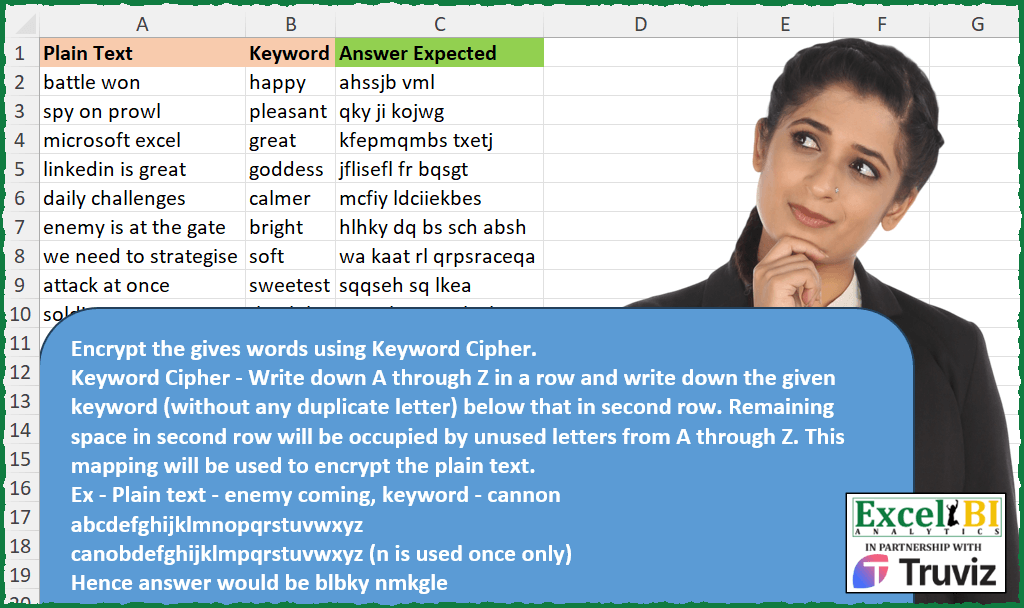
Encrypt the gives words using Keyword Cipher. Keyword Cipher – Write down A through Z in a row and write down the given keyword (without any duplicate letter) below that in second row. Remaining space in second row will be occupied by unused letters from A through Z. This mapping will be used to encrypt the plain text. Ex – Plain text – enemy coming, keyword – cannon abcdefghijklmnopqrstuvwxyz canobdefghijklmpqrstuvwxyz (n is used once only) Hence answer would be blbky nmkgle
📌 Challenge Details and Links
ExcelBI Excel Challenge Number: 377
Challenge Difficulty: ⭐️⭐️
📥Download Sample File
📥Link to the solutions on LinkedIn
Solving the challenge of Encrypt Text with Keyword Cipher with Power Query
Power Query solution 1 for Encrypt Text with Keyword Cipher, proposed by John V.:
let
 S = Excel.CurrentWorkbook(){0}[Content],
 L = Text.ToList,
 R = Table.AddColumn(S, "R", each
 let
 c = {"a".."z"}, k = List.Distinct(L([Keyword])),
 b = {" "} & k & List.Difference(c, k),
 r = List.Transform(L([Plain Text]), each b{List.PositionOf({" "} & c, _)})
 in
 Text.Combine(r)
 )[[R]]
in
 R

Blessings!
Power Query solution 2 for Encrypt Text with Keyword Cipher, proposed by Alejandro Simón 🇵🇦 🇪🇸:
let
  Source = Excel.CurrentWorkbook(){[Name = "Table1"]}[Content],
  Sol = Table.AddColumn(
    Source,
    "Answer",
    each
      let
        a = {"a" .. "z"},
        b = List.Distinct(Text.ToList([Keyword])),
        c = b & List.Difference(a, b),
        d = List.Zip({a, c}),
        e = Text.Split([Plain Text], " "),
        f = List.Transform(
          {0 .. List.Count(e) - 1},
          each Text.Combine(List.ReplaceMatchingItems(Text.ToList(e{_}), d))
        ),
        g = Text.Combine(f, " ")
      in
        g
  )[[Answer]]
in
  Sol
Power Query solution 3 for Encrypt Text with Keyword Cipher, proposed by Luan Rodrigues:
let
  Fonte = Tabela1,
  res = Table.AddColumn(
    Fonte,
    "Personalizar",
    each [
      a = List.Distinct(Text.ToList([Keyword])),
      b = List.Zip({{"a" .. "z"}, a & List.Difference({"a" .. "z"}, a)}),
      c = Text.Combine(List.ReplaceMatchingItems(Text.ToList([Plain Text]), b))
    ][c]
  )
in
  res
Power Query solution 4 for Encrypt Text with Keyword Cipher, proposed by Ramiro Ayala Chávez:
let
  Origen = Excel.CurrentWorkbook(){[Name = "Table1"]}[Content],
  Fx = (x, y) =>
    let
      a = {"a" .. "z"},
      b = List.Distinct(Text.ToList(y)),
      c = b & List.RemoveItems(a, b),
      d = Text.ToList(x),
      e = List.Zip({a, c}),
      f = Text.Combine(List.ReplaceMatchingItems(d, e))
    in
      f,
  Sol = Table.AddColumn(Origen, "Answer Expected", each Fx([Plain Text], [Keyword]))
in
  Sol
Power Query solution 5 for Encrypt Text with Keyword Cipher, proposed by Luke Jarych:
let
  Source = Excel.CurrentWorkbook(){[Name = "Table2"]}[Content],
  AnswerColumn = Table.AddColumn(
    Source,
    "Expected Answer",
    each
      let
        a = {"a" .. "z"},
        b = List.Distinct(Text.ToList([Keyword])),
        c = List.Combine({b, List.RemoveMatchingItems(a, b)}),
        d = List.Zip({a, c}),
        e = Text.ToList([Plain Text]),
        g = List.ReplaceMatchingItems(e, d),
        f = Text.Combine(g, "")
      in
        f
  )
in
  AnswerColumn
Solving the challenge of Encrypt Text with Keyword Cipher with Excel
Excel solution 1 for Encrypt Text with Keyword Cipher, proposed by Bo Rydobon 🇹🇭:
=MAP(
    A2:A10,
    B2:B10,
    LAMBDA(
        a,
        b,
        LET(
            c,
            CHAR(
                SEQUENCE(
                    26
                )+96
            ),
            CONCAT(
                XLOOKUP(
                    MID(
                        a,
                        SEQUENCE(
                            LEN(
                                a
                            )
                        ),
                        1
                    ),
                    c,
                    SORTBY(
                        c,
                        FIND(
                            c,
                            b
                        )
                    ),
                    " "
                )
            )
        )
    )
)
Excel solution 2 for Encrypt Text with Keyword Cipher, proposed by Rick Rothstein:
=MAP(
    A2:A10,
    B2:B10,
    LAMBDA(
        y,
        z,
        LET(
            f,
            LAMBDA(
                q,
                MID(
                    q,
                    SEQUENCE(
                        LEN(
                            q
                        )
                    ),
                    1
                )
            ),
            REDUCE(
                "",
                f(
                    y
                ),
                LAMBDA(
                    a,
                    x,
                    a&IF(
                        x=" ",
                        " ",
                        INDEX(
                            UNIQUE(
                                VSTACK(
                                    f(
                                        z
                                    ),
                                    CHAR(
                                        SEQUENCE(
                                            26,
                                            ,
                                            97
                                        )
                                    )
                                )
                            ),
                            CODE(
                                x
                            )-96
                        )
                    )
                )
            )
        )
    )
)
Excel solution 3 for Encrypt Text with Keyword Cipher, proposed by John V.:
=MAP(
    A2:A10,
    B2:B10,
    LAMBDA(
        t,
        k,
        LET(
            i,
            CHAR(
                ROW(
                    97:122
                )
            ),
            CONCAT(
                XLOOKUP(
                    MID(
                        t,
                        SEQUENCE(
                            LEN(
                                t
                            )
                        ),
                        1
                    ),
                    i,
                    SORTBY(
                        i,
                        FIND(
                            i,
                            k
                        )
                    ),
                    " "
                )
            )
        )
    )
)
Excel solution 4 for Encrypt Text with Keyword Cipher, proposed by محمد حلمي:
=MAP(
    A2:A10,
    B2:B10,
    LAMBDA(
        a,
        b,
        LET(
            j,
            CHAR(
                SEQUENCE(
                    26
                )+96
            ),
            i,
            LAMBDA(
                e,
                MID(
                    e,
                    SEQUENCE(
                        LEN(
                            e
                        )
                    ),
                    1
                )
            ),
            CONCAT(
                XLOOKUP(
                    i(
                        a
                    ),
                    j,
                    UNIQUE(
                        VSTACK(
                            i(
                                b
                            ),
                            j
                        )
                    ),
                    " "
                )
            )
        )
    )
)
Excel solution 5 for Encrypt Text with Keyword Cipher, proposed by Kris Jaganah:
=MAP(
    A2:A10,
    B2:B10,
    LAMBDA(
        x,
        y,
        LET(
            a,
            SEQUENCE(
                26
            ),
            b,
            CHAR(
                a+96
            ),
            c,
            UNIQUE(
                MID(
                    y,
                    TAKE(
                        a,
                        LEN(
                            y
                        )
                    ),
                    1
                )
            ),
            d,
            VSTACK(
                c,
                FILTER(
                    b,
                    XLOOKUP(
                        b,
                        c,
                        c,
                        1
                    )=1
                )
            ),
            CONCAT(
                XLOOKUP(
                    MID(
                        x,
                        SEQUENCE(
                            LEN(
                                x
                            )
                        ),
                        1
                    ),
                    b,
                    d,
                    " "
                )
            )
        )
    )
)
Excel solution 6 for Encrypt Text with Keyword Cipher, proposed by Timothée BLIOT:
=MAP(
    A2:A10,
    B2:B10,
    LAMBDA(
        v,
        w,
        LET(
            F,
            LAMBDA(
                n,
                MID(
                    n,
                    SEQUENCE(
                        LEN(
                            n
                        )
                    ),
                    1
                )
            ),
            A,
            UNIQUE(
                F(
                    w
                )
            ),
            B,
            CHAR(
                SEQUENCE(
                    26
                )+96
            ),
            CONCAT(
                MAP(
                    F(
                        v
                    ),
                    LAMBDA(
                        x,
                        XLOOKUP(
                            x,
                            B,
                            VSTACK(
                                A,
                                TOCOL(
                                    MAP(
                                        B,
                                        LAMBDA(
                                            x,
                                            IF(
                                                ISNA(
                                                    XMATCH(
                                                        x,
                                                        A
                                                    )
                                                ),
                                                x,
                                                1/0
                                            )
                                        )
                                    ),
                                    3
                                )
                            ),
                            " "
                        )
                    )
                )
            )
        )
    )
)
Excel solution 7 for Encrypt Text with Keyword Cipher, proposed by Hussein SATOUR:
=MAP(
    A2:A10,
    B2:B10,
     LAMBDA(
         x,
         y,
          LET(
              a,
               CHAR(
                   SEQUENCE(
                       26,
                       ,
                       97
                   )
               ),
               b,
               MID(
                   y,
                    SEQUENCE(
                        LEN(
                            y
                        )
                    ),
                    1
               ),
               c,
               MID(
                   x,
                    SEQUENCE(
                        LEN(
                            x
                        )
                    ),
                    1
               ),
               CONCAT(
                   XLOOKUP(
                       c,
                        a,
                        UNIQUE(
                            VSTACK(
                                b,
                                 a
                            )
                        ),
                        " "
                   )
               )
          )
     )
)
Excel solution 8 for Encrypt Text with Keyword Cipher, proposed by LEONARD OCHEA 🇷🇴:
=MAP(
    A2:A10,
    B2:B10,
    LAMBDA(
        t,
        k,
        LET(
            E,
            LAMBDA(
                x,
                MID(
                    x,
                    SEQUENCE(
                        LEN(
                            x
                        )
                    ),
                    1
                )
            ),
            l,
            CHAR(
                SEQUENCE(
                    26,
                    ,
                    97
                )
            ),
            m,
            UNIQUE(
                VSTACK(
                    E(
                        k
                    ),
                    l
                )
            ),
            CONCAT(
                XLOOKUP(
                    E(
                        t
                    ),
                    l,
                    m,
                    " "
                )
            )
        )
    )
)
Excel solution 9 for Encrypt Text with Keyword Cipher, proposed by 🇵🇪 Ned Navarrete C.:
=LET(
    a,
     CHAR(
         SEQUENCE(
             26,
             ,
             97
         )
     ),
     MAP(
         A2:A10,
         B2:B10,
          LAMBDA(
              p,
              k,
               LET(
                   b,
                    UNIQUE(
                        VSTACK(
                            MID(
                                k,
                                SEQUENCE(
                                    LEN(
                                        k
                                    )
                                ),
                                1
                            ),
                            a
                        )
                    ),
                   c,
                   MID(
                       p,
                       SEQUENCE(
                           LEN(
                               p
                           )
                       ),
                       1
                   ),
                   CONCAT(
                       IFNA(
                           INDEX(
                               b,
                               XMATCH(
                                   c,
                                   a
                               )
                           ),
                           " "
                       )
                   )
               )
          )
     )
)
Excel solution 10 for Encrypt Text with Keyword Cipher, proposed by Asheesh Pahwa:
=LET(a,
    A2:A10,
    b,
    B2:B10,
    c,

CHAR(
    SEQUENCE(
        26
    )+96
),
    MAP(a,
    b,
     LAMBDA (x,
    y,
    LET(m,
     UNIQUE(
         MID(
             Y,
             SEQUENCE(
                 LEN(
                     y
                 )
             ),
             1
         )
     ),

r,
    CONCAT(REDUCE(c,
    m,

LAMBDA (s,
    z,
    SUBSTITUTE(
        s,
        z,
        ""
    )))),

q,
    CONCAT(
        m
    )&r,

d,
    MID(
        q,
         SEQUENCE(
             LEN(
                 q
             )
         ),
        1
    ),

CONCAT(
    XLOOKUP(
        MID(
            x,
             SEQUENCE(
                 LEN(
                     x
                 )
             ),
            1
        ),
        c&,
        d,
        " "
    )
)))))
Excel solution 11 for Encrypt Text with Keyword Cipher, proposed by Charles Roldan:
=LET(a,
     CHAR(
         SEQUENCE(
             26,
              ,
              CODE(
                  "a"
              )
         )
     ),

f,
     LAMBDA(
         x,
          MID(
              x,
               SEQUENCE(
                   LEN(
                       x
                   )
               ),
               1
          )
     ),

MAP(A2:A10,
     B2:B10,
     LAMBDA(t,
    k,
     CONCAT(
XLOOKUP((f(
    t
)),
     a,
     (UNIQUE(
         VSTACK(
             f(
                 k
             ),
              a
         )
     )),
     " ")))))
Excel solution 12 for Encrypt Text with Keyword Cipher, proposed by Pieter de Bruijn:
=MAP(
    A2:A10,
    B2:B10,
    LAMBDA(
        a,
        b,
        LET(
            k,
            UNIQUE(
                VSTACK(
                    MID(
                        b,
                        SEQUENCE(
                            LEN(
                                b
                            )
                        ),
                        1
                    ),
                    CHAR(
                        ROW(
                            97:121
                        )
                    )
                )
            ),
            CONCAT(
                IFERROR(
                    INDEX(
                        k,
                        CODE(
                            MID(
                                a,
                                SEQUENCE(
                                    LEN(
                                        a
                                    )
                                ),
                                1
                            )
                        )-96
                    ),
                    " "
                )
            )
        )
    )
)

or 4 char shorter when implementing the lambda as seen in other posts:
=MAP(
    A2:A10,
    B2:B10,
    LAMBDA(
        a,
        b,
        LET(
            L,
            LAMBDA(
                L,
                MID(
                    L,
                    SEQUENCE(
                        LEN(
                            L
                        )
                    ),
                    1
                )
            ),
            k,
            UNIQUE(
                VSTACK(
                    L(
                                b
                            ),
                    CHAR(
                        ROW(
                            97:121
                        )
                    )
                )
            ),
            CONCAT(
                IFERROR(
                    INDEX(
                        k,
                        CODE(
                            L(
                                        a
                                    )
                        )-96
                    ),
                    " "
                )
            )
        )
    )
)
Excel solution 13 for Encrypt Text with Keyword Cipher, proposed by Mihai Radu O:
MAP(

     A2:A10,

     B2:B10,

     LAMBDA(
         a,
          k,

          LET(

               abc,
               VSTACK(
                   CHAR(
                       SEQUENCE(
                           26,
                            ,
                            97
                       )
                   ),
                    " "
               ),

               b,
               UNIQUE(
                   VSTACK(
                       MID(
                           k,
                            SEQUENCE(
                                LEN(
                                    k
                                )
                            ),
                            1
                       ),
                        abc
                   )
               ),

               d,
               MID(
                   a,
                    SEQUENCE(
                        LEN(
                            a
                        )
                    ),
                    1
               ),

               e,
               TEXTJOIN(
                   "",
                    0,
                    XLOOKUP(
                        d,
                         abc,
                         b
                    )
               ),

               e

          )

     )

)
Excel solution 14 for Encrypt Text with Keyword Cipher, proposed by Nicolas Micot:
=LET(
    _alphabet;
    CAR(
        SEQUENCE(
            26;
            ;
            97
        )
    );

    _keywordUnique;
    UNIQUE(
        STXT(
            B2;
            SEQUENCE(
                NBCAR(
                    B2
                )
            );
            1
        )
    );

    _encryption;
    ASSEMB.V(
        _keywordUnique;
        FILTRE(
            _alphabet;
            RECHERCHEX(
                _alphabet;
                _keywordUnique;
                _keywordUnique;
                ""
            )=""
        )
    );

    _plainText;
    STXT(
        A2;
        SEQUENCE(
            NBCAR(
                A2
            )
        );
        1
    );

    CONCAT(
        MAP(
            _plainText;
            LAMBDA(
                l_car;
                RECHERCHEX(
                    l_car;
                    _alphabet;
                    _encryption;
                    l_car
                )
            )
        )
    )
)
Excel solution 15 for Encrypt Text with Keyword Cipher, proposed by Giorgi Goderdzishvili:
=MAP(
    A2:A10,
    B2:B10,
    LAMBDA(
        x,
        y,
        LET(

            _pl,
            MID(
                x,
                SEQUENCE(
                    ,
                    LEN(
                        x
                    )
                ),
                1
            ),

            _kw,
            UNIQUE(
                MID(
                    y,
                    SEQUENCE(
                        ,
                        LEN(
                            y
                        )
                    ),
                    1
                ),
                TRUE
            ),

            _cr,
             CHAR(
                 96+SEQUENCE(
                     ,
                     26
                 )
             ),

            _cnc,
            CONCAT(
                _kw
            )&CONCAT(
                 IF(
                     ISNUMBER(
                         XMATCH(
                             _cr,
                             _kw,
                             0
                         )
                     ),
                     "",
                     _cr
                 )
            ),

            _nw,
            CONCAT(
                IFERROR(
                    MID(
                        _cnc,
                        XMATCH(
                            _pl,
                            _cr,
                            0
                        ),
                        1
                    ),
                    " "
                )
            ),

            _nw
        )
    )
)
Excel solution 16 for Encrypt Text with Keyword Cipher, proposed by Edwin Tisnado:
=MAP(
    A2:A10,
    B2:B10,
    LAMBDA(
        x,
        y,
        LET(
            s,
            CHAR(
                SEQUENCE(
                    26
                )+96
            ),
            f,
            LAMBDA(
                x,
                MID(
                    x,
                    SEQUENCE(
                        LEN(
                            x
                        )
                    ),
                    1
                )
            ),
            CONCAT(
                IFNA(
                    XLOOKUP(
                        f(
                            x
                        ),
                        s,
                        UNIQUE(
                            VSTACK(
                                f(
                                    y
                                ),
                                s
                            )
                        )
                    ),
                    " "
                )
            )
        )
    )
)
Solving the challenge of Encrypt Text with Keyword Cipher with Python
Python solution 1 for Encrypt Text with Keyword Cipher, proposed by Jan Willem Van Holst:
import string
import pandas as pd
df = pd.read_csv(r"C:JWLENOVOPYTHONPQ challengesExcel_Challenge_377.csv", sep=',')
alphabetList = list(string.ascii_lowercase)
def fx(row):
 text_list = list(text)
 keywordList = pd.unique(list(keyword)).tolist()
 chiper_list = keywordList + alphabet_ex_keyword
 chiper_dict = dict(zip(alphabetList, chiper_list)) | {' ':' '}
 chiper_text = ''.join([chiper_dict[elem] for elem in text_list])
 return chiper_text
df['answer'] = [fx(row) for row in df[['Plain Text', 'Keyword']].to_numpy().tolist()]
print(df)
Solving the challenge of Encrypt Text with Keyword Cipher with R
R solution 1 for Encrypt Text with Keyword Cipher, proposed by Konrad Gryczan, PhD:
library(tidyverse)
library(readxl)
prepare_keycode = function(keyword) {
 unique()
 alphabet = letters
 keycode = c(keyword, alphabet[!alphabet %in% keyword])
 return(keycode)
}
encode = function(sentence, keyword) {
 keycode = prepare_keycode(keyword)
 code = set_names(keycode, letters)
 map(str_split, "") %>%
 map(function(x) {
 x = x %>%
 unlist() %>%
 code[.] %>%
 paste(., collapse = "")
 return(x)
 })
 sentence = paste(words, collapse = " ")
 return(sentence)
}
result = input %>%
 mutate(`Answer Expected` = map2_chr(`Plain Text`, Keyword, encode))
&&