
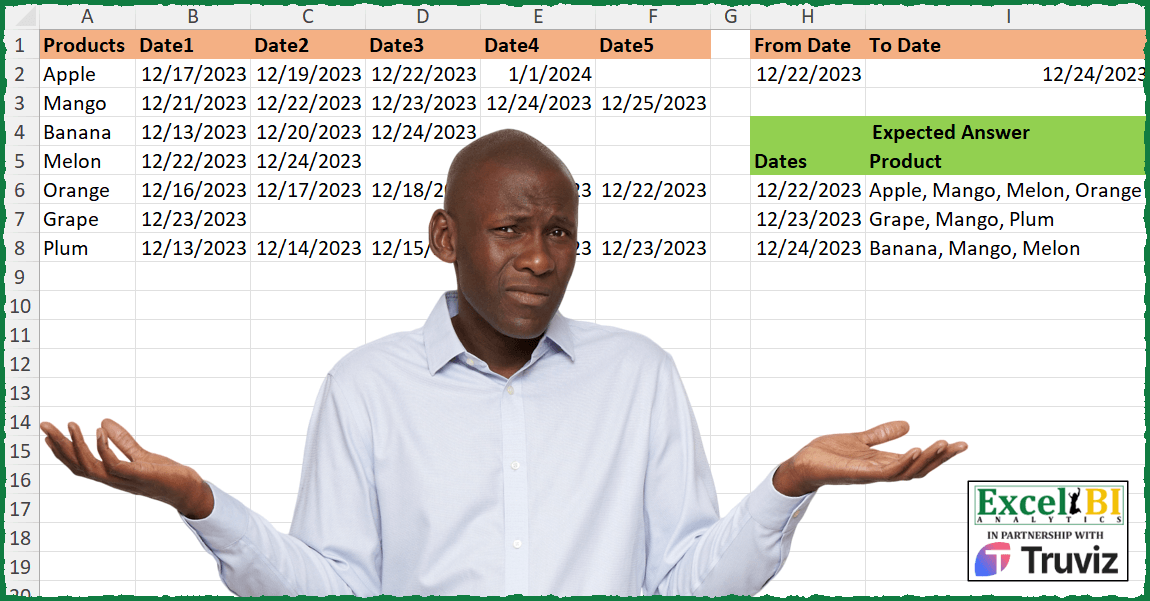
This problem is contributed by Mehmet Çiçek Find the list of products (alphabetically sorted) for the date range given in columns H & I from the table given in columns A to F.
📌 Challenge Details and Links
ExcelBI Excel Challenge Number: 371
Challenge Difficulty: ⭐️⭐️
📥Download Sample File
📥Link to the solutions on LinkedIn
Solving the challenge of Filter Products by Date Range with Power Query
Power Query solution 1 for Filter Products by Date Range, proposed by John V.:
let
 W = Excel.CurrentWorkbook()[Content],
 u = Table.UnpivotOtherColumns(W{0}, {"Products"}, "", "D"),
 g = Table.Group(u, "D", {"P", each Text.Combine(List.Sort(_[Products]), ", ")})
in
 Table.SelectRows(g, each [D] >= W{1}[From Date]{0} and [D] <= W{1}[To Date]{0})
Blessings!
Power Query solution 2 for Filter Products by Date Range, proposed by Aditya Kumar Darak 🇮🇳:
let
  Data = Excel.CurrentWorkbook(){[Name = "data"]}[Content],
  DateLookup = Excel.CurrentWorkbook(){[Name = "DateLookup"]}[Content],
  Unpivot = Table.UnpivotOtherColumns(Data, {"Products"}, "Head", "Date"),
  Group = Table.Group(Unpivot, "Date", {"Count", each Text.Combine(List.Sort([Products]), ", ")}),
  Return = Table.SelectRows(
    Group,
    each [Date] >= DateLookup{0}[From Date] and [Date] <= DateLookup{0}[To Date]
  )
in
  Return
Power Query solution 3 for Filter Products by Date Range, proposed by Luan Rodrigues:
let
  Fonte = Tabela1,
  din   = Table.UnpivotOtherColumns(Fonte, {"Products"}, "Atributo", "Date"),
  tab   = Table.ToRows(Tabela2),
  fil   = Table.SelectRows(din, each [Date] >= tab{0}{0} and [Date] <= tab{0}{1}),
  res   = Table.Group(fil, {"Date"}, {{"res", each Text.Combine(List.Sort([Products]), ", ")}})
in
  res
Power Query solution 4 for Filter Products by Date Range, proposed by Brian Julius:
let
 Source = Excel.CurrentWorkbook(){[Name="Table1"]}[Content],
 FromDate = Number.From( hashtag#date(2023, 12,22)),
 ToDate = Number.From( hashtag#date( 2023, 12, 24)),
 DateList = {FromDate..ToDate},
 #"Converted to Table" = Table.TransformColumnTypes( Table.FromList(DateList, Splitter.SplitByNothing(), {"Dates"}, null , ExtraValues.Error), {"Dates", Date.Type}),
 UnpivotedOther = Table.TransformColumnTypes( Table.UnpivotOtherColumns(Source, {"Products"}, "Attribute", "Date"), {"Date", Date.Type}),
 Join = Table.Join( #"Converted to Table", "Dates", UnpivotedOther, "Date", JoinKind.LeftOuter),
 SelectCols = Table.SelectColumns(Join,{"Dates", "Products"}),
 Group = Table.Group(SelectCols, {"Dates"}, {{"All", each List.Sort( [Products])}}),
 Extract = Table.TransformColumns(Group, {"All", each Text.Combine(List.Transform(_, Text.From), ", "), type text})
in
 Extract
Power Query solution 5 for Filter Products by Date Range, proposed by Ramiro Ayala Chávez:
let
 t1 = Excel.CurrentWorkbook(){[Name="Tabla1"]}[Content],
 t2 = Excel.CurrentWorkbook(){[Name="Tabla2"]}[Content],
 a = Table.AddColumn(t2, "D", each Duration.Days([To Date] - [From Date])),
 b = List.DateTimes(a[From Date]{0},a[D]{0}+1,hashtag#duration(1,0,0,0)),
 c = Table.UnpivotOtherColumns(t1, {"Products"}, "A", "V"),
 d = Table.ExpandListColumn(Table.AddColumn(c, "L", each b), "L"),
 e = Table.SelectRows(d, each [V]=[L])[[Products],[L]],
 f = Table.Group(e, {"L"}, {{"G", each Text.Combine(List.Sort([Products]),", ")}}),
 Sol = Table.RenameColumns(f,{{"L","Dates"},{"G","Product"}})
in
 Sol
Power Query solution 6 for Filter Products by Date Range, proposed by Rafael González B.:
let
tbl1=
let
Source1 = Excel.CurrentWorkbook(){[Name="Table1"]}[Content],
UP1 = Table.UnpivotOtherColumns(Source1, {"Products"}, "Field", "Date")[[Products], [Date]],
TS1 = Table.Sort(UP1,{{"Products", 0}, {"Date", 0}}),
TF1 = Table.SelectRows(TS1, each [Date] >= tbl2{0} and [Date] <= tbl2{1}),
FG1 = Table.Group(TF1, {"Date"}, {{"Prod", each Text.Combine(List.Sort(_[Products]), ", ")}})
in
FG1,
tbl2 =
let
Source2 = Excel.CurrentWorkbook(){[Name="Table2"]}[Content],
LD = List.Combine({Source2[From Date], Source2[To Date]})
in
LD
in
tbl1
🧙♂️🧙♂️🧙♂️
Power Query solution 7 for Filter Products by Date Range, proposed by Mihai Radu O:
let
  sursa = Excel.CurrentWorkbook(){[Name = "Table1"]}[Content],
  unpivoted = Table.TransformColumnTypes(
    Table.UnpivotOtherColumns(sursa, {"Products"}, "Attribute", "Value"),
    {"Value", type date}
  ),
  interval =
    let
      a = Excel.CurrentWorkbook(){[Name = "Table2"]}[Content],
      b = Table.AddColumn(a, "perioada", each {Number.From([From Date]) .. Number.From([To Date])})[
        perioada
      ]
    in
      Table.TransformColumnTypes(Table.FromColumns(b, {"perioada"}), {"perioada", type date}),
  merged = Table.NestedJoin(
    interval,
    {"perioada"},
    unpivoted,
    {"Value"},
    "interval",
    JoinKind.LeftOuter
  ),
  sol = Table.AggregateTableColumn(
    merged,
    "interval",
    {{"Products", Combiner.CombineTextByDelimiter(", "), "produse"}}
  )
in
  sol
Power Query solution 8 for Filter Products by Date Range, proposed by Nicolas Micot:
let
 Source = Excel.CurrentWorkbook(){[Name="produits"]}[Content],
 #"En-têtes promus" = Table.PromoteHeaders(Source, [PromoteAllScalars=true]),
 #"Tableau croisé dynamique des colonnes supprimé" = Table.UnpivotOtherColumns(#"En-têtes promus", {"Products"}, "Attribut", "Date"),
 #"Colonnes supprimées" = Table.RemoveColumns(#"Tableau croisé dynamique des colonnes supprimé",{"Attribut"}),
 #"Type modifié1" = Table.TransformColumnTypes(#"Colonnes supprimées",{{"Date", type date}}),
 #"Lignes filtrées" = Table.SelectRows(#"Type modifié1", each [Date] >= From_Date and [Date] <= To_Date),
 #"Lignes groupées" = Table.Group(#"Lignes filtrées", {"Date"}, {{"Concaténation", each Text.Combine([Products],", "), type nullable text}})
in
 #"Lignes groupées"


        Show translation


        Show translation of this comment
Power Query solution 9 for Filter Products by Date Range, proposed by Glyn Willis:
let
  Dates = Table.TransformColumnTypes(
    Excel.CurrentWorkbook(){[Name = "Table2"]}[Content],
    {{"From Date", type date}, {"To Date", type date}},
    "en-US"
  ),
  Source = Excel.CurrentWorkbook(){[Name = "Table1"]}[Content],
  #"Unpivoted Other Columns" = Table.UnpivotOtherColumns(Source, {"Products"}, "Attribute", "Date")[
    [Products],
    [Date]
  ],
  #"Changed Type with Locale" = Table.TransformColumnTypes(
    #"Unpivoted Other Columns",
    {{"Date", type date}},
    "en-US"
  ),
  #"Filtered Rows" = Table.SelectRows(
    #"Changed Type with Locale",
    each
      let
        f = Dates[From Date]{0},
        t = Dates[To Date]{0}
      in
        [Date] >= f and [Date] <= t
  ),
  #"Grouped Rows" = Table.Group(
    #"Filtered Rows",
    {"Date"},
    {{"Products", each Text.Combine(List.Sort(List.Distinct([Products])), ", "), type text}}
  ),
  #"Sorted Rows" = Table.Sort(#"Grouped Rows", {{"Date", Order.Ascending}})
in
  #"Sorted Rows"
Solving the challenge of Filter Products by Date Range with Excel
Excel solution 1 for Filter Products by Date Range, proposed by Bo Rydobon 🇹🇭:
=LET(
    f,
    H2,
    d,
    SEQUENCE(
        I2-f+1,
        ,
        f
    ),
    HSTACK(
        d,
        MAP(
            d,
            LAMBDA(
                e,
                TEXTJOIN(
                    ", ",
                    ,
                    SORT(
                        TOCOL(
                            IFS(
                                B2:F8=e,
                                A2:A8
                            ),
                            3
                        )
                    )
                )
            )
        )
    )
)
Excel solution 2 for Filter Products by Date Range, proposed by John V.:
=LET(
    s,
    SEQUENCE(
        1+I2-H2,
        ,
        H2
    ),
    HSTACK(
        s,
        MAP(
            s,
            LAMBDA(
                x,
                TEXTJOIN(
                    ", ",
                    ,
                    REPT(
                        A2:A8,
                        B2:F8=x
                    )
                )
            )
        )
    )
)
or
✅=LET(d,
    TOCOL(
        B2:F8,
        1
    ),
    GROUPBY(d,
    TOCOL(
        IFS(
            B2:F8,
            A2:A8
        ),
        2
    ),
    ARRAYTOTEXT,
    ,
    0,
    ,
    (d>=H2)*(d<=I2)))
Sorted:
✅=LET(
    s,
    SEQUENCE(
        1+I2-H2,
        ,
        H2
    ),
    HSTACK(
        s,
        MAP(
            s,
            LAMBDA(
                x,
                ARRAYTOTEXT(
                    SORT(
                        TOCOL(
                            IFS(
                                B2:F8=x,
                                A2:A8
                            ),
                            2
                        )
                    )
                )
            )
        )
    )
)
Excel solution 3 for Filter Products by Date Range, proposed by محمد حلمي:
=LET(
    d,
    SEQUENCE(
        I2-H2+1,
        ,
        H2
    ),

    HSTACK(
        d,
        MAP(
            d,
            LAMBDA(
                a,

                ARRAYTOTEXT(
                    SORT(
                        TOCOL(
                            IFS(
                                a=B2:F8,
                                A2:A8
                            ),
                            2
                        )
                    )
                )
            )
        )
    )
)
Excel solution 4 for Filter Products by Date Range, proposed by 🇰🇷 Taeyong Shin:
=LET(t,
    TOCOL(
        B2:F8,
        1
    ),
    GROUPBY(t,
    TOCOL(
        T(
            0/B2:F8
        )&A2:A8,
        2
    ),
    LAMBDA(
        x,
        ARRAYTOTEXT(
            SORT(
                x
            )
        )
    ),
    ,
    0,
    ,
    (t>=H2)*(t<=I2)))
Excel solution 5 for Filter Products by Date Range, proposed by Kris Jaganah:
=LET(a,
    B2:F8,
    b,
    SORT(TOCOL(IF((a>=H2)*(a<=I2),
    A2:A8&a,
    1/0),
    3)),
    c,
    --RIGHT(
        b,
        5
    ),
    GROUPBY(
        c,
        TEXTSPLIT(
            b,
            c
        ),
        ARRAYTOTEXT,
        ,
        0
    ))
Excel solution 6 for Filter Products by Date Range, proposed by Kris Jaganah:
=LET(a,
    TOCOL(
        A2:A8&"-"&B2:F8
    ),
    b,
    SORT(
        FILTER(
            a,
            TEXTAFTER(
                a,
                "-"
            )<>""
        )
    ),
    c,
    TEXTSPLIT(
        b,
        "-"
    ),
    d,
    --TEXTAFTER(
        b,
        "-"
    ),
    VSTACK({"Dates",
    "Product"},
    GROUPBY(d,
    c,
    ARRAYTOTEXT,
    ,
    0,
    ,
    (d>=H2)*(d<=I2))))
Excel solution 7 for Filter Products by Date Range, proposed by Hussein SATOUR:
=LET(
    f,
     H2,
     t,
     I2,
     v,
     TOCOL(
         A2:A8&"/"&B2:F8
     ),
     l,
     SEQUENCE(
         t-f+1,
         ,
         f
     ),
     HSTACK(
         l,
          MAP(
              l,
               LAMBDA(
                   x,
                    ARRAYTOTEXT(
                        FILTER(
                            TEXTBEFORE(
                                v,
                                "/"
                            ),
                             IFERROR(
                                 --TEXTAFTER(
                                     v,
                                     "/"
                                 ),
                                  0
                             )=x
                        )
                    )
               )
          )
     )
)
Excel solution 8 for Filter Products by Date Range, proposed by Sunny Baggu:
=LET(
 _d,
     UNIQUE(TOCOL(IF((B2:F8 >= H2) * (B2:F8 <= I2),
     B2:F8,
     x),
     3)),

 _p,
     MAP(

          _d,

          LAMBDA(
              a,
               ARRAYTOTEXT(
                   SORT(
                       TOCOL(
                           IF(
                               B2:F8 = a,
                                A2:A8,
                                x
                           ),
                            3
                       )
                   )
               )
          )

     ),

 HSTACK(
     TEXT(
         _d,
          "mm/dd/yyy"
     ),
      _p
 )
)
Excel solution 9 for Filter Products by Date Range, proposed by LEONARD OCHEA 🇷🇴:
=LET(d,TOCOL(B2:F8,1),GROUPBY(d,TOCOL(IF(B2:F8,A2:A8,z),3),ARRAYTOTEXT,,0,,(d>=H2)*(d<=I2)))
With header and ordered products
=LET(d,TOCOL(B2:F8,1),VSTACK({"Dates","Product"},GROUPBY(d,TOCOL(IF(B2:F8,A2:A8,z),3),LAMBDA(a,ARRAYTOTEXT(SORT(a))),,0,,(d>=H2)*(d<=I2))))
Excel solution 10 for Filter Products by Date Range, proposed by An Nguyen:
=LET(t,
    DROP(
        REDUCE(
            "",
            A2:A8,
            LAMBDA(
                X,
                Y,
                VSTACK(
                    X,
                    CHOOSE(
                        {1,
                        2},
                        Y,
                        TOCOL(
                            OFFSET(
                                Y,
                                ,
                                1,
                                ,
                                5
                            )
                        )
                    )
                )
            )
        ),
        1
    ),
    d,
    INDEX(
        t,
        ,
        2
    ),
    VSTACK({"Dates",
    "Product"},
    GROUPBY(d,
    INDEX(
        t,
        ,
        1
    ),
    ARRAYTOTEXT,
    0,
    0,
    ,
    (d>=H2)*(d<=I2))))
Excel solution 11 for Filter Products by Date Range, proposed by Pieter de B.:
=LET(
    d,
    ROW(
        45282:45284
    ),
    HSTACK(
        d,
        MAP(
            d,
            LAMBDA(
                m,
                TEXTJOIN(
                    ", ",
                    ,
                    SORT(
                        TOCOL(
                            REPT(
                                A2:A8,
                                B2:F8=m
                            )
                      &  )
                    )
                )
            )
        )
    )
)
Excel solution 12 for Filter Products by Date Range, proposed by Charles Roldan:
=LET(
    Products,
     A2:A8,
     DateRange,
     B2:F8,
     From,
     H2,
     To,
     I2,
     Timeframe,
     SEQUENCE(
         To-From+1,
          ,
          From
     ),
     HSTACK(
         Timeframe,
          BYROW(
              Timeframe,
               LAMBDA(
                   Date,
                    ARRAYTOTEXT(
                        FILTER(
                            Products,
                             BYROW(
                                 DateRange,
                                  LAMBDA(
                                      ProductRange,
                                       ISNUMBER(
                                           XMATCH(
                                               Date,
                                                ProductRange
                                           )
                                       )
                                  )
                             ),
                             ""
                        )
                    )
               )
          )
     )
)
Excel solution 13 for Filter Products by Date Range, proposed by Giorgi Goderdzishvili:
=LET(
_dts,
    B2:F8,

_ls,
    A2:A8,

_st,
    H2,

_en,
    I2,

_gr,
    UNIQUE(FILTER(TOCOL(
        _dts
    ),
    (TOCOL(
        _dts
    )>=_st)*(TOCOL(
        _dts
    )<=_en))),

_mp,

 MAP(
     _gr,
      LAMBDA(
          x,

           TEXTJOIN(
               ", ",
               ,
               SORT(
                   IF(
                       BYROW(
                           _dts,
                           LAMBDA(
                               y,

                               ISNUMBER(
                                   XMATCH(
                                       x,
                                       y,
                                       0
                                   )
                               )
                           )
                       ),
                       _ls,
                       ""
                   )
               )
           )
      )
 ),

HSTACK(
    _gr,
    _mp
))
Excel solution 14 for Filter Products by Date Range, proposed by Edwin Tisnado:
=LET(
    a,
    A2:A8,
    s,
    SEQUENCE(
        I2-H2+1,
        ,
        H2
    ),
    HSTACK(
        s,
        MAP(
            s,
            LAMBDA(
                x,
                ARRAYTOTEXT(
                    FILTER(
                        a,
                        BYROW(
                            B2:F8=x,
                            LAMBDA(
                                v,
                                OR(
                                    v
                                )
                            )
                        )
                    )
                )
            )
        )
    )
)
Excel solution 15 for Filter Products by Date Range, proposed by Md Ismail Hosen:
=HSTACK(
    SEQUENCE(
        I2-H2+1,
        ,
        H2
    ),
    MAP(
        SEQUENCE(
        I2-H2+1,
        ,
        H2
    ),
        LAMBDA(
            x,
             TEXTJOIN(
                 " ,",
                 FALSE,
                 SORT(
                     FILTER(
                         A2:A8,
                         BYROW(
                             B2:F8=x,
                             OR
                         )
                     )
                 )
             )
        )
    )
)
Excel solution 16 for Filter Products by Date Range, proposed by Rayan S.:
=LET(
 p,
     A2:A8,

 d,
     TOCOL(
         B2:F8
     ),

 arr,
     INDEX(

          p,

          ROUNDDOWN(
              SEQUENCE(
                  COUNTA(
                      p
                  ) * COLUMNS(
                      B1:F1
                  ),
                   ,
                   ,
                   1 / COLUMNS(
                      B1:F1
                  )
              ),
               0
          )

     ),

 Dates,
     UNIQUE(FILTER(d,
     ((d >= H2) * (d <= I2)))),

 VSTACK(

      {"Dates",
      "Products"},

      HSTACK(
          Dates,
           MAP(
               Dates,
                LAMBDA(
                    x,
                     TEXTJOIN(
                         ", ",
                          ,
                          FILTER(
                              arr,
                               d = x
                          )
                     )
                )
           )
      )

 )
)
Solving the challenge of Filter Products by Date Range with Python
Python solution 1 for Filter Products by Date Range, proposed by Jan Willem Van Holst:
In Python:
import pandas as pd
df = pd.read_csv(r"C:JWLENOVOPYTHONExcel_Challenge_371.csv", sep=";", usecols=[*range(6)])
df_unpivot = pd.melt(df, id_vars='Products').drop(columns='variable').dropna()
dates = ['22/12/2023', '23/12/2023','24/12/2023']
select = [sorted(df_unpivot.loc[df_unpivot['value']==elem]['Products'].to_list()) for elem in dates]
answer = list(zip(dates, select))
Solving the challenge of Filter Products by Date Range with R
R solution 1 for Filter Products by Date Range, proposed by Konrad Gryczan, PhD:
library(tidyverse)
library(readxl)
input1 = read_excel("Excel/371 Find data between dates.xlsx", range = "A1:F8")
input2 = read_excel("Excel/371 Find data between dates.xlsx", range = "H1:I2") %>%
 janitor::clean_names()
test = read_excel("Excel/371 Find data between dates.xlsx", range = "H5:I8")
result = input1 %>%
 pivot_longer(cols = -c("Products"), names_to = "index", values_to = "Dates") %>%
 filter(Dates >= input2$from_date & Dates <= input2$to_date) %>%
 group_by(Dates) %>%
 arrange(Products) %>%
 summarise(Product = paste(Products, collapse = ", "))
Solving the challenge of Filter Products by Date Range with DAX
DAX solution 1 for Filter Products by Date Range, proposed by Zoran Milokanović:
DEFINE
VAR F = MINX(Table2, Table2[From Date])
VAR T = MAXX(Table2, Table2[To Date])
EVALUATE
SELECTCOLUMNS(
 SUMMARIZE(
 FILTER(
 UNION(
 FILTER(SELECTCOLUMNS('Table1', Table1[Products], "Dates", Table1[Date1]), NOT(ISBLANK([Dates]))),
 FILTER(SELECTCOLUMNS('Table1', Table1[Products], "Dates", Table1[Date2]), NOT(ISBLANK([Dates]))),
 FILTER(SELECTCOLUMNS('Table1', Table1[Products], "Dates", Table1[Date3]), NOT(ISBLANK([Dates]))),
 FILTER(SELECTCOLUMNS('Table1', Table1[Products], "Dates", Table1[Date4]), NOT(ISBLANK([Dates]))),
 FILTER(SELECTCOLUMNS('Table1', Table1[Products], "Dates", Table1[Date5]), NOT(ISBLANK([Dates])))
 ),
 [Dates] >= F && [Dates] <= T
 ),
 [Dates],
 "Product", CONCATENATEX(Table1, Table1[Products], ", ", Table1[Products], ASC)
 ),
 "Dates", FORMAT([Dates], "MM/DD/YYYY", "en-US"),
 [Product]
)
&&