
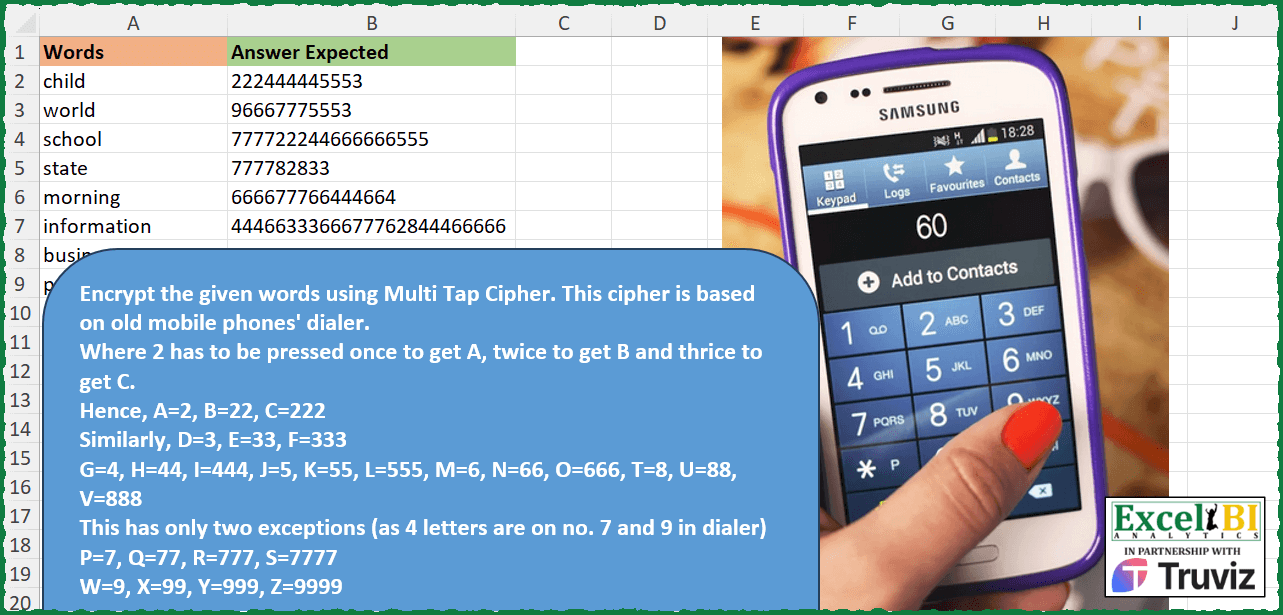
Encrypt the given words using Multi Tap Cipher. This cipher is based on old mobile phones’ dialer. Where 2 has to be pressed once to get A, twice to get B and thrice to get C. Hence, A=2, B=22, C=222 Similarly, D=3, E=33, F=333 G=4, H=44, I=444, J=5, K=55, L=555, M=6, N=66, O=666, T=8, U=88, V=888 This has only two exceptions (as 4 letters are on no. 7 and 9 in dialer) P=7, Q=77, R=777, S=7777 W=9, X=99, Y=999, Z=9999 Hence excel will be coded as e x c e l = 33 99 222 33 555 = 339922233555 (I have given space for sake of brevity)
📌 Challenge Details and Links
ExcelBI Excel Challenge Number: 368
Challenge Difficulty: ⭐️⭐️
📥Download Sample File
📥Link to the solutions on LinkedIn
Solving the challenge of Encrypt Text with Multi-Tap Cipher with Power Query
Power Query solution 1 for Encrypt Text with Multi-Tap Cipher, proposed by Alejandro Simón 🇵🇦 🇪🇸:
let
  Source = Excel.CurrentWorkbook(){[Name = "Table1"]}[Content],
  Sol = Table.AddColumn(
    Source,
    "Answer",
    each
      let
        a = [Words],
        b =
          let
            A = List.Zip(
              {
                List.Split({"a" .. "o"}, 3) & {{"p" .. "s"}} & {{"t" .. "v"}} & {{"w" .. "z"}},
                {2 .. 9}
              }
            ),
            B = List.Combine(
              List.Transform(
                A,
                each
                  let
                    a = _{0},
                    b = {1 .. List.Count(a)},
                    c = List.Zip({a, b, List.Repeat({_{1}}, List.Count(a))}),
                    d = List.Transform(c, each {_{0}, Text.Repeat(Text.From(_{2}), _{1})})
                  in
                    d
              )
            )
          in
            B,
        c = List.Accumulate(b, a, (s, c) => Text.Replace(s, c{0}, c{1}))
      in
        c
  )[[Answer]]
in
  Sol
Power Query solution 2 for Encrypt Text with Multi-Tap Cipher, proposed by Luan Rodrigues:
let
  Fonte = Tabela1,
  replace = [
    a = List.Split({"a" .. "o"}, 3)
      & List.Split({"p" .. "s"}, 4)
      & List.Split({"t" .. "v"}, 3)
      & {{"w" .. "z"}},
    b = {2 .. List.Count(a) + 1},
    c = List.Zip({a, List.Transform(a, each {1 .. List.Count(_)}), b}),
    d = List.TransformMany(
      c,
      each List.Zip({_{0}, List.Transform(_{1}, (x) => Text.Repeat(Text.From(_{2}), x))}),
      (x, y) => y
    )
  ][d],
  res = Table.AddColumn(
    Fonte,
    "Personalizar",
    each Text.Combine(List.ReplaceMatchingItems(Text.ToList([Words]), replace))
  )
in
  res
Power Query solution 3 for Encrypt Text with Multi-Tap Cipher, proposed by Ramiro Ayala Chávez:
let
  Origen = Excel.CurrentWorkbook(){[Name = "Tabla1"]}[Content],
  Fx = (x) =>
    let
      a = Text.ToList(x),
      b = {"a" .. "z"},
      c = {"2" .. "9"},
      d = {0 .. List.Count(c) - 1},
      e = List.Transform(d, each c{_} & c{_}),
      f = List.Transform(d, each c{_} & e{_}),
      g = List.Sort(c & e & f & {"7777"} & {"9999"}),
      h = Text.Combine(List.ReplaceMatchingItems(a, List.Zip({b, g})))
    in
      h,
  Sol = Table.AddColumn(Origen, "Answer Expected", each Fx([Words]))
in
  Sol
Power Query solution 4 for Encrypt Text with Multi-Tap Cipher, proposed by Glyn Willis:
let
  CfgTbl = Table.FromRows(
    {
      {{"a" .. "c"}, "2"},
      {{"d" .. "f"}, "3"},
      {{"g" .. "i"}, "4"},
      {{"j" .. "l"}, "5"},
      {{"m" .. "o"}, "6"},
      {{"t" .. "v"}, "8"},
      {{"p" .. "s"}, "7"},
      {{"w" .. "z"}, "9"}
    },
    {"T", "C"}
  ),
  Source = Excel.CurrentWorkbook(){[Name = "Table1"]}[Content],
  #"Changed Type" = Table.TransformColumnTypes(
    Source,
    {{"Words", type text}, {"Answer Expected", type text}}
  ),
  #"Added Custom" = Table.AddColumn(
    #"Changed Type",
    "Custom",
    each [
      L = Text.ToList([Words]),
      Tb = Table.Combine(
        List.Transform(L, (y) => Table.SelectRows(CfgTbl, (x) => List.Contains(x[T], y)))
      ),
      C = Table.FromColumns(Table.ToColumns(Tb) & {L}, {"T", "C", "L"}),
      I = Table.AddColumn(C, "R", (x) => Text.Repeat(x[C], List.PositionOf(x[T], x[L]) + 1)),
      A = Text.Combine(I[R])
    ][A]
  )
in
  #"Added Custom"
Solving the challenge of Encrypt Text with Multi-Tap Cipher with Excel
Excel solution 1 for Encrypt Text with Multi-Tap Cipher, proposed by Bo Rydobon 🇹🇭:
=MAP(A2:A10,LAMBDA(a,LET(s,SEQUENCE(8),n,94+s*3+(s>6),c,CODE(MID(a,SEQUENCE(LEN(a)),1)),CONCAT(REPT(MATCH(c,n)+1,1+c-LOOKUP(c,n))))))Excel solution 2 for Encrypt Text with Multi-Tap Cipher, proposed by Rick Rothstein:
=MAP(
    A2:A10,
    LAMBDA(
        x,
        CONCAT(
            MAP(
                MID(
                    x,
                    SEQUENCE(
                        LEN(
                            x
                        )
                    ),
                    1
                ),
                LAMBDA(
                    z,
                    LET(
                        k,
                        TEXTSPLIT(
                            ",abc,def,ghi,jkl,mno,pqrs,tuv,wxyz",
                            ","
                        ),
                        n,
                        MATCH(
                            "*"&z&"*",
                            k,
                            0
                        ),
                        r,
                        FIND(
                            z,
                            INDEX(
                                k,
                                n
                            )
                        ),
                        REPT(
                            n,
                            r
                        )
                    )
                )
            )
        )
    )
)
Excel solution 3 for Encrypt Text with Multi-Tap Cipher, proposed by John V.:
=MAP(A2:A10,
    LAMBDA(x,
    LET(b,
    CODE(
        MID(
            x,
            SEQUENCE(
                LEN(
                    x
                )
            ),
            1
        )
    )-96,
    n,
    b-(b>18)-(b>25)-1,
    CONCAT(REPT(2+INT(
        n/3
    ),
    1+(b=19)+(b=26)+MOD(
        n,
        3
    ))))))
Excel solution 4 for Encrypt Text with Multi-Tap Cipher, proposed by محمد حلمي:
=MAP(A2:A10,
    LAMBDA(a,
    LET(s,
    SEQUENCE(
        32
    )-1,
    i,
    MOD(
        s,
        4
    ),
    CONCAT(XLOOKUP(MID(
        a,
        s+1,
        1
    ),
    CHAR(
        TAKE(
            s,
            26
        )+97
    ),

FILTER(REPT(
    INT(
        s/4
    )+2,
    1+i
),
    i-3+(s=31)+(s=23)),
    "")))))
Excel solution 5 for Encrypt Text with Multi-Tap Cipher, proposed by Kris Jaganah:
=MAP(A2:A10,
    LAMBDA(x,
    LET(a,
    SEQUENCE(
        26
    ),
    b,
    SCAN(1,
    a,
    LAMBDA(x,
    y,
    LET(p,
    MOD(
        y,
        3
    ),
    IFS((p=1)*(y<19),
    1+x,
    (y>19)*(y<26)*(p=2),
    1+x,
    1,
    x)))),
    CONCAT(
        XLOOKUP(
            MID(
                x,
                a,
                1
            ),
            CHAR(
                a+64
            ),
            REPT(
                b,
                a-XMATCH(
                    b,
                    b
                )+1
            ),
            ""
        )
    ))))
Excel solution 6 for Encrypt Text with Multi-Tap Cipher, proposed by Julian Poeltl:
=MAP(A2:A10,LAMBDA(W,LET(POS,XMATCH(MID(W,SEQUENCE(1,LEN(W)),1),CHAR(SEQUENCE(26,,CODE("A")))),Z,MAP(POS,LAMBDA(A,IFS(A<19,MOD(A-1,3)+1,OR(A=19,A=26),4,1,MOD(A-20,3)+1))),N,IFS(POS<19,ROUNDDOWN((POS-1)/3,0)+2,POS=19,7,POS<23,8,1,9),CONCAT(REPT(N,Z)))))Excel solution 7 for Encrypt Text with Multi-Tap Cipher, proposed by Timothée BLIOT:
=MAP(
    A2:A10,
    LAMBDA(
        z,
        CONCAT(
            XLOOKUP(
                MID(
                    z,
                    SEQUENCE(
                        LEN(
                            z
                        )
                    ),
                    1
                ),
                CHAR(
                    SEQUENCE(
                        26
                    )+96
                ),
                DROP(
                    REDUCE(
                        "",
                        SEQUENCE(
                            8,
                            ,
                            2
                        ),
                        LAMBDA(
                            a,
                            v,
                            VSTACK(
                                a,
                                REPT(
                                    v,
                                    SEQUENCE(
                                        IF(
                                            OR(
                                                v=7,
                                                v=9
                                            ),
                                            4,
                                            3
                                        )
                                    )
                                )
                            )
                        )
                    ),
                    1
                )
            )
        )
    )
)
Excel solution 8 for Encrypt Text with Multi-Tap Cipher, proposed by Hussein SATOUR:
=MAP(
    A2:A10,
     LAMBDA(
         x,
          CONCAT(
              XLOOKUP(
                  MID(
                      x,
                       SEQUENCE(
                           LEN(
                               x
                           )
                       ),
                       1
                  ),
                   CHAR(
                       SEQUENCE(
                           26,
                           ,
                           97
                       )
                   ),
                   REPT(
                       VSTACK(
                           ROUNDUP(
                               SEQUENCE(
                                   18
                               )/3,
                               0
                           )+1,
                           {7;8;8;8;9;9;9;9}
                       ),
                        VSTACK(
                            LET(
                                y,
                                 MOD(
                                     SEQUENCE(
                                   18
                               ),
                                     3
                                 ),
                                 IF(
                                     y=0,
                                     3,
                                     y
                                 )
                            ),
                            {4;1;2;3;1;2;3;4}
                        )
                   )
              )
          )
     )
)
Excel solution 9 for Encrypt Text with Multi-Tap Cipher, proposed by Abdallah Ally:
=MAP(
    A2:A10,
    LAMBDA(
        u,
        LET(
            a,
            u,
            b,
            {"abc";"def";"ghi";"jkl";"mno";"pqrs";"tuv";"wxyz"},
            c,
            SEQUENCE(
                8,
                ,
                2
            ),
            d,
            SEQUENCE(
                LEN(
                    a
                )
            ),
            e,
            MID(
                a,
                d,
                1
            ),
            REDUCE(
                "",
                d,
                LAMBDA(
                    x,
                    y,
                    x&REPT(
                        XLOOKUP(
                            "*"&CHOOSEROWS(
                                e,
                                y
                            )&"*",
                            b,
                            c,
                            "",
                            2
                        ),
                        SUM(
                            IFERROR(
                                SEARCH(
                                    CHOOSEROWS(
                                e,
                                y
                            ),
                                    b
                                ),
                                0
                            )
                        )
                    )
                )
            )
        )
    )
)
Excel solution 10 for Encrypt Text with Multi-Tap Cipher, proposed by Charles Roldan:
=LET(
    Codex,
     INT(
         SEQUENCE(
             9,
              ,
              94,
              22/7
         )
     ),

    MAP(
        A2:A10,
         LAMBDA(
             Word,
              LET(

                  Array,
                   CODE(
                       MID(
                           Word,
                            SEQUENCE(
                                LEN(
                                    Word
                                )
                            ),
                            1
                       )
                   ),

                  Number,
                   MATCH(
                       Array,
                        Codex
                   ),
                   Times,
                   1+Array-INDEX(
                       Codex,
                        Number
                   ),

                  CONCAT(
                      REPT(
                          Number,
                           Times
                      )
                  )
              )
         )
    )
)
Excel solution 11 for Encrypt Text with Multi-Tap Cipher, proposed by Nicolas Micot:
=CONCAT(
    RECHERCHEX(
        STXT(
            A2;
            SEQUENCE(
                NBCAR(
                    A2
                )
            );
            1
        );
        letter;
        input
    )
)
Excel solution 12 for Encrypt Text with Multi-Tap Cipher, proposed by Giorgi Goderdzishvili:
=MAP(A2:A10,
    LAMBDA(x,
    LET(
_wr,
    x,

_cr,
     MID(
         _wr,
         SEQUENCE(
             ,
             LEN(
                 _wr
             )
         ),
         1
     ),

_ar,
    SEQUENCE(
        26,
        ,
        3
    ),

_in,
    INT(
        _ar/3
    )+1,

_sw,
     IFS(
         _ar=21,
         7,
         _ar=24,
         8,
         _ar>26,
         9,
         TRUE,
         _in
     ),

_xl,
     MAP(SEQUENCE(
         ROWS(
             _sw
         )
     ),
    LAMBDA(x,

REPT(INDEX(
    _sw,
    x,
    1
),
     SUM(--(TAKE(
         _sw,
         x
     )=INDEX(
    _sw,
    x,
    1
)))))),

CONCAT(
    XLOOKUP(
        _cr,
        CHAR(
            96+SEQUENCE(
                26
            )
        ),
        _xl
    )
))))
Excel solution 13 for Encrypt Text with Multi-Tap Cipher, proposed by Rayan S.:
=MAP(

     A2:A10,

     LAMBDA(
         arr,

          LET(

               a,
               UNICHAR(
                   SEQUENCE(
                       26,
                        ,
                        97
                   )
        &       ),

               s,
               SUBSTITUTE(

                    TEXTJOIN(
                        "",
                         ,
                         ROUNDDOWN(
                             SEQUENCE(
                                 26,
                                  ,
                                  2,
                                  1 / 3
                             ),
                              0
                         )
                    ),

                    "8889991010",

                    "78889999"

               ),

               n,
               MID(
                   s,
                    SEQUENCE(
                        LEN(
                            s
                        )
                    ),
                    1
               ),

               x,
               MID(
                   arr,
                    SEQUENCE(
                        LEN(
                            arr
                        )
                    ),
                    1
               ),

               l,
               XLOOKUP(
                   x,
                    a,
                    n
               ),

               CONCAT(
                   REPT(
                       l,
                        MATCH(
                            x,
                             a,
                             0
                        ) - MATCH(
                            l,
                             n,
                             0
                        ) + 1
                   )
               )

          )

     )

)
Excel solution 14 for Encrypt Text with Multi-Tap Cipher, proposed by Hazem Hassan:
=LET(a,
    SEQUENCE(
        8,
        ,
        2
    ),
    MAP(A2:A10,
    LAMBDA(x,
    CONCAT(XLOOKUP(MID(
        x,
        SEQUENCE(
            LEN(
                x
            )
        ),
        1
    ),
    CHAR(
        SEQUENCE(
            26,
            ,
            65
        )
    ),
    TOCOL(IF(((a=7)+(a=9)),
    REPT(
        a,
        SEQUENCE(
            ,
            4
        )
    ),
    REPT(
        a,
        SEQUENCE(
            ,
            3
        )
    )),
    3))))))
Excel solution 15 for Encrypt Text with Multi-Tap Cipher, proposed by Arden Nguyen, CPA:
=MAP(A2:A10,
     LAMBDA(x,
     REDUCE("",
     MID(
         x,
          SEQUENCE(
              LEN(
                  x
              )
          ),
          1
     ),
     LAMBDA(s,
    c,
     s & LET(alpha,
     IFNA(
         VSTACK(
             WRAPROWS(
                 CHAR(
                     SEQUENCE(
                         ,
                          15,
                          97
                     )
                 ),
                  3
             ),
              WRAPROWS(
                  CHAR(
                      SEQUENCE(
                          ,
                           7,
                           97 + 15
                      )
                  ),
                   4
              ),
              {"w",
             "x",
             "y",
             "z"}
         ),
          ""
     ),
     _r,
     SUM(SEQUENCE(
         8
     ) * --(c = alpha)) + 1,
     _c,
     SUM(SEQUENCE(
         ,
          4
     ) * --(c = alpha)),
     REPT(
         _r,
          _c
     ))))))
Solving the challenge of Encrypt Text with Multi-Tap Cipher with Python
Python solution 1 for Encrypt Text with Multi-Tap Cipher, proposed by Jan Willem Van Holst:
In Python:
import string
import pandas as pd
df = pd.read_csv(r"C:JWLENOVOPYTHONExcel_Challenge_368.csv", sep=";")
listOfWords=df[df.columns[0]].to_list()
alphabet = list(string.ascii_lowercase)
numbers = list(string.digits[2:])
nummberThreeTime = [x*3 for x in numbers]
dict = dict(zip(alphabet, code))
def fx(Word):
 listOfLetters = [*Word]
 result = "".join([dict[elem] for elem in listOfLetters])
 return result
answer = [fx(elem) for elem in listOfWords]
Solving the challenge of Encrypt Text with Multi-Tap Cipher with Python in Excel
Python in Excel solution 1 for Encrypt Text with Multi-Tap Cipher, proposed by John V.:
Hi everyone!
One [Python] option could be:
m = [str(i) * j for i in range(2, 10) for j in range(1, 5 if i in [7, 9] else 4)]
[''.join(m[ord(c) - 97] for c in w) for w in xl("A2:A10")[0]]
Blessings!
Python in Excel solution 2 for Encrypt Text with Multi-Tap Cipher, proposed by JvdV -:
=MAP(A2:A10,LAMBDA(s,CONCAT(INDEX(SORT(VSTACK(TOCOL(REPT(ROW(2:9),{1,2,3})),REPT({7;9},4))),CODE(MID(s,SEQUENCE(LEN(s)),1))-96))))
[''.join([sorted([*sum([[n*i for i in[1,2,3]]for n in[*"23456789"]],[]),*['7'*4,'9'*4]])[ord(c)-97]for c in[*s]])for s in xl("A2:A10")[0]]
Solving the challenge of Encrypt Text with Multi-Tap Cipher with R
R solution 1 for Encrypt Text with Multi-Tap Cipher, proposed by Konrad Gryczan, PhD:
 library(tidyverse)
library(readxl)
input = read_excel("Excel/368 Multi Tap Cipher.xlsx", range = "A1:A10")
test = read_excel("Excel/368 Multi Tap Cipher.xlsx", range = "B1:B10")
encode = function(word) {
 chars = str_split(word, "")[[1]]
 pos = match(chars, letters)
 tibble = tibble(
 Letter = chars,
 Position = pos,
 Button = calculate_button(pos),
 Taps = calculate_taps(pos),
 repetitions = (map2_chr(Button, Taps, ~ rep(.x, .y) %>% paste0(collapse = "")))
 ) %>%
 pull(repetitions) %>%
 str_c(collapse = "")
}
calculate_button <- function(letter_pos) {
 case_when(
 letter_pos <= 15 ~ ((letter_pos - 1) %/% 3) + 2,
 letter_pos <= 19 ~ 7,
 letter_pos <= 22 ~ 8,
 TRUE ~ 9
 )
}
calculate_taps <- function(letter_pos) {
 case_when(
 letter_pos <= 15 ~ ((letter_pos - 1) %% 3) + 1,
 letter_pos <= 19 ~ ((letter_pos - 16) %% 4) + 1,
 letter_pos <= 22 ~ ((letter_pos - 20) %% 3) + 1,
 TRUE ~ ((letter_pos - 23) %% 4) + 1
 )
}
result = input %>%
 mutate(`Answer Expected` = map_chr(Words, encode))
Solving the challenge of Encrypt Text with Multi-Tap Cipher with Excel VBA
Excel VBA solution 1 for Encrypt Text with Multi-Tap Cipher, proposed by Bahadır Örkmes:
 Dim i As Integer, j As Integer
 Dim m As Collection
 Set m = New Collection
 Dim letters() As Variant
 letters = Array("", "", "abc", "def", "ghi", "jkl", "mno", "pqrs", "tuv", "wxyz")
 For i = 2 To 9
 For j = 1 To Len(letters(i))
 m.Add String(j, CStr(i)), Mid(letters(i), j, 1)
 Next j
 Next i
 Dim output() As String
 ReDim output(1 To rng.Rows.Count)
 Dim r As Range
 Dim k As Integer
 k = 1
 For Each r In rng.Rows
 For j = 1 To Len(word)
 If Asc(Mid(word, j, 1)) >= 97 And Asc(Mid(word, j, 1)) <= 122 Then
 output(k) = output(k) & m(Mid(word, j, 1))
 End If
 Next j
 k = k + 1
 Next r
End Function
With VBA
&&