
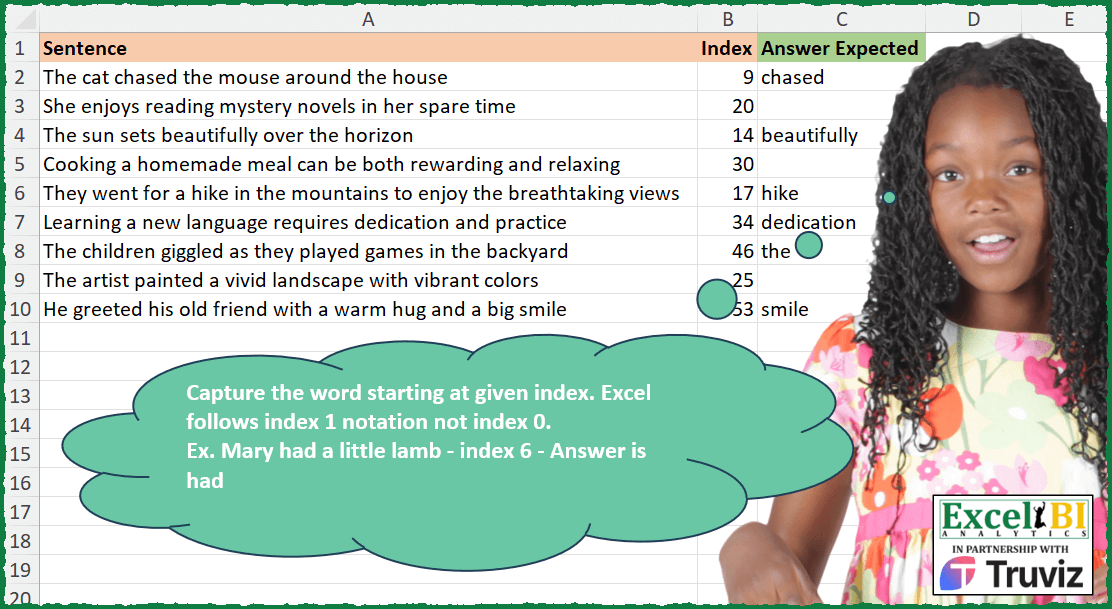
Capture the word starting at given index. Excel follows index 1 notation not index 0. Ex. Mary had a little lamb – index 6 – Answer is had index 7 – Blank as no word starts at index 7
📌 Challenge Details and Links
ExcelBI Excel Challenge Number: 367
Challenge Difficulty: ⭐️
📥Download Sample File
📥Link to the solutions on LinkedIn
Solving the challenge of Find Word by Exact Index with Power Query
Power Query solution 1 for Find Word by Exact Index, proposed by John V.:
let
 S = Excel.CurrentWorkbook(){0}[Content],
 R = Table.AddColumn(S, "R", each
 let
 M = Text.Middle, s = [Sentence], i = [Index]
 in
 if M(s, i - 2, 1) = " " then Text.Split(M(s, i - 1), " "){0} else null
 )[[R]]
in
 R

Blessings!
Power Query solution 2 for Find Word by Exact Index, proposed by Alejandro Simón 🇵🇦 🇪🇸:
let
  Source = Excel.CurrentWorkbook(){[Name = "Table1"]}[Content],
  Sol = Table.AddColumn(
    Source,
    "Answer",
    each
      let
        a = Text.ToList([Sentence]),
        b = List.RemoveFirstN(a, [Index] - 1),
        c = Text.Split(Text.Combine(b), " "){0},
        d = Text.Split([Sentence], " "),
        e = List.Select(d, each _ = c){0}?
      in
        e
  )[[Answer]]
in
  Sol
Power Query solution 3 for Find Word by Exact Index, proposed by Luan Rodrigues:
let
  Fonte = Tabela1,
  res = Table.AddColumn(
    Fonte,
    "Personalizar",
    each [
      a = List.Transform({[Sentence]}, (x) => List.Zip({Text.ToList(x), {1 .. Text.Length(x)}})){0},
      b = Text.Split(
        Text.Combine(List.Transform(List.Select(a, (x) => [Index] <= x{1}), each _{0})),
        " "
      ),
      c = List.ContainsAll(Text.Split([Sentence], " "), b),
      d = if c then List.First(b) else null
    ][d]
  )
in
  res
Power Query solution 4 for Find Word by Exact Index, proposed by Glyn Willis:
let
  Source = Excel.CurrentWorkbook(){[Name = "Table1"]}[Content],
  #"Changed Type" = Table.TransformColumnTypes(
    Source,
    {{"Sentence", type text}, {"Index", Int64.Type}, {"Answer Expected", type text}}
  ),
  #"Added Custom" = Table.AddColumn(
    #"Changed Type",
    "Custom",
    each [
      I = [Index],
      P = Text.PositionOfAny([Sentence], {" ", " "}, Occurrence.All),
      B = List.Transform(P, (x) => x + 2),
      C = List.Contains(B, I),
      LL = List.Last(B),
      LC = LL = I,
      E = if LC then LL else List.Select(B, (x) => x > I){0},
      R =
        if (C and LC) then
          Splitter.SplitTextByPositions({E - 1})([Sentence]){0}
        else if C then
          Text.Middle([Sentence], I - 1, E - I - 1)
        else
          null
    ][R]
  )
in
  #"Added Custom"
Solving the challenge of Find Word by Exact Index with Excel
Excel solution 1 for Find Word by Exact Index, proposed by Bo Rydobon 🇹🇭:
=LET(
    a,
    MID(
        " "&A2:A10,
        B2:B10,
        50
    ),
    REPT(
        TEXTSPLIT(
            TRIM(
                a
            ),
            " "
        ),
        a<"a"
    )
)
=MAP(
    A2:A10,
    B2:B10,
    LAMBDA(
        a,
        n,
        LET(
            t,
            TEXTSPLIT(
                MID(
                    " "&a,
                    n,
                    20
                ),
                " "
            ),
            REPT(
                INDEX(
                    t,
                    2
                ),
                @t=""
            )
        )
    )
)
Excel solution 2 for Find Word by Exact Index, proposed by Rick Rothstein:
=IF(
    MID(
        " "&A2:A10,
        B2:B10,
        1
    )=" ",
    TEXTBEFORE(
        MID(
            A2:A10,
            B2:B10,
            99
        )&" ",
        " "
    ),
    ""
)
Excel solution 3 for Find Word by Exact Index, proposed by John V.:
=REPT(
    TEXTSPLIT(
        MID(
            A2:A10,
            B2:B10,
            99
        ),
        " "
    ),
    MID(
        A2:A10,
        B2:B10-1,
        1
    )=" "
)
Excel solution 4 for Find Word by Exact Index, proposed by محمد حلمي:
=LET(d,MID(" "&A2:A10,B2:B10,20),
REPT(TEXTSPLIT(TRIM(d),," "),LEFT(d)=" "))


Idea of i>d from Bo Rydobon 🇹🇭
=LET(d,MID(" "&A2:A10,B2:B10,20),i,TRIM(d),
REPT(TEXTSPLIT(i,," "),i>d))
Excel solution 5 for Find Word by Exact Index, proposed by Kris Jaganah:
=LET(
    a,
    A2:A10,
    b,
    B2:B10,
    c,
    MID(
        a,
        b,
        LEN(
            a
        )-b+1
    )&" ",
    d,
    LEFT(
        c,
        FIND(
            " ",
            c
        )-1
    ),
    IF(
        BYROW(
            IFERROR(
                FIND(
                    TEXTSPLIT(
                        TEXTJOIN(
                            "#",
                            ,
                            a
                        ),
                        " ",
                        "#",
                        ,
                        ,
                        "?"
                    ),
                    d
                ),
                0
            ),
            SUM
        ),
        d,
        ""
    )
)
Excel solution 6 for Find Word by Exact Index, proposed by Julian Poeltl:
=LET(
    Array,
    A2:B10,
    CHOOSECOLS(
        IF(
            LEFT(
                RIGHT(
                    CHOOSECOLS(
                        Array,
                        1
                    ),
                    LEN(
                        CHOOSECOLS(
                        Array,
                        1
                    )
                    )-CHOOSECOLS(
                        Array,
                        2
                    )+2
                ),
                1
            )=" ",
            TEXTSPLIT(
                TRIM(
                    RIGHT(
                    CHOOSECOLS(
                        Array,
                        1
                    ),
                    LEN(
                        CHOOSECOLS(
                        Array,
                        1
                    )
                    )-CHOOSECOLS(
                        Array,
                        2
                    )+2
                )
                ),
                " "
            ),
            ""
        ),
        1
    )
)
Excel solution 7 for Find Word by Exact Index, proposed by Timothée BLIOT:
=MAP(
    A2:A10,
    B2:B10,
    LAMBDA(
        x,
        y,
         IFNA(
             REGEXEXTRACT(
                 x,
                 "(?<=^.{"&y-1&"})(?=b)w+"
             ),
             ""
         )
    )
)
Excel solution 8 for Find Word by Exact Index, proposed by Abdallah Ally:
=MAP(
    A2:A10,
    B2:B10,
    LAMBDA(
        x,
        y,
        LET(
            a,
            x,
            b,
            y,
            IF(
                MID(
                    a,
                    b-1,
                    1
                )=" ",
                IFERROR(
                    MID(
                        a,
                        b,
                        FIND(
                            " ",
                            a,
                            b
                        )-b
                    ),
                    MID(
                        a,
                        b,
                        LEN(
                            a
                        )-b+1
                    )
                ),
                ""
            )
        )
    )
)
Excel solution 9 for Find Word by Exact Index, proposed by Charles Roldan:
=MAP(A2:A10 & " ", B2:B10 - 1, LAMBDA(x,y,
REPT(TEXTBEFORE(RIGHT(x, LEN(x) - y), " "), MID(x, y, 1)=" ")))
Excel solution 10 for Find Word by Exact Index, proposed by Albert Cid Cañigueral:
=LET(a;EXTRAE(A2:A10;B2:B10-1;1)=" ";
SI(a;EXTRAE(A2:A10;B2:B10;SI.ERROR(HALLAR(" ";A2:A10;B2:B10)-B2:B10;100));""))
Excel solution 11 for Find Word by Exact Index, proposed by Ankur Sharma:
=IF(MID(A2:A10, B2:B10 - 1, 1) = " ", TEXTBEFORE(MID(A2:A10, B2:B10, 1000), " ", , , 1, ""), "")Excel solution 12 for Find Word by Exact Index, proposed by Bilal Mahmoud kh.:
=LET(
    x,
    A2:A10,
    y,
    B2:B10,
    IF(
        RIGHT(
            MID(
                x,
                1,
                y-1
            ),
            1
        ) =" ",
        MID(
            x,
            y,
            IFERROR(
                SEARCH(
                    " ",
                    x,
                    y
                )-y,
                LEN(
                    x
                )
            )
        ),
        IF(
            y=1,
            MID(
                x,
                y,
                IFERROR(
                    SEARCH(
                        " ",
                        x,
                        y
                    ),
                    ""
                )
            ),
            ""
        )
    )
)
Excel solution 13 for Find Word by Exact Index, proposed by Nicolas Micot:
=LET(_texte;A2&" ";SI(SIERREUR(STXT(_texte;B2-1;1);" ")=" ";TEXTE.AVANT(STXT(_texte;B2;NBCAR(_texte));" ");""))Excel solution 14 for Find Word by Exact Index, proposed by Giorgi Goderdzishvili:
=MAP(A2:A10,
    B2:B10,
    LAMBDA(x,
    y,
    LET(
_ys,
    MID(
        x,
        y-1,
        1
    )=" ",

_ch,
     XMATCH(1,
    --( MID(
        x,
        y+SEQUENCE(
            ,
            12
        ),
        1
    )=" "),
    0),

IF(
    _ys,
    MID(
        x,
        y,
        IFERROR(
            _ch,
            20
        )
    ),
    ""
))))
Excel solution 15 for Find Word by Exact Index, proposed by Edwin Tisnado:
=LET(
    a,
    MID(
        A2:A10,
        B2:B10-1,
        30
    ),
    IF(
        LEFT(
            a
        )=" ",
        MID(
            TEXTBEFORE(
                a,
                " ",
                2,
                ,
                1
            ),
            2,
            30
        ),
        ""
    )
)
Excel solution 16 for Find Word by Exact Index, proposed by Abdelrahman Omer, MBA, PMP:
=MAP(
    A2:A10,
    B2:B10,
    LAMBDA(
        a,
        b,
        LET(
            c,
            MID(
                a,
                b-1,
                1
            )=" ",
            IF(
                c,
                MID(
                    a,
                    b,
                    IFERROR(
                        FIND(
                            " ",
                            a,
                            b
                        )-b+1,
                        LEN(
                            a
                        )
                    )
                ),
                " "
            )
        )
    )
)
Excel solution 17 for Find Word by Exact Index, proposed by Hazem Hassan:
=LET(
    a,
    A2:A10,
    b,
    B2:B10,
    TEXTBEFORE(
        IF(
            MID(
                " "&a,
                b,
                1
            )=" ",
            MID(
                " "&a,
                b+1,
                20
            ),
            " "
        )&" ",
        " ",
        1
    )
)

//

=MAP(
    A2:A10,
    B2:B10,
    LAMBDA(
        x,
        y,
        TEXTBEFORE(
            IF(
                MID(
                    " "&x,
                    y,
                    1
                )=" ",
                MID(
                    " "&x,
                    y+1,
                    20
                ),
                " "
            )&" ",
            " ",
            1
        )
    )
)
Excel solution 18 for Find Word by Exact Index, proposed by Benjamin Weber:
=LET(
    input;
    A2:A10&" ";
    index;
    B2:B10;
    IF(
        MID(
            input;
            index-1;
            1
        )=" ";
        MID(
            input;
            index;
            FIND(
                " ";
                input;
                index
            )-index
        );
        ""
    )
)
Solving the challenge of Find Word by Exact Index with Python
Python solution 1 for Find Word by Exact Index, proposed by Luke Jarych:
Python with xlwings and pandas:
import pandas as pd
import xlwings as xw
sh = wb.sheets[0]
table = sh.tables['Table1']
rng = sh.range(table.range.address)
df = rng.options(pd.DataFrame, header = True, index=False, numbers=int).value
def split(word):
 return list(word)
df['Letters'] = df.apply(lambda row: row['Letters'][row['Index']-1:], axis=1)
# for each row getting list of words
df['Words'] = df['Sentence'].str.split()
Python solution 2 for Find Word by Exact Index, proposed by Jan Willem Van Holst:
In Python
import pandas as pd
df = pd.read_csv(r"C:JWLENOVOPYTHONExcel_Challenge_367.csv", sep=";")
listOfSentence=df[df.columns[0]].to_list()
listOfIndices=df[df.columns[1]].to_list()
combiList = list(zip(listOfIndices,listOfSentence))
def fx(inputTuple):
 index = inputTuple[0]
 sentence = inputTuple[1]+" "
 preceding = sentence[:index]
 if preceding[-2:-1] != " ":
 result = " "
 else:
 remains = sentence[index-1:]
 result = remains[:remains.find(" ")]

 return result

print( [fx(elem) for elem in combiList]  )