
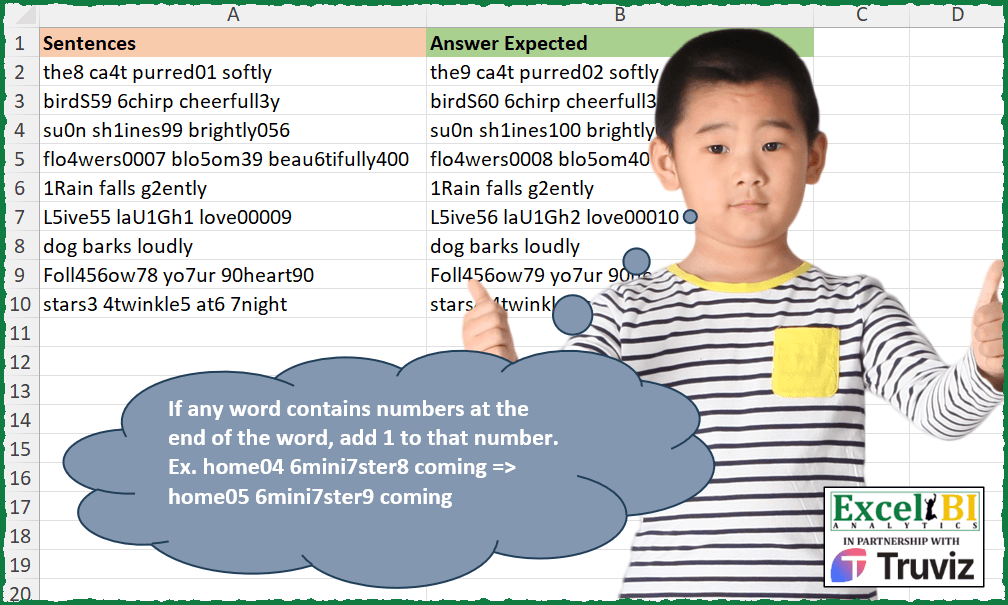
If any word contains numbers at the end of the word, add 1 to that number. Ex. home04 6mini7ster8 coming => home05 6mini7ster9 coming
📌 Challenge Details and Links
ExcelBI Excel Challenge Number: 363
Challenge Difficulty: ⭐️⭐️⭐️
📥Download Sample File
📥Link to the solutions on LinkedIn
Solving the challenge of Increment Number at Word End with Power Query
Power Query solution 1 for Increment Number at Word End, proposed by John V.:
let
 S = Excel.CurrentWorkbook(){0}[Content],
 C = Text.Combine,
 R = Table.AddColumn(S, "R", each
 C(List.Transform(Text.Split([Sentences], " "), each
 [a = Splitter.SplitTextByCharacterTransition({"A".."z"}, {"0".."9"})(_),
 l = List.Last(a),
 b = C(List.RemoveLastN(a, 1) & {try Text.PadStart(Text.From(1 + Number.From(l)), Text.Length(l), "0") otherwise l})][b]
 ), " "))[[R]]
in
 R

Blessings!
Power Query solution 2 for Increment Number at Word End, proposed by Alejandro Simón 🇵🇦 🇪🇸:
let
  Source = Excel.CurrentWorkbook(){[Name = "Table1"]}[Content],
  Sol = Table.AddColumn(
    Source,
    "Answer",
    each
      let
        a = Text.Split([Sentences], " "),
        b = List.Transform(
          {0 .. List.Count(a) - 1},
          each
            let
              c = Splitter.SplitTextByCharacterTransition({"A" .. "z"}, {"0" .. "9"})(a{_}),
              d = Text.Combine(
                List.Transform(
                  {0 .. List.Count(c) - 1},
                  each
                    if try Number.From(c{_}) is number otherwise false then
                      Text.PadStart(Text.From(Number.From(c{_}) + 1), Text.Length(c{_}), "0")
                    else
                      c{_}
                )
              )
            in
              d
        )
      in
        Text.Combine(b, " ")
  )[[Answer]]
in
  Sol
Power Query solution 3 for Increment Number at Word End, proposed by Glyn Willis:
let
  Source = Excel.CurrentWorkbook(){[Name = "Table1"]}[Content],
  #"Changed Type" = Table.TransformColumnTypes(
    Source,
    {{"Sentences", type text}, {"Answer Expected", type text}}
  ),
  #"Added Custom" = Table.AddColumn(
    #"Changed Type",
    "R",
    each [
      L = Text.Split([Sentences], " "),
      S = List.Transform(
        L,
        each Splitter.SplitTextByCharacterTransition({"A" .. "Z", "a" .. "z"}, {"0" .. "9"})(_)
      ),
      I = List.Transform(
        List.Select(
          S,
          each List.Count(_)
            > 1 and (try Number.From(Text.End(List.Last(_), 1)) is number otherwise false)
        ),
        each {Text.Combine(List.RemoveLastN(_, 1)), List.Last(_)}
      ),
      R = List.Transform(
        Table.ToRows(
          Table.TransformColumns(
            Table.FromRows(I, {"t", "n"}),
            {"n", each Text.PadStart(Text.From(Number.From(_) + 1), Text.Length(_), "0")}
          )
        ),
        each Text.Combine(_)
      ),
      O = List.Transform(I, each Text.Combine(_)),
      Z = Text.Combine(List.ReplaceMatchingItems(L, List.Zip({O, R})), " ")
    ][Z]
  )
in
  #"Added Custom"
Solving the challenge of Increment Number at Word End with Excel
Excel solution 1 for Increment Number at Word End, proposed by Rick Rothstein:
=MAP(
    A2:A10,
    LAMBDA(
        a,
        TEXTJOIN(
            " ",
            ,
            MAP(
                TEXTSPLIT(
                    a,
                    " "
                ),
                LAMBDA(
                    x,
                    LET(
                        c,
                        CHAR(
                            SEQUENCE(
                                ,
                                26,
                                65
                            )
                        ),
                        t,
                        TEXTAFTER(
                            x,
                            c,
                            -1,
                            1
                        ),
                        n,
                        LEN(
                            t
                        ),
                        IF(
                            ISNUMBER(
                                -RIGHT(
                                    x
                                )
                            ),
                            LEFT(
                                x,
                                LEN(
                                    x
                                )-n
                            )&TEXT(
                                t+1,
                                REPT(
                                    0,
                                    n
                                )
                            ),
                            x
                        )
                    )
                )
            )
        )
    )
)
Excel solution 2 for Increment Number at Word End, proposed by John V.:
=MAP(
    A2:A10,
    LAMBDA(
        x,
        LET(
            t,
            TEXTSPLIT(
                x,
                " "
            ),
            c,
            MAP(
                t,
                LAMBDA(
                    x,
                    -LOOKUP(
                        ,
                        -RIGHT(
                            x,
                            ROW(
                                1:9
                            )
                        )
                    )
                )
            ),
            n,
            LEN(
                c
            ),
            TEXTJOIN(
                " ",
                ,
                IFNA(
                    LEFT(
                        t,
                        LEN(
                            t
                        )-n
                    )&TEXT(
                        1+c,
                        REPT(
                            0,
                            n
                        )
                    ),
                    t
                )
            )
        )
    )
)
Excel solution 3 for Increment Number at Word End, proposed by محمد حلمي:
=MAP(
    A2:A10,
    lAMBdA(
        a,
        TExTJoIN(
            " ",
            ,
            MAP(
                TEXTSPlIT(

                    a,
                    " "
                ),
                lAMBDA(
                    d,
                    LET(
                        v,
                        RIGHT(
                            d,
                            SEQUENCE(
                                9
                            )
                        ),
                        i,
                        -lOOKUP(

                            0,
                            -v
                        ),
                        IFNA(
                            lEFT(
                                d,
                                lEN(
                                    d
                                )-lEN(
                                    i
                                )-or(
                                    v="09"
                                )
                            )&i+1,
                            d
                        )
                    )
                )
            )
        )
    )
)
Excel solution 4 for Increment Number at Word End, proposed by Julian Poeltl:
=LET(S,
    A2,
    SP,
    TEXTSPLIT(
        S,
        " "
    ),
    N,
    TEXTAFTER(
        SP,
        CHAR(
            64+SEQUENCE(
                26
            )
        ),
        -1,
        1
    ),
    LN,
    LEN(
        N
    ),
    NP,
    N+1,
    NN,
    IFERROR(
        REPT(
            "0",
            IF(
                LN-LEN(
                    NP
                )>0,
                LN-LEN(
                    NP
                ),
                0
            )
        )&NP,
        ""
    ),
    SON,
    LEFT(
        SP,
        LEN(
            SP
        )-LN
    ),
    TEXTJOIN(" ",
    ,
    (SON&NN)))
Excel solution 5 for Increment Number at Word End, proposed by Timothée BLIOT:
=MAP(
    A2:A10,
    LAMBDA(
        z,
        LET(
            A,
            TEXTSPLIT(
                z,
                " "
            ),
            TRIM(
                CONCAT(
                    MAP(
                        A&" ",
                        LAMBDA(
                            x,
                            LET(
                                B,
                                REGEXEXTRACT(
                                    x,
                                    "(?=w)d+(?=W)",
                                    1
                                ),
                                IFNA(
                                     REGEXREPLACE(
                                         x,
                                         "(?=w)d+(?=W)",
                                         TEXT(
                                             B+1,
                                             REPT(
                                                 0,
                                                 LEN(
                                                     B
                                                 )
                                             )
                                         )
                                     ),
                                    x
                                )
                            )
                        )
                    )
                )
            )
        )
    )
)
Excel solution 6 for Increment Number at Word End, proposed by Sunny Baggu:
=MAP(

     A2:A10,

     LAMBDA(
         x,

          LET(

               _ts,
               TEXTSPLIT(
                   x,
                    ,
                    " "
               ),

               _num,
               TEXTAFTER(

                    _ts,

                    CHAR(
                        VSTACK(
                            SEQUENCE(
                                26,
                                 ,
                                 65
                            ),
                             SEQUENCE(
                                 26,
                                  ,
                                  97
                             )
                        )
                    ),

                    -1

               ),

               TEXTJOIN(

                    " ",

                    ,

                    LEFT(
                        _ts,
                         LEN(
                             _ts
                         ) - LEN(
                             _num
                         )
                    ) &
                    TEXT(
                        IFERROR(
                            --_num + 1,
                             ""
                        ),
                         REPT(
                             "0",
                              LEN(
                             _num
                         )
                         )
                    )

               )

          )

     )

)
Excel solution 7 for Increment Number at Word End, proposed by Ziad A.:
=ARRAYFORMULA(LET(s,SPLIT(A2:A10," "),n,REGEXEXTRACT(s,"d+$"),BYROW(IFNA(REGEXEXTRACT(s,"(.+D)d+")&TEXT(n+1,REPT(0,LEN(n))),s),LAMBDA(r,TEXTJOIN(" ",1,r)))))Excel solution 8 for Increment Number at Word End, proposed by Ziad A.:
=map(
    A2:A10,
    lambda(
        a,
        sort(
            let(
                b,
                split(
                    regexreplace(
                        a,
                        "d9*b",
                        "|$0|"
                    ),
                    "|"
                ),
                join(
                    ,
                    iferror(
                        b+1,
                        b
                    )
                )
            )
        )
    )
)
Excel solution 9 for Increment Number at Word End, proposed by Giorgi Goderdzishvili:
=MAP(A2:A10,LAMBDA(t,LET(
_snt,t,_sp, TEXTSPLIT(_snt," "),
_mp, MAP(_sp, LAMBDA(w,LET(
_lst, RIGHT(w, SEQUENCE(5)),
_flt,FILTER(_lst,ISNUMBER(--_lst)),
RIGHT(TAKE(_flt,-1),2)))),
_rp,IF(ISNUMBER(--_mp),_mp+1,""),
_fin,TEXTJOIN(" ",,REPLACE(_sp,LEN(_sp) - LEN(_rp)+1+IFERROR((1*RIGHT(_sp,2))=99,0),LEN(_rp),_rp)),
_fin)))
Excel solution 10 for Increment Number at Word End, proposed by Abdelrahman Omer, MBA, PMP:
=MAP(A2:A10,
    LAMBDA(a,
    LET(b,
    TEXTSPLIT(
        a,
        ,
        " "
    ),
    TEXTJOIN(" ",
    ,
    (BYROW(b,
    LAMBDA(x,
    LET(y,
    RIGHT(
        x,
        SEQUENCE(
            20
        )
    )+1,
    z,
    MAX(
        IFERROR(
            y,
            0
        )
    ),

IF(z>0,
    LEFT(x,
    LEN(
        x
    )-IF(LEN(
        z
    )>COUNT(--(y)),
    COUNT(--(y)),
    LEN(
        z
    )))&z,
    x)))))))))
Excel solution 11 for Increment Number at Word End, proposed by Hazem Hassan:
=MAP(
    A2:A10,
    LAMBDA(
        n,
        LET(
            a,
            TEXTSPLIT(
                n,
                ,
                " ",
                1
            ),
            b,
            LEN(
                a
            ),
            c,
            BYROW(
                1*ISNUMBER(
                    1*RIGHT(
                        a,
                        SEQUENCE(
                            ,
                            MAX(
                                b
                            )
                        )
                    )
                ),
                LAMBDA(
                    x,
                    SUM(
                        x
                    )
                )
            ),
            d,
            RIGHT(
                a,
                c
            ),
            f,
            LEN(
                d
            ),
            TRIM(
                CONCAT(
                    LEFT(
                        a,
                        b-f
                    )&IFERROR(
                        TEXT(
                            1+d,
                            REPT(
                                0,
                                f
                            )
                        ),
                        ""
                    )&" "
                )
            )
        )
    )
)
Solving the challenge of Increment Number at Word End with Python
Python solution 1 for Increment Number at Word End, proposed by Jan Willem Van Holst:
import pandas as pd
import re
df = pd.read_csv(r"C:JWLENOVOPYTHONExcel_Challenge_363.csv", sep=";")
mylist=df['Sentences'].to_list()
def fxWithPrecZero(inputstring):
 lenghtOfString = len(inputstring)
 plusOne = str(int(inputstring)+1)
 lengthOfplusONe = len(plusOne)
 returnString = '0'* (lenghtOfString-lengthOfplusONe) + str(plusOne)
 return returnString
def fxNoPrecZero(inputString):
 plusOne = str(int(inputString)+1)
 return plusOne
def fx(inputString):
 splitList = inputString.split(" ")
 for i in range(len(splitList)):
 if splitList[i][-1].isdigit():
 splitByNumber = re.spli&t('(d+)$',splitList[i])[0:-1]
 if splitByNumber[-1].startswith('0'):
 splitByNumber[-1]=fxWithPrecZero(splitByNumber[-1])
 else:
 splitByNumber[-1]=fxNoPrecZero(splitByNumber[-1])
 splitList[i]=splitByNumber[0]+splitByNumber[-1]

 return  ' '.join(x for x in splitList)
result = [fx(elem) for elem in mylist]
Solving the challenge of Increment Number at Word End with Python in Excel
Python in Excel solution 1 for Increment Number at Word End, proposed by John V.:
Hi everyone!
import re
[re.sub(r'd+b', lambda x: str(1+int(x[0])).zfill(len(x[0])), s) for s in xl("A2:A10")[0]]
Blessings!
Python in Excel solution 2 for Increment Number at Word End, proposed by JvdV –:
With DAF:
=TRIM(SUBSTITUTE(REDUCE(A2:A10,ROW(1:10)-1&REPT(9,99-SEQUENCE(,99)),LAMBDA(x,y,SUBSTITUTE(x&" ",y&" ",y+1&"|"))),"|"," "))
With PY():
import re
[re.sub(r'd9*b',lambda m:str(int(m[0])+1),s) for s in xl("A2:A10")[0]]
With Google Sheets:
=MAP(A2:A10,LAMBDA(q,LET(s,SPLIT(REGEXREPLACE(q,"d?9*b","'$0"),"'"),SORT(JOIN(,IFERROR(s+1,s))))))
&&