
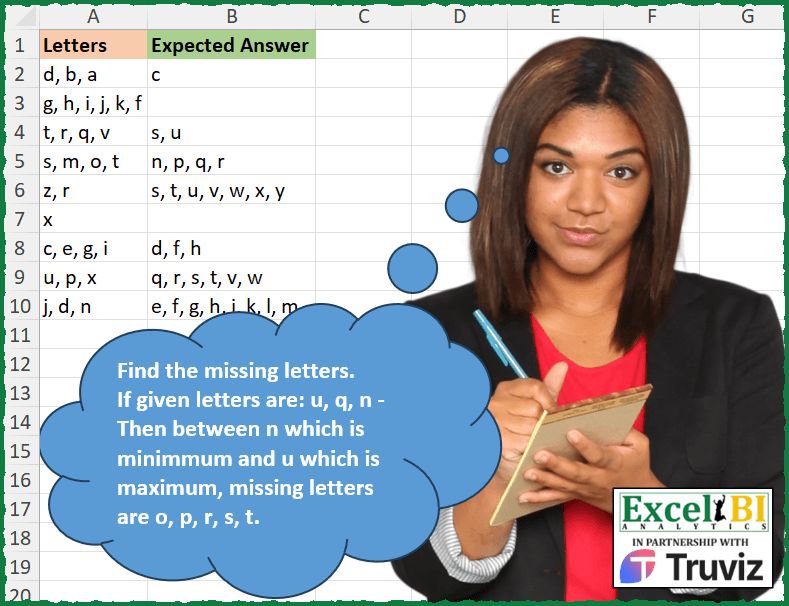
Find the missing letters. If given letters are: u, q, n – Then between n which is minimum and u which is maximum, missing letters are o, p, r, s, t.
📌 Challenge Details and Links
ExcelBI Excel Challenge Number: 353
Challenge Difficulty: ⭐️
📥Download Sample File
📥Link to the solutions on LinkedIn
Solving the challenge of Find Missing Letters in Range with Power Query
Power Query solution 1 for Find Missing Letters in Range, proposed by John V.:
let
 S = Excel.CurrentWorkbook(){0}[Content],
 R = Table.AddColumn(S, "R", each
 [a = Text.Split([Letters], ", "),
 b = Text.Combine(List.Difference({List.Min(a).. List.Max(a)}, a), ", ")][b]
 )[[R]]
in
 R

Blessings!
Power Query solution 2 for Find Missing Letters in Range, proposed by Kris Jaganah:
let
  Source = Excel.CurrentWorkbook(){[Name = "Table1"]}[Content],
  Ans = Table.AddColumn(
    Source,
    "Expected Answer",
    each
      let
        a = List.Transform(List.Sort(Text.Split([Letters], ", ")), each Character.ToNumber(_)),
        b = List.First(a),
        c = List.Numbers(b, List.Last(a) - b + 1),
        d = Text.Combine(List.Transform(List.Difference(c, a), each Character.FromNumber(_)), ", ")
      in
        d
  )
in
  Ans
Power Query solution 3 for Find Missing Letters in Range, proposed by Aditya Kumar Darak 🇮🇳:
let
  Source = Excel.CurrentWorkbook(){[Name = "data"]}[Content],
  Return = Table.AddColumn(
    Source,
    "Answer",
    each [
      S = Text.Split([Letters], ", "),
      L = {List.Min(S) .. List.Max(S)},
      D = List.Difference(L, S),
      R = Text.Combine(D, ", ")
    ][R]
  )
in
  Return
Power Query solution 4 for Find Missing Letters in Range, proposed by Alejandro Simón 🇵🇦 🇪🇸:
let
  Source = Excel.CurrentWorkbook(){[Name = "Table1"]}[Content],
  Sol = Table.AddColumn(
    Source,
    "Answer",
    each
      let
        a = List.Sort(Text.Split([Letters], ", ")),
        b = {a{0} .. List.Last(a)},
        c = List.Difference(b, a)
      in
        Text.Combine(c, ", ")
  )[[Answer]]
in
  Sol
Power Query solution 5 for Find Missing Letters in Range, proposed by Alexis Olson:
let
  Source = Excel.CurrentWorkbook(){[Name = "Table1"]}[Content],
  #"Added Custom" = Table.AddColumn(
    Source,
    "Expected Answer",
    each [
      ABC     = Text.Split([Letters], ", "),
      Range   = {List.Min(ABC) .. List.Max(ABC)},
      Missing = List.Difference(Range, ABC),
      Result  = Text.Combine(List.Sort(Missing), ", ")
    ][Result]
  )
in
  #"Added Custom"
Power Query solution 6 for Find Missing Letters in Range, proposed by Ramiro Ayala Chávez:
let
  Origen = Excel.CurrentWorkbook(){[Name = "Tabla1"]}[Content],
  Fx = (x) =>
    let
      a = x,
      b = List.RemoveNulls(List.Distinct(List.Sort(Text.Split(a, ", ")))),
      c = {b{0} .. List.Last(b)},
      d = Text.Combine(List.Difference(c, b), ", ")
    in
      d,
  Sol = Table.AddColumn(Origen, "Expected Answer", each Fx([Letters]))
in
  Sol
Power Query solution 7 for Find Missing Letters in Range, proposed by Rafael González B.:
let
Source = Excel.CurrentWorkbook(){0}[Content],
Anw = Table.TransformColumns(Source, {"Letters", each
let
TS = Text.Split(_, ", "),
LS = List.Sort(TS),
LC = {LS{0}..List.Last(LS)},
LD = List.Difference(LC,LS),
TC = Text.Combine(LD, ", ")
in
TC}
)
in
Anw
🧙♂️🧙♂️🧙♂️
Power Query solution 8 for Find Missing Letters in Range, proposed by Štěpán Rešl:
let
  tbl = Table.FromRows(
    Json.Document(
      Binary.Decompress(
        Binary.FromText(
          "HchJCoBADADBrzQ5949CDoq4IqIOvl+YY1VmTDLKEGXGIqtsssshc88mj9zydb5yyiUtqn4=",
          BinaryEncoding.Base64
        ),
        Compression.Deflate
      )
    ),
    let
      _t = ((type nullable text) meta [Serialized.Text = true])
    in
      type table [Letters = _t]
  ),
  addon = Table.AddColumn(
    tbl,
    "Expected Answer",
    each
      let
        prep = List.Sort(Text.Split([Letters], ", "))
      in
        Text.Combine(List.Difference({List.First(prep) .. List.Last(prep)}, prep), ", ")
  )
in
  addon
Power Query solution 9 for Find Missing Letters in Range, proposed by Alejandra Horvath CPA, CGA:
let
  Source = Excel.CurrentWorkbook(){[Name = "Table1"]}[Content],
  Sol = Table.TransformColumns(
    Source,
    {
      "Letters",
      each [
        a = Text.Split(Text.Replace(_, " ", ""), ","),
        b = List.Sort(a),
        c = List.RemoveMatchingItems({List.First(b) .. List.Last(b)}, b),
        d = Text.Combine(c, ", ")
      ][d]
    }
  )
in
  Sol
Solving the challenge of Find Missing Letters in Range with Excel
Excel solution 1 for Find Missing Letters in Range, proposed by Bo Rydobon 🇹🇭:
=MAP(
    A2:A10,
    LAMBDA(
        a,
        LET(
            c,
            CODE(
                TEXTSPLIT(
                    a,
                    " "
                )
            ),
            m,
            MIN(
                c
            ),
            d,
            SEQUENCE(
                MAX(
                c
            )-m+1,
                ,
                m
            ),

            TEXTJOIN(
                ", ",
                ,
                REPT(
                    CHAR(
                        d
                    ),
                    ISNA(
                        XMATCH(
                            d,
                            c
                        )
                    )
                )
            )
        )
    )
)
Excel solution 2 for Find Missing Letters in Range, proposed by Rick Rothstein:
=MAP(
    A2:A10,
    LAMBDA(
        x,
        LET(
            t,
            CODE(
                TEXTSPLIT(
                    x,
                    ", "
                )
            ),
            m,
            MIN(
                t
            ),
            TEXTJOIN(
                ", ",
                ,
                IFERROR(
                    CHAR(
                        UNIQUE(
                            HSTACK(
                                t,
                                SEQUENCE(
                                    ,
                                    MAX(
                t
            )-m+1,
                                    m
                                )
                            ),
                            TRUE,
                            1
                        )
                    ),
                    ""
                )
            )
        )
    )
)
Excel solution 3 for Find Missing Letters in Range, proposed by John V.:
=MAP(
    A2:A10,
    LAMBDA(
        x,
        LET(
            c,
            CODE(
                TEXTSPLIT(
                    x,
                    ", "
                )
            ),
            m,
            MIN(
                c
            ),
            b,
            SEQUENCE(
                ,
                1+MAX(
                c
            )-m,
                m
            ),
            TEXTJOIN(
                ", ",
                ,
                REPT(
                    CHAR(
                        b
                    ),
                    ISNA(
                        XMATCH(
                            b,
                            c
                        )
                    )
                )
            )
        )
    )
)
Excel solution 4 for Find Missing Letters in Range, proposed by محمد حلمي:
=MAP(
    A2:A10,
    LAMBDA(
        a,
        LET(
            d,
            TEXTSPLIT(
                a,
                ", "
            ),

            c,
            CODE(
                d
            ),
            m,
            MIN(
                c
            ),
            i,
            CHAR(
                SEQUENCE(
                    MAX(
                c
            )-m+1,
                    ,
                    m
                )
            ),

            TEXTJOIN(
                ", ",
                ,
                REPT(
                    i,
                    ISNA(
                        XMATCH(
                            i,
                            d
                        )
                    )
                )
            )
        )
    )
)
Excel solution 5 for Find Missing Letters in Range, proposed by محمد حلمي:
=MAP(A2:A10,
    LAMBDA(a,
    LET(v,
    SEQUENCE(
        26
    ),

c,
    CHAR(
        v+96
    ),
    x,
    IFERROR(
        FIND(
            c,
            a
        )^0,

    ),
    i,
    XMATCH(
        1,
        x,
        ,
        {1,
        -1}
    ),

TEXTJOIN(", ",
    ,
    REPT(c,
    (v>@i)*(v
Excel solution 6 for Find Missing Letters in Range, proposed by Kris Jaganah:
=MAP(
    A2:A10,
    LAMBDA(
        x,
        LET(
            a,
            CODE(
                SORT(
                    TEXTSPLIT(
                        x,
                        ,
                        ", "
                    )
                )
            ),
            b,
            SEQUENCE(
                MAX(
                    a
                )-@a+1,
                ,
                @a
            ),
            ARRAYTOTEXT(
                FILTER(
                    CHAR(
                        b
                    ),
                    ISNA(
                        XLOOKUP(
                            b,
                            a,
                            a
                        )
                    ),
                    ""
                )
            )
        )
    )
)
Excel solution 7 for Find Missing Letters in Range, proposed by Julian Poeltl:
=MAP(
    A2:A10,
    LAMBDA(
        L,
        LET(
            SP,
            TEXTSPLIT(
                L,
                ", "
            ),
            C,
            CODE(
                SP
            ),
            MI,
            MIN(
                C
            ),
            MA,
            MAX(
                C
            ),
            CZ,
            SEQUENCE(
                1,
                MA-MI-1,
                MI+1
            ),
            Z,
            CHAR(
                CZ
            ),
            IL,
            ISNUMBER(
                XMATCH(
                    CZ,
                    C
                )
            ),
            IFERROR(
                TEXTJOIN(
                    ", ",
                    ,
                    FILTER(
                        Z,
                        IL=FALSE
                    )
                ),
                ""
            )
        )
    )
)
Excel solution 8 for Find Missing Letters in Range, proposed by Timothée BLIOT:
=MAP(
    A2:A10,
    LAMBDA(
        z,
        LET(
            A,
            CODE(
                TEXTSPLIT(
                    z,
                    ,
                    ", "
                )
            ),
            B,
            SEQUENCE(
                MAX(
                    A
                )-MIN(
                    A
                )+1,
                ,
                MIN(
                    A
                )
            ),
            ARRAYTOTEXT(
                FILTER(
                    CHAR(
                        B
                    ),
                    ISNA(
                        XMATCH(
                            B,
                            A
                        )
                    ),
                    ""
                )
            )
        )
    )
)
Excel solution 9 for Find Missing Letters in Range, proposed by Nikola Z Grujicic - Nikola Ž Grujičić:
=MAP(
    A2:A10,
     LAMBDA(
         a,
          LET(
              e,
               TRIM(
                   TEXTSPLIT(
                       a,
                       ,
                       ","
                   )
               ),
               f,
               CODE(
                   e
               ),
               g,
               SORT(
                   f
               ),
               h,
               SEQUENCE(
                   MAX(
                       g
                   )-MIN(
                       g
                   )+1,
                   ,
                   MIN(
                       g
                   )
               ),
               i,
               NOT(
                   ISNUMBER(
                       MATCH(
                           h,
                           g,
                           0
                       )
                   )
               ),
               j,
               IF(
                   i=TRUE,
                    h,
                   ""
               ),
               k,
               FILTER(
                   j,
                    j<>"",
                   ""
               ),
              l,
               IF(
                   k<>"",
                   CHAR(
                       k
                   ),
                   ""
               ),
               TEXTJOIN(
                   ", ",
                   ,
                   l
               )
          )
     )
)
Excel solution 10 for Find Missing Letters in Range, proposed by Duy Tùng:
=IFERROR(
    MAP(
        A2:A10,
        LAMBDA(
            x,
            LET(
                a,
                CODE(
                    TEXTSPLIT(
                        x,
                        ,
                        ", "
                    )
                ),
                ARRAYTOTEXT(
                    UNIQUE(
                        VSTACK(
                            CHAR(
                                a
                            ),
                            CHAR(
                                SEQUENCE(
                                    MAX(
                                a
                            )-MIN(
                                a
                            )+1,
                                    ,
                                    MIN(
                                a
                            )
                                )
                            )
                        ),
                        ,
                        1
                    )
                )
            )
        )
    ),
    ""
)
Excel solution 11 for Find Missing Letters in Range, proposed by Sunny Baggu:
=MAP(

     A2:A10,

     LAM&BDA(
         x,

          LET(

               _ts,
               SORT(
                   TEXTSPLIT(
                       x,
                        ,
                        ", "
                   )
               ),

               _c,
               SEQUENCE(
                   26,
                    ,
                    97
               ),

               _t,
               CHAR(
                   _c
               ),

               _c1,
               XLOOKUP(
                   _ts,
                    _t,
                    _c
               ),

               _seq,
               SEQUENCE(
                   MAX(
                       _c1
                   ) - MIN(
                       _c1
                   ) + 1,
                    ,
                    MIN(
                       _c1
                   )
               ),

               _cri,
               1 - MAP(
                   _seq,
                    LAMBDA(
                        a,
                         OR(
                             a = _c1
                         )
                    )
               ),

               IFERROR(
                   TEXTJOIN(
                       ", ",
                        ,
                        CHAR(
                            FILTER(
                                _seq,
                                 _cri
                            )
                        )
                   ),
                    ""
               )

          )

     )

)
Excel solution 12 for Find Missing Letters in Range, proposed by 🇵🇪 Ned Navarrete C.:
=MAP(
    A2:A10,
    LAMBDA(
        r,
        LET(
            x,
            CODE(
                TEXTSPLIT(
                    r,
                    ,
                    ", "
                )
            ),
            s,
            SEQUENCE(
                MAX(
                    x
                )-MIN(
                    x
                )+1,
                ,
                MIN(
                    x
                )
            ),
            IFERROR(
                TEXTJOIN(
                    ", ",
                    ,
                    TOCOL(
                        CHAR(
                            ISNA(
                                XMATCH(
                                    s,
                                    x
                                )
                            )*s
                        ),
                        3
                    )
                ),
                ""
            )
        )
    )
)
Excel solution 13 for Find Missing Letters in Range, proposed by Asheesh Pahwa:
=MAP(E4:E12,
    LAMBDA(x,
     LET(a,
     TEXTSPLIT(
         x,
         ,
         ", "
     ),

b,
    CODE(
        a
    ),
    c,
    MAX(
        b
    ),
    d,
    MIN(
        b
    ),

e,
    SEQUENCE(
        c-d+1,
        ,
        d
    ),

IFERROR(ARRAYTOTEXT(CHAR(FILTER (e,
     ISNA(
         XMATCH(
             e,
             b
         )
     )))),
    ""))))
Excel solution 14 for Find Missing Letters in Range, proposed by Stefan Olsson:
=MAP(
    A2:A10,

    LAMBDA(
        x,

        LET(
            _s,
             REGEXREPLACE(
                 "abcdefghijklmnopqrstuvwxyz",
                  "^[^"&{x}&"]+|[^"&{x}&"]+$|["&{x}&"]",
                  ""
             ),

            TEXTJOIN(
                ", ",
                 1,
                 REGEXEXTRACT(
                     _s,
                      REPT(
                          "(.)",
                           LEN(
                               _s
                           )
                      )
                 )
            )

        )

    )
)
Excel solution 15 for Find Missing Letters in Range, proposed by Pieter de Bruijn:
=MAP(
    A2:A10,
    LAMBDA(
        a,
        LET(
            t,
            SORT(
                CODE(
                    TEXTSPLIT(
                        a,
                        ,
                        ", "
                    )
                )
            ),
            x,
            SEQUENCE(
                1+MAX(
                    t
                )-@t,
                ,
                @t
            ),
            TEXTJOIN(
                ", ",
                ,
                REPT(
                    CHAR(
                        x
                    ),
                    ISNA(
                        XMATCH(
                            x,
                            t
                        )
                    )
                )
            )
        )
    )
)
Excel solution 16 for Find Missing Letters in Range, proposed by Giorgi Goderdzishvili:
=MAP(
    A2:A10,
    LAMBDA(
        le,
        LET(

            _lt,
            le,

            _sp,
             TEXTSPLIT(
                 _lt,
                 ", "
             ),

            _cd,
             CODE(
                 _sp
             ),

            _mn,
             MIN(
                 _cd
             ),

            _mx,
             MAX(
                 _cd
             ),

            _crs,
             CHAR(
                 SEQUENCE(
                     ,
                     _mx- _mn +1,
                     _mn
                 )
             ),

            _isMiss,
             TEXTJOIN(
                 ", ",
                 ,
                 FILTER(
                     _crs,
                     ISERROR(
                         XMATCH(
                             _crs,
                             _sp,
                             0
                         )
                     ),
                     ""
                 )
             ),

            _isMiss
        )
    )
)
Excel solution 17 for Find Missing Letters in Range, proposed by Edwin Tisnado:
=MAP(
    A2:A10,
    LAMBDA(
        x,
        IFERROR(
            LET(
                t,
                CODE(
                    TEXTSPLIT(
                        x,
                        ,
                        ", "
                    )
                ),
                l,
                MIN(
                    t
                ),
                j,
                SEQUENCE(
                    MAX(
                    t
                )-l+1,
                    ,
                    l
                ),
                ARRAYTOTEXT(
                    TOCOL(
                        CHAR(
                            IF(
                                ISNUMBER(
                                    XLOOKUP(
                                        j,
                                        t,
                                        t
                                    )
                                ),
                                "",
                                j
                            )
                        ),
                        2
                    )
                )
            ),
            ""
        )
    )
)
Excel solution 18 for Find Missing Letters in Range, proposed by Narayanan J 🇮🇳:
=MAP(A1:A4,
    LAMBDA(inp,
    LET(ar,
    SORT(
        TEXTSPLIT(
            inp,
            ";",
            ", "
        )
    ),
    lst,
    CHAR(
        SEQUENCE(
            26,
            1,
            97
        )
    ),
    flt,
    FILTER(lst,
    (lst>=INDEX(
        ar,
        1
    ))*(lst<=INDEX(
        ar,
        ROWS(
            ar
        )
    )),
    ""),
    TEXTJOIN(
        ", ",
        TRUE,
        IFERROR(
            TOCOL(
                IF(
                    XLOOKUP(
                        flt,
                        ar,
                        ar,
                        ""
                    )="",
                    flt,
                    NA()
                ),
                3
            ),
            ""
        )
    ))))
Excel solution 19 for Find Missing Letters in Range, proposed by James Mott:
=MAP(
    A2:A10,
    LAMBDA(
        x,
        LET(
            xc,
            CODE(
                TEXTSPLIT(
                    x,
                    ", "
                )
            ),
            TEXTJOIN(
                ", ",
                ,
                FILTER(
                    CHAR(
                        SEQUENCE(
                            MAX(
                                xc
                            )-MIN(
                                xc
                            )+1,
                            ,
                            MIN(
                                xc
                            )
                        )
                    ),
                    ISERROR(
                        XLOOKUP(
                            CHAR(
                        SEQUENCE(
                            MAX(
                                xc
                            )-MIN(
                                xc
                            )+1,
                            ,
                            MIN(
                                xc
                            )
                        )
                    ),
                            TEXTSPLIT(
                                x,
                                ", "
                            ),
                            TEXTSPLIT(
                                x,
                                ", "
                            )
                        )
                    ),
                    ""
                )
            )
        )
    )
)
Solving the challenge of Find Missing Letters in Range with R
R solution 1 for Find Missing Letters in Range, proposed by Konrad Gryczan, PhD:
library(tidyverse)
library(readxl)
input = read_excel("Excel/353 Missing Letters.xlsx", range = "A1:A10")
test = read_excel("Excel/353 Missing Letters.xlsx", range = "B1:B10")
result = input %>%
 mutate(let = strsplit(Letters, ", ")) %>%
 mutate(let = map(let, sort)) %>%
 mutate(min = map(let, min),
 max = map(let, max),
 min_index = map_int(min, ~ which(letters == .x)),
 max_index = map_int(max, ~ which(letters == .x)),
 seq = map2(min_index, max_index, ~ letters[.x:.y]),
 diff = map2(seq, let, ~ setdiff(.x, .y)),
 answer = map_chr(diff, ~ paste(.x, collapse = ", "))
 ) %>%
 select(Letters, answer) %>%
 mutate(answer = ifelse(answer == "", NA, answer))
R solution 2 for Find Missing Letters in Range, proposed by Krzysztof Nowak:
L <- str_split(x,", ")[[1]]
Pos <- match(L,letters)
Sequence <- seq(from = min(Pos),to = max(Pos),by =1)
NotOverlap <- setdiff(union(Pos,Sequence),intersect(Pos,Sequence))
Missing <- letters[NotOverlap]
Result <- paste(Missing,collapse = ", ")
return(Result)
}
Answer <- Task |>
 mutate(MyResult = unlist(map(letters,LettersSearch)),
 Test = expected_answer == MyResult)
Answer
&&