
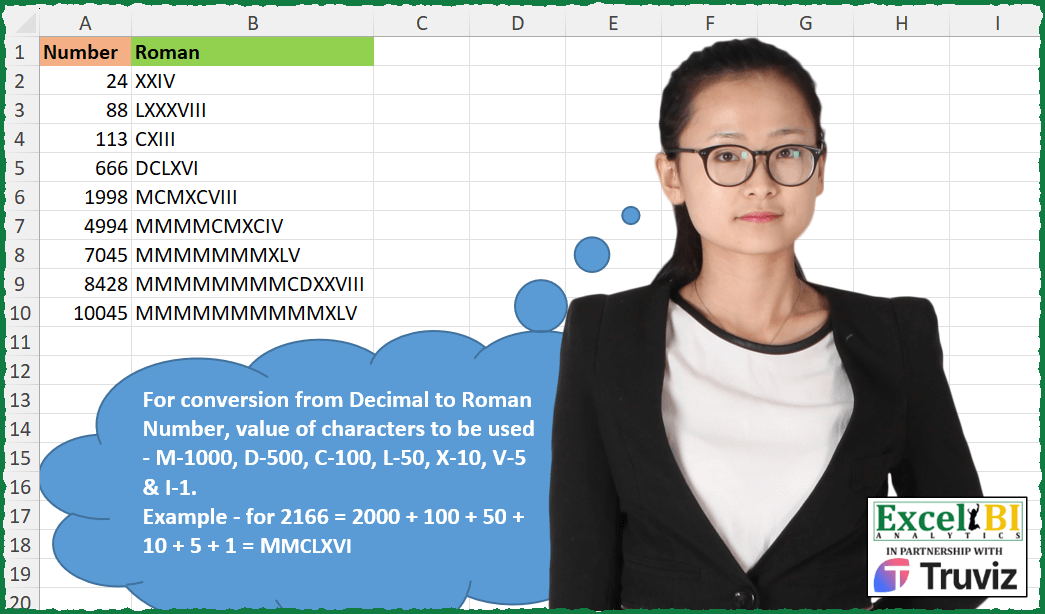
For conversion from Decimal to Roman Number, value of characters to be used – M-1000, D-500, C-100, L-50, X-10, V-5 & I-1. Example – for 2166 = 2000 + 100 + 50 + 10 + 5 + 1 = MMCLXVI
📌 Challenge Details and Links
ExcelBI Excel Challenge Number: 349
Challenge Difficulty: ⭐️⭐️
📥Download Sample File
📥Link to the solutions on LinkedIn
Solving the challenge of Decimal to Roman Numerals with Excel
Excel solution 1 for Decimal to Roman Numerals, proposed by Bo Rydobon 🇹🇭:
=LET(
    n,
    A2:A10,
    REPT(
        "M",
        n/1000
    )&ROMAN(
        RIGHT(
            n,
            3
        )
    )
)
Excel solution 2 for Decimal to Roman Numerals, proposed by Rick Rothstein:
=REPT(
    "M",
    A2:A10/1000
)&ROMAN(
    RIGHT(
        A2:A10,
        3
    )
)
Excel solution 3 for Decimal to Roman Numerals, proposed by John V.:
=REPT(
    "M",
    10*A2:A10%%
)&ROMAN(
    RIGHT(
        A2:A10,
        3
    )
)
Excel solution 4 for Decimal to Roman Numerals, proposed by محمد حلمي:
=LET(
    a,
    A2:A10,
    r,
    RIGHT(
        a,
        3
    ),

    REPT(
        "M",
        0&SUBSTITUTE(
            a,
            r,

        )
    )&ROMAN(
        r
    )
)
Excel solution 5 for Decimal to Roman Numerals, proposed by Kris Jaganah:
=LET(
    a,
    A2:A10,
    b,
    LEN(
        a
    ),
    REPT(
        "M",
        IF(
            b>3,
            LEFT(
                a,
                b-3
            ),
            0
        )
    )&ROMAN(
        RIGHT(
            a,
            3
        ),
        0
    )
)
Excel solution 6 for Decimal to Roman Numerals, proposed by Hussein SATOUR:
=LET(
    a,
    A2:A10,
    IFERROR(
        REPT(
            "M",
            LEFT(
                a,
                LEN(
                    a
                )-3
            )
        ),
        ""
    )&ROMAN(
        RIGHT(
            a,
            3
        )
    )
)
Excel solution 7 for Decimal to Roman Numerals, proposed by LEONARD OCHEA 🇷🇴:
=REPT(
    "M",
    TRUNC(
        A2:A10/1000
    )
)&ROMAN(
    MOD(
        A2:A10,
        1000
    )
)
=REPT(
    "M",
    INT(
        A2:A10/10^3
    )
)&ROMAN(
    MOD(
        A2:A10,
        10^3
    )
)
Excel solution 8 for Decimal to Roman Numerals, proposed by 🇵🇪 Ned Navarrete C.:
=LET(
    c,
    TEXT(
        A2:A10,
        "000000"
    ),
    REPT(
        "M",
        LEFT(
            c,
            3
        )
    )& ROMAN(
        RIGHT(
            c,
            3
        )
    )
)
Excel solution 9 for Decimal to Roman Numerals, proposed by Abdelrahman Omer, MBA, PMP:
=MAP(
    A2:A10,
    LAMBDA(
        x,
        LET(
            a,
            ROUNDDOWN(
                x/1000,

            ),
            REPT(
                "M",
                a
            )&ROMAN(
                x-a*1000
            )
        )
    )
)
Excel solution 10 for Decimal to Roman Numerals, proposed by Mehmet Çiçek:
=REPT(
    "M",
    TRUNC(
        A2:A3/1000
    )
)&ROMAN(
    SUBSTİTUE(
        A2:A3-TRUNC(
        A2:A3/1000
    )*1000;".",
        ""
    )
)
Excel solution 11 for Decimal to Roman Numerals, proposed by Luis Couto:
=LET(n,A2:A10,s,SEQUENCE(13),
 r,{1000;900;500;400;100;90;50;40;10;9;5;4;1},
 nr,{"M";"CM";"D";"CD";"C";"XC";"L";"XL";"X";"XI";"V";"IV";"I"},
 f,LAMBDA(x,REDUCE(0,s,LAMBDA(a,i,IF(i=1,INT(x/@r),VSTACK(a,INT((x-SUM(INDEX(r,(SEQUENCE(i-1)))*(a)))/INDEX(r,i))))))),
 MAP(n,LAMBDA(y,CONCAT(MAP(f(y),s,LAMBDA(i,j,REPT(INDEX(nr,j),i)))))))
Excel solution 12 for Decimal to Roman Numerals, proposed by Mohammed Baydoun:
=LET(a,A2:A10,IF(a>3999,REPT("M",LEFT(a,LEN(a)-3))&ROMAN(RIGHT(a,3)),ROMAN(a)))Solving the challenge of Decimal to Roman Numerals with R
R solution 1 for Decimal to Roman Numerals, proposed by Konrad Gryczan, PhD:
library(tidyverse)
library(readxl)
input = read_excel("Numbers to Roman.xlsx", range = "A1:A10")
test = read_excel("Numbers to Roman.xlsx", range = "B1:B10")
to_roman <- function(number) {
 if (!is.numeric(number) || number <= 0 || number != as.integer(number)) {
 return(NA)
 }

 roman_symbols <- c("M", "CM", "D", "CD", "C", "XC", "L", "XL", "X", "IX", "V", "IV", "I")
 arabic_values <- c(1000, 900, 500, 400, 100, 90, 50, 40, 10, 9, 5, 4, 1)

 numeral <- ""
 for (i in seq_along(roman_symbols)) {
 while (number >= arabic_values[i]) {
 numeral <- paste0(numeral, roman_symbols[i])
 number <- number - arabic_values[i]
 }
 }

 return(numeral)
}
result = input %>%
 mutate(Roman = map_chr(Number, to_roman))
&&&