
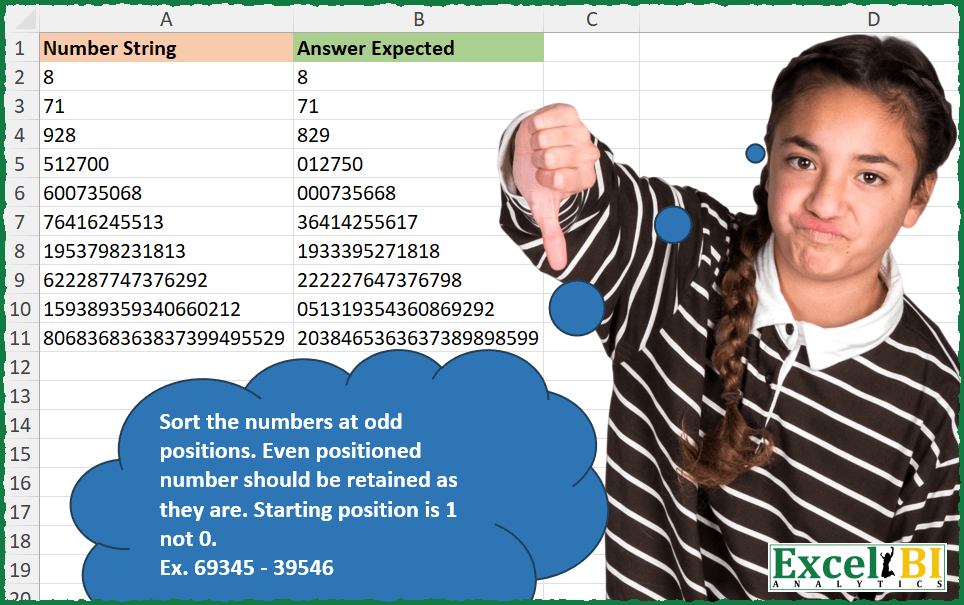
Sort the numbers at odd positions. Even positioned number should be retained as they are. Starting position is 1 not 0. Ex. 69345 – 39546
📌 Challenge Details and Links
ExcelBI Excel Challenge Number: 341
Challenge Difficulty: ⭐️
📥Download Sample File
📥Link to the solutions on LinkedIn
Solving the challenge of Sort odd positioned numbers with Power Query
Power Query solution 1 for Sort odd positioned numbers, proposed by Zoran Milokanović:
let
  Source = Excel.CurrentWorkbook(){[Name = "Input"]}[Content],
  S = Table.TransformRows(
    Source,
    each
      let
        l = Text.ToList([Number String]),
        p = List.Positions(l)
      in
        Text.Combine(
          List.Transform(
            p,
            each l{
              if Number.IsOdd(_) then _ else List.Sort(List.Alternate(p, 1, 1, 1), each l{_}){_ / 2}
            }
          )
        )
  )
in
  S
Power Query solution 2 for Sort odd positioned numbers, proposed by Zoran Milokanović:
let
  Source = Excel.CurrentWorkbook(){[Name = "Input"]}[Content],
  S = Table.TransformRows(
    Source,
    each
      let
        o = List.Split(Text.ToList([Number String]), 2)
      in
        List.Accumulate(
          List.Positions(o),
          "",
          (s, c) => s & List.Sort(o, each _{0}){c}{0} & (o{c}{1}? ?? "")
        )
  )
in
  S
Power Query solution 3 for Sort odd positioned numbers, proposed by Alejandro Simón 🇵🇦 🇪🇸:
let
  Source = Excel.CurrentWorkbook(){[Name = "Table1"]}[Content],
  Sol = Table.AddColumn(
    Source,
    "Answer",
    each
      let
        a = Text.ToList([Number String]),
        b = List.Alternate(a, 1, 1),
        c = List.Sort(List.Alternate(a, 1, 1, 1)),
        d = Text.Combine(List.Combine(List.Zip({c, b})))
      in
        d
  )[[Answer]]
in
  Sol
Power Query solution 4 for Sort odd positioned numbers, proposed by Alejandro Simón 🇵🇦 🇪🇸:
let
  Source = Excel.CurrentWorkbook(){[Name = "Table1"]}[Content],
  Sol = Table.AddColumn(
    Source,
    "Answer",
    each
      let
        a = Text.ToList([Number String]),
        b = {1 .. List.Count(a)},
        c = List.Sort(List.Transform(List.Select(b, Number.IsOdd), each a{_ - 1})),
        d = List.Transform(List.Select(b, Number.IsEven), each a{_ - 1}),
        e = Text.Combine(List.Combine(List.Zip({c, d})))
      in
        e
  )[[Answer]]
in
  Sol
Power Query solution 5 for Sort odd positioned numbers, proposed by Luan Rodrigues:
let
  Fonte = Tabela1,
  res = Table.AddColumn(
    Fonte,
    "Personalizar",
    each [
      a = Text.ToList([Number String]),
      b = List.Zip({a, List.Transform(List.Positions(a), each _ + 1)}),
      c = List.Select(b, (x) => Number.IsOdd(x{1})),
      d = List.Zip({List.Transform(c, (y) => y{1}), List.Sort(List.Transform(c, (y) => y{0}))}),
      e = List.Transform(List.Select(b, (x) => Number.IsEven(x{1})), List.Reverse),
      f = Text.Combine(List.ReplaceMatchingItems(List.Transform(b, each _{1}), d & e))
    ][f]
  )
in
  res
Power Query solution 6 for Sort odd positioned numbers, proposed by Brian Julius:
let
  Source = Excel.CurrentWorkbook(){[Name = "Table1"]}[Content],
  AddReverseOdd = Table.AddColumn(
    Source,
    "Answer",
    each [
      a = [Number String],
      b = Text.ToList(a),
      c = List.Positions(b),
      e = Table.FromColumns({b, c}, {"Char", "Pos"}),
      f = Table.SelectRows(e, each Number.IsOdd([Pos])),
      g = Table.SelectRows(e, each Number.IsEven([Pos])),
      h = Table.AddIndexColumn(g, "Index", 1, 1),
      i = Table.Sort(h, {"Index", Order.Descending}),
      j = Table.AddIndexColumn(Table.SelectColumns(i, "Char"), "Pos", 0, 2),
      m = Table.Sort(Table.Combine({f, j}), {"Pos", Order.Ascending}),
      n = Text.Combine(m[Char], "")
    ][n]
  )
in
  AddReverseOdd
Power Query solution 7 for Sort odd positioned numbers, proposed by Ramiro Ayala Chávez:
let
  Origen = Excel.CurrentWorkbook(){[Name = "Tabla1"]}[Content],
  t = Table.TransformColumnTypes(Origen, {{"Number String", type text}}),
  Fx = (x) =>
    let
      a = x,
      b = Text.ToList(Text.From(a)),
      c = List.Alternate(b, 1, 1),
      d = List.Sort(List.Alternate(b, 1, 1, 1), 0),
      e = List.RemoveNulls(List.Combine(Table.ToRows(Table.FromColumns({d, c})))),
      f = Text.Combine(e)
    in
      f,
  Sol = Table.AddColumn(t, "Answer Expected", each Fx([Number String]))
in
  Sol
Power Query solution 8 for Sort odd positioned numbers, proposed by Mihai Radu O:
let
  Source = Excel.CurrentWorkbook(){[Name = "Table1"]}[Content],
  s = Table.AddColumn(
    Source,
    "AE",
    each [
      a = Text.ToList([Number String]),
      b = List.Sort(List.Alternate(a, 1, 1, 1)),
      c = List.Alternate(a, 1, 1, 0),
      d = Text.Combine(List.Transform(List.Zip({b, c}), (x) => Text.Combine(x)))
    ][d]
  )
in
  s
Solving the challenge of Sort odd positioned numbers with Excel
Excel solution 1 for Sort odd positioned numbers, proposed by Bo Rydobon 🇹🇭:
=MAP(A2:A11,
    LAMBDA(n,
    LET(m,
    MID(n,
    SEQUENCE((LEN(
        n
    )+1)/2,
    2),
    1),
    CONCAT(
        HSTACK(
            TAKE(
                SORT(
                    m
                ),
                ,
                1
            ),
            DROP(
                m,
                ,
                1
            )
        )
    ))))
Excel solution 2 for Sort odd positioned numbers, proposed by Bo Rydobon 🇹🇭:
=MAP(A2:A11,LAMBDA(a,LET(s,SEQUENCE(LEN(a)),m,MID(a,s,1),f,MOD(s,2),CONCAT(SORTBY(SORTBY(m,m/f),SORTBY(s,1/f))))))Excel solution 3 for Sort odd positioned numbers, proposed by Rick Rothstein:
=MAP(
    A2:A11,
    LAMBDA(
        x,
        LET(
            m,
            MID(
                x,
                SEQUENCE(
                    ROUNDUP(
                        LEN(
                            x
                        )/2,
                        0
                    ),
                    2
                ),
                1
            ),
            CONCAT(
                HSTACK(
                    SORT(
                        TAKE(
                            m,
                            ,
                            1
                        )
                    ),
                    TAKE(
                        m,
                        ,
                        -1
                    )
                )
            )
        )
    )
)
Excel solution 4 for Sort odd positioned numbers, proposed by Rick Rothstein:
=MAP(
    A2:A11,
    LAMBDA(
        x,
        LET(
            l,
            LEN(
                x
            ),
            w,
            WRAPCOLS(
                MID(
                    x,
                    SEQUENCE(
                        l
                    ),
                    1
                ),
                2
            ),
            IF(
                l=1,
                x,
                CONCAT(
                    TOROW(
                        VSTACK(
                            SORT(
                                TAKE(
                                    w,
                                    1
                                ),
                                ,
                                ,
                                TRUE
                            ),
                            TAKE(
                                w,
                                -1
                            )
                        ),
                        3,
                        TRUE
                    )
                )
            )
        )
    )
)
Excel solution 5 for Sort odd positioned numbers, proposed by John V.:
=MAP(
    A2:A11,
    LAMBDA(
        x,
        LET(
            s,
            2*SEQUENCE(
                0.5+LEN(
                    x
                )/2
            ),
            CONCAT(
                HSTACK(
                    SORT(
                        MID(
                            x,
                            s-1,
                            1
                        )
                    ),
                    MID(
                        x,
                        s,
                        1
                    )
                )
            )
        )
    )
)
Excel solution 6 for Sort odd positioned numbers, proposed by محمد حلمي:
=MAP(A2:A11,LAMBDA(a,LET(s,SEQUENCE(LEN(a)),r,MID(a,s,1),x,MOD(s,2),CONCAT(IF(x,XLOOKUP(s,FILTER(s,x),SORT(FILTER(r,x))),r)))))Excel solution 7 for Sort odd positioned numbers, proposed by Kris Jaganah:
=MAP(
    A2:A11,
    LAMBDA(
        x,
        LET(
            a,
            x,
            b,
            SEQUENCE(
                LEN(
                    a
                )
            ),
            c,
            --MID(
                a,
                b,
                1
            ),
            CONCAT(
                IFNA(
                    HSTACK(
                        SORT(
                            TOCOL(
                                c/MOD(
                                    b,
                                    2
                                ),
                                3
                            )
                        ),
                        FILTER(
                            c,
                            MOD(
                                    b,
                                    2
                                )=0,
                            ""
                        )
                    ),
                    ""
                )
            )
        )
    )
)
Excel solution 8 for Sort odd positioned numbers, proposed by Julian Poeltl:
=MAP(
    A2:A11,
    LAMBDA(
        N,
        LET(
            W,
            WRAPCOLS(
                MID(
                    N,
                    SEQUENCE(
                        LEN(
                            N
                        )
                    ),
                    1
                ),
                2,
                ""
            ),
            IFERROR(
                CONCAT(
                    TOCOL(
                        VSTACK(
                            SORT(
                                --TAKE(
                                    W,
                                    1
                                ),
                                ,
                                ,
                                1
                            ),
                            DROP(
                                    W,
                                    1
                                )
                        ),
                        ,
                        1
                    )
                ),
                N
            )
        )
    )
)
Excel solution 9 for Sort odd positioned numbers, proposed by Timothée BLIOT:
=MAP(
    A2:A11,
    LAMBDA(
        z,
        LET(
            A,
            WRAPROWS(
                MID(
                    z,
                    SEQUENCE(
                        LEN(
                            z
                        )
                    ),
                    1
                ),
                2
            ),
            IFERROR(
                CONCAT(
                    TOCOL(
                        HSTACK(
                            SORT(
                                INDEX(
                                    A,
                                    ,
                                    1
                                )
                            ),
                            INDEX(
                                A,
                                ,
                                2
                            )
                        ),
                        3
                    )
                ),
                z
            )
        )
    )
)
Excel solution 10 for Sort odd positioned numbers, proposed by Nikola Z Grujicic – Nikola Ž Grujičić:
=MAP(
    A2:A11,
    LAMBDA(
        a,
         LET(
             d,
              MID(
                  a,
                   SEQUENCE(
                       LEN(
                           a
                       )
                   ),
                  1
              ),
              e,
              SEQUENCE(
                  ROWS(
                      d
                  )
              ),
              f,
              MOD(
                  e,
                  2
              )=1,
              g,
              SORT(
                  FILTER(
                      d,
                       f=TRUE
                  )
              ),
              i,
              FILTER(
                  d,
                   f=FALSE
              ),
             k,
              TOCOL(
                  HSTACK(
                      g,
                       i
                  ),
                  3
              ),
              IF(
                  LEN(
                           a
                       )>1,
                  TEXTJOIN(
                      "",
                      ,
                      k
                  ),
                  a
              )
         )
    )
)
Excel solution 11 for Sort odd positioned numbers, proposed by Hussein SATOUR:
=MAP(
    A2:A11,
     LAMBDA(
         x,
          IFERROR(
              LET(
                  a,
                   WRAPROWS(
                       MID(
                           x,
                            SEQUENCE(
                                LEN(
                                    x
                                )
                            ),
                            1
                       ),
                        2,
                        ""
                   ),
                   CONCAT(
                       HSTACK(
                           SORT(
                               INDEX(
                                   a,
                                   ,
                                   1
                               )
                           ),
                            INDEX(
                                a,
                                ,
                                2
                            )
                       )
                   )
              ),
               x
          )
     )
)
Excel solution 12 for Sort odd positioned numbers, proposed by Sunny Baggu:
=MAP(

     A2:A11,

     LAMBDA(
         x,

    &      LET(

               _l,
               EVEN(
                   LEN(
                       x
                   )
               ),

               _m,
               MID(
                   x,
                    SEQUENCE(
                        _l
                    ),
                    1
               ),

               _col,
               WRAPROWS(
                   SEQUENCE(
                        _l
                    ),
                    2
               ),

               LEFT(

                    CONCAT(

                         HSTACK(

                              SORT(
                                  INDEX(
                                      _m,
                                       TAKE(
                                           _col,
                                            ,
                                            1
                                       )
                                  )
                              ),

                              INDEX(
                                  _m,
                                   TAKE(
                                       _col,
                                        ,
                                        -1
                                   )
                              )

                         )

                    ),

                    LEN(
                       x
                   )

               )

          )

     )

)
Excel solution 13 for Sort odd positioned numbers, proposed by 🇵🇪 Ned Navarrete C.:
=MAP(A2:A11,LAMBDA(x,LET(s,SEQUENCE(LEN(x)),c,MID(x,s,1),f,MOD(s,2),IFERROR(CONCAT(TOCOL(HSTACK(SORT(FILTER(c,f)),FILTER(c,NOT(f))),3)),x))))Excel solution 14 for Sort odd positioned numbers, proposed by Charles Roldan:
=MAP(A2:A11,
    LAMBDA(y,
    CONCAT(TOCOL(LAMBDA(
        z,

        HSTACK(
            SORT(
                TAKE(
                    z,
                    ,
                    1
                )
            ),
            TAKE(
                z,
                ,
                -1
            )
        )
    )(IFERROR(
        INDEX(
            MID(
                y,
                SEQUENCE(
                    LEN(
                        y
                    )
                ),
                1
            ),

            SEQUENCE(
                ROUNDUP(
                    LEN(
                        y
                    )/2,
                    0
                ),
                2
            )
        ),
        ""
    ))))))
Excel solution 15 for Sort odd positioned numbers, proposed by Pieter de Bruijn:
=MAP(A2:A11,
    LEN(
        A2:A11
    ),
    LAMBDA(a,
    b,
    REDUCE(a,
    IFERROR(SEQUENCE((b+1)/2,
    ,
    ,
    2),
    1),
    LAMBDA(
        x,
        y,
        REPLACE(
            x,
            y,
            1,
            MID(
                a,
                b-y+ISODD(
                    b
                ),
                1
            )
        )
    ))))

Then I noticed the difference with expected (Doh!):
=MAP(
    A2:A11,
    ROUND(
        LEN(
        A2:A11
    )/2,

    ),
    LAMBDA(
        a,
        b,
        LET(
            c,
            SEQUENCE(
                b,
                ,
                ,
                2
            ),
            d,
            SORT(
                MID(
                    a,
                    c,
                    1
                )
            ),
            REDUCE(
                a,
                SEQUENCE(
                    ROWS(
                        c
                    )
                ),
                LAMBDA(
                    x,
                    y,
                    REPLACE(
                        x,
                        INDEX(
                            c,
                            y
                        ),
                        1,
                        INDEX(
                            d,
                            y
                        )
                    )
                )
            )
        )
    )
)
Excel solution 16 for Sort odd positioned numbers, proposed by Mihai Radu O:
=MAP(
    A2:A11,
     LAMBDA(
         a,
          LET(
              b,
               MID(
                   a,
                    SEQUENCE(
                        LEN(
                            a
                        )
                    ),
                    1
               ),
               c,
               WRAPROWS(
                   b,
                    2,
                    ""
               ),
               d,
               HSTACK(
                   SORT(
                       TAKE(
                           c,
                            ,
                            1
                       )
                   ),
                    TAKE(
                        c,
                         ,
                         -1
                    )
               ),
               e,
               CONCAT(
                   d
               ),
               IF(
                   LEN(
                            a
                        ) = 1,
                    a,
                    e
               )
          )
     )
)
Excel solution 17 for Sort odd positioned numbers, proposed by Giorgi Goderdzishvili:
=MAP(
    A2:A11,
    LAMBDA(
        x,
        LET(

            _str,
            x,

            _ln,
            LEN(
                _str
            ),

            _sq,
            SEQUENCE(
                ,
                _ln
            ),

            _cr,
            1*MID(
                _str,
                _sq,
                1
            ),

            _odd,
            MID(
                _str,
                SEQUENCE(
                    ,
                    INT(
                        _ln/2
                    )+1,
                    1,
                    2
                ),
                1
            ),

            _flt,
            1*FILTER(
                _odd,
                _odd<>""
            ),

            _srt,
            SORT(
                _flt,
                ,
                1,
                TRUE
            ),

            _chng,
            IF(
                ISODD(
                    --_sq
                ),
                INDEX(
                    _srt,
                    1,
                    1+INT(
                        _sq/2
                    )
                ),
                _cr
            ),

            _fin,
            CONCAT(
                _chng
            ),

            _fin
        )
    )
)
Excel solution 18 for Sort odd positioned numbers, proposed by Edwin Tisnado:
=MAP(
    A2:A11,
    LAMBDA(
        x,
        LET(
            a,
            MID(
                x,
                SEQUENCE(
                    LEN(
                        x
                    )/2+0.5,
                    2
                ),
                1
            ),
            CONCAT(
                HSTACK(
                    SORT(
                        TAKE(
                            a,
                            ,
                            1
                        )
                    ),
                    DROP(
                            a,
                            ,
                            1
                        )
                )
            )
        )
    )
)
Excel solution 19 for Sort odd positioned numbers, proposed by Abdelrahman Omer, MBA, PMP:
=MAP(A2:A11,LAMBDA(a,LET(b,MID(a,SEQUENCE(LEN(a)),1),c,WRAPROWS(b,2),IF(LEN(a)=1,a,CONCAT(TOCOL(HSTACK(SORT(INDEX(c,,1)),INDEX(c,,2)),3))))))Excel solution 20 for Sort odd positioned numbers, proposed by Anup Kumar:
=MAP(
    L5:L14,
    LAMBDA(
        x,
        LET(

            n,
            x,

            sq,
            SEQUENCE(
                LEN(
                    n
                )
            ),

            nr,
            --MID(
                n,
                sq,
                1
            ),

            IFERROR(
                CONCAT(
                    TOCOL(
                        HSTACK(
                            SORT(
                                FILTER(
                                    nr,
                                    MOD(
                                        sq,
                                        2
                                    )<>0
                                )
                            ),
                            FILTER(
                                nr,
                                MOD(
                                        sq,
                                        2
                                    )=0
                            )
                        ),
                        3
                    )
                ),
                x
            )

        )
    )
)
Excel solution 21 for Sort odd positioned numbers, proposed by LUIS FLORENTINO COUTO CORTEGOSO:
=MAP(A2:A11,
    LAMBDA(a,
    LET(s,
    SEQUENCE(
        LEN(
            a
        )
    ),
    n,
    MID(
        a,
        s,
        1
    ),
    or,
    SORT(
        FILTER(
            n,
            NOT(
                ISEVEN(
                    s
                )
            )
        )
    ),
    CONCAT(MAP(s,
    LAMBDA(j,
    IF(ISEVEN(
        j
    ),
    INDEX(
        n,
        j
    ),
    INDEX(or,
    (j+1)/2))))))))

option 2:
=MAP(
    A2:A11,
    LAMBDA(
        z,
        LET(
            s,
            SEQUENCE(
                LEN(
                    z
                )
            ),
            d,
            WRAPROWS(
                MID(
                    z,
                    s,
                    1
                ),
                2,
                ""
            ),
            IF(
                LEN(
                    z
                )=1,
                z,
                CONCAT(
                    TOROW(
                         HSTACK(
                             SORT(
                                 CHOOSECOLS(
                                     d,
                                     1
                                 )
                             ),
                             CHOOSECOLS(
                                 d,
                                 2
                             )
                         )
                    )
                )
            )
        )
    )
)
Excel solution 22 for Sort odd positioned numbers, proposed by Hazem Hassan:
=MAP(

     A2:A11,

     LAMBDA(
         x,

          LET(

               a,
               LEN(
                   x
               ),

               c,
               SEQUENCE(
                   a
               ),

               b,
               MID(
                   x,
                    c,
                    1
               ),

               IF(

                    a = 1,

                    x,

                    CONCAT(

                         IFNA(

                              HSTACK(

                                   TOCOL(
                                       SORT(
                                           b / ISODD(
                                               c
                                           )
                                       ),
                                        3
                                   ),

                                   TOCOL(
                                       IF(
                                           ISEVEN(
                                               c
                                           ),
                                            b,
                                            1 / 0
                                       ),
                                        3
                                   )

                              ),

                              ""

                         )

                    )

               )

          )

     )

)
Solving the challenge of Sort odd positioned numbers with Python in Excel
Python in Excel solution 1 for Sort odd positioned numbers, proposed by Alejandro Campos:
def sort_odd_positions(number):
 digits = list(str(number))
 odd_digits = [digits[i] for i in range(len(digits)) if i % 2 == 0]
 odd_digits.sort()
 odd_index = 0
 for i in range(len(digits)):
 if i % 2 == 0:
 digits[i] = odd_digits[odd_index]
 odd_index += 1

 return ''.join(digits)
data = xl("A1:A11", headers=True)
numbers = data['Number String'].tolist()
sorted_numbers = [sort_odd_positions(number) for number in numbers]
sorted_numbers
Solving the challenge of Sort odd positioned numbers with R
R solution 1 for Sort odd positioned numbers, proposed by Konrad Gryczan, PhD:
library(tidyverse)
library(readxl)
input = read_excel("Sort Alternate.xlsx", range = "A1:A11") %>% janitor::clean_names()
test = read_excel("Sort Alternate.xlsx", range = "B1:B11") %>% janitor::clean_names()
sort_odd_digits = function(number) {
 digits = strsplit(as.character(number), "")[[1]]
 if (length(digits) < 2) {
 return(as.numeric(paste0(digits, collapse = "")))
 }
 odd_digits = digits[seq(1, length(digits), 2)]
 even_digits = digits[seq(2, length(digits), 2)]
 sorted_odd = sort(odd_digits)
 digits[seq(1, length(digits), 2)] = sorted_odd
 number = digits %>% paste0(collapse = "")
 return(number)
}
result = input %>%
 mutate(answer_expected = map(number_string, sort_odd_digits))
&&