
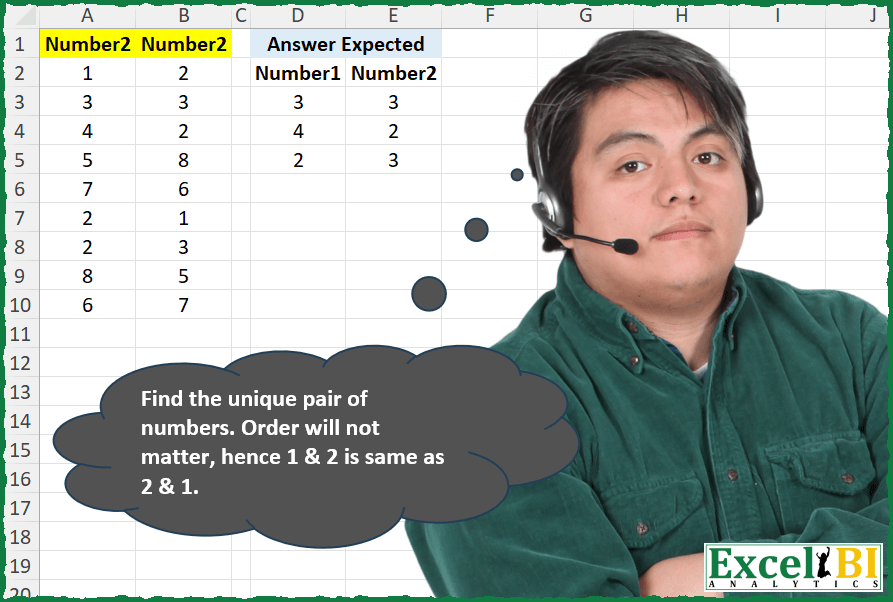
Find the unique pair of numbers. Order will not matter, hence 1 & 2 is same as 2 & 1.
📌 Challenge Details and Links
ExcelBI Excel Challenge Number: 336
Challenge Difficulty: ⭐️
📥Download Sample File
📥Link to the solutions on LinkedIn
Solving the challenge of Find unique number pairs with Power Query
Power Query solution 1 for Find unique number pairs, proposed by Zoran Milokanović:
let
  Source = Excel.CurrentWorkbook(){[Name = "Input"]}[Content],
  R = Table.ToRows(Source),
  L = List.Sort,
  S = Table.FromRows(
    List.Select(R, (s) => List.Count(List.PositionOf(R, L(s), 2, each L(_))) = 1),
    Table.ColumnNames(Source)
  )
in
  S
Power Query solution 2 for Find unique number pairs, proposed by Zoran Milokanović:
let
  Source = Excel.CurrentWorkbook(){[Name = "Input"]}[Content],
  R = Table.ToRows(Source),
  S = Table.FromRows(
    List.RemoveNulls(
      List.TransformMany(
        R,
        (x) =>
          let
            L = List.Sort
          in
            {if List.Count(List.PositionOf(R, L(x), 2, each L(_))) = 1 then x else null},
        (x, y) => y
      )
    ),
    Table.ColumnNames(Source)
  )
in
  S
Power Query solution 3 for Find unique number pairs, proposed by Zoran Milokanović:
let
  Source = Excel.CurrentWorkbook(){[Name = "Input"]}[Content],
  S = Table.SelectRows(
    Source,
    each
      let
        l = List.Sort
      in
        List.Count(List.PositionOf(Table.ToRows(Source), l(Record.ToList(_)), 2, each l(_))) = 1
  )
in
  S
Power Query solution 4 for Find unique number pairs, proposed by Zoran Milokanović:
let
  Source = Table.Sort(Excel.CurrentWorkbook(){[Name = "Input"]}[Content], C),
  C = each
    let
      l = List.Sort(Record.ToList(_))
    in
      10 * l{0} + l{1},
  S = Table.SelectRows(
    Table.Group(
      Source,
      {"Number2", "Number22"},
      {{"T", each Table.RowCount(_)}},
      0,
      (c, n) => Number.From(C(n) <> C(c))
    ),
    each [T] = 1
  )[[Number2], [Number22]]
in
  S
Power Query solution 5 for Find unique number pairs, proposed by Zoran Milokanović:
let
  Source = Excel.CurrentWorkbook(){[Name = "Input"]}[Content],
  D = each
    let
      c = List.Count,
      s = each List.Sort(_),
      m = List.Modes(_, s)
    in
      if c(_) = c(m) then _ else @D(List.RemoveMatchingItems(_, m, s)),
  S = Table.FromRows(D(Table.ToRows(Source)), Table.ColumnNames(Source))
in
  S
Power Query solution 6 for Find unique number pairs, proposed by Kris Jaganah:
let
  Source = Excel.CurrentWorkbook(){[Name = "Table1"]}[Content],
  Combine = Table.AddColumn(
    Source,
    "Combi",
    each
      let
        a = Text.From([Number1]),
        b = Text.From([Number2]),
        c = if a > b then b & a else a & b
      in
        c
  ),
  Group = Table.Group(Combine, {"Combi"}, {{"All", each _}, {"Count", each Table.RowCount(_)}}),
  Xpand = Table.ExpandTableColumn(Group, "All", {"Number1", "Number2"}, {"Number1", "Number2"}),
  Filter = Table.SelectRows(Xpand, each ([Count] = 1)),
  Select = Table.SelectColumns(Filter, {"Number1", "Number2"})
in
  Select
Power Query solution 7 for Find unique number pairs, proposed by Alejandro Simón 🇵🇦 🇪🇸:
let
  Source = Excel.CurrentWorkbook(){[Name = "Table1"]}[Content],
  Sol = Table.SelectRows(
    Source,
    each
      let
        a = Record.ToList(_),
        b = List.Zip(Table.ToColumns(Source)),
        c = List.Select({0 .. List.Count(b) - 1}, each (b{_} = a or b{_} = List.Reverse(a)) = true)
      in
        List.Count(c) = 1
  )
in
  Sol
Power Query solution 8 for Find unique number pairs, proposed by Alejandro Simón 🇵🇦 🇪🇸:
let
  Source = Excel.CurrentWorkbook(){[Name = "Table1"]}[Content],
  Sol = Table.SelectRows(
    Source,
    each
      let
        a = List.Distinct(Record.ToList(_)),
        b = List.Zip({Source[Number2], Source[Number22]}),
        c = List.Transform(b, each List.Distinct(_)),
        d = List.Select(c, each (List.ContainsAll(a, _) and List.Count(a) = List.Count(_)) = true)
      in
        List.Count(d) = 1
  )
in
  Sol
Power Query solution 9 for Find unique number pairs, proposed by Luan Rodrigues:
let
 Fonte = Tabela1,
 res = [
a = List.Transform(List.Zip(Table.ToColumns(Fonte)),List.Sort),
b = Table.FromRows(List.Select(List.Distinct(a), (x)=> List.Count(List.Select(a , each x = _)) = 1))
][b]
in
 res


        Show translation


        Show translation of this comment
Power Query solution 10 for Find unique number pairs, proposed by Alexis Olson:
let
  Source = Excel.CurrentWorkbook(){[Name = "Table1"]}[Content],
  #"Added Index" = Table.AddIndexColumn(Source, "Index", 0, 1, Int64.Type),
  #"Added Custom" = Table.AddColumn(
    #"Added Index",
    "Sorted",
    each List.Sort({[Number1], [Number2]})
  ),
  #"Grouped Rows" = Table.Group(
    #"Added Custom",
    {"Sorted"},
    {{"Count", each Table.RowCount(_), Int64.Type}, {"Index", each List.Max([Index]), type number}}
  ),
  #"Filtered Rows" = Table.SelectRows(#"Grouped Rows", each ([Count] = 1)),
  #"Merged Queries" = Table.NestedJoin(
    #"Added Index",
    {"Index"},
    #"Filtered Rows",
    {"Index"},
    "Filtered Rows",
    JoinKind.Inner
  ),
  #"Removed Other Columns" = Table.SelectColumns(#"Merged Queries", {"Number1", "Number2"})
in
  #"Removed Other Columns"
Power Query solution 11 for Find unique number pairs, proposed by Brian Julius:
let
  Source = Table.TransformColumnTypes(
    Excel.CurrentWorkbook(){[Name = "Table1"]}[Content],
    {{"Number2", Int64.Type}, {"Number22", Int64.Type}}
  ),
  AddSortedList = Table.AddColumn(
    Source,
    "SortedList",
    each Text.Combine(
      List.Transform(List.Sort({[Number2], [Number22]}, Order.Ascending), each Text.From(_)),
      ""
    )
  ),
  Group = Table.Group(
    AddSortedList,
    {"SortedList"},
    {
      {"Count", each Table.RowCount(_), Int64.Type},
      {
        "All",
        each _,
        type table [Number2 = nullable number, Number22 = nullable number, SortedList = text]
      }
    }
  ),
  Filter = Table.SelectColumns(Table.SelectRows(Group, each ([Count] = 1)), "All"),
  Expand = Table.ExpandTableColumn(Filter, "All", {"Number2", "Number22"}, {"Number1", "Number2"})
in
  Expand
Power Query solution 12 for Find unique number pairs, proposed by Ramiro Ayala Chávez:
let
  Origen = Excel.CurrentWorkbook(){[Name = "Tabla1"]}[Content],
  a      = List.Distinct(Table.ToRows(Origen)),
  b      = List.Select(a, each _{0} = _{1}),
  c      = List.Transform(a, each List.Reverse(_)),
  Sol    = Table.FromRows(b & List.Difference(a, c), {"Number1", "Number2"})
in
  Sol
Power Query solution 13 for Find unique number pairs, proposed by Rafael González B.:
let
Source = Excel.CurrentWorkbook(){0}[Content],
Result = Table.SelectRows(Source, each
let
a = List.Sort({[Number1]} & {[Number2]}),
b = List.Zip({Source[Number1], Source[Number2]}),
c = List.Transform(b, each List.Sort(_)),
d = List.Modes(c),
e = not List.Contains(d,a)
in
e )
in
Result
🧙♂️🧙♂️🧙♂️
Power Query solution 14 for Find unique number pairs, proposed by Rafael González B.:
let
Source = Excel.CurrentWorkbook(){0}[Content],
Result = Table.SelectRows(Source, each
let
a = {[Number1]} & {[Number2]},
b = List.Sort(a),
c = List.Zip({Source[Number1], Source[Number2]}),
d = List.Transform(c, each List.Sort(_)),
e = List.PositionOf(d,b,2),
f = List.Count(e) = 1
in
f)
in
Result
🧙♂️🧙♂️🧙♂️
Power Query solution 15 for Find unique number pairs, proposed by Mihai Radu O:
let
  Source = Excel.CurrentWorkbook(){[Name = "Table1"]}[Content],
  fctUnic = (x) => List.Difference(List.Distinct(x), List.Difference(x, List.Distinct(x))),
  add = Table.AddColumn(
    Source,
    "Custom",
    each
      if [Number2] > [Number22] then
        Text.From([Number22]) & Text.From([Number2])
      else
        Text.From([Number2]) & Text.From([Number22])
  ),
  R = Table.SelectRows(add, each List.Contains(fctUnic(add[Custom]), [Custom]))[
    [Number2],
    [Number22]
  ]
in
  R
Power Query solution 16 for Find unique number pairs, proposed by Dominic Walsh:
let
  Source = Excel.CurrentWorkbook(){[Name = "Table1"]}[Content],
  Value = Table.AddColumn(
    Source,
    "Value",
    each if [Number1] < [Number2] then [Number1] * 10 + [Number2] else [Number2] * 10 + [Number1]
  ),
  Group = Table.Group(
    Value,
    {"Value"},
    {
      {"Count", each Table.RowCount(_), Int64.Type},
      {"Count2", each _, type table [Number1 = number, Number2 = number, Value = number]}
    }
  ),
  Filter = Table.SelectRows(Group, each ([Count] = 1)),
  Result = Table.ExpandTableColumn(Filter, "Count2", {"Number1", "Number2"}, {"Number1", "Number2"})[
    [Number1],
    [Number2]
  ]
in
  Result
Solving the challenge of Find unique number pairs with Excel
Excel solution 1 for Find unique number pairs, proposed by Bo Rydobon 🇹🇭:
=LET(
    x,
    A2:B10,
    b,
    BYROW(
        x,
        MIN
    )&BYROW(
        x,
        MAX
    ),
    CHOOSEROWS(
        x,
        XMATCH(
            UNIQUE(
                b,
                ,
                1
            ),
            b
        )
    )
)
=UNIQUE(
    IF(
        A2:A10
Excel solution 2 for Find unique number pairs, proposed by Rick Rothstein:
=LET(
    a,
    A2:A10,
    b,
    B2:B10,
    s,
    IF(
        a>b,
        b&" "&a,
        a&" "&b
    ),
    CHOOSEROWS(
        A2:B10,
        MAP(
            UNIQUE(
                s,
                ,
                1
            ),
            LAMBDA(
                x,
                XMATCH(
                    x,
                    s
                )
            )
        )
    )
)

As a side comment,
     I notice some solutions which just concatenated columns A and B and/or A and B sorted. That works for the numbers given,
     but if it is possible for the numbers to be 1 or 2 digits long,
     a simple concatenation could lead to an incorrect result. Consider the if the unique pairs (2,
    12) and (21,
    2)
Excel solution 3 for Find unique number pairs, proposed by John V.:
=LET(
    a,
    A2:A10,
    b,
    B2:B10,
    MID(
        UNIQUE(
            IF(
                a>b,
                a&b,
                b&a
            ),
            ,
            1
        ),
        {1,
        2},
        1
    )
)
Excel solution 4 for Find unique number pairs, proposed by محمد حلمي:
=UNIQUE(
    REDUCE(
        A1:B1,
        A2:A10,
        LAMBDA(
            a,
            d,
            VSTACK(
                a,
                SORT(
                    TAKE(
                        d:B10,
                        1
                    ),
                    ,
                    ,
                    1
                )
            )
        )
    ),
    ,
    1
)
Excel solution 5 for Find unique number pairs, proposed by محمد حلمي:
=LET(
    r,
    A2:B10,
    i,
    BYROW(
        r,
        LAMBDA(
            a,
            CONCAT(
                SORT(
                    a,
                    ,
                    ,
                    1
                )
            )
        )
    ),

    CHOOSEROWS(
        r,
        XMATCH(
            UNIQUE(
                i,
                ,
                1
            ),
            i
        )
    )
)
Excel solution 6 for Find unique number pairs, proposed by Kris Jaganah:
=LET(a,
    A2:A10,
    b,
    B2:B10,
    c,
    IF(
        a>b,
        a&b,
        b&a
    ),
    FILTER(HSTACK(
        a,
        b
    ),
    MAP(c,
    LAMBDA(x,
    SUM(--(c=x))))=1))
Excel solution 7 for Find unique number pairs, proposed by Julian Poeltl:
=LET(
    N,
    A2:A10&B2:B10,
    L,
    LAMBDA(
        A,
        CONCAT(
            SORT(
                MID(
                    A,
                    SEQUENCE(
                        2
                    ),
                    1
                )
            )
        )
    ),
    U,
    UNIQUE(
        MAP(
            N,
            LAMBDA(
                A,
                L(
                    A
                )
            )
        ),
        ,
        1
    ),
    HSTACK(
        LEFT(
            U
        ),
        RIGHT(
            U
        )
    )
)
Excel solution 8 for Find unique number pairs, proposed by Timothée BLIOT:
=LET(A,A2:A10,B,B2:B10,C,MAP(A,B,LAMBDA(x,y,CONCAT(SORT(VSTACK(x,y))))),FILTER(HSTACK(A,B),MAP(C,LAMBDA(x,SUM(--(x=C))=1))))Excel solution 9 for Find unique number pairs, proposed by Nikola Z Grujicic - Nikola Ž Grujičić:
=LET(a,
     A2:A10,
     b,
     B2:B10,
     c,
     SEQUENCE(
         ROWS(
             a
         )
     ),
     d,
     a&b,
     e,
     b&a,
     f,
     MATCH(
         e,
          d,
         0
     ),
     g,
     FILTER(c,
    ISNUMBER(
        MATCH(
            c,
            IFNA(
                f,
                0
            ),
            0
        )
    )*(c<>IFNA(
                f,
       &         0
            ))),
     h,
     IF(
         NOT(
             ISNUMBER(
                 MATCH(
                     c,
                     g,
                     0
                 )
             )
         ),
         c,
         ""
     ),
     FILTER(
         A2:B10,
         c=h
     ))
Excel solution 10 for Find unique number pairs, proposed by Hussein SATOUR:
=LET(a,
     A2:A10,
     b,
     B2:B10,
     c,
     VSTACK(
         a&b,
          b&a
     ),
     d,
     TAKE(MAP(c,
     LAMBDA(x,
     SUM((c=x)*1))),
     COUNT(
         a
     )),
     FILTER(A2:B10,
     (d=1)+((d=2)*(a=b))))
Excel solution 11 for Find unique number pairs, proposed by Sunny Baggu:
=LET(

     _a,
     MAP(
         A2:A10,
          B2:B10,
          LAMBDA(
              a,
               b,
               CONCAT(
                   SORT(
                       VSTACK(
                           a,
                            b
                       )
                   )
               )
          )
     ),

     FILTER(
         A2:B10,
          ISNUMBER(
              XMATCH(
                  _a,
                   UNIQUE(
                       _a,
                        ,
                        1
                   )
              )
          )
     )

)
Excel solution 12 for Find unique number pairs, proposed by Sunny Baggu:
=LET(

     _a,
     IF(
         A2:A10 > B2:B10,
          A2:A10 & B2:B10,
          B2:B10 & A2:A10
     ),

     _b,
     UNIQUE(
         _a,
          ,
          1
     ),

     FILTER(
         A2:B10,
          XLOOKUP(
              _a,
               _b,
               _b,
               0
          ) + 0
     )

)
Excel solution 13 for Find unique number pairs, proposed by LEONARD OCHEA 🇷🇴:
=LET(a,
    A2:A10,
    b,
    B2:B10,
    FILTER(A2:B10,
    BYROW((a&b=TOROW(
        b&a
    ))*(a<>b),
    SUM)=0))
Excel solution 14 for Find unique number pairs, proposed by Abdallah Ally:
=LET(
    a,
    A2:B10,
    b,
    UNIQUE(
        DROP(
            REDUCE(
                "",
                SEQUENCE(
                    ROWS(
                        a
                    )
                ),
                LAMBDA(
                    x,
                    y,
                    VSTACK(
                        x,
                        SORT(
                            CHOOSEROWS(
                                a,
                                y
                            ),
                            ,
                            1,
                            1
                        )
                    )
                )
            ),
            1
        ),
        0,
        1
    ),
    c,
    BYROW(
        b,
        LAMBDA(
            x,
            CONCAT(
                x
            )
        )
    ),
    FILTER(
        a,
        BYROW(
            a,
            LAMBDA(
                x,
                OR(
                    OR(
                        CONCAT(
                x
            )=c
                    ),
                    OR(
                        CONCAT(
                            SORT(
                                x,
                                ,
                                1,
                                1
                            )
                        )=c
                    )
                )
            )
        )
    )
)
Excel solution 15 for Find unique number pairs, proposed by Charles Roldan:
=LAMBDA(
    x,
    LET(
        y,
        BYROW(
            x,
            LAMBDA(
                r,
                SUM(
                    r
                )&"|"&PRODUCT(
                    r
                )
            )
        ),

        CHOOSEROWS(
            x,
            XMATCH(
                UNIQUE(
                    y,
                    ,
                    1
                ),
                y
            )
        )
    )

)(A2:B10)
Excel solution 16 for Find unique number pairs, proposed by Ankur Sharma:
=LET(a,
     A2:A10,
     b,
     B2:B10,

FILTER(A2:B10,
     ((COUNTIFS(
         a,
          a,
          b,
          b
     ) + COUNTIFS(
         a,
          b,
          b,
          a
     )) = 1) + (a - b = 0)))
Excel solution 17 for Find unique number pairs, proposed by Mey Tithveasna:
=LET(
    a,
    A2:A10,
    b,
    B2:B10,
    c,
    IF(
        a>b,
        b&a,
        a&b
    ),
    u,
     UNIQUE(
         c,
         ,
         1
     ),
    FILTER(
        A2:B10,
        LOOKUP(
            c,
            u,
            u
        )
    )
)
Excel solution 18 for Find unique number pairs, proposed by Mey Tithveasna:
=LET(
    a,
    A2:A10,
    b,
    B2:B10,
    c,
    A2:B10,
    UNIQUE(
        IF(
            a
Excel solution 19 for Find unique number pairs, proposed by Pieter de Bruijn:
=UNIQUE(
    IF(
        A2:A10>B2:B10,
        HSTACK(
            B2:B10,
            A2:A10
        ),
        A2:B10
    ),
    ,
    1
)

else:
=LET(
    a,
    A2:A10,
    b,
    B2:B10,
    c,
    IF(
        a>b,
        b&a,
        a&b
    ),
    d,
    UNIQUE(
        c,
        ,
        1
    ),
    CHOOSEROWS(
        A2:B10,
        XMATCH(
            d,
            c
        )
    )
)

and implementing JvdV's comment:
=LET(
    a,
    A2:A10,
    b,
    B2:B10,
    c,
    IF(
        a>b,
        b&-a,
        a&-b
    ),
    CHOOSEROWS(
        A2:B10,
        XMATCH(
            UNIQUE(
        c,
        ,
        1
    ),
            c
        )
    )
)
Excel solution 20 for Find unique number pairs, proposed by Nicolas Micot:
=LET(_concatNombre;
    BYROW(
        A2:B10;
        LAMBDA(
            l_nombres;
            JOINDRE.TEXTE(
                "_";
                VRAI;
                TRIER(
                    l_nombres;
                    ;
                    ;
                    VRAI
                )
            )
        )
    );

_unique;
    MAP(_concatNombre;
    LAMBDA(l_concat;
    SOMME(--(_concatNombre=l_concat)) = 1));

FILTRE(
    A2:B10;
    _unique;
    ""
))
Excel solution 21 for Find unique number pairs, proposed by Ziad A.:
=LET(
    a,
    A2:B10,
    s,
    BYROW(
        a,
        LAMBDA(
            r,
            JOIN(
                "|",
                SORT(
                    TOCOL(
                        r
                    )
                )
            )
        )
    ),
    FILTER(
        a,
        1=COUNTIF(
            s,
            s
        )
    )
)
Excel solution 22 for Find unique number pairs, proposed by Giorgi Goderdzishvili:
=LET(
_arr,
    A2:B10,

_Srt,
    1*( TAKE(
        _arr,
        ,
        1
    )>=TAKE(
        _arr,
        ,
        -1
    )),

_ByR,
     BYROW(
         _arr,
         LAMBDA(
             x,
             CONCAT(
                 x
             )
         )
     ),

_Cnc,
     MAP(
         _ByR,
         _Srt,
         LAMBDA(
             x,
             y,
             IF(
                 y,
                 MID(
                     x,
                     2,
                     1
                 )&MID(
                     x,
                     1,
                     1
                 ),
                 x
             )
         )
     ),

_flt,
     MAP(
         _Cnc,
         LAMBDA(
             z,
             SUM(
                 IF(
                     z=_Cnc,
                     1,
                     0
                 )
             )>1
         )
     ),

FILTER(
    _arr,
    NOT(
        _flt
    )
))
Excel solution 23 for Find unique number pairs, proposed by Edwin Tisnado:
=FILTER(A2:B10,
    LET(t,
    A2:A10,
    l,
    B2:B10,
    BYROW(--(IF(
        t>l,
        t&l,
        l&t
    )=TOROW(
        IF(
        t>l,
        t&l,
        l&t
    )
    )),
    LAMBDA(
        x,
        SUM(
            x
        )=1
    ))))
Excel solution 24 for Find unique number pairs, proposed by Abdelrahman Omer, MBA, PMP:
=VSTACK({"Number1",
    "Number2"},
    FILTER(A2:B10,
    DROP(ISODD(LET(a,
    VSTACK(
        A2:A10&B2:B10,
        B2:B10&A2:A10
    ),
    BYROW(a,
    LAMBDA(x,
    SUM(--(x=a))))+VSTACK(
        A2:A10=B2:B10,
        B2:B10=A2:A10
    ))),
    -COUNTA(
        A2:A10
    ))))
Excel solution 25 for Find unique number pairs, proposed by LUIS FLORENTINO COUTO CORTEGOSO:
=LET(x,
    A2:A10,
    y,
    B2:B10,
    a,
    VSTACK(
        x&y,
        FILTER(
            y&x,
            IF(
                x<>y,
                1,
                0
            )
        )
    ),
    FILTER(HSTACK(
        x,
        y
    ),
    1=MAP(x&y,
    LAMBDA(x,
    SUM(--(x=a))))))
Excel solution 26 for Find unique number pairs, proposed by Hazem Hassan:
=LET(a,A2:A10*B2:B10,CHOOSEROWS(A2:B10,MATCH(UNIQUE(a,,1),a,0)))Excel solution 27 for Find unique number pairs, proposed by Gabriel Raigosa:
=LET(a,
    A2:A10,
    b,
    B2:B10,
    m,
    a&b,
    n,
    b&a,
    FILTER(A2:B10,
    ISERROR(
        XMATCH(
            m,
            n
        )
    )+(m=n)))

=LET(a,
    A2:A10,
    b,
    B2:B10,
    m,
    a&b,
    n,
    b&a,
    FILTER(HSTACK(
        a,
        b
    ),
    ISERROR(
        XMATCH(
            m,
            n
        )
    )+(m=n)))

▶️ES:
=LET(a,
    A2:A10,
    b,
    B2:B10,
    m,
    a&b,
    n,
    b&a,
    FILTRAR(A2:B10,
    ESERROR(
        COINCIDIRX(
            m,
            n
        )
    )+(m=n)))

=LET(a,
    A2:A10,
    b,
    B2:B10,
    m,
    a&b,
    n,
    b&a,
    FILTRAR(APILARH(
        a,
        b
    ),
    ESERROR(
        COINCIDIRX(
            m,
            n
        )
    )+(m=n)))
Excel solution 28 for Find unique number pairs, proposed by Narayanan J 🇮🇳:
=LET(
    a,
    A1:A9,
    b,
    B1:B9,
    FILTER(
        A1:B9,
        COUNTIFS(
            b,
            a,
            a,
            b
        )=0+IF(
            a=b,
            1,
            0
        ),
        ""
    )
)
Solving the challenge of Find unique number pairs with Python in Excel
Python in Excel solution 1 for Find unique number pairs, proposed by Alejandro Campos:
df =xl("A1:B10", headers=True)
df['Numero1'] = df[['Number1', 'Number2']].min(axis=1)
df['Numero2'] = df[['Number1', 'Number2']].max(axis=1)
df_unique = df.drop_duplicates(subset=['Numero1', 'Numero2'], keep=False)
result = df_unique[['Numero1', 'Numero2']].to_numpy().tolist()
result
Solving the challenge of Find unique number pairs with R
R solution 1 for Find unique number pairs, proposed by Konrad Gryczan, PhD:
library(tidyverse)
library(readxl)
input = read_excel("Unique Pairs.xlsx", range = "A1:B10") %>% janitor::clean_names()
test = read_excel("Unique Pairs.xlsx", range = "D2:E5")
colnames(test) = colnames(input)
result = input %>%
 mutate(pair = map2(number2_1, number2_2, ~ sort(c(.x, .y)))) %>%
 group_by(pair) %>%
 filter(n() == 1) %>%
 ungroup() %>%
 select(-pair)
Solving the challenge of Find unique number pairs with Excel VBA
Excel VBA solution 1 for Find unique number pairs, proposed by Vasin Nilyok:
Sub UniquePairs()
Dim RowCollection As New Collection
Dim N2Collection As New Collection, N1Collection As New Collection
Dim SetQuiz() As Variant
LastRow = Cells(Rows.Count, 1).End(xlUp).Row
SetQuiz = Range(Cells(2, 1), Cells(LastRow, 2))
rAns = 3
nAns = 1
n = 1
For r = 2 To LastRow
 If Cells(r, 1) < Cells(r, 2) Then
 Else
 RowCollection.Add r
 n1 = Cells(r, 1)
 n2 = Cells(r, 2)
 Cells(r, 1) = n2
 Cells(r, 2) = n1
 N2Collection.Add Cells(r, 1)
 N1Collection.Add Cells(r, 2)
 n = n + 1
 End If
Next r
For r = 2 To LastRow
 nAdd = Cells(r, 1) + Cells(r, 2)
 For rCheck = 2 To LastRow
 If Cells(rCheck, 1) = Cells(r, 1) And nAdd = Cells(rCheck, 1) + Cells(rCheck, 2) And rCheck <> r Then
 GoTo skip
 End If
 Next rCheck
 If r = RowCollection(nAns) Then
 Cells(rAns, 7) = Cells(r, 1)
 Cells(rAns, 6) = Cells(r, 2)
 rAns = rAns + 1
 nAns = nAns + 1
 Else
 Cells(rAns, 6) = Cells(r, 1)
 Cells(rAns, 7) = Cells(r, 2)
 rAns = rAns + 1
 nAns = nAns + 1
 End If
skip:
Next r
For i1 = 1 To UBound(SetQuiz, 1)
 For i2 = 1 To UBound(SetQuiz, 2)
 Cells(i1 + 1, i2) = SetQuiz(i1, i2)
 Next i2
Next i1
End Sub
&&