
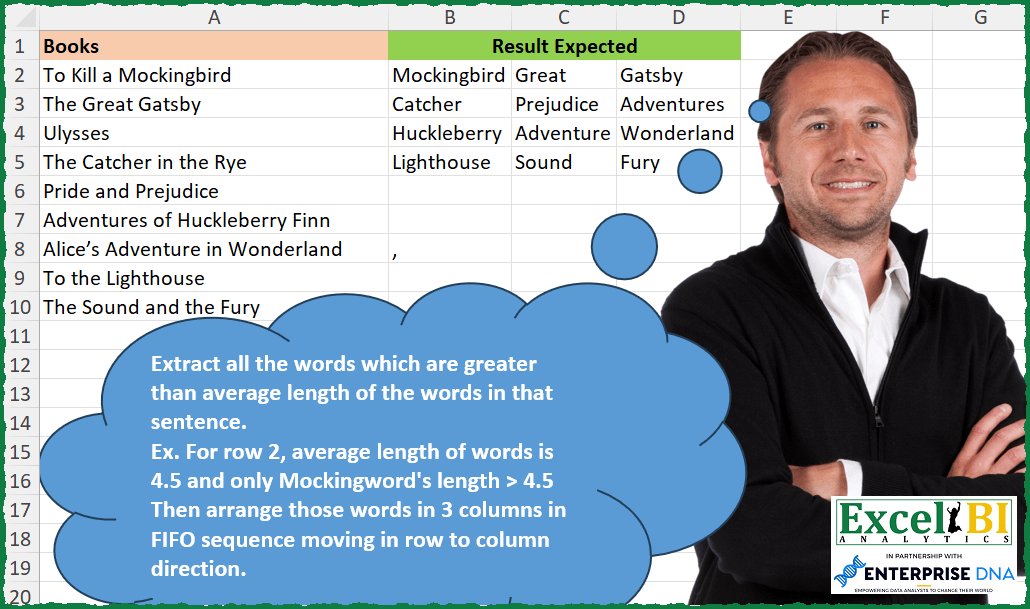
Extract all the words which are greater than average length of the words in that sentence. Ex. For row 2, average length of words is 4.5 and only Mockingbird’s length > 4.5 Then arrange those words in 3 columns in FIFO sequence moving in row to column direction.
📌 Challenge Details and Links
ExcelBI Excel Challenge Number: 330
Challenge Difficulty: ⭐️
📥Download Sample File
📥Link to the solutions on LinkedIn
Solving the challenge of List words longer than average word length with Power Query
Power Query solution 1 for List words longer than average word length, proposed by Zoran Milokanović:
let
  Source = Excel.CurrentWorkbook(){[Name = "Input"]}[Content][Books],
  S = Table.FromColumns(
    List.Zip(
      List.Split(
        List.TransformMany(
          Source,
          each
            let
              w = Text.Split(_, " "),
              l = Text.Length,
              a = List.Average(List.Transform(w, l))
            in
              List.Select(w, each l(_) > a),
          (x, y) => y
        ),
        3
      )
    )
  )
in
  S
Power Query solution 2 for List words longer than average word length, proposed by Alejandro Simón 🇵🇦 🇪🇸:
let
 Source = Excel.CurrentWorkbook(){[Name="Tabla1"]}[Content],
 Sol = Table.FromColumns(List.Zip(List.Split(List.Combine(Table.AddColumn(Source, "A", each
 let
 a = Text.Split([Books], " "),
 b = List.Average(List.Transform(a, Text.Length)),
 c = List.Select(a, each Text.Length(_)>b)
 in c)[A]),3)))
in
 Sol

Aquí hay otra sin utilizar List.Zip

let
 Source = Excel.CurrentWorkbook(){[Name="Tabla1"]}[Content],
 Lista = List.Combine(Table.AddColumn(Source, "A", each
 let
 a = Text.Split([Books], " "),
 b = List.Average(List.Transform(a, Text.Length)),
 c = List.Select(a, each Text.Length(_)>b)
 in c)[A]),
 Col = 3,
 Nulls = Number.RoundUp(List.Count(Lista)/Col)*Col-List.Count(Lista),
 Sol = Table.FromRows(List.Split(Lista&List.Repeat({null},Nulls), Col))
in
 Sol


        Show translation


        Show translation of this comment
Power Query solution 3 for List words longer than average word length, proposed by Alejandro Simón 🇵🇦 🇪🇸:
let
  Source = Excel.CurrentWorkbook(){[Name = "Table1"]}[Content],
  Sol = Table.FromRows(
    List.Split(
      List.Combine(
        Table.AddColumn(
          Source,
          "A",
          each
            let
              a = Text.Split([Books], " "),
              b = List.Average(List.Transform(a, Text.Length)),
              c = List.Select(a, each Text.Length(_) > b)
            in
              c
        )[A]
      ),
      3
    )
  )
in
  Sol
Power Query solution 4 for List words longer than average word length, proposed by Luan Rodrigues:
let
  Fonte = Tabela1,
  list = List.Union(
    Table.AddColumn(
      Fonte,
      "Personalizar",
      each [
        a = List.Average(List.Transform(Text.Split([Books], " "), (x) => Text.Length(x))),
        b = List.Select(Text.Split([Books], " "), (x) => Text.Length(x) > a)
      ][b]
    )[Personalizar]
  ),
  res = Table.FromRows(List.Split(list, 3))
in
  res
Power Query solution 5 for List words longer than average word length, proposed by Brian Julius:
let
  Source = Excel.CurrentWorkbook(){[Name = "Table1"]}[Content],
  AddWords = Table.AddColumn(
    Source,
    "Words",
    each [
      a = Text.Split([Books], " "),
      b = List.Transform(a, each Text.Length(_)),
      c = List.Average(b),
      d = List.Transform(b, each if _ > c then 1 else 0),
      f = Table.SelectColumns(
        Table.SelectRows(Table.FromColumns({a, d}), each [Column2] = 1),
        "Column1"
      )
    ][f]
  ),
  Expand = Table.SelectRows(
    Table.ExpandTableColumn(AddWords, "Words", {"Column1"}, {"Column1"}),
    each [Column1] <> null
  ),
  AddIndex = Table.AddIndexColumn(Expand, "Index", 0, 1, Int64.Type),
  Modulo3 = Table.TransformColumns(AddIndex, {{"Index", each Number.Mod(_, 3), type number}}),
  AddIndex2 = Table.AddIndexColumn(Modulo3, "Index.1", 0, 1, Int64.Type),
  IntDivide3 = Table.AddColumn(
    AddIndex2,
    "Integer-Division",
    each Number.IntegerDivide([Index.1], 3),
    Int64.Type
  ),
  RemCols = Table.RemoveColumns(IntDivide3, {"Books", "Index.1"}),
  PivotCols = Table.Pivot(
    Table.TransformColumnTypes(RemCols, {{"Index", type text}}, "en-US"),
    List.Distinct(Table.TransformColumnTypes(RemCols, {{"Index", type text}}, "en-US")[Index]),
    "Index",
    "Column1"
  ),
  RemCols2 = Table.RemoveColumns(PivotCols, {"Integer-Division"})
in
  RemCols2
Power Query solution 6 for List words longer than average word length, proposed by Ramiro Ayala Chávez:
let
  Origen = Excel.CurrentWorkbook(){[Name = "Tabla1"]}[Content],
  a = Table.TransformColumns(
    Origen,
    {
      "Books",
      each
        let
          b = Text.Split(_, " "),
          c = List.Transform(b, each Text.Length(_)),
          d = List.Average(c),
          e = List.Select(b, each Text.Length(_) > d)
        in
          e
    }
  ),
  f = Table.SelectRows(Table.ExpandListColumn(a, "Books"), each ([Books] <> null))[Books],
  Sol = Table.Transpose(Table.FromColumns(List.Split(f, 3)))
in
  Sol
Power Query solution 7 for List words longer than average word length, proposed by Rafael González B.:
let
Source = Excel.CurrentWorkbook(){0}[Content],
Select = Table.AddColumn(Source, "Words", each
let
Tx = [Books],
Ls = Text.Split(Tx, " "),
Lc = List.Count(Ls),
Tl = List.Transform(Ls, each Text.Length(_)),
Lavg = List.Sum(Tl) / Lc,
Sel = List.Select(Ls, each Text.Length(_) > Lavg)
in
Sel)[[Words]],
TSR = Table.SelectRows(Select, each not List.IsEmpty([Words])),
ExL = Table.Split(Table.ExpandListColumn(TSR, "Words"),3),
LT = List.Transform(ExL, each Table.ToList(_)),
Result = Table.FromRows(LT)
in
Result
🧙♂️🧙♂️🧙♂️
Solving the challenge of List words longer than average word length with Excel
Excel solution 1 for List words longer than average word length, proposed by Bo Rydobon 🇹🇭:
=WRAPROWS(
    TEXTSPLIT(
        TEXTJOIN(
            0,
            ,
            MAP(
                A2:A10,
                LAMBDA(
                    x,
                    LET(
                        t,
                        TEXTSPLIT(
                            x,
                            " "
                        ),
                        l,
                        LEN(
                            t
                        ),
                        TEXTJOIN(
                            0,
                            ,
                            REPT(
                                t,
                                l>AVERAGE(
                                    l
                                )
                            )
                        )
                    )
                )
            )
        ),
        0
    ),
    3,
    ""
)
Excel solution 2 for List words longer than average word length, proposed by Rick Rothstein:
=WRAPROWS(
    DROP(
        TOROW(
            REDUCE(
                "",
                A2:A10,
                LAMBDA(
                    c,
                    x,
                    LET(
                        t,
                        TEXTSPLIT(
                            x,
                            " "
                        ),
                        a,
                        AVERAGE(
                            LEN(
                                t
                            )
                        ),
                        VSTACK(
                            c,
                            IF(
                                LEN(
                                t
                            )>a,
                                t,
                                1/0
                            )
                        )
                    )
                )
            ),
            3
        ),
        ,
        1
    ),
    3
)
Excel solution 3 for List words longer than average word length, proposed by John V.:
=LET(r,REDUCE(0,A2:A10,LAMBDA(a,v,LET(b,TEXTSPLIT(v," "),l,LEN(b),HSTACK(a,IF(l>AVERAGE(l),b,))))),WRAPROWS(FILTER(r,r>0),3))Excel solution 4 for List words longer than average word length, proposed by محمد حلمي:
=LET(a,
    A2:A10,
    r,
    LEN(
        a
    ),
    u,
    " ",
    c,
    r-LEN(
        SUBSTITUTE(
            a,
            u,

        )
    ),

i,
    TEXTSPLIT(
        TEXTAFTER(
            u&a,
            u,
            SEQUENCE(
                ,
                MAX(
                    c
                )+1
            )
        ),
        u
    ),

WRAPROWS( TOCOL(IFS(LEN(
    i
)>(r-c)/(c+1),
    i),
    2),
    3))
Excel solution 5 for List words longer than average word length, proposed by محمد حلمي:
=LET(
    e,
    REDUCE(
        0,
        A2:A10,
        LAMBDA(
            a,
            d,
            LET(
                e,
                TEXTSPLIT(
                    d,
                    ,
                    " "
                ),
                s,
                LEN(
                    e
                ),
                i,
                SUM(
                    s
                )/ROWS(
                    e
                ),
                VSTACK(
                    a,
                    REPT(
                        e,
                        s>i
                    )
                )
            )
        )
    ),
    WRAPROWS(
        FILTER(
            e,
            e>""
        ),
        3
    )
)
Excel solution 6 for List words longer than average word length, proposed by محمد حلمي:
=WRAPROWS(
    DROP(
        REDUCE(
            0,
            A2:A10,
            LAMBDA(
                a,
                d,

                LET(
                    e,
                    TEXTSPLIT(
                        d,
                        ,
                        " "
                    ),
                    s,
                    LEN(
                        e
                    ),
                    i,
                    SUM(
                        s
                    )/
                    ROWS(
                        e
                    ),
                    IF(
                        OR(
                            s>i
                        ),
                        VSTACK(
                            a,
                            FILTER(
                                e,
                                s>i
                            )
                        ),
                        a
                    )
                )
            )
        ),
        1
    ),
    3
)
Excel solution 7 for List words longer than average word length, proposed by 🇰🇷 Taeyong Shin:
=LET(

     d,
     TOCOL(
         T(
             SEARCH(
                 " ",
                  A2:A10
             )
         ) & A2:A10,
          2
     ),

     func,
     LAMBDA(
         x,

          LET(

               s,
               TEXTSPLIT(
                   x,
                    ,
                    " "
               ),

               l,
               LEN(
                   s
               ),

               FILTER(
                   s,
                    l > AVERAGE(
                        l
                    )
               )

          )

     ),

     WRAPROWS(
         REDUCE(
             func(
                 @d
             ),
              DROP(
                  d,
                   1
              ),
              LAMBDA(
                  a,
                  c,
                   VSTACK(
                       a,
                        func(
                            c
                        )
                   )
              )
         ),
          3
     )

)
Excel solution 8 for List words longer than average word length, proposed by Kris Jaganah:
=WRAPROWS(
    LET(
        p,
        REDUCE(
            "",
            A2:A10,
            LAMBDA(
                x,
                y,
                HSTACK(
                    x,
                    LET(
                        a,
                        TEXTSPLIT(
                            y,
                            " "
                        ),
                        b,
                        LEN(
                            a
                        ),
                        c,
                        FILTER(
                            a,
                            AVERAGE(
                                b
                            )""
        )
    ),
    3
)
Excel solution 9 for List words longer than average word length, proposed by Julian Poeltl:
=LET(B,
    A2:A10,
    SP,
    IFNV(
        TEXTSPLIT(
            TEXTJOIN(
                ",",
                ,
                B
            ),
            " ",
            ","
        ),
        ""
    ),
    L,
    LEN(
        SP
    ),
    LA,
    BYROW(B,
    LAMBDA(A,
    LET(W,
    LEN(
        A
    )-LEN(
        SUBSTITUTE(
            A,
            " ",
            ""
        )
    )+1,
    (LEN(
        A
    )-W+1)/W))),
    F,
    IF(
        TOROW(
            L>LA
        )=TRUE,
        TOROW(
        SP
    ),
        ""
    ),
    WRAPROWS(
        FILTER(
            F,
            F<>""
        ),
        3,
        ""
    ))
Excel solution 10 for List words longer than average word length, proposed by Timothée BLIOT:
=WRAPROWS(
    DROP(
        TOCOL(
            REDUCE(
                "",
                A2:A10,
                LAMBDA(
                    w,
                    v,
                    LET(
                        A,
                        TEXTSPLIT(
                            v,
                            " "
                        ),
                        VSTACK(
                            w,
                            IF(
                                LEN(
                                    A
                                )>AVERAGE(
                                    LEN(
                                    A
                                )
                                ),
                                A,
                                1/0
                            )
                        )
                    )
                )
            ),
            3
        ),
        1
    ),
    3
)
Excel solution 11 for List words longer than average word length, proposed by Hussein SATOUR:
=WRAPROWS(
    TEXTSPLI&T(
        CONCAT(
            MAP(
                A2:A10,
                 LAMBDA(
                     x,
                      LET(
                          a,
                           TEXTSPLIT(
                               x,
                               " "
                           ),
                           b,
                           LEN(
                               a
                           ),
                           TEXTJOIN(
                               ",",
                               ,
                               IFERROR(
                                   FILTER(
                                       a,
                                        b>AVERAGE(
                                            b
                                        )
                                   ),
                                    ""
                               )
                           )&","
                      )
                 )
            )
        ),
         ",",
        ,
        1
    ),
    3
)
Excel solution 12 for List words longer than average word length, proposed by Sunny Baggu:
=LET(

     _z,
     REDUCE(

          "",

          A2:A10,

          LAMBDA(
              a,
               v,
               VSTACK(
                   a,
                    LET(
                        _ts,
                         TEXTSPLIT(
                             v,
                              ,
                              " "
                         ),
                         _l,
                         LEN(
                             _ts
                         ),
                         FILTER(
                             _ts,
                              _l > AVERAGE(
                                  _l
                              ),
                              ""
                         )
                    )
               )
          )

     ),

     WRAPROWS(
         FILTER(
             _z,
              _z <> ""
         ),
          3
     )

)
Excel solution 13 for List words longer than average word length, proposed by Abdallah Ally:
=LET(
    f,
    LAMBDA(
        x,
        WRAPROWS(
            TEXTSPLIT(
                TEXTJOIN(
                    ", ",
                    1,
                    BYROW(
                        x,
                        LAMBDA(
                            v,
                            LET(
                                a,
                                TEXTSPLIT(
                                    v,
                                    " "
                                ),
                                ARRAYTOTEXT(
                                    FILTER(
                                        a,
                                        LEN(
                                            a
                                        )>AVERAGE(
                                            LEN(
                                            a
                                        )
                                        ),
                                        ""
                                    )
                                )
                            )
                        )
                    )
                ),
                ", "
            ),
            3,
            ""
        )
    ),
    f(
        A2:A10
    )
)
Excel solution 14 for List words longer than average word length, proposed by Abdallah Ally:
=LET(
    a,
    REDUCE(
        "",
        A2:A10,
        LAMBDA(
            x,
            y,
            VSTACK(
                x,
                TOCOL(
                    LET(
                        a,
                         TEXTSPLIT(
                             y,
                             " "
                         ),
                         b,
                         LEN(
                             a
                         ),
                        c,
                        AVERAGE(
                            b
                        ),
                        FILTER(
                            a,
                            b>c,
                            ""
                        )
                    )
                )
            )
        )
    ),
     WRAPROWS(
         FILTER(
             a,
             a<>""
         ),
         3,
         ""
     )
)
Excel solution 15 for List words longer than average word length, proposed by 🇵🇪 Ned Navarrete C.:
=WRAPROWS(
    TEXTSPLIT(
        REDUCE(
            "",
            A2:A10,
            LAMBDA(
                c,
                v,
                 TEXTJOIN(
                     "*",
                     ,
                     c,
                     LET(
                         m,
                         TEXTSPLIT(
                             v,
                             ,
                             " "
                         ),
                          FILTER(
                              m,
                              LEN(
                                  m
                              )> AVERAGE(
                                  LEN(
                                  m
                              )
                              ),
                              ""
                          )
                     )
                 )
            )
        ),
        ,
        "*"
    ),
    3
)
Excel solution 16 for List words longer than average word length, proposed by Md. Zohurul Islam:
=WRAPROWS(TEXTSPLIT(ARRAYTOTEXT(TOCOL(MAP(A2:A10,LAMBDA(x,LET(a,TEXTSPLIT(x,," "),n,LEN(a),b,ARRAYTOTEXT(FILTER(a,n>AVERAGE(n))),c,IF(COUNTA(a)>1,b,1/x),c))),3)),,", "),3)Excel solution 17 for List words longer than average word length, proposed by Asheesh Pahwa:
=WRAPROWS(
    TEXTSPLIT(
        TEXTJOIN(
            "|",
            ,
            TOCOL(
                MAP(
                    E5:E13,
                    LAMBDA(
                        x,
                        LET(
                            a,
                            TEXTSPLIT(
                                x,
                                " "
                            ),
                             I,
                            LEN(
                                a
                            ),
                            b,
                            SUM(
                                I
                            )/COUNTA(
                                a
                            ),
                             TEXTJOIN(
                                 "|",
                                 ,
                                 FILTER(
                                     a,
                                     l>b
                                 )
                             )
                        )
                    )
                ),
                3
            )
        ),
        "|"
    ),
    3
)
Excel solution 18 for List words longer than average word length, proposed by Charles Roldan:
=LET(
    e,
     REDUCE(
         "",
          A2:A10,
          LAMBDA(
              a,
              b,

              VSTACK(
                  a,
                   LET(
                       c,
                        TEXTSPLIT(
                            b,
                             ,
                             " "
                        ),
                        d,
                        LEN(
                            c
                        ),

                       FILTER(
                           c,
                            d > AVERAGE(
                                d
                            ),
                            ""
                       )
                   )
              )
          )
     ),

    WRAPROWS(
        FILTER(
            e,
             LEN(
                 e
             )
        ),
         3,
         ""
    )
)
Excel solution 19 for List words longer than average word length, proposed by Pieter de Bruijn:
=IFNA(
    WRAPROWS(
        DROP(
            REDUCE(
                0,
                A2:A10,
                LAMBDA(
                    a,
                    b,
                    LET(
                        t,
                        TEXTSPLIT(
                            b,
                            " "
                        ),
                        l,
                        LEN(
                            t
                        ),
                        IFERROR(
                            VSTACK(
                                a,
                                TOCOL(
                                    IFS(
                                        l>AVERAGE(
                                            l
                                        ),
                                        t
                                    ),
                                    2
                                )
                            ),
                            a
                        )
                    )
                )
            ),
            1
        ),
        3
    ),
    ""
)
Excel solution 20 for List words longer than average word length, proposed by Nicolas Micot:
=LET(
    _extractMots;
    LAMBDA(
        l_phrase;
        LET(
            _mots;
            FRACTIONNER.TEXTE(
                l_phrase;
                ;
                " "
            );

            _nbCarMots;
            NBCAR(
                _mots
            );

            _moyenneNbCar;
            MOYENNE(
                _nbCarMots
            );

            JOINDRE.TEXTE(
                ";";
                VRAI;
                FILTRE(
                    _mots;
                    _nbCarMots > _moyenneNbCar;
                    ""
                )
            )
        )
    );

    _listeMots;
    REDUCE(
        "";
        A2:A10;
        LAMBDA(
            l_concat;
            l_mot;
            JOINDRE.TEXTE(
                ";";
                VRAI;
                l_concat;
                _extractMots(
                    l_mot
                )
            )
        )
    );

    ORGA.LIGNES(
        FRACTIONNER.TEXTE(
            _listeMots;
            ";"
        );
        3
    )
)
Excel solution 21 for List words longer than average word length, proposed by Ziad A.:
=WRAPROWS(
    TOCOL(
        MAP(
            A2:A10,
            LAMBDA(
                a,
                LET(
                    s,
                    SPLIT(
                        a,
                        " "
                    ),
                    FILTER(
                        s,
                        LEN(
                            s
                        )>AVERAGE(
                            LEN(
                            s
                        )
                        )
                    )
                )
            )
        ),
        3
    ),
    3
)
Excel solution 22 for List words longer than average word length, proposed by Giorgi Goderdzishvili:
=LET(

    _rslt,
    MAP(
        A2:A10,
        LAMBDA(
            x,
            LET(

                _wr,
                x,

                _spl,
                 TEXTSPLIT(
                     _wr,
                     " "
                 ),

                _ln,
                 LEN(
                     _spl
                 ),

                _flt,
                FILTER(
                    _spl,
                    AVERAGE(
                        _ln
                    )<_ln,
                    ""
                ),

                ARRAYTOTEXT(
                    _flt
                )
            )
        )
    ),

    _fl,
    FILTER(
        _rslt,
        _rslt<>""
    ),

    _fin,
    WRAPROWS(
        TEXTSPLIT(
            ARRAYTOTEXT(
                _fl
            ),
            ", "
        ),
        3,
        ""
    ),

    _fin
)
Excel solution 23 for List words longer than average word length, proposed by Edwin Tisnado:
=WRAPROWS(
    TEXTSPLIT(
        TEXTJOIN(
            "*",
            1,
            MAP(
                A2:A10,
                LAMBDA(
                    t,
                    LET(
                        a,
                        TEXTSPLIT(
                            t,
                            " "
                        ),
                        p,
                        AVERAGE(
                            LEN(
                                a
                            )
                        ),
                        TEXTJOIN(
                            "*",
                            ,
                            IF(
                                LEN(
                                a
                            )>p,
                                a,
                                ""
                            )
                        )
                    )
                )
            )
        ),
        ,
        "*"
    ),
    3
)
Excel solution 24 for List words longer than average word length, proposed by Abdelrahman Omer, MBA, PMP:
=WRAPROWS(
    TEXTSPLIT(
        TEXTJOIN(
            "#",
            ,
            TOCOL(
                BYROW(
                    A2:A10,
                    LAMBDA(
                        x,
                        TEXTJOIN(
                            "#",
                            ,
                            LET(
                                a,
                                TEXTSPLIT(
                                    x,
                                    ,
                                    " "
                                ),
                                FILTER(
                                    a,
                                    AVERAGE(
                                        LEN(
                                            a
                                        )
                                    )
Excel solution 25 for List words longer than average word length, proposed by Gabriel Raigosa:
=WRAPROWS(TEXTSPLIT(TEXTJOIN("|",
    ,
    MAP(A2:A10,
    LAMBDA(x,
    LET(t,
    TEXTSPLIT(
        x,
        " "
    ),
    L,
    LEN(
        t
    ),
    TEXTJOIN("|",
    ,
    FILTER(t,
    (L>AVERAGE(
        L
    )),
    "")))))),
    "|"),
    3)

ES:
=AJUSTARFILAS(DIVIDIRTEXTO(UNIRCADENAS("|",
    ,
    MAP(A2:A10,
    LAMBDA(x,
    LET(t,
    DIVIDIRTEXTO(
        x,
        " "
    ),
    L,
    LARGO(
        t
    ),
    UNIRCADENAS("|",
    ,
    FILTRAR(t,
    (L>PROMEDIO(
        L
    )),
    "")))))),
    "|"),
    3)
Excel solution 26 for List words longer than average word length, proposed by Ricardo Alexis Domínguez Hernández:
=WRAPROWS(
    TEXTSPLIT(
        TEXTJOIN(
            " ",
            TRUE,
            IFERROR(
                BYROW(
                    A2:A10,

                    LAMBDA(
                        z,

                        TEXTJOIN(
                            " ",
                            TRUE,
                            XLOOKUP(
                                FILTER(
                                    LEN(
                                        TEXTSPLIT(
                                            z,
                                            " "
                                        )
                                    ),
                                    LEN(
                                        TEXTSPLIT(
                                            z,
                                            " "
                                        )
                                    )>AVERAGE(
                                        LEN(
                                            TEXTSPLIT(
                  &                              z,
                                                " "
                                            )
                                        )
                                    )
                                ),
                                LEN(
                                    TEXTSPLIT(
                                        z,
                                        " "
                                    )
                                ),
                                TEXTSPLIT(
                                    z,
                                    " "
                                )
                            )
                        )
                    )
                ),
                 ""
            )
        ),
        " "
    ),
    3
)
Solving the challenge of List words longer than average word length with R
R solution 1 for List words longer than average word length, proposed by Konrad Gryczan, PhD:
library(tidyverse)
library(tidytext)
library(readxl)
library(data.table)
result = input %>%
 mutate(number = row_number()) %>%
 unnest_tokens(word, Books) %>%
 group_by(number) %>%
 mutate(word_len = nchar(word)) %>%
 reframe(number, word, word_len, avg_len = mean(word_len)) %>%
 ungroup() %>%
 filter(word_len > avg_len) %>%
 select(word) %>%
 mutate(group = rep(1:4, each = 3)) %>%
 group_by(group) %>%
 mutate(row = row_number()) %>%
 pivot_wider(names_from = row, values_from = word) %>%
 ungroup() %>%
 select(-group) %>%
 mutate(across(everything(), ~ str_to_title(.x)))
colnames(test) = c("1", "2", "3")
&