
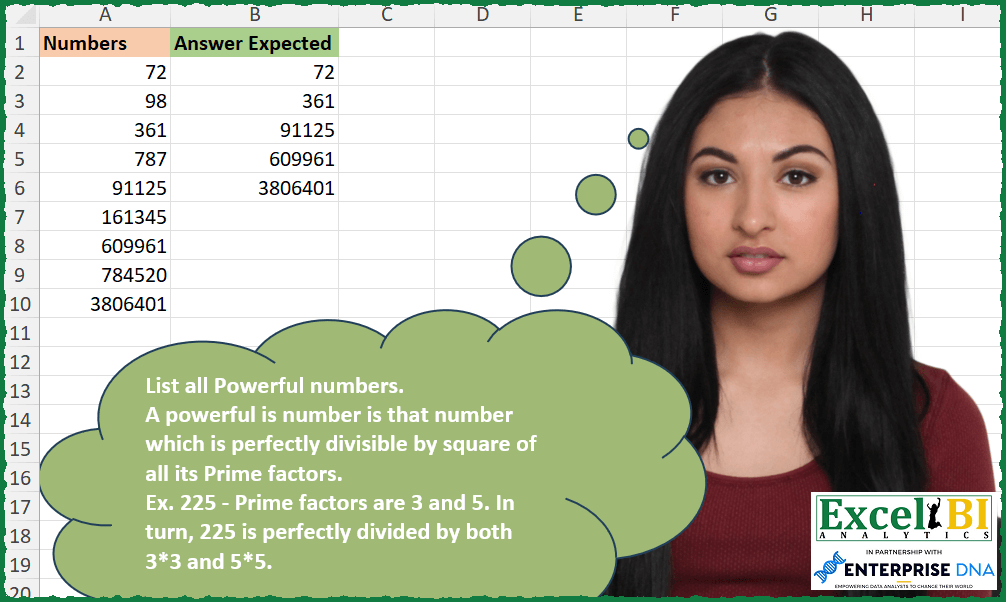
List all Powerful numbers. A powerful is number is that number which is perfectly divisible by square of all its Prime factors. Ex. 225 – Prime factors are 3 and 5. In turn, 225 is perfectly divided by both 3*3 and 5*5.
📌 Challenge Details and Links
ExcelBI Excel Challenge Number: 319
Challenge Difficulty: ⭐️⭐️⭐️⭐️
📥Download Sample File
📥Link to the solutions on LinkedIn
Solving the challenge of List all Powerful numbers with Power Query
Power Query solution 1 for List all Powerful numbers, proposed by Zoran Milokanović:
let
  Source = Excel.CurrentWorkbook(){[Name = "Input"]}[Content],
  S = Table.SelectRows(
    Source,
    each
      let
        s = each Number.RoundDown(Number.Sqrt(_)),
        f = (n, d) => Number.Mod(n, d) = 0,
        p = each not List.Accumulate({2 .. s(_)}, _ = 1, (s, c) => s or f(_, c)),
        l = List.Transform(
          List.Select({2 .. s([Numbers])}, (n) => p(n) and f([Numbers], n)),
          (t) => f([Numbers], t * t)
        )
      in
        List.AllTrue({not List.IsEmpty(l)} & l)
  )
in
  S
Power Query solution 2 for List all Powerful numbers, proposed by Alejandro Simón 🇵🇦 🇪🇸:
let
  Source = Excel.CurrentWorkbook(){[Name = "Table1"]}[Content],
  Sol = Table.SelectRows(
    Source,
    (x) =>
      let
        a = {2 .. Int64.From(Number.Sqrt(x[Numbers]))},
        b = List.Select(a, each Number.Mod(x[Numbers], _) = 0),
        c = List.Distinct(List.Combine(List.Transform(b, each {_} & {x[Numbers] / _}))),
        d = List.Select(
          c,
          (t) =>
            List.AllTrue(
              List.Transform({2 .. Int64.From(Number.Sqrt(t))}, (y) => Number.Mod(t, y) <> 0)
            )
        ),
        e =
          if List.IsEmpty(d) then
            false
          else
            List.AllTrue(List.Transform(d, each Number.Mod(x[Numbers], _ * _) = 0))
      in
        e
  )
in
  Sol
Solving the challenge of List all Powerful numbers with Excel
Excel solution 1 for List all Powerful numbers, proposed by Bo Rydobon 🇹🇭:
=TOCOL(MAP(A2:A10,
    LAMBDA(n,
    IF(n=1,
    1,
    LET(p,
    REDUCE(
        2,
        SEQUENCE(
            n^0.5/2,
            ,
            3,
            2
        ),
        LAMBDA(
            a,
            v,
            IF(
                AND(
                    v/a-INT(
                        v/a
                    )
                ),
                VSTACK(
                    a,
                    v
                ),
                a
            )
        )
    ),

n/(REDUCE(
    n,
    p,
    LAMBDA(
        m,
        d,
        LET(
            o,
            m/d^SEQUENCE(
                MAX(
                    1,
                    LOG(
                        m,
                        d
                    )
                ),
                ,
                2
            ),
            MIN(
                FILTER(
                    o,
                    MOD(
                        o,
                        1
                    )=0,
                    m
                )
            )
        )
    )
)=1))))),
    3)
Excel solution 2 for List all Powerful numbers, proposed by John V.:
=TOCOL(MAP(A2:A10,
    LAMBDA(n,
    LET(p,
    TOCOL(MAP(SEQUENCE(
        n^0.5
    ),
    LAMBDA(x,
    x/(SUM(
        N(
            MOD(
                x,
                SEQUENCE(
                    x
                )
            )=0
        )
    )=2))),
    2),
    n/AND(MOD(n,
    TOCOL(p/(MOD(
        n,
        p
    )=0),
    2)^2)=0)))),
    2)
Excel solution 3 for List all Powerful numbers, proposed by محمد حلمي:
=LET(
    a,
    A2:A10,
    s,
    SEQUENCE(
        2000
    )^2,
    d,
    SEQUENCE(
        ,
        500
    )^3,
    TOCOL(
        a*XMATCH(
            a,
            VSTACK(
                s,
                TOCOL(
                    d
                ),
                TOCOL(
                    s*d
                )
            )
        )^0,
        2
    )
)
Excel solution 4 for List all Powerful numbers, proposed by Julian Poeltl:
=FILTER(A2:A10,
    0=MAP(A2:A10,
    LAMBDA(N,
    LET(IP,
    LAMBDA(
        A,
        OR(
            A=2,
            AND(
                MOD(
                    A,
                    ROW(
                        INDIRECT(
                            "2:"&ROUNDUP(
                                SQRT(
                                    A
                                ),
                                0
                            )
                        )
                    )
                )<>0
            )
        )
    ),
    S,
    SEQUENCE(
        SQRT(
            N
        )
    ),
    IFERROR(SUM(MOD(N/(FILTER(S,
    (MAP(
        S,
        LAMBDA(
            A,
            IP(
                                    A
                                )
        )
    )*(MOD(
        N/S,
        1
    )=0)))^2),
    1)),
    1)))))
Excel solution 5 for List all Powerful numbers, proposed by Timothée BLIOT:
=TOCOL(A2:A10/MAP(A2:A10,
    LAMBDA(z,
    LET(D,
    VSTACK({2;3;5},
    SEQUENCE(FLOOR((FLOOR(
        z^0.5,
        1
    )-5)/2,
    1),
    ,
    7,
    2)),
    F,
    FILTER(
        D,
        MOD(
            z,
            D
        )=0
    ),
    SUM(
        MOD(
            z,
            FILTER(
                F,
                NOT(
                    REGEXTEST(
                        REPT(
                            "1",
                            F
                        ),
                        "^1?$|^(11+?)1+$"
                    )
                )
            )^2
        )
    )=0))),
    3)
Excel solution 6 for List all Powerful numbers, proposed by Sunny Baggu:
=TOCOL(

     A2:A10 * 1 /
     MAP(

          A2:A10,

          LAMBDA(
              a,

               LET(

                    _n,
                    SEQUENCE(
                        SQRT(
                            a
                        )
                    ),

                    _list,
                    VSTACK(
                        1,
                         2,
                         4,
                         FILTER(
                             _n,
                              MOD(
                                  _n,
                                   2
                              )
                         )
                    ),

                    OR(
                        _list ^ 2 * TOROW(
                            _list ^ 2
                        ) = a,
                         _list ^ 2 * TOROW(
                             _list ^ 3
                         ) = a
                    )

               )

          )

     ),

     3

)
Excel solution 7 for List all Powerful numbers, proposed by Abdallah Ally:
=FILTER(A2:A10,MAP(A2:A10,LAMBDA(x,LET(a,x,b,SEQUENCE(SQRT(a)-1,,2),c,DROP(REDUCE({0},b,LAMBDA(x,y,IFS(y<4,EXPAND(x,,COUNT(x)+1,y),OR(MOD(y,SEQUENCE(SQRT(y)-1,,2))=0),x,1,EXPAND(x,,COUNT(x)+1,y)))),,1),d,DROP(REDUCE({0},c,LAMBDA(x,y,IF(MOD(a,y)=0,EXPAND(x,,COUNT(x)+1,y),x))),,1),IFERROR(AND(INT(a/d^2)-(a/d^2)=0),FALSE)))))Excel solution 8 for List all Powerful numbers, proposed by Julien Lacaze:
=LET(d,
    A2:A10,

isPrime,
    LAMBDA(v,
    MAP(v,
    LAMBDA(a,
    SUM(--(MOD(
        a,
        SEQUENCE(
            SQRT(
                a
            )
        )
    )=0))=1))),

FILTER(d,
    MAP(d,
    LAMBDA(a,
    LET(f,
    SEQUENCE(
        SQRT(
                a
            ),
        ,
        2
    ),
    pf,
    IFERROR(FILTER(f,
    isPrime(
        f
    )*((
        a/f
    )=INT(
        a/f
    ))),
    0),
    IFERROR(SUM(--(MOD(
        a,
        pf*pf
    )=0))=ROWS(
        pf
    ),
    0))))))
Solving the challenge of List all Powerful numbers with Python in Excel
Python in Excel solution 1 for List all Powerful numbers, proposed by John V.:
Hi everyone!
One [Python] option could be:
def p(n):
 return all(n % v**2 == 0 for v in primefactors(n))
[i for i in xl("A2:A10")[0] if p(i)]
Blessings!
Python in Excel solution 2 for List all Powerful numbers, proposed by Owen Price:
import sympy
def is_powerful(n):
 return all([(n / p**2) % 1 == 0 for p in sympy.primefactors(n)])
numbers = xl("A2:A10")[0]

numbers.loc[numbers.apply(is_powerful)].values
Solving the challenge of List all Powerful numbers with R
R solution 1 for List all Powerful numbers, proposed by Konrad Gryczan, PhD:
library(tidyverse)
library(primes)
library(readxl)
input = read_excel("Powerful Numbers.xlsx", range = "A1:A10")
test = read_excel("Powerful Numbers.xlsx", range = "B1:B6")
is_powerful = function(number) {
 vec_primes = prime_factors(number)
 count_vec = vec_primes %>% as.data.frame() %>% select(num = 1) %>% group_by(num) %>%
 summarise(a = n())
 check = all(count_vec$a > 1)
 return(check)
}
result = input %>%
 mutate(is_powerful = map(Numbers, is_powerful)) %>%
 filter(is_powerful == TRUE) %>%
 select(Numbers)
identical(result$Numbers, test$`Answer Expected`)
# [1] TRUE
Solving the challenge of List all Powerful numbers with Excel VBA
Excel VBA solution 1 for List all Powerful numbers, proposed by Vasin Nilyok:
edited
VBA
Sub PowerfulNumbers()
LastRow = Cells(Rows.Count, 1).End(xlUp).Row
rAns = 2
Dim PrimeCollection As New Collection
Dim FacCollection As New Collection
For r = 2 To LastRow
 QNum = Cells(r, 1)
 For factor = 2 To Fix(Sqr(QNum))
 If QNum Mod factor = 0 Then
 FacCollection.Add factor
 FacCollection.Add QNum / factor
 End If
 Next factor
 n = FacCollection.Count
 If n = 0 Then
 GoTo skip
 End If
 For i = 1 To n
 CheckPrime = FacCollection(i)
 If CheckPrime = 2 Then
 PrimeCollection.Add CheckPrime
 GoTo nexti
 End If
 For ii = 2 To CheckPrime - 1
 If CheckPrime Mod ii = 0 Then
 GoTo NotPrime
 End If
 Next ii
 On Error Resume Next
 PrimeCollection.Add CheckPrime, Str(CheckPrime)
nexti:
NotPrime:
 Next i
 nn = PrimeCollection.Count
 For x = 1 To nn
 PowerPrime = WorksheetFunction.Power(PrimeCollection(x), 2)
 If QNum Mod PowerPrime = 0 And PowerPrime <= QNum Then
 Else
 GoTo skip
 End If
 Next x
 Cells(rAns, 3) = QNum
 rAns = rAns + 1
skip:
Set FacCollection = New Collection
Set PrimeCollection = New Collection
Next r
End Sub
Solving the challenge of List all Powerful numbers with DAX
DAX solution 1 for List all Powerful numbers, proposed by Zoran Milokanović:
Answer Expected =
FILTER(Input,
 VAR n = Input[Numbers]
 VAR r = GENERATESERIES(2, SQRT(n))
 VAR p = FILTER(r, VAR v = [Value] RETURN MOD(n, v) = 0 && COUNTROWS(FILTER(r, MOD(v, [Value]) = 0)) = 1)
 RETURN COUNTROWS(p) > 0 && COUNTROWS(FILTER(p, MOD(n, POWER([Value], 2)) <> 0 )) = 0
)
&&&