
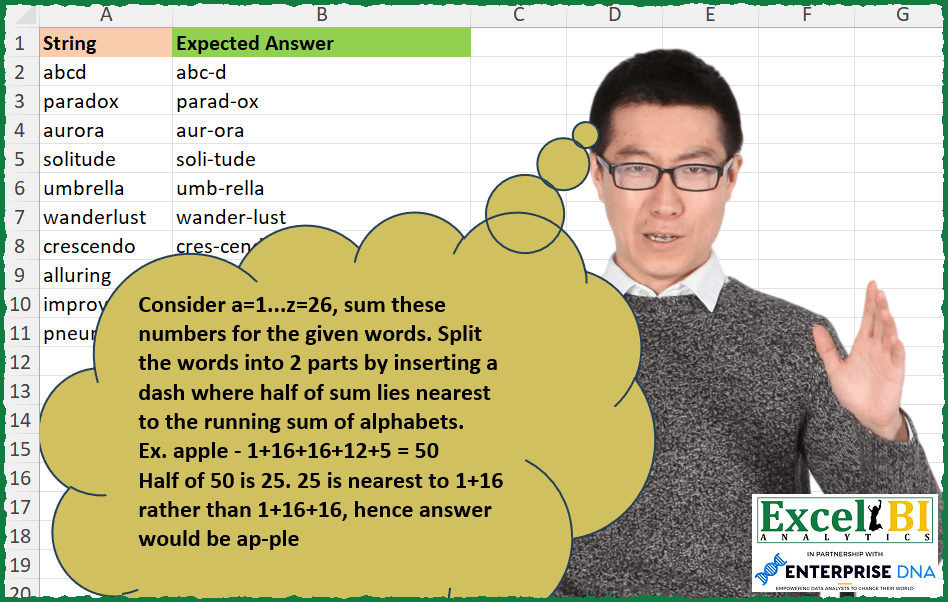
Consider a=1…z=26, sum these numbers for the given words. Split the words into 2 parts by inserting a dash where half of sum lies nearest to the running sum of alphabets. Ex. apple – 1+16+16+12+5 = 50 Half of 50 is 25. 25 is nearest to 1+16 rather than 1+16+16, hence answer would be ap-ple whale – 23+8+1+12+5 = 49. Half of 49 is 24.5 which is nearest to 23 rather than 23+8. Hence, answer would be w-hale. In case of tie, you can insert – in first occurrence. For example – aaa => 1+1+1 = 3. Half of sum is 1.5 and running sum would be 1, 2, 3. Now, 1.5 is equidistant from both 1 and 2. Hence, answer would be a-aa not aa-a. Trivia – Last word is the longest word in English language.
📌 Challenge Details and Links
ExcelBI Excel Challenge Number: 299
Challenge Difficulty: ⭐️⭐️
📥Download Sample File
📥Link to the solutions on LinkedIn
Solving the challenge of Split words by half total alphabet score with Power Query
Power Query solution 1 for Split words by half total alphabet score, proposed by Bo Rydobon 🇹🇭:
let
  Source = Excel.CurrentWorkbook(){[Name = "Table1"]}[Content],
  Ans = Table.TransformRows(
    Source,
    each
      let
        w = [String],
        c = List.Transform(Text.ToList(w), each Character.ToNumber(_) - 96),
        d = List.Transform(
          List.Accumulate(c, {}, (s, v) => s & {List.Last(s, 0) + v}),
          each Number.Abs(_ - List.Sum(c) / 2)
        )
      in
        Text.ReplaceRange(w, List.PositionOf(d, List.Min(d)) + 1, 0, "-")
  )
in
  Ans
Power Query solution 2 for Split words by half total alphabet score, proposed by Zoran Milokanović:
let
  Source = Excel.CurrentWorkbook(){[Name = "Input"]}[Content],
  M = each List.Sum(List.Transform(Text.ToList(_), each Number.Mod(Character.ToNumber(_), 32))) ?? 0,
  S = Table.TransformRows(
    Source,
    each List.Accumulate(
      {0 .. Text.Length([String]) - 1},
      "",
      (s, c) =>
        s
          & (
            let
              l = Text.At([String], c),
              m = M([String]) / 2,
              b = m - M(s),
              e = M(s & l) - m
            in
              if b >= 0 and e >= 0 then if b <= e then "-" & l else l & "-" else l
          )
    )
  )
in
  S
Power Query solution 3 for Split words by half total alphabet score, proposed by Alejandro Simón 🇵🇦 🇪🇸:
let
  Source = Excel.CurrentWorkbook(){[Name = "Table1"]}[Content],
  Sol = Table.AddColumn(
    Source,
    "Answer",
    each
      let
        a = Text.ToList([String]),
        b = List.Zip({{"a" .. "z"}, {1 .. 26}}),
        c = List.ReplaceMatchingItems(a, b),
        d = List.Transform({0 .. List.Count(c) - 1}, each List.Sum(List.FirstN(c, _ + 1))),
        e = List.Transform(d, each (Number.Abs(_ - List.Last(d) / 2))),
        f = List.PositionOf(e, List.Min(e)),
        g = Text.Insert([String], f + 1, "-")
      in
        g
  )[[Answer]]
in
  Sol
Power Query solution 4 for Split words by half total alphabet score, proposed by Luke Jarych:
let
  Source = Table1,
  ListFromColumn = Table.Column(Source, "String"),
  AddPositionColumn = Table.AddColumn(
    Source,
    "Position",
    each List.PositionOf(ListFromColumn, [String]),
    Number.Type
  ),
  wordsToList = Table.TransformColumns(Source, {"String", each Text.ToList(Text.Upper(_))}),
  a = List.Numbers(65, 26),
  b = List.Transform(a, each Character.FromNumber(_)),
  c = List.Transform(List.Positions(a), each _ + 1),
  d = List.Zip({b, c}),
  e = List.Transform(wordsToList[String], each List.ReplaceMatchingItems(_, d)),
  e1 = e{0},
  f = List.Transform(
    e,
    each
      let
        g  = _,
        l1 = List.Transform({0 .. List.Count(_) - 1}, each _),
        l2 = List.Transform(l1, each List.Sum(List.FirstN(g, _ + 1)))
      in
        l2
  ),
  g = List.Transform(
    f,
    each
      let
        g  = _,
        g1 = List.Last(g) / 2,
        g2 = List.Transform(g, each Number.Abs(_ - g1))
      in
        g2
  ),
  h = List.Transform(g, each List.PositionOf(_, List.Min(_))),
  FinalColumn = Table.AddColumn(
    AddPositionColumn,
    "Final",
    each Text.Insert([String], h{[Position]} + 1, "-")
  )
in
  FinalColumn[[Final]]
Solving the challenge of Split words by half total alphabet score with Excel
Excel solution 1 for Split words by half total alphabet score, proposed by Bo Rydobon 🇹🇭:
=MAP(
    A2:A11,
    LAMBDA(
        z,
        LET(
            c,
            CODE(
                MID(
                    z,
                    SEQUENCE(
                        LEN(
                            z
                        )
                    ),
                    1
                )
            )-96,
            REPLACE(
                z,
                XMATCH(
                    0,
                    ABS(
                        SCAN(
                            ,
                            c,
                            LAMBDA(
                                a,
                                v,
                                a+v
                            )
                        )-SUM(
                            c
                        )/2
                    ),
                    1
                )+1,
                ,
                "-"
            )
        )
    )
)
Excel solution 2 for Split words by half total alphabet score, proposed by Rick Rothstein:
=MAP(
    A2:A11,
    LAMBDA(
        z,
        LET(
            s,
            SEQUENCE(
                ,
                LEN(
                    z
                )
            ),
            c,
            CODE(
                MID(
                    z,
                    s,
                    1
                )
            )-96,
            a,
            ABS(
                SCAN(
                    0,
                    s,
                    LAMBDA(
                        a,
                        x,
                        SUM(
                            TAKE(
                                c,
                                ,
                                x
                            )
                        )
                    )
                )-SUM(
                    c
                )/2
            ),
            REPLACE(
                z,
                1+XMATCH(
                    ""&MIN(
                        a
                    ),
                    ""&a
                ),
                0,
                "-"
            )
        )
    )
)
Excel solution 3 for Split words by half total alphabet score, proposed by John V.:
=MAP(A2:A11,LAMBDA(x,LET(m,SCAN(,CODE(MID(x,SEQUENCE(LEN(x)),1))-96,LAMBDA(a,v,a+v)),REPLACE(x,1+XMATCH(0,ABS(m-MAX(m)/2),1),,"-"))))Excel solution 4 for Split words by half total alphabet score, proposed by محمد حلمي:
=MAP(
    A2:A11,
    LAMBDA(
        a,
        LET(
            e,
            CODE(
                MID(
                    a,
                    SEQUENCE(

                        LEN(
                            a
                        )
                    ),
                    1
                )
            )-96,
            REPLACE(
                a,
                XMATCH(
                    0,
                    ABS(
                        SUM(
                            e
                        )/2-SCAN(
                            ,
                            e,
                            LAMBDA(
                                A,
                                D,
                                A+D
                            )
                        )
                    ),
                    1
                )+1,
                ,
                "-"
            )
        )
    )
)
Excel solution 5 for Split words by half total alphabet score, proposed by Kris Jaganah:
=MAP(
    A2:A11,
    LAMBDA(
        z,
        LET(
            a,
            MID(
                z,
                SEQUENCE(
                    LEN(
                        z
                    )
                ),
                1
            ),
            b,
            SCAN(
                0,
                CODE(
                    a
                )-96,
                LAMBDA(
                    x,
                    y,
                    x+y
                )
            ),
            c,
            TAKE(
                b,
                -1
            )/2,
            d,
            XLOOKUP(
                c,
                b,
                b,
                ,
                {1;-1}
            ),
            e,
            ABS(
                c-d
            ),
            CONCAT(
                TOCOL(
                    HSTACK(
                        a,
                        XLOOKUP(
                            b,
                            UNIQUE(
                                FILTER(
                                    d,
                                    MIN(
                                        e
                                    )=e
                                )
                            ),
                            "-"
                        )
                    ),
                    3
                )
            )
        )
    )
)
Excel solution 6 for Split words by half total alphabet score, proposed by Timothée BLIOT:
=MAP(
    A2:A11,
    LAMBDA(
        z,
        LET(
            S,
            SEQUENCE(
                LEN(
                    z
                )
            ),
            A,
            MID(
                z,
                S,
                1
            ),
            B,
            SCAN(
                0,
                A,
                LAMBDA(
                    w,
                    v,
                    w+CODE(
                        v
                    )-96
                )
            ),
            C,
            MAP(
                B,
                LAMBDA(
                    x,
                    ABS(
                        MAX(
                            B
                        )/2-x
                    )
                )
            ),
            CONCAT(
                MAP(
                    S,
                    LAMBDA(
                        x,
                        IF(
                            INDEX(
                                C,
                                x
                            )=MIN(
                                C
                            ),
                            INDEX(
                                A,
                                x
                            )&"-",
                            INDEX(
                                A,
                                x
                            )
                        )
                    )
                )
            )
        )
    )
)
Excel solution 7 for Split words by half total alphabet score, proposed by Hussein SATOUR:
=MAP(
    A2:A11,
     LAMBDA(
         y,
          LET(

              a,
               MID(
                   y,
                    SEQUENCE(
                        LEN(
                            y
                        )
                    ),
                    1
               ),

              b,
               CODE(
                   a
               )-96,

              c,
               ABS(
                   SUM(
                       b
                   )/2- SCAN(
                       0,
                       b,
                        LAMBDA(
                            x,
                            y,
                             x+y
                        )
                   )
               ),

              d,
               XMATCH(
                   MIN(
                       c
                   ),
                    c,
                    1
               ),

              CONCAT(
                  TAKE(
                      a,
                       d
                  )
              ) &"-"& CONCAT(
                  TAKE(
                      a,
                       -COUNT(
                       b
                   )+d
                  )
              )
          )
     )
)
Excel solution 8 for Split words by half total alphabet score, proposed by Oscar Mendez Roca Farell:
=MAP(
    A2:A11,
     LAMBDA(
         a,
          LET(
              _s,
               SCAN(
                   ,
                    FIND(
                        MID(
                            a,
                             SEQUENCE(
                                 LEN(
                                     a
                                 )
                             ),
                             1
                        ),
                         CONCAT(
                             CHAR(
                                 SEQUENCE(
                                     26
                                 )+96
                             )
                         )
                    ),
                    LAMBDA(
                        i,
                         x,
                         i+x
                    )
               ),
              _n,
               XLOOKUP(
                   MAX(
                       _s
                   )/2,
                   _s,
                   SEQUENCE(
                       ROWS(
                       _s
                   )
                   ),
                    ,
                   1
               ),
               REPLACE(
                   a,
                   1+_n,
                    ,
                   "-"
               )
          )
     )
)
Excel solution 9 for Split words by half total alphabet score, proposed by Sunny Baggu:
=MAP(

     A2:A11,

     LAMBDA(
         x,

          LET(

               _s,
               SEQUENCE(
                   LEN(
                       x
                   )
               ),

               _t,
               MID(
                   x,
                    _s,
                    1
               ),

               _num,
               SEQUENCE(
                   26,
                    ,
                    97
               ),

               _no,
               XLOOKUP(
                   _t,
                    CHAR(
                        _num
                    ),
                    _num
               ) - 97,

               _runtot,
               ABS(
                   SCAN(
                       0,
                        _no,
                        LAMBDA(
                            a,
                             v,
                             a + v
                        )
                   ) - SUM(
                       _no
                   ) / 2
               ),

               _loc,
               FILTER(
                   _s,
                    _runtot = MIN(
                        _runtot
                    )
               ) + 1,

               REPLACE(
                   x,
                    _loc,
                    0,
                    "-"
               )

          )

     )

)
Excel solution 10 for Split words by half total alphabet score, proposed by LEONARD OCHEA 🇷🇴:
=MAP(
    A2:A11,
    LAMBDA(
        a,
        LET(
            l,
            LEN(
                a
            ),
            c,
            CODE(
                MID(
                    a,
                    SEQUENCE(
                        l
                    ),
                    1
                )
            )-96,
            p,
            XMATCH(
                SUM(
                    c
                )/2,
                SCAN(
                    0,
             &       c,
                    LAMBDA(
                        x,
                        y,
                        x+y
                    )
                ),
                1
            ),
            LEFT(
                a,
                p
            )&"-"&RIGHT(
                a,
                l-p
            )
        )
    )
)
Excel solution 11 for Split words by half total alphabet score, proposed by 🇵🇪 Ned Navarrete C.:
=MAP(A2:A11,
 LAMBDA(_fil,
 LET(
 _abc,"abcdefghijklmnopqrstuvwxyz",
 _str,MID(_fil,SEQUENCE(LEN(_fil)),1),
 _pos,MAP(_str;LAMBDA(f;SEARCH(f;_abc))),
 _dif,ABS(SCAN(,_pos,LAMBDA(c,v,c+v))-0.5*SUM(_pos)),
 _min,MATCH(MIN(_dif),_dif,0),
 LEFT(_fil,_min)&"-"&RIGHT(_fil,LEN(_fil)-_min)
 )
 )
)
Excel solution 12 for Split words by half total alphabet score, proposed by Charles Roldan:
=LET(
M, LAMBDA(Ω, Ω(Ω)),
Mp, LAMBDA(Ω, LAMBDA(x, MAP(x, LAMBDA(t, Ω(t))))),
f, LAMBDA(Char, CODE(Char) - CODE("a") + 1),
Mp(M(LAMBDA(Ω, LAMBDA(String,[Left],[Right],[n],
IF(LEN(String),
 LET(a, LEFT(String), b, RIGHT(String),
 IF(f(a) - f(b) < n,
 Ω(Ω)(RIGHT(String, LEN(String) - 1), Left & a, Right, n - f(a)),
 Ω(Ω)(LEFT(String, LEN(String) - 1), Left, b & Right, n + f(b)))),
Left & "-" & Right)))))
)(A2:A11)
Excel solution 13 for Split words by half total alphabet score, proposed by Pieter de Bruijn:
=MAP(
    A2:A11,
    LAMBDA(
        a,
        LET(
            n,
            CODE(
                MID(
                    a,
                    SEQUENCE(
                        LEN(
                            a
                        )
                    ),
                    1
                )
            )-96,
            m,
            ABS(
                SUM(
                    n
                )/2-SCAN(
                    0,
                    n,
                    LAMBDA(
                        b,
                        c,
                        b+c
                    )
                )
            ),
            REPLACE(
                a,
                XMATCH(
                    MIN(
                        m
                    ),
                    m
                )+1,
                ,
                "-"
            )
        )
    )
)
Excel solution 14 for Split words by half total alphabet score, proposed by Giorgi Goderdzishvili:
=
MAP(
    A2:A11,
    LAMBDA(
        x,

        LET(

            str,
            x,

            spl,
            MID(
                str,
                SEQUENCE(
                    ,
                    LEN(
                        str
                    )
                ),
                1
            ),

            pt,
            CODE(
                spl
            )-96,

            cum,
             SCAN(
                 0,
                 pt,
                 LAMBDA(
                     x,
                     y,
                     x+y
                 )
             ),

            sm_2,
            SUM(
                pt
            )/2,

            nr,
            ABS(
                cum-sm_2
            ),

            xm,
            XMATCH(
                MIN(
                    nr
                ),
                nr,
                0
            ),

            fn,
            MID(
                str,
                1,
                xm
            )&"-"&RIGHT(
                str,
                LEN(
                        str
                    )-xm
            ),

            fn
        )
    )
)
Excel solution 15 for Split words by half total alphabet score, proposed by Abdelrahman Omer, MBA, PMP:
=MAP(A2:A11,

LAMBDA(w,

LET(a,
    MID(
        w,
        SEQUENCE(
            LEN(
                w
            )
        ),
        1
    ),

b,
    SCAN(
        0,
        UNICODE(
            a
        )-96,
        LAMBDA(
            x,
            y,
            x+y
        )
    ),

c,
    DROP(
        b,
        LEN(
                w
            )-1
    ),
    d,
    ABS(
        c/2-b
    ),

e,
    (XMATCH(
        MIN(
            d
        ),
        d,
        0
    )),

LEFT(
    w,
    e
)&"-"&RIGHT(
    w,
    LEN(
                w
            )-e
)
)
)
)
Excel solution 16 for Split words by half total alphabet score, proposed by Daniel Garzia:
=MAP(
    A2:A11,
    LAMBDA(
        x,
        LET(
            l,
            MID(
                x,
                SEQUENCE(
                    LEN(
                        x
                    )
                ),
                1
            ),
            c,
            CODE(
                l
            )-96,
            i,
            ABS(
                SUM(
                    c
                )/2-SCAN(
                    0,
                    c,
                    LAMBDA(
                        a,
                        b,
                        a+b
                    )
                )
            ),
            CONCAT(
                l&IF(
                    i=MIN(
                        i
                    ),
                    "-",
                    ""
                )
            )
        )
    )
)
Excel solution 17 for Split words by half total alphabet score, proposed by Kriddakorn Pongthanisorn:
=MAP(
    A2:A11,
    LAMBDA(
        r,
         LET(
             x,
              r,
              l,
              LEN(
                  x
              ),
             s,
             MID(
                 x,
                  SEQUENCE(
                      l
                  ),
                 1
             ),
             c,
             UNICODE(
                 s
             )-96,
             h,
             SUM(
                 c
             )/2,
             o,
             ABS(
                 h-SCAN(
                     0,
                     c,
                      LAMBDA(
                          x,
                          y,
                          x+y
                      )
                 )
             ),
              p,
             MATCH(
                 MIN(
                     o
                 ),
                 o,
                 0
             ),
             MID(
                 x,
                 1,
                 p
             )&"-"&RIGHT(
                 x,
                 l-p
             )
         )
    )
)
Solving the challenge of Split words by half total alphabet score with Python in Excel
Python in Excel solution 1 for Split words by half total alphabet score, proposed by Bo Rydobon 🇹🇭:
def das(w):
 a,cs= 0,[ord(x)-96 for x in w]
 h =[abs((a:=a+c)-sum(cs)/2) for c in cs]
 n =h.index(min(h))+1
 return w[:n]+'-'+w[n:]
[das(w) for w in xl("A2:A11")[0]]
Python in Excel solution 2 for Split words by half total alphabet score, proposed by John V.:
Hi everyone!
def r(t):
 c = [ord(i) - 96 for i in t]
 a = [sum(c[:i+1]) for i in range(len(c))]
 m = [abs(i - max(a) / 2) for i in a]
 p = 1 + m.index(min(m))
 return t[:p] + "-" + t[p:]
[r(i) for i in xl("A2:A11")[0]]
Blessings!
Solving the challenge of Split words by half total alphabet score with R
R solution 1 for Split words by half total alphabet score, proposed by Konrad Gryczan, PhD:
library(tidyverse)
library(readxl)
 letter_vals <- unlist(strsplit(word, "")) %>%
 map_dbl(~ which(.x == letters))
 running_sum <- cumsum(letter_vals)
 midpoint <- sum(letter_vals) / 2
 position <- which.min(abs(running_sum - midpoint))
 paste0(substr(word, 1, position), "-", substr(word, position + 1, nchar(word)))
}
result = input %>%
 mutate(my_answer = map_chr(String, split_word),
 correct = my_answer == `Expected Answer`)
&&