
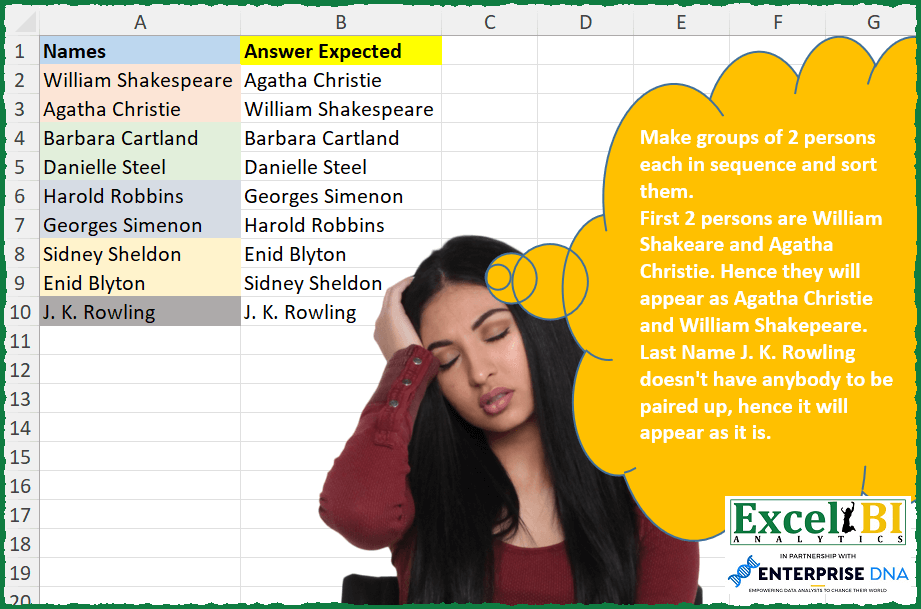
Make groups of 2 persons each in sequence and sort them. First 2 persons are William Shakespeare and Agatha Christie. Hence they will appear as Agatha Christie and William Shakespeare. Last Name J. K. Rowling doesn’t have anybody to be paired up, hence it will appear as it is.
📌 Challenge Details and Links
ExcelBI Excel Challenge Number: 288
Challenge Difficulty: ⭐️
📥Download Sample File
📥Link to the solutions on LinkedIn
Solving the challenge of Pair and Sort People with Power Query
Power Query solution 1 for Pair and Sort People, proposed by Zoran Milokanović:
let
  Source = Excel.CurrentWorkbook(){[Name = "Input"]}[Content],
  S = Table.Sort(
    Source,
    {{each Number.IntegerDivide(List.PositionOf(Source[Names], [Names]), 2), 0}, "Names"}
  )
in
  S
Power Query solution 2 for Pair and Sort People, proposed by Aditya Kumar Darak 🇮🇳:
let
  Source = Excel.CurrentWorkbook(){[Name = "data"]}[Content],
  Split  = Table.Split(Source, 2),
  Sort   = List.Transform(Split, each Table.Sort(_, "Names")),
  Return = Table.Combine(Sort)
in
  Return
Power Query solution 3 for Pair and Sort People, proposed by Alejandro Simón 🇵🇦 🇪🇸:
let
  Source = Excel.CurrentWorkbook(){[Name = "Table1"]}[Content],
  Sol    = List.Combine(List.Transform(List.Split(Source[Names], 2), List.Sort))
in
  Sol
Power Query solution 4 for Pair and Sort People, proposed by Luan Rodrigues:
let
  Fonte = Tabela1[Names],
  res   = List.Combine(List.Transform(List.Split(Fonte, 2), List.Sort))
in
  res
Power Query solution 5 for Pair and Sort People, proposed by Ramiro Ayala Chávez:
let
  Origen = Excel.CurrentWorkbook(){0}[Content],
  a      = List.Transform(Table.Split(Origen, 2), each Table.ToList(_)),
  b      = List.Transform(a, each List.Sort(_)),
  c      = Table.FromList(b, Splitter.SplitByNothing()),
  d      = Table.ExpandListColumn(c, "Column1")
in
  d
Power Query solution 6 for Pair and Sort People, proposed by Rafael González B.:
let
  Source = Excel.CurrentWorkbook(){0}[Content],
  a      = Table.Split(Source, 2),
  b      = List.Transform(a, each Table.Sort(_, {{"Names", Order.Ascending}})),
  Answer = Table.Combine(b, {"Names"})
in
  Answer
Power Query solution 7 for Pair and Sort People, proposed by Szabolcs Phraner:
Table.Combine(List.Transform(Table.Split(Table, 2), each Table.Sort(_, {{"Names", 0}})))Solving the challenge of Pair and Sort People with Excel
Excel solution 1 for Pair and Sort People, proposed by Bo Rydobon 🇹🇭:
=LET(
    a,
    A2:A10,
    SORTBY(
        a,
        ODD(
            ROW(
                a
            )
        ),
        ,
        a,

    )
)
Excel solution 2 for Pair and Sort People, proposed by Rick Rothstein:
=TOCOL(
    CHOOSECOLS(
        WRAPROWS(
            A2:A10,
            2
        ),
        2,
        1
    ),
    2
)
Excel solution 3 for Pair and Sort People, proposed by Rick Rothstein:
=TEXTSPLIT(TEXTJOIN("|",,BYROW(WRAPROWS(A2:A10,2),LAMBDA(r,TEXTJOIN("|",,TOROW(SORT(TAKE(r,,{1,-1}),,,1),3))))),"/","|")Excel solution 4 for Pair and Sort People, proposed by John V.:
=LET(
    n,
    A2:A10,
    SORTBY(
        n,
        INT(
            ROW(
                n
            )/2
        ),
        ,
        n,

    )
)
Excel solution 5 for Pair and Sort People, proposed by محمد حلمي:
=LET(
    a,
    A2:A10,
    SORTBY(
        a,
        INT(
            ROW(
                a
            )/2
        ),
        ,
        a,

    )
)
Excel solution 6 for Pair and Sort People, proposed by محمد حلمي:
=LET(a,
    A2:A10,
    SORTBY(a,
    INT((ROW(
        a
    )-2)/2)+1,
    ,
    a,
    ))
Excel solution 7 for Pair and Sort People, proposed by Kris Jaganah:
=LET(
    a,
    A2:A10,
    SORTBY(
        a,
        INT(
            SEQUENCE(
                ROWS(
                    a
                ),
                ,
                ,
                0.5
            )
        ),
        1,
        a,
        1
    )
)
Excel solution 8 for Pair and Sort People, proposed by Timothée BLIOT:
=LET(
    A,
    WRAPROWS(
        A2:A10,
        2
    ),
    DROP(
        TOCOL(
            REDUCE(
                "",
                SEQUENCE(
                    ROWS(
                        A
                    )
                ),
                LAMBDA(
                    w,
                    v,
                    VSTACK(
                        w,
                        SORT(
                            INDEX(
                                A,
                                v
                            ),
                            ,
                            ,
                            1
                        )
                    )
                )
            ),
            3
        ),
        1
    )
)
Excel solution 9 for Pair and Sort People, proposed by Hussein SATOUR:
=TEXTSPLIT(
    CONCAT(
        BYROW(
            WRAPROWS(
                A2:A10,
                 2,
                 ""
            ),
             LAMBDA(
                 x,
                  TEXTJOIN(
                      "/",
                      ,
                       SORT(
                           TOCOL(
                               x
                           )
                       )
                  )&"/"
             )
        )
    ),
    ,
     "/",
    1
)
Excel solution 10 for Pair and Sort People, proposed by Sunny Baggu:
=LET(

     _a,
     A2:A10,

     SORTBY(
         _a,
          INT(
              SEQUENCE(
                  ROWS(
                      _a
                  ),
                   ,
                   2
              ) / 2
          ) & _a
     )

)
Excel solution 11 for Pair and Sort People, proposed by Abdallah Ally:
=LET(
    a,
    WRAPROWS(
        A2:A10,
        2,
        ""
    ),
    b,
    REDUCE(
        "",
        SEQUENCE(
            ROWS(
                a
            )
        ),
        LAMBDA(
            x,
            y,
            VSTACK(
                x,
                SORT(
                    TOCOL(
                        CHOOSEROWS(
                            a,
                            y
                        ),
                        1
                    )
                )
            )
        )
    ),
    FILTER(
        b,
        b<>""
    )
)
Excel solution 12 for Pair and Sort People, proposed by 🇵🇪 Ned Navarrete C.:
=LET(
_matriz, A2:A10,
_matrizSort, ROUNDUP(SEQUENCE(ROWS(_matriz))/2,0),
SORTBY(_matriz,_matrizSort,1;_matriz,1)
)
Excel solution 13 for Pair and Sort People, proposed by Pieter de B.:
=TOCOL(SORT(WRAPROWS(A2:A10,2),,,1),2)

Old formula
TOCOL(CHOOSECOLS(WRAPROWS(A2:A10,2),2,1),2)
Excel solution 14 for Pair and Sort People, proposed by Pieter de B.:
=TOCOL(SORT(WRAPROWS(A2:A10,2),,,1),2)Excel solution 15 for Pair and Sort People, proposed by Charles Roldan:
=LAMBDA(x,CHOOSEROWS(VSTACK(x,x),2*SEQUENCE(ROWS(x)))
)(A2:A10)
Excel solution 16 for Pair and Sort People, proposed by JvdV –:
=LET(x,
    A2:A10,
    SORTBY(x,
    ROUND((ROW(
        x
    )-1)/2,
    ),
    ,
    x,
    ))
Excel solution 17 for Pair and Sort People, proposed by Ziad A.:
=SORT(A2:A,INT(ROW(A2:A)/2),1,1,1)Excel solution 18 for Pair and Sort People, proposed by Giorgi Goderdzishvili:
=LET(

    nm,
    A2:A10,

    wr,
     WRAPROWS(
         nm,
         2,
         ""
     ),

    br,
     BYROW(
         wr,
         LAMBDA(
             x,
             TEXTJOIN(
                  ",",
                 TRUE,
                 SORT(
                     x,
                     1,
                     1,
                     TRUE
                 ),
                 ","
             )
         )
     ),

    TEXTSPLIT(
        CONCAT(
            br
        ),
        ,
        ",",
        TRUE
    )
)
Excel solution 19 for Pair and Sort People, proposed by Abdelrahman Omer, MBA, PMP:
=LET(a,
    A2:A10,
    b,
    SORT(
        a
    ),
    c,
    INT((SEQUENCE(
        COUNTA(
        a
    )
    )+1)/2),
    SORTBY(a,
    (c&"."&XMATCH(
        a,
        b
    ))))
Excel solution 20 for Pair and Sort People, proposed by Quadri Olayinka Atharu:
=LET(
    names,
    A2:A10,

    group,
    ROUND(
        SEQUENCE(
            ROWS(
                names
            )
        )/2,
        0
    ),

    SORTBY(
        names,
        group,
        1,
        names,
        1
    )
)
Excel solution 21 for Pair and Sort People, proposed by Diarmuid Early:
=SORTBY(
    A2:A10,
    INT(
        SEQUENCE(
            ROWS(
                A2:A10
            ),
            ,
            ,
            0.5
        )
    ),
    1,
    A2:A10,
    1
)
Excel solution 22 for Pair and Sort People, proposed by samir tobeil:
=LET(
    x,
    A2:A10,
    y,
    SEQUENCE(
        9
    ),
    SORTBY(
        x,
        MOD(
            y,
            2
        )+y,
        ,
        x,

    )
)
Excel solution 23 for Pair and Sort People, proposed by Surendra Reddy:
=LET(x,
    A2:A10,
    SORTBY(x,
    INT((SEQUENCE(
        ROWS(
            x
        )
    )-1)/2) + 1,
    ,
    x,
    ))

▣ LET - Defines local variables within the formula.

▣ x - Is a variable assigned to the range A2:A10.

▣ SEQUENCE(
        ROWS(
            x
        )
    ) - Generates a sequence of numbers based on the number of rows in x.

▣ INT((SEQUENCE(
        ROWS(
            x
        )
    )-1)/2) + 1 - Creates a new array for sorting keys.

SORTBY(
    x,
    ...,
    ,
    x,

)
Solving the challenge of Pair and Sort People with Python in Excel
Python in Excel solution 1 for Pair and Sort People, proposed by Bo Rydobon 🇹🇭:
l=xl("A2:A10")[0].tolist()
sorted(l,key=lambda x :[l.index(x)//2,x])
Python in Excel solution 2 for Pair and Sort People, proposed by Bo Rydobon 🇹🇭:
[n for i,n in sorted(enumerate(xl("A2:A10")[0]),key=lambda x :[int(x[0]/2),x[1]])]Python in Excel solution 3 for Pair and Sort People, proposed by John V.:
Hi everyone!
One option (Python) could be:
Blessings!
Python in Excel solution 4 for Pair and Sort People, proposed by 🇰🇷 Taeyong Shin:
df = xl("A1:A10", headers=True)
df.groupby(df.index // 2)['Names']
 .apply(lambda x: sorted(x))
 .explode().values
Python in Excel solution 5 for Pair and Sort People, proposed by Sergei Baklan:
--
xl("A1:A10", headers=True).sort_index(
 key = lambda x : 2*(x//2)-(x%2),
 ignore_index=True )