
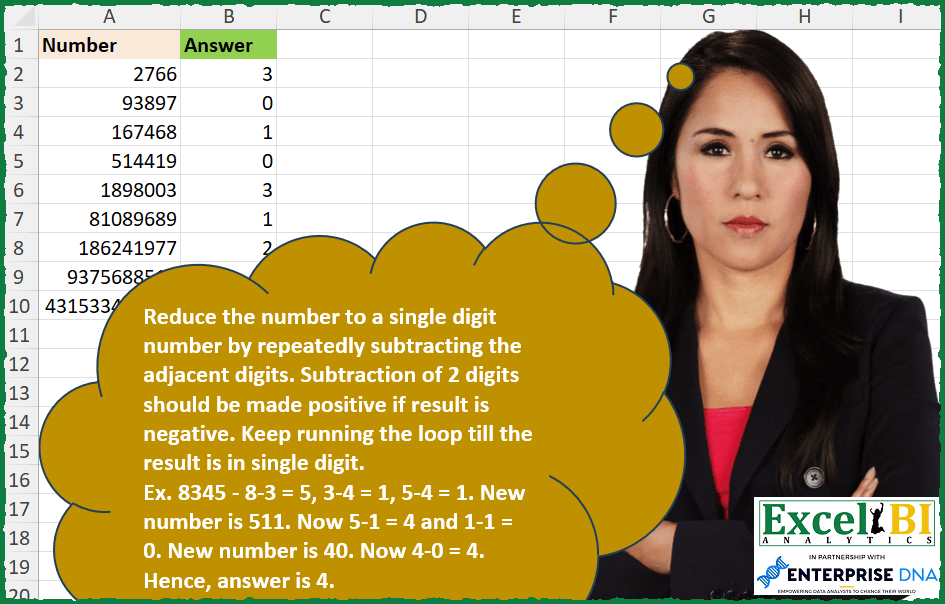
Reduce the number to a single digit number by repeatedly subtracting the adjacent digits. Subtraction of 2 digits should be made positive if result is negative. Keep running the loop till the result is in single digit. Ex. 8345 – 8-3 = 5, 3-4 = 1, 5-4 = 1. New number is 511. Now 5-1 = 4 and 1-1 = 0. New number is 40. Now 4-0 = 4. Hence, answer is 4.
📌 Challenge Details and Links
ExcelBI Excel Challenge Number: 278
Challenge Difficulty: ⭐️
📥Download Sample File
📥Link to the solutions on LinkedIn
Solving the challenge of Reduce to Single Digit by Difference with Power Query
Power Query solution 1 for Reduce to Single Digit by Difference, proposed by Bo Rydobon 🇹🇭:
let
  Source = Excel.CurrentWorkbook(){[Name = "Table1"]}[Content],
  Ans = Table.AddColumn(
    Source,
    "Custom",
    each List.Accumulate(
      {0 .. 15},
      [Number],
      (a, l) =>
        let
          l = Text.ToList(Text.From(a)),
          c = List.Count(l)
        in
          if c < 2 then
            Number.From("0" & Text.From(a))
          else
            Text.TrimStart(
              Text.Combine(
                List.Transform(
                  {0 .. c - 2},
                  (n) => Text.From(Number.Abs(Number.From(l{n}) - Number.From(l{n + 1})))
                )
              ),
              "0"
            )
    )
  )
in
  Ans
Power Query solution 2 for Reduce to Single Digit by Difference, proposed by Zoran Milokanović:
let
  Source = Excel.CurrentWorkbook(){[Name = "Input"]}[Content],
  R = (l) =>
    let
      c = List.Count(l)
    in
      if c > 1 then @R(List.Transform({0 .. c - 2}, each Number.Abs(l{_} - l{_ + 1}))) else l{0},
  S = Table.TransformRows(
    Source,
    each R(List.Transform(Text.ToList(Text.From([Number])), Number.From))
  )
in
  S
Power Query solution 3 for Reduce to Single Digit by Difference, proposed by Rick de Groot:
let
  Source = Table.FromRows(
    Json.Document(
      Binary.Decompress(
        Binary.FromText(
          "NYy7EcAgDEN3oU6BsZHkWTj2XyOcSbqn71ptEGj7WS1dySIDAyqcFmF5XaV692JZV0J/gHFK5HfDCekMS4bbdA+5eB73Cw==",
          BinaryEncoding.Base64
        ),
        Compression.Deflate
      )
    ),
    let
      _t = ((type nullable text) meta [Serialized.Text = true])
    in
      type table [Number = _t]
  ),
  Custom1 = Table.TransformColumns(
    Source,
    {
      {
        "Number",
        let
          fxReduceNumber = (text as text) as text =>
            if Text.Length(text) > 1 then
              @fxReduceNumber(
                [
                  a = text,
                  b = Text.ToList(a),
                  c = List.RemoveFirstN(b),
                  d = List.RemoveLastN(b),
                  e = List.Zip({d, c}),
                  f = List.Transform(
                    e,
                    each Text.From(Number.Abs(Number.From(_{0}) - Number.From(_{1})))
                  ),
                  g = Text.Combine(f, "")
                ][g]
              )
            else
              text,
          result = fxReduceNumber
        in
          result,
        type text
      }
    }
  )
in
  Custom1
Power Query solution 4 for Reduce to Single Digit by Difference, proposed by Alejandro Simón 🇵🇦 🇪🇸:
let
  Source = Excel.CurrentWorkbook(){[Name = "Table1"]}[Content],
  g = (f) =>
    let
      a = List.Transform(Text.ToList(Text.From(f)), Number.From),
      b = List.RemoveLastN(
        List.Transform({0 .. List.Count(a) - 1}, each Number.Abs(a{_} - a{_ + 1}))
      ),
      c = Number.From(Text.Combine(List.Transform(b, Text.From)))
    in
      if f < 10 then f else if c < 10 then c else @g(c),
  Sol = Table.AddColumn(Source, "Answer", each g([Number]))
in
  Sol
Power Query solution 5 for Reduce to Single Digit by Difference, proposed by Luan Rodrigues:
let
  Fonte = Tabela1,
  loop = (x) =>
    [
      a = Number.From(
        Text.Combine(
          List.RemoveLastN(
            List.Transform(
              {0 .. List.Count(Text.ToList(Text.From(x))) - 1},
              (y) =>
                Text.From(
                  Number.Abs(
                    Expression.Evaluate(
                      Text.Combine(Text.ToList(Text.Middle(Text.From(x), y, 2)), "-")
                    )
                  )
                )
            )
          )
        )
      ),
      b = if a < 10 then a else @loop(a)
    ][b],
  res = Table.AddColumn(Fonte, "Personalizar", each loop([Number]))
in
  res
Power Query solution 6 for Reduce to Single Digit by Difference, proposed by Rafael González B.:
let
  Source = Excel.CurrentWorkbook(){0}[Content],
  RN = (n) =>
    let
      a = Text.ToList(Text.From(n)),
      b = List.Transform(a, each Number.From(_)),
      c = List.Skip(b, 1),
      d = Table.FromColumns({b, c}),
      e = Table.AddColumn(d, "New", each Number.Abs([Column1] - [Column2])),
      f = List.RemoveNulls(e[New]),
      g = List.Transform(f, each Text.From(_)),
      h = Number.From(Text.Combine(g)),
      i = if h < 10 then h else @RN(h)
    in
      i,
  Result = Table.AddColumn(Source, "Answer", each RN([Number]))[[Answer]]
in
  Result
Power Query solution 7 for Reduce to Single Digit by Difference, proposed by Szabolcs Phraner:
let
txt = Text.From(input),

// List of all digits
 values = List.Transform( Text.ToList(txt), Number.From ),
//list of subtraction numbers
 subtract = List.Skip(values,1),
//create a table out of values and subtract lists
tbl = Table.FromColumns({values,subtract}, {"Value","Subtract"}),
//Filter out null values
RemoveLast = Table.SelectRows(tbl, each [Subtract] <> null ),
//Creates a list of the Absolute subtracted amounts of value - subtraction, in text format
Subtract = Table.TransformRows(RemoveLast, each Text.From(Number.Abs([Value] - [Subtract])))
// condition ensures, that there will be no error, combine digits into number
in if Text.Length(txt) = 1 then input else Number.From(Text.Combine(Subtract)),
// Use custom function in conjuction with List.Accumulate to repeat the process x amount of times.
 // Number of repetition is based on the length of digits
 ReduceNumber = Table.AddColumn(Source, "Reduce Number to Single Digit", each List.Accumulate(
List.Numbers(1, Text.Length( Text.From([Number]))-1),
[Number],
(state,current) => FN_SubtractDigits(state)
), Int64.Type
)
in
 ReduceNumber
Solving the challenge of Reduce to Single Digit by Difference with Excel
Excel solution 1 for Reduce to Single Digit by Difference, proposed by Bo Rydobon 🇹🇭:
=MAP(
    A2:A10,
    LAMBDA(
        a,
        LET(
            s,
            SEQUENCE(
                LEN(
                    a
                )-1
            ),
            REDUCE(
                a,
                s,
                LAMBDA(
                    a,
                    v,
                    IFERROR(
                        --CONCAT(
                            TOCOL(
                                ABS(
                                    MID(
                                        a,
                                        s,
                                        1
                                    )-MID(
                                        a,
                                        s+1,
                                        1
                                    )
                                ),
                                3
                            )
                        ),
                        a
                    )
                )
            )
        )
    )
)
Excel solution 2 for Reduce to Single Digit by Difference, proposed by Bo Rydobon 🇹🇭:
=LET(
    r,
    LAMBDA(
        r,
        a,
        LET(
            s,
            SEQUENCE(
                LEN(
                    a
                )-1
            ),
            IF(
                a>9,
                r(
                    r,
                    --CONCAT(
                        ABS(
                            MID(
                                a,
                                s,
                                1
                            )-MID(
                                a,
                                s+1,
                                1
                            )
                        )
                    )
                ),
                a
            )
        )
    ),

    MAP(
        A2:A10,
        LAMBDA(
            a,
            r(
                r,
                a
            )
        )
    )
)
Excel solution 3 for Reduce to Single Digit by Difference, proposed by Rick Rothstein:
=LET(f,LAMBDA(n,REDUCE("",SEQUENCE(LEN(n)-1),LAMBDA(a,x,a&ABS(MID(n,x,1)-MID(n,x+1,1))))),0+TAKE(TOROW(SCAN(A2,SEQUENCE(,LEN(A2)-1),LAMBDA(a,z,f(0+a))),3),,-1))Excel solution 4 for Reduce to Single Digit by Difference, proposed by John V.:
=MAP(A2:A10,LAMBDA(n,REDUCE(n,ROW(1:9),LAMBDA(a,v,LET(s,SEQUENCE(LEN(a)-1),IF(a>9,--CONCAT(ABS(MID(a,s,1)-MID(a,1+s,1))),a))))))

With Recursive Function:
✅=LET(r,LAMBDA(r,n,LET(s,SEQUENCE(LEN(n)-1),IF(n>9,r(r,--CONCAT(ABS(MID(n,s,1)-MID(n,1+s,1)))),n))),MAP(A2:A10,LAMBDA(x,r(r,x))))
Excel solution 5 for Reduce to Single Digit by Difference, proposed by محمد حلمي:
=MAP(A2:A10,LAMBDA(e,REDUCE(MID(e,SEQUENCE(LEN(e)),1),ROW(1:15),LAMBDA(a,d,IFS(ROWS(a)=1,a,@a=0,DROP(a,1),1,ABS(DROP(a,-1)-DROP(a,1)))))))Excel solution 6 for Reduce to Single Digit by Difference, proposed by محمد حلمي:
=LET(
    r,
    LAMBDA(
        r,
        a,
        LET(
            i,
            MID(
                a,
                SEQUENCE(
                    LEN(
                        a
                    )
                ),
                1
            ),

            x,
            ABS(
                DROP(
                    i,
                    -1
                )-DROP(
                    i,
                    1
                )
            ),

            IF(
                ROWS(
                    i
                )=1,
                i,
                r(
                    r,
                    IF(
                        @x=0,
                        DROP(
                            VSTACK(
                                x,
                                0
                            ),
                            1
                        ),
                        x
                    )
                )
            )
        )
    ),

    MAP(
        A2:A10,
        LAMBDA(
            a,
            r(
                r,
                a
            )
        )
    )
)
Excel solution 7 for Reduce to Single Digit by Difference, proposed by Kris Jaganah:
=MAP(
    A2:A10,
    LAMBDA(
        z,
        TAKE(
            TOCOL(
                SCAN(
                    z,
                    SEQUENCE(
                        9
                    ),
                    LAMBDA(
                        x,
                        y,
                        LET(
                            a,
                            SEQUENCE(
                                LEN(
                                    x
                                )
                            ),
                            b,
                            MID(
                                x,
                                a,
                                1
                            ),
                            --CONCAT(
                                DROP(
                                    ABS(
                                        b-XLOOKUP(
                                            a+1,
                                            a,
                                            b,
                                            ""
                                        )
                                    ),
                                    -1
                                )
                            )
                        )
                    )
                ),
                3
            ),
            -1
        )
    )
)
Excel solution 8 for Reduce to Single Digit by Difference, proposed by Timothée BLIOT:
=MAP(
    A2:A10,
     LAMBDA(
         z,
          LET(
              F,
               LAMBDA(
                   me,
                   n,
                    IF(
                        LEN(
                            n
                        )=1,
                        n,
                         me(
                             me,
                              CONCAT(
                                   MAP(
                                       SEQUENCE(
                                           LEN(
                            n
                        )-1
                                       ),

                                       LAMBDA(
                                           x,
                                            ABS(
                                                MID(
                                                    n,
                                                    x,
                                                    1
                                                )*1-MID(
                                                    n,
                                                    x+1,
                                                    1
                                                )*1
                                            )
                                       )
                                   )
                              )
                         )
                    )
               ),
               --F(
                   F,
                   z
               )
          )
     )
)
Excel solution 9 for Reduce to Single Digit by Difference, proposed by Hussein SATOUR:
=MAP(A2:A10, LAMBDA(z, LET(a, LAMBDA(x, LET(b, --MID(x, SEQUENCE(LEN(x)), 1), CONCAT(ABS(DROP(b, -1) - DROP(b, 1))))),
F, LAMBDA(ME,y, IF(LEN(y) = 1, y, ME(ME, a(y)))), F(F, z))))
Excel solution 10 for Reduce to Single Digit by Difference, proposed by Sunny Baggu:
=MAP(

     A2:A10,

     LAMBDA(
         x,

          LET(

               _sum,
               LAMBDA(
                   num,
                    rfn,

                    IF(

                         LEN(
                             num
                         ) = 1,

                         num,

                         rfn(

                              LET(
                                  _m,
                                   MID(
                                       num,
                                        SEQUENCE(
                                            LEN(
                             num
                         )
                                        ),
                                        1
                                   ),
                                   CONCAT(
                                       ABS(
&                                           DROP(
                                               _m,
                                                1
                                           ) - DROP(
                                               _m,
                                                -1
                                           )
                                       )
                                   ) + 0
                              ),

                              rfn

                         )

                    )

               ),

               _sum(
                   x,
                    _sum
               )

          )

     )

)
Excel solution 11 for Reduce to Single Digit by Difference, proposed by LEONARD OCHEA 🇷🇴:
=MAP(A2:A10,LAMBDA(a,LET(F,LAMBDA(F,x,LET(s,MID(x,SEQUENCE(LEN(x)),1),c,--CONCAT(ABS(DROP(s,1)-DROP(s,-1))),IF(LEN(c)>1,F(F,c),c))),F(F,a))))Excel solution 12 for Reduce to Single Digit by Difference, proposed by Charles Roldan:
=LET(M, LAMBDA(g, g(g)),
f, M(LAMBDA(g, LAMBDA(x,[y], IF(LEN(x), IF(ISBLANK(y), ,
ABS(LEFT(x) - y)) & g(g)(REPLACE(x, 1, 1, ), LEFT(x)), )))),
MAP(A2:A10, M(LAMBDA(g, LAMBDA(x,
IF(LEN(x) > 1, g(g)(--f(x)), x))))))
Excel solution 13 for Reduce to Single Digit by Difference, proposed by JvdV -:
=REDUCE(
    A2:A10,
    ROW(
        1:99
    ),
    LAMBDA(
        a,
        b,
        IF(
            a>9,
            --REDUCE(
                0,
                ROW(
        1:99
    ),
                LAMBDA(
                    x,
                    y,
                    IFERROR(
                        x&ABS(
                            MID(
                                a,
                                y,
                                1
                            )-MID(
                                a,
                                y+1,
                                1
                            )
                        ),
                        x
                    )
                )
            ),
            a
        )
    )
)
Excel solution 14 for Reduce to Single Digit by Difference, proposed by Peter Bartholomew:
= MAP(
    number,
     Answerλ
)
which conceals more than it explains!

Answerλ is a lambda function that passes the number to the formula
=LET(

    n,
     LEN(
         number
     ),

    digits,
     TextSplitλ(
         number
     ),

    i,
     SEQUENCE(
         n - 1
     ),

    REDUCE(
        digits,
         i,
         AbsDiffλ
    )

)

TextSplitλ is a lambda function that splits a string using a null as the separator
= LET(

    n,
     LEN(
         str
     ),

    k,
     SEQUENCE(
         n
     ),

    MID(
        str,
         k,
         1
    )

)
something that is missing from the built-in function.

AbsDiffλ is a function that calculates the absolute differences of adjacent terms of an array.
=IF(

    TAKE(
        v,
         1
    ) > 0,

    ABS(
        DROP(
        v,
         1
    ) - DROP(
        v,
         -1
    )
    ),

    DROP(
        v,
         1
    )

)
Excel solution 15 for Reduce to Single Digit by Difference, proposed by Pieter de Bruijn:
=MAP(
    A2:A10,
    LAMBDA(
        a,
        REDUCE(
            a,
            SEQUENCE(
                LEN(
                    a
                )
            ),
            LAMBDA(
                b,
                x,
                LET(
                    c,
                    SEQUENCE(
                        LEN(
                            b
                        )-1
                    ),
                    --CONCAT(
                        IFERROR(
                            ABS(
                                MID(
                                    b,
                                    c,
                                    1
                                )-MID(
                                    b,
                                    c+1,
                                    1
                                )
                            ),
                            b
                        )
                    )
                )
            )
        )
    )
)
Excel solution 16 for Reduce to Single Digit by Difference, proposed by Ziad A.:
=LET(
    R,
    LAMBDA(
        R,
        l,
        n,
        IF(
            l<2,
            n,
            R(
                R,
                l-1,
                REDUCE(
                    ,
                    SEQUENCE(
                        l-1
                    ),
                    LAMBDA(
                        a,
                        i,
                        a&ABS(
                            MID(
                                n,
                                i,
                                1
                            )-MID(
                                n,
                                i+1,
                                1
                            )
                        )
                    )
                )
            )
        )
    ),
    MAP(
        A2:A,
        LAMBDA(
            n,
            R(
                R,
                LEN(
                    n
                ),
                n
            )
        )
    )
)
Excel solution 17 for Reduce to Single Digit by Difference, proposed by samir tobeil:
=MAP(
    A2:A10,
    LAMBDA(
        t,
        REDUCE(
            t,
            SEQUENCE(
                20
            ),
            LAMBDA(
                a,
                x,
                LET(
                    k,
                    LEN(
                        a
                    ),
                    s,
                    DROP(
                        MID(
                            a,
                            SEQUENCE(
                                k
                            ),
                            2
                        ),
                        -1
                    ),
                    IF(
                        k>1,
                        CONCAT(
                            MAP(
                                s,
                                LAMBDA(
                                    f,
                                    ABS(
                                        LEFT(
                                            f
                                        )-RIGHT(
                                            f
                                        )
                                    )
                                )
                            )
                        ),
                        a
                    )+0
                )
            )
        )
    )
)
Excel solution 18 for Reduce to Single Digit by Difference, proposed by Md Ismail Hosen:
=LET(
    fx_Rec,
     LAMBDA(
         Number,
         fx_plc,
          LET(
              Chars,
               MID(
                   Number,
                    SEQUENCE(
                        LEN(
                            Number
                        )
                    ),
                    1
               ) * 1,
               Subtracted,
               CONCAT(
                   ABS(
                       DROP(
                           Chars,
                            -1
                       ) - DROP(
                           Chars,
                            1
                       )
                   )
               ) * 1,
               Result,
               IF(
                   LEN(
                            Number
                        ) = 1,
                    Number,
                    fx_plc(
                        Subtracted,
                         fx_plc
                    )
               ),
               Result
          )
     ),
     Result,
     MAP(
         A2:A10,
          LAMBDA(
              Number,
               fx_Rec(
                   Number,
                    fx_Rec
               )
          )
     ),
     Result
)
Excel solution 19 for Reduce to Single Digit by Difference, proposed by Amardeep Singh:
=MAP(
    A2:A10,
    LAMBDA(
        m,

        LET(

            f,
            LAMBDA(
                ME,
                x,
                IF(
                    x<=9,
                    x,

                    LET(
                        d,
                        MID(
                            x,
                            SEQUENCE(
                                LEN(
                                    x
                                )
                            ),
                            1
                        ),

                        ME(
                            ME,
                             --CONCAT(
                                 ABS(
                                     DROP(
                                         d,
                                         1
                                     )-DROP(
                                         d,
                                         -1
                                     )
                                 )
                             )
                        )
                    )
                )
            ),

            f(
                f,
                m
            )
        )
    )
)
Excel solution 20 for Reduce to Single Digit by Difference, proposed by Jeff Blakley:
=LET(
    recurse,
     LAMBDA(
         num,
         fx,
          IF(
              LEN(
                  num
              )=1,
               num,
               LET(
                   np,
                    MID(
                        num,
                         SEQUENCE(
                             LEN(
                  num
              )-1
                         ),
                         2
                    ),
                    fx(
                        --CONCAT(
                            ABS(
                                LEFT(
                                    np
                                )-RIGHT(
                                    np
                                )
                            )
                        ),
                         fx
                    )
               )
          )
     ),

     MAP(
         A2:A10,
          LAMBDA(
              x,
               recurse(
                   x,
                   recurse
               )
          )
     )
)
Excel solution 21 for Reduce to Single Digit by Difference, proposed by Parneet Kaur:
=1):
 l = len(
     n
 )
 num = 0
 for i in range(
     l-1
 ):
 d=int(
     n[i]
 )-int(
     n[i+1]
 )
 if(
     d<0
 ):
 num = num*10+(-1*d)
 else:
 num = num*10+d
 n = str(
     num
 )
 return(
     num
 )
nums = [2766,
    93897,
    167468,
    514419,
    1898003]
t=[]
for i in nums:
 t.append(
     func(
         str(
             i
         )
     )
 )
Solving the challenge of Reduce to Single Digit by Difference with Python
Python solution 1 for Reduce to Single Digit by Difference, proposed by Mungunbayar Bat-Ochir:
def main():
 nums = [2766, 93897, 167468, 514419, 1898003, 81089689, 186241977, 9375688514, 431533483878]
 for num in nums:
 single_digit = condense_to_single_digit(num)
 print(single_digit)
def condense_to_single_digit(prm_num):
 num_str = str(prm_num)
 if len(num_str) == 1:
 return prm_num
 else:
 result = ""
 for digit1, digit2 in zip(num_str, num_str[1:]):
 diff = abs(int(digit1) - int(digit2))
 result += str(diff)
 return condense_to_single_digit(int(result))
if __name__ == "__main__":
 main()
Solving the challenge of Reduce to Single Digit by Difference with Python in Excel
Python in Excel solution 1 for Reduce to Single Digit by Difference, proposed by Bo Rydobon 🇹🇭:
red =lambda a: red(str(int(''.join(str(abs(int(a[n+1])-int(a[n]))) for n in range(len(a)-1))))) if len(a) > 1 else int(a)
xl("A2:A10")[0].astype('string').apply(red)
Python in Excel solution 2 for Reduce to Single Digit by Difference, proposed by Bo Rydobon 🇹🇭:
def red(a):
 while len(a)>1: a = str(int(''.join([str(abs(int(a[n+1])-int(a[n]))) for n in range(len(a)-1)])))
 return int(a[0])
[red(a) for a in xl("A2:A10")[0].astype('string')]
Python in Excel solution 3 for Reduce to Single Digit by Difference, proposed by Bo Rydobon 🇹🇭:
Finally Python Reduce
from functools import reduce
[int(reduce(lambda a, n: str(int(''.join(str(abs(int(a[n+1])-int(a[n])))
for n in range(len(a)-1)))) if len(a)>1 else a , range(len(a)),a)[0]) for a in xl("A2:A10")[0].astype('string')]
Python in Excel solution 4 for Reduce to Single Digit by Difference, proposed by Bo Rydobon 🇹🇭:
def red(a):
 for _ in range(len(a)-1): a = [str(abs(int(a[n+1])-int(a[n]))) for n in range(len(a)-1)]
 return int(a[0])
[red(a) for a in xl("A2:A10")[0].astype('string')]
Python in Excel solution 5 for Reduce to Single Digit by Difference, proposed by 🇰🇷 Taeyong Shin:
Python 2
df = xl("A2:A10")
from itertools import tee
def pair(iterable):
 a, b = tee(iterable)
 next(b, None)
 return zip(a, b)

def subt(n):
 while n >= 10:
 n = int(''.join(str(abs(int(a) - int(b))) for a, b in pair(str(n))))
 return n
df.iloc[:, 0].apply(subt).to_numpy()
Python in Excel solution 6 for Reduce to Single Digit by Difference, proposed by 🇰🇷 Taeyong Shin:
Python
df = xl("A1:A10", headers=True)
def subt(num):
 if num < 10:
 return num
 else:
 lst = list(str(num))
 n = int(''.join(str(abs(int(lst[i]) - int(lst[i+1]))) for i in range(len(lst)-1)))
 return subt(n)

df['Number'].apply(subt).to_numpy()
Python in Excel solution 7 for Reduce to Single Digit by Difference, proposed by Aditya Kumar Darak 🇮🇳:
from itertools import pairwise
data = xl("A1:A10", True)
def MyFun(num):
 while num >= 10:
 digits = map(int, str(num))
 num = int("".join(str(abs(a - b)) for a, b in pairwise(digits)))
 return num
data["Answer"] = [MyFun(i) for i in data["Number"]]
data
Python in Excel solution 8 for Reduce to Single Digit by Difference, proposed by Diarmuid Early:
def f(n):
 if len(str(n)) == 1:
 return n
 else:
 return f(int("".join([str(abs(int(a)-int(b))) for a, b in zip(str(n)[1:], str(n)[:-1])])))
[f(a) for a in xl("A2:A10")[0]]
I'm savi&ng all my Python solutions to these challenges here if anyone wants to explore:
bit.ly/PythonLearningFolder
Solving the challenge of Reduce to Single Digit by Difference with R
R solution 1 for Reduce to Single Digit by Difference, proposed by Konrad Gryczan, PhD:
library(tidyverse)
library(readxl)
get_digits <- function(n) {
 as.numeric(str_split(as.character(n), "")[[1]])
}
diff_adjacent <- function(digits) {
 map2_dbl(digits[-length(digits)], # list of digits except last element
 ~abs(.x - .y))
}
reduce_number <- function(n) {
 digits <- get_digits(n)

 if(length(digits) == 1) {
 return(digits)
 }

 new_digits <- diff_adjacent(digits)

 new_num <- as.numeric(paste0(new_digits, collapse = ''))

 reduce_number(new_num) # recursion
}
input = read_excel("Reduce Number to a Single Digit.xlsx")
result = input %>%
 mutate(my_answer = map_int(Number, reduce_number),
 test = Answer == my_answer)
Solving the challenge of Reduce to Single Digit by Difference with Excel VBA
Excel VBA solution 1 for Reduce to Single Digit by Difference, proposed by Nicolas Micot:
VBA solution:
Function f_reduceToOneDigit(nombre)
Dim newNombre
newNombre = ""
If Len(nombre) > 1 Then
 For i = 1 To Len(nombre) - 1
 newNombre = newNombre & Abs(Mid(nombre, i, 1) - Mid(nombre, i + 1, 1))
 Next i
 f_reduceToOneDigit = f_reduceToOneDigit(newNombre + 0)
Else
 f_reduceToOneDigit = nombre + 0
End If
End Function
&