
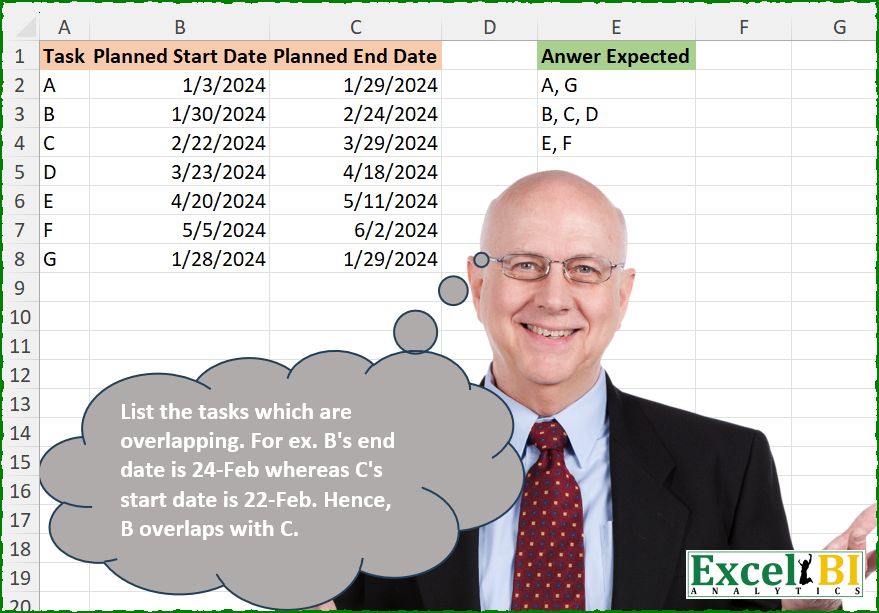
List the tasks which are overlapping. For ex. B’s end date is 24-Feb whereas C’s start date is 22-Feb. Hence, B overlaps with C.
📌 Challenge Details and Links
ExcelBI Excel Challenge Number: 685
Challenge Difficulty: ⭐️⭐️
📥Download Sample File
📥Link to the solutions on LinkedIn
Solving the challenge of Detect Overlapping Tasks with Power Query
Power Query solution 1 for Detect Overlapping Tasks, proposed by Kris Jaganah:
let
  A = Excel.CurrentWorkbook(){[Name = "Table1"]}[Content],
  B = Table.Sort(A, {"Planned Start Date"}),
  C = Table.AddIndexColumn(B, "In"),
  D = Table.AddColumn(
    C,
    "Grp",
    each Number.From(
      (try C[Planned End Date]{[In] - 1}? otherwise [Planned End Date]) - [Planned Start Date]
    )
  ),
  E = Table.Group(
    D,
    "Grp",
    {"Answer", each Text.Combine([Task], ", ")},
    0,
    (x, y) => Number.From(y < 0)
  )[[Answer]]
in
  E
Power Query solution 2 for Detect Overlapping Tasks, proposed by Alejandro Simón 🇵🇦 🇪🇸:
let
  Source = Excel.CurrentWorkbook(){[Name = "Table1"]}[Content],
  Dates = Table.AddColumn(
    Source,
    "A",
    each List.Transform(
      {Number.From([Planned Start Date]) .. Number.From([Planned End Date])},
      Date.From
    )
  )[[Task], [A]],
  Exp = Table.ExpandListColumn(Dates, "A"),
  Grp = Table.Group(Exp, {"A"}, {{"B", each List.Sort([Task])}, {"C", each Table.RowCount(_)}}, 1),
  Sel = Table.FromRows(List.Distinct(Table.SelectRows(Grp, each ([C] > 1))[B])),
  Idx = Table.AddIndexColumn(Sel, "Idx", 0),
  Sol = Table.Group(
    Idx,
    "Idx",
    {
      "Answer",
      each
        let
          a = _,
          b = List.Transform(Table.ToRows(a), each List.RemoveLastN(_)),
          c = Text.Combine(List.Distinct(List.Combine(b)), ", ")
        in
          c
    },
    0,
    (x, y) =>
      Number.From(
        not List.ContainsAny(
          {Idx[Column1]{y}, Idx[Column2]{y}},
          {Idx[Column1]{y - 1}, Idx[Column2]{y - 1}}
        )
      )
  )[[Answer]]
in
  Sol
Power Query solution 3 for Detect Overlapping Tasks, proposed by Seokho MOON:
let
  Source = Excel.CurrentWorkbook(){[Name = "Table1"]}[Content],
  Rows = Table.ToRows(Table.Sort(Source, "Planned Start Date")),
  Lst = List.Accumulate({1 .. List.Count(Rows) - 1}, {Rows{0}{0}}, Fun_1),
  Fun_1 = (a, v) =>
    if Rows{v}{1} <= Rows{v - 1}{2} then
      a & {List.Last(a) & ", " & Rows{v}{0}}
    else
      a & {Rows{v}{0}},
  Res = Table.FromList(List.Select(Lst, Fun_2), each {_}, {"Answer Expected"}),
  Fun_2 = each Text.Length(_)
    > 1 and List.AllTrue(List.Transform(List.RemoveItems(Lst, {_}), (x) => not Text.Contains(x, _)))
in
  Res
Power Query solution 4 for Detect Overlapping Tasks, proposed by Peter Krkos:
let
 Ad_Dates = Table.AddColumn(ChangedType1, "Dates", each List.Dates([Planned Start Date], Duration.Days([Planned End Date]-[Planned Start Date])+1, hashtag#duration(1,0,0,0))),
 ExpandedDates = Table.ExpandListColumn(Ad_Dates, "Dates"),
 MergedQueries = Table.NestedJoin(ExpandedDates, {"Dates"}, ExpandedDates, {"Dates"}, "ExpandedDates", JoinKind.LeftOuter),
 Filtered = Table.SelectRows(MergedQueries, each Table.RowCount([ExpandedDates]) > 1),
 Ad_Child = Table.AddColumn(Filtered, "Child", each [ExpandedDates][Task]),
 Combinations = List.Distinct(Table.Group(Ad_Child[[Task], [Child]], {"Task"}, {{"L", each List.Sort(List.Distinct(List.Combine([Child]))), type table}})[L]),
 Result =
 Table.FromColumns({
 List.Transform(
 List.Select(Combinations, each not List.AnyTrue(List.Transform(Combinations, (x)=> List.ContainsAll(x, _) and List.Count(x) > List.Count(_)))),
 (z)=> Text.Combine(z, ", "))},
 {"Answer"})
in
 Result
Power Query solution 5 for Detect Overlapping Tasks, proposed by Peter Krkos:
v2:
 Combinations = List.Distinct(List.Transform(List.Split(
 List.TransformMany(Table.ToRows(Ad_Dates),
 each Table.ToRows(Ad_Dates),
 (x,y)=> if x{0} = y{0} then null else if List.ContainsAny(x{1}, y{1}) then {x{0}, y{0}} else null),
 Table.RowCount(Ad_Dates)), (z)=> List.Sort(List.Distinct(List.Combine(List.RemoveNulls(z)))))),
 Result = Table.FromColumns({List.Transform(List.Select(Combinations, each not List.AnyTrue(List.Transform(Combinations, (x)=> List.ContainsAll(x, _) and List.Count(x) > List.Count(_)))), (z)=> Text.Combine(z, ", "))}, {"Answer"})
in
 Result
Power Query solution 6 for Detect Overlapping Tasks, proposed by Maciej Kopczyński:
let
 source = Excel.CurrentWorkbook(){[Name = "tblStart"]}[Content],
 cDT = Table.TransformColumnTypes(
 source,
 {{"Task", type text}, {"Planned Start Date", type date}, {"Planned End Date", type date}}
 ),
 cstCol = Table.AddColumn(
 cDT,
 "grouping",
 each Text.Combine(
 List.Sort(
 Table.SelectRows(
 cDT,
 (x) =>
 List.Intersect(
 {
 List.Dates(
 x[Planned Start Date],
 Duration.Days(x[Planned End Date] - x[Planned Start Date]) + 1,
 hashtag#duration(1, 0, 0, 0)
 ),
 List.Dates(
 [Planned Start Date],
 Duration.Days([Planned End Date] - [Planned Start Date]) + 1,
 hashtag#duration(1, 0, 0, 0)
 )
 }
 )
 <> {}
 )[Task]
 ),
 ", "
 )
 ),
 delOthercols = Table.Distinct(Table.SelectColumns(cstCol, {"grouping"})),
 cstCol2 = Table.AddColumn(delOthercols, "Nst", each Text.Split([grouping], ", ")),
 expand = Table.ExpandListColumn(cstCol2, "Nst"),
 cstCol3 = Table.AddColumn(expand, "Nst2", each Text.Length([grouping])),
 grp= List.Distinct(
 Table.Group(
 cstCol3,
 {"Nst"},
 {{"Grp", each Table.First(Table.Sort(_, {"Nst2", Order.Descending}))[grouping]}}
 )[Grp]
 )
in
 grp
Solving the challenge of Detect Overlapping Tasks with Excel
Excel solution 1 for Detect Overlapping Tasks, proposed by Bo Rydobon 🇹🇭:
=DROP(
    GROUPBY(
        REDUCE(
            B2:B8,
            A2:A8,
            LAMBDA(
                a,
                _,
                MAP(
                    a,
                    LAMBDA(
                        x,
                        MIN(
                            IF(
                                x=f))))),
    h,
    SORTBY(
        g,
        -LEN(
            g
        )
    ),
    UNIQUE(
        XLOOKUP(
            g,
            h,
            h,
            ,
            3
        )
    ))
Excel solution 2 for Detect Overlapping Tasks, proposed by John V.:
=LET(a,
    A2:A8,
    b,
    B2:B8,
    c,
    C2:C8,
    m,
    MAP(b,
    c,
    LAMBDA(x,
    y,
    ARRAYTOTEXT(FILTER(a,
    (x<=c)*(y>=b))))),
    s,
    SORTBY(
        m,
        -LEN(
            m
        )
    ),
    UNIQUE(
        XLOOKUP(
            a,
            s,
            s,
            ,
            3
        )
    ))
Excel solution 3 for Detect Overlapping Tasks, proposed by Kris Jaganah:
=LET(a,SORT(A2:C8,2),b,TAKE(a,,-1),c,(VSTACK(@b,DROP(b,-1))-INDEX(a,,2))<0,d,SCAN(0,c,SUM),DROP(GROUPBY(d,TAKE(a,,1),ARRAYTOTEXT,0,0),,1))Excel solution 4 for Detect Overlapping Tasks, proposed by Alejandro Campos:
= plt.subplots(figsize=(10,
     6))
colors = ["skyblue",
     "lightgreen",
     "salmon",
     "gold",
     "plum",
     "orange",
     "lightcoral"]
for i,
     task in enumerate(
         df["Task"]
     ):
 ax.barh(task,
     (df.loc[i,
     "Planned End Date"] - df.loc[i,

 "Planned Start Date"]).days,
     left=df.loc[i,

 "Planned Start Date"],
     color=colors[i % len(
         colors
     )])
ax.set(
    xlabel="Date",
     ylabel="Tasks",
     title="Gantt Chart"
)
ax.grid(
    True,
     which='both',
     linestyle='--',
     linewidth=0.5,
     color='gray'
)
plt.xticks(
    rotation=45
)
plt.tight_layout()
plt.show()
Excel solution 5 for Detect Overlapping Tasks, proposed by Timothée BLIOT:
=LET(A,A2:A8,B,B2:B8,C,C2:C8,D,UNIQUE(MAP(A,B,C, LAMBDA(x,y,z, TEXTJOIN(", ",,SORT(VSTACK(x,IF((yB),A,""),IF((yC),A,""))))))), bE,SORTBY(D,LEN(D)),UNIQUE(MAP(E,LAMBDA(x,TAKE(FILTER(E,ISNUMBER(FIND(x,E))),-1))))) Excel solution 6 for Detect Overlapping Tasks, proposed by Hussein SATOUR:
=LET(t,
    A2:A8,
    a,
    XLOOKUP(
        C2:C8,
        B2:B8,
        t,
        ,
        -1
    ),
    b,
    IF(
        a=t,
        "",
        t&", "&a
    ),
    c,
    XLOOKUP(
        RIGHT(
            b
        ),
        LEFT(
            b
        ),
        b
    ),
    d,
    IFNA(
        b&", "&RIGHT(
            c
        ),
        b
    ),
    FILTER(d,
    (d<>", ")*ISNA(
        XMATCH(
            d,
            c
        )
    )))
Excel solution 7 for Detect Overlapping Tasks, proposed by Duy Tùng:
=LET(U,UNIQUE,R,ARRAYTOTEXT,b,B2:B8,c,C2:C8,a,MAP(b,c,LAMBDA(x,v,R(FILTER(A2:A8,(x<=c)*(v>=b))))),h,REDUCE(a,a,LAMBDA(x,y,U(MAP(x,LAMBDA(z,R(MAP(U(TEXTSPLIT(z,,", ")),LAMBDA(t,R(TOCOL(IFS(FIND(t,a),a),3)))))))))),MAP(h,LAMBDA(x,R(U(TEXTSPLIT(x,,", "))))))Excel solution 8 for Detect Overlapping Tasks, proposed by Sunny Baggu:
=LET(
 t, A2:A8,
 _b, MAP(
 t,
 LAMBDA(a,
 LET(
 _a, FILTER(B2:C8, t = a),
 _a1, TAKE(_a, , 1),
 _a2, TAKE(_a, , -1),
 ARRAYTOTEXT(FILTER(t, (B2:B8 > _a1) * (B2:B8 < _a2), ""))
 )
 )
 ),
 _l, IFNA(TEXTBEFORE(_b, ", "), _b),
 _c, XLOOKUP(_l, t, _b, ""),
 _d, BYROW(HSTACK(t, _b, _c), LAMBDA(a, TEXTJOIN(", ", , a))),
 FILTER(_d, IF(_b = "", FALSE, ISNA(XMATCH(t, _l))))
)
Excel solution 9 for Detect Overlapping Tasks, proposed by Md. Zohurul Islam:
=LET(
    u,
    SORT(
        A2:C8,
        2,
        1
    ),

    a,
    CHOOSECOLS(
        u,
        2
    ),

    b,
    VSTACK(
        0,
        DROP(
            TAKE(
                u,
                ,
                -1
            ),
            -1
        )
    ),

    c,
    SCAN(
        0,
        ABS(
            a>b
        ),
        SUM
    ),

    d,
    DROP(
        REDUCE(
            "",
            UNIQUE(
                c
            ),
            LAMBDA(
                x,
                y,
                VSTACK(
                    x,
                    ARRAYTOTEXT(
                        FILTER(
                            TAKE(
                                u,
                                ,
                                1
                            ),
                            c=y
                        )
                    )
                )
            )
        ),
        1
    ),

    d
)
Excel solution 10 for Detect Overlapping Tasks, proposed by Pieter de B.:
=LET(z,
    SORT(
        A2:C8,
        {2,
        3}
    ),
    i,
    INDEX,
    r,
    DROP(REDUCE({0,
    0,
    0},
    i(
        z,
        ,
        1
    ),
    LAMBDA(a,
    b,
    LET(v,
    LAMBDA(
        x,
        VLOOKUP(
            b,
            z,
            x,

        )
    ),
    c,
    v(
        2
    ),
    d,
    v(
        3
    ),
    e,
    TAKE(
        a,
        -1
    ),
    VSTACK(a,
    IF((c<=i(
        e,
        ,
        3
    ))*(d>=i(
        e,
        ,
        2
    )),
    HSTACK(
        @e&", "&b,
        MIN(
            c,
            i(
        e,
        ,
        2
    )
        ),
        MAX(
            d,
            i(
        e,
        ,
        3
    )
        )
    ),
    HSTACK(
        b,
        c,
        d
    )))))),
    1),
    XLOOKUP(
        UNIQUE(
            i(
                r,
                ,
                2
            )
        ),
        i(
                r,
                ,
                2
            ),
        TAKE(
            r,
            ,
            1
        ),
        ,
        ,
        -1
    ))
Excel solution 11 for Detect Overlapping Tasks, proposed by Asheesh Pahwa:
=LET(m,MAP(B2:B8,C2:C8,LAMBDA(x,y,ARRAYTOTEXT(FILTER(A2:A8,(x<=C2:C8)*(y>=B2:B8))))),u,UNIQUE(m),UNIQUE(MAP(A2:A8,LAMBDA(x,
LET(f,FILTER(UNIQUE(u),ISNUMBER(FIND(x,u))),IF(COUNTA(f)>1,ARRAYTOTEXT(UNIQUE(TEXTSPLIT(ARRAYTOTEXT(f),,", "))),ARRAYTOTEXT(f)))))))
Excel solution 12 for Detect Overlapping Tasks, proposed by Dhaval Patel:
=IF(ROW()-1=1,
     TEXTJOIN(", ",
     TRUE,
     FILTER ($A$2:$A$8,
     $B$2:$B$8<=DATE (2024,
    1,
    28),
     "")),
     IF (ROW()-1-2,
     TEXTJOIN(", ",
     TRUE,
     FILTER ($A$2:$A$8,
     ($B$2:$B$8>=DATE (2024,
    1,
    30))*($B$2:$B$8<=DATE(
        2024,
        3,
        23
    )),
     "")),
     IF(ROW()-1-3,
     TEXTJOIN(", ",
     TRUE,
     FILTER( $A$2:$A$8,
     ($B$2:$B$8>=DATE(
         2024,
         4,
         20
     ))+($B$2:$B$B<=DATE(
         2024,
         5,
         5
     )),
     "")),
     "")))
Excel solution 13 for Detect Overlapping Tasks, proposed by ferhat CK:
=LET(
    a,
    MAP(
        B2:B8,
        C2:C8,
        LAMBDA(
            x,
            y,
            TEXTJOIN(
                "|",
                ,
                SEQUENCE(
                    y-x+1,
                    ,
                    x
                )
            )
        )
    ),
    b,
    MAP(
        a,
        LAMBDA(
            x,
            TEXTJOIN(
                "|",
                ,
                FILTER(
                    A2:A8,
                    REGEXTEST(
                        a,
                        x
                    )
                )
            )
        )
    ),
    UNIQUE(
        MAP(
            b,
            LAMBDA(
                x,
                ARRAYTOTEXT(
                    FILTER(
                        A2:A8,
                        REGEXTEST(
                            b,
                            x
                        )
                    )
                )
            )
        )
    )
)
Excel solution 14 for Detect Overlapping Tasks, proposed by Fredson Alves Pinho:
=TOCOL(A2:A8&", "&IFS((B2:B8<=TRANSPOSE(C2:C8))*(C2:C8>=TRANSPOSE(B2:B8))*(SEQUENCE(7)Solving the ch&allenge of Detect Overlapping Tasks with Python
Python solution 1 for Detect Overlapping Tasks, proposed by Konrad Gryczan, PhD:
import pandas as pd
def intervals_overlap(start1, end1, start2, end2):
 return max(start1, start2) <= min(end1, end2)
path = "685 Overlapping Tasks.xlsx"
input = pd.read_excel(path, usecols="A:C", nrows=8)
test = pd.read_excel(path, usecols="E", nrows=3)
input['interval_start'] = pd.to_datetime(input['Planned Start Date'])
input['interval_end'] = pd.to_datetime(input['Planned End Date'])
tasks = pd.merge(input, input, how='cross')
tasks = tasks[tasks['Task_x'] < tasks['Task_y']]
tasks['overlap'] = tasks.apply(
 lambda row: intervals_overlap(
 row['interval_start_x'], row['interval_end_x'],
 row['interval_start_y'], row['interval_end_y']
 ),
 axis=1
)
tasks = tasks[tasks['overlap']][['Task_x', 'Task_y']]
g = nx.Graph()
g.add_edges_from(tasks.values)
subgraphs = [", ".join(sorted(component)) for component in nx.connected_components(g)]
subgraphs_df = pd.DataFrame({'ans': sorted(subgraphs)})
print(subgraphs_df['ans'].equals(test['Anwer Expected']))  # True
Solving the challenge of Detect Overlapping Tasks with Python in Excel
Python in Excel solution 1 for Detect Overlapping Tasks, proposed by Alejandro Campos:
df = xl("A1:C8", headers=True).sort_values("Planned Start Date").reset_index(drop=True)
def find_overlapping_tasks(df):
 groups, group, end = [], [df.loc[0, 'Task']], df.loc[0, 'Planned End Date']
 for i in range(1, len(df)):
 if df.loc[i, 'Planned Start Date'] <= end:
 group.append(df.loc[i, 'Task'])
 end = max(end, df.loc[i, 'Planned End Date'])
 else:
 groups.append(group)
 group, end = [df.loc[i, 'Task']], df.loc[i, 'Planned End Date']
 return groups + [group]
overlapping_df = pd.DataFrame({"Tasks": [", ".join(g) for g in find_overlapping_tasks(df)]})
Python in Excel solution 2 for Detect Overlapping Tasks, proposed by Aditya Kumar Darak 🇮🇳:
def MyFun(df):
 df = df.sort_values(by="Planned Start Date").reset_index(drop=True)
 df["Group"] = (
 df["Planned Start Date"] > df["Planned End Date"].cummax().shift(1)
 ).cumsum()
 return df.groupby("Group")["Task"].apply(lambda x: ", ".join(x)).tolist()
df = xl("A1:C8", True)
result = MyFun(df)
result
&&