
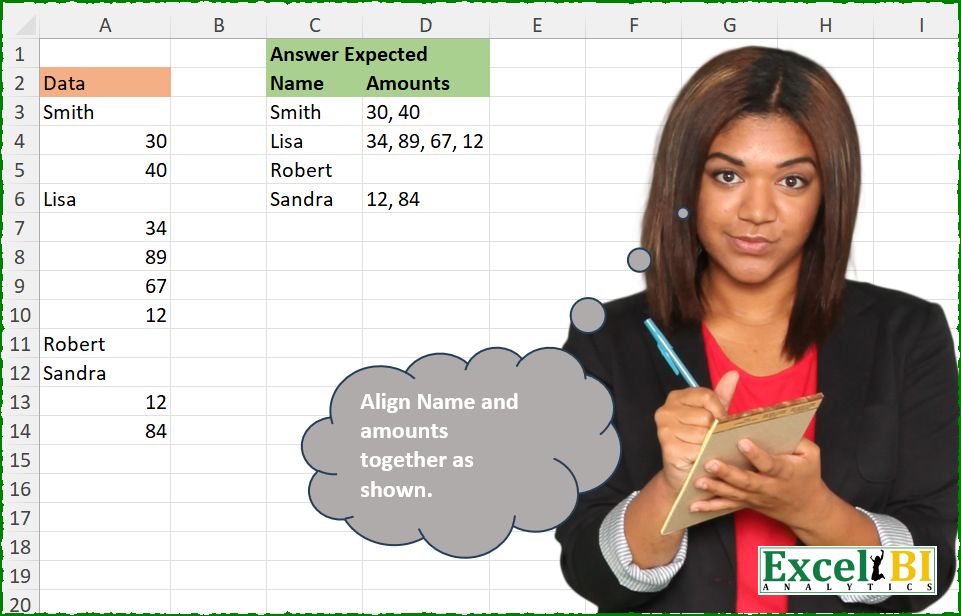
Align Name and amounts together as shown.
📌 Challenge Details and Links
ExcelBI Excel Challenge Number: 684
Challenge Difficulty: ⭐️
📥Download Sample File
📥Link to the solutions on LinkedIn
Solving the challenge of Align Names With Amounts with Power Query
Power Query solution 1 for Align Names With Amounts, proposed by Kris Jaganah:
let
  A = Excel.CurrentWorkbook(){[Name = "Table1"]}[Content],
  B = Table.Group(
    A,
    "Data",
    {"Amounts", each Text.Combine(List.Transform(List.Skip([Data]), Text.From), ", ")},
    0,
    (x, y) => Number.From(y is text)
  ),
  C = Table.RenameColumns(B, {"Data", "Name"})
in
  C
Power Query solution 2 for Align Names With Amounts, proposed by Alejandro Simón 🇵🇦 🇪🇸:
let
  Source = Excel.CurrentWorkbook(){[Name = "Table1"]}[Content],
  Sol = Table.Group(
    Source,
    "Data",
    {"Amounts", each Text.Combine(List.Transform(List.Skip([Data]), Text.From), ", ")},
    0,
    (x, y) => Number.From(y is text)
  )
in
  Sol
Power Query solution 3 for Align Names With Amounts, proposed by Abdallah Ally:
let
  Source = Excel.CurrentWorkbook(){[Name = "Table1"]}[Content],
  Result = Table.RenameColumns(
    Table.Group(
      Source,
      "Data",
      {"Amounts", each Text.Combine(List.Transform(List.Skip([Data]), Text.From), ", ")},
      0,
      (x, y) => Byte.From(y is text)
    ),
    {"Data", "Name"}
  )
in
  Result
Power Query solution 4 for Align Names With Amounts, proposed by Ramiro Ayala Chávez:
let
  S = Excel.CurrentWorkbook(){[Name = "Table1"]}[Content],
  T = Table.Group(
    S,
    "Data",
    {"Amounts", each Text.Combine(List.Transform(List.Skip([Data]), Text.From), ", ")},
    0,
    (x, y) => Number.From(y is text)
  ),
  Sol = Table.RenameColumns(T, {"Data", "Name"})
in
  Sol
Power Query solution 5 for Align Names With Amounts, proposed by Meganathan Elumalai:
let
  Source = Table.RenameColumns(
    Excel.CurrentWorkbook(){[Name = "Table1"]}[Content],
    {"Data", "Name"}
  ),
  Result = Table.Group(
    Source,
    "Name",
    {"Amounts", each Text.Combine(List.Transform(List.Skip([Name]), Text.From), ", ")},
    0,
    (x, y) => Number.From(y is text)
  )
in
  Result
Power Query solution 6 for Align Names With Amounts, proposed by Meganathan Elumalai:
let
  Source = Excel.CurrentWorkbook(){[Name = "Table1"]}[Content],
  Result = Table.FromRows(
    List.Accumulate(
      Source[Data],
      {},
      (s, c) =>
        if c is text then
          s & {{c, ""}}
        else
          List.RemoveLastN(s, 1)
            & {
              {
                List.Last(s){0},
                if List.Last(s){1} = "" then
                  Text.From(c)
                else
                  Text.Combine({List.Last(s){1}, Text.From(c)}, ", ")
              }
            }
    ),
    {"Name", "Amounts"}
  )
in
  Result
Power Query solution 7 for Align Names With Amounts, proposed by Antriksh Sharma:
let
  Source = Table,
  Seq = List.Skip(
    List.Accumulate(
      Source[Data],
      {0},
      (s, c) =>
        s & {if Value.Is(Value.FromText(c), Text.Type) then List.Max(s) + 1 else List.Max(s)}
    )
  ),
  Combine = Table.FromColumns({Seq} & {Source[Data]}, type table [Seq = Int64.Type, Data = text]),
  Group = Table.Group(
    Combine,
    "Seq",
    {
      "T",
      each Table.FromRows(
        {{_[Data]{0}} & {Text.Combine(List.Skip(_[Data]), ", ")}},
        type table [Name = text, Amounts = text]
      )
    }
  ),
  ToTable = Table.Combine(Group[T])
in
  ToTable
Power Query solution 8 for Align Names With Amounts, proposed by Antriksh Sharma:
let
  Source = Table,
  Group = Table.Group(
    Source,
    "Data",
    {"Amounts", each Text.Combine(List.Skip([Data]), ", "), type text},
    GroupKind.Local,
    (x, y) => Byte.From(Value.Is(Value.FromText(y), Text.Type))
  ),
  Rename = Table.RenameColumns(Group, {"Data", "Name"})
in
  Rename
Power Query solution 9 for Align Names With Amounts, proposed by Rafael González B.:
let
  Source = Table.RenameColumns(Question_Table, {"Data", "Name"}),
  Result = Table.Group(
    Source,
    "Name",
    {{"Amounts", each Text.Combine(List.Transform(List.Skip(_[Name]), each Text.From(_)), ", ")}},
    0,
    (x, y) => Number.From(y is text)
  )
in
  Result
Power Query solution 10 for Align Names With Amounts, proposed by Aleksandar Kovacevic:
let
  Source = Excel.CurrentWorkbook(){[Name = "Table1"]}[Content],
  Res = Table.FromColumns(
    Record.ToList(
      [
        a = Source[Data],
        b = List.Select(a, each Value.Is(_, type text)),
        d = List.Transform(List.PositionOfAny(a, b, Occurrence.All), each _ + 1),
        g = List.Transform(List.Skip(d) & {List.Count(a) + 1}, each _ - 2),
        h = List.Transform({0 .. List.Count(b) - 1}, each {d{_} .. g{_}}),
        i = List.Transform(h, each Text.Combine(List.Transform(_, (s) => Text.From(a{s})), ", "))
      ][[b], [i]]
    ),
    {"Name", "Amounts"}
  )
in
  Res
Power Query solution 11 for Align Names With Amounts, proposed by Ernesto Vega Castillo:
let
  Source = Excel.CurrentWorkbook(){[Name = "Table1"]}[Content],
  A = Table.AddColumn(Source, "Name", each if [Data] is text then [Data] else null),
  B = Table.AddColumn(A, "Amounts", each if [Data] is number then [Data] else null),
  D = Table.RemoveColumns(B, {"Data"}),
  E = Table.TransformColumnTypes(D, {{"Amounts", type text}}),
  Result = Table.Group(
    E,
    {"Name"},
    {{"Amounts", each Text.Combine([Amounts], ", ")}},
    GroupKind.Local,
    (x, y) => Number.From(y[Name] is text)
  )
in
  Result
Solving the challenge of Align Names With Amounts with Excel
Excel solution 1 for Align Names With Amounts, proposed by Bo Rydobon 🇹🇭:
=TEXTSPLIT(LET(z,A3:A14,CONCAT(IF(z>"","|"&z&"_",", "&z))),{"_, ","_"},"|",1,,"")
=TEXTSPLIT(REGEXREPLACE(ARRAYTOTEXT(A3:A14),",? ?(pl+), ","|$1_"),"_","|",1,,"")
=LET(z,A3:A14,y,z>"",HSTACK(FILTER(z,y),MID(TEXTSPLIT(TEXTJOIN(IF(DROP(y,1),"_",", "),0,REPT(z,z<"")),,"_"),3,99)))
Excel solution 2 for Align Names With Amounts, proposed by Rick Rothstein:
=LET(
    a,
    A3:A14,
    t,
    TEXTSPLIT(
        TEXTJOIN(
            ", ",
            ,
            a
        ),
        ,
        ", "
    ),
    HSTACK(
        FILTER(
            a,
            ISTEXT(
                a
            )
        ),
        IFERROR(
            TEXTBEFORE(
                DROP(
                    TEXTSPLIT(
                        TEXTJOIN(
                            ", ",
                            ,
                            IF(
                                ISERROR(
                                    -t
                                ),
                                " ",
                                t
                            )
                        )&",",
                        ,
                        " , "
                    ),
                    1
                ),
                ",",
                -1
            ),
            ""
        )
    )
)
Excel solution 3 for Align Names With Amounts, proposed by John V.:
=TEXTSPLIT(CONCAT(TEXT(A3:A14,", 0;!@|")),{"|, ";"|"},"!",1,,"")Excel solution 4 for Align Names With Amounts, proposed by 🇰🇷 Taeyong Shin:
=REGEXEXTRACT(
    DROP(
        GROUPBY(
            SCAN(
                0,
                A3:A14>"",
                SUM
            ),
            A3:A14,
            ARRAYTOTEXT,
            0,
            0
        ),
        ,
        1
    ),
    {"w+",
    "(?<=,).*|"}
)
=TEXTSPLIT(
    REGEXREPLACE(
        ARRAYTOTEXT(
            A3:A14
        ),
        "(?<=pL)(, )(?=d)|(, )(?=pL)",
        "${1:+_$2:|}"
    ),
    "_",
    "|",
    ,
    ,
    ""
)
Excel solution 5 for Align Names With Amounts, proposed by Kris Jaganah:
=LET(a,A3:A14,b,SCAN(0,ISTEXT(a),SUM),c,XLOOKUP(b,b,a),VSTACK({"Name","Amounts"},DROP(GROUPBY(HSTACK(b,c),a,LAMBDA(x,TEXTJOIN(", ",,IF(ISTEXT(x),"",x))),0,0),,1)))Excel solution 6 for Align Names With Amounts, proposed by Julian Poeltl:
=LET(D,
    A3:A14,
    S,
    SCAN(
        ,
        A3:A14,
        LAMBDA(
            A,
            B,
            IF(
                ISTEXT(
                    B
                ),
                B,
                A
            )
        )
    ),
    U,
    UNIQUE(
        S
    ),
    VSTACK(HSTACK(
        "Name",
        "Amounts"
    ),
    HSTACK(U,
    MAP(U,
    LAMBDA(A,
    ARRAYTOTEXT(IFERROR(FILTER(D,
    ISNUMBER(
        D
    )*(S=A)),
    "")))))))
Excel solution 7 for Align Names With Amounts, proposed by Timothée BLIOT:
=LET(
    A,
    A3:A14,
    B,
    TAKE(
        GROUPBY(
            SCAN(
                0,
                ISTEXT(
                    A
                ),
                SUM
            ),
            A,
            ARRAYTOTEXT,
            0,
            0
        ),
        ,
        -1
    ),
    HSTACK(
        TEXTBEFORE(
            B,
            ", ",
            ,
            ,
            ,
            B
        ),
        TEXTAFTER(
            B,
            ", ",
            ,
            ,
            ,
            ""
        )
    )
)
Excel solution 8 for Align Names With Amounts, proposed by Hussein SATOUR:
=LET(
    d,
    A3:A14,
    a,
    SCAN(
        ,
        d,
        LAMBDA(
            x,
            y,
            IF(
                y>"",
                y,
                x
            )
        )
    ),
    b,
    UNIQUE(
        a
    ),
    HSTACK(
        b,
        MAP(
            b,
            LAMBDA(
                x,
                TEXTAFTER(
                    ARRAYTOTEXT(
                        FILTER(
                            d,
                            a=x
                        )
                    ),
                    " ",
                    ,
                    ,
                    ,
                    ""
                )
            )
        )
    )
)
Excel solution 9 for Align Names With Amounts, proposed by Oscar Mendez Roca Farell:
=LET(d,
    A2:A14,
    r,
    ROW(
        d
    ),
    n,
    LOOKUP(r,
    r/(d>""),
    d),
    DROP(
        GROUPBY(
            HSTACK(
                XMATCH(
                    n,
                    n
                ),
                n
            ),
            IFERROR(
                --d,
                ""
            ),
            LAMBDA(
                i,
                TEXTJOIN(
                    ", ",
                    ,
                    i
                )
            ),
            0,
            0
        ),
        1,
        1
    ))
Excel solution 10 for Align Names With Amounts, proposed by Duy Tùng:
=LET(
    a,
    A3:A14,
    TEXTSPLIT(
        CONCAT(
            IF(
                a>"",
                "-"&a&"/",
                ", "&a
            )
        ),
        {"/",
        "/, "},
        "-",
        1,
        ,
        ""
    )
)
Excel solution 11 for Align Names With Amounts, proposed by Duy Tùng:
=LET(a,A3:A14,TEXTSPLIT(CONCAT(IFS(a>"","-"&a&"/",(a<"")*(A4:A15<""),a&", ",1,a)),"/","-",1,,""))Excel solution 12 for Align Names With Amounts, proposed by Duy Tùng:
=LET(a,A3:A14,DROP(GROUPBY(SCAN(0,a>"",SUM),HSTACK(T(+a),N(+a)),LAMBDA(x,TEXTJOIN(", ",,IF(x>0,x,"")))),-1,1))Excel solution 13 for Align Names With Amounts, proposed by Duy Tùng:
=LET(a,A3:A14,TEXTSPLIT(CONCAT(IF(a>"","-"&a&"/",", "&a)),{"/","/, "},"-",1,,""))Excel solution 14 for Align Names With Amounts, proposed by Duy Tùng:
=LET(a,A3:A14,b,SCAN(0,a,LAMBDA(x,y,IF(y>"",y,x))),REDUCE({"Name","Amounts"},UNIQUE(b),LAMBDA(x,y,IFERROR(VSTACK(x,IF({1,0},y,ARRAYTOTEXT(DROP(FILTER(a,b=y),1)))),""))))Excel solution 15 for Align Names With Amounts, proposed by Sunny Baggu:
=LET(

     _a,
     CONCAT(

          IF(
              ISNUMBER(
                  --A3:A14
              ),
               A3:A14 & ", ",
               "/" & A3:A14 & "/"
          )

     ),

     _b,
     WRAPROWS(
         DROP(
             TEXTSPLIT(
                 _a,
                  ,
                  "/"
             ),
              1
         ),
          2
     ),

     HSTACK(

          TAKE(
              _b,
               ,
               1
          ),

          IFERROR(
              TEXTBEFORE(
                  TAKE(
                      _b,
                       ,
                       -1
                  ),
                   ", ",
                   -1,
                   ,
                   1
              ),
               ""
          )

     )

)
Excel solution 16 for Align Names With Amounts, proposed by LEONARD OCHEA 🇷🇴:
=LET(
    d,
    A3:A14,
    w,
    SCAN(
        ,
        d,
        LAMBDA(
            a,
            b&,
            IF(
                b>"",
                b,
                a
            )
        )
    ),
    DROP(
        GROUPBY(
            HSTACK(
                XMATCH(
                    w,
                    w
                ),
                w
            ),
            IFERROR(
                --d,
                ""
            )&"",
            LAMBDA(
                x,
                TEXTJOIN(
                    ", ",
                    ,
                    x
                )
            ),
            ,
            0
        ),
        ,
        1
    )
)
Excel solution 17 for Align Names With Amounts, proposed by Md. Zohurul Islam:
=LET(
    u,
    A3:A14,
    a,
    SCAN(
        ,
        IF(
            ISERROR(
                ABS(
                    u
                )
            ),
            u,
            ""
        ),
        LAMBDA(
            x,
            y,
            IF(
                y="",
                x,
                y
            )
        )
    ),
    REDUCE(
        {"Name",
        "Amounts"},
        UNIQUE(
            a
        ),
        LAMBDA(
            x,
            y,
            VSTACK(
                x,
                HSTACK(
                    y,
                    IFERROR(
                        ARRAYTOTEXT(
                            DROP(
                                FILTER(
                                    u,
                                    a=y
                                ),
                                1
                            )
                        ),
                        ""
                    )
                )
            )
        )
    )
)
Excel solution 18 for Align Names With Amounts, proposed by Md. Zohurul Islam:
=LET(u,A3:A14,
a,SCAN(,IF(ISERROR(ABS(u)),u,""),LAMBDA(x,y,IF(y="",x,y))),
b,IF(ISNUMBER(ABS(u)),u,0),
d,GROUPBY(a,b,LAMBDA(x,IFERROR(ARRAYTOTEXT(FILTER(x,x>0)),"")),0,0),
VSTACK({"Name","Amounts"},d))
Excel solution 19 for Align Names With Amounts, proposed by Pieter de B.:
=SUBSTITUTE(WRAPROWS(TRIM(TEXTSPLIT(CONCAT(IF(A3:A14>"","|"&A3:A14&"| ",A3:A14&" ")),"|",,1)),2)," ",", ")Excel solution 20 for Align Names With Amounts, proposed by Asheesh Pahwa:
=LET(
    s,
    SCAN(
        ,
        A3:A14,
        LAMBDA(
            x,
            y,
            IF(
                ISTEXT(
                    y
                ),
                y,
                x
            )
        )
    ),
    u,
    UNIQUE(
        s
    ),
    HSTACK(
        u,
        MAP(
            u,
            LAMBDA(
                x,
                IFERROR(
                    ARRAYTOTEXT(
                        DROP(
                            FILTER(
                                A3:A14,
                                s=x
                            ),
                            1
                        )
                    ),
                    ""
                )
            )
        )
    )
)
Excel solution 21 for Align Names With Amounts, proposed by Jaroslaw Kujawa:
=LET(b;DROP(TEXTSPLIT(REDUCE("";A3:A14;LAMBDA(a;x;IF(ISTEXT(x);a&"|"&x&";";a&", "&x)));";";"|");1);IF(LEFT(b)=",";MID(b;3;100);b))Excel solution 22 for Align Names With Amounts, proposed by Ankur Sharma:
=LET(Nm, SCAN("", A3:A14, LAMBDA(iv, ar, IF(ISNUMBER(ar), iv, ar))),
Am, SCAN("", A3:A14, LAMBDA(iv, ar, IF(ISTEXT(ar), "", ar))),
GROUPBY(Nm, Am, LAMBDA(a, b, TEXTJOIN(", ", , a)), 0, 0))
Excel solution 23 for Align Names With Amounts, proposed by Meganathan Elumalai:
=LET(z,A3:A14,a,SCAN(0,z>"",SUM),b,UNIQUE(a),nm,INDEX(z,XMATCH(b,a)),HSTACK(nm,MAP(b,LAMBDA(x,ARRAYTOTEXT(IFERROR(DROP(FILTER(z,a=x),1),""))))))Excel solution 24 for Align Names With Amounts, proposed by Eddy Wijaya:
=LET(
t,A3:A14,
d,SCAN(0,t,LAMBDA(a,v,IF(ISTEXT(v),a+1,a))),
REDUCE(C2:D2,SEQUENCE(MAX(d)),LAMBDA(a,v,VSTACK(a,LET(
i,FILTER(t,d=v),
HSTACK(@i,IFERROR(TEXTJOIN(", ",,DROP(i,1)),"")))))))
Excel solution 25 for Align Names With Amounts, proposed by Gerson Pineda:
=LET(i,DROP,a,A3:A14,b,SCAN(,IF(a<"","",a),LAMBDA(a,v,IF(v="",a,v))),i(IFERROR(GROUPBY(HSTACK(XMATCH(b,UNIQUE(b)),b),a,LAMBDA(x,ARRAYTOTEXT(i(x,1))),0,0),""),,1))Excel solution 26 for Align Names With Amounts, proposed by Milan Shrimali:
=LET(A,A3:A14,LUKPTB,FILTER(HSTACK(ROW(A),A),ISTEXT(A)),MAIN,HSTACK(A,ARRAYFORMULA(VLOOKUP(ROW(A),LUKPTB,2,1))),BYROW(CHOOSECOLS(LUKPTB,2),LAMBDA(X,HSTACK(X,JOIN(",",IFERROR(FILTER(CHOOSECOLS(MAIN,1),(CHOOSECOLS(MAIN,2)=X)*(CHOOSECOLS(MAIN,1)<>X)),""))))))Excel solution 27 for Align Names With Amounts, proposed by Ziad A.:
=LET(
    x,
    A3:A,
    s,
    SCAN(
        ,
        x,
        LAMBDA(
            a,
            c,
            IF(
                c<"",
                a,
                c
            )
        )
    ),
    MAP(
        UNIQUE(
            s
        ),
        LAMBDA(
            c,
            {c,
            JOIN(
                ", ",
                IFNA(
                    FILTER(
                        x,
                        s=c,
                        x<""
                    )
                )
            )}
        )
    )
)
Excel solution 28 for Align Names With Amounts, proposed by Craig Runciman:
=LET(d,A3:A14,f,ISTEXT(d),HSTACK(FILTER(d,f),TRIM(DROP(TEXTSPLIT(CONCAT(IF(f,"F",", "&d)),,{"F","F,"},,,""),1))))Excel solution 29 for Align Names With Amounts, proposed by red craven:
=TEXTSPLIT(CONCAT(TEXT(A3:A14,", 0;;+@-")),{"-, ","-"},"+",1,,"")

another option:
=REGEXEXTRACT(DROP(GROUPBY(SCAN(0,A3:A14>"",SUM),A3:A14,ARRAYTOTEXT,0,0),,1),{"w+","(, K[d, ]+|$)"})
Excel solution 30 for Align Names With Amounts, proposed by Jorge Alvarez:
=LET(
    bd;
    A3:A14;

     ag;
    SCAN(
        0;
        A3:A14;
        LAMBDA(
            a;
            v;

             SI(
                 NO(
                     ESNUMERO(
                         v
                     )
                 );
                 a+1;
                 a
             )
        )
    );

     re;
    AGRUPARPOR(
        ag;
        bd;
        LAMBDA(
            v;
            UNIRCADENAS(
                ",";
                ;
                v
            )
        );
        0;
        0
    );

     Amounts;
    MAP(
        ELEGIRCOLS(
            re;
            2
        );
        LAMBDA(
            ca;

             SI.ERROR(
                 UNIRCADENAS(
                     ", ";
                     ;
                     REGEXEXTRACCION(
                         ca;
                         "d+";
                         1
                     )
                 );
                 ""
             )
        )
    );

     Name;
    ELEGIRCOLS(
        TEXTOANTES(
            re;
            ",";
            ;
            ;
            ;
            re
        );
        2
    );

     APILARH(
         Name;
         Amounts
     )
)
Excel solution 31 for Align Names With Amounts, proposed by abdelaziz kamal allam:
=LET(x,SCAN("",A3:A14,LAMBDA(a,b,IF(ISNUMBER(b)=TRUE,a,b))),u,UNIQUE(x),HSTACK(u,BYROW(DROP(IFNA(DROP(REDUCE("",u,LAMBDA(z,g,VSTACK(z,TRANSPOSE(FILTER($A$3:$A$14,x=g))))),1),""),,1),LAMBDA(n,TEXTJOIN(",",,n)))))Excel solution 32 for Align Names With Amounts, proposed by Bahadır Örkmes:
LET(

    data,
    A3:A14,

    name,
    SCAN(
        "",
        data,
        LAMBDA(
            a,
            b,
            IF(
                ISTEXT(
                    b
                ),
                b,
                a
            )
        )
    ),

    value,
    SCAN(
        0,
        data,
        LAMBDA(
            a,
            b,
            IF(
                ISNONTEXT(
                    b
                ),
                b,
                ""
            )
        )
    ),

    SUBSTITUTE(
        GROUPBY(
            name,
            value,
            ARRAYTOTEXT,
            0,
            0
        ),
        ",",
        "",
        1
    )

)
Solving the challenge of Align Names With Amounts with Python
Python solution 1 for Align Names With Amounts, proposed by Konrad Gryczan, PhD:
import pandas as pd
import numpy as np
path = "684 Align Name and Data.xlsx"
input_data = pd.read_excel(path, usecols="A", skiprows=1, nrows=13, names=["Data"])
test = pd.read_excel(path, usecols="C:D", skiprows=1, nrows=4).fillna({"Amounts": " "}).sort_values(by="Name").reset_index(drop=True)
input_data["Name"] = input_data["Data"].where(input_data["Data"].str.isalpha()).ffill()
input_data["Data"] = np.where(input_data["Data"] == "Robert", " ", input_data["Data"])
filtered_data = input_data[input_data["Data"] != input_data["Name"]]
grouped_data = filtered_data.groupby("Name")["Data"].apply(lambda x: ", ".join(map(str, x))).sort_index()
grouped_data = grouped_data.reset_index(name="Data")
grouped_data["Amounts"] = test["Amounts"].values
grouped_data = grouped_data.drop(columns=["Data"])
print(grouped_data.equals(test)) # True
Python solution 2 for Align Names With Amounts, proposed by Abdallah Ally:
import pandas as pd
file_path = 'Excel_Challenge_684 - Align Name and Data.xlsx'
df = pd.read_excel(io=file_path, usecols='A', skiprows=1)
# Perform data manipulation
df = (
 df
 .assign(
 Amount = df['Data'].map(lambda x: '' if isinstance(x, str) else str(x)),
 Names = df['Data'].map(lambda x: x if isinstance(x, str) else pd.NA).ffill()
 )
 .groupby('Names', sort=False)['Amount']
 .agg(lambda x: ', '.join(y for y in x if y))
 .reset_index()
)
df
Solving the challenge of Align Names With Amounts with Python in Excel
Python in Excel solution 1 for Align Names With Amounts, proposed by Alejandro Campos:
data = xl("A3:A14")[0]
name_amounts, current_name = {}, None
for item in data:
 if isinstance(item, str):
 current_name = item
 name_amounts[current_name] = []
 elif current_name:
 name_amounts[current_name].append(item)
df = pd.DataFrame([(k, ', '.join(map(str, v))) for k, v in name_amounts.items()], columns=['Name', 'Amounts'])
Python in Excel solution 2 for Align Names With Amounts, proposed by Aditya Kumar Darak 🇮🇳:
df = xl("A2:A14", True)
df["Group"] = df["Data"].apply(lambda x: isinstance(x, str)).cumsum()
result = df.groupby("Group")["Data"].agg(
 lambda x: (x.iloc[0], ", ".join(map(str, x[1:])))
)
result = pd.DataFrame(result.tolist(), columns=["Name", "Amounts"])
result
Python in Excel solution 3 for Align Names With Amounts, proposed by Antriksh Sharma:
df = xl("A1:A13", headers = True)
df['is_name'] = df['Data'].apply(lambda x: isinstance(x, str))
df['Name'] = df['Data'].where(df['is_name']).ffill()
names = pd.DataFrame({'Name': df['Name'].unique()})
df = df[~df['is_name']][['Data', 'Name']]
df = df.groupby('Name')['Data'].agg(lambda x: ', '.join(map(str, x))).reset_index()
df.columns = ['Name', 'Amounts']
df = df.merge(names, on = 'Name', how = 'right').fillna('')
df
Solving the challenge of Align Names With Amounts with R
R solution 1 for Align Names With Amounts, proposed by Konrad Gryczan, PhD:
library(tidyverse)
library(readxl)
path = "Excel/684 Align Name and Data.xlsx"
input = read_excel(path, range = "A2:A14")
test  = read_excel(path, range = "C2:D6") %>%
 replace_na(list(Amounts = " "))
result = input %>%
 mutate(Name = ifelse(str_detect(Data, "\d"), NA, Data)) %>%
 fill(Name) %>%
 mutate(Data = ifelse(Data == "Robert", " ", Data)) %>%
 filter(Data != Name) %>%
 summarize(Amounts  = paste0(Data, collapse = ", "), .by = Name)
all.equal(result, test)
#> [1] TRUE
&&