
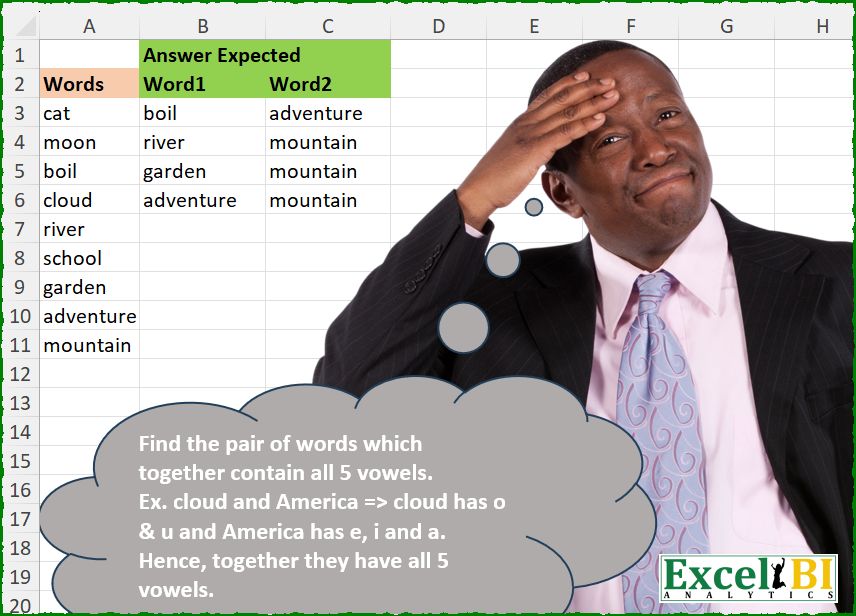
Find the pair of words which together contain all 5 vowels. Ex. cloud and America => cloud has o & u and America has e, i and a. Hence, together they have all 5 vowels.
📌 Challenge Details and Links
ExcelBI Excel Challenge Number: 671
Challenge Difficulty: ⭐️⭐️
📥Download Sample File
📥Link to the solutions on LinkedIn
Solving the challenge of Word Pairs With All Vowels with Power Query
Power Query solution 1 for Word Pairs With All Vowels, proposed by John V.:
let
 S = Excel.CurrentWorkbook(){0}[Content][Words],
 B = List.TransformMany({1..List.Count(S)}, each List.Skip(S, _), (x, y)=> {S{x - 1}, y}),
 D = List.Select(B, each List.ContainsAll(Text.ToList(_{0} & _{1}), {"a", "e", "i", "o", "u"}))
in
 Table.FromRows(D, {"Words1", "Words2"})

Blessings!
Power Query solution 2 for Word Pairs With All Vowels, proposed by Luan Rodrigues:
let
  Fonte = Table.AddIndexColumn(Tabela1, "ind", 0),
  col = Table.AddColumn(Fonte, "tab", each Text.Select([Words], {"a", "e", "i", "o", "u"})),
  add = Table.AddColumn(
    col,
    "Word2",
    each
      let
        a = List.RemoveItems(col[tab], {[tab]}),
        b = List.Transform(
          a,
          (x) => Text.Combine(List.Sort(List.Distinct(Text.ToList(x & [tab])))) = "aeiou"
        ),
        c = List.Last(List.PositionOf(b, true, 2)) + 1,
        d = try col[Words]{c} otherwise null
      in
        d
  ),
  res = Table.SelectRows(add, each ([Word2] <> null and [Words] <> [Word2]))[[Words], [Word2]]
in
  res
Power Query solution 3 for Word Pairs With All Vowels, proposed by Ramiro Ayala Chávez:
let
  S = Excel.CurrentWorkbook(){[Name = "Table1"]}[Content],
  a = List.Generate(
    () => [i = 0, j = 1],
    each [i] < List.Count(S[Words]),
    each if [j] = List.Count(S[Words]) then [i = [i] + 1, j = [i] + 2] else [i = [i], j = [j] + 1],
    each {S[Words]{[i]}} & {S[Words]{[j] - 1}}
  ),
  b = List.Select(a, each _{0} <> _{1}),
  c = List.Transform(b, each Text.ToList(Text.Combine(_, " "))),
  d = List.Select(c, each List.ContainsAll(_, {"a", "e", "i", "o", "u"})),
  e = Table.FromColumns({List.Transform(d, Text.Combine)}),
  Sol = Table.SplitColumn(e, "Column1", Splitter.SplitTextByDelimiter(" "), {"Word1", "Word2"})
in
  Sol
Power Query solution 4 for Word Pairs With All Vowels, proposed by Seokho MOON:
let
  Source = Excel.CurrentWorkbook(){[Name = "Table1"]}[Content],
  Vowels = {"a", "e", "i", "o", "u"},
  Fun = (x as text) => List.Select(Text.ToList(x), each List.Contains(Vowels, _)),
  Rows = List.TransformMany(
    Source[Words],
    (x) => List.Select(Source[Words], each List.RemoveItems(Vowels, Fun(_) & Fun(x)) = {}),
    (x, y) => List.Sort({x, y}, each List.PositionOf(Source[Words], _))
  ),
  Res = Table.FromRows(List.Distinct(Rows), {"Word1", "Word2"})
in
  Res
Power Query solution 5 for Word Pairs With All Vowels, proposed by Rafael González B.:
let
Source = Question_Table[Words], TM = List.TransformMany, TC = Text.Combine,
LG = List.Generate(
() => [i = 0, L = Source],
each [i] <= List.Count(Source) - 1,
each
[
i = [i] + 1,
L1 = {Source{[i]}},
L = List.Skip([L]),
LTM = TM(
L1,
each L,
(x , y) => {x} & {y})
],
each [LTM]),
LC = TM(
List.Combine(List.Skip(LG)),
(x) => {TC(x, ",")},
(x, y) => Text.ToList(y)),
LS = List.Select(LC, each List.ContainsAll(_, {"a", "e", "i", "o", "u"})),
LT = List.Transform(LS, each TC(_)),
LTT = Table.FromList(LT, null, {"Word1", "Word2"})
in
LTT
🧙🏻♂️🧙🏻♂️🧙🏻♂️
Power Query solution 6 for Word Pairs With All Vowels, proposed by Peter Krkos:
let
  Vowels = List.Sort(Text.ToList("aeiou")),
  Ad_W = Table.AddColumn(Source, "W", each List.Distinct(Text.ToList(Text.Select([Words], Vowels)))),
  Gen = List.RemoveNulls(
    List.TransformMany(
      Table.ToRows(Ad_W),
      each Table.ToRows(Ad_W),
      (x, y) =>
        if List.Count(List.Distinct(x{1} & y{1})) = List.Count(Vowels) then {x{0}, y{0}} else null
    )
  ),
  Result = Table.FromRows(
    List.Distinct(Gen, each List.Sort(_)),
    type table [Word1 = text, Word2 = text]
  )
in
  Result
Power Query solution 7 for Word Pairs With All Vowels, proposed by Mihai Radu O:
let
  Source = Excel.CurrentWorkbook(){[Name = "Table1"]}[Content],
  s = [
    lt = List.Transform,
    w = Source[Words],
    a = List.Combine(lt(w, (x) => lt(w, (y) => x & "|" & y))),
    b = List.Select(
      a,
      (x) =>
        Text.Length(
          Text.Combine(List.Distinct(Text.ToList(Text.Select(x, {"a", "e", "i", "o", "u"}))))
        )
          = 5
    ),
    c = Table.FromRows(
      lt(
        b,
        (x) =>
          List.Sort(
            Text.Split(x, "|"),
            (x, y) => Value.Compare(List.PositionOf(w, x), List.PositionOf(w, y))
          )
      ),
      {"Word1", "Word2"}
    ),
    d = Table.Distinct(c)
  ][d]
in
  s
Solving the challenge of Word Pairs With All Vowels with Excel
Excel solution 1 for Word Pairs With All Vowels, proposed by John V.:
=LET(w,A3:A11,z,TOROW(w),c,w&0&z&1,TEXTSPLIT(CONCAT(IF((w>z)*(REGEXREPLACE("aeiou","["&c&"]",)=""),c,)),0,1,1))Excel solution 2 for Word Pairs With All Vowels, proposed by Julian Poeltl:
=LET(W,A3:A11,C,W&","&TOROW(W),M,MAP(C,LAMBDA(A,PRODUCT(--(LEN(A)<>LEN(SUBSTITUTE(A,{"a","e","i","o","u"},"")))))),T,TOCOL(IF(M,C,X),3),TEXTSPLIT(TEXTJOIN("|",,UNIQUE(MAP(T,LAMBDA(A,ARRAYTOTEXT(SORT(TEXTSPLIT(A,,","))))))),", ","|"))Excel solution 3 for Word Pairs With All Vowels, proposed by Hussein SATOUR:
=LET(
    w,
    A3:A11,
    a,
    MAP(
        w,
        LAMBDA(
            x,
            CONCAT(
                REGEXEXTRACT(
                    x,
                    "[aeiou]",
                    1
                )
            )
        )
    ),
    b,
    MAP(
        w,
        LAMBDA(
            z,
            INDEX(
                w,
                XMATCH(
                    1,
                    --NOT(
                        ISERR(
                            MAP(
                                a,
                                LAMBDA(
                                    y,
                                    SUM(
                                        FIND(
                                            UNIQUE(
                                                TOCOL(
                                                    HSTACK(
                                                        REGEXEXTRACT(
                                                            z,
                                                            "[aeiou]",
                                                            1
                                                        ),
                                                        {"a",
                                                        "e",
                                                        "i",
                                                        "o",
                                                        "u"}
                                                    )
                                                ),
                                                ,
                                                1
                                            ),
                                            y
                                        )
                                    )
                                )
                            )
                        )
                    )
                )
            )
        )
    ),
    FILTER(
        HSTACK(
            w,
            b
        ),
        NOT(
            ISNA(
                b
            )
        )
    )
)
Excel solution 4 for Word Pairs With All Vowels, proposed by Oscar Mendez Roca Farell:
=LET(
    w,
    A3:A11,
    r,
    ROW(
        w
    ),
    c,
    TOCOL(
        IFS(
            r
Excel solution 5 for Word Pairs With All Vowels, proposed by Duy Tùng:
=LET(
    a,
    A3:A11,
    b,
    DROP(
        REDUCE(
            0,
            DROP(
                a,
                 -1
            ),
            LAMBDA(
                x,
                y,
                VSTACK(
                    x,
                    y&"-"&DROP(
                        y:TAKE(
                            a,
                            -1
                        ),
                        1
                    )
                )
            )
        ),
        1
    ),
    TEXTSPLIT(
        TEXTJOIN(
            "/",
            ,
            FILTER(
                b,
                BYROW(
                    SEARCH(
                        {"a",
                        "e",
                        "i",
                        "o",
                        "u"},
                        b
                    ),
                    COUNT
                )=5
            )
        ),
        "-",
        "/"
    )
)
Excel solution 6 for Word Pairs With All Vowels, proposed by Sunny Baggu:
=LET(
 _v, {"a", "e", "i", "o", "u"},
 _a, MAP(A3:A11, LAMBDA(a, CONCAT(FILTER(_v, ISNUMBER(SEARCH(_v, a)))))),
 _b, TOROW(_a),
 _c, IF(_a = _b, _a, _a & _b),
 _d, TOCOL(
 IF(
 MAP(_c, LAMBDA(a, AND(ISNUMBER(SEARCH(_v, a))))),
 A3:A11 & "," & TOROW(A3:A11),
 1 / x
 ),
 3
 ),
 _e, UNIQUE(MAP(_d, LAMBDA(a, ARRAYTOTEXT(SORT(TEXTSPLIT(a, , ",")))))),
 REDUCE({"Word1", "Word2"}, _e, LAMBDA(x, y, VSTACK(x, TEXTSPLIT(y, ","))))
)
Excel solution 7 for Word Pairs With All Vowels, proposed by Anshu Bantra:
=LET(

     combi_,
     REDUCE(

          "",

          DROP(
              A3:A11,
               -1
          ),

          LAMBDA(
              x,
               y,
               VSTACK(
                   x,
                    y & "~" & y:TAKE(
              A3:A11,
               -1
          )
               )
          )

     ),

     fltr_,
     BYROW(
         SEARCH(
             {"a",
              "e",
              "i",
              "o",
              "u"},
              combi_
         ),
          COUNT
     ) = 5,

     TEXTSPLIT(

          TEXTJOIN(
               ";",
               ,
               FILTER(
                   combi_,
                    fltr_
               )
          ),
          "~",
          ";"

     )

)
Excel solution 8 for Word Pairs With All Vowels, proposed by Md. Zohurul Islam:
=LET(z,A3:A11,v,{"a","e","I","o","u"},
a,DROP(REDUCE("",z,LAMBDA(x,y,VSTACK(x,y&"-"&DROP(z,MATCH(y,z,0)-1)))),1),
d,FILTER(a,MAP(a,LAMBDA(x,IF(SUM(--ISNUMBER(XMATCH(UNIQUE(MID(x,SEQUENCE(LEN(x)),1)),v)))=5,1,0)))>0),
REDUCE({"Word1","Word2"},d,LAMBDA(x,y,VSTACK(x,TEXTSPLIT(y,"-"))))
)
Excel solution 9 for Word Pairs With All Vowels, proposed by Pieter de B.:
=REDUCE(
    "Word"&{1,
    2},
    A3:A11,
    LAMBDA(
        a,
        b,
        LET(
            c,
            VSTACK(
                a,
                IF(
                    BYROW(
                        FIND(
                            {"a",
                            "e",
                            "i",
                            "o",
                            "u"},
                            b&b:A11
                        ),
                        AND
                    ),
                    IFNA(
                        HSTACK(
                            b,
                            b:A11
                        ),
                        b
                    )
                )
            ),
            FILTER(
                c,
                1-ISERR(
                    TAKE(
                        c,
                        ,
                        1
                    )
                )
            )
        )
    )
)
Excel solution 10 for Word Pairs With All Vowels, proposed by Charles Roldan:
=LET(Words, A3:A11, Vowels, {"a","e","i","o","u"}, Gaps, --ISERR(FIND(Vowels, Words)), Atlas, REPT(XMATCH(Words, Words), 0 = MMULT(Gaps, TRANSPOSE(Gaps))), Left, TOCOL(Atlas, , 0), Right, TOCOL(Atlas, , 1), INDEX(Words, FILTER(HSTACK(Left, Right), IFERROR(Left < Right, ))))Excel solution 11 for Word Pairs With All Vowels, proposed by Charles Roldan:
=LET(x, A3:A11, m, --ISERR(FIND({"a","e","i","o","u"}, x)), f, LAMBDA(n, TOCOL(REPT(XMATCH(x, x), 0 = MMULT(m, TRANSPOSE(m))), , n)), INDEX(x, FILTER(HSTACK(f(0), f(1)), IFERROR(f(0) < f(1), ))))Excel solution 12 for Word Pairs With All Vowels, proposed by Jaroslaw Kujawa:
=DROP(TEXTSPLIT(CONCAT(REDUCE("";
    LET(b;
    A3:A11;
    bb;
    TOCOL(
        IF(
            b<>TOROW(
                b
            );
            b&";"&TOROW(
                b
            );
            NA()
        )
    );
    by;
    BYROW(
        bb;
        LAMBDA(
            x;
            IF(
                SUM(
                    FIND(
                        {"a";
                        "e";
                        "i";
                        "o";
                        "u"};
                        x
                    )
                );
                x;
                ""
            )
        )
    );
    FILTER(by;
    NOT(ISERROR((by)))));
    LAMBDA(
        a;
        x;
        LET(
            xx;
            TEXTJOIN(
                ";";
                ;
                TAKE(
                    TEXTSPLIT(
                        x;
                        ";"
                    );
                    ;
                    {-1;
                    1}
                )
            );
            IF(
                ISERROR(
                    MATCH(
                        xx&"|";
                        a;
                        0
                    )
                )*ISERROR(
                    MATCH(
                        x&"|";
                        a;
                        0
                    )
                );
                VSTACK(
                    a;
                    x&"|"
                );
                a
            )
        )
    )));
    ";";
    "|");
-1)Excel solution 13 for Word Pairs With All Vowels, proposed by Andy Heybruch:
=LET(

    _list,
    TOCOL(
        A3:A11&"|"&TOROW(
            A3:A11
        )
    ),

    _match,
    FILTER(
        _list,
        BYROW(
            ISNUMBER(
                SEARCH(
                    {"A",
                    "E",
                    "I",
                    "O",
                    "U"},
                    _list
                )
            ),
            AND
        )
    ),

    _removedup,
    FILTER(
        _match,
        LEFT(
            _match
        )>LEFT(
            TEXTAFTER(
                _match,
                "|"
            )
        )
    ),

    TEXTSPLIT(
        ARRAYTOTEXT(
            _removedup
        ),
        "|",
        ", "
    )
)Excel solution 14 for Word Pairs With All Vowels, proposed by Josh Brodrick:
=WRAPCOLS(TEXTSPLIT(LET(a,
    IFERROR(MAP(TOCOL((A1:A9&"-"&TRANSPOSE(
        A1:A9
    ))),
    LAMBDA(
        a,
        TEXTBEFORE(
            CONCAT(
                IF(
                    SEARCH(
                        {"a",
                        "e",
                        "I",
                        "o",
                        "u"},
                        a
                    ),
                    a&"|",
                    ""
                )
            ),
            "|"
        )
    )),
    ""),
    FILTER(
        a,
        a<>""
    )),
    "-"),
4)Solving the challenge of Word Pairs With All Vowels with Python
_x000D_Python solution 1 for Word Pairs With All Vowels, proposed by Konrad Gryczan, PhD:
import pandas as pd
import re
input = pd.read_excel(path, usecols="A", skiprows=1, nrows=10)
test = pd.read_excel(path, usecols="B:C", skiprows=1, nrows=5)
def extract_vowels(word):
 return ''.join(sorted(set(re.findall(r'[aeiou]', word))))
result = [
 (w1, w2) for i, w1 in enumerate(input_words)
 for w2 in input_words[i + 1:]
 if extract_vowels(w1 + w2) == 'aeiou'
]
result = pd.DataFrame(result, columns=['Var1', 'Var2'])
print(result)
Solving the challenge of Word Pairs With All Vowels with Python in Excel
_x000D_Python in Excel solution 1 for Word Pairs With All Vowels, proposed by Alejandro Campos:
vowels = set("aeiou")
df = pd.DataFrame([(w1, w2) for i, w1 in enumerate(words) for w2 in words[i+1:] Python in Excel solution 2 for Word Pairs With All Vowels, proposed by Anshu Bantra:
from itertools import combinations
df=xl("A2:A11", headers=True)
vowels = set('aeiou')
combinations_list = []
for _ in combinations(df['Words'].to_list(), 2):
 if vowels.issubset(set([*''.join(_)])):
 combinations_list.append(_)
combinations_list
Solving the challenge of Word Pairs With All Vowels with R
_x000D_R solution 1 for Word Pairs With All Vowels, proposed by Konrad Gryczan, PhD:
library(tidyverse)
library(readxl)
input = read_excel(path, range = "A2:A11")
test = read_excel(path, range = "B2:C6")
extract_vowels = function(word) {
 paste(sort(unique(unlist(str_extract_all(word, "[aeiou]")))), collapse = "")
}
result = expand.grid(input$Words, input$Words, stringsAsFactors = F) %>%
 filter(nchar(Var1) < nchar(Var2)) %>%
 mutate(combined = paste(Var1, Var2, sep = "")) %>%
 filter(map_chr(combined, extract_vowels) == "aeiou") %>%
 select(Var1, Var2)