
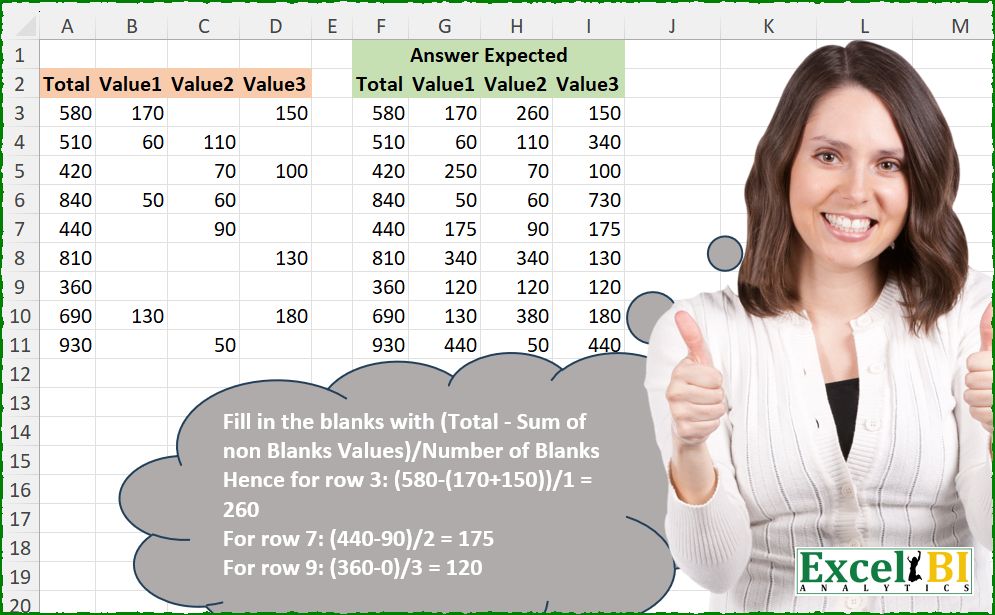
Fill in the blanks with (Total – Sum of non Blanks Values)/Number of Blanks Hence for row 3: (580-(170+150))/1 = 260 For row 7: (440-90)/2 = 175 For row 9: (360-0)/3 = 120
📌 Challenge Details and Links
ExcelBI Excel Challenge Number: 666
Challenge Difficulty: ⭐️
📥Download Sample File
📥Link to the solutions on LinkedIn
Solving the challenge of Fill Missing With Average with Power Query
Power Query solution 1 for Fill Missing With Average, proposed by Kris Jaganah:
let
  A = Excel.CurrentWorkbook(){[Name = "Table1"]}[Content],
  B = Table.FromRows(
    List.TransformMany(
      Table.ToRows(A),
      each {List.Sum({- _{0}} & List.Skip(_)) / (List.NonNullCount(_) - List.Count(_))},
      (x, y) => List.ReplaceValue(x, null, y, (u, v, w) => if u = null then w else u)
    ),
    Table.ColumnNames(A)
  )
in
  B
Power Query solution 2 for Fill Missing With Average, proposed by Alejandro Simón 🇵🇦 🇪🇸:
let
  Origen = Excel.CurrentWorkbook(){[Name = "Tabla1"]}[Content],
  Sol = Table.Combine(
    Table.AddColumn(
      Origen,
      "A",
      each
        let
          a = Record.ToList(_),
          b = List.Count(List.Select(a, each _ = null)),
          c = List.Sum(List.Skip(a)) ?? 0,
          d = (a{0} - c) / b,
          e = List.Transform(a, each _ ?? d),
          f = Table.FromRows({e}, Table.ColumnNames(Origen))
        in
          f
    )[A]
  )
in
  Sol
Power Query solution 3 for Fill Missing With Average, proposed by Abdallah Ally:
let
  Source = Excel.CurrentWorkbook(){[Name = "Table1"]}[Content],
  Result = Table.FromRows(
    List.Transform(
      Table.ToRows(Source),
      each [
        a = List.Count(_) - List.NonNullCount(_),
        b = (_{0} - (List.Sum(List.Skip(_)) ?? 0)) / a,
        c = List.ReplaceValue(_, null, b, Replacer.ReplaceValue)
      ][c]
    ),
    Table.ColumnNames(Source)
  )
in
  Result
Power Query solution 4 for Fill Missing With Average, proposed by Ramiro Ayala Chávez:
let
  S = Excel.CurrentWorkbook(){[Name = "Table1"]}[Content],
  a = Table.ToRows(S),
  Fx = (x) =>
    let
      b = List.ReplaceValue(x, null, 0, Replacer.ReplaceValue),
      c = b{0},
      d = List.Skip(b),
      e = List.Select(d, each _ <> 0),
      f = List.Difference(d, e),
      g = (c - List.Sum(e)) / List.Count(f),
      h = if g = null then c / List.Count(f) else g,
      i = List.ReplaceValue(x, null, h, Replacer.ReplaceValue),
      j = Table.FromRows({i}, Table.ColumnNames(S))
    in
      j,
  Sol = Table.Combine(List.Transform(a, each Fx(_)))
in
  Sol
Power Query solution 5 for Fill Missing With Average, proposed by Seokho MOON:
let
  Source = Excel.CurrentWorkbook(){[Name = "Table1"]}[Content],
  Res = Table.ReplaceValue(
    Source,
    null,
    Fun,
    Replacer.ReplaceValue,
    List.Skip(Table.ColumnNames(Source))
  ),
  Fun = each [
    A = List.Skip(Record.ToList(_)),
    B = [Total] - (List.Sum(A) ?? 0),
    C = List.Count(A) - List.NonNullCount(A),
    D = B / C
  ][D]
in
  Res
Power Query solution 6 for Fill Missing With Average, proposed by Ankur Sharma:
let
 Source = Excel.CurrentWorkbook(){[Name="Table1"]}[Content],

TblToRows = Table.ToRows(Source),

Transformation = List.Transform(TblToRows,
each
let
ml = List.Skip(_),
s = List.First(_) - List.Sum(List.Transform(ml, each if _ is null then 0 else _)),
nc = List.Count(ml) - List.NonNullCount(ml),
v = if nc = 0 then null else s/nc
in
List.Transform(_, (f) => if f is null then v else f)),

TblFrmRows = Table.FromRows(Transformation)
in
TblFrmRows

Best Wishes!
Power Query solution 7 for Fill Missing With Average, proposed by Meganathan Elumalai:
let
  Source = Excel.CurrentWorkbook(){[Name = "Table1"]}[Content],
  Result = Table.FromRows(
    List.Transform(
      Table.ToRows(Source),
      (x) =>
        List.Transform(
          x,
          (f) =>
            f ?? (x{0} - (List.Sum(List.Skip(x)) ?? 0)) / (List.Count(x) - List.NonNullCount(x))
        )
    ),
    Table.ColumnNames(Source)
  )
in
  Result
Power Query solution 8 for Fill Missing With Average, proposed by Antriksh Sharma:
let
  Source = Table,
  ToRows = Table.ToRows(Source),
  Trasnform = List.TransformMany(
    ToRows,
    (x) =>
      let
        a = x{0},
        b = List.Skip(x),
        c = List.Sum(b) ?? 0,
        d = List.Count(b) - List.NonNullCount(b),
        e = (a - c) / d
      in
        {List.ReplaceMatchingItems(x, {{null, e}})},
    (x, y) => Table.FromRows({y}, Table.ColumnNames(Source))
  ),
  Combine = Table.Combine(Trasnform)
in
  Combine
Power Query solution 9 for Fill Missing With Average, proposed by Peter Krkos:
let a = Record.ToList(Record.RemoveFields(_, "Total")) in ([Total] - List.Sum(a)) / (List.Count(a) - List.NonNullCount(a)),
 null,
 (x,y,z)=> x ?? y ,
 Table.ColumnNames(Source) )
Solving the challenge of Fill Missing With Average with Excel
Excel solution 1 for Fill Missing With Average, proposed by Bo Rydobon 🇹🇭:
=LET(
    z,
    A3:D11,
    IF(
        z,
        z,
        BYROW(
            z,
            LAMBDA(
                b,
                SUM(
                    @+b*2,
                    -b
                )/COUNTBLANK(
                    b
                )
            )
        )
    )
)
Excel solution 2 for Fill Missing With Average, proposed by John V.:
=LET(i,
    A3:D11,
    IF(i,
    i,
    (2*A3:A11-BYROW(
        i,
        SUM
    ))/BYROW(
        i,
        COUNTBLANK
    )))

or hardcoding the columns:
✅
 =LET(i,
    A3:D11,
    IF(i,
    i,
    (2*A3:A11-BYROW(
        i,
        SUM
    ))/(4-BYROW(
        i,
        COUNT
    ))))
Excel solution 3 for Fill Missing With Average, proposed by Kris Jaganah:
=LET(
    a,
    A3:D11,
    b,
    BYROW(
        a,
        LAMBDA(
            x,
            SUM(
                x*-{-1,
                1,
                1,
                1}
            )/COUNTBLANK(
                x
            )
        )
    ),
    IF(
        a="",
        b,
        a
    )
)
Excel solution 4 for Fill Missing With Average, proposed by Timothée BLIOT:
=LET(A,A3:D11,MAKEARRAY(9,4,LAMBDA(x,y, IF(INDEX(A,x,y)="",(INDEX(A,x,1)-SUM(DROP(TAKE(A,x,-3),x-1)))/COUNTBLANK(DROP(TAKE(A,x,4),x-1)),INDEX(A,x,y)))))Excel solution 5 for Fill Missing With Average, proposed by Hussein SATOUR:
=LET(a,
    A3:D11,
    IF(a="",
    BYROW(a,
    LAMBDA(x,
    (TAKE(
        x,
        ,
        1
    )-SUM(
        TAKE(
            x,
            ,
            -3
        )
    ))/COUNTBLANK(
        TAKE(
            x,
            ,
            -3
        )
    ))),
    a))
Excel solution 6 for Fill Missing With Average, proposed by Oscar Mendez Roca Farell:
=LET(d,
    A3:D11,
    IF(d,
    d,
    BYROW(d,
    LAMBDA(r,
    (2*@+r-SUM(
        r
    ))/SUM(
        N(
            r=0
        )
    )))))
Excel solution 7 for Fill Missing With Average, proposed by Duy Tùng:
=IF(A2:D11>0,A2:D11,(A2:A11-BYROW(B2:D11,SUM))/BYROW(N(B2:D11=0),SUM))Excel solution 8 for Fill Missing With Average, proposed by Anshu Bantra:
=LET( data_, A3:D11,
totals_, TAKE(data_,,1),
nums_, DROP(data_,,1),
sums_, BYROW(nums_,SUM),
blanks_, BYROW(nums_, COUNTBLANK),
fill_vals_, (totals_-sums_)/blanks_,
VSTACK(A2:D2,
HSTACK(totals_, IF(nums_="",fill_vals_,nums_))))
Excel solution 9 for Fill Missing With Average, proposed by Md. Zohurul Islam:
=LET(hdr,
    A2:D2,
    u,
    A3:A11,
    v,
    B3:D11,

w,
    BYROW(
        v,
        SUM
    ),

z,
    BYROW(
        v,
        COUNTBLANK
    ),

a,
    MAP(u,
    w,
    z,
    LAMBDA(p,
    q,
    r,
    (p-q)/r)),

b,
    IF(
        v="",
        a,
        v
    ),

d,
    VSTACK(
        hdr,
        HSTACK(
            u,
            b
        )
    ),

d)
Excel solution 10 for Fill Missing With Average, proposed by Pieter de B.:
=LET(b,A3:D11,L,LAMBDA(x,BYROW(x(+DROP(b,,1)),SUM)),IF(b,b,(TAKE(b,,1)-L(N))/(3-L(SIGN))))Excel solution 11 for Fill Missing With Average, proposed by Hamidi Hamid:
=LET(x,(A3:A11)-BYROW(B3:D11,SUM),z,x/BYROW(B3:D11,LAMBDA(a,COUNTIF(a,""))),VSTACK(A2:D2,HSTACK(A3:A11,IF(B3:D11="",z,B3:D11))))Excel solution 12 for Fill Missing With Average, proposed by Asheesh Pahwa:
=REDUCE(F2:I2,SEQUENCE(9),LAMBDA(x,y,VSTACK(x,LET(I,INDEX(B3:D11,y,),s,SUM(I),c,COUNTBLANK(I),_i,INDEX(A3:A11,y,),d,(_i-s)/c,HSTACK(_i,IF(I,I,d))))))Excel solution 13 for Fill Missing With Average, proposed by ferhat CK:
=LET(a,
    BYROW(
        B3:D11,
        SUM
    ),
    b,
    3-BYROW(
        B3:D11,
        COUNT
    ),
    c,
    MAP(A3:A11,
    a,
    b,
    LAMBDA(x,
    y,
    n,
    (x-y)/n)),
    IF(
        A3:D11="",
        INDEX(
            c,
            ROW(
                A3:D11
            )-2
        ),
        A3:D11
    ))
Excel solution 14 for Fill Missing With Average, proposed by Jaroslaw Kujawa:
=DROP(REDUCE("";
    A3:A11;
    LAMBDA(a;
    x;
    LET(f;
    OFFSET(
        x;
        ;
        1;
        ;
        3
    );
    VSTACK(a;
    HSTACK(x;
    IF(f="";
    (x-SUM(
        f
    ))/COUNTBLANK(
        f
    );
    f))))));
    1)
Excel solution 15 for Fill Missing With Average, proposed by Ankur Sharma:
=LET(r, B3:D11,
a, BYROW(r, LAMBDA(z, COUNTBLANK(z))),
b, BYROW(r, SUM),
HSTACK(A3:A11, IF(r = "", (A3:A11 - b)/a, r)))
Excel solution 16 for Fill Missing With Average, proposed by Ankur Sharma:
=LET(t,
     A3:A11,

HSTACK(t,

DROP(
REDUCE("",
     SEQUENCE(
         COUNT(
             t
         )
     ),
     LAMBDA(iv,
     ar,

LET(v,
     INDEX(
         B3:D11,
          ar,

     ),

VSTACK(iv,

IF(v = "",
     (INDEX(
         t,
          ar
     ) - SUM(
         v
     ))/COUNTBLANK(
         v
     ),
     v))))),

1)
)
)
Excel solution 17 for Fill Missing With Average, proposed by Meganathan Elumalai:
=TEXTSPLIT(CONCAT(BYROW(A3:D11,LAMBDA(x,ARRAYTOTEXT(IF(x,x,(TAKE(x,,1)-SUM(DROP(x,,1)))/COUNTIF(x,"=")))))&"|"),", ","|",1)Excel solution 18 for Fill Missing With Average, proposed by Imam Hambali:
=LET(
t, A3:A11,
v, B3:D11,
ts, BYROW(v, SUM),
tb, BYROW(v, COUNTBLANK),
VSTACK(A2:D2, HSTACK(t, IF(v=0,(t-ts)/tb,v)))
)
Excel solution 19 for Fill Missing With Average, proposed by Gerson Pineda:
=LET(m,B3:D11,IF(m,m,(A3:A11-BYROW(m,SUM))/BYROW(m,COUNTBLANK)))Excel solution 20 for Fill Missing With Average, proposed by Milan Shrimali:
=BYROW(A3:D11,LAMBDA(X,ARRAYFORMULA(IF(ISBLANK(X),(CHOOSECOLS(X,1)-SUM(CHOOSECOLS(X,2,3,4)))/COUNTBLANK(X),X))))Excel solution 21 for Fill Missing With Average, proposed by Erdit Qendro:
=LET(area,A3:D11,fr,@ROW(area)-1,
blval,BYROW(area,LAMBDA(a,(TAKE(a,,1)-SUM(DROP(a,,1)))/SUM(--(a=0)))),
MAP(area,LAMBDA(a,a+(a=0)*INDEX(blval,ROW(a)-fr))))
Excel solution 22 for Fill Missing With Average, proposed by Fausto Bier:
=IF(A3:D11="",
    MAP(A3:A11,
    B3:B11,
    C3:C11,
    D3:D11,
    LAMBDA(a,
    b,
    c,
    d,
    (a-(b+d)-c)/COUNTBLANK(
        INDEX(
            b:d,

        )
    ))),
    A3:D11)
Excel solution 23 for Fill Missing With Average, proposed by Surendra Reddy:
=LET(a,A3:A11,b,B3:D11,d,A3:D11,x,a-BYROW(b,SUM),y,BYROW((b="")*1,SUM),VSTACK(A2:D2,IF(d="",x/y,d)))Solving the challenge of Fil&l Missing With Average with Python
Python solution 1 for Fill Missing With Average, proposed by Konrad Gryczan, PhD:
import pandas as pd
path = "666 Fill in Blanks.xlsx"
input = pd.read_excel(path, usecols="A:D", skiprows=1, nrows=9)
test = pd.read_excel(path, usecols="F:I", skiprows=1, nrows=9).rename(columns=lambda x: x.split('.')[0])
def fill(input_df, rn):
 row = input_df.iloc[rn]
 na_positions = row[row.isna()].index
 if not na_positions.empty:
 row[na_positions] = (row[0] - row[1:].sum()) / len(na_positions)
 return row
result = input.apply(lambda row: fill(input, row.name).astype('int64'), axis=1)
print(result.equals(test))  # True
Python solution 2 for Fill Missing With Average, proposed by Abdallah Ally:
import pandas as pd
file_path = 'Excel_Challenge_666 - Fill in Blanks.xlsx'
df = pd.read_excel(io=file_path, usecols='A:D', skiprows=1)
# Perform data manipulation
values = []
for i in df.index:
 items = df.loc[i].tolist()
 nulls = len(list(filter(pd.isna, items)))
 result = [
 v if pd.notna(v)
 else (items[0] - pd.Series(items[1:]).sum()) / nulls
 for v in items
 ]
 values.append(result)
df = pd.DataFrame(data=values, columns=df.columns).map(int)
df
Solving the challenge of Fill Missing With Average with Python in Excel
Python in Excel solution 1 for Fill Missing With Average, proposed by Alejandro Campos:
df = xl("A2:D11", headers=True).replace("", float("nan"))
df[["Value1", "Value2", "Value3"]] = df.apply(
 lambda r: [(t := (r["Total"] - sum(v for v in [r["Value1"], r["Value2"], r["Value3"]] if pd.notna(
 v))) / (3 - sum(pd.notna([r["Value1"], r["Value2"], r["Value3"]])))) if pd.isna(
 v) else v for v in [r["Value1"], r["Value2"], r["Value3"]]],
 axis=1, result_type="expand")
df
Solving the challenge of Fill Missing With Average with R
R solution 1 for Fill Missing With Average, proposed by Konrad Gryczan, PhD:
library(tidyverse)
library(readxl)
path = "Excel/666 Fill in Blanks.xlsx"
input = read_excel(path, range = "A2:D11")
test = read_excel(path, range = "F2:I11")
fill_missing_values <- function(row) {
 na_index <- which(is.na(row[-1])) + 1
 if (length(na_index) > 0) {
 row[na_index] <- (row$Total - sum(row[-1], na.rm = TRUE)) / length(na_index)
 }
 return(row)
}
result = input
for (i in 1:nrow(input)) {
 result[i,] <- fill_missing_values(input[i,])
}
all.equal(result, test)
#> [1] TRUE
&&