
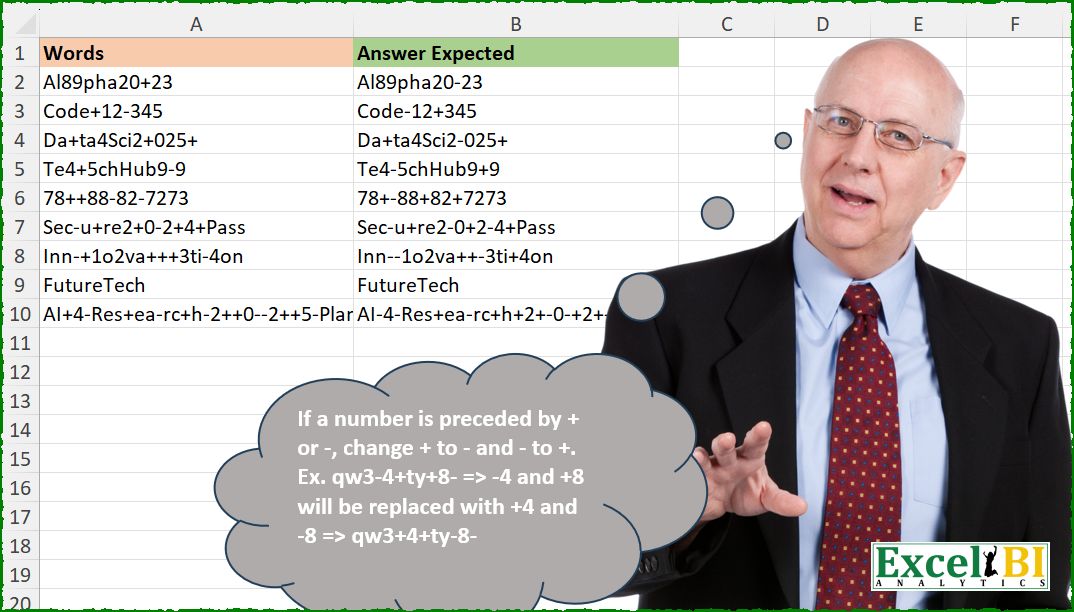
If a number is preceded by + or -, change + to – and – to +. Ex. qw3-4+ty+8- => -4 and +8 will be replaced with +4 and -8 => qw3+4+ty-8-
📌 Challenge Details and Links
ExcelBI Excel Challenge Number: 629
Challenge Difficulty: ⭐️⭐️
📥Download Sample File
📥Link to the solutions on LinkedIn
Solving the challenge of Toggle Arithmetic Operation Signs with Power Query
Power Query solution 1 for Toggle Arithmetic Operation Signs, proposed by Kris Jaganah:
let a = Text.Replace in a(a(a(x,"+"&y,"*"&y ),"-"&y,"+"&y ),"*"&y,"-"&y ) ))Power Query solution 2 for Toggle Arithmetic Operation Signs, proposed by Alejandro Simón 🇵🇦 🇪🇸:
let
  Source = Excel.CurrentWorkbook(){[Name = "Table1"]}[Content],
  Sol = Table.AddColumn(
    Source,
    "Answer",
    each
      let
        a = Text.Replace([Words], "+", " " & "+"),
        b = Text.Replace(a, "-", " " & "-"),
        c = Text.Split(b, " "),
        d = List.Transform(
          c,
          each try

              if Text.StartsWith(_, "+") and List.Contains({"0" .. "9"}, Text.Range(_, 1, 1)) then
                "-" & Text.Range(_, 1)
              else if Text.StartsWith(_, "-") and List.Contains({"0" .. "9"}, Text.Range(_, 1, 1)) then
                "+" & Text.Range(_, 1)
              else
                _
          otherwise
            _
        )
      in
        Text.Combine(d)
  )
in
  Sol
Power Query solution 3 for Toggle Arithmetic Operation Signs, proposed by Alexandre Garcia:
let
  A = Excel.CurrentWorkbook(){[Name = "Table1"]}[Content],
  B = {"+", "-"},
  C = Table.AddColumn(
    A,
    "Answer",
    each [
      x = Splitter.SplitTextByCharacterTransition(B, {"0" .. "9"})([Words]),
      y = Text.Combine(
        List.Accumulate(
          List.Transform(List.RemoveLastN(x), Text.ToList),
          {},
          (s, c) =>
            s
              & List.RemoveLastN(c)
              & List.ReplaceMatchingItems({List.Last(c)}, {B, List.Reverse(B)})
        )
      )
        & List.Last(x)
    ][y]
  )
in
  C
Power Query solution 4 for Toggle Arithmetic Operation Signs, proposed by Mihai Radu O:
let
  Source = Excel.CurrentWorkbook(){[Name = "Table1"]}[Content],
  s = Table.AddColumn(
    Source,
    "r",
    each [
      a = Text.ToList([Words]),
      b = Text.Combine(
        List.Transform(
          {0 .. List.Count(a) - 1},
          (x) =>
            try

                if x = List.Count(a) - 1 then
                  a{x}
                else if a{x} = "+" and Number.From(a{x + 1}) is number then
                  "-"
                else if a{x} = "-" and Number.From(a{x + 1}) is number then
                  "+"
                else
                  a{x}
            otherwise
              a{x}
        )
      )
    ][b]
  )[r]
in
  s
Solving the challenge of Toggle Arithmetic Operation Signs with Excel
Excel solution 1 for Toggle Arithmetic Operation Signs, proposed by Bo Rydobon 🇹🇭:
=REGEXREPLACE(
    A2:A10,
    "((-)|(+))(?=d)",
    "${2:++}${3:+-}"
)
Excel solution 2 for Toggle Arithmetic Operation Signs, proposed by Rick Rothstein:
=MAP(A2:A10,
    LAMBDA(x,
    LET(z,
    LAMBDA(c,
    f,
    t,
    LET(m,
    MID(
        c,
        SEQUENCE(
            LEN(
                c
            )
        ),
        1
    ),
    CONCAT(IF((m=f)*ISNUMBER(
        -MID(
            x&"x",
            SEQUENCE(
                LEN(
                    x
                ),
                ,
                2
            ),
            1
        )
    ),
    t,
    m)))),
    z(
        z(
            z(
                x,
                "+",
                "|"
            ),
            "-",
            "+"
        ),
        "|",
        "-"
    ))))
Excel solution 3 for Toggle Arithmetic Operation Signs, proposed by John V.:
=MAP(
    A2:A10,
    LAMBDA(
        x,
        LET(
            i,
            MID(
                x,
                ROW(
                    1:40
                ),
                1
            ),
            CONCAT(
                IF(
                    ISERR(
                        -VSTACK(
                            DROP(
                                i,
                                1
                            ),
                            0
                        )
                    ),
                    i,
                    SWITCH(
                        i,
                        "+",
                        "-",
                        "-",
                        "+",
                        i
                    )
                )
            )
        )
    )
)
Excel solution 4 for Toggle Arithmetic Operation Signs, proposed by 🇰🇷 Taeyong Shin:
=REGEXREPLACE(
    A2:A10,
    "(?:(+)|-)(?=d)",
    "${1:+-:+}"
)
Excel solution 5 for Toggle Arithmetic Operation Signs, proposed by Kris Jaganah:
=REDUCE(A2:A10,SEQUENCE(10,,0),LAMBDA(x,y,LET(a,SUBSTITUTE,a(a(a(x,"+"&y,"*"&y),"-"&y,"+"&y),"*"&y,"-"&y))))Excel solution 6 for Toggle Arithmetic Operation Signs, proposed by Julian Poeltl:
=MAP(A2:A10,
    LAMBDA(A,
    LET(SP,
    MID(
        A,
        SEQUENCE(
            LEN(
                A
            )
        ),
        1
    ),
    C,
    IFNA(((SP="+")+(SP="-"))*ISNUMBER(
        --DROP(
            SP,
            1
        )
    ),
    0),
    CONCAT(
        IF(
            C,
            IF(
                SP="+",
                "-",
                "+"
            ),
            SP
        )
    ))))
Excel solution 7 for Toggle Arithmetic Operation Signs, proposed by Hussein SATOUR:
=MAP(A2:A10,LAMBDA(z,LET(a,MID(z,SEQUENCE(LEN(z)),1),b,VSTACK(DROP(a,1),""),CONCAT(MAP(a,b,LAMBDA(x,y,IFS(AND(x="+",ISNUMBER(--y)),"-",AND(x="-",ISNUMBER(--y)),"+",1,x)))))))Excel solution 8 for Toggle Arithmetic Operation Signs, proposed by Sunny Baggu:
=MAP(

     A2:A10,

     LAMBDA(
         t,

          LET(

               l,
               SEQUENCE(
                   LEN(
                       t
                   )
               ),

               _a,
               TOCOL(
                   IF(
                       ISNUMBER(
                           MID(
                               t,
                                l,
                                1
                           ) + 0
                       ),
                        l,
                        1 / x
                   ),
                    3
               ) + 0,

               _b,
               FILTER(
                   _a,
                    _a <> 1
               ) - 1,

               _c,
               MID(
                   t,
                    _b,
                    1
               ),

               _d,
               IFS(
                   _c = "+",
                    "-",
                    _c = "-",
                    "+",
                    1,
                    _c
               ),

               IFERROR(

                    REDUCE(

                         t,

                         SEQUENCE(
                             ROWS(
                                 _b
                             )
                         ),

                         LAMBDA(
                             a,
                              v,
                              REPLACE(
                                  a,
                                   INDEX(
                                       _b,
                                        v,
                                        1
                                   ),
                                   1,
                                   INDEX(
                                       _d,
                                        v,
                                        1
                                   )
                              )
                         )

                    ),

                    t

               )

          )

     )

)
Excel solution 9 for Toggle Arithmetic Operation Signs, proposed by Md. Zohurul Islam:
=MAP(A2:A10,LAMBDA(z,LET(
p,MID(z,SEQUENCE(LEN(z)),1),
q,ABS(ISNUMBER(ABS(p))),
r,VSTACK(DROP(q,1),0),
s,MAP(p,r,LAMBDA(x,y,IFS(AND(x="+",y=1),"-",AND(x="-",y=1),"+",TRUE,x))),
u,CONCAT(s),
u)
))
Excel solution 10 for Toggle Arithmetic Operation Signs, proposed by Pieter de B.:
=MAP(A2:A10,LAMBDA(a,LET(y,MID(a,SEQUENCE(LEN(a)),2),l,LEFT(y),CONCAT(IF(ISNUMBER(--y),IFS(l="-","+",l="+","-",1,l),l)))))

Or
=LET(y,MID(A2:A10,SEQUENCE(,255),2),l,LEFT(y),BYROW(IF(ISERR(--y),l,IFS(l="-","+",l="+","-",1,l)),CONCAT))
Excel solution 11 for Toggle Arithmetic Operation Signs, proposed by JvdV –:
=REGEXREPLACE(A2:A10,"((+)|-)(d)","${2:+-:+}$3")Excel solution 12 for Toggle Arithmetic Operation Signs, proposed by Milan Shrimali:
=byrow(A2:A10,lambda(x, let(a,arrayformula(mid(x,SEQUENCE(len(x)),1)),b,len(x),c,hstack(a,SEQUENCE(b,1,1,1)),join("",byrow(hstack(choosecols(c,1),filter(choosecols(c,1),choosecols(c,2)>choosecols(chooserows(c,1),2))),lambda(x,let(d,choosecols(x,1),join("",iferror(ifs(and(char(43)=d,isnumber(--choosecols(x,2))),SUBSTITUTE(d,char(43),char(45)),and(char(45)=d,isnumber(--choosecols(x,2))),SUBSTITUTE(d,char(45),char(43))),d)))))))))Excel solution 13 for Toggle Arithmetic Operation Signs, proposed by Nicolas Micot:
=MAP(A2:A10;LAMBDA(l_words;
LET(_chars;STXT(l_words;SEQUENCE(NBCAR(l_words)-1);2);
CONCAT(MAP(_chars;LAMBDA(l_chars;SI(SIERREUR(CHERCHE(DROITE(l_chars;1);"0123456789");-1)>0;
SI(GAUCHE(l_chars;1)="+";"-";SI(GAUCHE(l_chars;1)="-";"+";GAUCHE(l_chars;1)));
GAUCHE(l_chars;1))));DROITE(l_words;1)))))
Excel solution 14 for Toggle Arithmetic Operation Signs, proposed by Anup Kumar:
=BYROW(
    A2:A10,
    LAMBDA(
        tx,
        SUBSTITUTE(
            REGEXREPLACE(
                REGEXREPLACE(
                    tx,
                    "-(d)",
                    "+#$1"
                ),
                "+(d)",
                "-$1"
            ),
            "#",
            ""
        )
    )
)
Excel solution 15 for Toggle Arithmetic Operation Signs, proposed by Ricardo Romero Garcia:
=MAP(
    A2:A10;
    LAMBDA(
        z;
        CONCAT(
            LET(
                a;
                EXTRAE(
                    z;
                    SECUENCIA(
                        LARGO(
                            z
                        )
                    );
                    1
                );
                b;
                EXCLUIR(
                    ESNUMERO(
                        -a
                    );
                    1
                );
                c;
                MAP(
                    a;
                    LAMBDA(
                        x;
                        SI.CONJUNTO(
                            x="+";
                            "-";
                            x="-";
                            "+";
                            1;
                            x
                        )
                    )
                );
                SI.ERROR(
                    SI(
                        b;
                        c;
                        a
                    );
                    a
                )
            )
        )
    )
)
Solving the challenge of Toggle Arithmetic Operation Signs with Python
Python solution 1 for Toggle Arithmetic Operation Signs, proposed by Konrad Gryczan, PhD:
import pandas as pd
import re
path = "629 Invert Sign.xlsx"
input = pd.read_excel(path, usecols="A", skiprows=0, nrows=10)
test = pd.read_excel(path, usecols="B", skiprows=0, nrows=10)
def switch_sign(match):
 signs = {"+": "-", "-": "+"}
 return signs[match.group(1)]
result = input['Words'].apply(lambda x: re.sub(r"([+-])(?=d)", switch_sign, x))
print(result.equals(test['Answer Expected'])) # True
Python solution 2 for Toggle Arithmetic Operation Signs, proposed by Abdallah Ally:
import pandas as pd
import re
def replace_sign(text):
 text = re.sub('([+-]d)', lambda x: f'-{x[1][1]}' if x[1][0] == '+' else f'+{x[1][1]}', text)
 return text
file_path = 'Excel_Challenge_629 - Invert Sign.xlsx'
df = pd.read_excel(io=file_path, usecols='A:B')
# Perform data manipulation
df['My Answer'] = df['Words'].map(replace_sign)
df['Check'] = df['My Answer'] == df['Answer Expected']
df
Solving the challenge of Toggle Arithmetic Operation Signs with Python in Excel
Python in Excel solution 1 for Toggle Arithmetic Operation Signs, proposed by Alejandro Campos:
import re
result_df = pd.DataFrame({"Original": words, "Transformed": [re.sub(r'([+-])(d+)', lambda m: ('+' if m[1] == '-' else '-') + m[2], w) for w in words]})
Python in Excel solution 2 for Toggle Arithmetic Operation Signs, proposed by Aditya Kumar Darak 🇮🇳:
import re
df = xl("A1:A10", True)
def MyFun(text):
 return re.sub(r"([+-])(?=d)", lambda m: "-" if m.group(1) == "+" else "+", text)
df["Answer&"] = df["Words"].map(MyFun)
df
Solving the challenge of Toggle Arithmetic Operation Signs with R
R solution 1 for Toggle Arithmetic Operation Signs, proposed by Konrad Gryczan, PhD:
library(tidyverse)
library(readxl)
path = "Excel/629 Invert Sign.xlsx"
input = read_excel(path, range = "A1:A10", col_names = "Words")
test = read_excel(path, range = "B1:B10")
result = input %>%
 mutate(`Answer Expected` = str_replace_all(Words, "([+-])(?=\d)", function(m) ifelse(m == "+", "-", "+")))
all.equal(result$`Answer Expected`, test$`Answer Expected`)
#> [1] TRUE
&&