
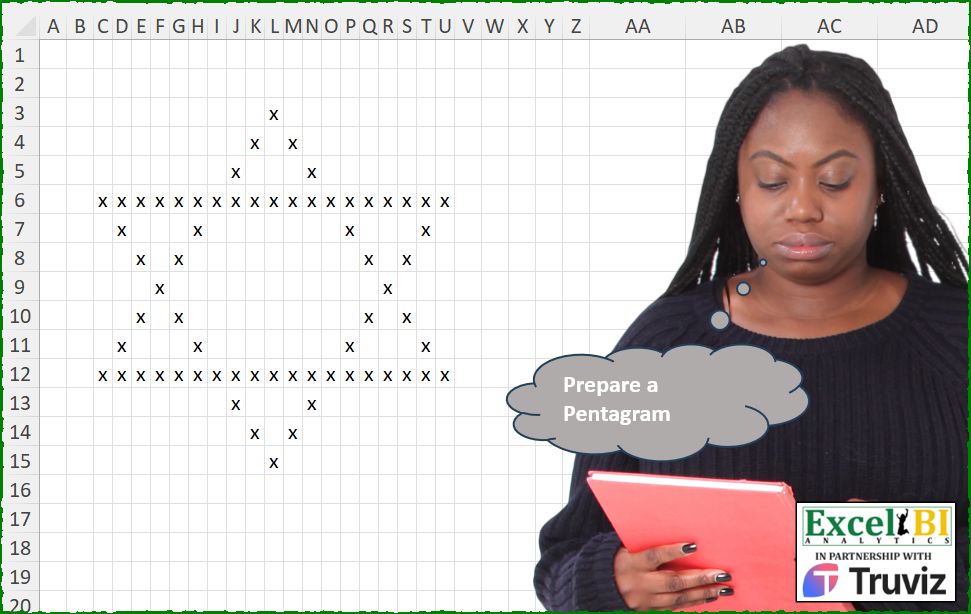
Prepare a Pentagram.
📌 Challenge Details and Links
ExcelBI Excel Challenge Number: 597
Challenge Difficulty: ⭐️⭐️⭐️
📥Download Sample File
📥Link to the solutions on LinkedIn
Solving the challenge of Draw a Pentagram Symbol with Excel
Excel solution 1 for Draw a Pentagram Symbol, proposed by Bo Rydobon 🇹🇭:
=MAKEARRAY(
    13,
    19,
    LAMBDA(
        r,
        c,
        REPT(
            "x",
            OR(
                ABS(
                    c-10
                )=r*{1,
                -1}+{-1,
                13},
                r={4,
                10}
            )
        )
    )
)

=MAKEARRAY(
    13,
    19,
    LAMBDA(
        r,
        c,
        REPT(
            "x",
            OR(
                r+c={11,
                23},
                r-c={-9,
                3},
                r={4,
                10}
            )
        )
    )
)
Excel solution 2 for Draw a Pentagram Symbol, proposed by Rick Rothstein:
=MAKEARRAY(13,19,LAMBDA(r,c,IF(OR(r={4,10},c=10+(r-{1,13})*{-1;1}),"x","")))

Note: The semi-colon (;)
Excel solution 3 for Draw a Pentagram Symbol, proposed by Rick Rothstein:
=MAKEARRAY(
    13,
    19,
    LAMBDA(
        r,
        c,
        IF(
            OR(
                r={4,
                10},
                c=10+VSTACK(
                    r-1,
                    13-r
                )*{-1,
                1}
            ),
            "x",
            ""
        )
    )
)
Excel solution 4 for Draw a Pentagram Symbol, proposed by Rick Rothstein:
=MAKEARRAY(13,19,LAMBDA(r,c,IF(OR(r={4,10}),"x",IF(OR(c=11-r,c=9+r),"x",IF(OR(c=r-3,c=23-r),"x","")))))Excel solution 5 for Draw a Pentagram Symbol, proposed by John V.:
=MAKEARRAY(13,19,LAMBDA(r,c,REPT("x",OR(r={4;10},r-c={3;-9},r+c={11;23}))))Excel solution 6 for Draw a Pentagram Symbol, proposed by Julian Poeltl:
=MAKEARRAY(
    13,
    19,
    LAMBDA(
        A,
        B,
        LET(
            S,
            A+B,
            IF(
                OR(
                    S=11,
                    A=4,
                    A=10,
                    S=9+A*2,
                    S=23,
                    AND(
                        A>4,
                        S=3+B*2
                    )
                ),
                "x",
                ""
            )
        )
    )
)
Excel solution 7 for Draw a Pentagram Symbol, proposed by Timothée BLIOT:
=MAKEARRAY(13,19,LAMBDA(x,y,IF(OR(x=y-9,11-y=x,x={4,10},x-3=y,23-y=x),"*","")))Excel solution 8 for Draw a Pentagram Symbol, proposed by Sunny Baggu:
=LET(
 r, ABS(SEQUENCE(13) - 7),
 c, ABS(SEQUENCE(, 19) - 10),
 REPT(
 "x",
 (r = 6) * (c = 0) + (r = 0) * (c = 6) +
 (r = 5) * (c = 1) +
 (r = 4) * (c = 2) + (r = 3) +
 (r = 2) * ((c = 4) + (c = 8)) +
 (r = 1) * ((c = 7) + (c = 5))
 )
)
Excel solution 9 for Draw a Pentagram Symbol, proposed by Anshu Bantra:
= 'x'
def draw_triangle(symbol):
 shape = []
 for _ in range(1, 19, 2):
 msg =   symbol if _ == 1 else
 symbol + ' '*(_-2) + symbol
 shape.append([*f"{msg:^19}"])
 msg = symbol*(_+2)
 shape.append([*f"{msg:^19}"])
 return shape, shape[::-1]
shape1, shape2 = draw_triangle(symbol,)
shape3 = []
for _ in range(len(shape1)+4):
 if _ < 3:
 shape3.append(shape1[_])
 elif _ < 10:
 shp = []
 for col in range(19):
 shp.insert(col,   shape1[_][col] if shape1[_][col] == symbol else
 shape2[_-4][col] if shape2[_-4][col] == symbol else ' ')
 shape3.append(shp)
 else:
 shape3.append(shape2[_-4])
Excel solution 10 for Draw a Pentagram Symbol, proposed by Md. Zohurul Islam:
=MAKEARRAY(
    13,
    19,
    LAMBDA(
        p,
        q,

        LET(

            a,
            p=HSTACK(
                4,
                10
            ),

            b,
            p-1,

            c,
            13-p,

            d,
            VSTACK(
                b,
                c
            ),

            e,
            HSTACK(
                -1,
                1
            ),

            f,
            d*e,

            g,
            q=10+f,

            pg,
            IF(
                OR(
                    a,
                    g
                ),
                "x",
                ""
            ),

            pg
        )
    )
)
Excel solution 11 for Draw a Pentagram Symbol, proposed by Jaroslaw Kujawa:
=MAKEARRAY(13;19;LAMBDA(r;c;IF(OR(c={0;12}+{0,1}*8+{1,-1}*(r-3));"x";IF(OR(r={4;10});"x";""))))Excel solution 12 for Draw a Pentagram Symbol, proposed by Mey Tithveasna:
=MAKEARRAY(13,19,LAMBDA(r,c,REPT("*",OR(r={4,10},c=r+9,c=11-r,c=r-3,c=23-r))))Solving the challenge of Draw a Pentagram Symbol with Python
Python solution 1 for Draw a Pentagram Symbol, proposed by Konrad Gryczan, PhD:
PS. Technical note it is Hexagram, not Pentagram.
import pandas as pd
import numpy as np
from pprint import pprint
path = "597 Pentagram.xlsx"
test = pd.read_excel(path, header=None, usecols="C:U", skiprows=2, nrows=13).values
test = np.where(pd.isna(test), "", test)
M = [["" for _ in range(19)] for _ in range(13)]
middle_col_index = len(M[0]) // 2
def draw_x_pattern(matrix, middle_index):
 for i in range(0, len(matrix)):
 if middle_index - i >= 0:
 matrix[i][middle_index + i] = "x"
 matrix[i][middle_index - i] = "x"
draw_x_pattern(M, middle_col_index)
M = M[::-1]
draw_x_pattern(M, middle_col_index)
row_indexes_with_x = [index for index, row in enumerate(M) if row[0] == "x"]
for index in row_indexes_with_x:
 M[index] = ["x" for _ in range(len(M[index]))]
df = pd.DataFrame(M)
test = pd.DataFrame(test)
print(df.equals(test)) # True
Solving the challenge of Draw a Pentagram Symbol with R
R solution 1 for Draw a Pentagram Symbol, proposed by Konrad Gryczan, PhD:
PS. Technical note it is Hexagram, not Pentagram.
library(tidyverse)
library(readxl)
path = "Excel/597 Pentagram.xlsx"
test = read_excel(path, range = "C3:U15", col_names = FALSE) %>% as.matrix()
M = matrix(NA, nrow = 13, ncol = 19)
middle = (ncol(2M) + 1) / 2
draw_x_pattern <- function(M, middle) {
 M[1, middle] = "x"
 for (i in 2:nrow(M)) {
 if (middle - i >= 0) {
 M[i, middle + i - 1] = "x"
 M[i, middle - i + 1] = "x"
 }
 }
 M
}
M = draw_x_pattern(M, middle)
M = M[nrow(M):1,]
M = draw_x_pattern(M, middle)
rows = which(!is.na(M[, 1]))
for (i in rows) {
 M[i, ] = "x"
}
all.equal(M, test, check.attributes = FALSE)
#> [1] TRUE
Solving the challenge of Draw a Pentagram Symbol with Excel VBA
Excel VBA solution 1 for Draw a Pentagram Symbol, proposed by Md. Zohurul Islam:
Sub ExcelBI_ExcelChallenge597()
 'Prepare a Pentagram
 Dim r As Range, c As Range
 Dim i, j, k, m

 Range("B5:T5") = "x"
 Range("B11:T11") = "x"
 k = 0
 m = 0
 'loop01
 For i = 1 To 9
 Set r = Cells(i + 1, k + 11)
 Set c = Cells(i + 1, 11 - k)
 r = "x"
 If i > 1 Then c = "x"
 k = k + 1
 Next i
 'loop02
 For j = 9 To 1 Step -1
 Set r = Cells(j + 5, m + 11)
 Set c = Cells(j + 5, 11 - m)
 r = "x"
 c = "x"
 m = m + 1
 Next j
Range("A:Z").ColumnWidth = 1
End Sub
&&&