
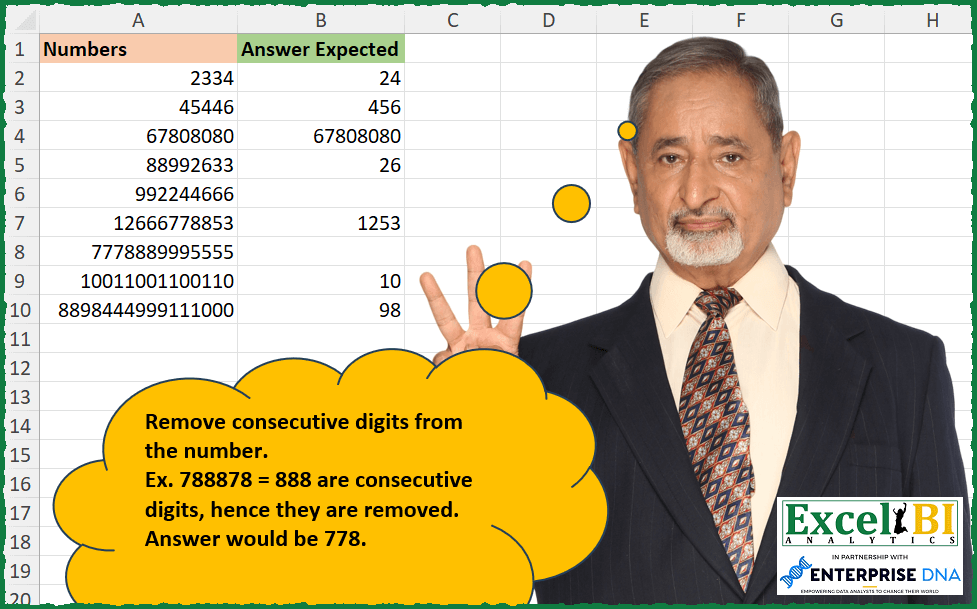
Remove consecutive digits from the number. Ex. 788878 = 888 are consecutive digits, hence they are removed. Answer would be 778.
📌 Challenge Details and Links
ExcelBI Excel Challenge Number: 269
Challenge Difficulty: ⭐️
📥Download Sample File
📥Link to the solutions on LinkedIn
Solving the challenge of Remove Consecutive Repeated Digits with Power Query
Power Query solution 1 for Remove Consecutive Repeated Digits, proposed by Bo Rydobon 🇹🇭:
let
  Source = Excel.CurrentWorkbook(){[Name = "Table1"]}[Content],
  Ans = Table.TransformRows(
    Source,
    each Number.From(
      Text.Combine(
        Table.SelectRows(
          Table.Group(
            Table.FromList(Text.ToList(Text.From([Numbers]))),
            "Column1",
            {"C", each Table.RowCount(_)},
            0
          ),
          each [C] = 1
        )[Column1]
      )
    )
  )
in
  Ans
Power Query solution 2 for Remove Consecutive Repeated Digits, proposed by Zoran Milokanović:
let
  Source = Excel.CurrentWorkbook(){[Name = "Input"]}[Content],
  S = Table.TransformRows(
    Source,
    each
      let
        d = Text.ToList(Text.From([Numbers]))
      in
        Number.From(
          Text.Combine(
            List.Transform(
              List.Select(
                List.Positions(d),
                each d{_} <> d{_ + 1}? and ((_ = 0) or d{_} <> d{_ - 1})
              ),
              each d{_}
            )
          )
        )
  )
in
  S
Power Query solution 3 for Remove Consecutive Repeated Digits, proposed by Aditya Kumar Darak 🇮🇳:
let
  Source = Excel.CurrentWorkbook(){[Name = "data"]}[Content],
  Return = Table.AddColumn(
    Source,
    "Answer",
    each [
      T = " " & Text.From([Numbers]) & " ",
      C = Text.Length(T) - 2,
      G = List.Transform(
        {1 .. C},
        (f) =>
          [
            t1 = Text.At(T, f),
            t0 = Text.At(T, f - 1),
            t2 = Text.At(T, f + 1),
            r  = if t1 = t0 or t1 = t2 then null else t1
          ][r]
      ),
      R = Number.From(Text.Combine(G))
    ][R]
  )
in
  Return
Power Query solution 4 for Remove Consecutive Repeated Digits, proposed by Alejandro Simón 🇵🇦 🇪🇸:
let
  Source = Excel.CurrentWorkbook(){[Name = "Table1"]}[Content],
  Sol = Table.AddColumn(
    Source,
    "Answer",
    each
      let
        a = Text.From([Numbers]),
        b = Table.FromColumns({Text.ToList(a)}),
        c = Text.Combine(
          Table.SelectRows(
            Table.Group(b, {"Column1"}, {"Count", each List.Count(_)}, GroupKind.Local),
            each [Count] < 2
          )[Column1]
        )
      in
        Number.From(c)
  )
in
  Sol
Power Query solution 5 for Remove Consecutive Repeated Digits, proposed by Luan Rodrigues:
let
  Fonte = Tabela1,
  res = Table.AddColumn(
    Fonte,
    "Resposta",
    each [
      a = Table.FromColumns({Text.ToList(Text.From([Numbers]))}),
      b = Text.Combine(
        Table.SelectRows(
          Table.Group(a, {"Column1"}, {{"Count", each Table.RowCount(_)}}, GroupKind.Local),
          each [Count] = 1
        )[Column1]
      )
    ][b]
  )
in
  res
Power Query solution 6 for Remove Consecutive Repeated Digits, proposed by Rafael González B.:
let
  Source = Excel.CurrentWorkbook(){0}[Content],
  TC = Table.TransformColumnTypes(Source, {{"Numbers", type text}}),
  Answer = Table.TransformColumns(
    TC,
    {
      "Numbers",
      each
        let
          a = Text.ToList(_),
          b = Table.FromList(a, Splitter.SplitByNothing(), {"Answer"}, null, ExtraValues.Error),
          c = Table.Group(
            b,
            {"Answer"},
            {{"Recuento", each Table.RowCount(_), Int64.Type}},
            GroupKind.Local
          ),
          d = Table.SelectRows(c, each ([Recuento] = 1))[Answer],
          e = Text.Combine(d)
        in
          e
    }
  ),
  Result = Table.TransformColumnTypes(Answer, {{"Numbers", Int64.Type}})
in
  Result
Power Query solution 7 for Remove Consecutive Repeated Digits, proposed by Kalyan Kumar Reddy Kethireddy:
let
  Source = Table.FromRows(
    Json.Document(
      Binary.Decompress(
        Binary.FromText(
          "RYzLDQAhCER78bwHhZFPLcT+29hRs1kIyRt4oaqJKtp6qmECdsg8+u4TIjLFVE8gCi273hCSe8S8V99MPSfrGr2Pf75/AYDW2Gsu1ws=",
          BinaryEncoding.Base64
        ),
        Compression.Deflate
      )
    ),
    let
      _t = ((type nullable text) meta [Serialized.Text = true])
    in
      type table [Numbers = _t]
  ),
  #"Changed Type" = Table.TransformColumnTypes(Source, {{"Numbers", Int64.Type}}),
  Ans = Table.AddColumn(
    #"Changed Type",
    "Expected Ans",
    each [
      a = Text.ToList(Text.From([Numbers])),
      b = Table.FromList(a, null, {"Number"}),
      c = Table.Group(b, {"Number"}, {"Count", each List.Count(_)}, GroupKind.Local),
      d = Table.SelectRows(c, each [Count] = 1)[Number],
      e = Text.Combine(d)
    ][e]
  ),
  #"Changed Type1" = Table.TransformColumnTypes(Ans, {{"Expected Ans", Int64.Type}})
in
  #"Changed Type1"
Solving the challenge of Remove Consecutive Repeated Digits with Excel
Excel solution 1 for Remove Consecutive Repeated Digits, proposed by Bo Rydobon 🇹🇭:
=MAP(0&A2:A10,LAMBDA(a,LET(s,SEQUENCE(LEN(a),,2),m,MID(a,s,1),IFERROR(--CONCAT(REPT(m,(m=MID(a,s-1,1))+(m=MID(a,s+1,1))=0)),""))))Excel solution 2 for Remove Consecutive Repeated Digits, proposed by Rick Rothstein:
=MAP(
    A2:A10,
    LAMBDA(
        r,
        CONCAT(
            MAP(
                TEXTSPLIT(
                    REDUCE(
                        r,
                        SEQUENCE(
                            LEN(
                                r
                            )-1,
                            ,
                            LEN(
                                r
                            ),
                            -1
                        ),
                        LAMBDA(
                            a,
                            x,
                            REPLACE(
                                a,
                                x,
                                0,
                                RIGHT(
                                    " ",
                                    MID(
                                        r,
                                        x-1,
                                        1
                                    )<>MID(
                                        r,
                                        x,
                                        1
                                    )
                                )
                            )
                        )
                    ),
                    " "
                ),
                LAMBDA(
                    n,
                    IF(
                        LEN(
                            n
                        )=1,
                        n,
                        ""
                    )
                )
            )
        )
    )
)
Excel solution 3 for Remove Consecutive Repeated Digits, proposed by John V.:
=MAP(A2:A10,LAMBDA(x,LET(m,MID(x,ROW(1:20),1),CONCAT(IF((m=VSTACK(DROP(m,1),0))+(m=VSTACK(0,DROP(m,-1))),"",m)))))Excel solution 4 for Remove Consecutive Repeated Digits, proposed by محمد حلمي:
=MAP(A2:A10,
    LAMBDA(a,
    LET(i,
    MID(
        a,
        ROW(
            1:30
        ),
        1
    ),
    IFERROR(--CONCAT(DROP(IF(IFNA((i=VSTACK(
        0,
        i
    ))+(i=DROP(
        i,
        1
    )),
    ),
    "",
    i),
    -1)),
    ""))))
Excel solution 5 for Remove Consecutive Repeated Digits, proposed by محمد حلمي:
=MAP(A2:A10,
    LAMBDA(a,
    LET(i,
    MID(
        a,
        ROW(
            1:30
        ),
        1
    ),
    CONCAT(IF((i=VSTACK(
        0,
        DROP(
            i,
            -1
        )
    ))+(VSTACK(
        DROP(
            i,
            1
        ),
        0
    )=i),
    "",
    i)))))

For Number formatting

=MAP(A2:A10,
    LAMBDA(a,
    LET(i,
    MID(
        a,
        ROW(
            1:30
        ),
        1
    ),
    IFERROR(--CONCAT(IF((i=VSTACK(
        0,
        DROP(
            i,
            -1
        )
    ))+(VSTACK(
        DROP(
            i,
            1
        ),
        0
    )=i),
    "",
    i)),
    ""))))
Excel solution 6 for Remove Consecutive Repeated Digits, proposed by Kris Jaganah:
=MAP(A2:A10,
    LAMBDA(x,
    LET(a,
    SEQUENCE(
        LEN(
            x
        )
    ),
    b,
    MID(
        x,
        a,
        1
    ),
    c,
    XLOOKUP(
        a-{-1,
        1},
        a,
        b,
        ""
    ),
    CONCAT(IF((b=TAKE(
        c,
        ,
        1
    ))+(b=TAKE(
        c,
        ,
        -1
    ))=0,
    b,
    "")))))
Excel solution 7 for Remove Consecutive Repeated Digits, proposed by Timothée BLIOT:
=MAP(
    A2:A10,
    LAMBDA(
        z,
        LET(
            A,
            MID(
                z,
                SEQUENCE(
                    LEN(
                        z
                    )
                ),
                1
            ),
            CONCAT(
                FILTER(
                    A,
                    MAP(
                        SEQUENCE(
                            ROWS(
                                A
                            )
                        ),
                        LAMBDA(
                            v,
                            IF(
                                v>1,
                                IF(
                                    INDEX(
                                        A,
                                        v
                                    )=INDEX(
                                        A,
                                        v-1
                                    ),
                                    0,
                                    IF(
                                        v
Excel solution 8 for Remove Consecutive Repeated Digits, proposed by Hussein SATOUR:
=MAP(A2:A10, LAMBDA(x, IFERROR(LET(
a, SEQUENCE(LEN(x)), b, MID(x, a, 1),
c, VSTACK(DROP(b, 1), ""), d, VSTACK("", DROP(b, -1)),
CONCAT(FILTER(b, (b=c)+(b=d) = 0))), "")))
Excel solution 9 for Remove Consecutive Repeated Digits, proposed by Sunny Baggu:
=MAP(
 A2:A10,
 LAMBDA(num,
 LET(
 _seq, REDUCE(
 "",
 SEQUENCE(10, , 0),
 LAMBDA(a, v, VSTACK(a, DROP(REPT(v, SEQUENCE(LEN(num), , LEN(num), -1)), -1)))
 ),
 SUBSTITUTE(REDUCE(num, _seq, LAMBDA(a, v, SUBSTITUTE(a, v, "x"))), "x", "")
 )
 )
)
Excel solution 10 for Remove Consecutive Repeated Digits, proposed by LEONARD OCHEA 🇷🇴:
=REDUCE(
    A2:A10;
    REPT(
        SEQUENCE(
            10
        )-1;
        7-SEQUENCE(
            ;
            5
        )
    );
    LAMBDA(
         a;
        b;
        SUBSTITUTE(
            a;
            b;
            ""
        )
    )
)
Excel solution 11 for Remove Consecutive Repeated Digits, proposed by Abdallah Ally:
=MAP(
    A2:A10,
    LAMBDA(
        v,
        LET(
            a,
            v,
            b,
            SEQUENCE(
                LEN(
                    a
                )
            ),
            REDUCE(
                "",
                b,
                LAMBDA(
                    x,
                    y,
                    IF(
                        OR(
                            IFERROR(
                                MID(
                                    a,
                                    y,
                                    1
                                )=MID(
                                    a,
                                    y+1,
                                    1
                                ),
                                FALSE
                            ),
                            IFERROR(
                                MID(
                                    a,
                                    y,
                                    1
                                )=MID(
                                    a,
                                    y-1,
                                    1
                                ),
                                FALSE
                            )
                        ),
                        x,
                        x&MID(
                                    a,
                                    y,
                                    1
                                )
                    )
                )
            )
        )
    )
)
Excel solution 12 for Remove Consecutive Repeated Digits, proposed by JvdV -:
=MAP(
    A2:A10,
    LAMBDA(
        s,
        CONCAT(
            TEXTSPLIT(
                s,
                REPT(
                    ROW(
                        1:10
                    )-1,
                    SEQUENCE(
                        ,
                        99,
                        2
                    )
                )
            )
        )
    )
)

Or,
     to make this a bit more dynamic and split based on the lenght of s variable:

=MAP(
    A2:A10,
    LAMBDA(
        s,
        CONCAT(&
            TEXTSPLIT(
                s,
                REPT(
                    ROW(
                        1:10
                    )-1,
                    SEQUENCE(
                        ,
                        LEN(
                            s
                        ),
                        2
                    )
                )
            )
        )
    )
)
Excel solution 13 for Remove Consecutive Repeated Digits, proposed by Ziad A.:
=INDEX(
    LET(
        s,
        ROW(
            1:10
        )-1,
        REGEXREPLACE(
            A2:A,
            JOIN(
                "|",
                s&s&"+"
            ),

        )
    )
)

This formula uses REGEXREPLACE to remove each digit that occurs at least two times in a row.

The regular_expression field is:

JOIN(
    "|",
    s&s&"+"
) where "s" is ROW(
            1:10
        )-1

Which returns

"00+|11+|22+|33+|44+|55+|66+|77+|88+|99+"

Which is then replaced with nothing (last argument empty)
Excel solution 14 for Remove Consecutive Repeated Digits, proposed by Giorgi Goderdzishvili:
=MAP(A2:A10,LAMBDA(x,
LET(
nm,x,
arr, MAKEARRAY(1,LEN(nm), LAMBDA(r,c,
IF( OR(
 IFERROR(MID(nm,c,1)=MID(nm,c+1,1),FALSE),
 IFERROR(MID(nm,c-1,1)=MID(nm,c,1),FALSE)),
1,0))),
CONCAT(IF(arr=0,MID(nm,SEQUENCE(,LEN(nm)),1),"")))))
Excel solution 15 for Remove Consecutive Repeated Digits, proposed by Daniel Garzia:
=MAP(A2:A10,
    LAMBDA(x,
    LET(f,
    LAMBDA(
        x,
        [y],
        IFERROR(
            MID(
                x,
                SEQUENCE(
                    LEN(
                        x
                    )
                )+y,
                1
            ),

        )
    ),
    d,
    f(
                        x
                    ),
    CONCAT(IF((d=f(
        x,
        -1
    ))+(d=f(
        x,
        1
    )),
    "",
    d)))))
Excel solution 16 for Remove Consecutive Repeated Digits, proposed by samir tobeil:
=SUBSTITUTE(REDUCE(A2:A10,REPT(SEQUENCE(10,,10,-1)-1,{9,8,7,6,5,4,3,2}),LAMBDA(a,x,SUBSTITUTE(a,x,","))),",","")Excel solution 17 for Remove Consecutive Repeated Digits, proposed by Md Ismail Hosen:
=LET(
    Numbers,
     A2:A10,
     fx_one,
     LAMBDA(
         Number,
          LET(
              GroupedDigit,
               TEXTSPLIT(
                   REDUCE(
                       ,
                        MID(
                            Number,
                             SEQUENCE(
                                 LEN(
                                     Number
                                 )
                             ),
                             1
                        ) * 1,
                        LAMBDA(
                            a,
                            v,
                             a & IF(
                                 RIGHT(
                                     a,
                                      1
                                 ) * 1 = v,
                                  "",
                                  " "
                             ) & v
                        )
                   ),
                    " "
               ),
               Result,
               IFERROR(
                   CONCAT(
                       FILTER(
                           GroupedDigit,
                            LEN(
                                GroupedDigit
                            ) = 1
                       )
                   ) * 1,
                    ""
               ),
               Result
          )
     ),
     Result,
     MAP(
         Numbers,
          fx_one
     ),
     Result
)
Excel solution 18 for Remove Consecutive Repeated Digits, proposed by Mungunbayar Bat-Ochir:
=MAP(
    A2:A10;
    LAMBDA(
        input;

        LET(

            indice;
            SEQUENCE(
                LEN(
                    input
                )
            );

            chars;
            MID(
                input;
                indice;
                1
            );

            CONCAT(
                MAP(
                    chars;
                    indice;
                    LAMBDA(
                        chr;
                        idx;

                         IFS(

                              idx=1;
                             IF(
                                 INDEX(
                                     chars;
                                     idx
                                 )=INDEX(
                                     chars;
                                     idx+1
                                 );
                                 "";
                                 chr
                             );

                              idx=LEN(
                    input
                );
                             IF(
                                 INDEX(
                                     chars;
                                     idx
                                 )=INDEX(
                                     chars;
                                     idx-1
                                 );
                                 "";
                                 chr
                             );

                              TRUE;
                             IF(
                                 AND(
                                     INDEX(
                                     chars;
                                     idx
                                 )<>INDEX(
                                     chars;
                                     idx+1
                                 );
                                     INDEX(
                                     chars;
                                     idx
                                 )<>INDEX(
                                     chars;
                                     idx-1
                                 )
                                 );
                                 chr;
                                 ""
                             )

                         )
                    )
                )
            )
        )

    )
)
Excel solution 19 for Remove Consecutive Repeated Digits, proposed by Hazem Hassan:
=REDUCE(A2:A10;TRANSPOSE(REPT(SEQUENCE(10;;0);TRANSPOSE(SEQUENCE(7;;8;-1))));LAMBDA(x;y;SUBSTITUTE(x;y;"")))Excel solution 20 for Remove Consecutive Repeated Digits, proposed by Ibrahim Sadiq:
=REDUCE(
    A2:A10,
    REPT(
        SEQUENCE(
            10,
            ,
            9,
            -1
        ),
        SEQUENCE(
            ,
            8,
            9,
            -1
        )
    ),
    LAMBDA(
        a,
        b,
        SUBSTITUTE(
            a,
            b,

        )
    )
)
Solving the challenge of Remove Consecutive Repeated Digits with Python
Python solution 1 for Remove Consecutive Repeated Digits, proposed by Vijay Tumbur:
def removeCons(k):
 output = "".join([a for a,b in groupby(list(str(k))) if sum([1 for i in b]) == 1])
 return output
list1 = list(map(removeCons,data.Numbers))
list2 = [int(a) for a in list1 if a != ""]
print(list2)
Solving the challenge of Remove Consecutive Repeated Digits with Excel VBA
Excel VBA solution 1 for Remove Consecutive Repeated Digits, proposed by Mungunbayar Bat-Ochir:
VBA with regex:
Option Explicit
Function RemoveConsecutiveDigits(rg As Range) As Variant

 Dim regex As Object
 Dim num As String

 Set regex = CreateObject("VBScript.RegExp")
 num = rg.Text

 With regex
 .Pattern = "(d)1+"
 .Global = True
 If .Test(num) Then num = .Replace(num, "")
 End With

 If num <> vbNullString Then
 RemoveConsecutiveDigits = CDbl(num)
 Else
 RemoveConsecutiveDigits = vbNullString
 End If


End Function
&&